A few years ago, a junior sales rep on my team spent three days copying names, phone numbers, and addresses from Google Maps. The result: a massive Excel sheet, tired eyes, and a list of leads that were mostly cold or incorrect.
Whether you’re building a B2B lead pipeline, running hyper-local market research, or mapping competitor store locations, Google Maps data is essential. But Google Maps was never designed to be scraped. It’s a JavaScript-heavy, dynamically rendered platform built for visual browsing, not bot-driven extraction. The wrong tool wastes more time debugging than scraping.
This guide compares the two best Google Maps scrapers, Apify and Octoparse, across five areas that really matter for success: setup, data output, scale, bot handling, and price.
Quick Answer
Between Apify and Octoparse, the only difference is technical expertise. Apify is a developer-centric cloud platform offering API control and high scalability, though it requires JSON and proxy management. Octoparse always provides a user-friendly, no-code interface with pre-made templates and automated proxy rotation at a more predictable price. For non-engineering teams, Octoparse is the most efficient and cost-effective solution for acquiring clean Google Maps data.
What Makes Google Maps So Difficult to Scrape?
Writing my own Python script to scrape local business data would be a quick weekend project using BeautifulSoup. I was very naive.
Google Maps is a real fortress of complicated front-end work. These are the exact walls you will run into before you even get your first row of data if you are trying to build or test a Google Maps scraper:
- Dynamic Rendering and Infinite Scrolling: The platform does not load a clean list of HTML elements. Instead, as you scroll or zoom, map tiles, business pins, and sidebar data load in the background through AJAX requests that happen at the same time. If your scraper can not run JavaScript and act like a person scrolling, it will only get the first 10 results and then fail without saying anything.
- A changing DOM structure: Google engineers continually update the Maps UI. The CSS classes and XPath selectors that worked perfectly on Tuesday could be completely random by Thursday. If you depend on rigid, hard-coded selectors, your pipeline will break.
- Google’s infrastructure is very good at finding non-human behavior through aggressive rate limiting and bot detection. If you make too many requests from the same IP address or move too quickly through the page, you will get a lot of CAPTCHA requests, IP blocks, or shadow bans, which means the map will not load results.
- No Official Public API for Bulk Extraction: The Google Places API exists, but it is designed (and priced) for adding maps to apps, not for bulk data retrieval. Using the official API to get 10,000 local business listings will quickly empty your wallet.
- Data that is not consistent: Data from the real world is messy. One business might have a well-organized listing with hours of operation, a menu link, and hundreds of reviews. The next listing could be a name and a location. Your scraper needs to handle these missing data fields without causing errors or corrupting your final database.
The “DIY script” route often ends in frustration due to these technical problems. You need a special tool that was made just for this situation.

Apify Google Maps Scraper and Octoparse’s at a Glance
Before we get into the details, let us quickly go over the main ideas behind these two platforms. It is important to note right away that both tools can handle the heavy JavaScript rendering required by Google Maps, so this is a fair fight between two similar products.
Apify is basically a cloud computing platform that developers can use. It has a marketplace of “Actors,” which are pre-made cloud programs. You can rent or run an Apify Actor made just for scraping Google Maps if you want to. It is highly configurable and integrates directly into software pipelines via an API. It does require a working knowledge of JSON configuration, API webhooks, and proxy management.
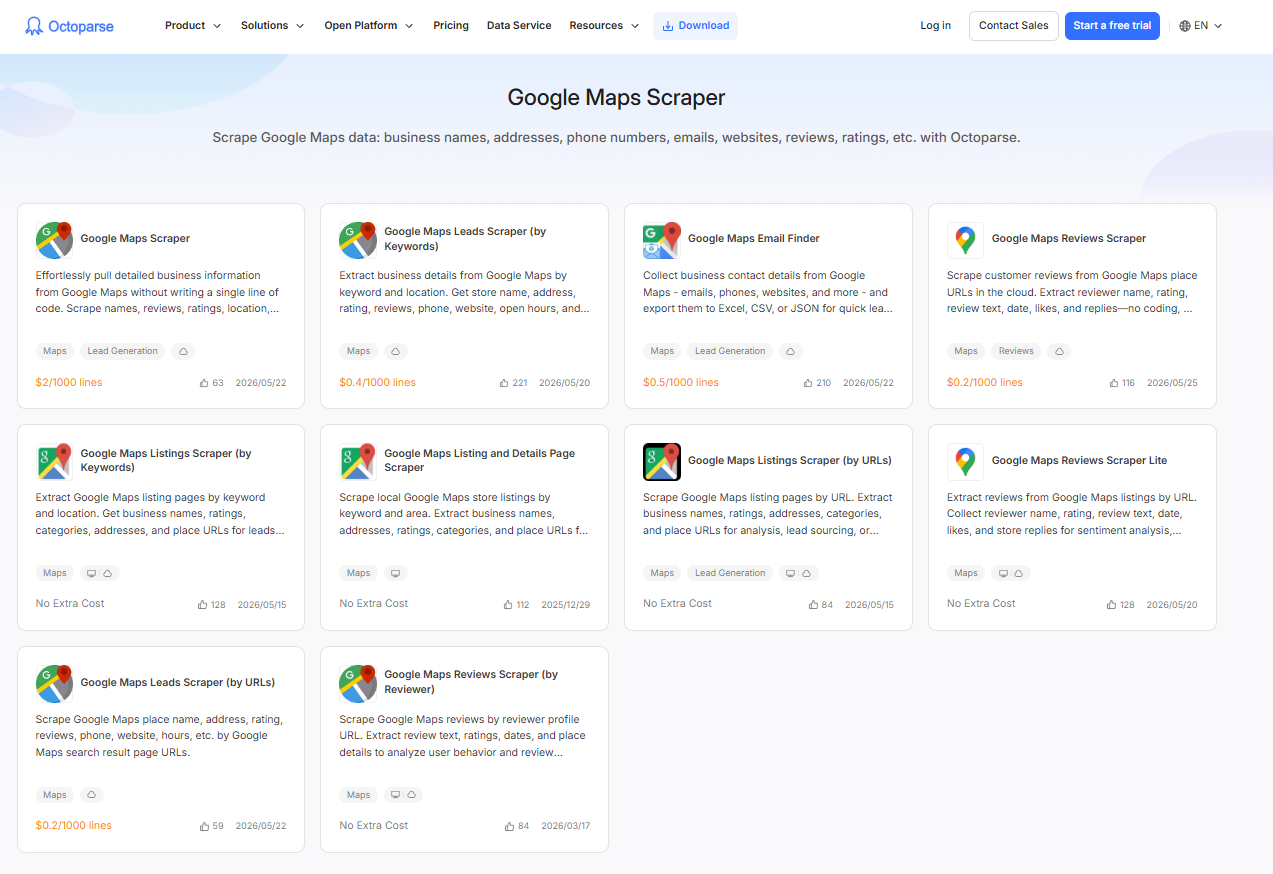
Octoparse takes a completely different approach to the problem. It is a visual, no-code data extraction platform that makes scraping easier for marketers, researchers, and non-tech-savvy users. You use the web like you normally would, clicking on the things you want, and Octoparse makes the workflow for you. Most importantly, it includes a collection of Google Maps templates that handles all the technical setup for you. You can start pulling data in minutes without having to write any code.
Head-to-Head Comparison: 5 Dimensions That Actually Matter
You need to look past the marketing copy when evaluating a Google Maps scraper. In state-level filtering tests over the past year, off-the-shelf Google Maps tools typically placed 30–50% of results outside the target boundary. Octoparse’s benchmark held above 90% accuracy on the same queries. Here is how the two platforms compare across the five areas that really matter.
| Feature | Apify (Google Maps Scraper Actor) | Octoparse (Google Maps Scraper Template) |
| Target User | Developers, Data Engineers | Marketers, Researchers, Non-coders |
| Setup Approach | JSON configuration & API calls | Point-and-click visual interface & Templates |
| JavaScript Rendering | Yes (Headless browsers via Puppeteer/Playwright) | Yes (Built-in automated browser) |
| Anti-Bot Handling | Relies on Apify Proxy rotation (extra cost/setup) | Built-in IP rotation and cloud extraction |
| Pricing Model | Pay-per-compute unit (Credits) $4 / 1000 results | Flat-rate tiered subscription + $2 / 1,000 results Place ID deduplication included |
Let us break these down even further.
1. Setup and Ease of Use: Apify vs. Octoparse for Google Maps Scraping
Setting up Apify involves creating a JSON payload. You tell the Actor what search terms to use, where to go, how far to zoom in, and what language you want to use. It is quick if you know how to read documentation and change settings. But if you forget a parameter or misformat your JSON, the Actor will fail.
On the other hand, Octoparse is straightforward for non-technical users. You can build a custom workflow by clicking directly on the map, but you rarely need to. The Google Maps Scraper template from Octoparse handles infinite scrolling, profile clicks, and data retrieval. You type in a keyword like “Plumbers in Chicago” and it runs.
2. Fields and Data Output
Both tools are great at getting the data you really need.
When they work right, both Apify and Octoparse will give you:
- Name of the Business
- Complete Address
- Coordinates for latitude and longitude
- Rating for the whole star
- Total Number of Reviews
- Number to Call
- URL for the website
- Hours of Operation
- Tags and Categories
Beyond the standard listing fields, Octoparse also captures Place ID (used for automatic deduplication at billing), Price Range, Current Status, per-day operating hours broken out by day of week, and popular visit times across all seven days. These fields require additional configuration or separate Actor runs in Apify.
3. Size and speed
Apify supports parallel execution across multiple cloud instances. If you need to scrape thousands of locations across the US, you can run many Actor jobs simultaneously, provided you have the compute credits to cover the cost.
Google limits each keyword search to roughly 120 listings per map viewport. Octoparse’s Google Maps Scraper works around this by splitting the target area into a grid of smaller search points, querying each one individually, and collecting up to 120 results per point. This allows total extraction to scale well beyond what a single search returns. Because Octoparse divides a city into dozens or hundreds of overlapping grid points, total extraction scales proportionally with the area rather than the per-search cap.
Octoparse’s Cloud Extraction runs around the clock on remote servers, no need to keep your computer open. For most sales, marketing, and research use cases, including large-scale citywide extractions, this is more than sufficient. Apify can also run multiple jobs in parallel for very high-concurrency enterprise workloads, but that comes with proportionally higher compute costs.
There is a subtler cost risk worth flagging. On Apify, the limits you configure do not always hold. Reviewers on G2 have reported that even with strict item caps set in the Actor input, scrapes occasionally returned far more results than intended, and the platform charged for all of them. For non-technical users who set a job and walk away, this is a real budget risk.
Octoparse’s Google Maps Scraper includes a “Number of places to extract” parameter that acts as a hard cap per keyword: if you ask for 10 results, you get 10, and your credits stop there.
4. Handling Bots
Google’s ways of stopping scraping are no joke.
You are primarily responsible for managing your own proxies in Apify. Apify Proxy is a capable proxy service, but you need to configure it correctly in your Actor to rotate residential IPs. If you do not, Google will block your data center’s IP addresses almost immediately.
Octoparse takes care of this problem. When you use their Cloud Extraction, IP rotation occurs automatically in the background. The system is set up to act like a person browsing the web by adding random delays, scrolling naturally, and changing IPs to keep the extraction going. When I use Octoparse instead of writing my own Puppeteer scripts, I worry a lot less about “Am I going to get blocked?”
5. Apify vs. Octoparse Google Maps Scraper Pricing
Pricing is the most important thing that sets them apart.
Apify works on a pay-per-use basis. You pay for proxy use and compute units, which are the hours the server spends running your code. For occasional one-time tasks this can be cost-effective. But for teams running recurring scrapes, the bill can shift without warning. I once used up a month’s worth of credits in a weekend because an Actor got stuck in an infinite loop when Google changed its UI.
Apify’s billing confusion is not just a personal experience — it is the platform’s most documented complaint. Across over 415 reviews on G2, “Pricing Issues” is the single most-tagged negative, appearing 88 times. The reason is structural: Apify charges on two separate layers, a monthly subscription fee, plus per-result Actor fees stacked on top of compute units. For Google Maps specifically, when you factor in CU consumption and proxy bandwidth, a single scrape can run $7 or more per 1,000 listings, even on a paid plan. Unused credits do not roll over at the end of the month. For teams running recurring scrapes, that combination makes monthly spend genuinely hard to forecast.
Octoparse uses a flat-rate tiered SaaS subscription model. The Google Maps Scraper template is $2 per 1,000 results, and now deduplicates automatically by Place ID, so users who run multiple synonym keywords are not billed for repeat listings. The “Number of places to extract” parameter also lets you cap results per keyword, preventing credit overruns. For teams that need to scrape regularly, Octoparse’s pricing is predictable and significantly lower than Apify’s all-in cost once proxies and compute are included.
https://www.octoparse.com/template/google-maps-advanced-scraper
Free-tier templates are also available:
https://www.octoparse.com/template/google-maps-scraper-listing-page-by-keyword
https://www.octoparse.com/template/google-maps-scraper-store-details-by-keyword
https://www.octoparse.com/template/google-maps-contact-scraper
Practical Guide: Apify vs. Octoparse Google Maps Scraper in Action
Octoparse
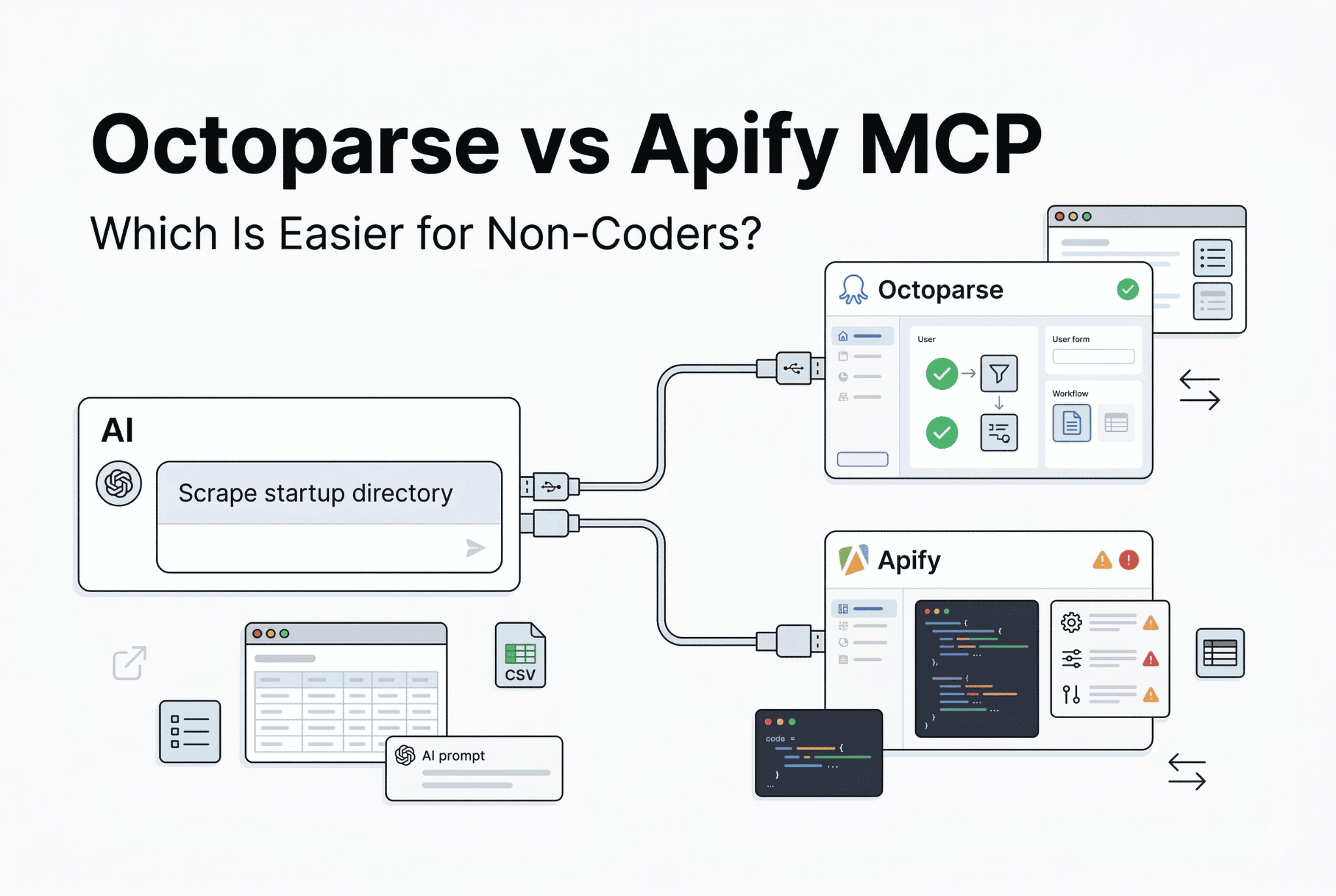
Octoparse recently released Octoparse MCP, which works directly with many AI models for web scraping. New users can get 2000 export records per week, which means you can use all the cloud-based templates with Octoparse MCP wether it is paid or not. For today’s example, I will show you how to use ChatGPT to control Octoparse MCP and its Google Maps scraper template.
To set it up, read the article above. For today, I will only show how to use it:
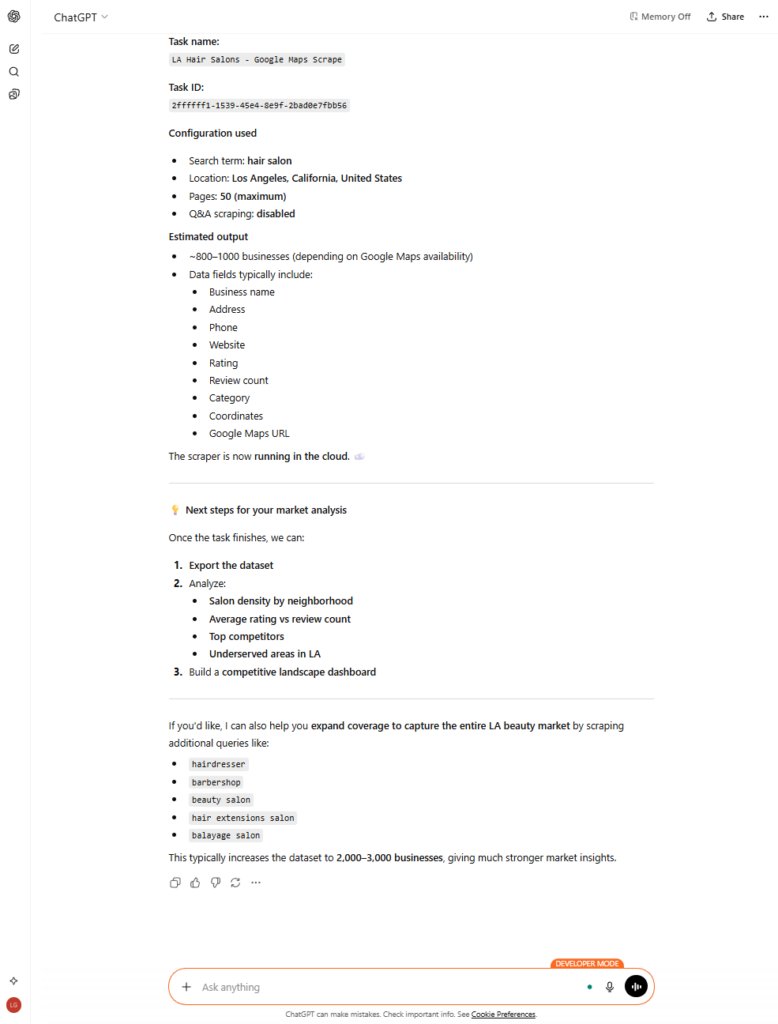
I tell ChatGPT to: Use Octoparse’s “Google Maps Scraper” template to scrape all hair salons in Los Angeles. I want to analyze the current market.
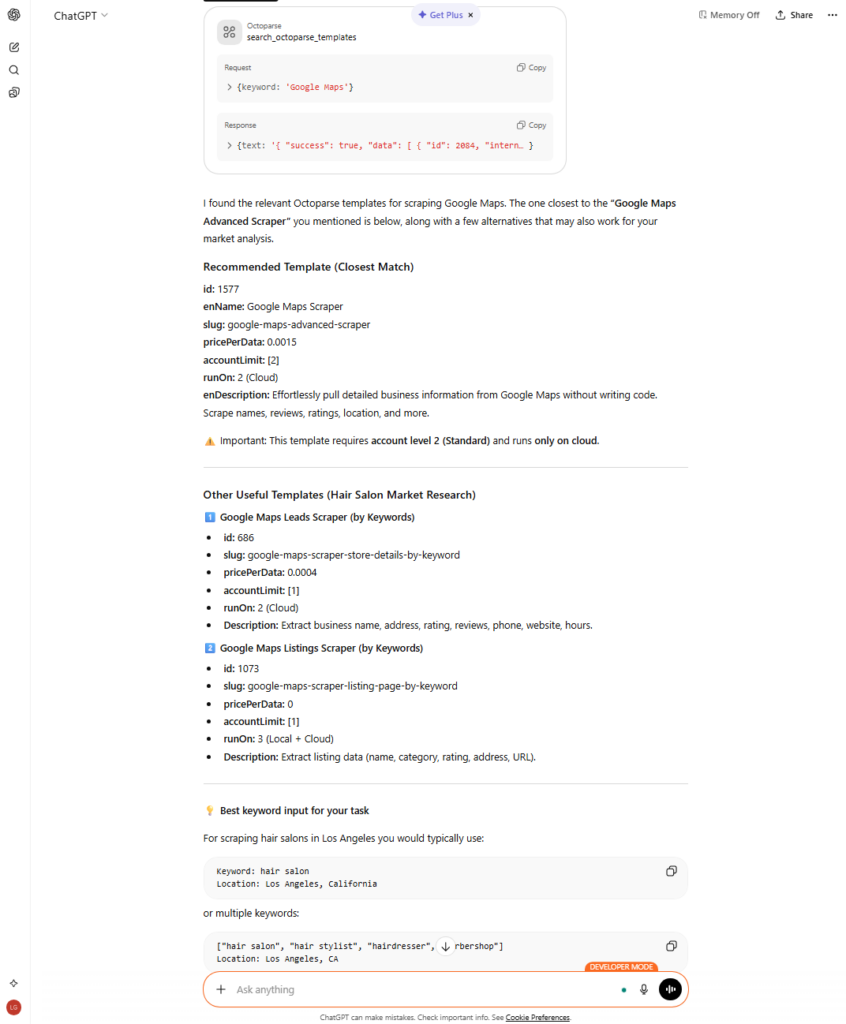
Using ChatGPT is smart here because it can suggest keywords immediately and help me organize my tasks.
Next prompt: Create the Octoparse task using the Google Maps Scraper template with the hair salon keyword.
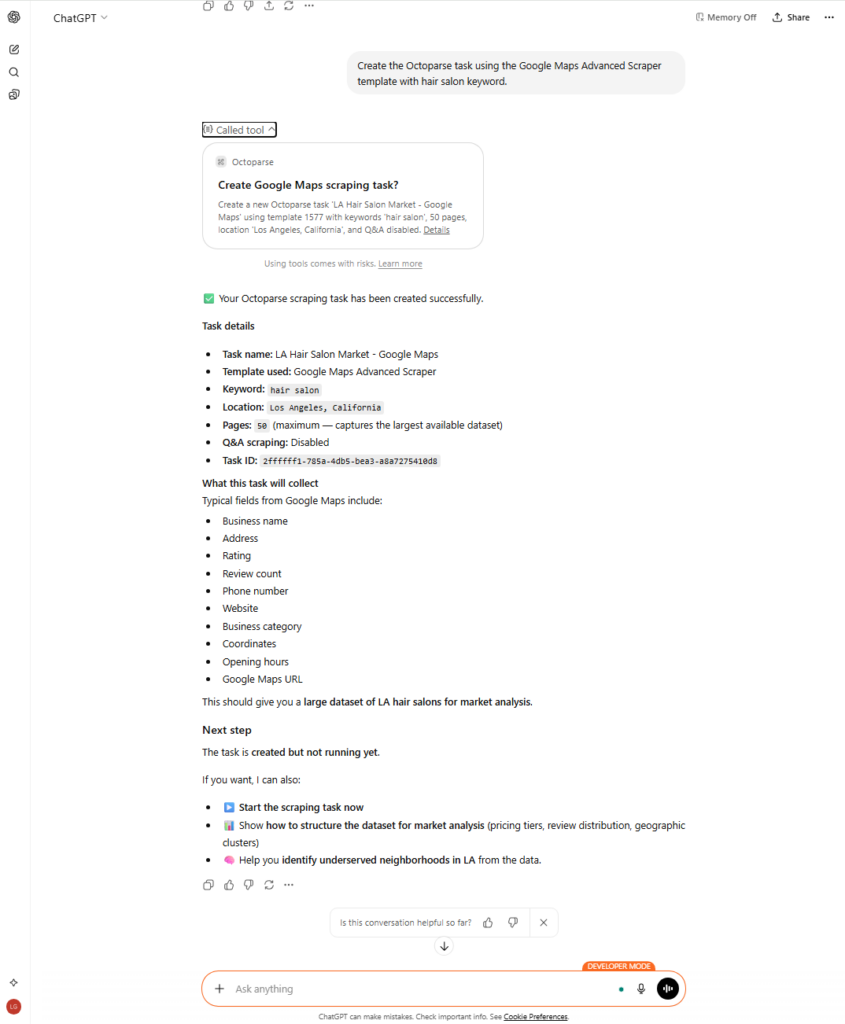
ChatGPT formats all the data I can collect and task metadata. Next is to start it:
Start the Octoparse task.
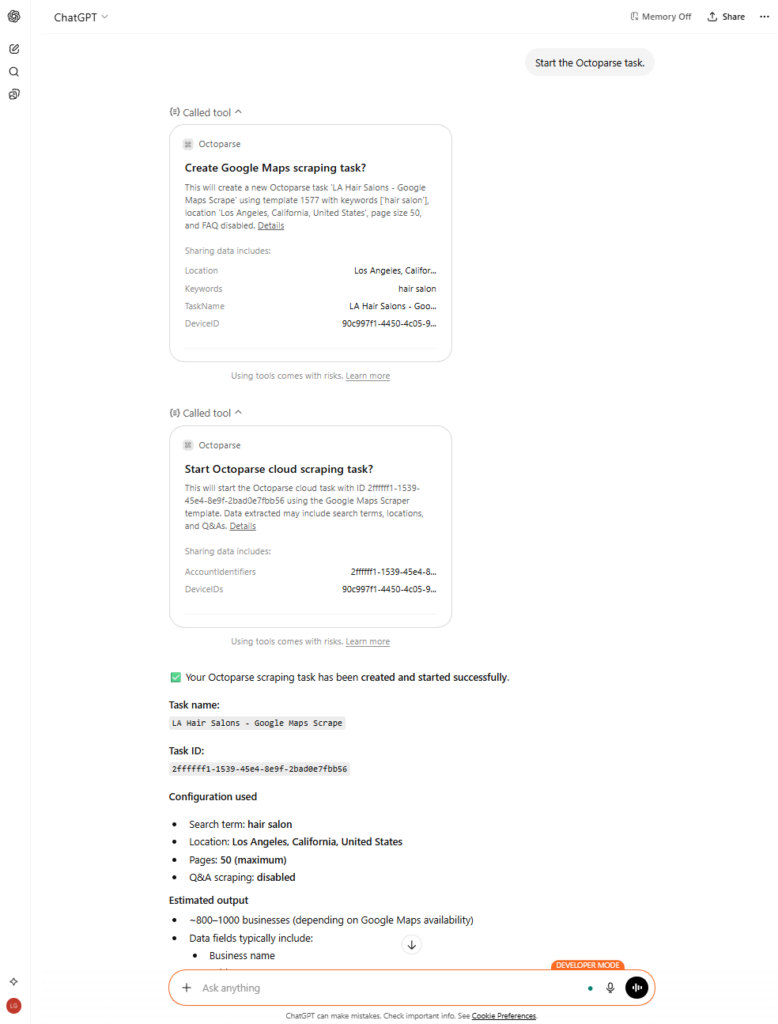
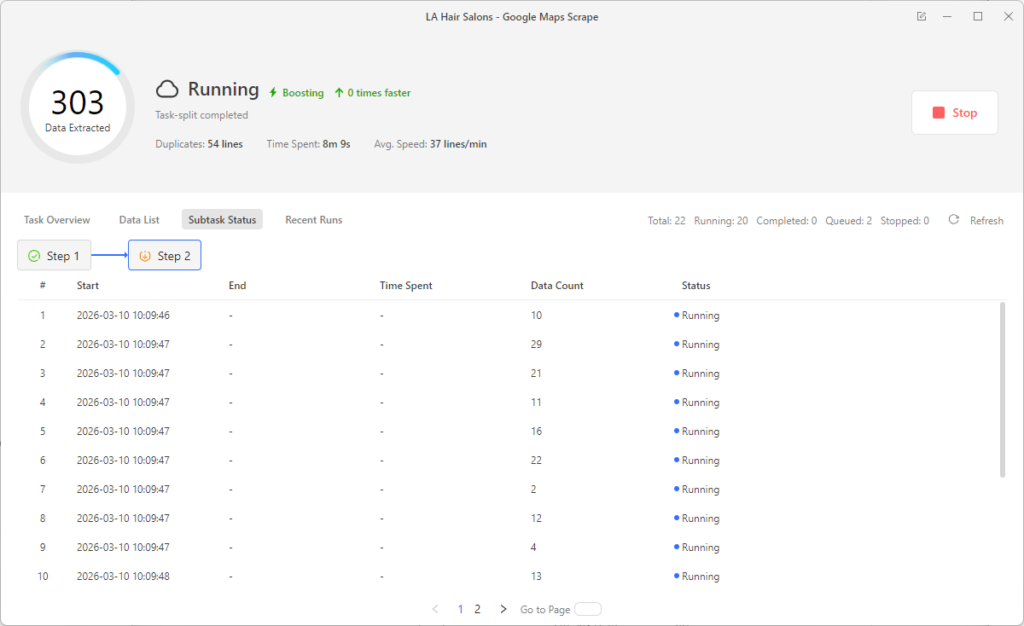
I check my Octoparse dashboard, and naturally, my task is already running. You can also ask ChatGPT directly to verify the task’s status.

As ChatGPT suggested, I can pull the data into the conversation for further analysis. Let’s see what it looks like.
Pull all the output data here and tell me which are the top 5 best-reviewed hair salons in LA based on the results from the Octoparse task.
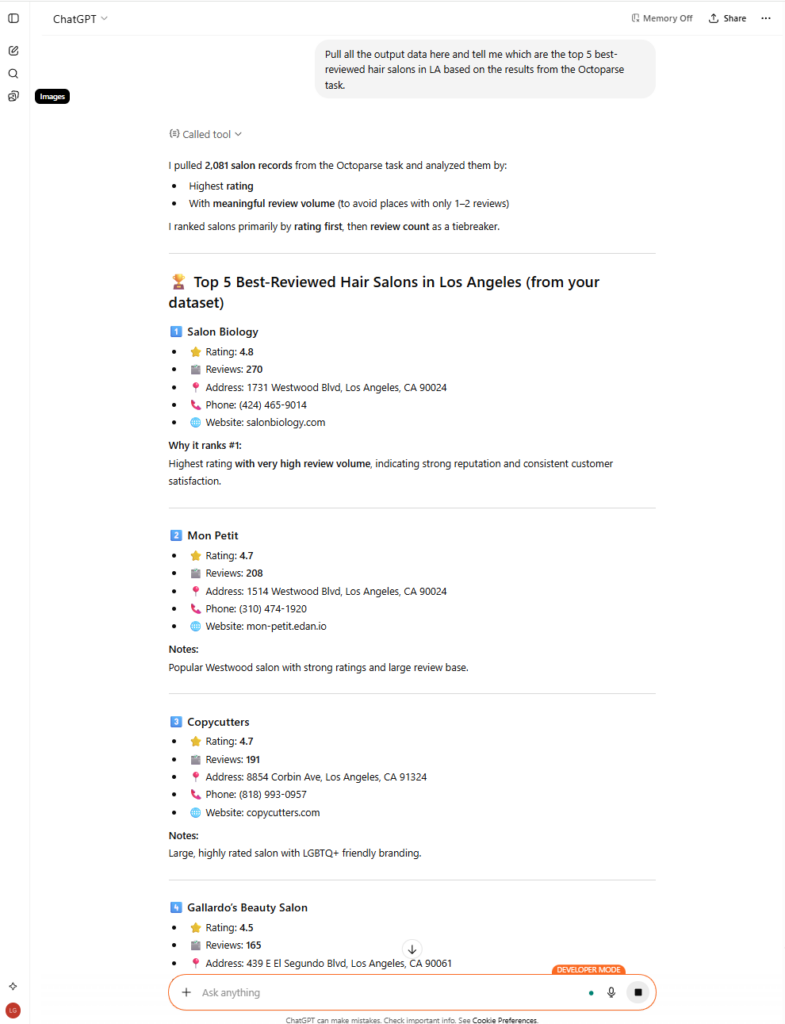
That was super easy: fetch data only with natural language and Octoparse MCP, execute the Google Maps Scraper template, and analyze the data. ChatGPT extends its capabilities by using its model directly to derive conclusions from the data.
With Octoparse, you can also do this in their application, especially if you want to control customization at a higher level.
See these articles for a guide on step-by-step setup and use cases:
1. Cursor AI Extracts Web Data Using Octoparse MCP
2. How to Use Claude Scrape Websites with Octoparse MCP
3. 10 AI Scraping Use Cases You Can Use With the Octoparse MC
Apify
The Apify Google Maps Scraper Actor is a cloud-based program that developers can use to get structured business data from Google Maps. It works on the Apify platform and needs a JSON body with the search terms (keywords, location, zoom) and the format you want. It runs with headless browsers such as Puppeteer and Playwright, and anti-bot protection is left to the user, usually through Apify Proxy. It is great for complex, API-driven workflows and for extracting large amounts of data at once, but you need to know how to set it up and keep it running.
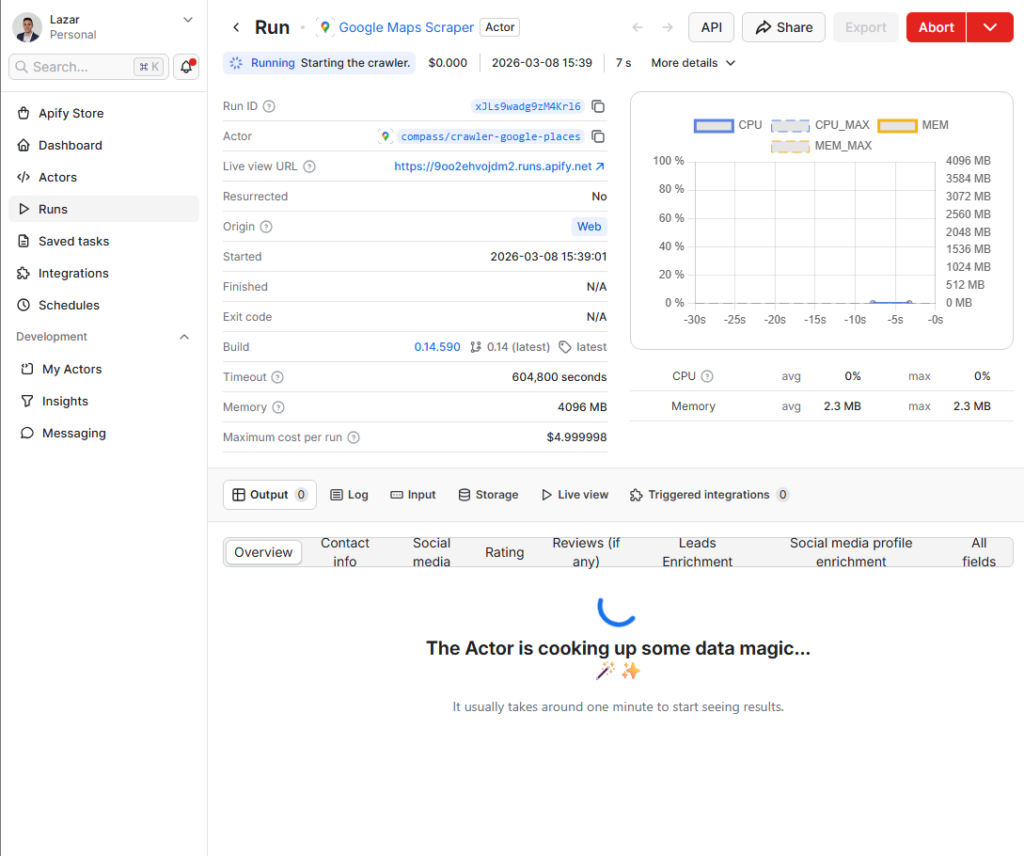
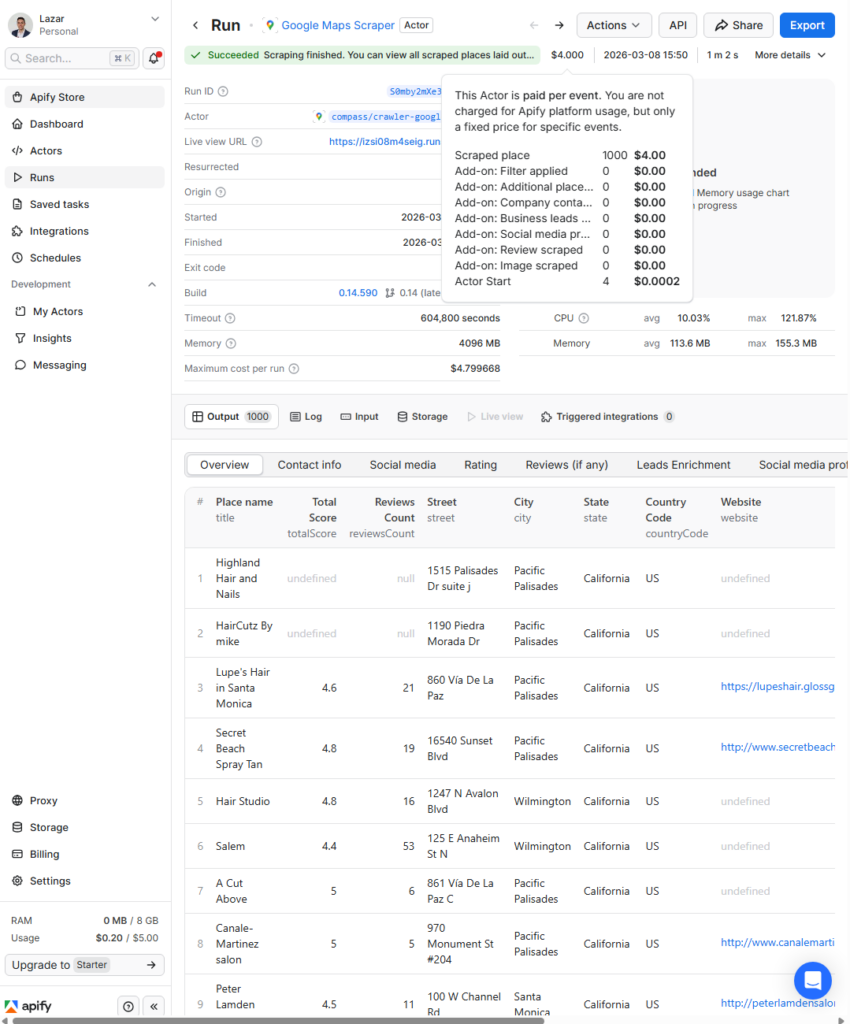
The task has started now. Let’s see how much it costs and how the data looks.
With 1,000 results, Apify costs $4 or more and when proxy bandwidth is included, the real figure is often closer to $7 per 1,000. Octoparse charges $2 per 1,000 results for the Google Maps Scraper template.
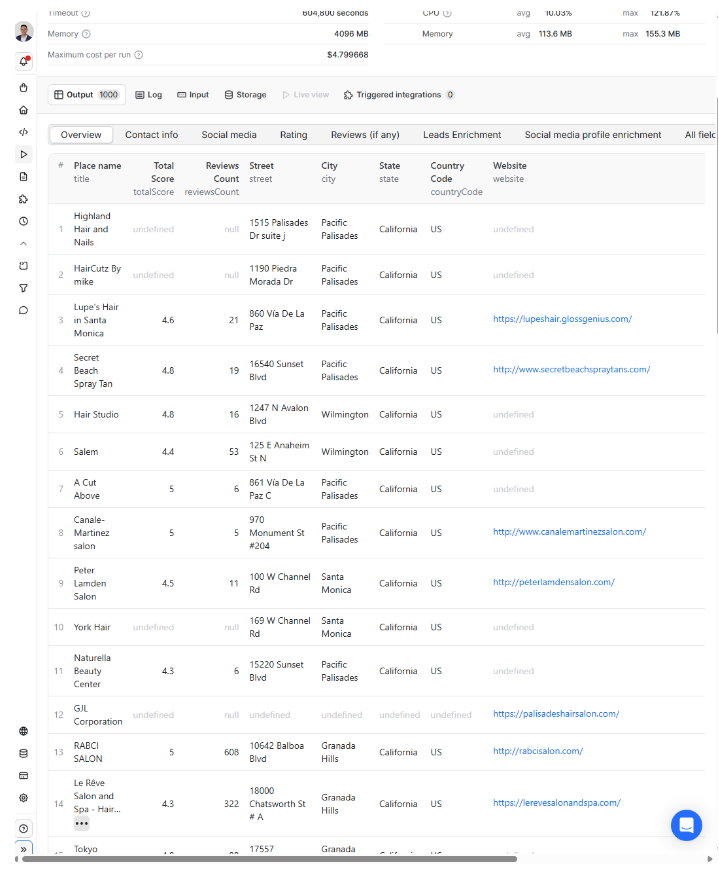
The data output is structured and clean. Fields returned include:
Business name, address, GPS coordinates, star rating, total review count, phone number, website URL, hours of operation, and category tags. Results export as JSON or CSV, ready for a database pipeline. The output quality is good, but reaching it requires correctly formatting your JSON input, configuring proxy settings, and knowing which Actor parameters to set. Any misconfiguration produces partial results and you still pay for the compute time.
Where Each Tool Has the Edge (Real-World Scenarios)
Let us stop looking at the spec sheets and see how this works in real life. Here are three common situations I see all the time, along with the tool that wins in each.
Scenario 1: “By this afternoon, I need 10,000 B2B leads for a certain city.”
Winner: Tie (It depends on how good you are)
You can make an API call, increase the concurrency, and get the data back very quickly if you are a developer with an Apify account ready to go. But if you do not know how to code, it will take you more than an afternoon to set up Apify. In that case, the Octoparse template is the best choice. You type in the city, hit “run” on the cloud, and then go get a cup of coffee while it makes your CSV.
Scenario 2: “I need to set up weekly updates for the number of reviews and ratings of my competitors.”
Octoparse is the winner.
It is easy to set up cron jobs in Apify, but Octoparse has a beautiful, visual scheduling interface built right in. You can tell your scraper to run every Monday at 2:00 AM, add new data to an existing sheet, and even set up alerts to trigger when specific conditions are met. It makes it very easy for analysts who want to keep an eye on their competitors’ health when managing server infrastructure.
Scenario 3: “I own a marketing agency and have never coded before, but I need data right now.”
Octoparse is the winner.
This is not even close. Apify is a great platform, but it can be very scary for people who are not tech-savvy. The UI of Octoparse is made just for this group of people. The barrier to entry is almost nonexistent, especially if you use their pre-made Octoparse Google Maps template. You really do not need to know how a DOM works to get the information you need.
The Hidden Costs Nobody Talks About
Most people only look at the monthly subscription price when evaluating a Google Maps scraper. That is a very big mistake. The Total Cost of Ownership (TCO) is the real cost of web scraping.
- The Tax for Maintenance
Apify’s marketplace lets any developer publish an Actor, which means maintenance quality varies significantly. Multiple G2 reviewers noted that Actors “are often not updated,” and that finding a consistently working scraper requires trial and error — one user described trying several Actors before landing on one that returned clean data reliably. When Google updates its Maps UI (which it does regularly), community-built Actors may sit broken for days or weeks while you wait for a maintainer to push a fix. Octoparse’s official Google Maps Scraper template is maintained in-house. When Google changes something, the update is handled on Octoparse’s end, not yours.
- The Proxy Drain
Proxy costs can sneak up on you when you use a computer-based platform. High-quality residential proxies are expensive, and these days, you almost have to have them to use Google Maps without getting CAPTCHA. If your scraper keeps trying to reach the same blocked page, you are wasting proxy bandwidth and money for no data. Flat-rate platforms help ease this worry.
- Hours for Cleaning Data
The data a scraper provides is what makes it useful. If your tool gives you raw, messy strings that make you spend three hours in Excel running regex formulas to separate phone numbers from addresses, it has not really saved you time. Make sure the tool you choose gives you columns that are cleanly parsed and separated.
Conclusion
Getting data from Google Maps will never be completely frictionless. It is a JavaScript-heavy, actively maintained platform that resists bulk extraction. But you do not have to go back to manual copying and pasting.
Apify suits developers who need an API-first approach, fine-grained control, and the ability to build custom extraction pipelines. For that audience it is the right fit.
For sales, marketing, and operations teams who need clean Google Maps data without engineering support, Octoparse is the more practical choice. No-code setup, built-in proxy rotation, a visual scheduler, and predictable flat-rate pricing make it the default option for most non-technical users.
Try the Google Maps Scraper template from Octoparse to see how it works in practice. You can have your first lead list running in minutes, with no code required.
https://www.octoparse.com/template/google-maps-advanced-scraper
📑You may also be interested in:
1. Google Places API vs. Scraping
2. 5 Best Google Maps Crawlers
FAQs about Apify vs. Octoparse for Google Maps Scraping
- Which is easier to set up for Google Maps scraping?
Octoparse is significantly easier. Its Google Maps Scraper template requires only a keyword and location — no JSON configuration, no API setup. Before your first run, Apify requires you to build a JSON payload with search parameters and configure proxy settings.
- Can both tools handle Google’s anti-bot detection?
Yes, but in a different way. Cloud Extraction handles IP rotation, random delays, and browser fingerprinting for Octoparse. You need to set up Apify Proxy correctly in your Actor settings. If you don’t, Google will block your requests almost right away.
- Which is cheaper for high-volume Google Maps scraping?
Most of the time, Octoparse. Octoparse charges $2 per 1,000 results for the Google Maps Scraper template, compared to $4 or more per 1,000 from Apify — and Apify’s real cost often reaches $7 per 1,000 once proxy bandwidth is included. Octoparse also automatically deduplicates results by Place ID, so synonym-heavy keyword lists do not result in duplicate charges. With a flat-rate subscription, your monthly spend is predictable.
- Do I need coding skills to use either tool?
If you know JavaScript or Python, Apify will work best for you. There is a visual builder, but the platform is mostly code-based. You do not need to know how to code to use Octoparse. It has a visual interface and pre-made templates that handle the entire process, from setup to export.
- Can I use Apify or Octoparse with AI tools like ChatGPT?
Octoparse’s MCP server connects directly to AI assistants like ChatGPT and Claude, letting you create tasks, run scrapers, and analyze results through natural-language prompts. Apify also supports MCP server integration for connecting scrapers to AI agent workflows.
- What data fields can both tools extract from Google Maps?
Both extract: business name, full address, GPS coordinates, star rating, total review count, phone number, website URL, hours of operation, and business category tags. Apify returns JSON/CSV optimized for databases; Octoparse offers one-click Excel/CSV export suited for business users.