You refresh the page manually, scroll down, and watch hundreds more items load. But your scraper sees none of them.
If this sounds familiar, you’ve just encountered infinite scroll—and it breaks traditional web scrapers in a very specific way.
The good news is once you understand why infinite scroll defeats most scrapers, fixing it takes about 2 minutes in a web scraping tool like Octoparse.
This guide shows you exactly what’s happening under the hood and four proven methods to scrape every single item from infinite scroll pages.
What Is Infinite Scroll (And Why Does It Break Scrapers?)
Infinite scroll, sometimes called “endless scroll” or “lazy loading”, is a web design pattern where new content loads automatically as you scroll down the page. Instead of clicking “Next Page,” you just keep scrolling, and more items appear.
According to the Nielsen Norman Group, infinite scroll increases user engagement on content-discovery sites but can frustrate users looking for specific items. For web scrapers, it creates a specific technical challenge.
You’ve seen this on:
- Social media feeds (Twitter/X, Facebook, Instagram)
- E-commerce category pages (Amazon search results, Etsy)
- Job boards (LinkedIn Jobs, Indeed)
- Image galleries (Pinterest, Behance)
- Review sections (Google Maps reviews, Yelp)
Why websites use it: It keeps users engaged longer. No page loads, no waiting—just smooth, continuous content. Google’s Web Dev guidelines note that infinite scroll, when combined with lazy loading, can significantly improve initial page load performance.
Why it breaks scrapers: Traditional scrapers make a single HTTP request and parse whatever HTML comes back. With infinite scroll, that initial HTML only contains the first batch of items (often 10-30). The rest doesn’t exist yet—it only loads when JavaScript detects you’ve scrolled to the bottom.
A basic scraper doesn’t scroll. It doesn’t run JavaScript. So it only sees what’s loaded initially.
When you visit an infinite scroll page, here’s what happens:
- Initial load: Browser receives HTML with first 20-30 items
- You scroll: JavaScript detects you’ve reached the bottom (using the Intersection Observer API)
- AJAX request: Browser sends a background request for more data
- DOM update: New items are injected into the page
- Repeat: Steps 2-4 continue until you stop scrolling or run out of content
A web scraper that only does Step 1 will only ever see those first 20-30 items.
How to Know If a Page Uses Infinite Scroll
Before you try to fix the problem, confirm you’re actually dealing with infinite scroll:
Signs of infinite scroll:
- No “Next” button or page numbers
- New content appears as you scroll without page refresh
- URL doesn’t change when more content loads
- A loading spinner or “Loading more…” message appears at the bottom
Quick test: Open your browser’s Developer Tools (F12), go to the Network tab, filter by “XHR” or “Fetch,” then scroll down the page. If you see new requests firing as you scroll, it’s infinite scroll.

4 Methods to Scrape Infinite Scroll Pages
Method 1: Simulate Scrolling (Best for No-Code Users)
The most straightforward approach: make your scraper scroll the page like a human would, wait for content to load, then extract.
How it works:
- Load the page in a browser-based scraper
- Scroll to the bottom
- Wait for new content to load
- Repeat until no more content appears
- Extract all loaded items
In Octoparse:
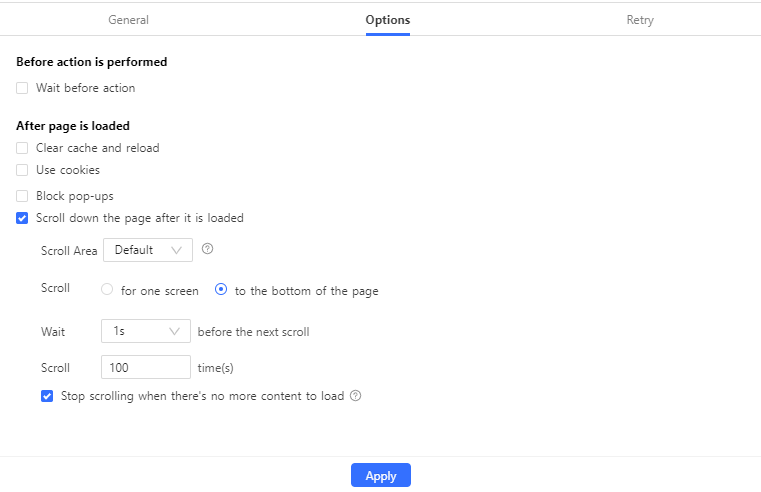
Octoparse handles this natively with its scroll action feature. Here’s how to set it up:
- Create a new task and enter your target URL
- Wait for the page to load in Octoparse’s built-in browser
- Click on “Go to Web Page” in the workflow
- Select “Scroll down the page” in the page options
- Configure:
- Scroll times: How many times to scroll (start with 10, increase as needed)
- Scroll interval: Time between scrolls (1-2 seconds usually works)
- Scroll direction: Down (default)
- Select the data fields you want to extract
- Run the task
If you don’t know how many scrolls you need, set it higher than you think. Octoparse will stop automatically when there’s no more content to load.
When to use this method:
- Pages where scrolling triggers all content to load
- When you need a no-code solution
- For sites that don’t require extremely fast scraping
Method 2: Find the Hidden API Endpoint
Here’s a secret most tutorials don’t tell you: infinite scroll pages usually load data from a hidden API. If you find that API, you can request data directly—no scrolling required.
How to find it:
- Open Developer Tools (F12) → Network tab
- Filter by “XHR” or “Fetch”
- Scroll down the page and watch for new requests
- Look for requests returning JSON data with the items you want
- Examine the request URL for pagination patterns
According to research from Akamai, over 83% of web traffic now comes from API calls. But the pagination patterns vary wildly:
| Site Type | API Pattern | Ease of Use |
|---|---|---|
| Traditional e-commerce | ?page=1, ?offset=30 | ✅ Easy — increment the number |
| Modern apps (Reddit, Twitter) | ?after=dDNfMXB... (cursor token) | ⚠️ Hard — token from previous response |
| GraphQL sites | POST request with query body | ❌ Complex — requires schema knowledge |
Example of an easy pattern (e-commerce):
Example of a hard pattern (Reddit, Twitter):
That after= parameter is a cursor token — it changes with each response. You can’t just generate URLs; you need the previous response to get the next cursor. Twitter’s API documentation explains this pagination model in detail.
In Octoparse (for simple patterns):
Use the URL list feature to scrape multiple API endpoints:
- Generate your list of API URLs (e.g., page 1-100)
- Create a new task
- Import URLs as a batch
- Configure extraction for the JSON response
- Run the task
When to use this method:
- Older e-commerce sites with
page=oroffset=parameters - Search result pages where URL changes as you paginate
- Sites with publicly documented APIs
When to skip this method and use Method 1 instead:
- Reddit, Twitter/X, Facebook (cursor-based pagination)
- Most modern React/Vue single-page applications
- Sites using GraphQL (identifiable by POST requests to
/graphql) - Any site where the pagination token is encrypted or session-specific
A 2023 study from HTTP Archive found that 97% of websites now use JavaScript, and the majority use modern frameworks that favor cursor pagination over simple page numbers. When in doubt, Method 1 (simulating scrolls) is more universally reliable.
Method 3: Handle “Load More” Buttons
Some pages look like infinite scroll but actually use a “Load More” or “Show More” button. The content doesn’t load until you click.
The difference:
- True infinite scroll: Content loads automatically when you reach the bottom
- Load More buttons: Content only loads when you click the button
In Octoparse:
- Build your task and select the data you want to extract
- Click on the “Load More” button in the page
- Select “Click to paginate” or “Loop click”
- Configure the loop to continue until the button disappears
- Make sure your data extraction step is inside the loop
- Run the task
Octoparse will click the button repeatedly, waiting for new content to load after each click, until there’s no more button to click.
Common issues and fixes:
| Problem | Solution |
|---|---|
| Button changes text (e.g., “Load More” → “Loading…”) | Use XPath that matches the button in both states |
| Button disappears briefly during loading | Add a wait time between clicks |
| Scraper clicks but nothing loads | Increase AJAX timeout in task settings |
Method 4: Scroll Within a Specific Element (Nested Infinite Scroll)
Sometimes infinite scroll isn’t on the main page—it’s inside a specific section, like a reviews panel or a sidebar.
Example: You’re on a Google Maps listing. The main page is static, but the reviews section has its own infinite scroll.
In Octoparse:
Use the “Partial Scroll” feature to scroll only within a designated area:
- Identify the scrollable container element
- In your workflow, add a scroll action
- Click “Scroll within a designated area”
- Select the specific element (Octoparse will generate the XPath)
- Configure scroll times and intervals
- Extract data from within that element
This is crucial for pages where the whole page doesn’t scroll, but a specific section does.
When Your Scraper Still Gets Limited Results
Even after configuring scroll actions, you might still see incomplete data. Here’s a diagnostic checklist:
1. Scraper stops at a fixed number (e.g., always 50 items)
Likely cause: Your data extraction is using a “Fixed List” loop instead of a “Variable List.”
Fix in Octoparse:
- Click on your Loop Item in the workflow
- Check the Loop Mode
- Switch from “Fixed List” to “Variable List”
- Variable List automatically detects new items as they load
2. Page loads more content, but scraper doesn’t capture it
Likely cause: Scroll is happening, but extraction runs before new content fully loads.
Technical context: Modern web frameworks like React batch DOM updates for performance (React documentation on batching). Your scraper might catch the page mid-update.
Fix: Increase the wait time after each scroll. In Octoparse, adjust the “AJAX timeout” or add a “Wait” action after scrolling. Start with 2 seconds and increase if needed.
3. Scraper works locally but fails in cloud extraction
Likely cause: Cloud execution is faster than local, and the page can’t keep up.
Fix: Increase scroll intervals and wait times for cloud tasks. What works with 1-second intervals locally might need 2-3 seconds in the cloud.
4. Website shows CAPTCHA or blocks scraper
Likely cause: Too many rapid requests or scroll actions triggered anti-bot detection.
According to Imperva’s Bad Bot Report, nearly 30% of all web traffic comes from bots, and sites are increasingly aggressive about blocking them.
Fix:
- Slow down your scraping (longer intervals between actions)
- Use Octoparse’s built-in IP rotation
- Scrape during off-peak hours for the target site
- Check out our guide on handling CAPTCHAs while web scraping
5. Different results each time you run the scraper
Likely cause: Personalized or randomized content feeds.
Many infinite scroll implementations show personalized content based on cookies, location, or behavior. Research from Princeton’s Web Transparency Project found that major platforms show significantly different content to different users.
Fix:
- Clear cookies before each run for consistent baseline
- Use the same proxy location each time
- For personalized feeds, accept that results may vary—consider multiple runs and deduplication
Infinite Scroll vs. Traditional Pagination
| Factor | Infinite Scroll | Traditional Pagination |
|---|---|---|
| Difficulty | Medium | Easy |
| Speed | Slower (requires scrolling/waiting) | Faster (direct URL requests) |
| Reliability | Can be finicky | Very reliable |
| Best approach | Browser-based scraping + scroll actions | URL-based scraping |
If you have a choice: Traditional paginated sites (with “Next” buttons or page numbers) are almost always easier to scrape. But infinite scroll is increasingly common, especially on modern sites—so knowing how to handle it is essential.
For more on handling different pagination types, see our complete guide: Tackle Pagination for Web Scraping.
What Are The Common Infinite Scroll Sites
1. E-commerce Product Listings
Many Shopify stores use infinite scroll for category pages. Products load as you scroll, with no page numbers.
Approach:
- Use Method 1 (simulate scrolling)
- Set scroll times based on expected product count (e.g., 50 products ÷ 10 per scroll = 5 scrolls minimum)
- Add buffer scrolls (set to 10 instead of 5)
- Extract product name, price, URL, and image
2. Social Media Feeds
Twitter/X, Facebook, and LinkedIn feeds all use infinite scroll.
Approach:
- Log in to your account (Octoparse supports login-required scraping)
- Use Method 1 with higher scroll counts (feeds can be very long)
- Set reasonable limits—you probably don’t need every post ever made
- Be aware of rate limits and platform ToS
3. Review Sections
Google Maps reviews, Yelp reviews, and Amazon reviews often use nested infinite scroll within a modal or panel.
Approach:
- Navigate to the reviews section
- Use Method 4 (scroll within specific element)
- Target the reviews container, not the whole page
- Extract review text, rating, date, and reviewer name
How Octoparse Handles Infinite Scroll Automatically
One advantage of using Octoparse for infinite scroll pages: the Auto-detect feature often recognizes infinite scroll patterns and configures scrolling automatically.
How it works:
- Enter your URL and click “Start”
- Click “Auto-detect web page data”
- Octoparse analyzes the page structure
- If it detects infinite scroll, it suggests scroll settings
- Review and adjust as needed, then run
This works especially well for common patterns like product listings, search results, and content feeds.
For pages with unusual infinite scroll implementations, you can always build a custom workflow using the methods described above.
Key Takeaways
- Infinite scroll breaks scrapers because new content only loads via JavaScript when you scroll—traditional scrapers don’t scroll.
- Four methods to fix it:
- Simulate scrolling (easiest, works with Octoparse’s no-code interface)
- Find the hidden API (fastest for large datasets)
- Handle “Load More” buttons (similar to pagination)
- Scroll within specific elements (for nested scroll areas)
- Most common issues are fixed by switching to Variable List loop mode and increasing wait times.
- Octoparse’s Auto-detect often handles infinite scroll automatically, but understanding the underlying mechanics helps you troubleshoot edge cases.
Frequently Asked Questions
Does infinite scroll affect SEO for the websites using it?
Yes, and this matters for scrapers too. Google’s documentation confirms that Googlebot can execute JavaScript, but it’s resource-intensive. Many sites using infinite scroll implement “hybrid” pagination—infinite scroll for users, but ?page= URLs for search engines. If you’re scraping an SEO-conscious site, check if paginated URLs exist (try adding ?page=2 to the base URL). You might find an easier scraping path.
Can infinite scroll pages be scraped on a schedule (automated daily runs)?
Yes, but with caveats. Scheduled scraping of infinite scroll pages works best when:
- You use cloud extraction (Octoparse Cloud handles browser rendering)
- You set conservative scroll intervals (sites may load slower during peak hours)
- You monitor for layout changes (infinite scroll implementations change frequently)
For business-critical data, consider setting up alerts for when your scheduled task returns significantly fewer results than expected—this often indicates the site changed their infinite scroll implementation.
How do I scrape infinite scroll behind a login (like LinkedIn or private dashboards)?
The process adds one step: authenticate first, then scroll. In Octoparse:
- Use the built-in browser to log in manually
- Save cookies from that session
- Your scroll-and-extract workflow runs with those credentials
Important: Respect rate limits and terms of service. Sites like LinkedIn actively detect automated access patterns. Slower scroll intervals and human-like delays between sessions reduce detection risk.
What’s the performance difference between scraping infinite scroll vs. paginated pages?
Based on typical extraction times:
| Page Type | 1,000 items | 10,000 items |
|---|---|---|
| Paginated (URL-based) | 2-5 minutes | 15-30 minutes |
| Infinite scroll (browser-based) | 10-20 minutes | 1-3 hours |
The difference comes from wait times. Each scroll requires 1-3 seconds for content to load. If you’re scraping at scale (100K+ items), finding the API endpoint (Method 2) or checking for hidden paginated URLs becomes worth the investigation time.
Are there legal considerations specific to scraping infinite scroll pages?
The scroll mechanism itself doesn’t change the legal analysis—the same rules apply as any web scraping. However, infinite scroll pages often contain user-generated content (social feeds, reviews) which may have additional protections. The hiQ Labs v. LinkedIn case established that scraping publicly accessible data isn’t automatically illegal, but the legal landscape varies by jurisdiction and data type. For commercial scraping projects, consult our guide on Is Web Scraping Legal?.
How do I handle infinite scroll that stops loading after a certain point?
Some sites deliberately limit how far you can scroll (Twitter shows ~800 tweets max, Instagram limits older posts). This isn’t a scraper issue—it’s a platform restriction. Options:
- Accept the limit — Extract what’s available
- Use date ranges — Search within specific time periods to work around limits
- Use official APIs — Platforms like Twitter offer API access with different (sometimes higher) limits
- Multiple entry points — Start from different searches/filters to access different data slices
My scraper works locally but fails in cloud/scheduled runs. Why?
Common causes:
- Timing differences — Cloud servers are faster; the page can’t load content as quickly as the scraper scrolls. Fix: Increase wait times by 50-100% for cloud runs.
- IP reputation — Cloud IPs may be flagged by anti-bot systems. Fix: Enable IP rotation in Octoparse settings.
- Geo-restrictions — Some content only appears for certain regions. Fix: Use proxies matching your target region.
- Session/cookie issues — Login sessions may expire between runs. Fix: Refresh credentials in your task settings.
Related Resource
- Tackle Pagination for Web Scraping — Complete guide to all pagination types
- Click Load More Button to Scrape More Web Pages — Specific guide for “Load More” buttons
- Learn All About Dynamic Web Pages — Understanding JavaScript-rendered content
- Common Challenges with AJAX and JavaScript Websites — Troubleshooting dynamic content extraction
- Octoparse Help Center: Dealing with Infinite Scroll — Official tutorial with video walkthrough