Let me be honest, most web scraping tutorials lie to you.
They show:
- requests.get()
- BeautifulSoup
- Done.
But try that on any real-world modern website, and you’ll end up with empty content, broken pages, and missing data.
That’s because modern websites no longer serve data directly. Since they expect a real browser, and if you’re not running one, you’re already losing.
This is exactly where headless browsers come in.
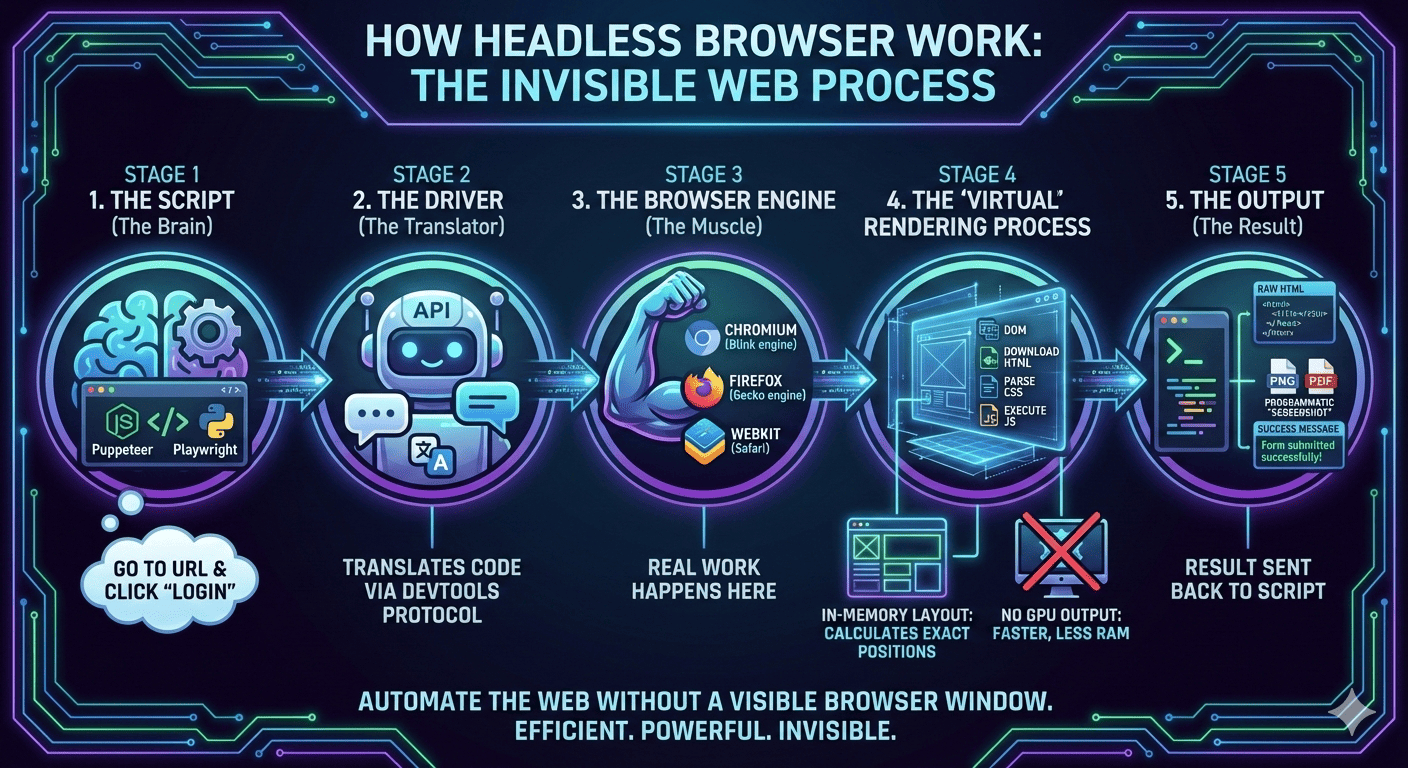
They are essentially Chrome or Firefox running invisibly, executing JavaScript, clicking buttons, loading dynamic content, and behaving like a real user.
And once you start using them, you stop dealing with modern websites and start scraping and automating them the way they were actually designed to be used.
What Is a Headless Browser?
A headless browser is simply a real browser running without a visible window or screen.
This idea of “running Chrome without chrome” is exactly how the Chromium team itself describes headless mode, where the full browser engine runs in an unattended environment with no visible UI.
Want a practical example? Think about Chrome or Firefox.
Now remove the window, the tabs, the buttons, and all the visuals.
What’s left is just the engine, and that engine is what we call a headless browser.
The best part is that this engine still:
- loads pages and renders the DOM
- runs JavaScript and executes AJAX
- handles cookies
- logs in and clicks buttons
But instead of you clicking, your code does the clicking. That’s it.
And that’s what gives you an unfair advantage in web scraping, automation, QA testing, and more.
To make it even clearer, think of it like this:
- Normal browser: You open Chrome, click, scroll, type, and data loads
- Headless browser: Your script clicks, scrolls, types, and data loads
Now you know what a headless browser is, so let’s look at how it actually works.
Why cURL and Requests Fail on Modern Websites
Now, let me show you the problem first before learning more about Headless Browsers.
Suppose you try this:
And what you expect is JSON or HTML data.
Instead, you get:
But why? Because the page loads like this:
- Step 1: Server sends an empty shell
- Step 2: JavaScript runs
- Step 3: JS fetches the API
- Step 4: JS renders products
But cURL never runs step 2. So it never sees step 3 or 4.
That’s why requests fail, HTML parsers fail, and so scraping fails.
Not because you’re doing something wrong, but because you’re not running inside a browser.
And Headless browsers fix exactly this. To be more clear, here are the steps the headless browsers focus on:
- open the page
- execute JavaScript
- wait for everything to load
- then extract data
Yes, exactly like a human browser, and that’s what helps in web scraping, automation, QA testing, and more.
Picking a Headless Browser and Running Your First Automation Script
Now you know what a headless browser is and the problem it solves.
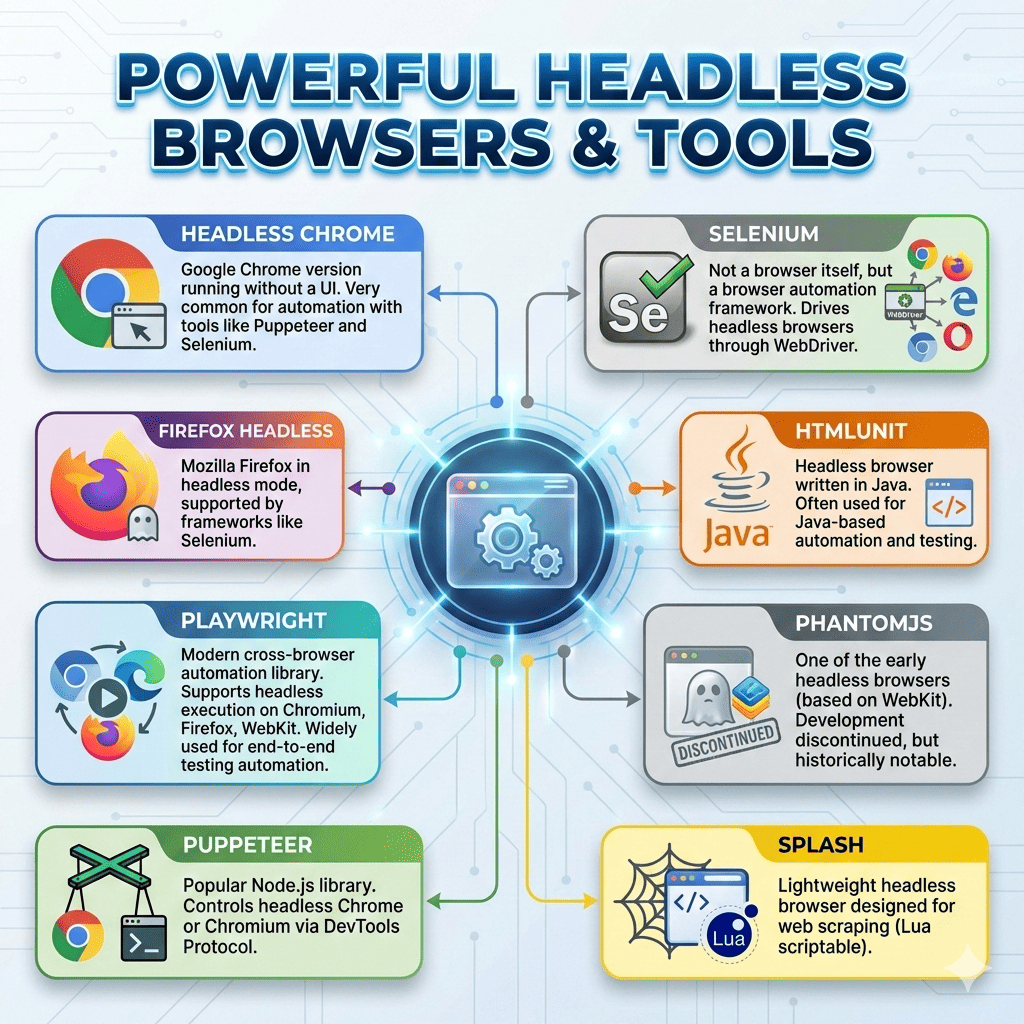
And thanks to that, we have several headless browser tools available, but a few are especially popular.
Out of all of them, these are the most common and widely used:
Multiple independent benchmarks and tooling guides show that Playwright and Puppeteer generally outperform Selenium in execution speed because they communicate directly with the browser over the DevTools protocol, while Selenium’s WebDriver layer adds extra overhead.
Now, let’s try Playwright and run our first headless browser script.
First install:
npm install playwright
And then run the below code:
Nitin, what just happened?
Well, your script launched Chrome, opened the page, waited for it to render, extracted the data, and then closed the browser.
It did exactly what you would do manually, but in an automated way.
If you want to try it yourself, run the code below:
But Here’s the Problem Nobody Talks About
Now here’s the part most tutorials conveniently skip, because most of them don’t actually build and use headless browsers in real-world scenarios.
No doubt, headless browsers are insanely powerful.
- They can render JavaScript-heavy apps.
- They behave like real users.
- They work beautifully in serverless setups.
- They scale with proxies and let you automate and speed up web scraping.
But in real life, they slowly become tedious and complicated.
Because using a headless browser is never just “use a headless browser → extract data → done”.
It starts simple, but then reality hits.
- First, you add retries because requests randomly fail.
- Then proxies because you get blocked.
- Then CAPTCHA handling because Cloudflare shows up.
- Then pagination logic, login sessions, rate limiting.
- Then logging, scheduling, and exports.
And before you realize it, your cute little 30-line script becomes 800 lines of code.
At this point, you’re not “scraping a website” anymore. You’re basically building a mini scraping framework.
You see, you end up spending more time building and maintaining the scraper than actually scraping the data.
That’s the hidden cost nobody tells you about headless browsers.
And this is exactly where tools like Octoparse start to make a lot more sense.
Octoparse: A Simpler Alternative to Headless Browsers
Nitin, what is Octoparse? Well, it is a no-code solution for web scraping, and for you, it can act as more than a raw headless browser.
But how? First of all, it handles the stuff you don’t want to think about:
- managing multiple browser instances
- queuing, retrying failed runs, proxy handling and rate limiting
- CAPTCHA solving and other anti‑bot mitigations
- adjusts browser fingerprints and request patterns to make scraping look human and avoid detection
- scheduling, cloud execution, and exporting data without writing code
And the best part? It decides how to run your task based on the site:
- uses a lightweight engine for simple pages
- switches to full headless (or even visible browsers) when needed
- picks the most stable and cost-efficient approach automatically
You see, it’s not just a visual layer on top of headless browsers, it actually manages and controls how they run.
And that’s exactly what makes the process easy to understand and follow.
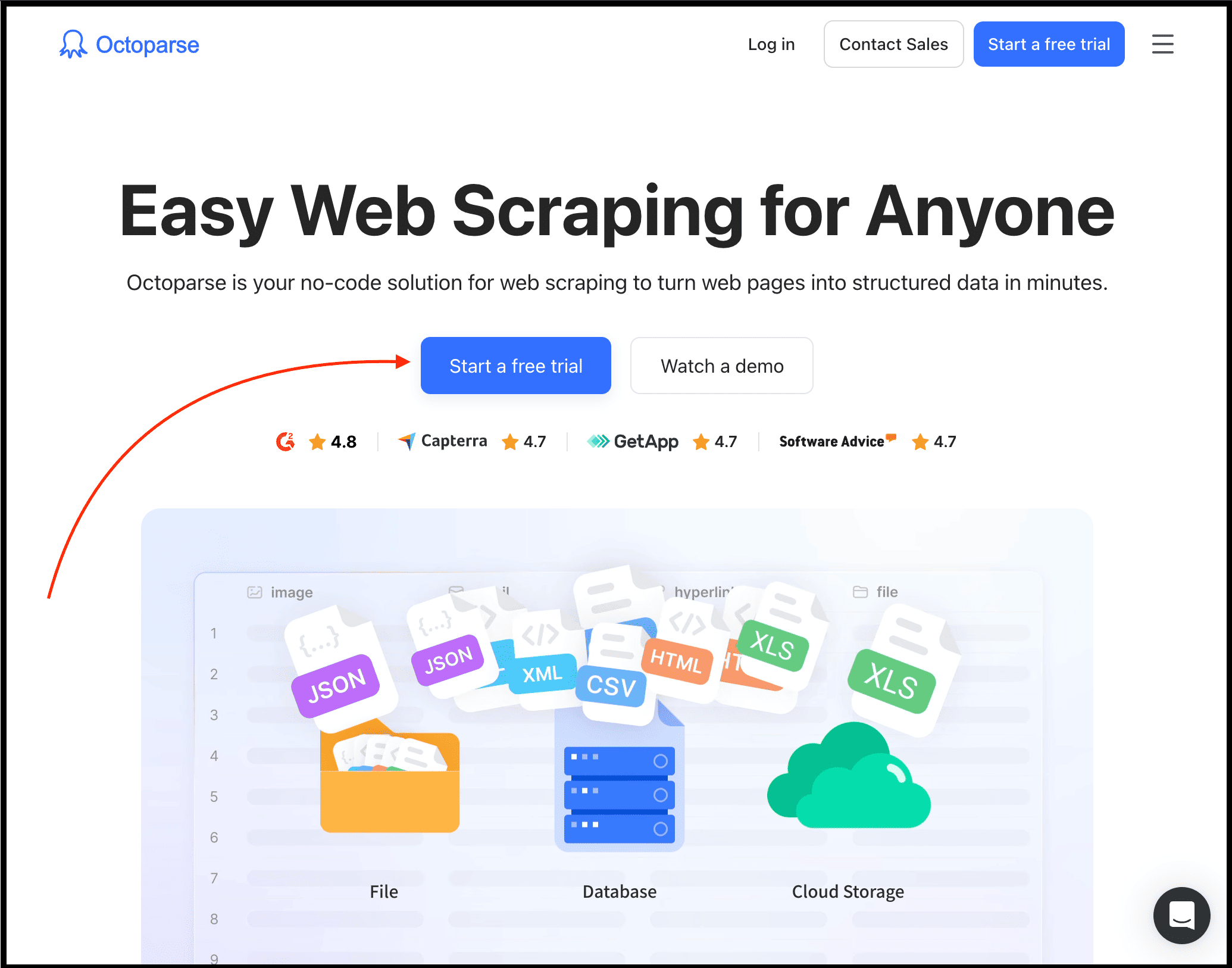
To get started, simply visit Octoparse official website, click the “Start a free trial” button to create your account, and then download their app.
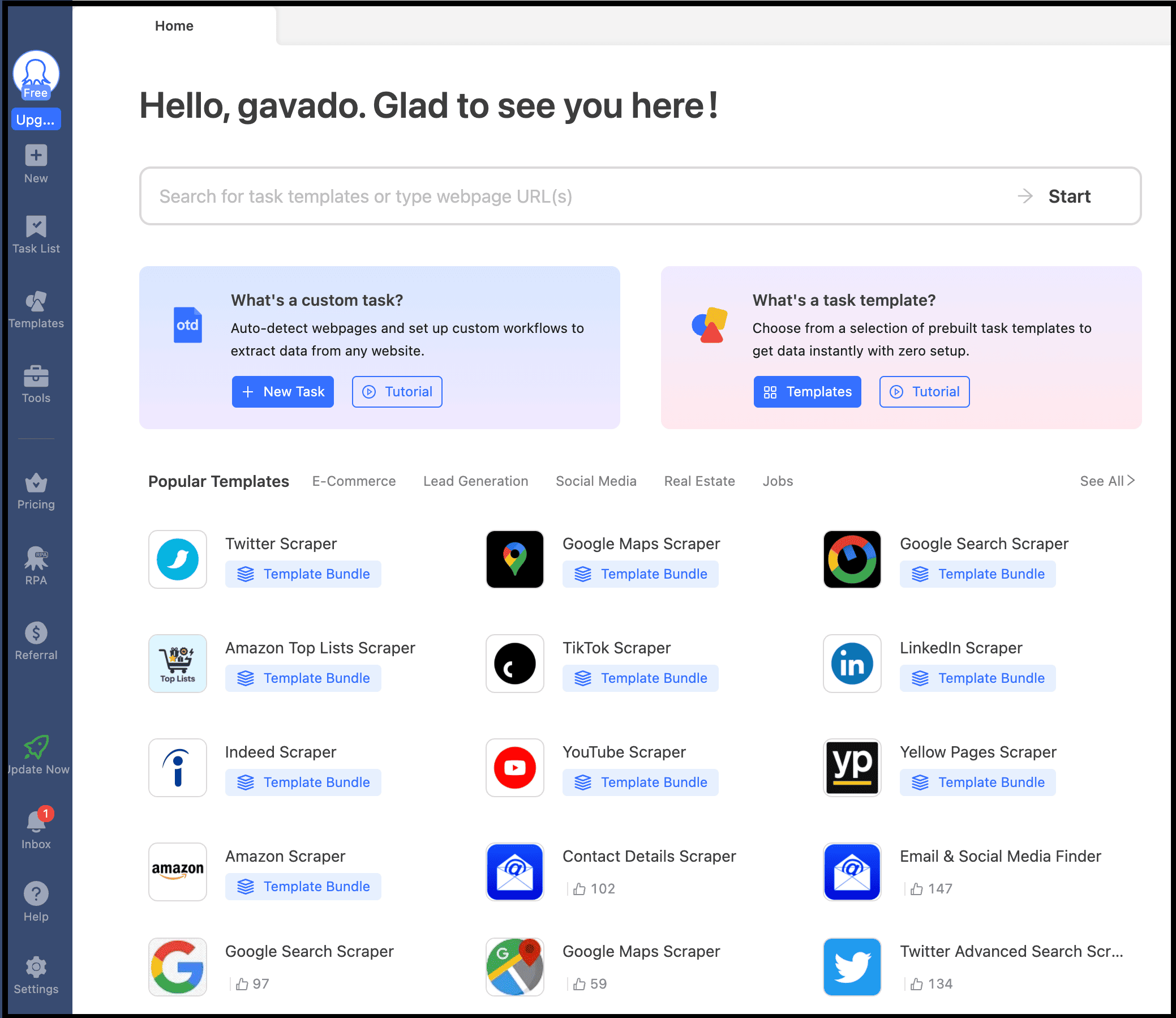
Next, you can create a custom task or use one of their ready-made templates to scrape data with the features and functionality you need.
So if your goal is to:
- scrape 1,000 pages
- run it daily
- export to CSV
- and avoid complex logic
Then Octoparse is usually all you need, and your work gets done without headaches. For most business use cases, that’s more than enough.
When You Should Use Headless (And When You Shouldn’t)
Now you know what a headless browser is, why it exists, and how to get started, but most beginners still misuse it.
They use headless browsers everywhere, when in reality, you should use them only when they are actually needed.
To be more precise, use a headless browser when:
- the site relies heavily on JavaScript
- login is required or forms need to be submitted
- there is infinite scroll
- button clicks are needed to load data
- you’re dealing with dynamic dashboards
- the site has anti-bot protections
- you need screenshots or PDF generation
But Nitin, when should you not use it? Don’t use a headless browser when the site serves static HTML pages, a simple API already gives you the data, or you need fast bulk scraping with minimal overhead.
But when should you use cURL, a headless browser, and Octoparse? Well, here’s the simple mental model I use:
- Use cURL or simple HTTP clients when there’s a clean API or static HTML. It’s the fastest and least overhead.
- Use Playwright or Puppeteer when you need full control. Complex flows, custom logic, deep integrations, or anything where you want to control every step.
- Use Octoparse when the real problem isn’t “how to scrape”, but “how to run this reliably every day at scale”. You know it can handle browser orchestration, infrastructure, and anti-bot details, using a mix of WebView, headless, and headed modes as needed.
FAQs about Headless Web Browser
1. Are headless browsers slower than normal scraping libraries?
Yes, because a headless browser literally launches Chrome (chrome headless browser) or Firefox under the hood.
That means higher memory usage, more CPU consumption, slower startup times, and fewer concurrent jobs.
So compared to simple libraries like requests or direct API access, headless browsers are always slower.
2. Which one should I pick between Playwright, Puppeteer, and Selenium?
If you’re starting today, just use Playwright. It’s faster, more modern, and supports multiple browsers out of the box.
Puppeteer is also great, but it’s mostly Chrome-focused. Selenium is powerful too, but it feels heavier and older unless you specifically need it for enterprise testing.
3. Can headless browsers get blocked or detected?
Absolutely. Websites can still detect headless browsers through signals like too many requests, unnatural behavior, missing delays, repeated IP addresses, or incomplete headers.
4. When should I skip using headless browsers and use something like Octoparse instead?
If your goal is to scrape thousands of pages, run daily jobs, export data to CSV or Excel, and you don’t need custom engineering logic, then Octoparse is the better choice.
Using Playwright or Puppeteer in this case will simply waste your time, and you’ll likely spend weeks debugging something a visual tool can solve in 20 minutes.