If you have been experimenting with Claude or ChatGPT, you may know that we can’t interact with external tools, apps, and data sources to get what you need.
In short, you can’t ask ChatGPT or Claude to scrape Amazon and get the specific product details.
And that’s where Anthropic released the MCP protocol, which makes it very simple to interact with external tools and other systems directly from LLMs.
You can think of MCP as simply a way for AI models to connect with external tools, apps, and data sources to get what you need.
With that, you can fetch real data, run tools, read documents, and interact with other software.
To be more precise, you just need to simply ask the LLMs like:
- Get me product prices from this website
- Extract all startup names from this directory
- Scrape the emails from this page
And the AI does the rest, thanks to MCPs that let you scrape data.
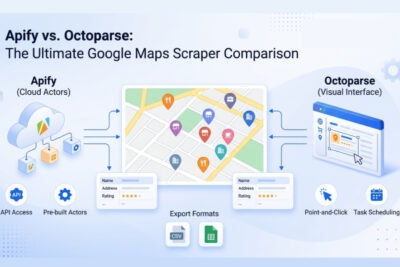
Now, in the web scraping space, Octoparse and Apify provide their MCP servers so that you can scrape with a single prompt and then work with data right inside LLMs.
And in this post, I am going to break down:
- Why MCP matters and how it works
- What Octoparse MCP and Apify MCP actually do
- How difficult they are to set up in practice
- Which one gets you running faster
- When each MCP actually makes sense to use
With that said, let’s get into it.
Why MCP Matters & How It Works
MCP acts like a USB between an AI model and external tools. Instead of building a custom integration every time you want an AI to use a new data source, a tool provider builds one MCP server (running behind an AI “host,” like Claude Desktop, talking to it through a “client”), and any MCP-compatible AI can connect to it automatically. We go deeper on how the pieces fit together in What Is MCP? if you want the full picture.
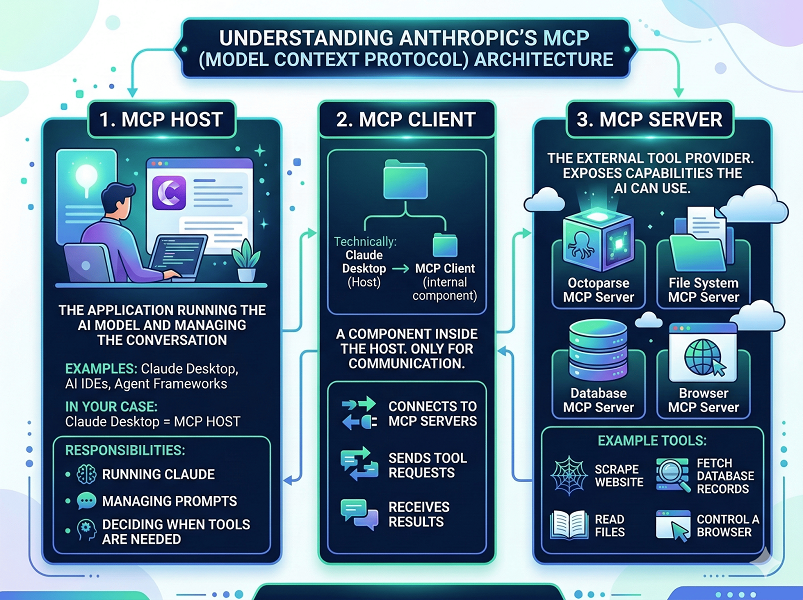
For scraping specifically, this means the LLM can call a scraping tool directly through MCP, get the data, and process it, all inside the same conversation.
Now, in the web scraping space, Octoparse and Apify each expose their own MCP server. Let’s see what they actually do.
Apify MCP Review
What Is Apify MCP and How to Get Started?
Apify is another web scraping platform that offers an MCP server. It uses a developer-oriented model based on individual scraping programs called ‘Actors.’
But Nitin, what does Apify MCP do? Well, it lets AI tools like ChatGPT, Claude, or Cursor interact directly with Apify’s web scraping platform. This means you can trigger Apify Actors, extract structured data, and run scraping tasks simply by writing prompts.
Here’s how to connect the Apify MCP Server with Claude:
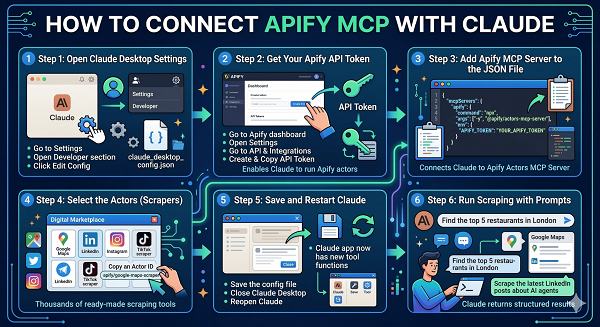
Now, Apify is a developer-focused scraping platform that has existed for years.
Instead of building one scraper for each website manually, Apify provides something called Actors.
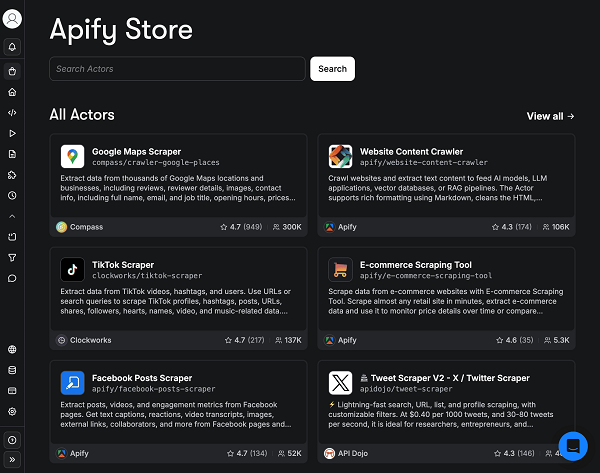
Actors are basically small scraping programs designed to extract specific data from websites, and they have 18,875 actors when I’m writing this post.
To be more precise, there are actors like:
- Website Content Crawler
- Instagram Scraper
- LinkedIn Post Scraper
- And more
That can scrape content based on the name suggested.
And once the MCP integration is enabled, Claude or another AI can run these actors directly.
Then the workflow looks like this:
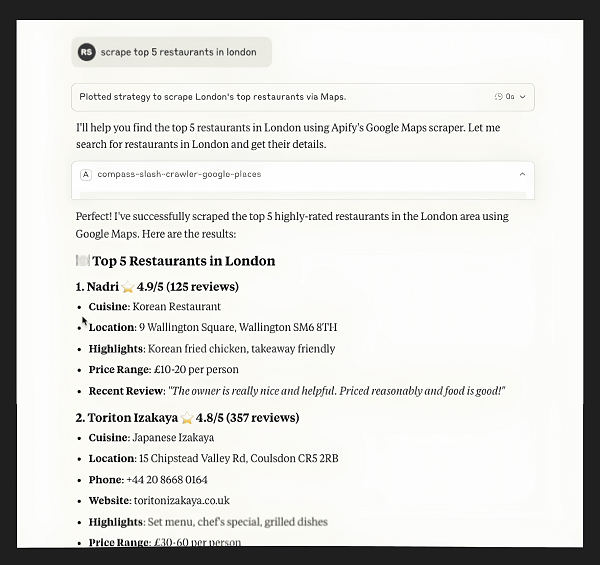
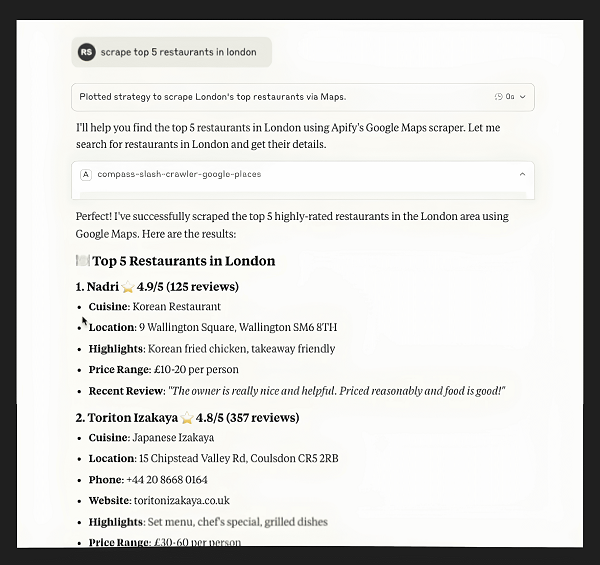
You ask the AI something like: Get the top restaurants in London from Google Maps.
Claude then calls the Google Maps scraper actor inside Apify, runs it, and returns the results.
Where Apify MCP’s Setup Gets Complicated
The first challenge appears during setup.
To connect Apify to Claude through MCP, you usually need to:
- create an Apify account
- generate an API token
- configure the MCP server
- find the actors and add them if you want to scrape something specific
And so, if you are comfortable reading documentation and dealing with configuration files, this is manageable.
But if you are a non-technical user, it can feel confusing very quickly, and it will become hard to even set up.
Then comes the second challenge: choosing the right actor, and adding them inside the config file.
That’s not all. Apify has thousands of them, and each has its own documentation about how to use it.
That sounds great until you realize you now have to figure out:
- which actor actually works
- which one is maintained
- what inputs it expects
So even though the AI runs the actor for you, the workflow still assumes some technical understanding.
This is why Apify MCP feels powerful but slightly heavy for beginners.
What Apify MCP Actually Costs
Apify’s free plan gives you $5 of platform usage credit a month, billed by compute units (1 CU = 1 GB of RAM running for an hour, at $0.2/CU on the free tier), plus separate charges for proxies (residential proxy runs $8/GB) and storage. Once that $5 runs out, Apify blocks access until your next billing cycle, and there’s no simple way to know upfront how far $5 will stretch, it depends on which Actor you picked and how heavy the job is.
Paid tiers start at $29/month (Starter), scaling to $199/month (Scale) and $999/month (Business), each bundling more usage credit and a lower per-CU rate. But because pricing is usage-based, your actual monthly bill still tracks how much you run, not just which tier you picked.
Octoparse MCP Review
What Is Octoparse MCP, and How to Get Started?
You know, Octoparse takes a completely different approach to help you scrape.
It mainly focuses on visual scraping workflows using their point-and-click interface.
If you have ever used a no-code scraper or a no-code website builder, the process looks familiar.
You open a webpage and simply:
- click the elements you want to extract
- define fields like name, price, or email
- let the scraper navigate the pages automatically
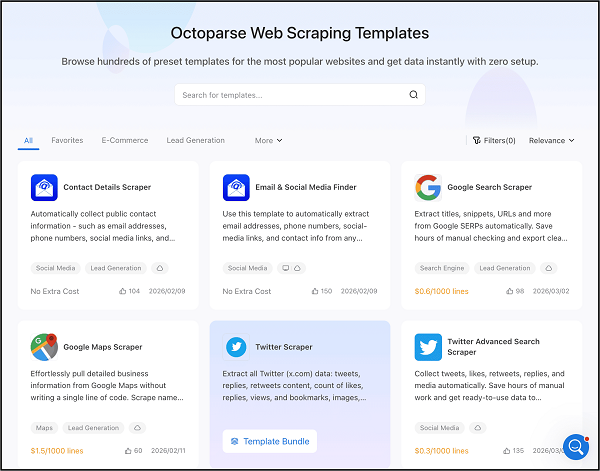
The best part? Octoparse already has millions of users doing this, and they even provide hundreds of prebuilt templates, solve anti-bot techniques easily, and even allow scheduling scraping tasks.
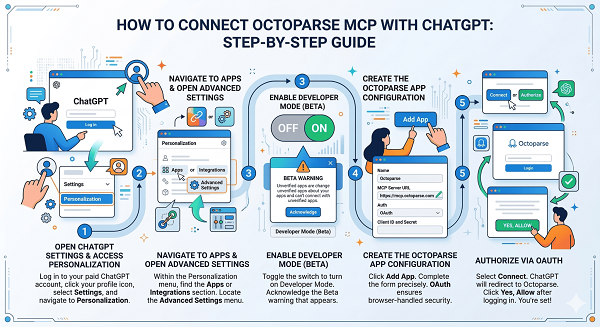
What the MCP integration does is connect those scraping tasks directly to AI assistants. So Claude or ChatGPT can trigger your Octoparse workflows automatically.
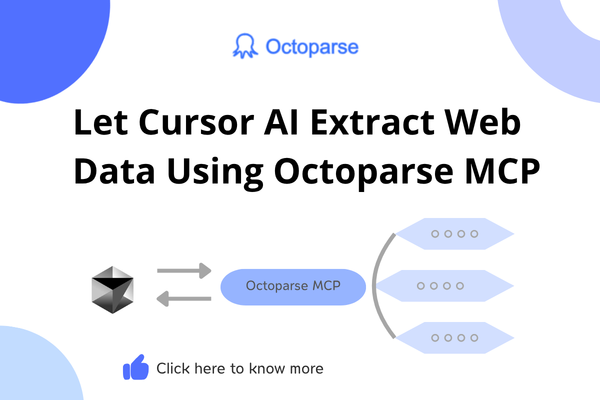
In simple terms, Octoparse MCP allows you to connect with ChatGPT, Claude, Cursor, or even the terminal, and you can perform complex web scraping by writing simple prompts.
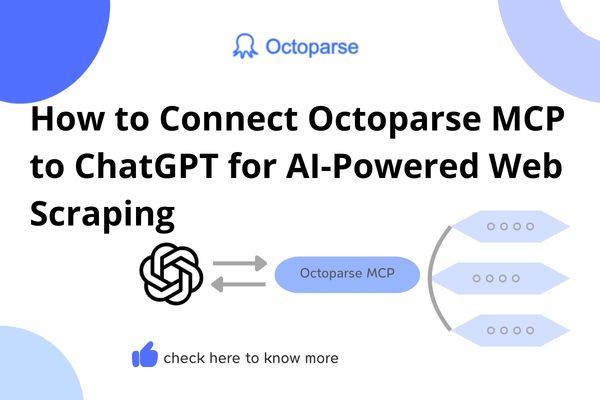
Here’s how to connect Octoparse MCP with Claude and with ChatGPT.
And after connecting, the AI can search pre-built web scraping templates, scrape data, create custom web scraping tasks, initiate cloud extraction, and more.
Why Octoparse MCP’s Setup Is Faster
Now, as you know the way Apify and Octoparse work, so the usual difference is only while doing the setup and in the scraping process.
First, connecting the Octoparse MCP takes about 3 minutes. Let’s say connecting it with Claude. You just add a custom connector in Claude Desktop, paste the remote MCP server URL (https://mcp.octoparse.com), and authorize with your Octoparse account. No API tokens to generate, no config files to edit, no actors to add manually.
And as we know, both provide web scraping templates to make the process simpler and save you time.
But with Apify, you usually need to find the actor, add the actor, understand the way to use it, and then scrape the output.
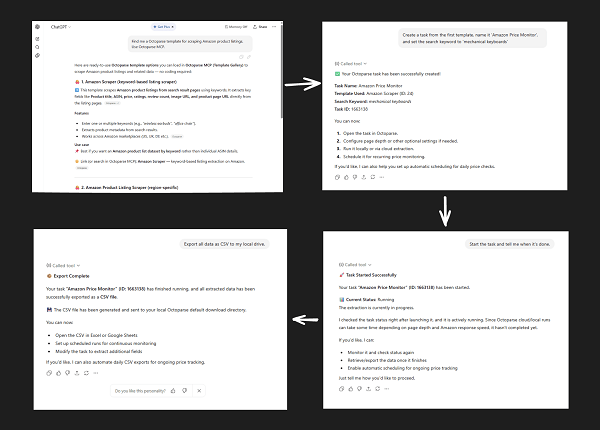
And with Octoparse, you simply need to ask for the template you need, create a task to scrape, and export the output instantly.
For example, imagine you want to scrape startup listings from a directory.
Inside Octoparse you would:
- connect the Octoparse MCP visually
- ask the LLM to find a template that can scrape
- create a task to scrape
- and then export it
Yes, it’s that easy — no coding background needed, and just as fast if you do code.
Also, one common issue with Apify is that it often throws errors that take time to fix. Octoparse MCP usually does not have these kinds of problems.
Independent review platforms also highlight that Octoparse makes web scraping accessible even for users without technical skills, praising its user‑friendly interface, no‑code functionality, and pre‑built templates that reduce setup time.
What Octoparse MCP Actually Costs
Octoparse MCP’s free tier works differently: up to 2,000 records a week (about 8,000 a month) through your AI assistant, no credit card, no compute-unit math to do first.
Paid plans start at $69/month (Standard) up to $249/month (Professional), with custom Enterprise pricing above that. Octoparse doesn’t bill by compute time, so what you pay maps directly to export and task limits, not to how long a job happened to run.
A Real Example of Apify and Octoparse MCP Workflows
You see, we have learned everything about what MCP is, why it matters, and then learned about Apify MCP and Octoparse MCP.
But we haven’t seen a real, practical workflow, so let’s talk about that.
Let’s say you want to build a list of SaaS companies from a directory website.
Here is how the process differs.
Using Octoparse MCP
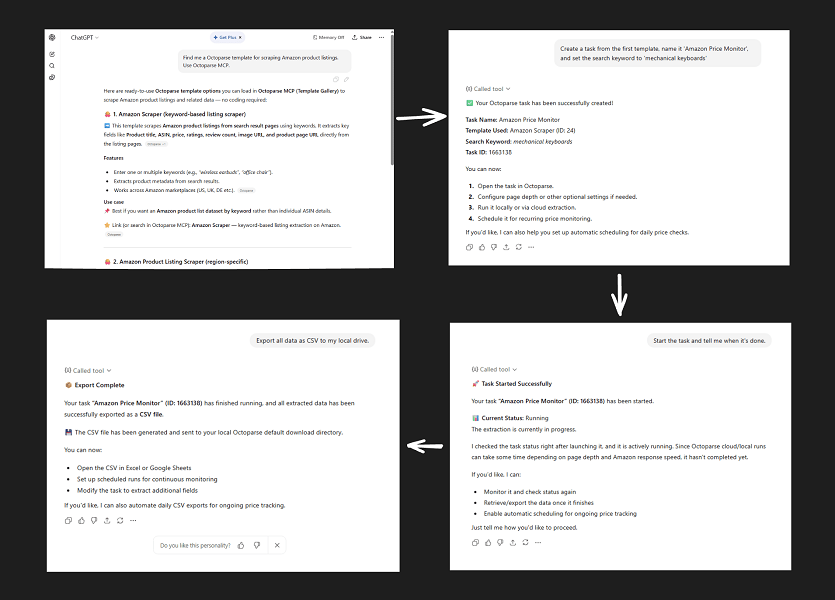
You need first download Octoparse and create an account. Then you can:
- configure the MCP visually
- ask the LLMs to find an Octoparse template that fits your needs (multiple templates combined are supported)
- ask the LLMs to create a task using the appropriate templates
- start the task
- export all data as CSV
- ask the LLMs to analyze your data
Based on the above steps, here’s the output:
Using Apify MCP
You first need to:
- configure the MCP integration through a complex setup process
- find an actor capable of scraping the site,
- add the specific actor to the config file
- let Claude or ChatGPT run the actor
Based on the above steps, here’s the output:
Which MCP Should You Actually Use?
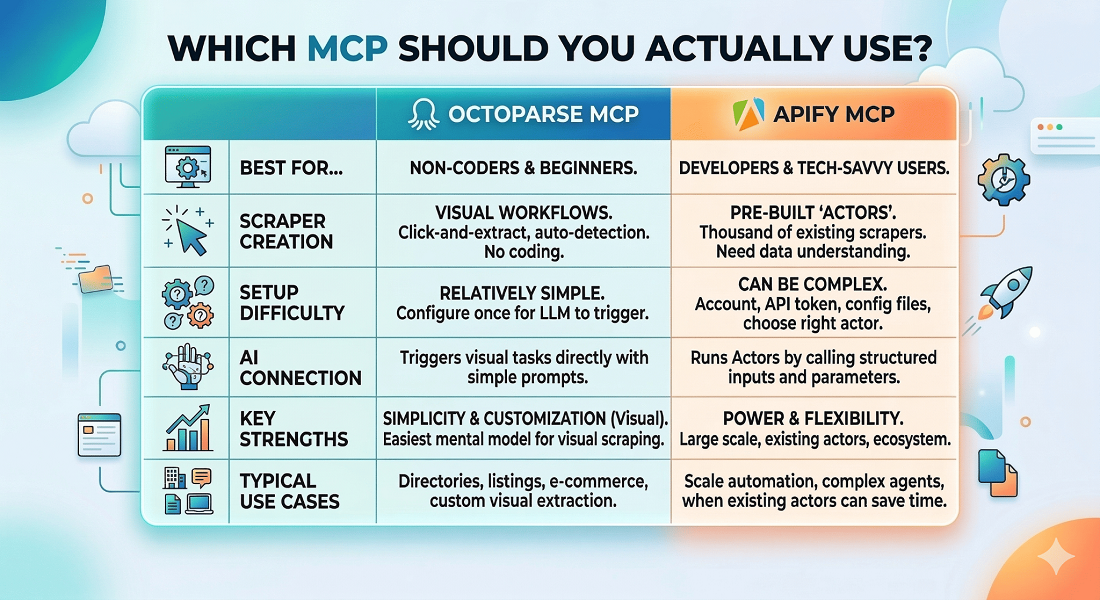
Now, I can’t say that you should simply use Octoparse because Apify can also scale.
And it has a huge ecosystem of actors which can save a lot of time, so it depends on what you do and the features you need — not on whether you know how to code.
So, here’s a table comparing its features and more:
And now, to give you some more ideas, use Octoparse MCP if:
- you want pre-built templates for popular scraping scenarios instead of building from scratch
- you want a scraper running in minutes — no API tokens or config files to manage, whether or not you code
- you need cloud-based, 24/7, high-speed, large-scale data harvesting
- you mainly scrape directories, listings, or websites
- you want uninterrupted data collection with built-in IP rotation and CAPTCHA bypass, without wiring it up yourself
Use Apify MCP if:
- you need one of its 18,000+ existing Actors for a niche or unusual data source
- you’re building scraping logic custom enough that a template won’t cover it
- you’re chaining scraping into a larger AI agent or automation pipeline
- you’re already building on the Apify platform and want to keep everything in one place
In other words, Octoparse gets you running fast either way, while Apify trades setup time for a bigger library of prebuilt scrapers and finer control.
FAQs About Octoparse MCP vs Apify MCP
1. Do I need to know coding to use MCP for web scraping?
Not necessarily.
And MCP itself is just the protocol that makes the process easier and allows AI models to connect with external tools like Octoparse or Apify. The technical complexity mainly depends on the tool you connect to the MCP server.
For example, if you use Apify MCP, you need to add a couple of lines of code, API tokens, and actor inputs. That means you should at least understand basic developer concepts.
2. Can Claude or ChatGPT scrape any website using MCP?
The answer is simply “no”.
MCP only allows the AI model to call external tools, but the actual scraping still depends on the tool you connect.
For example: If you connect Octoparse MCP, Claude can trigger your Octoparse scraping workflows.
And Octoparse can easily solve CAPTCHAs, auto-detect page elements, provide tons of web scraping templates, and so on.
But if the tool you connect can’t scrape a specific website because of login walls, anti-bot protection, or dynamic loading, MCP cannot magically bypass that.
So the AI is only as capable as the scraping tool it is connected to.
3. Can I use MCP with tools other than Octoparse and Apify?
Yes, MCP is not limited to web scraping tools.
The protocol is designed to connect AI models with any external tool or data source that exposes an MCP server. This could include databases, APIs, file systems, automation tools, and many other services.
Octoparse and Apify are just two popular examples in the scraping space.
And as MCP adoption grows, you will likely see many more tools exposing MCP servers so AI assistants can interact with them directly.
4. Can MCP automate the entire data collection process with AI?
Well, it depends on the scraping tool you use.
For instance, we know that using Octoparse MCP we can easily scrape websites, and then the LLM can analyze the results as well.
And further, Octoparse supports automation since it has all the capabilities like handling login requirements, anti-bot protection, and dynamic content restrictions.
But other MCPs cannot bypass those limitations.
In short, MCP makes the automation process simpler, but what is technically possible still depends on the scraping tool behind it.