If you’ve ever tried asking Claude to pull pricing data from a competitor’s website, scrape product listings from Amazon, or gather leads from a business directory, you already know the answer you’ll get: “I’m sorry, I can’t access external websites or scrape web data.”
It’s a frustrating gap. Claude is arguably one of the most capable AI assistants available today—brilliant at analyzing data, writing reports, and answering complex questions—but it hits a wall the moment you need it to actually go out and get real-world data from the web.
That changes now.
Claude can now scrape websites — powered by Octoparse MCP. You can now give Claude the power to scrape websites, extract structured data, and deliver results—all without writing a single line of code. This post walks you through what MCP is, why it matters, and how Octoparse bridges the gap between Claude’s intelligence and the live web.
The Problem: Claude Is Brilliant, But Blind to the Live Web
Large language models like Claude are trained on massive datasets, but they operate within a sandbox. They can’t browse the internet, visit URLs, or interact with live web pages in real time. This means that common data tasks—like pulling product prices, monitoring job postings, or collecting contact information from directories—are completely off the table.
For data analysts tracking market trends, marketers running competitive research, or businesses building lead lists, this limitation turns what should be a simple ask into a multi-tool workflow: open a scraper here, export a CSV there, upload it to Claude, and hope the formatting doesn’t break.
The root cause is that Claude has no standardized way to connect with external data sources. Every integration requires custom code, API wrangling, or manual workarounds. That’s exactly the problem MCP was designed to solve.
What Is MCP (and Why Should You Care)?
The Model Context Protocol (MCP) is an open standard introduced by Anthropic in November 2024 to create a universal way for AI assistants to connect with external tools and data sources. Think of it as a USB-C port for AI,one standardized connection that replaces dozens of proprietary adapters.
Before MCP, connecting an AI assistant to an external tool meant building a custom integration from scratch for every single data source. Need Claude to access Google Drive? Build an integration. Need it to query a database? Build another one. Need it to scrape a website? You get the picture.
MCP changes this by providing a single, open protocol that any tool can plug into. When a tool like Octoparse creates an MCP server, Claude can discover it, connect to it, and use it—automatically.
The industry has noticed. By March 2025, OpenAI had officially adopted MCP across its products, including the ChatGPT desktop app and its Agents SDK. In April 2025, Google DeepMind’s leadership confirmed support for MCP in the Gemini ecosystem. Microsoft also integrated MCP support into its AI tooling. In December 2025, Anthropic donated the Model Context Protocol to the newly formed Agentic AI Foundationunder the Linux Foundation, co-founded with OpenAI and Block and supported by major partners, which signaled MCP’s emergence as an open industry standard, according to Anthropic.
Here is a picture that shows how MCP Connects Claude to the Web:
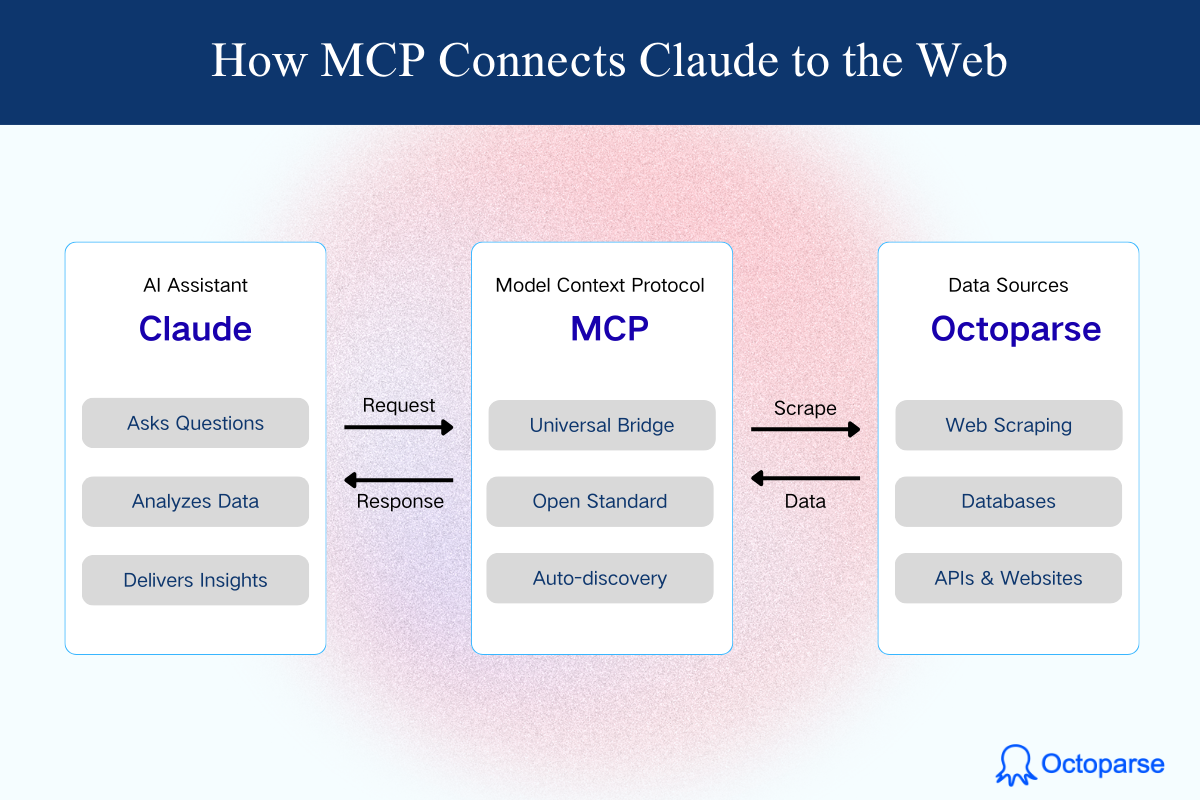
Figure 1: How MCP Connects Claude to the Web
Octoparse MCP: Enabling Claude to Scrape Websites Without Code
No-Code Web Scraping with Octoparse
If MCP is the bridge, Octoparse is what’s waiting on the other side.
Octoparse is a no-code web scraping platform that lets anyone—regardless of technical background—extract data from websites using a simple point-and-click interface. Since its launch in 2016, it has grown into a comprehensive data automation ecosystem used by marketers, researchers, e-commerce teams, and analysts worldwide.
Here’s what makes Octoparse stand out:
- Visual workflow builder: Design scraping tasks by clicking on the data you want.
- AI-powered auto-detection: Octoparse’s AI can scan a webpage and automatically identify the data fields you’re likely looking for.
- Cloud-based extraction: Run scraping tasks on Octoparse’s cloud servers 24/7 without keeping your computer on.
- Scheduled scraping: Set up automated runs at regular intervals for monitoring prices, inventory, or content changes.
- Built-in anti-blocking: IP rotation, CAPTCHA solving, and browser simulation help ensure reliable data collection.
- Flexible export: Get your data as CSV, Excel, JSON, or push it directly to databases and apps via API.
In short, Octoparse handles the hard parts of web scraping so you don’t have to. And now, through MCP, it can hand that data directly to Claude.
How Octoparse MCP Works with Claude
The Octoparse MCP server acts as a translator between Claude and Octoparse’s scraping engine. Here’s the simplified flow:
- You ask Claude a question that requires web data, like “Tell me information about the most popular men’s shoes with a star rating of over 4.8 in Amazon US.”
- Claude recognizes it needs external data and connects to the Octoparse MCP server.
- Octoparse searches its template library, finds the right Amazon scraping template, creates a task, and runs it—all automatically.
- 4. The structured data flows back to Claude through MCP, including product names, prices, ratings, reviews, and links, all neatly organized.
- Claude analyzes and presents the results, filtering for 4.8+ star ratings, ranking by popularity, and delivering a clean summary you can act on immediately.
The whole process happens in the background. You never have to open a separate app, configure a scraper, or deal with messy CSV files.
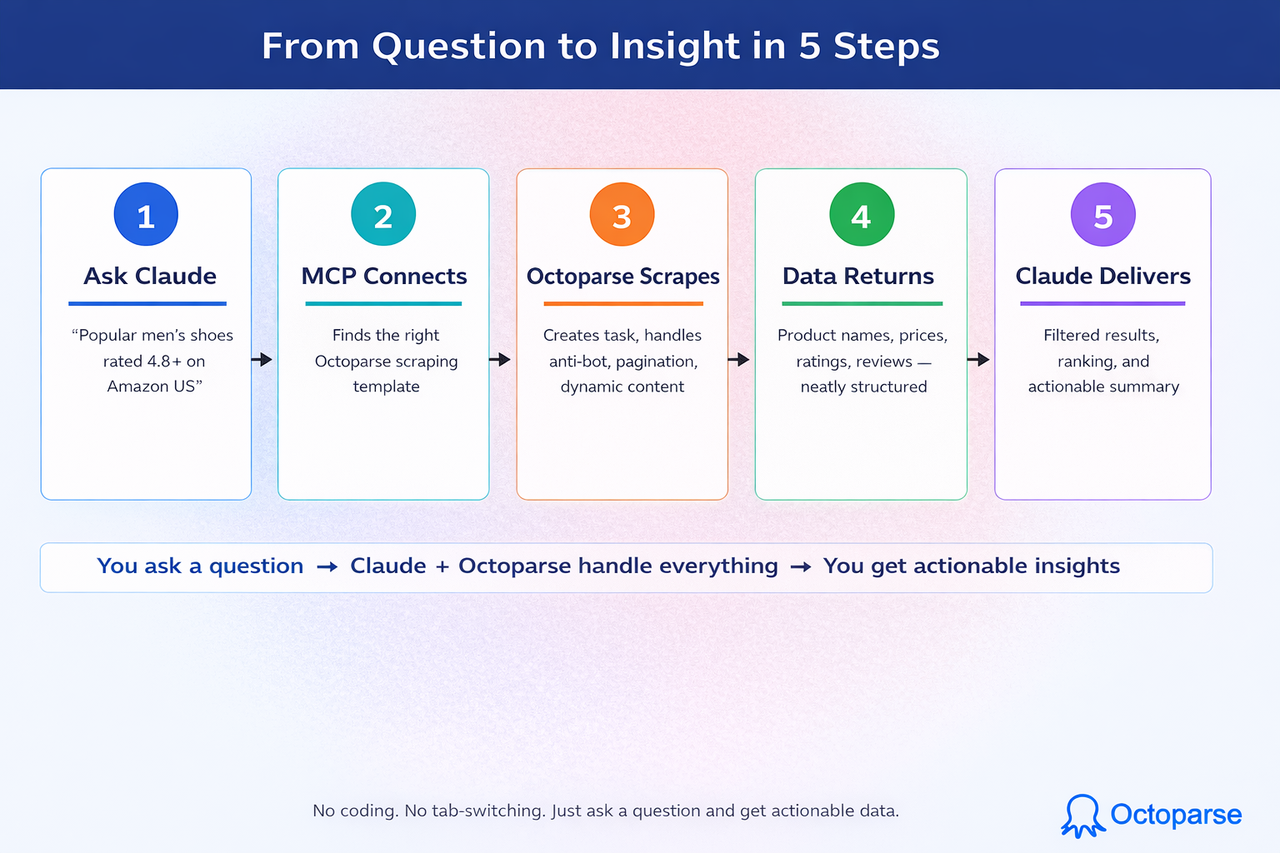
Figure 2: From Question to Insight in 5 Steps
What Claude Can Do Through Octoparse MCP
Behind the scenes, the Octoparse MCP server gives Claude access to a powerful set of capabilities:
- Search Templates: Claude uses AI to find the right Octoparse scraping template for your request, whether it’s Amazon products, Google Maps listings, or social media profiles.
- Create Tasks: Claude translates your natural language request into a scraping task automatically. No manual configuration needed.
- Control Tasks: Start, stop, and monitor scraping tasks—all through your conversation with Claude.
- Check Status: Track task progress in real time. Claude will let you know when your data is ready.
- Export Data: Get your scraped data exported in JSON or CSV format, ready for analysis or import into other tools.
- Account Management: Check your Octoparse account balance, subscription status, and plan details without leaving the chat.
Setting Up Octoparse MCP in Claude Desktop (Step-by-Step)
One of the best things about MCP is that getting started doesn’t require a computer science degree. Here’s exactly how to connect Octoparse MCP to the Claude desktop in just a few clicks.
- Open Claude Desktop and go to the Setting>Connector section.
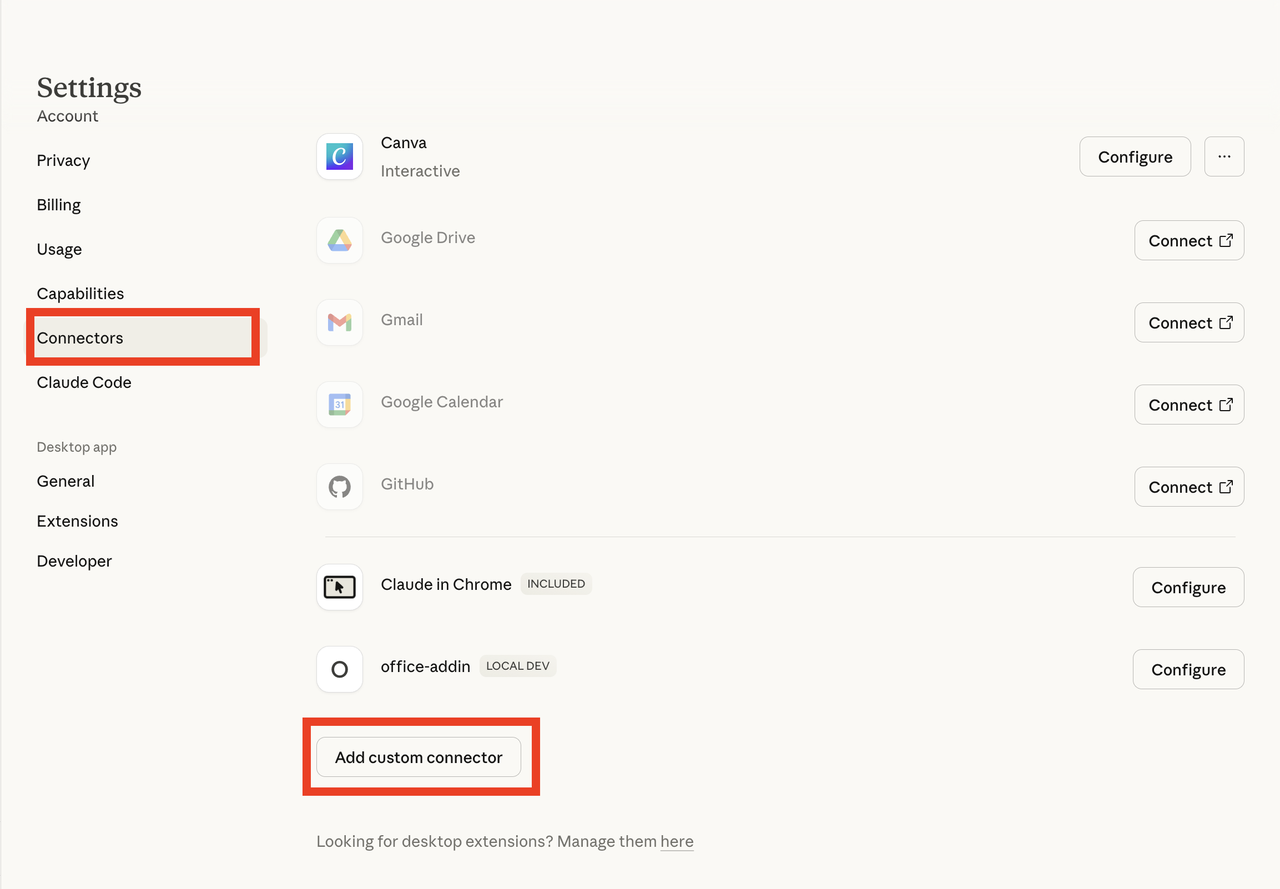
- Click Add Custom Connector.
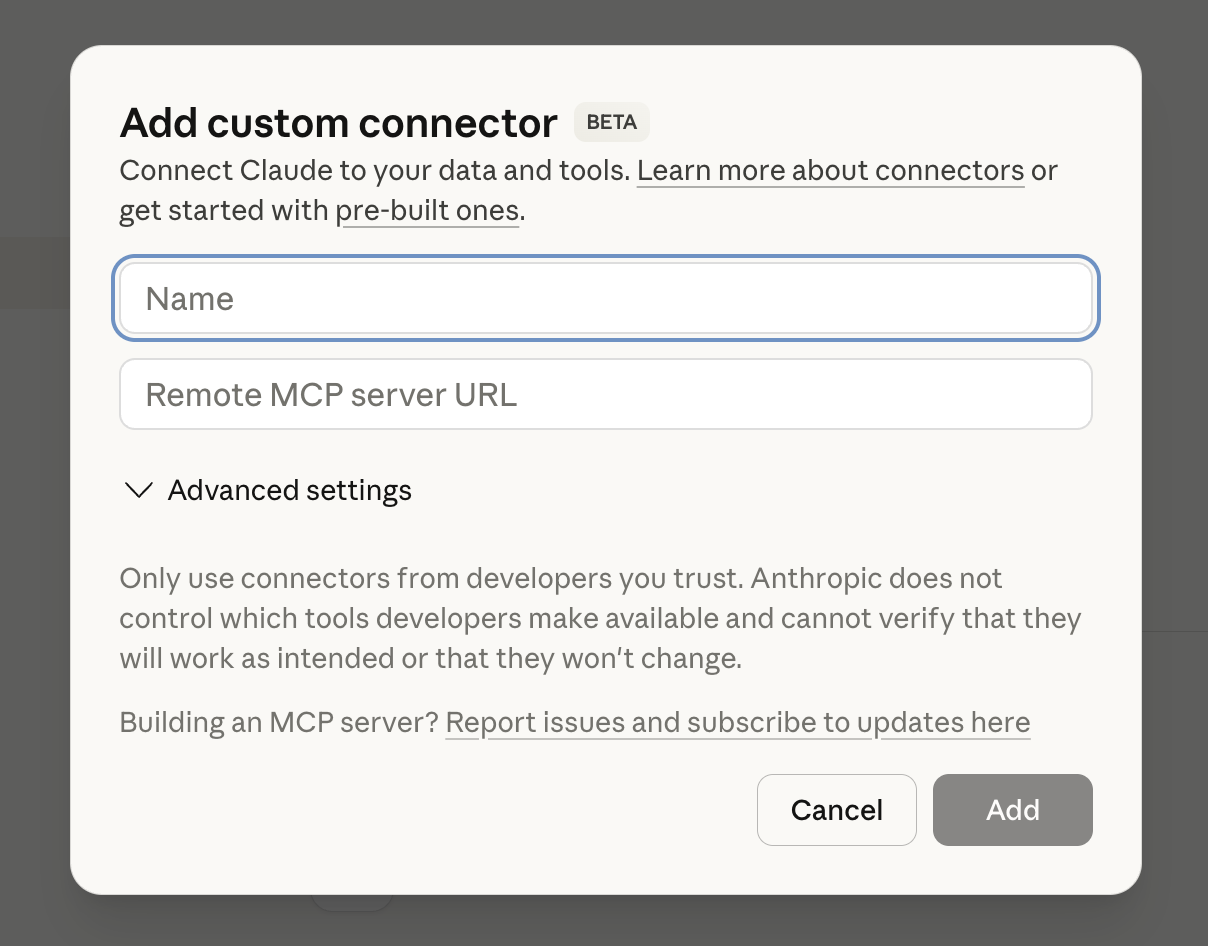
- Name it Octoparse MCP.
- Paste the Remote MCP server URL: https://mcp.octoparse.com
- Click Add.
- Click Connect

- Follow the OAuth authorization prompt—sign in with your Octoparse account and confirm access.
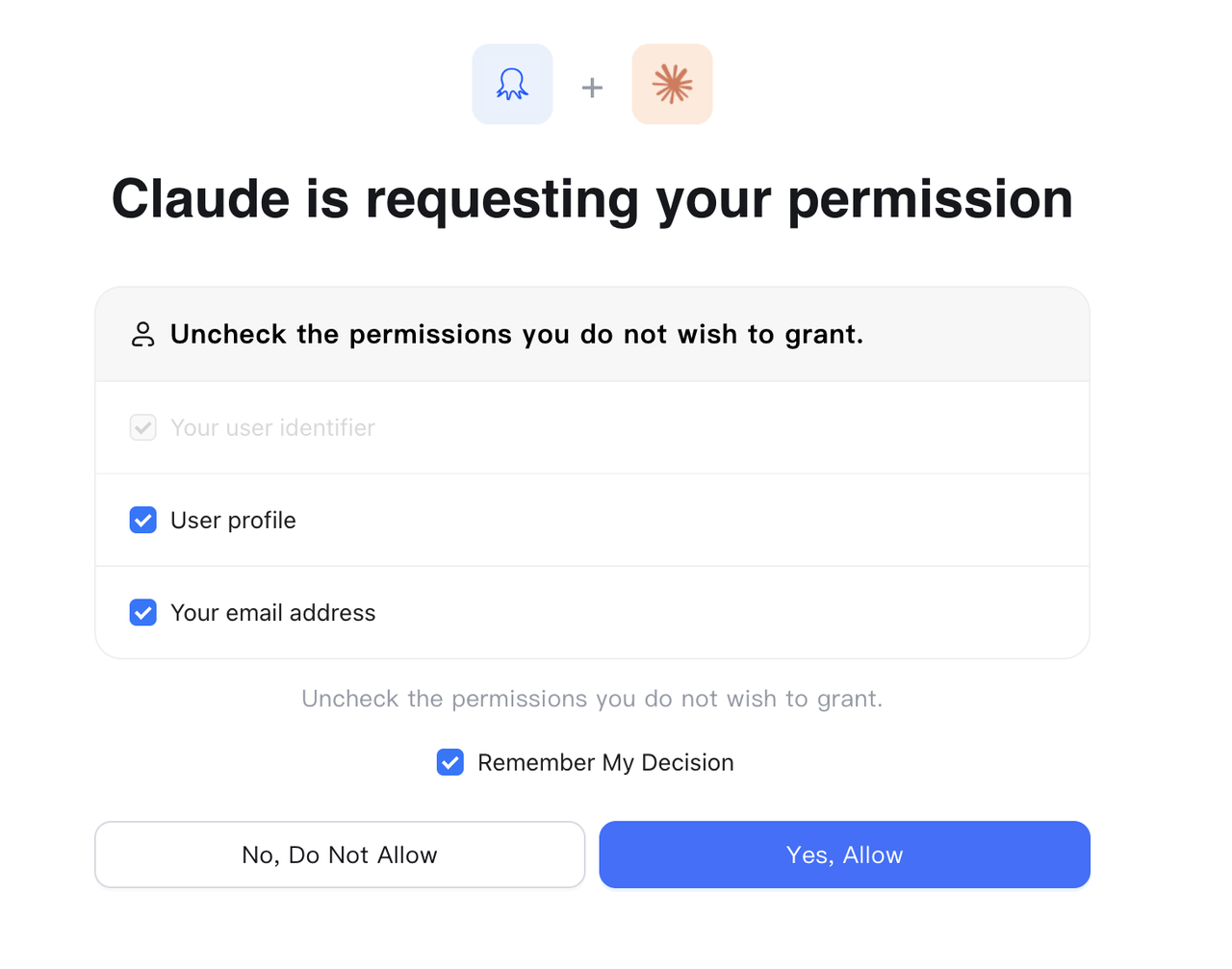
That’s it. Claude now has full access to Octoparse’s scraping capabilities.
For the full setup guide with screenshots and troubleshooting, visit the Octoparse MCP Guide.
What Can You Actually Do with Octoparse MCP?
Connecting Claude to Octoparse through MCP opens up possibilities that were previously out of reach for non-technical users. Here are some practical examples:
Competitive Price Monitoring
Ask Claude: “Compare the pricing of [product] across Amazon and Walmart.” Octoparse scrapes the live pricing data, and Claude delivers a comparison table with insights on which retailer offers the best deal—and how prices have shifted over time.
Lead Generation
Ask Claude: “Find 50 digital marketing agencies in New York with their contact information.” Octoparse extracts business listings from directories, and Claude organizes them into a clean spreadsheet format with names, websites, phone numbers, and email addresses.
Content Monitoring
Ask Claude: “Track mentions of [brand] across these three review sites.” Octoparse monitors the pages at regular intervals, and Claude flags new mentions, analyzes sentiment, and summarizes what people are saying.
Job Market Analysis
Ask Claude: “What are the most common skills required for data analyst positions in the healthcare industry?” Octoparse scrapes job postings from major platforms, and Claude analyzes the data to surface trends in required qualifications.
Why Octoparse MCP Changes the Workflow
The web scraping market is growing fast. According to industry analysts, the global web scraping market reached over $1 billion in 2026 and is projected to exceed $2 billion by 2030, growing at a 14.2% compound annual growth rate. AI-powered scraping tools are driving much of this growth, achieving accuracy rates as high as 99.5% on complex, dynamic websites.
But here’s the key shift: the future of data extraction isn’t about better scrapers—it’s about smarter workflows. When your scraping tool and your AI assistant speak the same language through a standard like MCP, the entire process collapses from a multi-step workflow into a single conversation. You stop thinking about “How do I get this data?” and start thinking about “What do I want to know?”
That’s the promise of Octoparse MCP with Claude. Not just scraping—but understanding.
How Octoparse MCP Compares to Manual Approaches
| Aspect | Traditional Workflow | Octoparse MCP + Claude |
| Setup | Install scraper, configure selectors, test extraction rules | Add MCP server to Claude (one-time setup) |
| Skill required | Basic coding or workflow design knowledge | None—just ask questions in plain English |
| Data delivery | Export CSV → upload to analysis tool → interpret manually | Data flows directly to Claude for instant analysis |
| Time to insight | 30 minutes to hours | Minutes |
| Maintenance | Fix broken selectors when websites change | Octoparse handles updates automatically |
Conclusion
Claude has always been exceptional at understanding and analyzing data. Its limitation was never about intelligence—it was about access. MCP changes the equation by creating a standardized bridge between AI and the tools that interact with the real world.
Octoparse brings years of web scraping expertise to that bridge: reliable extraction, anti-blocking technology, cloud infrastructure, and a no-code interface that makes it accessible to everyone.
Together, they turn Claude from an AI that can only work with data you hand it into one that can go out, get the data it needs, and deliver the insights you’re looking for—all in a single conversation.
Claude couldn’t scrape websites. Now it can.