When fetching places data, there is a binary choice you have to make: rely on Google Places API or use web scraping techniques. While the API offers a reliable stream of data directly from Google, web scraping provides greater flexibility, especially for scaling businesses. Still, it also accounts for the API’s costs and many restrictions.
Today’s guide will review the Google Places API and a web scraping approach for getting data, and eventually compare them in detail. We will explore the technical capabilities of both methods, compare pricing (primarily since March 2025, when Google’s prices changed), and provide a practical guide.
What Is the Google Places API?
The Google Places API is a service within the Google Maps Platform, part of Google Cloud. While Google Maps provides visual feedback in the form of maps, the Google Places API provides information about more than 200 million places. When I refer to “place,” it can really be any object on the map, such as a local business, a church, or a stadium. Each place is uniquely identified by its place ID, which can be retrieved directly from its API.
Beyond the Place ID, the API provides much more information in JSON or XML format. The Google Places API focuses on backend information, while the Maps API focuses on the frontend. Developers and professionals mostly use both the Maps and Places APIs together to get a full palette of information and produce the best results.
Multiple crucial distinctions led to the creation of a new Google Places API in 2023 and the transition of the old one to the legacy Places API. In the new API, key features include improved performance, consistent response data for a place, expanded place types, dynamic place data, and simplified pricing, which we will discuss in detail later.
Google claims it is worthwhile to switch from a legacy to a new one, but the question is whether this data is enough for most people at that price.
Key Features and Capabilities
Google Places API gives you a structured, sanctioned, trustworthy source of data, and here are the different categories of features you can find in Google Places API:
- Autocomplete: A Prediction service that is used in checkout forms and search bars. It will autocomplete your address as you type. As the user types “606 Br”, the Autocomplete feature returns “606 Broadway, Los Angeles 90014” and a Place ID, ensuring address validation at the point of entry.
- Place Search: This part of the Google Places API returns results based on a query. It can work by doing “Nearby Search”(finding places within a radius), “Text Search” (e.g., “dentists in Austin, TX”), and “Find Place” (locating a specific entity by phone number or name).
- Place Details: After obtaining a Place ID, a user can request more details about the place using this feature. This includes fields such as the formatted address, international phone number, website URL, opening hours, price level, and up to 5 top reviews. Depending on the billing tier, this can vary, but we will dig into this deeper later.
- Place Photos: Users leave valuable reviews with photos, providing visual feedback for further analysis. You can retrieve metadata for pictures and then request the actual binary image data, resized to your specifications.
Everyday Use Cases and Applications
Big companies like Uber, TripAdvisor, and Yelp use the Google Places API, which enables them to validate addresses, search for “coffee shops near me”, and display rich details like star ratings and price levels. The Google Places API is a powerful tool with significant utility, and it is easily accessible to all users today in many industries:
- Logistics and Delivery: Delivery companies (Uber Eats, DoorDash) use Geocoding and Places to pinpoint exact pickup locations and validate user addresses, reducing failed delivery attempts. They can coordinate their drivers to use the closest ones on the best possible route.
- Travel and Hospitality: Booking websites use the Places API to display nearby hotels, show aggregate ratings, and provide recommendations for “things to do” around a destination.
- Real Estate: Property listings use a nearby search feature to enrich listings with information about supermarkets and public transport near the specific location. Another use is neighbourhood analysis to strengthen further your selling points for customers, such as good schools or monuments.
- Local SEO & Marketing: Agencies audit business listings, ensuring their clients’ names, addresses, and phone numbers are consistent across multiple locations on the web.
- Market Intelligence: Analyzing business locations and density in different areas, transportation positions, etc. Analyzing locations in the neighbourhood can help high-margin companies make business decisions.
How to Get Started with Google Places API (Step-by-Step Setup)
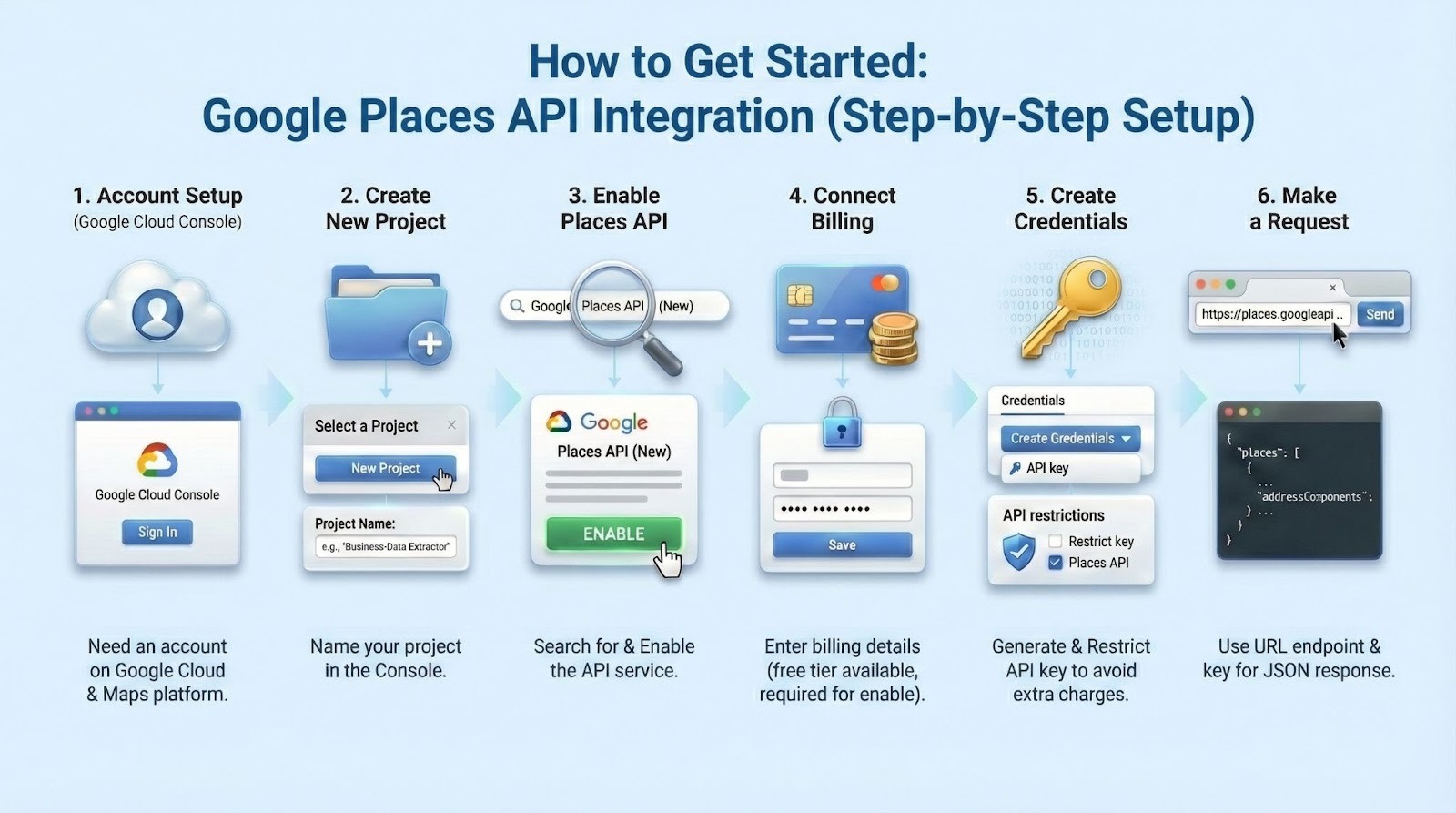
Since the Google Places API is part of the Google Maps platform and Google Cloud Console, you will need an account there.
- Create a new Google Cloud Project: In the Google Cloud Console, click “”Select a Project”” > “”New Project”.” Name your project (e.g., “”Business-Data-Extractor””).
- Enable Places API: Search for Google Places API (New), navigate to it when prompted, and click Enable.
- Connect Billing: Although there is a free tier, Google requires you to enter billing details to enable the Google Places API.
- Create credentials: To generate an API key, go to the Credentials tab and create a new one. Avoid additional charges by properly restricting your API key under “API restrictions” and limiting it to the Places API.
- Make a request: The Places API (New) accepts requests via a standard URL with a specific service endpoint, such as /places or places: search Text, and returns a JSON response. An example would be: https://places.googleapis.com/v1/places/GyuEmsRBfy61i59si0?fields=addressComponents&key=YOUR_API_KEY.
Google Places API Pricing and Costs (2025 Update)
Once Google completely reformed the Google Places API in 2023, two years later, in March 2025, it came time for a pricing change as well. The Google Maps platform as a whole, not simply the Google Places API, was impacted. The original $200 monthly credit has been changed into a more product-specific model with new membership tiers. There is still a free tier available, but with specific restrictions. The current Google Cloud pricing is as follows:
The “Pay-as-you-go” model has distinct categories designed to cater to various business needs and usage patterns, and includes free billable events per Core Service SKU each month. The Google Maps platform tiers include:
- Essentials: Ready-to-integrate APIs and SDKs enable you to get started with critical features for key use cases and scale swiftly. For basic data calls (e.g., IDs, names, lat/long). Free tier includes 10,000 requests.
- Pro: Access more capabilities to build more dynamic and differentiated geospatial experiences. For richer data (opening hours, ratings, photos), the free tier includes 5,000 requests.
- Enterprise: Maximum flexibility and control to create custom geospatial experiences. Data in this category includes high-value fields like extensive reviews or “”atmosphere””. The freeFree tier includes 1,000 requests.
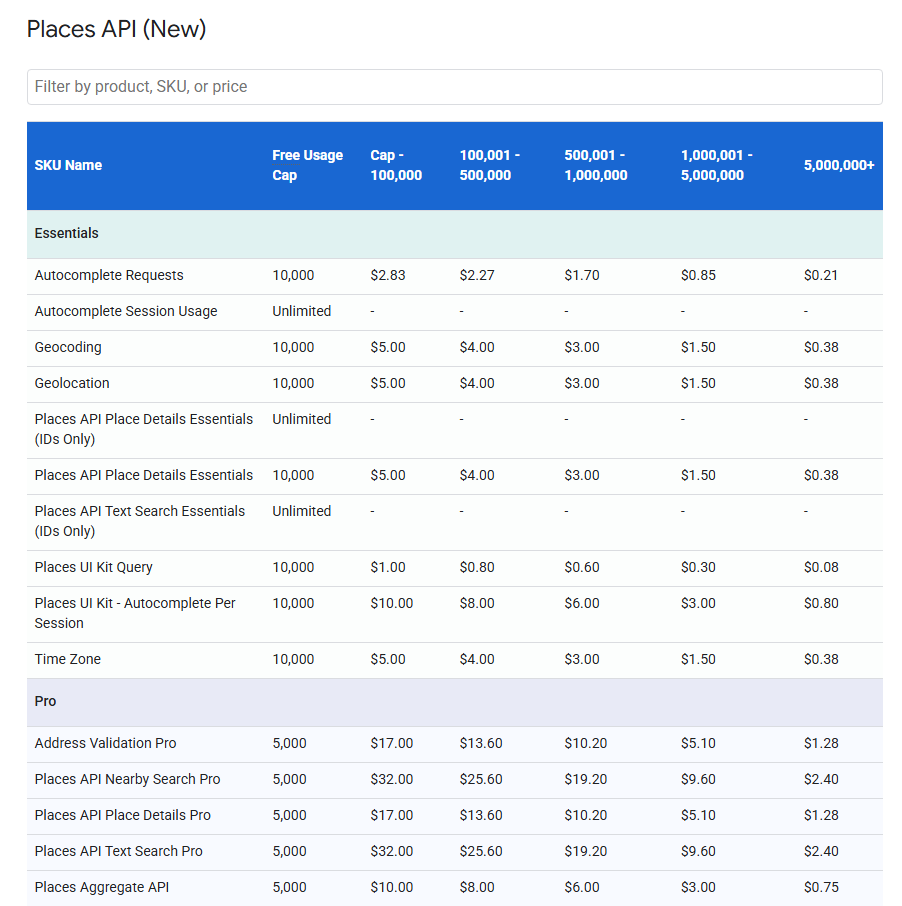
Specific Places API pricing is divided into Stock Keeping Units (SKUs). In the Places API, SKU is a specific billable item that represents a particular feature or data type you request. Each category has separate SKU pricing for every kind of billable event you request.
Another option is the subscription billing model, which combines your requests across all features the Google Maps platform offers. Depending on the mentioned categories, it includes different options:
- Starter: Includes a bundle of 50,000 monthly calls across standard APIs for $100.
- Essentials: Offers higher volume limits (100,000 calls) and access to “”Pro”” data fields at a discounted rate compared to pay-as-you-go.
- Pro: Up to 250,000 combined calls per month at $1,200 with all features unlocked.
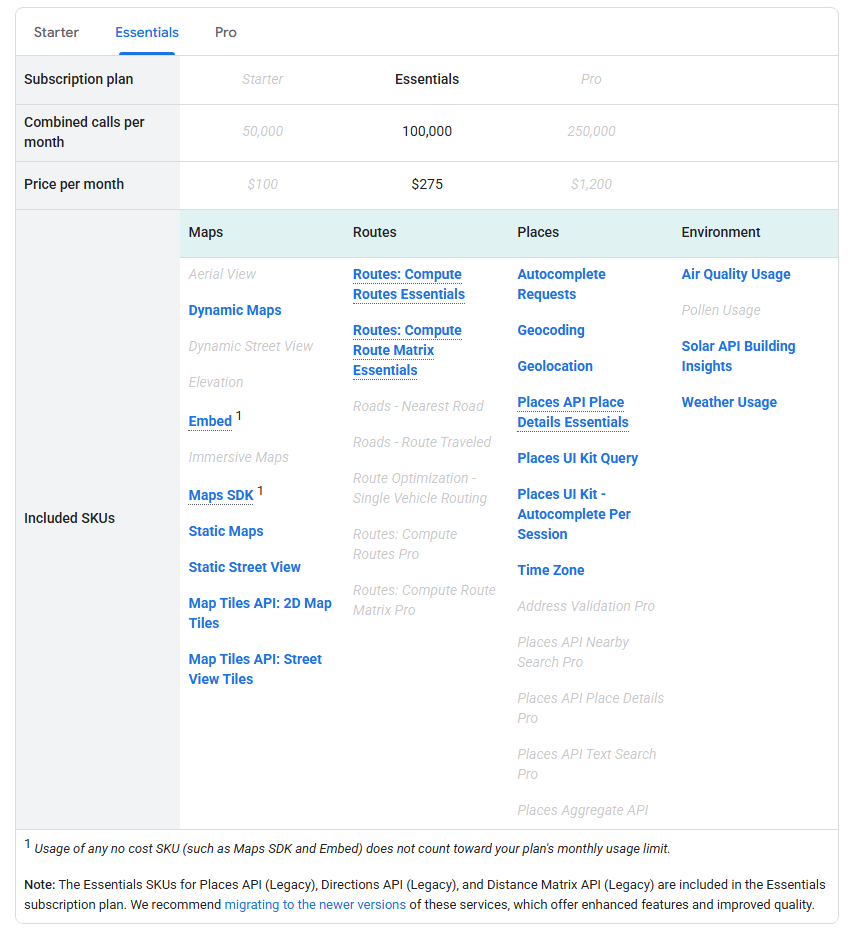
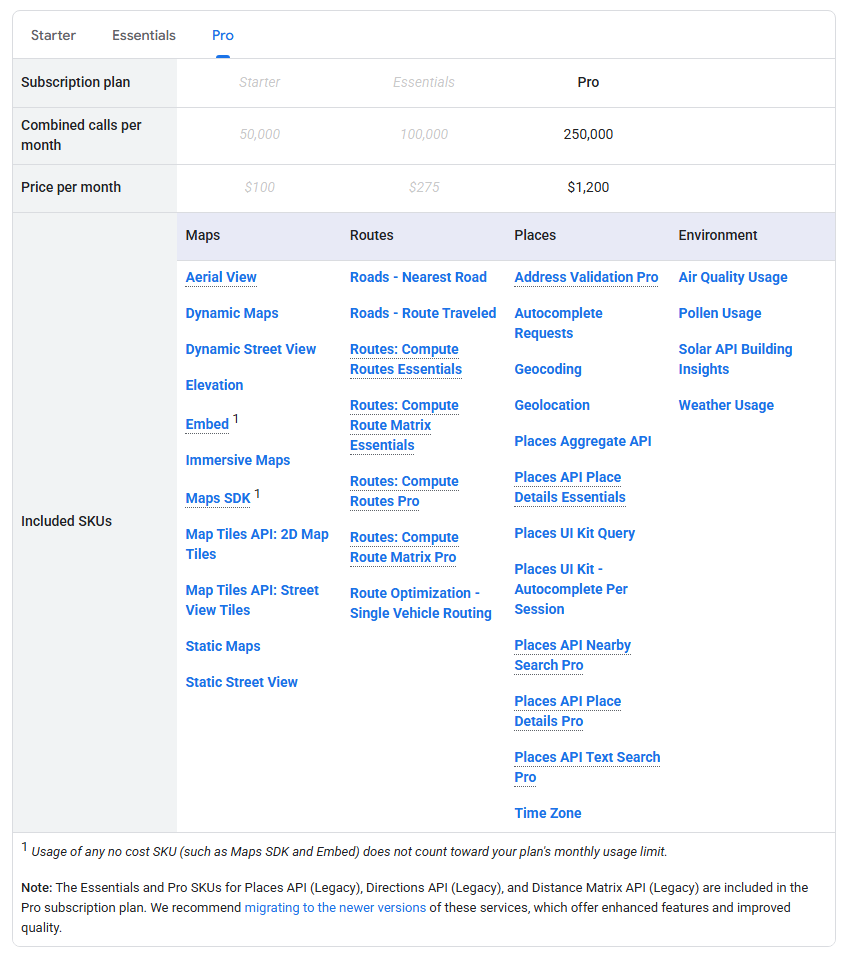
If you are using multiple features at a lower rate, it makes more sense to switch to a subscription model from a pay-as-you-go one.
The pricing is naturally very complex, as it includes many features, so here is an example:
If a customer generates 250,000 Autocomplete Request billable events in a calendar month, the monthly cost is computed as follows:
Monthly Cost of 250,000 Autocomplete Request Billable Events
| Billable events | Cost per 1000 billable events | Calculated cost per pricing tier |
| 0 – 10,000 free cap (First 10,000 events) | $0 | $0 * 10,000/1,000 = $0.00 |
| 10,001 – 100,000 (Next 90,000 events) | $2.83 | $2.83 * (100,000-10,000)/1,000 = $254.70 |
| 100,001 – 500,000 (Next 400,000 events) | $2.27 | $2.27 * (250,000 – 100,000)/1,000 = $340.5 |
| TOTAL MONTHLY COST | $595.2 | |
This example uses only one SKU in the most affordable tier of the Google Maps platform, and it is already expensive. The required information from Google Places API can be repetitive if users are looking for the same places, and in that case, it is especially crucial to switch to more affordable options.
If you are already working with the Google Places API or just getting started, there are options for getting data from Google Maps and Places without using their API. Web scraping might be an option for your business or project for multiple reasons.
Web Scraping for Places Data
Web scraping is the automated extraction of data from websites. The same goes for Google’s website, any data that is visible can be extracted. In the context of business details, scraping involves using software (bots) to navigate Google Maps or business directories, simulate user clicks, and “read” the information displayed on the screen.
At large scales and in operations, especially for repetitive data, replacing the Google Places API can be cost- and performance – effective.
Compared to the Google Places API, web scraping provides a direct source of information from the frontend. Modern web scrapers like Octoparse provide templates for websites like Google Maps to scrape all the data the API offers, at a fraction of the cost. Octoparse provides multiple Google Maps scraper templates, but as a browser automation tool, you can also choose to create the scrapping workflows manually or try auto-detect however you need. This means you specify how to extract data (the pattern), and Octoparse will do the repeated work for you until you have all the data. Also, when you require an update, you can do it periodically and schedule it in the Octoparse cloud.
Why Octoparse Stands Out:
- Auto-detect: This feature allows you to automatically detect the elements that can be scraped on your target page, which is time-saving and efficient.
- Template Mode: You don’t need to build a scraper from scratch. Simply try the “Google Maps Scraper” template, enter your keywords (e.g., “Real Estate Agents in New York”), and the tool automatically navigates the results, scrolling and extracting data. If you want the same maps workflow inside Claude, ChatGPT, or Cursor, the Google Maps MCP Server gives AI clients a direct way to run Google Maps extraction.
- Cloud Extraction: For large-scale projects, you can run your tasks on Octoparse’s cloud servers. This means you can extract 100,000 listings overnight without keeping your own computer running.
- Dynamic Handling: Octoparse automatically handles the AJAX loading and infinite scrolling found on Google Maps, which aretechnical hurdles that often trip up custom-coded scripts.
- Cost Cap: Unlike the API, where a runaway loop could cost you thousands, Octoparse operates on a flat subscription model.
- MCP (Model Context Protocol) Integration: Octoparse now supports MCP, which means it can connect directly to your everyday AI tools like Claude and ChatGPT. You can let AI trigger scraping tasks, retrieve structured data in real time, and analyze it instantly.
Google Places API vs Web Scraping: Head-to-Head Comparison
For you to decide which way to choose from here for your business, let’s compare multiple aspects of both methods.
Data Versatility Comparison
| Data Feature | Octoparse | Google Places API |
| Basic Data (Name, Address, GPS) | ✅ Yes | ✅ Yes |
| Contact Info (Phone, Website) | ✅ Yes | ✅ Yes (Requires “Contact” SKU) |
| Extended Contact (Emails, Social Links) | ✅ Yes (Scrapes from site/description) | ❌ No (Not provided by Google) |
| Reviews | ✅ limited (pagination supported) | ⚠️ Limited (Capped at 5 per request) |
| Popular Times / Activity | ✅ Yes (Can parse histograms/graphs) | ❌ No (Not available in standard API) |
| Images | ✅ Download actual image files with URL scraped | ⚠️ Image references only (separate cost to download) |
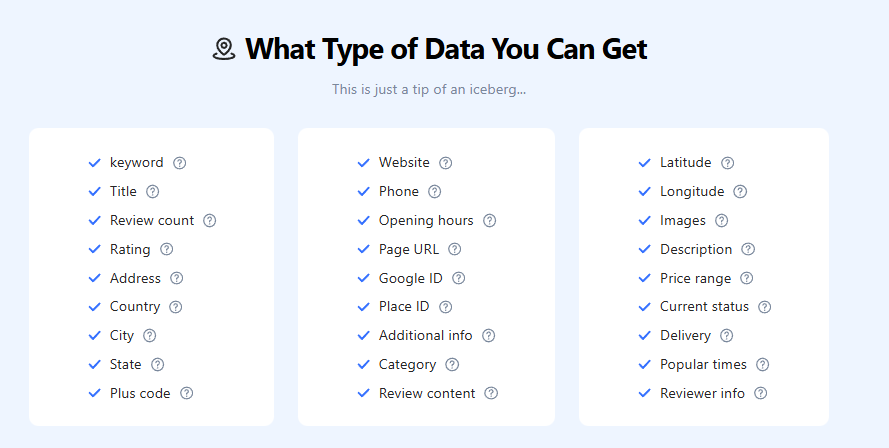
Web scraping gives you an advantage over APIs, as it extracts very tailored, versatile data that you can choose yourself. Octoparse offers multiple Google Maps scraper templates, specific to each task, or a general one that provides the most versatile data in a single template. You can also try auto-detect or custom scraping workflows.
This is a comparison of a few categories. Octoparse offers much more data from Google Maps scraper templates:
Cost Comparison: Web Scraping vs Google Places API
| Cost Factor | Octoparse (Google Maps Scraper template) | Google Places API (Pro Subscription) |
| Pricing Model | Pay-per-result ($1.50 / 1,000 lines) | Flat Subscription ($1,200 / month) |
| Volume limit | 100,000 records | Capped at 250,000 calls |
| Cost for 250k Records | $375 + $69 (annual plan) = $444 | $1,200 |
| Cost per 1,000 Records | $1.50 | $4.80 |
| Overage Cost | Linear ($1.50/1k) | High (Pay-as-you-go rates apply after cap) |
| Infrastructure Cost | Included (Cloud Extraction) | None (API is serverless) |
Octoparse scrapes very versatile data, and for the Google Places API, Pro is the only subscription that includes all features in bulk. Let’s compare Octoparse’sGoogleMaps Scraper templates with Google Places API in a simple example to see how pricing looks for 250,000 events.
It’s almost three times cheaper to use web scraping than the Google Places API for bulk comparisons. If you are selectively using Google Places API features, it can be more affordable, but Octoparse also offers multiple cheaper templates that run locally at no extra cost. For example, the template “Google Maps Listing and Details Page Scraper” gets you store listings by inputting multiple keywords and locations. It’s even free! In the end, it always goes case by case, but you have to adapt it to your own needs and business requirements.
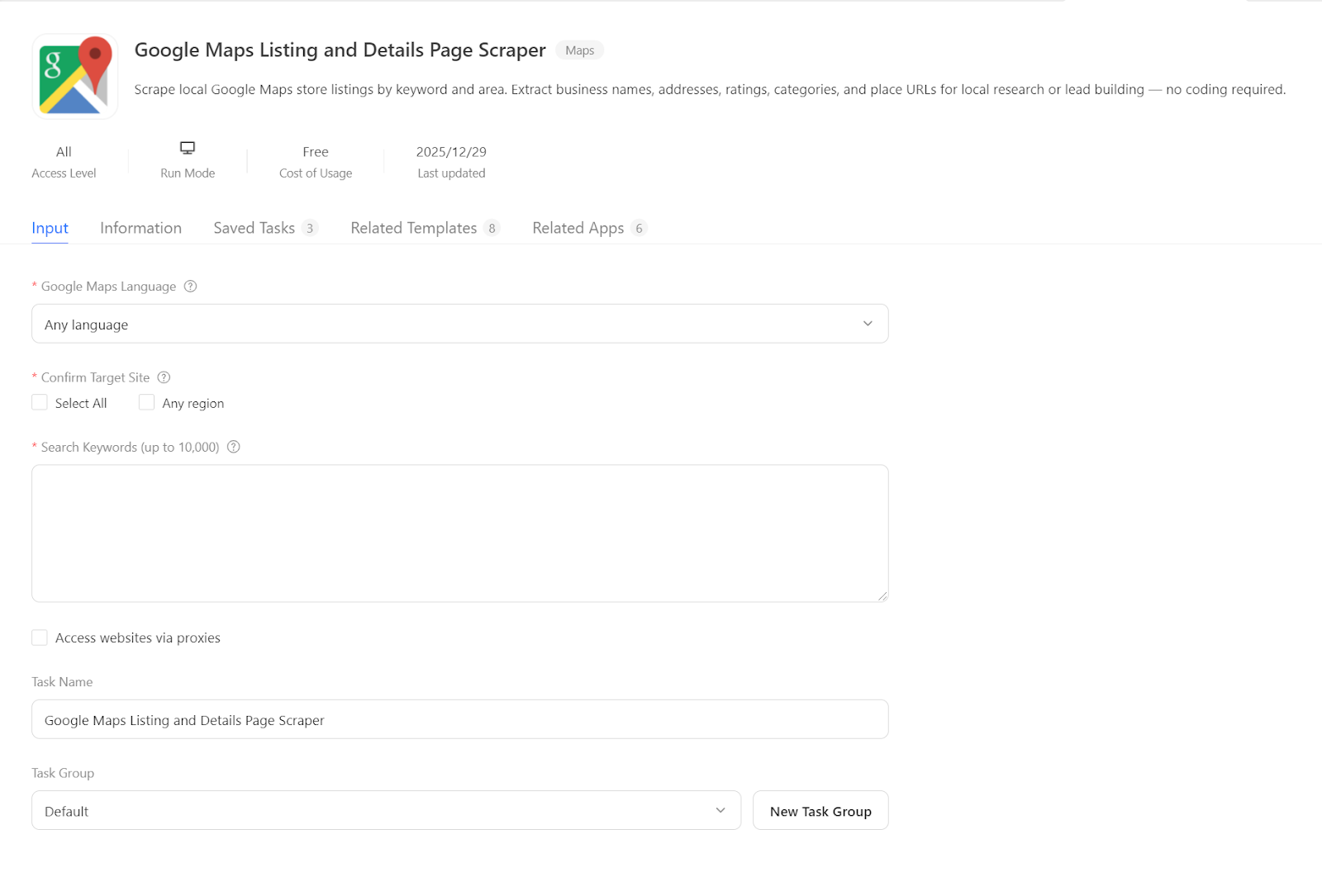
https://www.octoparse.com/template/google-maps-store-scraper-local
How to Use Web Scraping to Get Places Data with Octoparse’s Template (Step-by-step Guide)
For today’s example, I will show you how Octoparse’s Google Maps Advanced Scraper works in action. I like to use this one as it gives me the most versatile data.
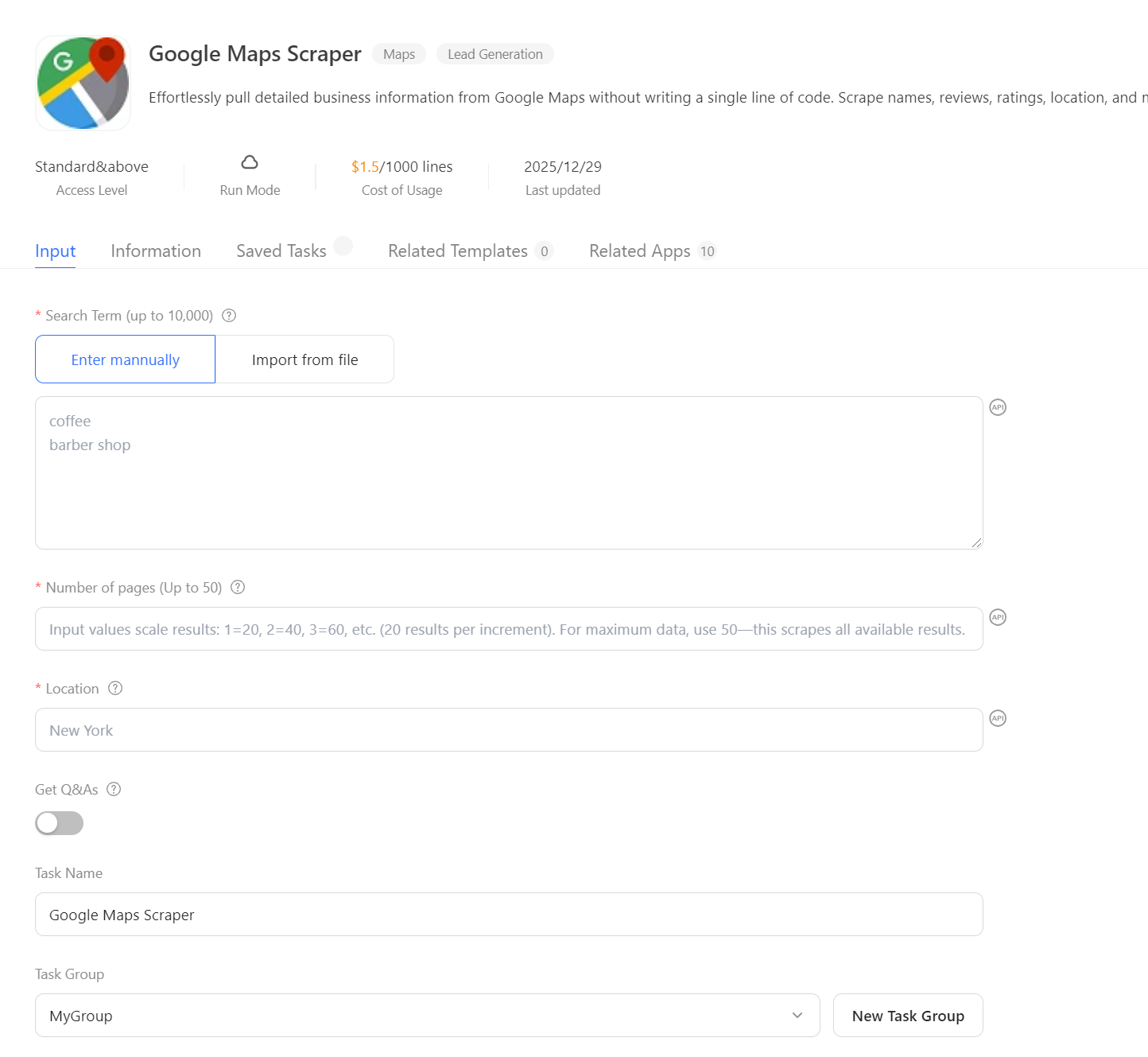
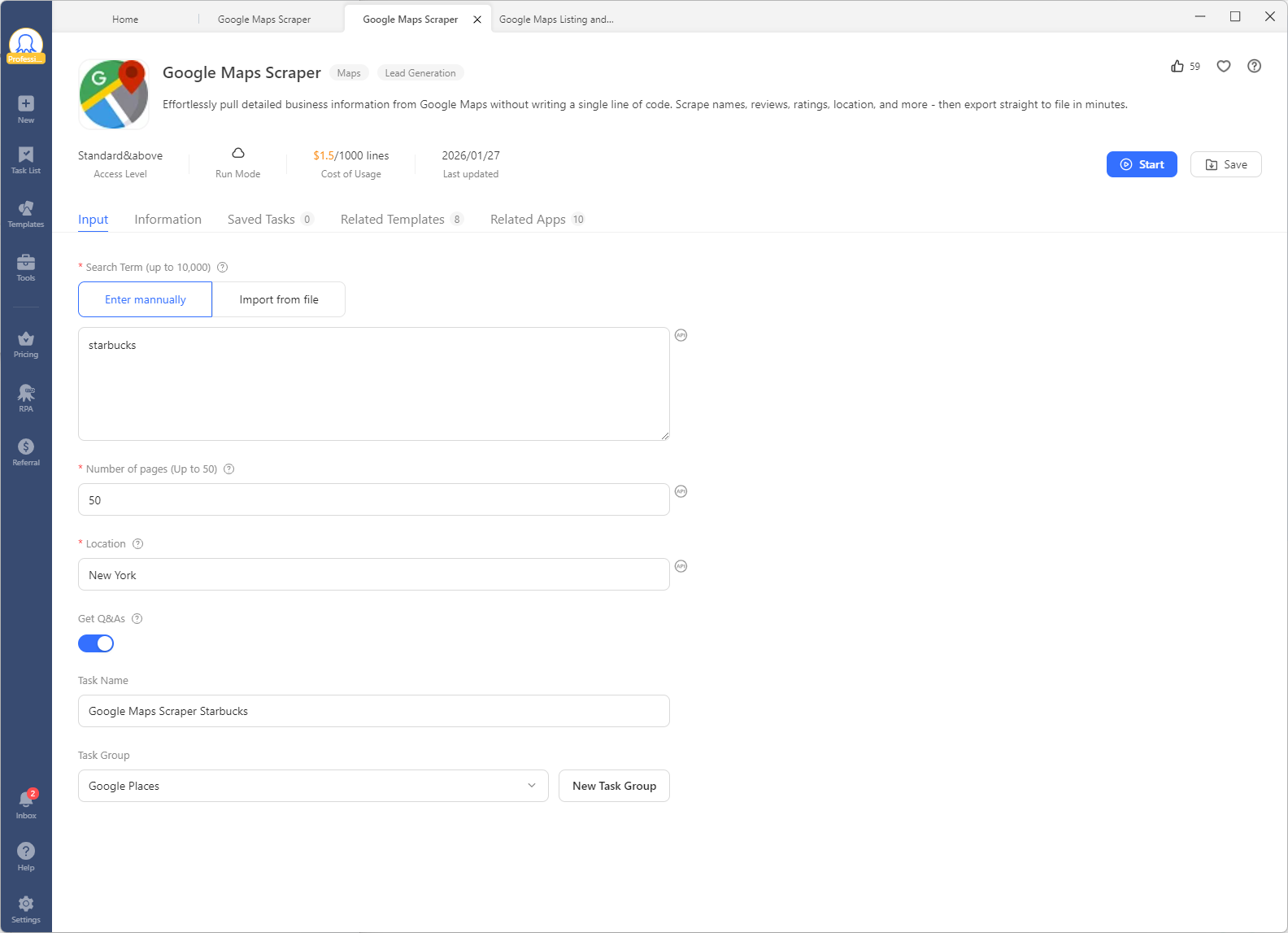
I want to open a coffee shop and investigate my strongest competitor in the whole city: Starbucks. They have many locations, and I want to do a deep analysis, so I set the limit to 50 pages. I include the Q&A to see what they are doing well and where they might be lacking, so I can position my business accordingly.
Octoparse divides your main task into subtasks and efficiently parallelizes the whole task, making it very quick.
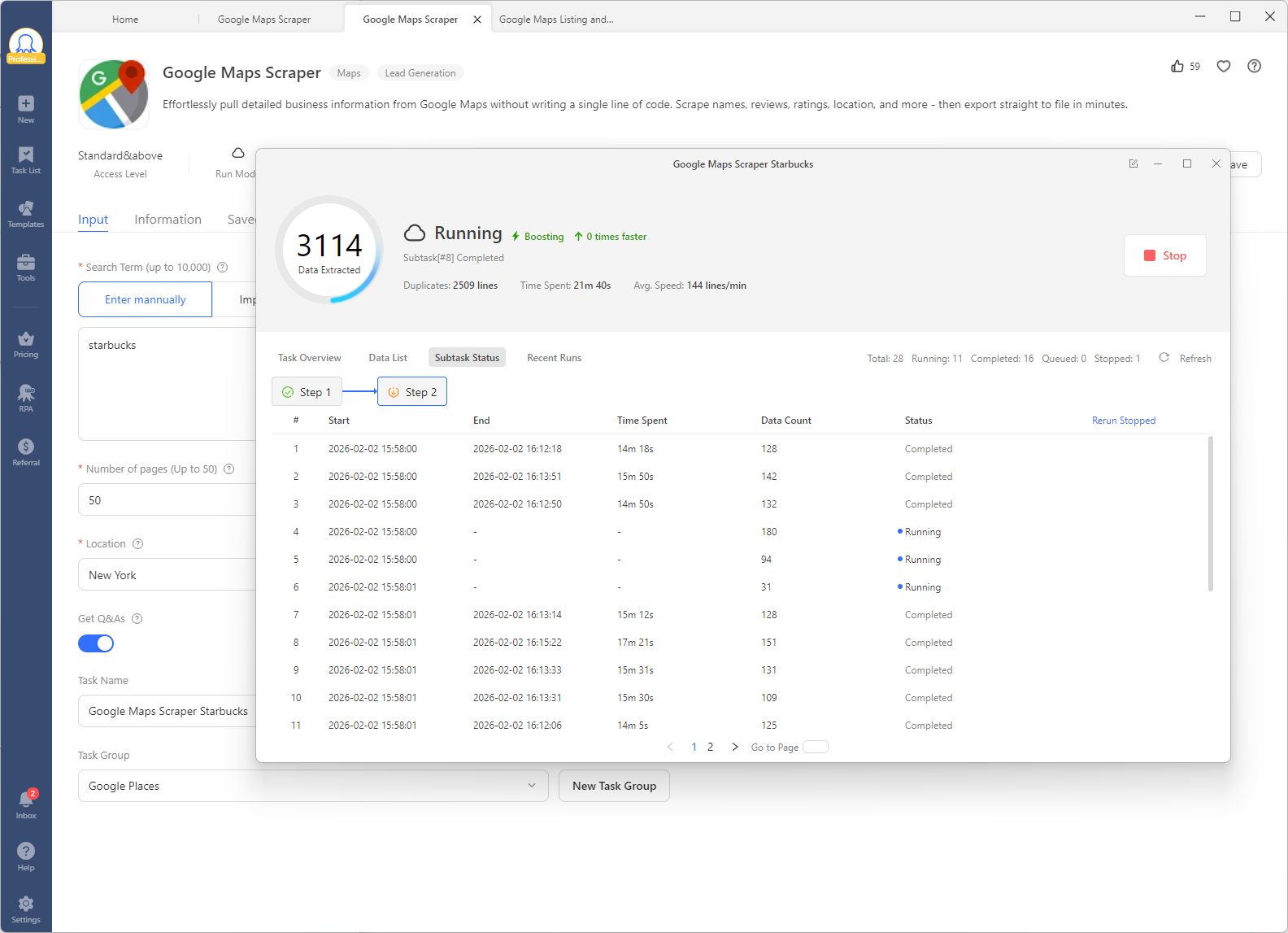
There is a Data List tab that shows the data you’ve already fetched in real time.
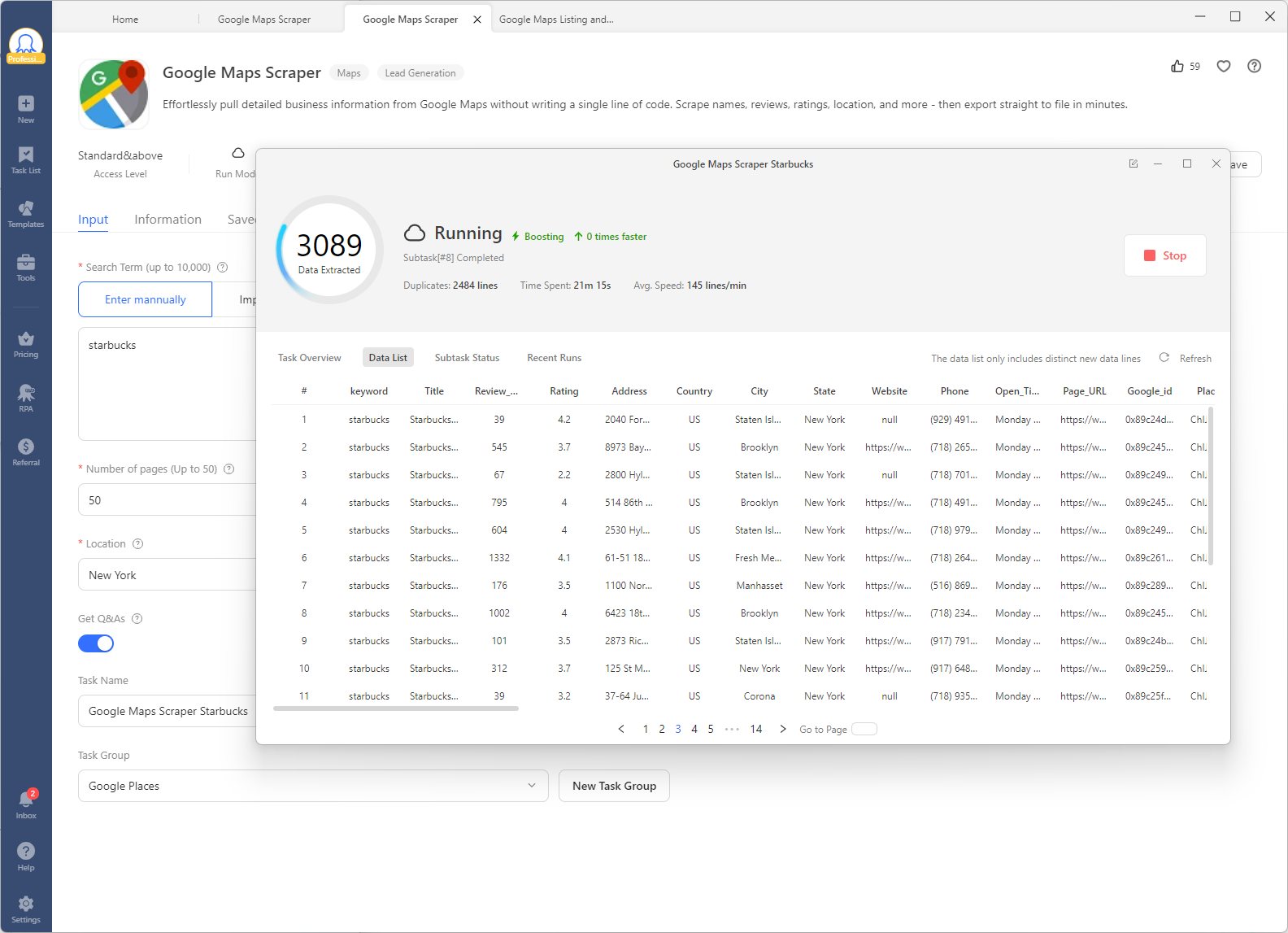
A lot of data is extracted, and I export it to Excel (also available in CSV, HTML, JSON, and XML). I can then use the exported data for competitive analysis, location planning, or to enrich my own business intelligence database. This structured approach ensures I have a comprehensive view of Starbucks’ operations in the area, far exceeding the 5-review limit of the Places API.
Here are the columns I obtain:
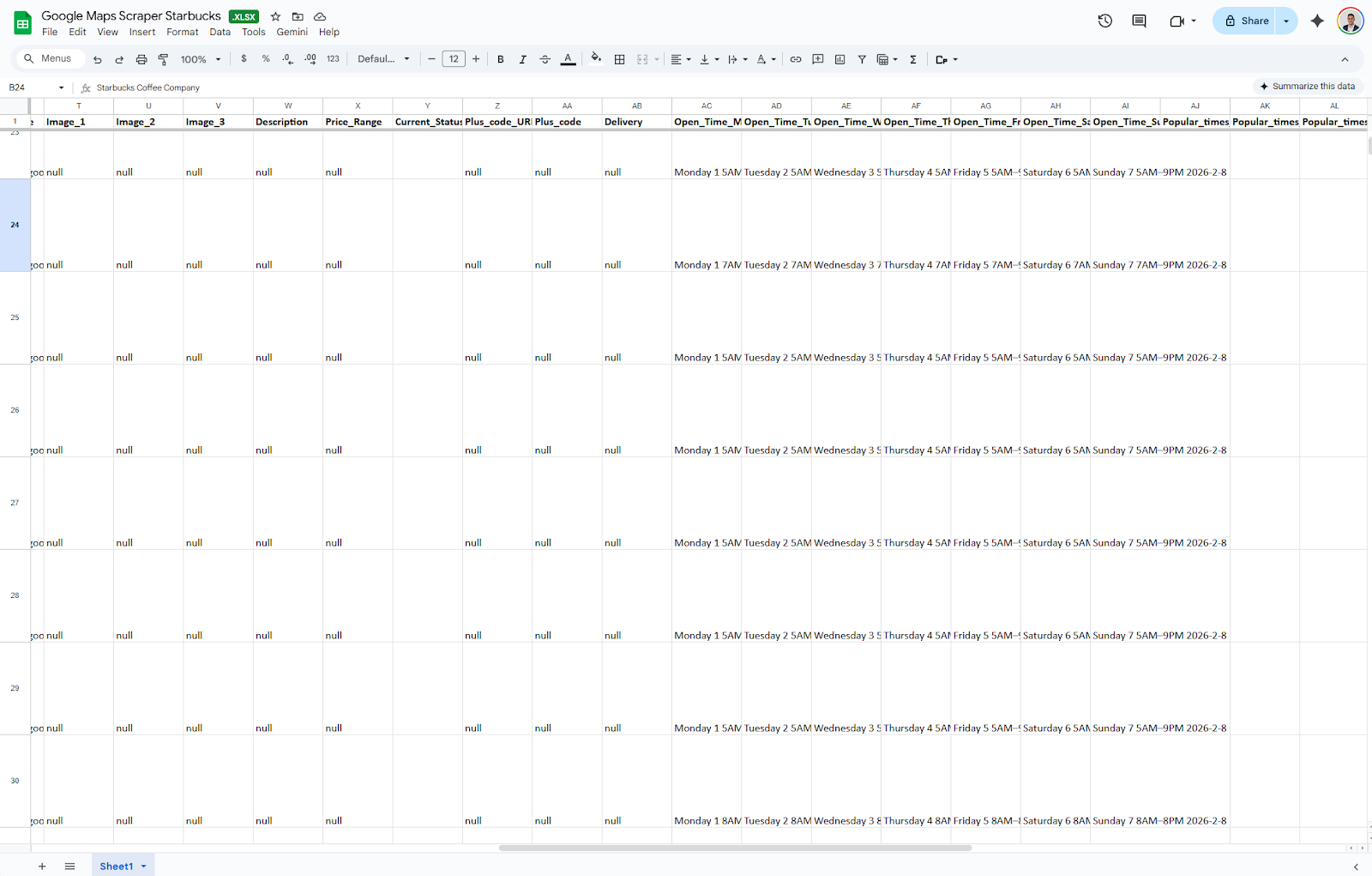
keyword, Title, Review_Count, Rating, Address, Country, City, State, Website, Phone, Open_Time, Page_URL, Google_id, Place_id, Additional_info, Latitude, Longitude, Category, Main_image, Image_1, Image_2, Image_3, Description, Price_Range, Current_Status, Plus_code_URL, Plus_code, Delivery, Open_Time_Monday, Open_Time_Tuesday, Open_Time_Wednesday, Open_Time_Thursday, Open_Time_Friday, Open_Time_Saturday, Open_Time_Sunday, Popular_times_Monday, Popular_times_Tuesday, Popular_times_Wednesday, Popular_times_Thursday, Popular_times_Friday, Popular_times_Saturday, Popular_times_Sunday, about, FAQ1, FAQ2, FAQ3, FAQ4, FAQ5, FAQ6, FAQ7, FAQ8, FAQ9, FAQ10.
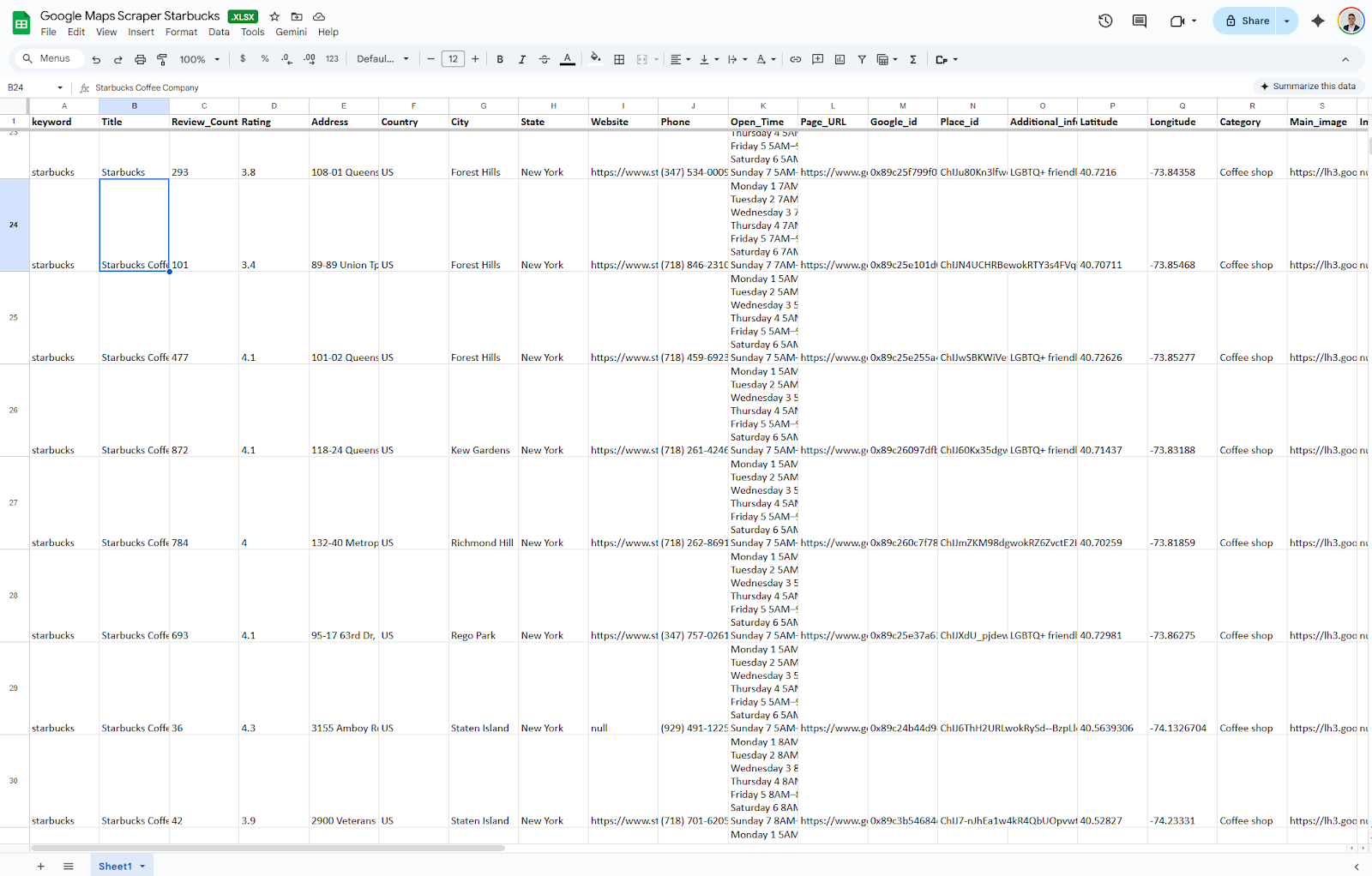
All the data is nicely formatted with clear column names, perfect for further analysis.
For more information, read the full docs of Octoparse’s Google Maps Scraper template.
https://www.octoparse.com/template/google-maps-advanced-scraper
Alternatives to Google Places API
If the Google Places API is too expensive but manual scraping (Python) feels too risky, consider these middle-ground alternatives:
- Bing Maps API: Microsoft’s alternative is often significantly cheaper and offers generous free tiers. While their dataset is smaller than Google’s, it is sufficient for many B2B use cases.
- OpenStreetMap (OSM): The “Wikipedia of Maps.” It is free and open-source. While it lacks Google’s detailed company information (such as opening hours), it excels in geocoding and identifying basic locations.
- No-Code Scraping Tools (Octoparse, Chat4Data, Apify): These platforms help to bridge the gap. They provide the power of scraping without requiring Python scripts or manual proxy server configuration.
Conclusion
In the end, the decision between Google Places API and web scraping methods comes down to reliability and cost. If your business requires real-time data, the Google Places API is the only choice, but if you’re looking for versatility and lower cost, web scraping with Octoparse is the way to go.
In data acquisition—building lists, analyzing markets, or feeding internal dashboards—the API’s cost structure is often unjustified. In these scenarios, web scraping with a robust tool like Octoparse provides a scalable, budget-friendly alternative that delivers deeper data without the meter running on every request.
Choose wisely and assess the business requirements before committing!
Keep learning
Curious about how businesses gather their local data? Understanding the technology behind reliable business information—from how the Google Places API returns structured data to the complexities of web scraping—opens up many possibilities for large-scale data projects. Google Maps and Google Cloud are good tools for learning how they work and can help your business with web scraping techniques.
Here are some good starting points:
- Google Maps Scraper in 2025
- How to Extract Google Maps Coordinates
- Cloud Data Extraction
- 5 Best Google Maps Crawlers
The more you understand about how the web works, the better equipped you are to troubleshoot problems, build your own projects, or simply make sense of the digital world around you.
FAQs about Google Places API
- Is Google Places API free?
There is a free tier available, capped per request category (e.g., geocoding, place details). Once you hit the limit, billing is required, and you pay per stock-keeping unit (SKU). There are multiple tiers, such as Essentials, Pro, and Enterprise, depending on the number of requests. The previous monthly $200 credit for Maps has changed since Google’s March 2025 pricing announcement, so refer to the current Google Cloud pricing. Now, you are limited up to 10,000 requests before you have to set up billing.
- What’s the difference between Places API and Maps API?
The Maps API is used to display the visual map. The Places API is for retrieving data about map locations (names, ratings, phone numbers). You often use them together to produce the best results in your applications or market research.
- How do I get a Google Places API key?
First, head to the Google Cloud Console, enable the “Places API,” and then create the credentials you will use. Google will generate your Places API key. For more information, refer to the above section “Step-by-Step Setup”.
- What is a Place ID?
A Place ID is a unique identifier for a single place in the Google Places database. A Place ID looks like this: GhIJQWDl0CIeQUARxks3icF8U8A, and it can vary, as there is no maximum length. Place IDs also change over time, so that a single location can have multiple IDs.
- Why is my API key not working?
There can be multiple possible core issues related to the Google Places API key not working:
- The “Places API” service is not enabled in the Google Cloud Console
- Billing is not set on the Cloud project
- You have exceeded your daily quota
- API restrictions are set incorrectly (blocking the domain or IP you are using)
- If there is an (auto-rotated) new API key, you have to replace the old one