




🚀 Why Use the Google Maps Listing Page Scraper?
This template helps you extract all business listings shown on Google Maps search result pages using keywords and locations. Instead of manually scrolling through Maps results, the scraper automatically loads listings and captures structured data at scale.
It’s ideal for:
- Building keyword-based business lists
- Analyzing local markets and competition
- Collecting place URLs for deeper scraping
- Preparing datasets for lead generation or research
Fast, automated, and beginner-friendly.
New to Google Maps scraping? Our step-by-step guide on exporting Google Maps search results to Excel walks you through the complete workflow from search to spreadsheet.
Data Preview
Keyword | Name | Rating | Review_count | Price_range | Category | Address | Latitude | Longitude | Current_status | Next_status | Website | Scraped_at | Telephone | Tags | Detail_URL |
|---|---|---|---|---|---|---|---|---|---|---|---|---|---|---|---|
petrol station in london | Shell | 3.0 | 47 | $$ | Gas station | 110 Fanshawe Park Rd E | 43.0288652 | -81.2763379 | Open 24 hours | https://find.shell.com/ca/fuel/10052687-fanshawe-pk-e-north-centre | 2024-03-26 21:27:32 | +1 519-672-5762 | CA$1.53/Regular | https://www.google.com/maps/place/Shell/data=!4m7!3m6!1s0x882eee5db488dadf:0x51ef7711c2cdff0a!8m2!3d43.0288652!4d-81.2763379!16s%2Fg%2F1tdftsjs!19sChIJ39qItF3uLogRCv_NwhF371E?authuser=0&hl=en&rclk=1 | |
petrol station in london | Costco Gas Station | 4.5 | 1,091 | $$ | Gas station | 693 Wonderland Rd N | 42.9887376 | -81.2932015 | Open | Closes 9:30 PM | http://www.costco.ca/warehouse-locations/n-london-london-on-530.html | 2024-03-26 21:27:33 | +1 519-474-5301 | https://www.google.com/maps/place/Costco+Gas+Station/data=!4m7!3m6!1s0x882ef1d27e0156cb:0xc2358c81ababe84d!8m2!3d42.9887376!4d-81.2932015!16s%2Fg%2F11bw224ktb!19sChIJy1YBftLxLogRTeirq4GMNcI?authuser=0&hl=en&rclk=1 | |
petrol station in london | Fast Stop | 4.9 | 7 | Gas station | 1880 Huron St | 43.0280547 | -81.188415 | Open | Closes 8 PM | 2024-03-26 21:27:34 | +1 519-453-2020 | CA$1.49/Regular | https://www.google.com/maps/place/Fast+Stop/data=!4m7!3m6!1s0x882eed1fcdf2543b:0x7d30797b52a37b66!8m2!3d43.0280547!4d-81.188415!16s%2Fg%2F11k5k74r1s!19sChIJO1TyzR_tLogRZnujUnt5MH0?authuser=0&hl=en&rclk=1 | ||
petrol station in london | Shell | 3.9 | 31 | $$ | Gas station | 1679 KY-192 | 37.108411 | -84.0875 | Open 24 hours | https://find.shell.com/us/fuel/10011472-1679-n-192-bypass/en_US | 2024-03-26 21:27:35 | (606) 864-0612 | $3.30/Regular | https://www.google.com/maps/place/Shell/data=!4m7!3m6!1s0x885cd17fc7e6ec69:0x95d4080c547abfc7!8m2!3d37.108411!4d-84.0875!16s%2Fg%2F1tlmp137!19sChIJaezmx3_RXIgRx796VAwI1JU?authuser=0&hl=en&rclk=1 | |
petrol station in london | Canadian Tire Gas+ | 3.1 | 47 | Gas station | 1895 Hyde Park Rd | 43.0079975 | -81.3359199 | Open | Closes 10 PM | http://gasplus.canadiantire.ca/ | 2024-03-26 21:27:37 | +1 519-641-3807 | https://www.google.com/maps/place/Canadian+Tire+Gas%2B/data=!4m7!3m6!1s0x882eeffeb506cee1:0x9a47af09c26d37d6!8m2!3d43.0079975!4d-81.3359199!16s%2Fg%2F1hc48z46l!19sChIJ4c4Gtf7vLogR1jdtwgmvR5o?authuser=0&hl=en&rclk=1 | ||
petrol station in london | Shell | 3.9 | 61 | $$ | Gas station | 2210-2212 Norwich-New London Turnpike | 41.484819 | -72.100192 | Open 24 hours | https://find.shell.com/us/fuel/10013220-2210-norwich-new-london-tpke-2212/en_US | 2024-03-26 21:27:39 | (860) 848-1075 | $3.26/Regular | https://www.google.com/maps/place/Shell/data=!4m7!3m6!1s0x89e672f94a07ae4f:0x8bbd03aec74f6cec!8m2!3d41.484819!4d-72.100192!16s%2Fg%2F11xlbt7gl!19sChIJT64HSvly5okR7GxPx64DvYs?authuser=0&hl=en&rclk=1 | |
petrol station in london | Phillips 66 | 4.7 | 14 | Gas station | 500 Main St | 39.5843034 | -91.4011661 | Open | Closes 5:30 PM | http://www.phillips66.com/ | 2024-03-26 21:27:40 | (573) 985-2811 | https://www.google.com/maps/place/Phillips+66/data=!4m7!3m6!1s0x87ddc30b99926a43:0xe4b5b769509c6741!8m2!3d39.5843034!4d-91.4011661!16s%2Fg%2F1td13tp1!19sChIJQ2qSmQvD3YcRQWecUGm3teQ?authuser=0&hl=en&rclk=1 |
This template captures key listing-level fields, including:
- 🏢 Business name
- ⭐ Rating & review count
- 📍 Address
- 🗂 Category
- 🔗 Google Maps place details URL
- 📌 Latitude & longitude
The extracted place URLs can be reused in store detail, contact, or review scrapers.
Ready to Start Scraping?
No coding. No setup. Works immediately.
📈 What to Do After Scraping Your Listings
Once you've extracted your Google Maps data, here are common next steps:
Play with Contact Details
The Listings Scraper captures place URLs that can be used with our Google Maps Contact Scraper to extract emails, phone numbers, and social profiles for each business.
Extract Coordinates for Mapping
Need latitude and longitude data for visualization or geofencing? Learn how to extract Google Maps coordinates from your scraped URLs.
Build a Multi-Source Lead Database
Combine Google Maps data with listings from Yellow Pages, Yelp, or Crunchbase for more comprehensive coverage.
Analyze and Visualize in Excel
Our guide on scraping website data to Excel covers best practices for formatting, filtering, and analyzing your exported data.
🗺️ Not Sure Which Google Maps Scraper Fits Your Needs?
Octoparse offers multiple Google Maps templates optimized for different use cases. Here's how to choose:
If You Need... | Use This Template |
|---|---|
Business listings from keyword searches | You're in the right place — Google Maps Listings Scraper (by Keywords) |
Listings from specific Google Maps URLs | |
Deep store details (hours, popular times, delivery options) | |
Email addresses and social profiles | |
Customer reviews and ratings |
👉 Explore all options: Google Maps Scraper Library
🐙 Why Octoparse?
🧩 No-Code Required - You don't need programming knowledge; just input keywords and locations, and run the scraper.
🔄 Automatic Workflow & Pagination - Octoparse handles navigation through search results, page loading, and data extraction for you.
📁 Easy Export Formats - Export scraped results directly to Excel, CSV or JSON for easy analysis or integration into CRMs and databases.
💻 Beginner-Friendly UI - Ready to use out of the box. Just enter your keywords and run.
Start collecting Google Maps data quickly - no setup, no hassle, just raw data in minutes.
⚠️ Important Notes & Best Practices
🔢 Google Maps Result Limits
Google Maps returns about 120–200 results per query (keyword + location).
To maximize coverage, we strongly recommend breaking large locations into smaller sub-locations and running multiple queries.
❌ Don't:
- restaurants in New York City
☑️ Do:
- restaurants in Manhattan, New York City
- restaurants in Brooklyn, New York City
- restaurants in Queens, New York City
- restaurants in The Bronx, New York City
- restaurants in Staten Island, New York City
This approach allows Google Maps to return more listings overall by expanding the number of valid queries.
🤖 Not Sure How to Split Locations?
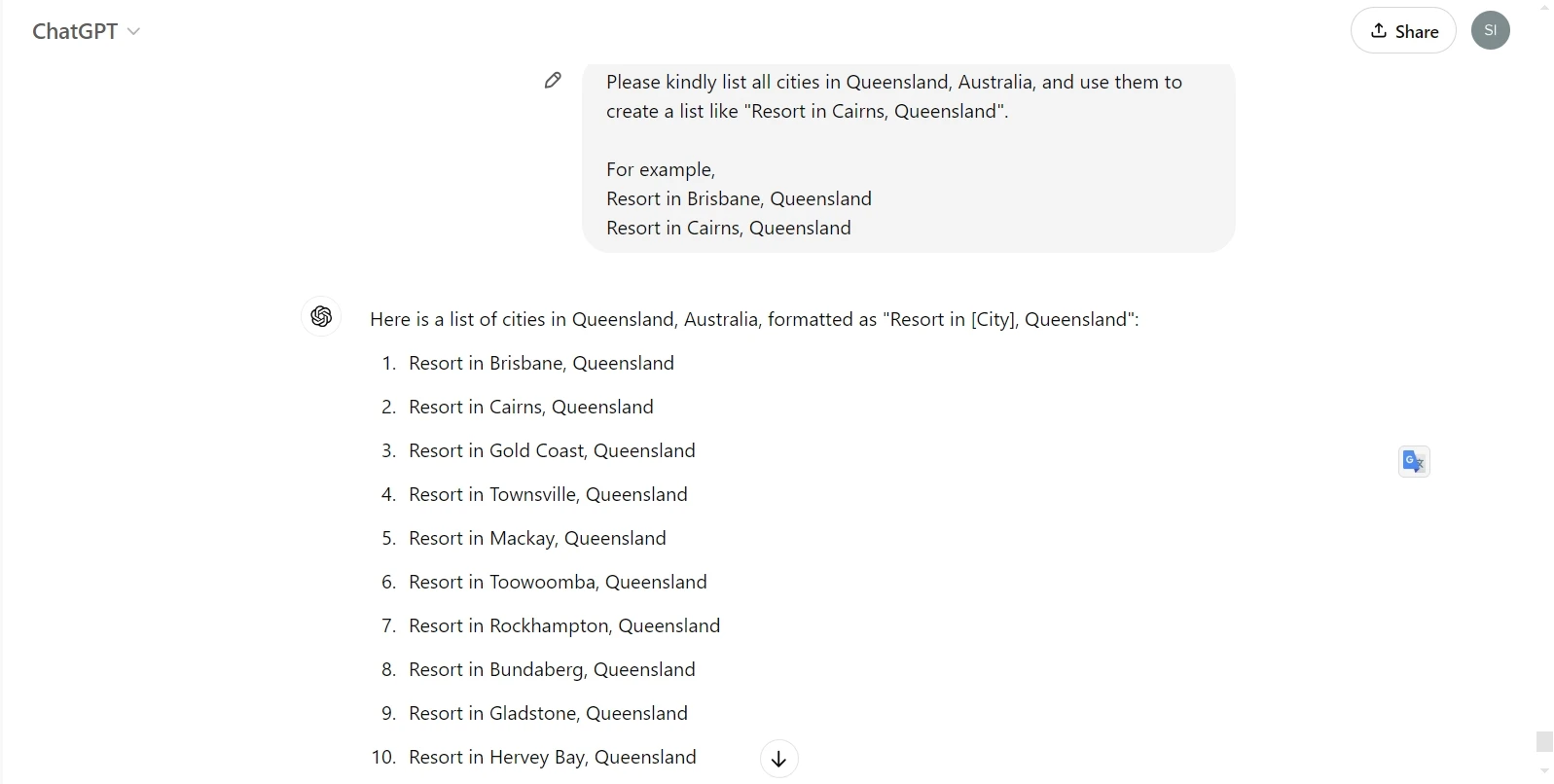
If you're unfamiliar with sub-locations, you can use AI to generate keyword + location combinations automatically.
For example, ask AI to expand a large city into smaller areas to improve scraping coverage and result volume.
❓ FAQs
Can I bypass the 120–200 results limit?
No. Google Maps limits each keyword + location query. Splitting large regions into smaller areas is the best way to collect more data.
What does cost of usage mean?
Local runs do not consume cloud credits. Costs apply only if optional paid features are enabled.
Can I scrape Google Maps in languages other than English?
Yes. This template supports multiple Google Maps language versions including English, French, Spanish, Italian, Korean, Japanese, and Traditional Chinese. Select your preferred language in the input parameters before running the scraper.
How is this different from using the Google Places API?
The official Google Places API has usage limits and costs that scale with volume. It also doesn't provide certain data points like popular times histograms, email addresses, or social profile links.
Octoparse's Google Maps scrapers use an automatic zooming algorithm to capture more results per search and extract data fields the API doesn't offer—making it a more cost-effective solution for large-scale data collection.
Compare your options in our Top 5 Google Maps Scrapers roundup.
Can I combine data from this scraper with other templates?
Absolutely. A common workflow is:
- Run Listings Scraper → Get business names, categories, ratings, and place URLs
- Feed URLs into Contact Scraper → Extract emails, phone numbers, social profiles
- Enrich with Reviews Scraper → Add customer sentiment data
- This modular approach lets you build comprehensive lead databases without paying for data you don't need.
I got blocked or hit a CAPTCHA. What should I do?
If a CAPTCHA appears during scraping:
- Pause the task
- Solve the CAPTCHA manually in the built-in browser
- Resume the task
- To minimize blocks, avoid running at extremely high speeds and consider using Octoparse's built-in residential proxies for larger projects. Our guide on bypassing CAPTCHA while web scraping covers additional techniques.
Is scraping Google Maps legal?
Scraping publicly available, non-personal data from Google Maps is generally permitted. However, legality depends on how you use the data and local regulations (such as GDPR or CCPA for personal information).
Key considerations:
- Only scrape publicly visible information
- Avoid scraping data behind login walls
- Use data in compliance with privacy laws
- Be mindful of Google's Terms of Service
- For a deeper dive into the legal landscape, read our comprehensive guide: Is Web Scraping Legal? It Depends.
why didn't the template pull any listings telephone number?
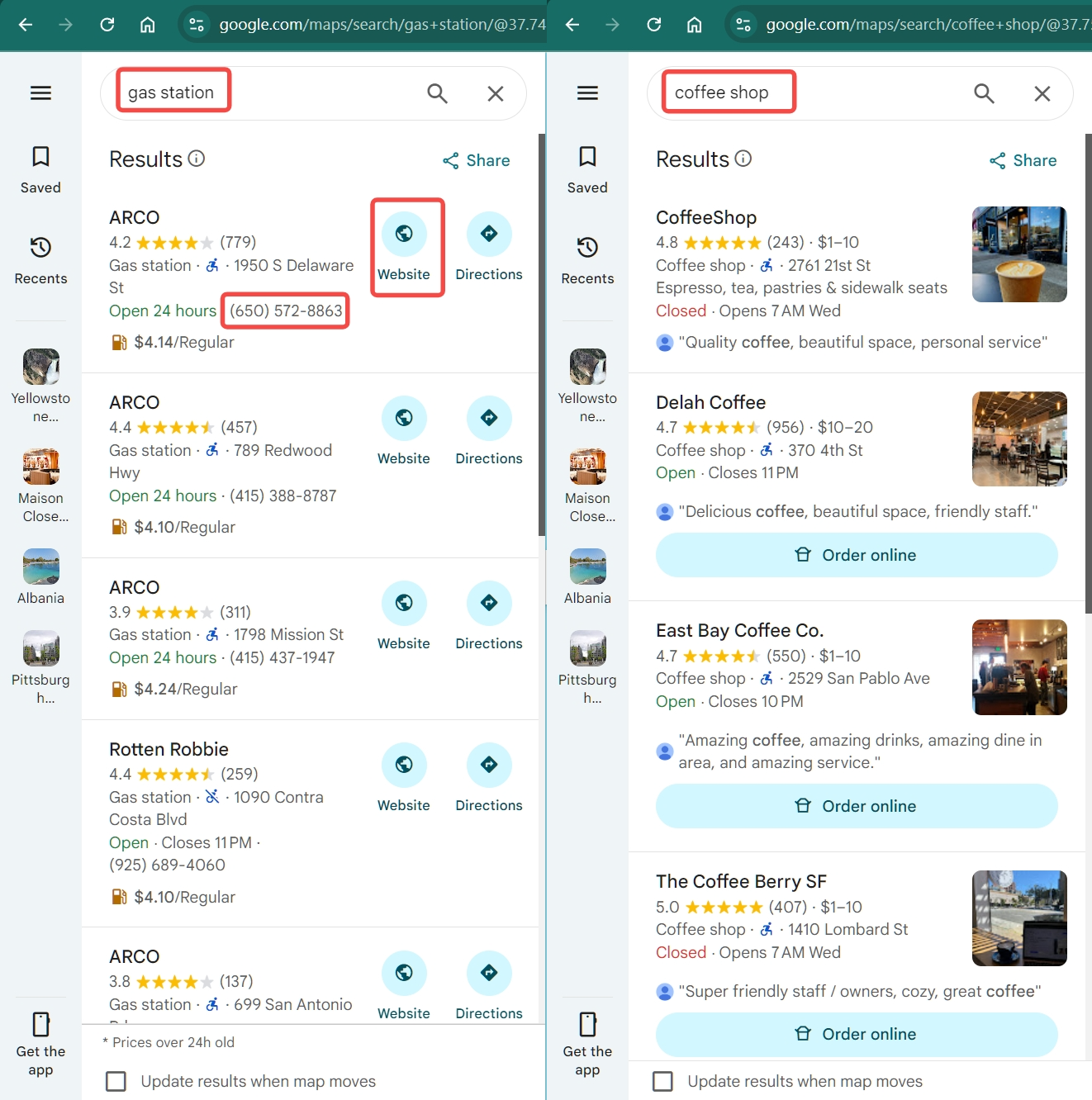
The template only scrapes data from the listing page where it only shows website and telephone when use specific keywords, such as gas station. If it does not scrape any website or telephone, it means that there is no such data on the listing page. Alternatively, it is suggested to use the Google Maps Leads Scraper (by URL) to scrape website and email.
🛠 How to Use: Step-by-Step Guide
1. Start the template
Click "Try it!" or "Start" to load the template.
2. Enter your scraping parameters
On the input screen, fill in your keyword and filter options.
✍🏻 Input Fields Explained
Parameter | Required? | Description | Example |
|---|---|---|---|
Google Maps Language | Required | Select the Google Maps language version used for scraping. | English |
Confirm Target Site | Required | Confirm the website to be scraped. This ensures the task runs on the correct platform. | Google Maps |
Search Keywords (up to 5,000) | Required | Enter one or multiple keywords. Supports up to 10,000 entries per run (one per line). | Starbucks near 95136Petrol stations in London, UK |
3. Run the scraper
- Click "Start" and select a run mode. (Greyed-out modes are not supported for this template.)
- Octoparse will automatically browse Google Maps, load search results, scroll pages, and extract all matching products.
4. Monitor & Handle Interruptions
- Scraping duration may vary based on the number of products returned for your search.
- If a CAPTCHA appears, pause the task, solve it manually, then resume the run.
5. Export your data
- Once scraping completes, go to the "Data Preview" or output section to review.
- Export the results - e.g. as CSV or Excel - for further analysis, filtering, or storage.