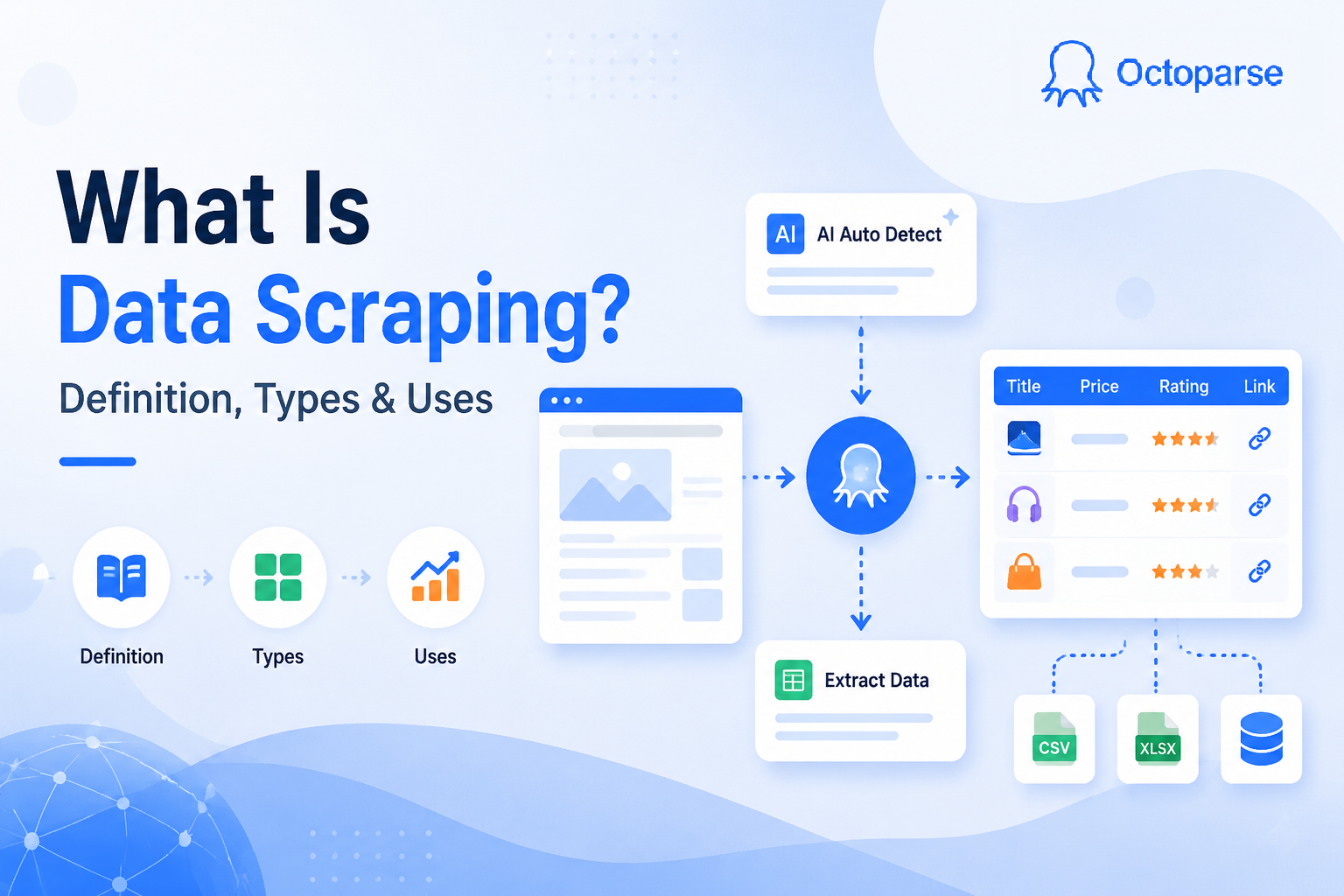
Every day, businesses copy competitor prices, journalists pull public records, and data teams build AI training sets from the web. Most of them aren’t doing it by hand. They’re using web scraping.
Web scraping is one of those topics that sounds technical until you understand what it actually does: it automates the work of going to a website, finding the data you need, and saving it somewhere useful. This guide covers what it is, how it works, what tools exist, where it’s legal, and how to start, whether you write code or not. We’ve also covered related techniques separately: data scraping, screen scraping, and web crawling. Web scraping is where most of that theory becomes practice.
The scale of adoption tells the story: Mordor Intelligence estimates the global web scraping market at $1.03 billion in 2025, growing to $2.23 billion by 2031. 65% of enterprises used web scraping to feed AI and machine learning projects in 2024. It’s no longer a niche developer skill. It’s infrastructure.
Quick Answer
Web scraping is the automated process of extracting data from websites and converting it into structured formats like spreadsheets, databases, or JSON files. It’s a subset of data scraping (the broader category for automated data collection from any digital source).
What’s in this guide:
- What web scraping is and how it differs from related terms
- How it works, step by step
- Types of web scrapers and tools
- Easy web scraping with Octoparse
- What people actually use it for
- Pros, cons, and technical challenges
- Is web scraping legal
- How to start (no-code and developer paths)
What Is Web Scraping
| Term | What it means | Relationship to web scraping |
| Data scraping | Automated data collection from any digital source (web, databases, files, APIs) | Web scraping is a subset of data scraping |
| Web crawling | Bots that follow links to discover and index pages broadly (what Google does) | Crawling finds pages; scraping extracts data from them |
| Screen scraping | Capturing visual data from a GUI or display output | Older technique; web scraping replaced it for most web use cases |
| Data extraction | Parsing raw content into structured fields | This is one step within the web scraping process |
| Web harvesting | Informal synonym for web scraping | Same thing, different name |
There are a few related terms worth knowing before we go further. The most important distinction for everyday use is web scraping vs. web crawling. Crawling is about navigation and discovery at scale; scraping is about targeted extraction. Most real scraping projects do a bit of both.
One thing worth clarifying is that, web scraping is not the same as downloading an entire website. A common misconception is that pointing a scraper at a domain will pull down every page on it. It doesn’t. A scraper extracts only the specific fields you’ve told it to find, on the specific pages you’ve told it to visit. Most scraping projects touch a narrow slice of a site, not the entire domain.
Web crawling (following links to discover and index all pages at scale) is a separate operation, and one you’d set up deliberately.
And what can you actually scrape? Any data that’s visible in a browser is fair game for a scraper:
- Product prices, descriptions, availability, and reviews
- Business contact details: names, emails, phone numbers, addresses
- News articles, blog posts, social media content
- Job listings, real estate data, financial figures
- Research datasets from public sources
How Does Web Scraping Work
Every web page you see is built from HTML. The prices, reviews, and contact details you read in your browser are all sitting in that HTML source. A scraper reads the same source your browser does, it just skips the rendering part and goes straight for the data.
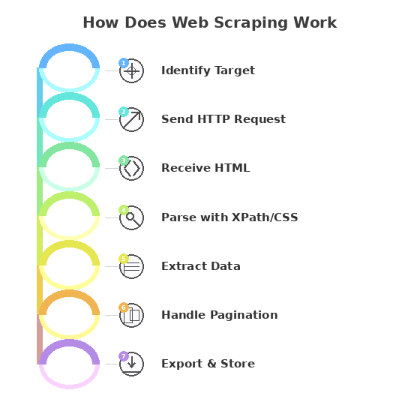
Here’s what happens under the hood:
- Identify the target. You define which URLs to visit and which data fields to collect.
- Send an HTTP request. The scraper requests the page from the server, exactly like a browser would.
- Receive the HTML. The server returns the page’s source code.
- Parse the content. The scraper reads the HTML and locates your target data using selectors like XPath or CSS selectors. Think of selectors as coordinates that point to specific elements on the page.
- Extract the data. Text, links, images, attribute values, whatever you’ve specified gets pulled out.
- Handle pagination. The scraper follows ‘next page’ links or scrolls to capture full result sets, not just page one.
- Export and store. Results go to Excel, CSV, JSON, or directly into your database.
The scraper repeats this across as many pages as you need, around the clock.
What Are the Types of Web Scrapers and Tools
This is where most people get confused, because ‘web scraper’ covers everything from a Python script you write in an afternoon to a cloud service running thousands of parallel tasks. The right tool depends on three things: your technical comfort level, how complex the target site is, and how much data you need.
By how web scraper tools are built
Self-built scrapers
You write the code yourself, typically in Python. Full control, zero licensing cost, but you own the maintenance. The Python ecosystem covers almost any scenario:
- requests + BeautifulSoup: the go-to for static pages. BeautifulSoup parses the HTML; requests handles the HTTP calls. Good for simpler sites where content is in the initial page load.
- Scrapy: a full scraping framework built for scale. It handles concurrency, pipelines, and crawling logic out of the box. The right choice when you’re hitting thousands of pages.
- Selenium or Playwright: for sites that load content via JavaScript after the page opens. They drive a real browser (headless or visible), which means they can click buttons, fill forms, and wait for dynamic content to render. Slower than BeautifulSoup, but necessary for modern single-page apps.
Pre-built / no-code tools
No-code tools like Octoparse give you a point-and-click interface: you load the target URL, click on the elements you want, and the tool builds the scraper for you. No Python required. Some no-code tools like Octoparse also support MCP (Model Context Protocol), which means you can trigger scraping tasks directly from your AI assistant through natural language, without opening the tool at all. They’re also the practical choice when you need to get data this week, not after a learning curve. Most come with pre-built templates for common targets.
By where web scraper tools run
Cloud-based scrapers
Run on remote servers. Your laptop can be off. They handle scheduling, IP rotation, and scale automatically. Cloud scraping is the standard for any recurring or large-volume project. The trade-off is cost: you’re paying for compute and bandwidth.
Local / desktop scrapers
Run on your machine. Free or cheaper to start. Fine for one-off projects or learning the basics. The limits show up fast when you need to run overnight jobs or handle thousands of pages.
By what web scraper tools can handle
Static page scrapers
Work on sites where all content is in the initial HTML response. Fast, lightweight, and easy to build. Most e-commerce product pages, news sites, and directories fall into this category.
Dynamic page scrapers
Required for sites that load content via JavaScript after the initial page request, things like infinite scroll, tab-loaded content, or login-gated data.
Browser extension scrapers
Tools like Web Scraper (Chrome extension) let you build scrapers directly in the browser dev tools. Low barrier to entry, good for quick one-off jobs. Limited for anything that needs scheduling, login handling, or volume.
AI-powered scrapers
A newer category where the tool like Chat4Data uses machine learning to identify data fields automatically, adapt to layout changes without manual updates, and handle anti-bot measures. Faster to set up for complex sites; trade-off is less predictable output on edge cases.
Not sure which approach fits your situation? See: free web scraping tools worth trying.
Quick reference:
| Scraper type | Best for | Examples |
| No-code / pre-built | Non-developers, fast setup, recurring jobs | Octoparse, ParseHub, Web Scraper |
| Python (BeautifulSoup) | Static pages, learning scraping, lightweight projects | BeautifulSoup + requests |
| Python (Scrapy) | Large-scale multi-page crawls, data pipelines | Scrapy |
| Browser automation | JavaScript-heavy sites, login-gated content | Selenium, Playwright |
| Browser extension | Quick one-off jobs, no install required | Web Scraper (Chrome) |
| Cloud scraping service | Enterprise scale, no infrastructure management | Octoparse Cloud, Bright Data |
| AI-powered scraper | Complex sites, auto-adapting to layout changes | Chat4Data, Octoparse auto-detect |
How to Start Web Scraping
Two paths, depending on your background.
No-code path (if you don’t want to write code)
- Download a no-code tools like Octoparse and create an account. They work on Windows and Mac, no setup beyond installation. Octoparse even support MCP for web scraping.
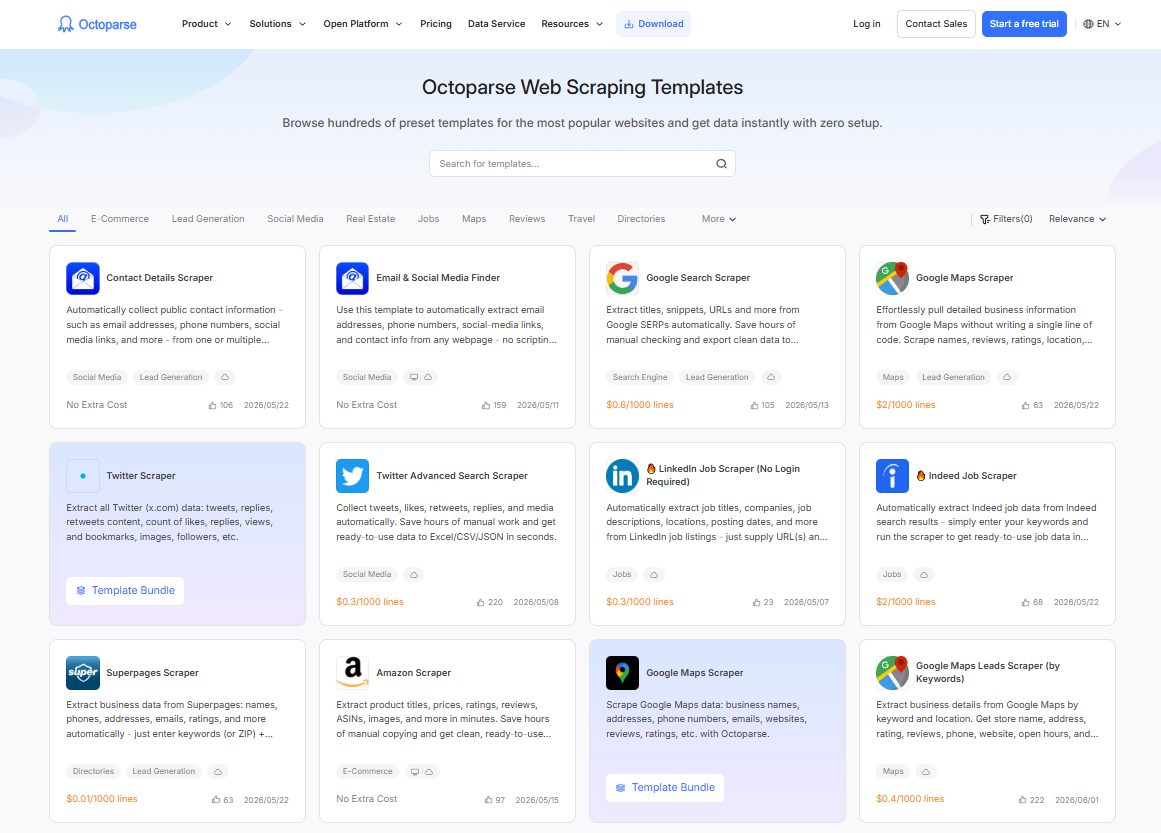
- Pick a template or start from scratch. Templates cover common targets (Amazon, Google Maps, LinkedIn, Indeed, and 600+ more) and work out of the box. For a custom site, you use the point-and-click task builder. If you are unsure about which one to choose, you can click the free template below to have a try.
https://www.octoparse.com/template/contact-details-scraper
- Click the data you want. The tool identifies the HTML selector automatically when you click on an element. You don’t need to know what XPath is.
- Run it, locally or in the cloud. Cloud runs mean you don’t need to keep your laptop on. They also handle IP rotation automatically.
- Export. Excel, CSV, JSON, or direct API connection to your database.
Developer path (Python)
- Static sites: requests + BeautifulSoup. Lightweight, easy to start, handles the majority of simpler targets.
- Large-scale crawls: Scrapy. Full framework with concurrency, pipelines, and export handling built in.
- JavaScript-heavy sites: Playwright or Selenium. Slower, but handles anything that requires a real browser.
If you want a complete step-by-step guide on web scraping, check our article on How to Scrape Data from a Website: A Step-by-Step Guide for Every Skill Level.
What Is Web Scraping Used For
The honest answer: almost any industry that makes decisions based on data. Here are the most common applications, with real examples.
Price monitoring and competitive intelligence
Retailers and wholesalers scrape competitor pages to track prices in real time and adjust their own pricing without manual research. This is probably the single most common commercial use case.
🙋 Real customer example
A European B2B holding company managing approximately 50 companies replaced gut-feel pricing with automated weekly competitor price scraping. Sales teams now use data-backed formulas (taking the median price of three competitors and applying a multiplier) instead of relying on anecdotal market estimates. Based on their experience across the portfolio, moving to data-driven pricing typically yields a 2 to 4% improvement in profit margins.
Lead generation
Sales teams scrape directories, Google Maps, and professional platforms to build targeted contact lists, filtered by location, industry, or business characteristics.
🙋 Real customer example
A digital marketing agency in Spain scrapes Google Business Profiles daily to identify newly registered local businesses. Their 30-person remote sales team uses the data (including whether a business lacks a website or has poor ratings) to personalize outreach. Their benchmark is to contact new entrepreneurs within 15 days of their Google listing appearing, before competitors notice them.
Market research
Companies use web scraping to track how competitors position and price products across retail channels, turning what used to be a manual quarterly exercise into an automated ongoing feed.
🙋 Real customer example
A US-based lighting fixtures design company needed to track how Home Depot, Lowe’s, and Target priced and stocked comparable products across their online catalogues. Before scraping, their team ran manual spot-checks quarterly, a process that took two analysts roughly three days per cycle and still only covered about 30% of relevant SKUs. After setting up scheduled Octoparse scrapes across the three retail sites, the same coverage now runs automatically every two weeks, pulling over 1,200 competitor SKUs per run. The data feeds directly into their quarterly pricing review.
AI and machine learning training data
Organizations building domain-specific models scrape web content to assemble training datasets tailored to their field, rather than relying on generic public datasets.
Over the past year, HTML and metadata extraction has been one of the fastest-growing workload types on Octoparse. The usage pattern is telling: users are scraping raw page content at scale, not targeted product fields. That’s a dataset-building workflow, not a business intelligence one. If you’re assembling training data for fine-tuning, the priorities are different from typical scraping: volume, format consistency, and scheduling reliability matter more than field-level precision.
🙋 Real customer example
A SaaS company building an AI-powered customer support assistant used Octoparse to collect their own help center articles, historical support conversation summaries, and relevant third-party documentation pages. Over four weeks of scheduled scraping across approximately 800 source pages, the pipeline produced a structured dataset of ~120,000 text chunks used to fine-tune their support model. The main requirement wasn’t precision (they didn’t need specific fields), it was consistent HTML-to-text formatting and reliable scheduling so the dataset stayed current as new articles were published.
More common applications
- eCommerce: product catalog building, stock monitoring, review aggregation
- Finance: real-time market data, earnings filings, real estate listings
- Recruitment: job board aggregation, candidate sourcing
- Travel: rate comparison, availability tracking across booking sites
- Marketing: brand monitoring, competitor ad tracking, social listening
- Academic research: large-scale data collection from public sources
For business applications, see web scraping business ideas.
Is Web Scraping Legal
The short answer: scraping publicly available data is generally legal in most jurisdictions, but ‘generally’ is doing a lot of work in that sentence. Several factors determine where your specific project lands.
Scraping search engines is a common case. See whether SerpApi is legal after the 2026 ruling, and how to get Google search data in practice
What typically makes it acceptable
- The data is publicly accessible without authentication
- You’re collecting factual information, not copyrighted creative content
- You’re not bypassing technical access controls
- Your use complies with the site’s Terms of Service
- You’re not collecting personal data in ways that violate GDPR or CCPA
Key precedent: hiQ v. LinkedIn
In 2022, the US Ninth Circuit ruled in hiQ Labs v. LinkedIn that scraping publicly available data does not violate the Computer Fraud and Abuse Act (CFAA), establishing that accessing public web data programmatically is not “unauthorized access” under US law. LinkedIn’s Terms of Service still prohibit scraping, however, and the legal landscape continues to evolve.
EU and GDPR
GDPR places strict limits on collecting, storing, or processing personal data about EU residents, regardless of whether that data is publicly accessible. Scraping names, emails, or contact details from EU sources for commercial use requires a lawful basis. When in doubt, take legal advice before scraping personal data at scale.
Web Scraping Best Practices
| Practice | Why it matters |
| Check robots.txt first | Tells you which paths the site owner prefers not to be crawled |
| Add delays between requests (1 to 3 seconds) | Faster requests trigger rate-limiting and blocks |
| Read the Terms of Service | Some sites explicitly prohibit scraping. Five minutes now beats a legal headache later |
| Scrape only public data | Don’t bypass authentication, login walls, or paywalls |
| Use rotating proxies at scale | Distributes request load and reduces block risk on large projects |
| Know your data privacy obligations | GDPR and CCPA apply to EU and California residents’ contact details even if publicly visible |
| Build in error handling | Sites go down, layouts change. Robust scrapers log failures and retry gracefully |
| Get legal advice for commercial use at scale | A one-off scrape is a different risk profile from a production pipeline on millions of records |
Most scraping projects fail not because the scraper broke, but because someone skipped the basics. These are the ones worth internalizing before you write a single line of code or run your first template.
For a full breakdown, see: is web scraping legal? and is it legal to scrape Amazon?
Easy Web Scraping With Octoparse
If you want to start scraping without writing a line of code, Octoparse is worth a look. It’s a no-code desktop and cloud scraping tool built around a point-and-click task builder: you load a URL, click the data you want, and Octoparse generates the scraper for you.
A few things that distinguish it from coding your own scraper:
- 600+ pre-built templates. Amazon, Google Maps, LinkedIn, Indeed, TikTok, and more. Point the template at your target URL and run. No configuration needed for standard targets.
- Cloud execution. Runs on Octoparse’s servers, not your laptop. Schedule scrapes daily or hourly, and data lands in your export without you being online.
- Built-in anti-blocking. Four mechanisms work together: automatic user agent switching cycles through desktop and mobile browser agents to avoid device fingerprinting; auto cookie clearing resets session state at set intervals so the target site sees each request as a fresh visit; cloud execution distributes tasks across multiple globally deployed server nodes, each with a different IP address, so no single IP is making high-frequency requests; and residential proxy support uses real residential IP addresses to ensure privacy and anonymity, granting access to content that may be restricted based on geographical location. You don’t configure any of this manually.
- MCP integration. Octoparse supports Model Context Protocol (MCP), which means your AI assistant (Claude, ChatGPT, Cursor, and others) can search templates, create tasks, run scrapers, and export data through natural language, without opening the Octoparse app at all.
- Flexible export. Excel, CSV, JSON, or direct connection to your database or Google Sheets.
What Octoparse Learned From 10+ Years of Scraping
What Are The Most Scraped Data Types
According to the post Most Scraped Websites, e-commerce marketplaces, directory websites, and social media platforms are the more scraped websites in general. Websites like Amazon, eBay, Walmart, Yellow Pages, Craigslist, and social media platforms like Twitter and LinkedIn are among the popular.
What data are people getting from these sites? Well, everything that serves their research or sales.
- Online product details like stock, prices, reviews, and specifications;
- Business/leads information like stores’ or individuals’ names, email addresses, phone numbers, and other information that serve any outbound gestures;
- Discussions on social media or comments on the review pages that offer data sources for NLP or sentiment analysis.
The need to migrate data is also one of the reasons people choose web scraping. A scraper then works out like a grand CTRL+C action and helps copy data from one place to another for the user.
You may also be interested in:
1. How to Scrape eBay Listings
2. How to Scrape Google Shopping
3. Steps to Scrape Amazon Product Data
4. How to Scrape & Track Amazon Prices
What Are The Biggest Web Scraping Failure Causes
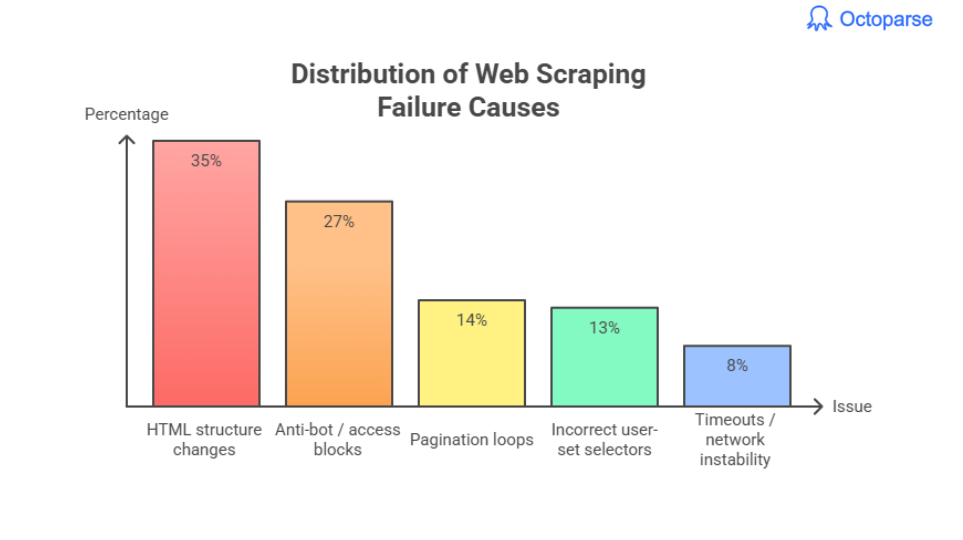
Across all recorded errors:
- HTML structure changes → ~35%
- Anti-bot / access blocks → ~27%
- Pagination loops → ~14%
- Incorrect user-set selectors → ~13%
- Timeouts / network instability → ~8%
No-Code Scraping Has Overtaken Coding
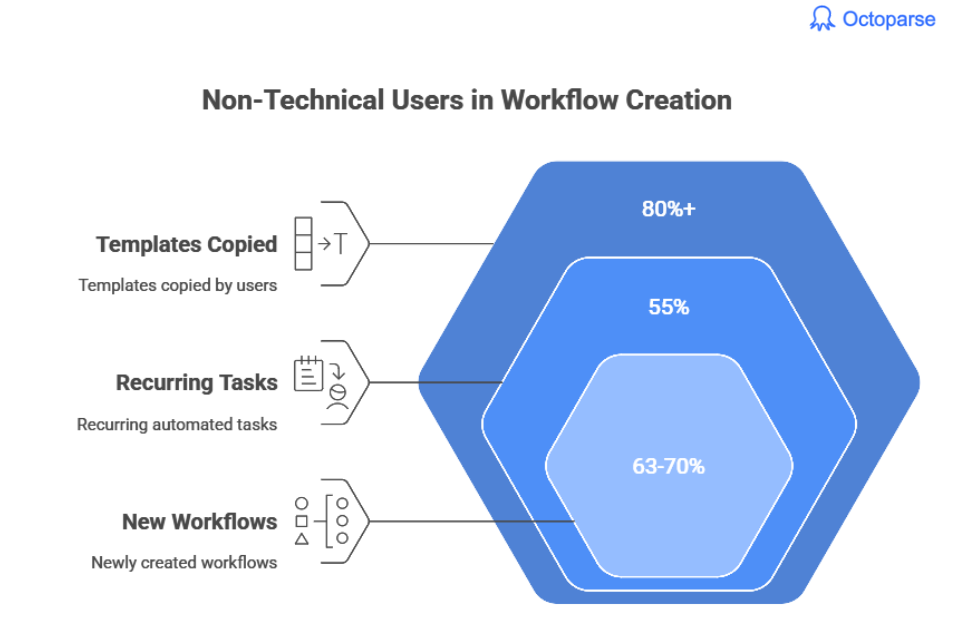
In 2024–2025, industry estimates suggest non-technical users now account for:
This reflects a broader shift toward business teams owning their data pipelines directly, without depending on engineering.
- 80%+ of templates copied by users
Upstream Data Cleaning Cuts Work by ~40%
Teams that clean data during extraction reduce manual cleanup time dramatically.
Common high-value transformations:
- Price normalization
- Unit conversions
- Text stripping
- Category tagging
- Date formatting
Most users underestimate the value of extraction-level sanitation.
Pros, Cons, and Common Challenges of Web Scraping
Web scraping is powerful, but it’s not the right tool for every situation. Here’s an honest look at what it’s good at and where it gets complicated.
The advantages of web scraping
- Scale without headcount. A scraper runs overnight and returns thousands of records. The manual equivalent is a team of people with spreadsheets.
- Cheaper than alternatives. Building a custom API integration for every data source you need is expensive and slow. For a one-time or occasional project, a scraper is usually faster and cheaper.
- Gets data APIs don’t expose. An API gives you what the company decides to share. Scraping gives you anything visible in the browser. That gap matters when you need pricing history, competitor product catalogs, or public contact data that no API provides.
- Format flexibility. Output goes to Excel, CSV, JSON, or straight into your database. Most tools let you clean and structure the data in the same step.
- Accessible without coding. No-code tools handle the majority of common scraping scenarios without any programming knowledge.
The disadvantages of web scraping
- Setup takes time. Even no-code tools require understanding the basics of how HTML is structured. Budget an hour or two for your first scraper, longer for complex sites.
- Sites push back. Anti-bot systems like Cloudflare, Datadome, and CAPTCHA services actively block scrapers. Some sites (LinkedIn, Facebook) are aggressively protected. Getting around this requires proxies and careful request pacing.
- Scrapers break. When a site changes its layout, your scraper needs to be updated. For long-running projects, factor in maintenance time.
- Legal and compliance considerations. Scraping personal data from EU or California residents triggers GDPR and CCPA obligations. Not everything that’s public is fair game for commercial use.
Technical challenges in Scraping and how to handle them
These come up on almost every project. Knowing about them in advance saves a lot of frustration.
IP blocking
High-frequency requests from a single IP get flagged fast. The standard solution is rotating proxies, which cycles through different IP addresses with each request. For sites with strict enforcement, residential proxies (IPs tied to real devices rather than datacenters) are harder to detect and block. Paid residential IP services offer higher-quality IP pools with lower block rates, which is worth considering for large-scale or high-value projects where datacenter IPs consistently get flagged.
Anti-bot systems
Major sites use Cloudflare, Datadome, or CAPTCHAs to block automated traffic. Bypassing these usually requires rotating proxies, spoofing browser headers to appear human, and adding random delays between requests. Some cloud-based tools handle this automatically. Sandbox your scraper on low-traffic test targets before hitting production sites at scale.
Dynamic JavaScript rendering
Many modern sites load their actual content after the page opens, via JavaScript. A basic scraper that only reads the initial HTML gets an empty page. For these sites you need a dynamic page scraper that runs a real browser engine (Selenium, Playwright, or a tool with built-in JS rendering).
CAPTCHA
Some sites serve CAPTCHAs when they detect non-human behavior. But there are ways out: slow down your request rate to stay under the detection threshold, use CAPTCHA-solving services, or use cloud scraping tools with built-in handling.
Scraper maintenance
Sites redesign. When they do, your scraper’s selectors (the XPath or CSS coordinates pointing to specific elements) break. For any production scraping project, build in a monitoring step that alerts you when output drops to zero.
More on handling challenges
1. 9 web scraping challenges and how to solve them
The Bottom Line
Web scraping has moved from a niche developer skill to something data analysts, marketers, and researchers use every week. The tools are better, the no-code options are genuinely usable, and the range of applications keeps expanding, especially as more teams need data for AI projects.
The limiting factor isn’t usually the scraping technology. It’s knowing what data you need and what you’re going to do with it. Start there, pick the tool that matches your technical level, and run a small test before committing to a full pipeline.
FAQs about Website Scraping
- What is the difference between web scraping and web crawling?
Crawling is about discovery: a crawler follows links to find and index pages at scale (what search engines do). Scraping is about extraction: it pulls specific data from specific pages. Most real scraping projects use a crawl step to find target URLs, then a scraping step to get the data.
- What programming language is best for web scraping?
Python, by a significant margin. The ecosystem (BeautifulSoup, Scrapy, Playwright, Selenium) covers every scraping scenario from simple static pages to complex JavaScript-heavy sites. Node.js with Puppeteer or Playwright is a solid alternative for teams already working in JavaScript. For non-developers, no-code tools remove the language question entirely.
- Can I scrape any website?
Technically, any publicly accessible website can be scraped. Practically, some sites deploy aggressive anti-bot measures that make scraping difficult. Legally, Terms of Service and data privacy laws (GDPR, CCPA) apply. Always check robots.txt and Terms of Service before starting.
- How do I avoid getting blocked while scraping?
Rate-limit your requests (1 to 3 second delays), rotate IP addresses with proxies, vary your user-agent string, and use cloud-based scraping that distributes request load.
- What’s the difference between web scraping and data scraping?
Data scraping is the broader category: any automated process that extracts data from a digital source, including databases, files, and APIs. Web scraping is specifically about extracting data from web pages via HTTP requests and HTML parsing. All web scraping is data scraping; not all data scraping is web scraping.