If you’ve been asked to “build an API for scraping social media data” or “integrate web data into our analytics database,” you’re probably wondering where to start.
The terminology alone can be confusing: APIs, web scraping, data extraction, ETL pipelines—these terms get used interchangeably, even though they refer to different things.
This guide is designed to clarify the fundamentals. We’ll cover what an API actually is, how APIs relate to web scraping, and—critically—when an API is the right tool for your data extraction needs versus when it isn’t.
Note: If you’re already familiar with the basics of APIs and want to compare specific scraping API tools, see our companion guide: The Best Web Scraping APIs for Real Time Data.
Key Takeaways
- “API” means different things in the data extraction context. Clarify whether you need official data APIs, scraping-as-a-service APIs, or API access to scraping platforms.
- Raw data is just the beginning. Budget time and resources for transformation, validation, and storage—not just extraction.
- Choose tools based on operational reality. Ad-hoc needs favor API-first services. Long-term monitoring favors platforms with visual maintenance.
- Legal and ethical considerations matter. “Technically possible” doesn’t mean “advisable.” It’s best to always check the legal landscape of web scraping before scaling.
- Start with the question, not the tool. Define what data you need and why before deciding how to get it.
What Is an API? A Practical Definition
An API (Application Programming Interface) is a structured way for software systems to communicate with each other. Think of it as a contract: one system says “if you send me a request in this exact format, I’ll send you data back in this exact format.”
Wikipedia’s definition captures the technical essence: “In computer programming, an application programming interface (API) is a set of subroutine definitions, protocols, and tools for building application software. In general terms, it is a set of clearly defined methods of communication between various software components”.
But in practical terms, an API is simply a set of rules that developers follow to request and receive data from another system.
One misconception that most people have is that API can extract data.
It is not completely true since it’s only responsible to retrieve the data according to the dedicated resources. In most cases, you will get only what you request. However, you are not accessible to other information.
For Example: When you call Twitter’s API to retrieve tweets, you don’t access Twitter’s database directly. You send a structured request, and Twitter’s servers decide what data to return based on their rules.
A Web API is used to send your request for that keyword to a web server, and in return, the server provides reviews or comments to you in a raw data format. Raw format data doesn’t necessarily look user-friendly like spreadsheet rows and columns:

As such, in order to “consume the data” from a product page, we need to go through a few steps for an intact process of extraction, transformation to storage. Sometimes you even have to convert the raw data into the desired format. It sounds like an easy task for experienced programmers. However, the complexity still frustrates people who have no programming background yet need data the most.
Three Types of “APIs” in Web Data Collection
Here’s where confusion typically starts. When people search for “web scraping API,” they might be looking for three fundamentally different things:
1. Official Data APIs (Not Web Scraping)
These are APIs provided directly by platforms—Google, Twitter, Amazon, financial data providers.
Examples: Google Search API, Twitter API, Yahoo Finance API, Shopify API
What they offer:
- Clean, structured data
- Official permission to access
- Reliable uptime and documentation
- Rate limits and usage quotas
What they don’t offer:
- Data outside their predefined schema
- Historical data they’ve chosen not to expose
- Flexibility when their rules change
Official APIs are excellent when they exist and cover your needs. The problem? They often don’t. API schemas are designed for the platform’s priorities, not yours. When you need data points they don’t expose, you’re out of luck.
2. API-First Web Scraping Services
These are third-party services that let you send a URL and receive HTML or parsed data back.
Examples: ScraperAPI, ScrapingBee, Bright Data Web Unlocker
How they work:
- You send a request:
GET https://api.scraper.com/scrape?url=example.com - The service handles proxies, browser rendering, and anti-bot measures
- You receive raw HTML or structured JSON
Best for:
- Developers who want to avoid proxy management
- Quick validation of whether a site is scrapable
- Lightweight, one-off data collection
Limitations:
- You still write the parsing logic
- Complex JavaScript-rendered pages require configuration
- Ongoing changes to target sites break your code
3. Scraping Platforms with API Access
These are comprehensive scraping tools where you define extraction logic first (often visually), then use APIs to automate and retrieve results.
Examples: Octoparse, ParseHub, Import.io
How they work:
- You build a scraper (point-and-click or code)
- The platform handles execution, scheduling, and proxy rotation
- APIs can be used to manage tasks and retrieve extracted data programmatically
Best for:
- Non-developers who need maintainable scrapers
- Teams that want to separate “building” from “running”
- Long-term monitoring projects where site layouts may change and visual maintenance is preferred over code rewrites
Trade-off:
- Less immediate than API-first services
- Setup overhead before you can retrieve data
API vs Web Scraping
This is the conceptual shift that trips up most beginners.
API-first scraping services let you scrape through an API. You send URLs, receive HTML. The API is the scraping mechanism itself.
Scraping platforms with API access let you scrape with API control. You build the scraper elsewhere, then use APIs to operate it—triggering runs, adjusting parameters, pulling results.
Neither approach is inherently better. The right choice depends on your operational reality:
| Factor | API-First Services | Platform + API Access |
|---|---|---|
| Speed to first result | Minutes | Hours (setup required) |
| Maintenance burden | You maintain parsers | Visual tools make updates easier |
| Technical skill required | Moderate | Low to moderate |
| Best for | Ad-hoc requests, testing | Scheduled monitoring, team workflows |
What Happens After Data Extraction?
Here’s something product marketing rarely mentions: getting raw data is only the beginning.
When you call an API—whether official or scraping-based—you receive data in a specific format (usually JSON or HTML). That raw response is rarely ready for immediate use. Real-world data pipelines involve:
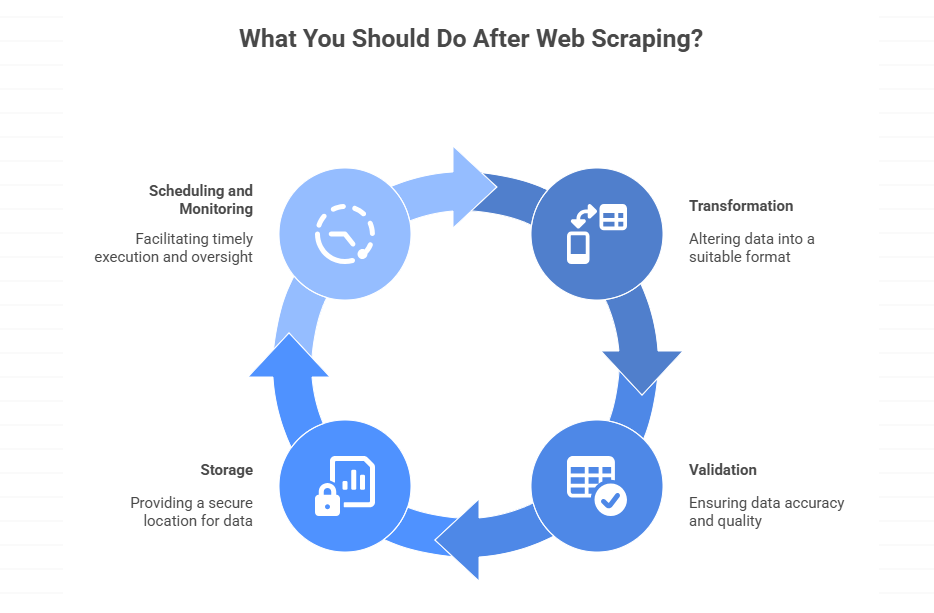
1. Raw JSON from a scraping API might look like this:
json
To analyze this data, you need to:
- Convert
"$49.99"to a numeric value:49.99 - Parse
"4.5 out of 5 stars"to extract:4.5 - Extract the integer from
"2,341 ratings":2341
2. Validation
Not all scraped data is accurate. You need checks:
- Did the page load correctly, or did you scrape a CAPTCHA?
- Are required fields present?
- Do values fall within expected ranges?
3. Where Scraped Data Is Stored?
Where does data go after extraction?
- Flat files (CSV, Excel) for simple analysis
- Databases for ongoing collection
- Data warehouses for cross-source analysis
- CRM systems, BI tools, or custom applications
4. Scheduling, Monitoring, and Failure Handling
If you need data regularly:
- How often should scraping run?
- What happens when a job fails?
- How do you detect when site layouts break your scraper?
This is why the “just use an API” advice often oversimplifies. APIs handle one piece of the puzzle. The extraction-to-insight journey involves much more.
When APIs Are the Wrong Tool
APIs—whether official or scraping-based—are not always the answer. Recognizing when to use alternatives saves significant time and frustration.
1. When Official APIs Are Sufficient
If a platform provides an official API that covers your data needs, use it. Official APIs offer:
- Better reliability
- Legal clarity
- No anti-bot friction
Before building a scraper, always check: Does an official API exist? Does it expose the data I need?
2. When Manual Collection Makes More Sense
For one-time projects with small data volumes, the overhead of setting up API integrations may exceed the time saved. Copy-paste exists for a reason.
3. When You Need Data APIs Don’t Provide
This is where web scraping becomes necessary. Common scenarios:
- Competitor pricing that isn’t exposed via API
- Historical data that platforms don’t archive
- Public data from sites without developer APIs
- Cross-platform aggregation from multiple sources
4. When Real-Time Isn’t Actually Required
Many “real-time” requirements are actually “fresh enough” requirements. If hourly or daily data meets your needs, scheduled scraping is simpler and cheaper than engineering true real-time pipelines.
Getting Started: Your First API Integration in Web Scraping
If you’re ready to experiment, here’s a minimal path to your first API-powered data extraction:
Step 1: Define What You Need
- What specific data points?
- From which websites?
- How frequently?
- In what format for downstream use?
Step 2: Check for Official APIs
Search [site name] API documentation. Many platforms offer developer access you might not know about.
Step 3: Evaluate Your Options
- For quick experiments: Try a free tier from ScraperAPI or ScrapingBee
- For ongoing projects: Evaluate platforms like Octoparse that separate building from running
- For full control: Build custom scrapers with libraries like Scrapy or Playwright
Step 4: Start Small
Don’t architect a complex pipeline before validating that:
- The data you need is actually accessible
- Your extraction logic handles edge cases
- The volume and frequency requirements are realistic
Step 5: Plan for Maintenance
Every scraping project eventually breaks. Plan for:
- Monitoring and alerting
- Update workflows when sites change
- Documentation so others can maintain your work
How Octoparse Fits This Workflow
Octoparse is a visual scraping platform designed for users who want to avoid writing code. You build scrapers by pointing and clicking, then use the API layer to automate everything else.
Developers who want an end-to-end implementation can follow this YouTube scraper API with Python tutorial.
What the API lets you do:
- Trigger extraction tasks programmatically
- Schedule runs (hourly, daily, or custom intervals)
- Pull structured results directly into your database, CRM, or BI tools
- Export data as JSON, CSV, or Excel
Why this matters for beginners: You focus on what data you need. Octoparse handles proxies, browser rendering, and cloud execution. When a site layout changes, you fix the scraper visually—no code debugging required.
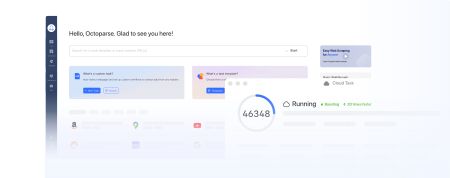
Turn website data into structured Excel, CSV, Google Sheets, and your database directly.
Scrape data easily with auto-detecting functions, no coding skills are required.
Preset scraping templates for hot websites to get data in clicks.
Never get blocked with IP proxies and advanced API.
Cloud service to schedule data scraping at any time you want.
Conclusion
You’re not looking for an API. You’re looking to turn web data into business decisions—faster and with less friction than doing it manually.
The API is just the mechanism. What matters is whether you can:
- Get the data you actually need (not just what’s easy to access)
- Keep it flowing reliably (without babysitting broken scripts)
- Use it where it matters (your CRM, your dashboards, your models)
For some teams, that means stitching together scraping services and custom code. For others, it means using a platform that handles the infrastructure so you can focus on what the data tells you.
Either way, the goal isn’t “use an API.” The goal is to make web data work for your business.
Start with the outcome you need. Then choose the extraction method that gets you there with the least ongoing friction.