You set a scraper running on a major e-commerce site expecting thousands of rows of data. The script finishes without errors, the CSV looks clean, and then you realize you have 20 rows instead of 10,000. Your scraper found the front door of the site and missed every page behind the “Next” button. This is the most common data loss problem in web scraping, and it has a name: pagination.
Most modern websites split large datasets across multiple pages to keep load times fast. Getting all the data means teaching your scraper to navigate every page, and the approach is completely different depending on which pagination type the site uses.
This guide covers every pagination pattern you’ll encounter in web scraping and walks you through how to handle each one in Octoparse or using code.
Web Scraper Pagination Types at a Glance
| Pagination Type | How to Identify It | URL Changes? | Octoparse Method |
| Next Button | Clickable “Next” or “>” at page bottom | Yes (usually) | Pagination Loop → Click to Paginate |
| Page Numbers | Numbered links (1, 2, 3…), no Next button | Yes | Pagination Loop → XPath-based loop |
| Infinite Scroll | Content loads as you scroll; no page links | No | Scroll Page action |
| Load More Button | Single button appends next batch | No (usually) | Click Item loop on the button |
| AJAX / Dynamic | URL stays the same; content updates on click | Sometimes | Built-in JS browser; wait actions added |
The table above summarizes all five pagination types, how to identify each one, and the corresponding method in Octoparse.
Understanding these patterns is important because pagination is one of the most common challenges in web scraping. In fact, more than 70% of structured web data extraction tasks involve lists spread across multiple pages, making pagination handling one of the highest-impact skills for any scraping workflow.
What Is Pagination in Web Scraping?
Pagination is a design pattern that splits large datasets across multiple pages to keep individual pages fast and readable. Rather than loading 10,000 product listings on a single URL, a site displays 50 per page and provides navigation like buttons, links, or scroll triggers to move between pages.
For web scraping, this creates a specific problem: a basic scraper makes one HTTP request to one URL, extracts what it finds, and stops. To collect the full dataset, your scraper needs to detect that more pages exist, navigate each one in sequence, and extract data from each, without duplicates and without skipping a page.
The approach differs entirely depending on the pagination type. A site using a Next button requires a completely different strategy than one using infinite scroll even if both ultimately display the same data. You need to identify which type you’re dealing with before you can build a reliable scraper.
Why Scrapers Miss Paginated Data
Most scrapers that miss paginated data fall into one of three failure modes:
The static trap
Simple scripts, particularly those using Python’s BeautifulSoup, make one GET request, download the HTML, parse it, and stop. They can see the HTML code for a “Load More” button but cannot click it or trigger the JavaScript event that loads new content.
The timing gap
Even a scraper designed to handle pagination can fail if the page takes 2 seconds to render new content after a scroll or click. The bot advances in milliseconds, finds an empty container, and assumes it has reached the end. This is a race condition between page load time and scraper speed.
Hidden pagination logic
Modern SPAs (React, Vue.js) often encode pagination in JavaScript event handlers rather than standard HTML links. A scraper looking only for <a> tags will miss these triggers entirely. The URL may not change between pages, making it impossible to detect pagination from the URL alone.
How to Handle Each Pagination Type in Octoparse
1. Next Button Pagination
The most common pattern. The button may say “Next”, display a right arrow “>”, or use a custom label, the underlying behavior is the same: each click loads the next page of results. Octoparse can detect and click it automatically.

Setup in Octoparse:
- Complete your data field selection on the first page.
- In the Tips panel, click Auto-detect web page data → Check. Octoparse highlights the detected Next button.
- Select “Paginate to scrape more pages” and uncheck “Add a page scroll” unless the page lazy-loads content. Click “Create workflow” and run a test.
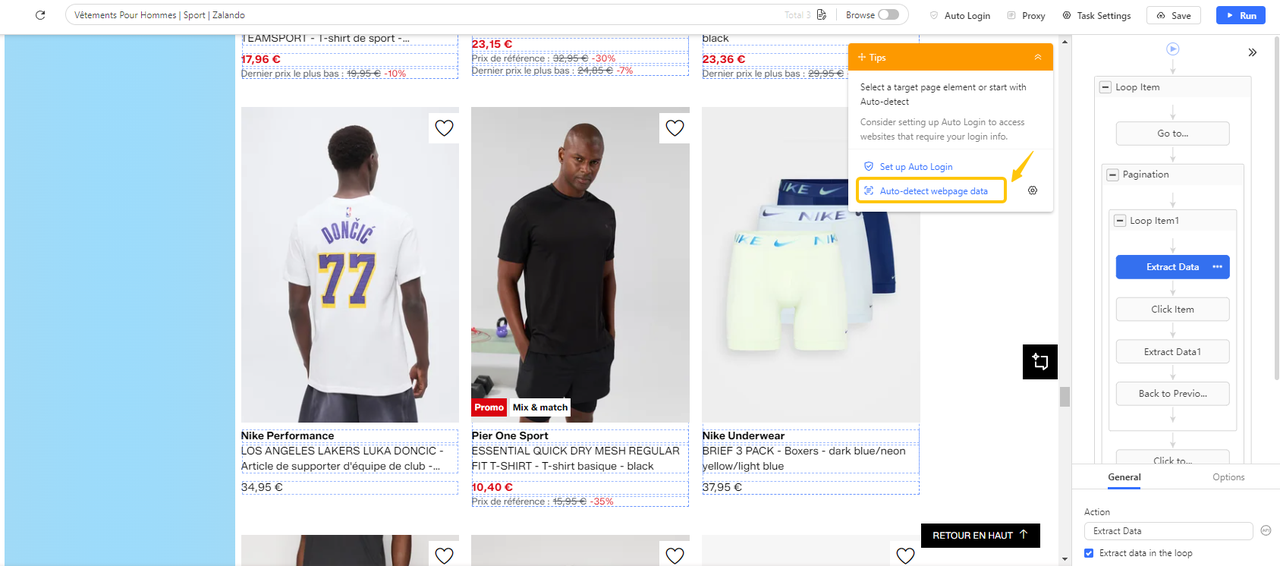
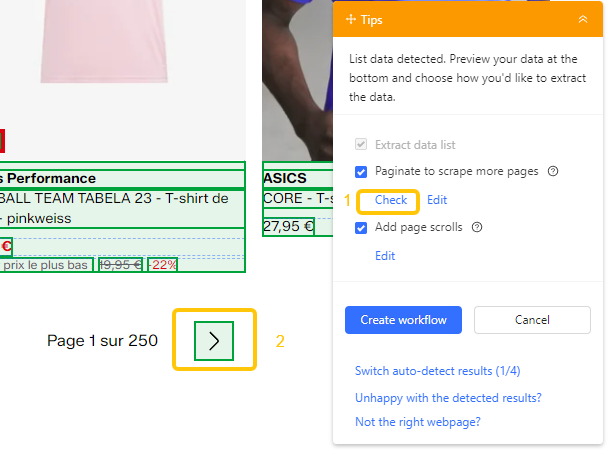
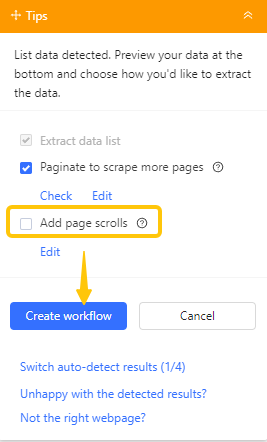
If auto-detection fails:
- Click the Next button manually inside Octoparse’s browser.
- In the Tips panel, select “Loop click next page”.
- Confirm the correct element is highlighted in the workflow.
- Add a delay in Advanced Options if the site takes time to load between pages.
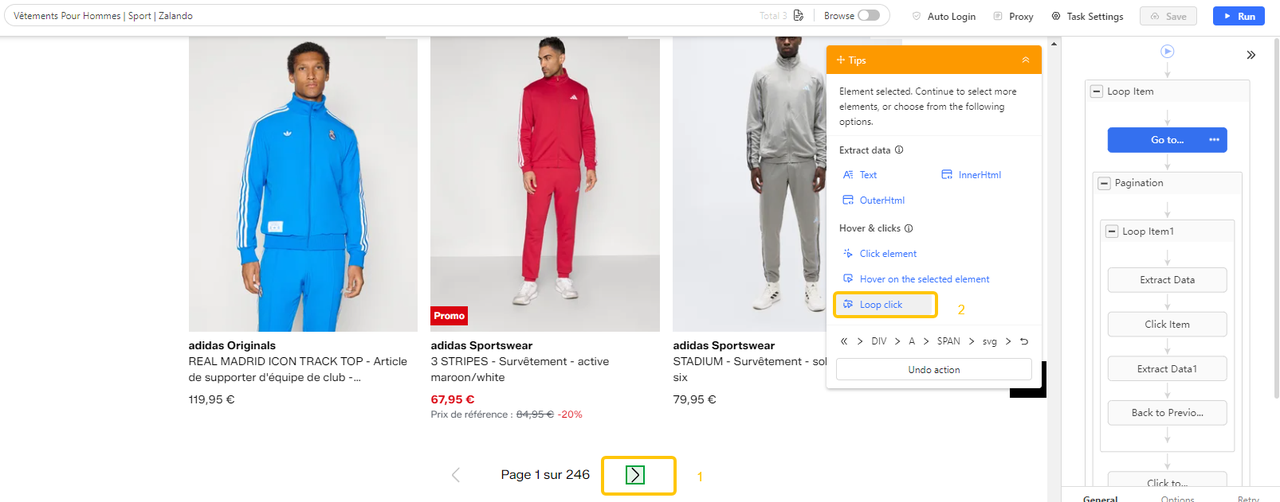
Note: Octoparse uses XPath to locate the button regardless of its visible label. The scraper clicks the element, waits for the next page to load, extracts data, and repeats until no Next button is found.
👉 Step-by-step tutorial: Dealing with Pagination (clicking a Next button)
2. Page Number Pagination (No Next Button)
Some sites show numbered links (1, 2, 3…) without a Next button. The challenge is that the “current page” and “next page” elements look nearly identical in the HTML. Octoparse needs to identify which link advances the scraper forward on every single page.
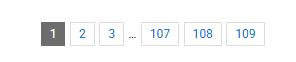
Setup in Octoparse:
- Click the next page number (e.g., “2”) in Octoparse’s browser view.
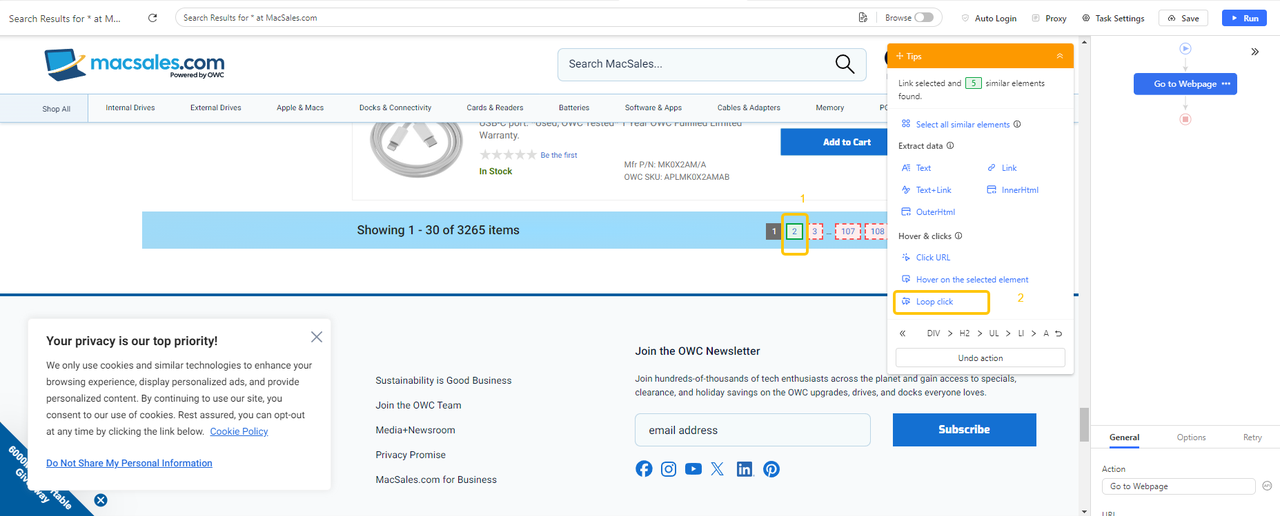
- Select Loop click single URL from the action options.
- Copy and paste the current page URL to your browser (e.g., Chrome). Right-click page 1 and select the Inspect option. You’ll find the code corresponds to the link on page 1.
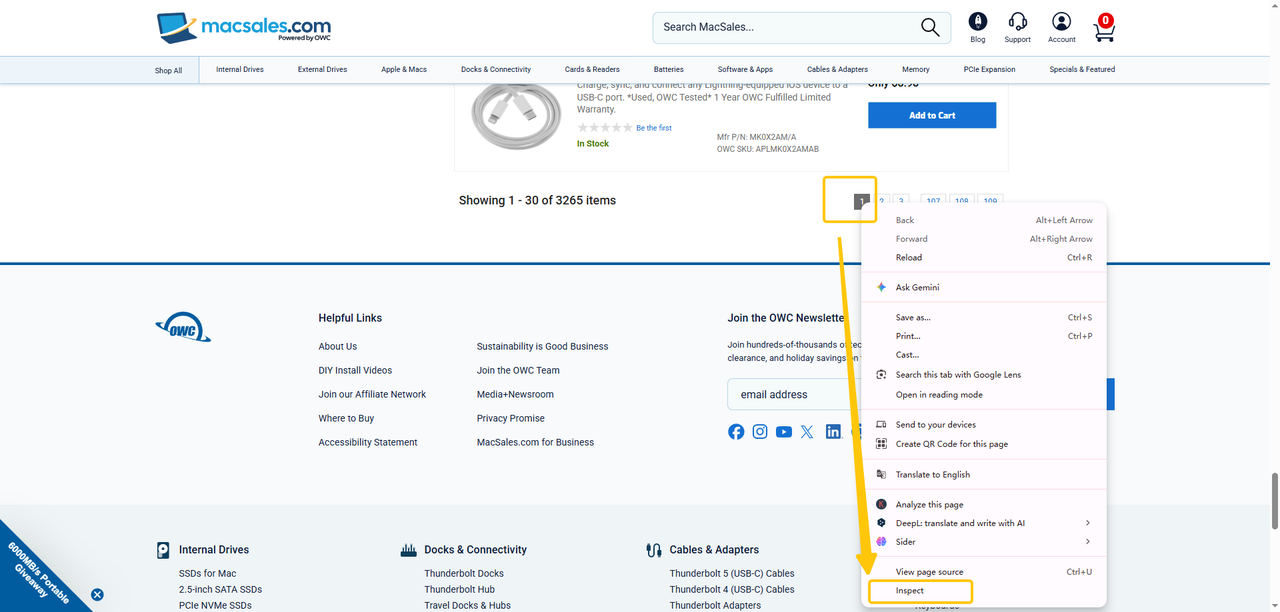
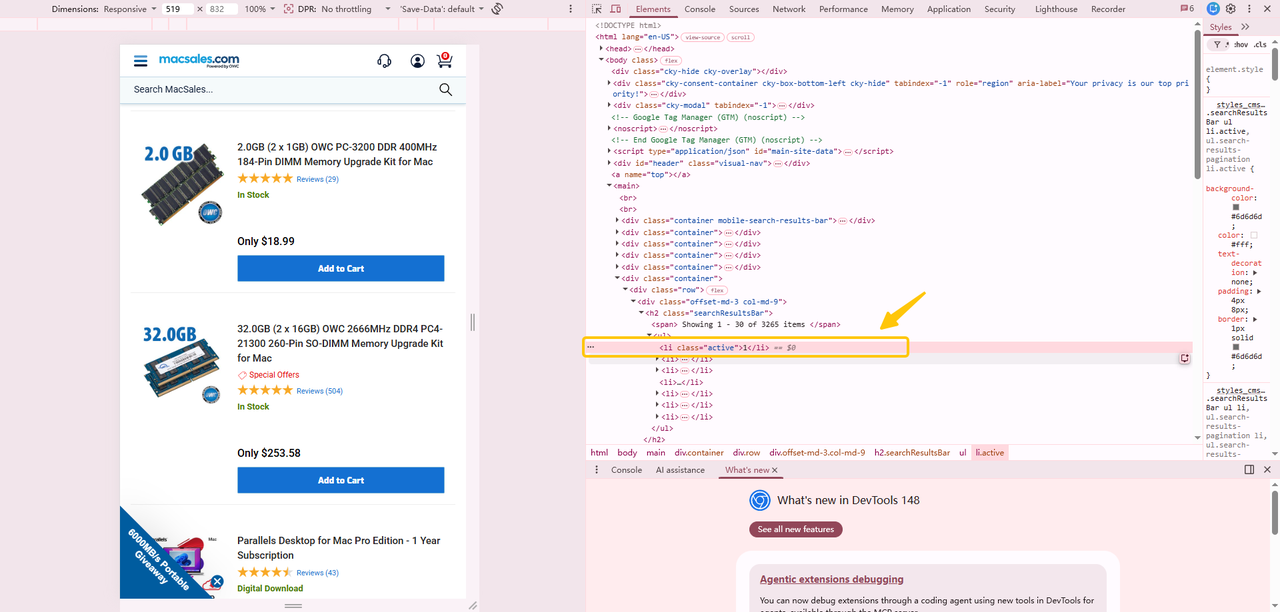
- Replace the auto-generated XPath with a relative expression that always targets the active page’s immediate sibling:
This targets the currently active page link (class=”on”) and selects the next link in sequence, so on page 1 the scraper clicks “2”, on page 2 it clicks “3”, regardless of how many pages exist.
For sites with “Next 10 Pages” jumps (e.g., page 1 → page 11), the same XPath approach handles it, the sibling selector finds the next available number rather than expecting a sequential +1 increment.
Note: The exact XPath depends on the website’s HTML structure. Always use Chrome DevTools (right-click → Inspect) to verify the class name of the active page element before setting the XPath.
📑 Step-by-step tutorial:
👉 Dealing with Pagination (no Next button)
👉 Step-by-step tutorial: How to handle Next 10 Pages pagination
3. Infinite Scroll
Infinite scroll, also called endless scroll, loads new content automatically as the user scrolls down, with no page links or buttons. Social feeds, image galleries, and job boards use this pattern heavily.
The scraping problem is that a standard scraper’s initial HTTP response only contains the first batch of visible items (typically 10–30 records). The rest doesn’t exist in the DOM yet. It only loads when JavaScript detects a scroll event. Infinite scroll is designed to increase time-on-page engagement, which is precisely what makes it hard for bots that don’t scroll.
Setup in Octoparse:
The built-in browser renders JavaScript and simulates scrolling. Configure a Scroll Page action inside a loop that scrolls to the bottom, waits for new content to load, and repeats until no new items appear.
Option 1: Auto-Detect (Recommended)
1. Click Auto-detect webpage data in the Tips panel.
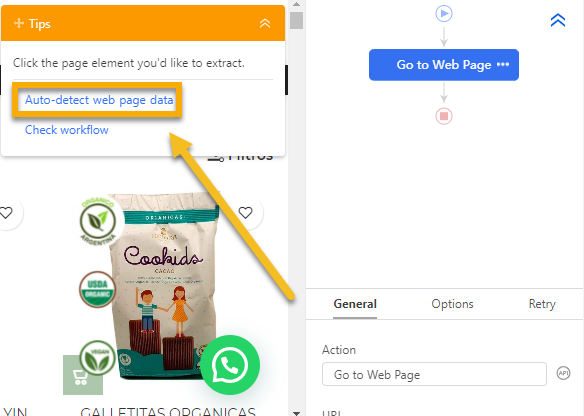
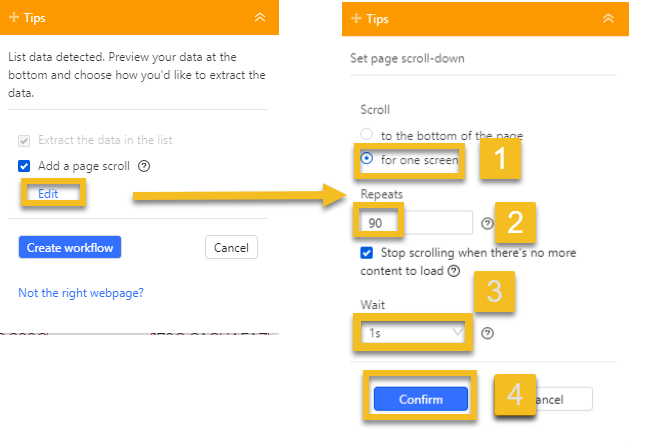
2. In the workflow, click Edit under Add a page scroll; Configure scroll settings:
- Scroll mode: Choose Scroll to bottom (for bottom-triggered loading) or Scroll one screen (for continuous loading).Repeats: Set the number of scrolls needed to load all content.Wait time: Allow enough time between scrolls for content to load.
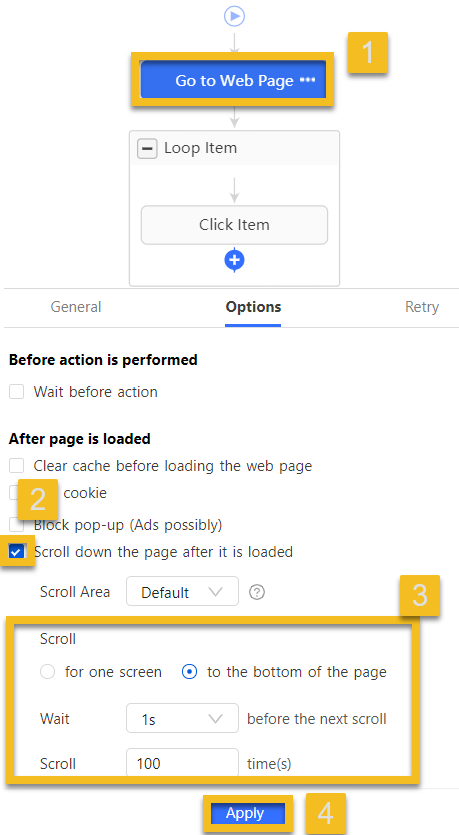
Option 2: Manual Setup
1. Add to existing step: Click Go to Web Page → open Options tab → enable Scroll down the page after it is loaded → select To the bottom → click Apply.
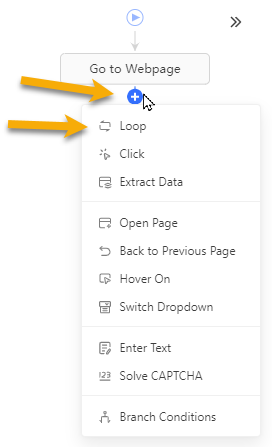
2. Create from scratch: Click + → select Loop → click the new Loop Item → switch Loop Mode to Scroll Page → click Apply.
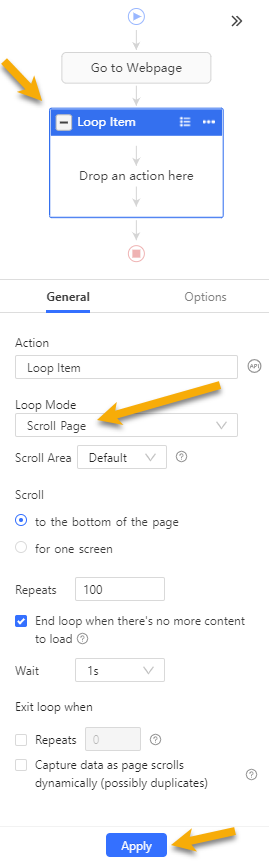
Note: if your scraper captures the same items repeatedly, the page is loading before new content is fully rendered. Increase the wait time after each scroll and start at 2 seconds. If items still duplicate, increase further or add an explicit Wait action.
4. Load More Button
Sites with a “Load More”, “Show More”, or “View More” button dynamically append results to the same page when clicked, similar to infinite scroll, but requiring user action each time. The new content is injected into the existing DOM via JavaScript, with no separate URL to request.
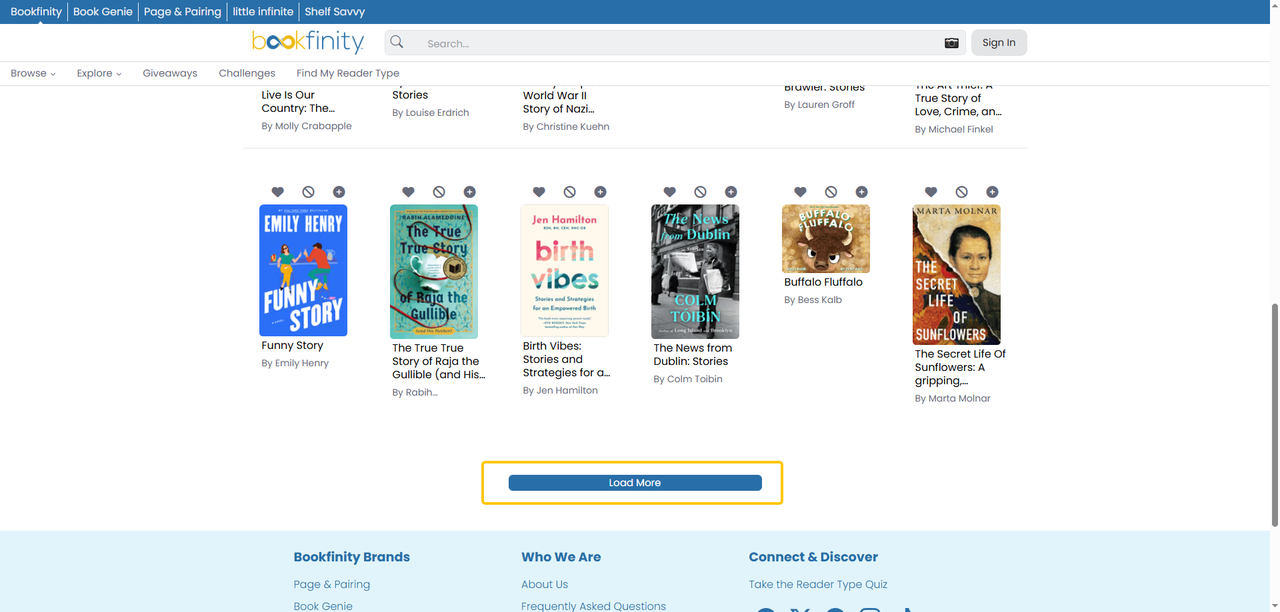
Setup in Octoparse:
Option 1: Auto-Detect (Recommended)
1. Click Auto-detect webpage data and wait for it to complete.
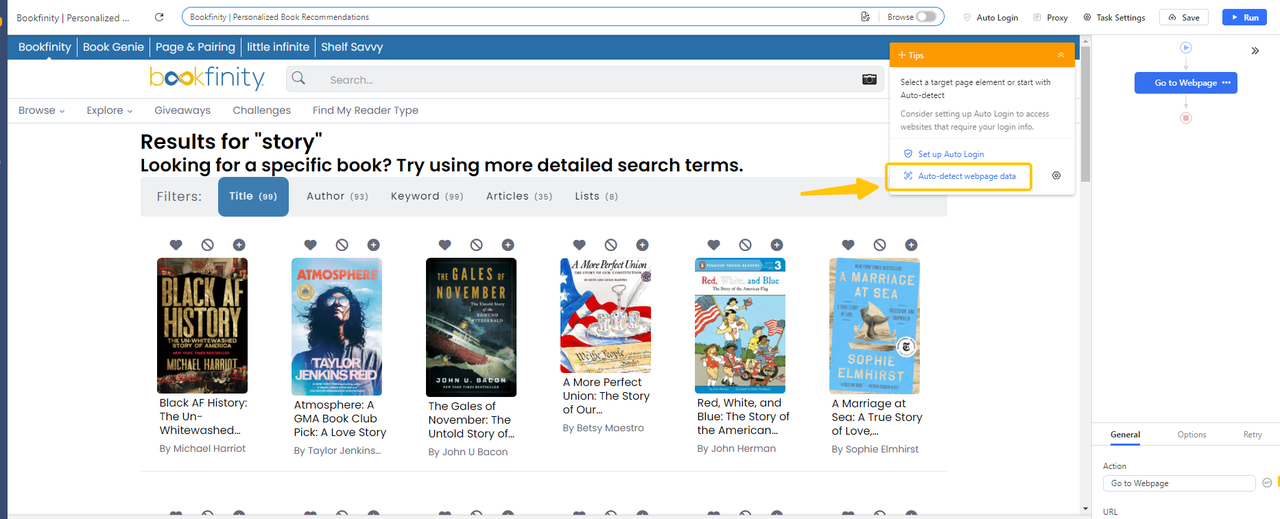
2. A “Add page scrolls” step will appear in the Tips panel.
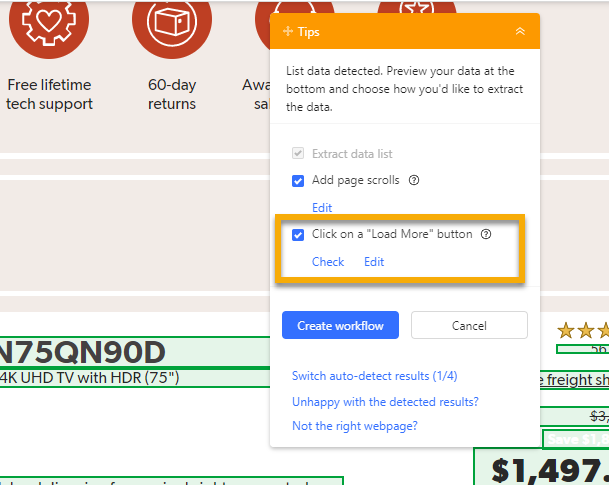
3. Click Check to verify the button is correctly located; click Edit if not.
4. Click Edit to set the number of clicks (how many times to click Load More).
5. Set the AJAX timeout (wait time for content to load after each click).
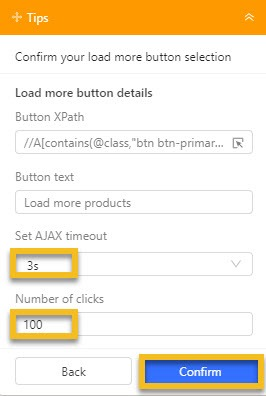
6. Click Create workflow to finalize.
Option 2: Manual Setup
- Click the Load More button on the page in Octoparse’s browser.
- Select Loop click from the action options.
- Set a proper AJAX timeout. A Pagination step will be created automatically.
5. AJAX and JavaScript-Rendered Pagination
Some sites fetch paginated content via AJAX: clicking “Next” sends an asynchronous request to a JSON endpoint and injects the response into the page without reloading. The URL may not change. A scraper that parses only the initial HTML will never see past page one.
Setup in Octoparse:
In Octoparse, the built-in browser executes JavaScript and waits for AJAX responses automatically. For most AJAX-paginated sites, the standard pagination loop setup works without additional configuration.
For complex cases, open your browser’s DevTools (Network tab) and click to the next page. If you see a JSON request to an API endpoint, you can call that endpoint directly, which is faster and more reliable than simulating browser interaction. Copy the endpoint, replicate headers and tokens, and loop through the offset parameter.
Choosing the Right Approach: Decision Framework
| What you observe | Pagination type — use this method |
| “Next” button or “>” arrow visible | Next button → Pagination Loop → Click to Paginate |
| Numbered links (1,2,3…), no Next | Page numbers → XPath loop targeting next sequential number |
| Content loads as you scroll, no button | Infinite scroll → Scroll Page action with wait + loop |
| “Load More” / “Show More” button | Load More → Click Item loop until button disappears |
| URL stays the same, content changes on click | AJAX → Use JS-rendering engine; or inspect Network tab for JSON endpoint |
Facing an unfamiliar site? Use this table to identify the pagination type in under a minute.
Troubleshooting: Why Your Scraper Stops at Page One
If your scraper consistently stops after the first page, work through these causes in order:
- Wrong element selected: The XPath targets the current page number instead of the next one. Use Octoparse’s element inspector to verify exactly what is being clicked.
- No wait time on dynamic pages: For AJAX, infinite scroll, and Load More pages, the scraper advances before the next batch has loaded. Add a Wait action after each navigation step.
- Fixed List mode enabled: Octoparse generates loop items in Fixed List mode by default on some site types. If new items aren’t being added to the list, switch to Variable List mode.
- Anti-bot detection: Scraping many pages in quick succession triggers rate limiting. Add a randomized delay of 1–3 seconds between page requests and use Octoparse’s cloud extraction with automatic IP rotation for large datasets.
Real-World Uses: What Gets Scraped Across Paginated Pages
Pagination handling is rarely the end goal. It’s what unlocks the actual data. The most common workflows:
- E-commerce price monitoring: Product listings split across 20–100+ pages. Automated weekly scraping across all pages, piped into a pricing model, is how a European B2B holding company managing 50+ portfolio companies replaced gut-feel pricing with market-rate data, yielding a 2–4% improvement in profit margins across their portfolio.
- Lead generation from directories: Business directories (Google Maps, LinkedIn, industry-specific listings) paginate by city or category. Scraping every page builds complete lead lists.
- Job market research: Job boards paginate by date, keyword, or location. Full-dataset collection lets you track hiring trends, salary ranges, and skill demand across an entire market.
- Review and sentiment analysis: Product reviews on Amazon or Tripadvisor spread across dozens of pages per product. Full-dataset sentiment analysis requires scraping every page.
- SEO competitor monitoring: Paginated search result pages show which domains rank for a keyword across all positions, not just the first page.
No-Code Pagination: What Octoparse Handles Automatically
For users who don’t write scraping code, Octoparse’s automatic pagination detection removes the biggest technical barrier. Octoparse auto-detects:
- Next button (standard HTML anchor elements)
- Page number sequences
- URL parameter increments
- Load More buttons (single-click patterns)
Infinite scroll and AJAX-heavy pages are also handled automatically. Octoparse’s auto-detect generates the scroll action without any manual configuration required. No code needed, just a single workflow step.
For the majority of list-based scraping tasks, you can set up and run a paginated scraper in Octoparse in minutes, without writing a line of code. Setting up pagination for an infinite-scroll site in Python typically takes 3–4 hours of coding and debugging. In Octoparse, the same configuration typically takes 3–5 minutes.
For Developers: Python Approaches to Pagination
If you’re building a custom pipeline, Python has a mature ecosystem for each pagination type.
Choosing a library by pagination type
- Next button / page number: Selenium or Playwright. Render a full browser, locate the button by XPath or CSS selector, click and wait for the next page.
- Infinite scroll / Load More: Playwright (preferred) or Selenium. Inject scroll events, detect DOM height changes to identify new content.
- AJAX endpoints: requests library, targeting the JSON endpoint directly. Fastest method — no HTML parsing needed.
- Multi-site crawls: Scrapy. Asynchronous recursive follow — extract the Next page URL from HTML, yield a new Request, let the framework handle scheduling and parallelism.
The While True loop pattern (Playwright / Selenium)
The recursive follow pattern (Scrapy)
The Scrapy pattern processes pages in parallel and is typically faster than a linear Selenium loop for large crawls. The key tradeoff: Scrapy requires more setup and doesn’t render JavaScript by default — combine with Playwright or Splash for AJAX-heavy sites.
Common Python pagination problems
- Detecting the end: Does the Next button disappear, become disabled, redirect to page 1, or show “No more results”? Each requires a different stop condition. Getting this wrong causes infinite loops and IP bans.
- Race conditions with infinite scroll: The DOM renders new content 2–3 seconds after the scroll event.
window.scrollTo()followed immediately by DOM parsing will return the old content. Use explicit waits on element staleness or DOM length change. - Dynamic DOM in SPAs: On single-page applications, clicking Next changes the content without reloading the URL. Selenium must wait for the stale element reference to resolve before scraping the new page — otherwise you get duplicates or empty results.
- Maintenance debt: When a site switches from numbered pagination to Load More, a custom Python script must be substantially rewritten. For teams scraping dozens of sites, this maintenance burden is a real cost.
No-Code Tool Comparison: Octoparse vs Alternatives
| Tool | Best For | Pagination Handling | Code Required? | Relative Strength |
| Octoparse | Non-devs & business teams | Auto-detects all types; dedicated pagination loop | None | Easiest setup; best for no-code |
| ParseHub | Mid-complexity sites | Relative selectors; good AJAX handling | None | Steeper UI learning curve |
| Apify | Developers; large-scale cloud | Actor-based Puppeteer engine | JSON config / JS | Least no-code |
| Browse AI | Simple monitoring; recording-based | Good for single-page; weaker on large paginated datasets | None | Fast to set up; limited scale |
If you’re evaluating no-code tools specifically for paginated data extraction, the key questions are: does it handle JavaScript-rendered pagination? Does it support cloud execution for overnight jobs? Does it include IP rotation for large crawls?
Octoparse is the only tool in this comparison with a dedicated pagination loop workflow and auto-detection that covers all five pagination types listed in this guide. Apify is an option for developer teams requiring custom anti-bot bypass or millions of records at scale.
📑Depending on the type of pagination you’re dealing with, these guides go deeper on specific scenarios:
1. List Crawling Guide: How to Scrape Any Structured List
2. How to Scrape Data by Country or Region
3. How to Avoid IP Bans with Proxies in Web Scraping
FAQs about Web Scraping Pagination
- Can Octoparse handle AJAX pagination automatically?
Yes. Octoparse’s built-in browser renders JavaScript and waits for AJAX responses before extraction. For most AJAX-paginated sites, the standard pagination loop setup works without additional configuration. For complex cases where AJAX requests target a JSON endpoint, you can intercept those requests directly (see Section 5 above).
- Why is my web scraper only getting the first page?
The most common causes: (1) no pagination loop configured, (2) the scraper advances before the next page has loaded — add a Wait action, (3) Fixed List mode is enabled in Octoparse, preventing new items from being added to the loop. Check the troubleshooting section above for a full diagnostic list.
- How do I scrape a website with infinite scroll pagination?
Octoparse can handle infinite scroll both automatically and manually. For auto-detection, simply run the setup wizard. Octoparse detects the scroll pattern and generates the required action. For manual setup, add a Scroll Page action, configure it to scroll to the bottom, wait for new content to load (typically 2–3 seconds), and loop until no new items appear. If items duplicate, increase the wait time in the loop settings.
- What is the difference between Next button pagination and URL parameter pagination?
Next button pagination requires clicking a DOM element — the scraper simulates user interaction. URL parameter pagination encodes the page number in the URL itself (e.g., ?page=2), so the scraper can construct all URLs in advance and visit them directly without clicking. URL parameter pagination is faster and more reliable when available.
- What is a stop condition in pagination scraping?
The logic that tells your scraper to stop when it reaches the last page. Common stop conditions: the Next button disappears from the HTML, the button becomes disabled, the URL parameter exceeds the known total page count, or the page content returns “No results found.” Getting this wrong causes either missed pages (stopping too early) or infinite loops (never stopping).
- What is the difference between web scraping and web crawling in the context of pagination?
Crawling is navigating from page to page by following links — typically to discover URLs. Scraping is extracting specific data from a single page. When handling pagination, a scraper must crawl (navigate to the next page) before it can scrape (extract the data). In practice, the two are combined in any paginated extraction workflow.
- How do I avoid getting blocked when scraping many paginated pages?
Add a randomized delay of 1–3 seconds between page requests. For large datasets, use Octoparse’s cloud extraction with automatic IP rotation, which distributes requests across different IP addresses to avoid triggering rate limits. Avoid scraping hundreds of pages per minute from a single IP.
- Is it faster to use Python or a no-code tool like Octoparse?
It depends on the project. Python (Scrapy / Playwright) is better for highly complex sites, custom anti-bot bypass, massive scale (millions of records), or when data needs to feed directly into an existing Python pipeline. It requires coding expertise and ongoing maintenance. Octoparse is better for non-developers, standard pagination types, and small-to-medium datasets — faster setup, lower maintenance, and automatic handling of headless browsers and basic anti-scraping measures.
- Can I scrape pagination with no code?
Yes. Octoparse handles Next button, page number, URL parameter, Load More, and most infinite scroll patterns through a visual workflow editor with no coding required. Setup for standard pagination types typically takes a few minutes.