To scrape Amazon reviews for sentiment analysis, use a review-specific template, check a sample of the returned text and ratings, and export the validated rows. Keep the ASIN, marketplace, collection date, and source URL with the data so each observation can be traced back to its collection context.
https://www.octoparse.com/template/amazon-reviews-scraper-for-amazon-us
A product’s rating total is not the number of written reviews available for export. Review visibility can depend on marketplace, filters and login state. Our bounded UK test below provides a downloadable audit trail; it does not establish an Amazon-wide review limit.
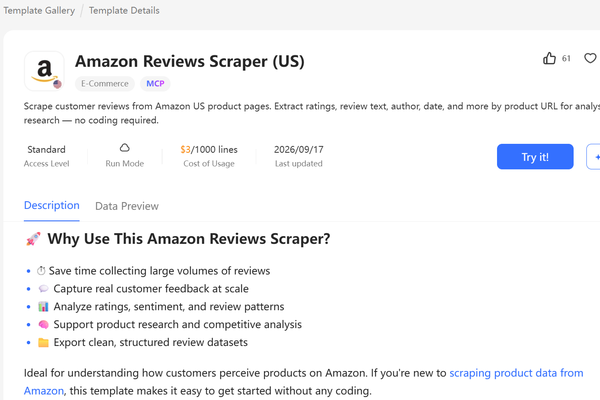
Use a template that matches the marketplace. Our UK retest used Amazon Reviews Scraper (20 Marketplaces), with an explicit review-count limit. The dedicated US template was inspected but not run in this retest, so its advertised schema should not be presented as verified field completeness.
Why Scraping Amazon Reviews Is Essential for Modern Businesses
Sentiment analysis uses natural language processing, text analysis, and computational linguistics to identify the emotional tone of written content. In e-commerce, it is widely applied to customer feedback (such as reviews, ratings, and surveys) for purposes ranging from marketing and customer support to product development. Beyond Amazon, book platforms are another rich source; see how to scrape Goodreads ratings and comments.
Related Reading: 10 Useful Tips for Amazon Marketing
Review Fields for Customer Feedback Analysis
The volume of product reviews on Amazon is immense, and shoppers actually rely on it: per PowerReviews’ June 2025 survey of 21,279 consumers, 95% said they regularly read product reviews before buying, and only 43% would purchase a listing with zero ratings or reviews at all. Each review contains structured data points including:
- Rating scores (1-5 stars) for a rating baseline, separate from text sentiment
- Review text with detailed customer experiences
- Verified purchase indicators for authenticity validation
- Helpful votes showing community agreement levels
- Date stamps for temporal analysis trends
Use Star Ratings as a Baseline for Sentiment Analysis
For an initial rating-based grouping, you can use the following convention. These groups are a working heuristic, not labels verified against each review’s text:
- 4-5 stars = high-rating group, not a verified positive text label
- 3 stars = middle-rating group, not necessarily neutral text
- 1-2 stars = low-rating group, not a verified negative label
Star-based groups provide a baseline. Read the review text to identify mixed opinions and check whether the text agrees with the star rating.
The actionable insights from Amazon review scraping include identifying product weaknesses, understanding competitor advantages, spotting emerging trends, and discovering unmet customer needs that could drive product innovation.
Scrape Amazon Product Reviews Without Coding
A review scraper converts accessible review fields into structured rows. Start with a small sample to confirm that review text, rating, and date belong to the same review before collecting additional pages.
Review text, ratings, and dates can be collected as structured rows for analysis.
Octoparse is a web data platform that turns Amazon pages into clean, structured data, no code required. For reviews specifically, you can run a ready-made template from its Templates Gallery (like the ones further down this page) or build a custom scraper in Octoparse Desktop to pull review text, pricing, stocks, and descriptions into Excel, no coding required. It also supports various data extraction modes (headless browse mode included), scheduled Cloud runs, IP rotation, and CAPTCHA solving to keep collection running.
An Octoparse customer story about Amazon product monitoring describes a reseller’s price-collection workflow. It concerns product prices, so it should not be treated as evidence of review-extraction coverage or reliability.
Hands-on retest: 20 Amazon UK reviews
On October 7, 2026, we ran Amazon Reviews Scraper (20 Marketplaces) in Octoparse Cloud for Soundcore P20i, ASIN B0BTYCRJSS, on Amazon UK, with one product and a maximum of 20 reviews. The task completed in 40 seconds and returned 20 distinct review IDs, dated September 29 through October 5. See the run receipt (account access required) and review-ID, rating and date audit CSV. The audit CSV was transcribed from both result-table pages and then checked against the downloaded platform-native CSV: all 20 IDs, ratings, dates, verified flags and review URLs matched. The full export was also checked for missing fields.
| Validation check | Observed result | Interpretation |
|---|---|---|
| Unique review IDs | 20 of 20 | No duplicate IDs in this sample |
| Text, rating, date and review URL | 20 of 20 for each field | Non-empty output; not an independent source-accuracy score |
| Verified-purchase flag | 19 True; 1 blank | Preserve the blank as unknown |
| Brand, helpful count and Vine tag | 0 of 20 populated for each field | Missing values cannot be treated as zero or false |
| Review image URL | 1 non-empty value | The value was a grey-pixel.gif placeholder, not a usable review photo |
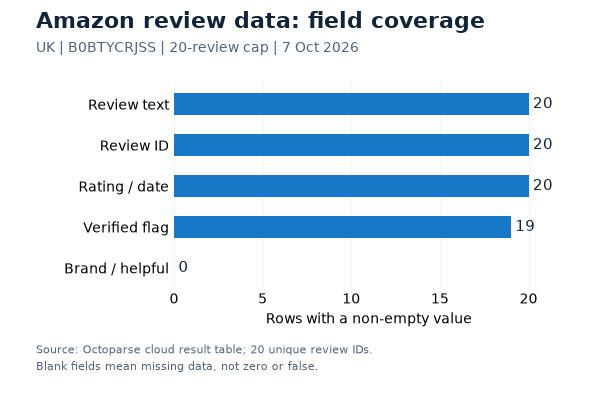
The sample contained 11 five-star, one four-star, five two-star and three one-star reviews. Thus 12 of 20 reviews (60%) had four or five stars and 8 of 20 (40%) had one or two stars. These are star-rating counts, not model-generated sentiment labels, and this capped sample does not estimate sentiment across all buyers. For aspect sentiment, classify the actual text separately: a high overall rating can still contain a specific complaint.
The 20-marketplace template rejected Amazon.com URLs during input validation. Its displayed rate was $0.60 per 1,000 rows, implying $0.012 for 20 rows; this is a calculation, not a verified billing receipt. The dedicated US review template was not executed in this retest because its input form did not expose a hard row limit. These results validate only the UK run described here.
https://www.octoparse.com/template/amazon-reviews-scraper-20-marketplaces
Turn Amazon reviews data into Excel, CSV, Google Sheets, or any other formats.
Scrape data easily with auto-detecting functions, no coding skills are required.
Preset scraping templates for hot websites to get data in clicks.
Use IP rotation, CAPTCHA handling, and scheduled Cloud runs where the selected plan and target site support them.
Cloud service to schedule data scraping at any time you want.
Step-by-Step: How to Scrape Amazon Reviews with Octoparse
Step 1. Enter Amazon Page URL to Create a Task
Copy the URL of a product detail page, and paste it to the search bar on Octoparse. Then click “Start” to create a new scraping task. Wait until Octoparse’s built-in browser finishes loading the page before moving on.
Step 2. Auto-detecting and Customize Data Field
Click “Auto-detect web page data” in the Tips panel, then inspect the detected fields. Depending on the page and accessible review elements, the fields may include:
- Reviewer names and profiles
- Star ratings and review titles
- Full review text and descriptions
- Review dates and verification status
- Helpful vote counts and reviewer rankings
You can check if the data is to your needs or not. You can also preview all data fields in the Data Preview panel and remove any unwanted fields.
Step 3. Export Scraped Amazon Product Reviews
After checking the preview, click “Run” to collect the configured fields. Inspect the exported rows for missing text, duplicate reviews, and mismatched ratings before using them for analysis.
Octoparse also has preset scraping templates for Amazon product reviews. You can search Amazon to find the templates and preview the data samples. If you still have any questions about the above steps, you can move to Octoparse Amazon Review Scraping Guide for more details.
Ready-to-Use Amazon Review Scraper Templates
Choose a review-specific template by marketplace and input type. Review templates can require ASINs or product URLs rather than keywords. Check the template’s current access tier, price, login requirements and output limits before starting.
The Lite template below currently targets Amazon UK and requires a pre-login cookie configuration. We inspected that requirement but did not run the Lite template in this retest.
https://www.octoparse.com/template/amazon-reviews-scraper
If you want to scrape Amazon product titles, prices, inventories, images, and more by ASINs, you can try the Amazon Product Scraper below:
If you want to scrape Amazon product review content, ratings, dates, reviewers, etc., by ASIN, you can try Amazon Reviews Scraper below:
Does Amazon Have an Official Reviews API?
Amazon’s Customer Feedback API provides review topics, trends, and snippets for eligible sellers and vendors. It supports seven stores, refreshes weekly, and requires a Brand Analytics or Selling Partner Insights role. Its documented output is feedback insights, not a complete archive of every written review.
Product catalog APIs and feedback APIs serve different needs. If your analysis requires full review text, check the endpoint’s actual response fields rather than assuming that product-data access includes reviews.
Third-party reviews APIs provide their own collection and delivery services. Before choosing one, test the target ASIN and marketplace, inspect the returned text, and check pagination, access conditions, billing, and data-use terms.
How to choose: start with the prepared template for review text, use Amazon’s official API only when your seller or vendor role qualifies, and move to a custom task when the page or fields need special handling.
Template vs Customer Feedback API vs Third-Party Reviews API
Use this short matrix to choose the right data-access route.
Choose between a prepared template, Amazon’s first-party insights API, or a provider-managed API endpoint.
| Metric | Octoparse template | Customer Feedback API | Third-party Reviews API |
|---|---|---|---|
| Data scope | Review text, rating, date, ASIN | Topics, trends, snippets | Provider-defined review fields |
| ASIN coverage | Test the target page and marketplace | Check the supported stores and endpoint requirements | Provider-dependent |
| Refresh | On demand or scheduled | Weekly | On demand or cached |
| Full review text | Yes, when rendered | No; snippets only | Often, but verify coverage |
| Best for | No-code exports | Eligible sellers/vendors | Developer pipelines |
| Access limits | Login, CAPTCHA, marketplace rules | SP-API roles and stores | API key, cost, quota, terms |
| Check first | Test one ASIN | Confirm role and region | Test schema and row count |
Source: Amazon Customer Feedback API documentation. Template and third-party API coverage must be checked against the target page and provider’s current documentation.
Amazon Review Policy and Industry Updates
What changed recently: As of September 20, 2026, the latest public policy signals point in the same direction: review data is becoming more useful for analysis, but provenance and compliance matter more. Amazon’s 2025 Trustworthy Shopping Experience Report says Amazon blocked hundreds of millions of suspected fake reviews in 2025 and uses AI, behavioral signals, and human investigation before reviews are shown. That means sentiment datasets should preserve the ASIN, source URL, collection date, marketplace, and any visible verification label instead of treating every row as equally reliable.
The compliance baseline is also clearer. Amazon’s customer-review policy guidance prohibits misleading or incentivized reviews, while the FTC Consumer Reviews and Testimonials Rule addresses fake reviews, sentiment-conditioned incentives, undisclosed insider reviews, and review suppression. For analysis, collect only data you are authorized to access, do not manufacture or alter review sentiment, and keep the raw text separate from your model’s label. This is practical compliance guidance, not legal advice.
Sentiment Analysis for Amazon Product Reviews
Start with a reproducible baseline, then classify the text. The 20-review UK audit dataset yields the following distribution. The denominator is the 20 collected written reviews, not the product’s displayed total rating count.
| Stars | Reviews | Share of this sample |
|---|---|---|
| 5 | 11 | 55% |
| 4 | 1 | 5% |
| 3 | 0 | 0% |
| 2 | 5 | 25% |
| 1 | 3 | 15% |
Why a five-star review can still contain a complaint
In the collected five-star review RJUMPQTFL00Z8, the reviewer praises comfort and battery life but also says the earbuds do not report the battery level. An aspect-level annotation can preserve positive comfort feedback and a negative battery-status observation in the same record. This is our interpretation of one captured review, not a claim about model accuracy.
A reproducible sentiment-analysis workflow
Keep an immutable raw export. Deduplicate by marketplace and Review_ID, preserve missing values, and record the collection date. Keep star_rating, overall_text_sentiment and aspect_sentiment in separate columns. Use labels such as positive, negative, mixed, neutral and unclear; do not force every review into a star-derived category.
Before reporting accuracy, have reviewers label an evaluation set independently of the model. Compare predicted labels with those reference labels using a confusion matrix and per-class precision and recall. Record the model/version, prompt or classifier settings, sampling rule and disagreements. The current test validates extraction and rating counts; it does not provide a human-validated sentiment benchmark.
For ongoing monitoring, compare equivalent sampling windows, marketplaces and product variants. A capped newest-review sample can overrepresent recent events. Do not convert its percentages into claims about all buyers, and do not treat a missing review in a later snapshot as proof it was removed.
Is It Legal to Scrape Amazon?
Public visibility alone does not establish permission to collect or reuse Amazon data. The applicable terms, access controls, privacy obligations, and jurisdiction all matter.
Where you can run into legal trouble: accessing data behind login requirements, scraping personal customer information, or violating Amazon’s Terms of Service can result in legal consequences including lawsuits or permanent account suspension.
Amazon’s ToS clearly states that automated data collection is prohibited, and they actively use technical countermeasures like IP blocking to enforce this policy.
Best Practices for Compliant Amazon Review Scraping:
- Use reasonable request intervals (1-2 seconds between requests)
- Respect robots.txt directives where applicable
- Don’t overload Amazon’s servers with simultaneous requests
- Focus on data analysis rather than republishing content
The Ninth Circuit’s April 2022 hiQ opinion addressed a preliminary injunction involving public LinkedIn profiles and the CFAA. It is not blanket authorization to scrape Amazon or a resolution of every contractual or privacy issue.
Final Thoughts
Use the completed UK run to check the extraction workflow and the audit CSV to reproduce the star counts. For a different marketplace or product, repeat the field checks before scaling. Octoparse collects the data; sentiment classification and its evaluation are separate steps.
To compare review-capable tools by price, marketplaces, and API access, see these Amazon scraping tools compared before choosing a recurring review workflow.
FAQs about Amazon Review Scraper
How Many Pages Can You Scrape at Once on Amazon?
The limit depends on the template and task settings. The Amazon Reviews Scraper (US) template handles pagination for supported review pages, but Amazon can require sign-in or show different marketplace views. Test one ASIN first, then scale only after checking the returned rows and fields.
What All Can You Scrape From Amazon?
Product templates and review templates collect different fields. Validate each required field on the selected route before building a dataset; the list below describes possible data needs, not guaranteed output from every template:
- Product prices, descriptions, and images
- Seller information and ratings
- Best seller rankings
- Review text, ratings, and verification status
- Reviewer profiles and helpful votes
How Do You Avoid Getting Blocked While Scraping Amazon?
Use these strategies:
- Rotate IP addresses with residential proxies
- Choose conservative request pacing and stop when access is denied
- Randomize browser headers and User-Agent strings
- Use professional tools like Octoparse that handle anti-bot measures automatically
Which Tools Work Best for Scraping All Reviews Without Coding?
No tool was shown to export every review in this test. Select a route by marketplace, supported inputs, login requirements, row limits and the fields that actually return values. The US and Lite templates remain untested here; a successful UK sample cannot establish their coverage.
Does Amazon Prohibit Scraping?
Amazon’s Conditions of Use and the target page’s access controls still matter. Public visibility does not remove contractual, privacy, or jurisdiction-specific obligations, so review the terms and collect only what you are authorized to use.
Can Amazon Detect Fake Reviews?
Amazon says it uses automated systems and human investigation to protect review integrity. For context, see its Community Guidelines for Customer Reviews. Signals commonly discussed include:
- Reviewer behavior patterns
- Purchase verification checks
- Language pattern analysis
- Review timing clusters
Text patterns and missing verification labels are not proof of fraud. Preserve the source context and treat such signals as prompts for review, not as grounds to label an individual reviewer or product fraudulent.
Is There an Official Amazon Reviews API?
Yes. Amazon’s Customer Feedback API offers review insights to eligible sellers and vendors. For a dataset of individual review text, verify the fields and coverage of your chosen collection route; an insights endpoint is not a complete review export.