“As a newbie, I built a web crawler and successfully extracted 20k data from Amazon website.”
Do you also want to know how to make a web crawler and create a database that eventually turns into your asset at no cost? It’s not a difficult thing after you’ve learned the right tool and method. This article will share 2 different ways to help you build a web crawler step-by-step even if you don’t know anything about coding.
Quick Answer:
To make a web crawler, you have two ways.
(1) No-code: use Octoparse: paste a URL, let the AI detect data fields, click Run, export to Excel/CSV.
(2) Code: use Python with
requests+BeautifulSoupfor static sites, or Node.js withaxios+cheeriofor JavaScript-heavy pages. The no-code method takes under 10 minutes; the coding route requires setting up libraries and handling edge cases like pagination and anti-bot measures.
What Is A Web Crawler
According to Wikipedia, a web crawler (also known as a web spider or web bot) is a type of automated software designed to browse the web and collect data from websites. Search engines like Google use massive crawlers to index the web. You can build a smaller, targeted crawler to extract the specific data you need:product prices, contact lists, research datasets, competitor information, and more.
The basic workflow of any crawler is the same:
- Send an HTTP request to a starting URL
- Parse the HTML response
- Extract data and links
- Queue those links and repeat
The difference between methods is how much of this you have to build yourself.
Further reading: Web crawler vs. web scraper: A crawler navigates pages and discovers URLs. A scraper extracts specific data from those pages. In practice, most tools do both.

Why Do You Need a Web Crawler
There are 2.5 quintillion bytes of data created online each day. Without automated tools to collect and organize it, finding what you need is like looking for a needle in a haystack, which is exactly why search engines like Google rely on web crawlers to index the web at scale.
You don’t need to be Google to benefit from one. A customized web crawler lets you turn public web data into a structured asset for your own goals:
- Price monitoring: Track competitor pricing across e-commerce sites automatically — no manual checking required.
- Lead generation: Extract emails, phone numbers, and company profiles from directories, trade fair attendee lists, or exhibitor pages.
- Market research & sentiment analysis: Pull reviews, social comments, and forum posts to analyze public attitudes toward a product or service.
- Content aggregation: Compile niche information from multiple sources into one platform — and keep it updated automatically.
- Academic research: Gather housing listings, job postings, or government data at scale without manual downloading.
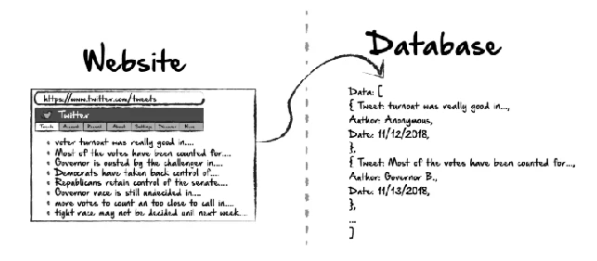
From Hackernoon by Ethan Jarrell
Challenges When Scraping Data from a Website
Beginners usually feel it’s hard to get past the web scraping. A question on Reddit’s r/learnprogramming put it simply: “I want to build a web crawler, where do I even start? Do I need a server? What handles JavaScript pages?”
The answers reveal the three real sticking points:
- JavaScript-rendered pages. Many modern sites load data after the initial HTML using JavaScript. Libraries like requests in Python fetch only the initial HTML. If the data you want loads dynamically, you’ll get an empty result. You need a headless browser (Selenium, Playwright) to handle this, which adds complexity.
- Anti-bot blocking. Sites use IP rate limiting, CAPTCHA, and user-agent detection to block automated requests. A basic crawler gets blocked quickly. Handling this requires proxy rotation, request throttling, and custom headers, none of which are beginner-friendly to set up.
- Maintenance overhead. Websites change layouts. When they do, your scraper breaks and needs debugging. For anyone crawling multiple sites, maintaining custom code becomes a part-time job.
If you recognize any of these blockers, the no-code method below addresses all three problems. And even for the developers, you can also get some new solutions.
How to Make a Web Crawler: 2 Methods
There are two practical ways: no-code tools and coding from scratch. Which one fits you depends on your technical background and what you’re building.
Method 1: No-Code Web Crawler with Octoparse
Octoparse is a no-code web crawling tool built for non-developers. Its AI auto-detection identifies data fields automatically when you paste a URL; you don’t write a single line of code. It handles JavaScript, AJAX, pagination, and infinite scroll without extra configuration.
What Octoparse can do:
- Crawl static and dynamic (JavaScript/AJAX) websites
- Auto-detect data fields with AI — no manual CSS/XPath selection needed
- Handle pagination, infinite scroll, and login-required pages
- Run tasks in the cloud 24/7 with IP rotation to avoid blocking
- Export to Excel, CSV, JSON, Google Sheets, or directly to a database
- Schedule recurring crawls automatically
Free plan includes: unlimited tasks, up to 10,000 records per export, local device runs.
Option A: Use a Pre-Built Template
If you only want to crawl a specific site for data quickly, you can try to use a preset data scraping template. Octoparse has 600+ ready-made templates. These templates are designed for popular scraped sites and can be used from the web page, which means that you don’t need to download any software to your device. No setup required, just enter your search parameters and run.
Steps:
- Go to the Octoparse Template Gallery
- Search for your target site (e.g., “Amazon product,” “Google Maps reviews”)
- Click Use Template, enter your parameters (keyword, URL, location)
- Click Run and data appears in the preview panel
- Export to Excel or CSV
This is the fastest path: from URL to structured data in under 5 minutes.
Try the online Contact Details Scraper template below:
https://www.octoparse.com/template/contact-details-scraper
Option B: Build a Custom Crawler Workflow
For sites without a template, or when you need custom data fields, use the free web crawler‘s visual workflow builder.
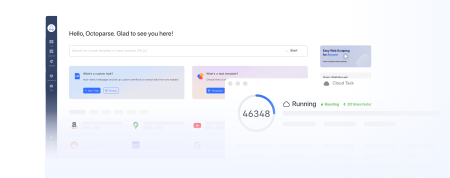
Turn website data into structured Excel, CSV, Google Sheets, and your database directly.
Scrape data easily with auto-detecting functions, no coding skills are required.
Preset scraping templates for hot websites to get data in clicks.
Never get blocked with IP proxies and advanced API.
Cloud service to schedule data scraping at any time you want.
Step 1: Paste your target URL
Open Octoparse, paste the target page URL into the input bar. Octoparse launches its built-in browser and begins auto-detecting data on the page.
Step 2: Review and customize data fields
The AI highlights detected data fields (product names, prices, links, etc.). Click Create Workflow to confirm, then click any element on the page preview to add or remove fields. Rename fields as needed.
Step 3: Set up pagination
If the site has multiple pages, click the Next Page button on the page preview. Octoparse adds a pagination loop to your workflow automatically.
Step 4: Run and export
Click Run — choose Run on Device (local, free) or Run in Cloud (runs 24/7 without your computer). Once complete, export your data to Excel, CSV, or push to Google Sheets via API.
For complex sites (login-required, CAPTCHA, heavy JavaScript), use Octoparse’s Advanced Mode settings: IP proxy rotation, custom user agents, and CAPTCHA bypass are available in paid plans.
Method 2: Build A Web Crawler with a Coding Script
Coding gives you maximum flexibility but requires programming knowledge and ongoing maintenance. Choose this route if you’re comfortable with Python or JavaScript/Node.js, need to integrate crawling into an existing codebase, or are building something highly custom.
Python Web Crawler
Best for: data analysts, researchers, and developers familiar with Python. Python has the richest web scraping ecosystem and the most beginner-friendly libraries.
Core libraries:
requests: sends HTTP requests to fetch page HTMLBeautifulSoup: parses HTML and extracts elementsScrapy: full-featured framework for large-scale crawlingPlaywrightorSelenium: a headless browser for JavaScript-rendered pages
Basic Python crawler (requests + BeautifulSoup):
Key things to know before you start:
- Set a
User-Agentheader to avoid immediate blocking (as shown above) - Add delays between requests (
time.sleep(2)) to avoid rate limiting - Track
visitedURLs to prevent infinite loops requestscannot execute JavaScript — use Playwright for dynamic content- Always check a site’s
robots.txtbefore crawling
For a complete Python tutorial including Scrapy, Playwright, and handling anti-bot measures, see: How to Crawl Data with Python( Beginner’s Guide)
JavaScript (Node.js) Web Crawler
Best for: developers already working in JavaScript/Node.js, or anyone building a crawler that needs to integrate with a JS-based backend. Node.js’s non-blocking architecture makes it naturally efficient for async HTTP requests.
Requirements: Node.js 16+ installed, basic JavaScript knowledge, familiarity with async/await.
Core libraries:
axios+cheerio: fast combination for static HTML pages (cheerio is jQuery-like HTML parsing for Node.js)puppeteer: headless Chrome for JavaScript-rendered pagesplaywright: cross-browser headless automation (Chromium, Firefox, WebKit); recommended over Puppeteer for new projects
Basic Node.js crawler (axios + cheerio):
Important caveats:
axios+cheerioonly work on static HTML — if content loads via JavaScript, you’ll get empty results- For JS-rendered sites, switch to Puppeteer or Playwright (headless browser)
- Add
setTimeoutdelays between requests to avoid triggering rate limits - Check
robots.txtand the site’s Terms of Service before running at scale
For a deeper guide covering Puppeteer, Playwright, and handling dynamic content in Node.js, see: How to Crawl Data With JavaScript
No-Code vs. Code: Which Should You Use?
| No-Code (Octoparse) | Python | JavaScript (Node.js) | |
| Setup time | < 10 minutes | 1–4 hours | 1–4 hours |
| Coding required | None | Yes | Yes |
| Handles JavaScript pages | Yes (built-in) | Requires Playwright/Selenium | Requires Puppeteer/Playwright |
| Anti-bot handling | Built-in (IP rotation, CAPTCHA) | DIY | DIY |
| Maintenance when site changes | Minimal | High | High |
| Best for | Non-developers, analysts, researchers | Python developers, data scientists | JS/Node.js developers |
| Scales to many sites | Yes | Yes (with Scrapy) | Yes |
When no-code is the right call:
- You need data from a specific site quickly
- You’re scraping multiple different sites (maintaining separate scripts per site is unsustainable)
- You don’t have coding experience
- The site uses JavaScript, pagination, or login walls you’d otherwise need to engineer around
- You want scheduled, automated runs without managing infrastructure
When to write code:
- You’re integrating crawling into an existing application or data pipeline
- You need custom logic that no visual tool can configure
- You’re a developer and want full control over performance and output format
For most business and research use cases — especially across multiple sites — Octoparse removes the engineering overhead so you can focus on the data itself.
Conclusion
Making a web crawler doesn’t require a computer science background. The no-code route with Octoparse gets you from a URL to exported data in under 10 minutes. The Python and JavaScript routes give developers full control but require more setup and ongoing maintenance.
Start with the method that matches your current skills. If you hit walls with anti-bot blocking, JavaScript-rendered pages, or scaling across many sites, Octoparse’s cloud infrastructure handles all of that without code changes.
FAQs
What is the easiest way to make a web crawler for beginners?
The easiest method is to use a no-code tool like Octoparse. Paste your target URL, let the AI auto-detect data fields, and export. No libraries to install, no code to debug. For popular sites, pre-built templates make it even faster, just enter parameters and click Run.
Can I make a web crawler without Python?
Yes. No-code tools like Octoparse require no programming at all. If you do want to code, JavaScript/Node.js with axios and cheerio is a valid alternative to Python. Python is more commonly recommended because of its larger scraping library ecosystem, but both work well.
How do I make a web crawler that handles JavaScript pages?
In Python, use Playwright or Selenium instead of requests, which control a real browser and execute JavaScript before returning page content. In Node.js, use Puppeteer or Playwright. With Octoparse, JavaScript pages are handled automatically with no additional configuration.
Why does my web crawler get blocked?
Most blocks happen because of high request frequency, a missing or generic User-Agent header, or consistent request patterns that look automated. To avoid blocking: add delays between requests, set a realistic User-Agent string, rotate IP addresses, and throttle your crawl speed. Octoparse handles IP rotation and anti-bot settings automatically. For custom code, consider a proxy service and request rate limiting.
Is it legal to make a web crawler?
Crawling publicly available data is legal in most jurisdictions. However, legality depends on the site’s Terms of Service, the type of data collected, and applicable privacy laws (GDPR, CCPA). Always review a site’s robots.txt file before crawling, and avoid scraping personal data or content that is explicitly restricted. When in doubt, consult your legal team.