Collecting one YouTube video URL is easy. Building a repeatable table of public titles, URLs, publish dates, durations, thumbnails, and visible view counts across one or more channels is where manual work breaks down.
A YouTube crawler is a tool or workflow that navigates public YouTube channel and video pages, collects selected metadata, and turns it into structured rows for research or reporting. It is not a video or audio downloader, and it does not unlock private YouTube Analytics.
YouTube channel data collection methods
| Method | Best for | Setup | Output |
|---|---|---|---|
| Manual collection | A one-time check of a few videos | Low | Your spreadsheet |
| YouTube Data API | Developer-managed applications | High | Structured JSON |
| No-code scraper | Repeatable channel exports without code | Low | Excel, CSV, or JSON |
For a one-time check, manual collection may be enough. Use the official API for a developer-maintained application. If the deliverable is an Excel or CSV file, a no-code channel template is usually the shortest route. If you also need Shorts, live streams, playlists, podcasts, or community posts, the paid https://www.octoparse.com/template/youtube-channel-scraper covers six channel tabs and accepts channel handles.
What is a YouTube crawler?
A YouTube crawler discovers or loads relevant public channel and video pages. A scraper then extracts selected fields from those pages. Many products combine both actions, so the terms are often used interchangeably in practical workflows.
A typical channel export contains one video per row, with fields for the channel name, handle, title, URL, publish date, duration, thumbnail, and visible view count. The result can be filtered, compared, or exported to Excel.
A generic YouTube crawler is different from a branded creator-discovery database and from a YouTube downloader. This guide focuses on collecting structured public metadata from channels you specify. It does not download video or audio files. Comments and transcripts also require separate video-level workflows.
How to Download YouTube Videos or Extract Channel Data?
Start with the result you need. Use a crawler when you want a spreadsheet of public channel and video data. Use a downloader when you are authorized to save the media file. If you only need titles, descriptions, URLs, or publish dates, choose a metadata scraper instead.
| What you want to do | Best tool type | Recommended option |
|---|---|---|
| Build a spreadsheet of channel videos and public metadata | YouTube channel crawler | Follow the Octoparse YouTube Channel Scraper workflow in this guide |
| Save a video you own or have permission to download | Browser-based video downloader | Octoparse YouTube Video Downloader |
| Download videos uploaded to your own channel | Official account export tools | YouTube Studio or Google Takeout |
| Save authorized Shorts or extract an audio track | Desktop downloader or command-line tool | 4K Video Downloader Plus for a visual interface, or yt-dlp for command-line control |
| Export descriptions, titles, URLs, views, and publish dates | Video metadata scraper | https://www.octoparse.com/template/youtube-video-list-scraper |
What YouTube channel data can you collect?
Public channel pages can expose channel-level and video-level fields. The exact values depend on the page, region, channel settings, and collection method.
Public YouTube channel fields
| Data level | Common fields | Useful for |
|---|---|---|
| Channel | Name, handle, URL, description, subscriber count, public video count | Channel identity, size, and positioning |
| Video | Title, URL, thumbnail, publish date, duration, visible view count | Content themes, publishing cadence, and relative performance |
| Comments | Text, public author name, date, likes, replies | Audience questions, complaints, and topic demand |
| Transcript | Timestamped spoken text and video metadata | Topic analysis, research, and content audits |
The YouTube Data API channel resource separates public channel data from owner-authorized fields. A public YouTube data scraper cannot provide private watch time, audience retention, revenue, or detailed audience demographics. Channel owners should use YouTube Studio or an authorized API workflow for those measures.
Which method should you use to collect YouTube channel data?
Use manual collection for a small validation sample, the official API for a maintained software integration, and a no-code scraper for repeatable spreadsheet exports.
YouTube channel collection methods compared
| Method | Main advantage | Main limitation | Choose it when |
|---|---|---|---|
| Manual collection | No technical setup | Slow and difficult to repeat | You only need a few rows once |
| YouTube Data API | Documented resources and structured responses | Credentials, quotas, pagination, and code maintenance | The data feeds an application |
| No-code scraper | Fast setup and spreadsheet-ready output | Limited to public fields supported by the selected workflow | Analysts need recurring CSV or Excel exports |
The three methods are not mutually exclusive. A team can validate a few rows manually, automate the main export with a template, and use the API for a separate production application.
Method 1: Collect YouTube channel data manually
Manual collection works when you need a small, non-recurring sample.
- Open the public YouTube channel.
- Select the Videos tab.
- Copy the title, URL, visible view count, and publish information into a spreadsheet.
- Open individual videos if you also need descriptions, comments, or transcripts.
- Use consistent column names before comparing rows.
Manual collection has no technical setup, but it is difficult to audit at scale. Values can land in the wrong row, older videos require more scrolling, and repeating the work next month means starting again.
Use this method as a validation step. Collect several rows manually and compare them with an automated export before scheduling a recurring workflow.
Method 2: Use the official YouTube Data API
The YouTube Data API is Google’s documented application programming interface for retrieving channel, playlist, video, and comment resources. It is the best fit for developers who need predictable JSON responses inside an application.
A typical channel workflow uses these steps:
- Create a Google Cloud project and enable the YouTube Data API.
- Create the required credentials.
- Call
channels.listto retrieve channel metadata and the uploads playlist ID. - Call
playlistItems.listto page through uploaded videos. - Call
videos.listwhen you need video statistics or additional metadata. - Store only the fields permitted by YouTube’s policies and your use case.
Google documents a quota cost of one unit for a channels.list request. Other endpoints have their own costs, and every additional results page can consume more quota. Estimate the complete workflow rather than one request.
The API gives developers control, but it also creates maintenance work. Your application must handle credentials, pagination, empty values, deleted videos, quota errors, and policy updates.
How to scrape YouTube channel data with Octoparse
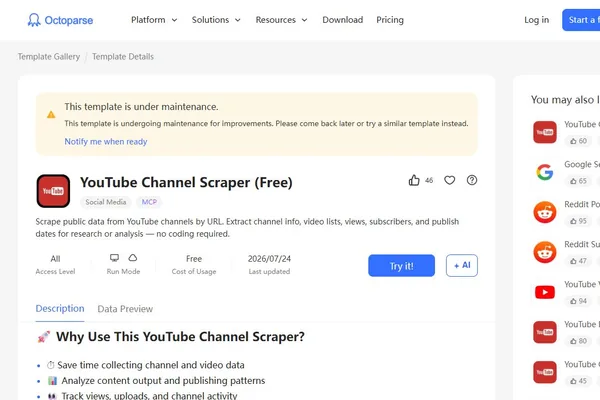
Octoparse provides a ready-to-run YouTube Channel Scraper (Free) for public channel URLs. This method avoids selector building and API client maintenance, and it can export YouTube channel videos to Excel, CSV, or JSON.
Step 1: Choose the channel template
Use the https://www.octoparse.com/template/youtube-channel-scraper-free when you already have public channel URLs. Its current template page states that one run accepts up to 10,000 channel Videos-page URLs. Each input should follow this format:
https://www.youtube.com/@ChannelName/videos
If you only have a channel handle, use the separate YouTube Channel Scraper workflow that accepts handles.
Step 2: Enter and validate the URLs
Paste one channel URL per line. Start with one channel and confirm that the URL opens a public Videos page. This small test catches formatting problems before a large run.
Step 3: Run the task and inspect the data preview
Start the task, then inspect the preview before exporting. The current free template displays fields including channel name, subscriber count, handle, video count, title, video URL, thumbnail, duration, visible view count, and date.
In an August 14, 2026 cloud test against the public Octoparse YouTube channel, the free template completed with 50 exported rows. Five returned sample rows contained all ten fields listed above. The task used a best-effort 10-row stop, but the final export contained 50 rows, so validate the completed total instead of treating a requested cap as an exact guarantee.
To automate this verified channel workflow from Python, follow the tested YouTube scraper API workflow.
Check several rows against the public page. Preserve missing values as missing instead of replacing them with zero, because an unavailable field is not the same as a confirmed zero.
Step 4: Export the channel data
- Wait until the run reports a completed or exported status.
- Open the data preview and check several rows against the public channel.
- Select Export Data and choose Excel for a spreadsheet workflow, or CSV/JSON for a data pipeline.
- Keep the video URL column if you plan to enrich the dataset with comments or transcripts in a second task.
Next step: Run one public channel, confirm the fields you need, and only then expand the input list or schedule another collection.
How we verified the channel export
On August 14, 2026, we ran the live YouTube Channel Scraper (Free) against https://www.youtube.com/@Octoparsewebscraping/videos. The cloud task was accepted, reached exported status, and reported 50 rows. The response exposed five sample rows with channel and video metadata. The first screenshot shows the live template page, while the second records the real export status and row total.
This single-channel test proves the workflow executed and exported data for that public input. It is not a universal speed or completeness guarantee. Results can change with channel size, page behavior, region, network conditions, and future template updates.
Watch the original Octoparse crawler walkthrough
The original article included the following Octoparse video, and it remains available. The walkthrough uses Octoparse 7, so its interface differs from the current product and template steps above. Use it to understand the crawler-building logic rather than as an exact guide to the latest buttons and menus.
The video demonstrates how a non-technical user can build a crawler to collect public YouTube data. For the current workflow, follow the YouTube Channel Scraper steps and verified export evidence in this guide.
Which Octoparse YouTube template fits your task?
Choose a template according to the page type and fields you need. A focused workflow is easier to validate and collects less unnecessary data.
Octoparse YouTube templates by task
| Goal | Exact template name |
|---|---|
| Collect channel and video data from public channel URLs | YouTube Channel Scraper (Free) |
| Collect channel videos from handles | YouTube Channel Scraper |
| Discover videos from keyword search results | YouTube Video List Scraper |
| Collect videos from a known YouTube results URL | YouTube Video List Scraper (by URL) |
| Combine video details with top-level comments | YouTube Details & Comments Scraper |
| Extract public community posts | YouTube Community Scraper |
| Analyze comments on Shorts | YouTube Comments Scraper (Short Video) |
Template access levels and run modes can differ. Check the live template page before a production run instead of assuming every YouTube workflow has the same free, local, or cloud options.
How do you add YouTube comments and transcripts?
Channel metadata describes what a creator publishes. Comments reveal audience reactions, while transcripts expose the spoken content inside each video.
Add comments to identify audience demand
Export the video URL column, then pass those URLs to the https://www.octoparse.com/template/youtube-comments-replies-scraper. Depending on what is publicly displayed, rows can include comment text, public author name, comment time, likes, replies, and reply counts. Our YouTube comment scraper guide compares the template, API, and Desktop routes for comment collection.
Use comment data to group repeated questions, feature requests, objections, and competitor mentions. Do not describe a comment sample as representative unless the sampling method supports that conclusion.
This official Octoparse walkthrough demonstrates the 2026 YouTube Comments & Replies workflow, including bulk URL input, task settings, cloud execution, and spreadsheet export.
Add transcripts to analyze topic coverage
Use the https://www.octoparse.com/template/youtube-transcripts-scraper when titles and descriptions do not capture the full content. The workflow accepts video URLs and returns timestamped text when YouTube publicly exposes a transcript. Our guide on how to extract YouTube video transcripts compares the template with code-based methods.
Transcripts support content audits, research, summaries, and retrieval-augmented generation datasets. Automated captions can contain errors, so spot-check names, numbers, and technical terms before analysis.
How can you analyze exported YouTube channel data?
A useful channel analysis connects each field to a decision. Keep the original URLs and record the collection date because public metrics change.
Find the publishing pattern
Group videos by week or month and count uploads. Compare duration, format, and topic across each period to see whether a channel relies on long-form videos, Shorts, live content, or a mixed schedule.
Identify repeatable content themes
Create one topic label per title or transcript. A pivot table can compare video counts and visible views by topic. Add publish date or video age so old and new videos are not treated as directly comparable.
Build a competitor content-gap list
Combine several public channel exports and standardize the columns. Look for topics one channel covers repeatedly while another ignores. Add comment themes to distinguish a genuine audience question from a topic that only appears in titles.
Use first-hand social-media research carefully
For a general example of scheduled research collection, an Octoparse education customer story describes a University of Texas researcher using cloud tasks to collect social-interaction records. This is not a YouTube-template performance test; it only illustrates why documented, repeatable collection matters in research.
The Octoparse LYRIQ YouTube community study provides a topic-specific model: document the video-selection criteria, fields, deduplication rules, and analysis limitations before drawing conclusions from public comments.
Monitor changes over time
Save each export with a collection date. Scheduled snapshots can show new uploads and changes in visible metrics, but they do not replace private YouTube Analytics.
What can go wrong when scraping YouTube channel data?
Most extraction problems come from URL formatting, unavailable public fields, dynamic loading, or page changes.
- The task returns no videos: Confirm that the channel and its Videos tab are public. For the free channel template, use a URL ending in
/videos. - Some fields are empty: The channel or video may not display that value. Do not replace missing values with zero unless zero has a distinct meaning.
- Subscriber counts look rounded: Preserve the displayed value or document the conversion rule.
- The video count differs from the public page: Private, unlisted, deleted, region-restricted, or newly published videos can change what is accessible.
- A saved workflow stops working: YouTube can change page structure and loading behavior. Revalidate the workflow before a scheduled reporting cycle.
- Comments or transcripts are missing: Use the dedicated workflow and confirm that the video publicly exposes the requested content.
Is it legal to scrape YouTube channel data?
YouTube scraping is not automatically lawful or permitted in every situation. The answer depends on the collection method, YouTube’s terms, applicable law, privacy, copyright, and the intended use of the output.
The YouTube Terms of Service restrict automated access except in stated circumstances, including prior written permission or access permitted by applicable law. API projects must also follow the YouTube API Services policies.
Collect only data you are authorized to use. Do not bypass access controls, collect private information, harvest personal data for unsolicited outreach, or automate engagement. Obtain legal advice for high-risk, commercial, or regulated uses.
Turn a public YouTube channel into a usable dataset
Manual collection works for a quick check. The official API suits developer-managed products. For analysts who need a spreadsheet without maintaining code, a ready-made template is the most direct starting point.
Start with one public channel, validate the fields, and add comments or transcripts only when required. This keeps the workflow easier to audit and limits unnecessary collection.
FAQs about YouTube channel scraping
Can I export every video from a YouTube channel?
You can export public videos that the selected method can access. Private, deleted, unlisted, age-restricted, or region-restricted videos may not appear. Compare the exported count with the public channel page and record the collection date, because a later channel change can otherwise look like an extraction error.
What YouTube channel URL should I use in a scraper?
For the YouTube Channel Scraper (Free), use the public Videos-page URL ending in /videos, such as https://www.youtube.com/@ChannelName/videos. Other workflows may accept a handle, keyword, video URL, or search-results URL. Check the template’s input instructions before importing a large list.
Can I scrape YouTube channel data without an API key?
Yes. A no-code channel template can collect publicly displayed channel and video fields without a YouTube Data API key. This avoids API credentials and quota handling, but it does not grant access to private analytics. You still need to follow platform terms, applicable law, and the selected template’s limits.
Is a YouTube scraper the same as the YouTube Data API?
No. A scraper extracts fields displayed on public pages, while the YouTube Data API returns documented resources through Google endpoints. The API requires credentials and quota management. A no-code scraper is often easier for spreadsheet exports, while the API is better for applications maintained by developers.
Can one channel scraper collect comments and transcripts?
Most channel scrapers return channel and video metadata, not full comments or transcripts. Export the video URL column and use separate comment and transcript workflows. Keeping these outputs in separate tables also prevents one video from being duplicated across hundreds of comment or transcript rows.
How often should I scrape a YouTube channel?
Match the schedule to the decision. A monthly export may be enough for a content benchmark, while an active campaign may need more frequent checks. Avoid collecting data more often than necessary, record every collection date, and confirm that recurring automation complies with platform terms and applicable rules.