If you need long-term Twitter data like competitor sentiment, historical tweets with timestamps going back years, and a pipeline that keeps running, you’re stuck choosing between Twitter scraping and the official Twitter APIs.
The API is reliable but can cost thousands of dollars per month, while scraping is cheap but fragile, plagued by IP blocks and constant breakage.
This guide talks about the foremost problem data experts and companies deal with now: How much it costs compared to how much you can trust it.
We are not just looking to export data once. We are checking out keeping tabs on data for a long time: being able to watch the data for six, twelve, or twenty-four months without fail.
If you are a coder thinking about a Python Twitter scraping script or a boss looking at company tools, this guide will break down the real costs, dangers, and whether each approach can last in the long run, so you can choose the option that will genuinely work for the long run.
Quick Answer
For long-term Twitter (X) monitoring, the official API offers the highest reliability but at a prohibitive cost, while DIY scraping is cheaper but unstable and resource-intensive.
For most businesses, no-code scraping tools like Octoparse provide the best balance of cost, reliability, and scalability, making them the most practical solution for continuously collecting historical and real-time tweet data without heavy engineering overhead.
Understanding Twitter Scraping
Getting data from Twitter, now called X, is an automated way to extract information. This is done by pretending a person is using the site or the mobile app. An API returns data that computers can easily read, such as JSON, when requested. Scraping is different. It means loading web pages and displaying the HTML content. Then it takes what you can see and organizes it into a structured data format.
Common Methods of Scraping
- Browser Automation with Code: Selenium and Playwright are tools that control a real web browser (such as Chrome or Firefox). They may log in, navigate a timeline, select “Show more,” and copy the text on the screen. This is the most prevalent approach, since Twitter relies heavily on JavaScript to display content, making standard HTTP requests inefficient.
- HTTP Request Interception: More complex scrapers reverse-engineer the internal API calls made by the Twitter website to its own servers. Scrapers can get data quicker by emulating these “unofficial” queries than by fetching the entire visual interface.
- Third-Party Scraping Tools: Pre-built software or SaaS platforms handle the complexities for you, providing a simple interface for entering a URL and downloading a CSV. As an alternative to the Python approach, no-code tools like Octoparse offer full browser automation, especially on websites like Twitter.
What Data Can Be Scraped from Twitter?
Virtually anything visible to a logged-in user can be scraped. This includes:
- Tweet content includes text, hashtags, cashtags, and emoticons.
- Media includes images and video links.
- Engagement Metrics include public counts of likes, retweets, responses, and views.
- Profile information includes follower numbers, bios, join dates, and locations.
- Metadata includes timestamps, device source (where applicable), and tweet IDs.
Technical Requirements
A script alone is insufficient for effective Twitter scraping. Because X employs rigorous anti-bot methods, you require a technology stack that includes:
- Proxy Rotation: Using a network of residential IP addresses to keep your scraper from getting blocked after a few hundred requests.
- Headless browsers are browsers that run in the background to execute JavaScript.
- Session Management: Managing cookies and “auth tokens” to keep a logged-in state, as Twitter now requires login to see practically all information.
In summary, Twitter scraping provides direct, unfiltered access to public data without the artificial constraints of a free API tier, but also incurs substantial technological “overhead” to keep the door open.
Understanding Twitter APIs
The Twitter API (now X API) is the approved gateway for developers to access the platform’s publicly available conversation data. It lets apps connect with Twitter programmatically while adhering to the company’s rigorous restrictions and rate constraints.
Twitter APIs Picing: The Tiered Access Model
As of late 2023, the API structure has shifted towards a high-cost tiered approach that clearly distinguishes between casual users and businesses:
- Free Tier: This is essentially a “write-only” tier. It permits you a restricted amount of tweets (about 1,500 per month) but provides no or limited access to tweet data. It’s worthless for monitoring.
- Basic Tier ($100/mo): Designed for amateurs and prototypes. You are given a modest read restriction (for example, 10,000 tweets each month). This quota may be met in a single day if a brand monitors mentions around the clock.
- Pro Tier ($5,000/mo): This is the entry point for commercial data access. It provides around 1 million tweets every month and access to the whole archive search (historical data).
- Enterprise Tier ($42,000+/mo): Custom limitations, specialized account support, and the highest degree of dependability.
Handling Twitter’s Per‑Request Limits
Twitter’s internal APIs and timelines impose strict limits on how much data you can receive in a single request or scroll session. If you simply “scroll to the bottom” or fire one large query, you will hit these limits long before you reach three years of history: the browser becomes unstable, requests start timing out, or the platform quietly stops returning older tweets.
To work around this reliably, Octoparse’s Twitter templates don’t try to grab everything at once. Instead, they automatically split the task by date ranges (for example, day by day) based on how you configure the job. Each run focuses on a smaller time window, which:
- Respects Twitter’s per‑request and timeline limits,
- Reduces the risk of crashes or silent truncation, and
- Maximizes the amount of complete historical data you can actually collect.
For end users, this date‑based splitting is invisible: you only define your overall time range (such as “the last three years”), and Octoparse orchestrates multiple smaller runs in the background to assemble the fullest possible archive of tweets.
No-Code Solutions: The Third Path for Twitter Data Monitoring
For 90% of users like marketing agencies, researchers, and small and medium-sized businesses, building a Python scraper or paying $5,000 per month is out of the question. This has resulted in No-Code Scraping Solutions.
These solutions manage the infrastructure (proxies, browsers, anti-bot evasion) and provide a simple interface for retrieving the data. They effectively serve as a “scraping API.”
No-code Twitter Scraping Approach:
A web scraping tool with a visual interface and templates. You may download the Octoparse desktop, choose a pre-built “Twitter” template, enter the URLs/Keywords, and execute the action in the cloud.
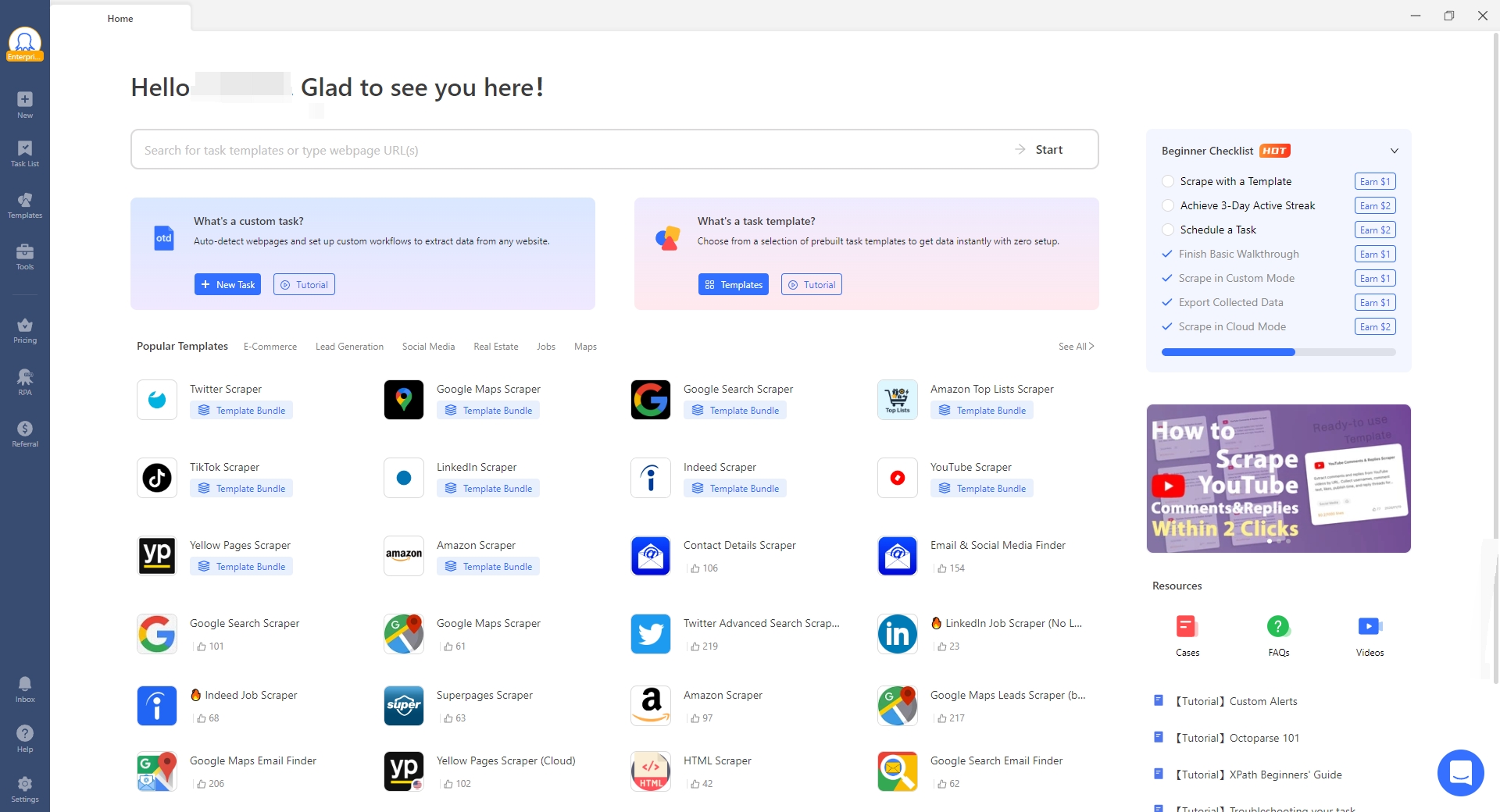
For more detailed steps, you can refer to the guide to extract data from Twitter (X.com).
Advantages of Using Octoparse to Scrape Twitter
Built-in Automation & Anti-Bot Capabilities
It automatically performs complex JavaScript rendering and supports limitless scrolling. It incorporates capabilities such as IP rotation and cloud extraction to ensure that long-term monitoring duties do not become obstructed. It costs substantially less than the official API.
Reliable Long-Term Twitter Monitoring
Octoparse and other no-code twitter scrapers like Chat4Data, Intant Data Scraper help to bridge the gap. They offer low-cost scraping alongside the reliability of a managed service. When Twitter’s UI changes, the Octoparse team (or template maintainers) updates the scraper, not you. You can set up a job to run every hour, and the results are sent to your database via a webhook or an API.
For teams that need developer-friendly access to Twitter/X data without building and maintaining their own scraping infrastructure, third-party API providers such as TwitterAPI.io can be a practical alternative. TwitterAPI.io offers real-time and historical Twitter/X data access through simple API endpoints, making it suitable for developers, data teams, researchers, and businesses that need scalable social data collection without managing proxies, browser automation, or scraper maintenance.
ScrapeBadger takes a similar API-first approach, offering a broad range of Twitter Scraping APIs for tweets, profiles, followers, lists, trends, spaces, communities, and more, with structured JSON responses rather than HTML. For long-term monitoring in particular, its Twitter Streams endpoint watches keywords or accounts continuously and pushes new matches by webhook, which removes the scheduling, pagination, and deduplication work that DIY setups usually require. It also ships an MCP server, so teams working inside Claude, ChatGPT, or Cursor can pull Twitter data conversationally without writing API calls.
Head-to-head comparison: Twitter Scraping vs. Twitter APIs
| Feature | Official Twitter API (Pro) | Python/DIY Scraping | No-Code (e.g., Octoparse) |
| Setup Time | < 1 Day (API Keys) | 3-7 Days (Dev & Testing) | < 2 Hours (Templates) |
| Monthly Cost | ~$5,000/mo (Pro Tier) | ~$200/mo (Proxies + Server) | ~$100-$300/mo (Standard/Pro Plans) |
| 12-Month TCO | $60,000+ (Additionally, someone to set it up) | $2,400 + $50,000 (Dev Salaries) | $1,200 – $3,600 |
| Maintenance | None (Very Low) | High (Weekly fixes) | Low (Managed by provider) |
| Data Reliability | 100% (Gold Standard) | 60-80% (Prone to breaks) | 90-95% (High) |
| Technical Skill | Medium (JSON/OAuth) | High (Python/Selenium) | Low (Point & Click) |
| Risk | Zero (Official) | High (Bans/IP Blocks) | Low (Managed Proxies) |
To help you decide, here is a breakdown above of the three approaches over a 12-month monitoring project.
Scenario: Monitoring 2,000 tweets/day (approx. 60,000/month) for a year.
Conclusion
Based on the long-term lens, here is the decision framework:
- If you have a $60k annual budget, go with the Official Twitter Enterprise/Pro API. It is the only option to rapidly obtain a guaranteed “3-year history” without any restrictions.
- If you have engineers but no extra budget, you may try Python scraping, but be warned: obtaining three years of historical data by scrolling is quite tricky and prone to error. You will most likely encounter “rate limit” blockages before you finish the first year of data.
- The Balanced Recommendation: For the majority of robust use cases, a No-Code/SaaS Scraper such as Octoparse is ideal.
- Historical Data: It can automate the “search” feature to locate tweets from specific time periods.
- Continuous Monitoring: You may set tasks to run every day to catch fresh tweets
FAQs about Twitter Scraping and Twitter APIs
- Is scraping Twitter legal, or will I get sued?
While X (Twitter) has lost court lawsuits seeking to prevent firms from collecting public data, it retains the authority to suspend your account and block your IP address for breaking their conditions of service.
Scraping public tweets without signing in (which is difficult to accomplish right now) or seeing public profiles with disposable accounts. Scraping private data, direct messages, or your principal business account can put your brand’s official presence at risk of suspension.
- Can I really get 3 years of historical data without paying $42,000 for the Enterprise API?
Yes, but it requires patience and the right tools.
- Official API: The “Pro” tier ($5,000/mo) gives access to the Full Archive Search, allowing you to pull tweets from 2021 instantly. The “Basic” tier ($100/mo) only searches the last 7 days.
- Scraping: A scraper can go back 3 years by using the “Advanced Search” parameters (e.g., from:user since:2024-01-01 until:2026-12-31). However, you cannot just “scroll down” for three years; the browser will crash. To successfully handle pagination, you must split the process down into smaller parts (for example, scraping month by month) and utilize a tool like Octoparse.
- Why can’t I just use the $100 “Basic” API tier for monitoring?
The Basic tier only lets you read 10,000 tweets per month. If you’re following a popular brand or a trending topic, you can surpass that limit in one afternoon. Once you reach the limit, your data stream is switched off until the next pay month. For continuous, long-term monitoring with unacceptable data gaps, the Basic tier is rarely enough.
- Will my personal Twitter account get banned if I use it for scraping?
Yes, this is quite likely. If you use your personal credentials (cookies) in a Python script or scraping tool, Twitter’s anti-bot algorithms will detect “non-human” activities. Such activities usually involve quickly accessing links, clicking buttons, or filling out forms.
Never use your primary account. Serious monitoring projects use a pool of “burner” accounts or, better, a no-code platform like Octoparse, which handles sessions and proxies on your behalf, keeping your identity separate from scraping activity.
- Why should I pay for a tool like Octoparse when I could just hire a Python developer?
It comes down to maintenance costs. A Python script you write today will likely break next week when Twitter updates its website code (e.g., changing a class name).
- Python: You can always employ a developer to maintain and patch the script constantly, but you must also pay separately for servers and proxies, which become more costly as you scale.
- No-Code (Octoparse): Maintenance is deferred and handled entirely by the platform. If Twitter’s layout changes, the Octoparse team will update the template promptly. You pay a fixed monthly charge for a functional tool rather than an uncertain fee for updating broken code and infrastructure.
In comparison, no-code tools like Octoparse are much more affordable, especially for smaller companies.
- What are the fastest web scraper of Twitter options?
APIs are fastest, but most users choose no-code or cloud tools for practical, stable performance. Some web scrapers like Octoparse (check Octoparse MCP here), offer MCP that can connect to LLMs for AI scraping, which is more fast, convenient and easy for non-coders.
- Fastest overall: Official X API → highest speed, highest cost
- Best balance (speed + cost): Cloud scrapers (e.g., Apify)
- Fastest to set up: No-code tools like Octoparse, Chat4Data
- Fast in theory, unstable: DIY scripts (Playwright, Puppeteer)