Last updated: November 9, 2026
Dynamic web scraping is the process of collecting data that appears after a page runs JavaScript, waits for an API response, accepts user input, or establishes an authenticated session. Browser-based scraping reproduces that experience. HTTP requests work better when the required data is already available through a stable, accessible endpoint.
The choice is not about which method is universally faster. It is about how the target website delivers data, how much interaction the workflow needs, and who will maintain it after launch.
If your goal is to collect usable data quickly, start by checking the page in a browser. You can then decide whether you need a browser workflow, direct requests, or both.
This guide focuses on choosing a collection method. For a broader explanation of how dynamic pages work, see Octoparse’s dynamic web page guide. For a deeper troubleshooting guide to AJAX-loaded content, see What Is Ajax Crawling?.
Quick answer
- Choose browser-based scraping when JavaScript, clicks, scrolling, filters, or login reveal the data.
- Choose HTTP requests when a public, stable HTML or JSON endpoint already contains the fields you need.
- Choose Octoparse when you want to test the page visually and turn a working flow into a repeatable task.
If you are new to scraping, this is the easiest starting point: open the page, confirm that the records are visible, and collect a small sample before you scale.
What is dynamic web scraping?
A static page sends the content you need in its initial HTML response. A dynamic page often sends a basic document first, then uses JavaScript to request products, prices, reviews, listings, or other records. The browser assembles the final view after those requests finish.
That difference explains a common scraping problem: the value is visible in Chrome, but missing from the HTML returned by a simple request. The browser has already executed scripts, loaded additional data, and applied the page’s interaction state. A basic HTTP client has not.
Dynamic web scraping usually involves one or more of these signals:
- Data appears after JavaScript runs.
- A click, search, filter, or tab reveals the records.
- Results load as the user scrolls.
- Pagination depends on a button or a changing request.
- The page requires login, cookies, or an authenticated session.
- A request must carry a token, header, or other session value.
The first step is to identify which of these signals controls the data you need. That decision tells you whether to start with a browser, an HTTP client, or a combination of both.
Browser-based scraping vs. HTTP requests
Browser-based scraping opens a real or automated browser, lets the page render, and extracts data from the resulting state. HTTP scraping sends requests directly and parses the returned HTML, JSON, or other response.
| Decision factor | Browser-based scraping | HTTP requests |
|---|---|---|
| JavaScript-rendered content | Strong fit because scripts run in the page | Works only if you identify and reproduce the underlying request |
| Clicks, filters, tabs, and scrolling | Natural fit | Must be translated into request parameters or a custom flow |
| Login and session state | Can follow the browser session | Requires explicit cookie, token, and header management |
| CAPTCHA and popups | Easier to observe and handle within the workflow | Usually requires a separate solution or manual intervention |
| Initial setup | More visual and easier to validate | More technical because you inspect requests and responses |
| Runtime cost | Higher because a browser consumes more resources | Lower when the endpoint is stable and lightweight |
| Throughput | Can scale, but needs browser resource planning | Often efficient for high-frequency, repeatable requests |
| Failure diagnosis | Easier to see what a user would see | Easier to inspect at the request and response level |
| Maintenance risk | Selectors and page flows can change | Parameters, schemas, signatures, and tokens can change |
| Best fit | Interactive, authenticated, or JavaScript-heavy pages | Public, stable, structured endpoints |
The practical rule is simple. Use a browser when the page itself is part of the data path. Use HTTP requests when the endpoint is the data path.
For a first test, validate the page in a browser before you spend time rebuilding its request logic. If you want a visual workflow, open Octoparse and start with a template or a target URL.
When should you use browser-based scraping?
When data appears only after JavaScript runs
If the initial HTML contains placeholders but the browser later displays prices, cards, reviews, or table rows, browser-based scraping is the safer starting point. The workflow can wait for the page to render and then select the fields the reader can see.
This approach avoids forcing a team to reverse-engineer every client-side request before it has confirmed what the page actually contains.
When the task requires clicks, filters, or scrolling
Many sites do not expose all records in the first response. A user must choose a category, submit a search, click “Load more,” or scroll through an infinite list. A browser workflow can reproduce those actions in the same order as a person.
HTTP can still work if those actions map cleanly to documented parameters. The question is whether the request logic is stable enough to maintain. If the page changes its request sequence often, the browser workflow may be easier to keep understandable.
When login or session state matters
Authenticated pages depend on more than a URL. They may require cookies, CSRF tokens, a user-specific session, or a sequence of login steps. A browser-based workflow keeps those steps visible and makes it easier to verify that the task is collecting the right account view.
Always confirm that you have permission to access and collect the data. Authentication is a technical requirement, not permission to bypass access controls.
When visual debugging matters
Browser-based workflows make failures easier to interpret. If a selector stops matching, a popup covers the page, or a button moves, you can inspect the same interface a user would see. That feedback is useful for operations teams that need to maintain a task without reading every network request.
When do HTTP requests work better?
HTTP requests are a good fit when the target exposes a stable HTML or JSON response and the required records do not depend on browser state. This is common for public feeds, simple listing pages, and endpoints with predictable pagination.
Direct requests can reduce resource use because they skip browser rendering. They can also make it easier to control retries, rate limits, response validation, and downstream parsing in code.
The trade-off is maintenance responsibility. A request-based workflow may need to preserve headers, cookies, tokens, signatures, pagination parameters, and response schemas. If any of those values change, the workflow can fail even while the page still looks normal in a browser.
Use HTTP requests when:
- The endpoint is public or you have an approved access method.
- The response contains the fields you need.
- Pagination and filters are predictable.
- The request parameters remain stable over time.
- Your team can maintain authentication, rate limits, retries, and schema changes.
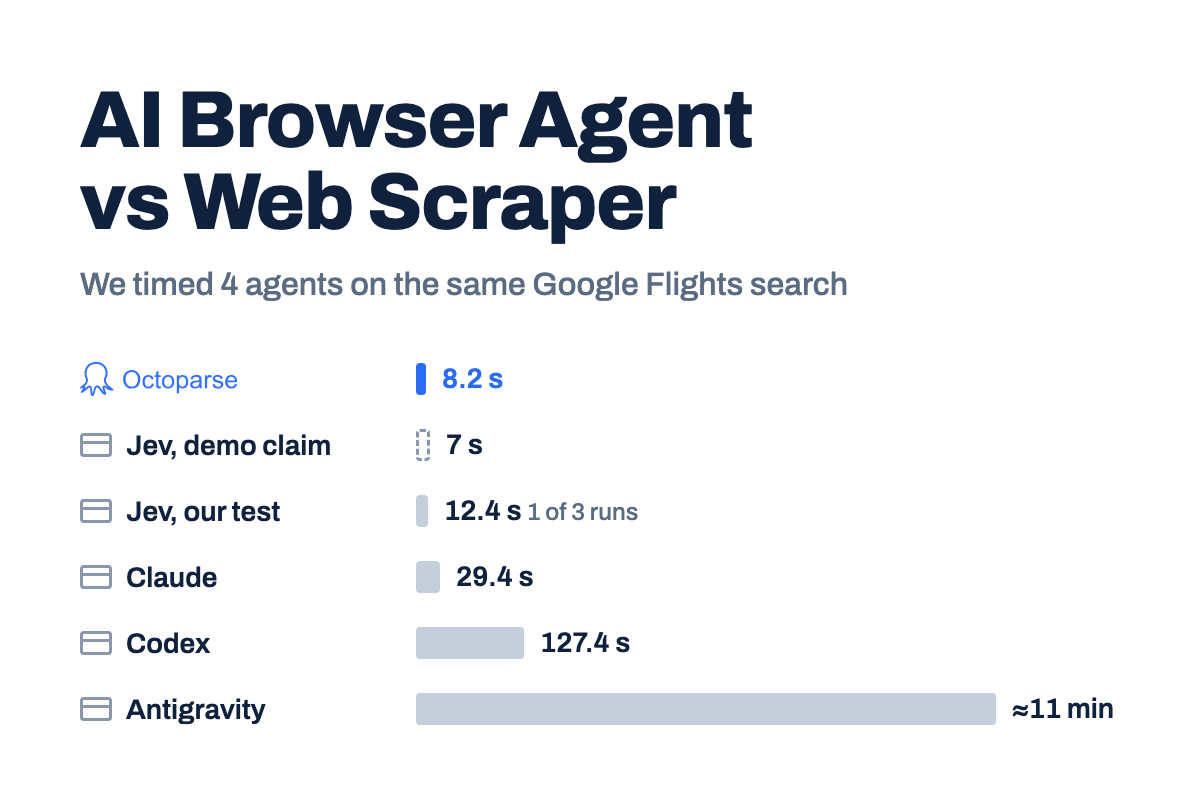
Do not choose HTTP simply because it sounds more technical or because a benchmark shows a lower request time. A fast request that returns incomplete data is not a faster workflow.
How to scrape a dynamic website with Octoparse
Octoparse is a web data platform with browser-based extraction workflows. You do not need to understand every network request before you can test a page. Start with the visible user journey, confirm the fields, and only then decide whether the task needs more advanced settings.
If you are comparing web scraping tools, focus first on whether the tool can reproduce the page state you need and let you verify a small sample before you commit to a larger run.
A simple three-step workflow
- Choose a template or paste a URL. A template is the fastest route when your site or use case is already covered. Otherwise, open the target page in Octoparse’s visual workflow.
- Show Octoparse what to collect. Enter the keyword, location, or other input. Click the records and fields you want, then add the visible action the page needs, such as scrolling, pagination, or opening a detail page.
- Run a small sample and check it. Review a few rows before you scale. If the values look right, export them or reuse the task in Octoparse Cloud.
This keeps the first session focused on one question: Can the workflow collect the same information that a person can see on the page? If the answer is yes, you already have a useful starting point.
A real browser-based test: Google Maps listings
To make the workflow concrete, I ran Octoparse’s https://www.octoparse.com/template/google-maps-scraper-listing-page-by-keyword with English, Google Maps in the United States, and coffee shops in Austin, TX on November 6, 2026.
The run produced a verifiable evidence set. Instead of treating a screenshot as the proof, the table below records the run receipt, exported file, and response-text cross-check so each claim can be checked independently.
| Evidence item | Observed result | What it supports | Source |
|---|---|---|---|
| Template inputs | English; Google Maps United States; coffee shops in Austin, TX | Octoparse accepted parameterized keyword and location inputs | Run notes, November 6, 2026 |
| Run receipt | 44 records; 2 minutes 16 seconds elapsed before stop | The task completed a browser-based collection workflow | Octoparse run record |
| Export file | 44 rows; 16 columns | Results were returned as structured data | google-maps-coffee-shops-austin-2026-11-06.csv |
| Representative fields | Name, rating, review count, category, address, coordinates, status | Multiple listing fields were extracted in one task | Export schema and sample rows |
| Sample rows | Epoch Coffee (4.5; 2,536 reviews); Jo’s Coffee – South Congress (4.4; 2,008); UFO Coffee & Tea (4.9; 51) | The output contains populated listing values, not only page metadata | Export rows |
| Initial HTML check | The search phrase was present, but those sample business names were absent from plain response text | The browser-rendered workflow exposed records that a simple text fetch did not | google-maps-initial-html-check.txt |
This evidence package validates one complete Google Maps workflow. A second independent location run was not completed here, so the article does not claim repeatability across inputs or universal coverage. It also does not benchmark browser speed against an HTTP client.
What this test proves: The evidence supports four specific capabilities in this scenario: parameterized template input, browser-rendered collection, multi-field structured extraction, and result review/export. It does not prove universal site coverage, repeatability across all inputs, or browser speed versus HTTP.
The export included populated values such as Epoch Coffee (4.5 rating, 2,536 reviews), Jo’s Coffee – South Congress (4.4 rating, 2,008 reviews), and UFO Coffee & Tea (4.9 rating, 51 reviews). Review a small sample before scaling because fields can vary by listing.
If the first sample needs more control, Octoparse documents browser modes for pages with login, popups, or complex interactions. Treat these as adjustments after the basic flow works, rather than as prerequisites.
Teams that need integration can use the Octoparse Open Platform or Open API to run tasks and retrieve results after the task has been authored.
How to choose the right method
Use this quick path:
The resulting recommendation is usually one of three paths:
- Simple public endpoint: use HTTP requests when the response is complete and stable.
- Dynamic or authenticated page: use browser-based scraping to reproduce the page state.
- Complex project: use the browser to validate the data path, then consider a request-based or cloud workflow for repeatable collection where the site and access terms support it.
Frequently asked questions
What is dynamic web scraping?
Dynamic web scraping collects data that appears after JavaScript executes, a user interacts with a page, or an authenticated session is established. The workflow must capture the rendered or requested state that contains the records.
What is the difference between browser scraping and HTTP requests?
Browser scraping opens and interacts with a page. HTTP scraping sends requests directly and parses responses. Browser workflows handle rendering and interaction more naturally, while HTTP workflows are efficient when a stable endpoint already exposes the required data.
Is browser-based scraping slower?
It can use more resources because it runs a browser and waits for page behavior. That does not make it the wrong choice. If a direct request returns incomplete data, the browser workflow may be the faster route to a correct and maintainable result.
Can HTTP requests scrape JavaScript-rendered pages?
Sometimes. If you identify a stable endpoint behind the page and can reproduce its permitted request parameters, HTTP may work well. If the endpoint requires changing tokens, complex interaction, or an authenticated browser state, a browser workflow may be more practical.
How do you scrape a page that requires login?
Use an approved account and a workflow that preserves the required session state. A browser-based approach makes the login and post-login page state visible. Do not use scraping as a way to bypass authentication or access restrictions.
How do you scrape infinite-scroll pages?
Identify the interaction that loads more records, then configure a controlled loop or pagination flow. Test the stopping condition carefully so the task does not stop early or run indefinitely.
Can Octoparse scrape dynamic websites?
Yes. Octoparse is designed for browser-based extraction workflows that interact with rendered pages. For a directory workflow such as Google Maps, start with a template, enter the search inputs, review a small sample, and confirm field coverage before scaling.
When should developers use HTTP requests instead of a browser?
Use HTTP requests when the endpoint is stable, the response contains the complete dataset, and your team can maintain request parameters, authentication, retries, and schema changes. Direct requests are a good optimization after the data path is understood.
Is Octoparse suitable for non-technical teams?
Yes. It is designed to make web data collection more visual and repeatable. A new user can start with a template, select fields on the page, and review a small sample before scaling.
Start with the page, then choose the method
Dynamic web scraping becomes easier when you start with the page’s data path instead of a preferred technology. If the browser is responsible for revealing the data, use a browser-based workflow. If a stable endpoint already contains the records, use HTTP requests. If the project needs both, validate the page in a browser and optimize the repeatable part afterward.
If you want to test a dynamic website without building a request parser from scratch, start with Octoparse. Choose a template or paste a URL, run a small sample, review the rows, and keep the task when you need the same data again.