The “Empty Page” Problem
Ajax crawling is an adjusted crawling process in which a crawler bot can render, wait for, or directly capture data loaded via background JavaScript requests instead of static HTML. Asynchronous JavaScript and XML (AJAX) has been a part of the web development industry for decades, but it has now evolved into client-side JavaScript that fetches data in JSON format, more than XML.
You could build a robust and efficient web scraper that flawlessly scrapes webpages, but when you return the next day, it no longer works. The data fields you gathered previously are now returned empty, but they appear on the screen when you open the web page. You check the HTML structure your scraper fetched, and there is no data either. This issue is similar to what many people face with Asynchronous JavaScript and XML (AJAX) crawling.
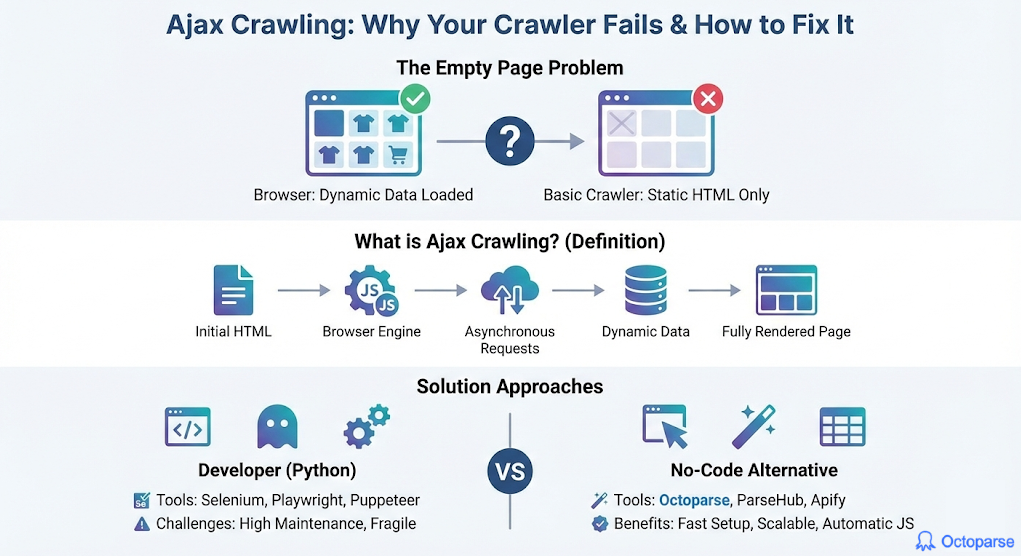
This scenario describes how people usually learn about AJAX crawling problems, but for developers, it is very necessary. Modern development aims to accelerate everything, and as 99% of websites use JavaScript, they are now loaded both statically and dynamically. The dynamic part comes later, which is done asynchronously, and that is the part your scraper is missing when fetching data.
In this guide, we will examine why and when this issue with Ajax crawling occurs, as well as how to solve it in multiple methods.
By the end of the article, you will get a good grasp of:
1. What Ajax Crawling Is for the Modern Internet
2. Why Traditional Crawlers Fail on Ajax Pages
3. How Ajax Crawling Works in Practice: Three Core Models
4. No-Code Ajax Crawling Alternative
The Difference between traditional and AJAX crawling
Ajax crawling, compared to traditional crawling, has core distinctions:
- Traditional crawling: The Crawler bot fetches the static HTML file from the HTTP request.
- Ajax crawling: After loading the initial HTML page, there are XHR or Fetch requests that load the dynamic content into the static part. This process is more advanced and requires a crawler to simulate a browser environment, thereby mimicking those requests.
The primary difference between traditional and AJAX crawling lies in how pages are handled. Ajax crawling observes the entire process (waits for all the content to load), while traditional crawling processes pure static documents. This is why modern web crawling tools must adjust to the new way web pages are developed and loaded.
Why Traditional Crawlers Fail on Ajax Pages
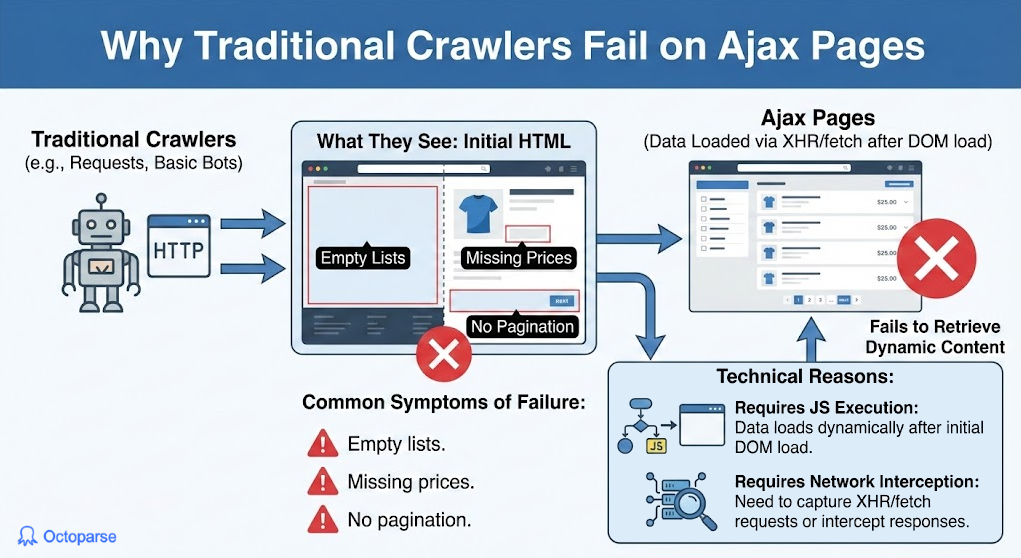
Manually built crawlers use Python’s library requests to fetch the HTML structure and then parse it, but they miss the valuable data content we are looking to extract. More and more websites use Ajax techniques to load the complete content, so using traditional crawling will only load the skeleton.
The content is only loaded when the website executes JavaScript in the browser’s backend to fetch the current data. This process helps increase the speed of loading, but traditional crawlers are not designed for this approach. When you apply traditional crawlers to a dynamically loaded website, there can be multiple issues involved:
- Empty fields: Lists, tables, or product grids that populate in the browser are empty in the fetched HTML page.
- No pagination: Most commonly, `next` page buttons are loaded by JavaScript, which causes only crawling on the first page of the website.
- Lazy loading: Data that requires scrolling to is not loaded initially on the static page, hence it is not present.
Library requests does not have a JavaScript engine to execute the scripts that trigger network calls or manipulate the Document Object Model (DOM), and hence are not suited for this task.
How Ajax Crawling Works in Practice: Three Core Models
Traditional crawling still has its purpose, but I would like to demonstrate how we can overcome problems with dynamic loading and utilize various Ajax crawling techniques.
Method 1: Browser Rendering (The Full Simulation)
A full browser replication launches a headless variant (without a graphical interface) to load the page, execute the JavaScript requests, and wait for the DOM to be ready. With this approach, we are playing it safe by having a browser capable of handling any actions that may arise. Any interaction with the browser is possible, such as clicking, scrolling, and logging in.
Although this browser is launched in headless mode, this method is very resource-intensive (CPU/RAM usage). Like any self-developed crawler, it can also be blocked by anti-bot detection if no appropriate measures are taken.
Method 2: XHR/API Sniffing (The Direct Approach)
XHR/API sniffing of background network requests skips interacting with the browser and uses JavaScript to load data directly. This method identifies suitable API endpoints that serve the structured data we need and calls them directly.
Unlike the previous method, it accesses the data source directly and uses fewer computing resources. By obtaining the data directly from the source, you can shape it as needed and use it for further processing later. Another issue with this approach is that it requires a significant amount of initial technical effort to reverse-engineer the API logic, including the implementation of appropriate authentication and parameters.
The investigation process to find requests to sniff involves using the Networks tab in the Inspect Elements feature of the browser, and this can also be done programmatically using the requests library.
Method 3: Hybrid Approach
The hybrid crawling approach combines the first two methods. At first, it triggers the headless browser to discover data API endpoints and session tokens, then switches to making direct XHR/API requests for bulk data extraction. This way, it replaces the manual efforts of debugging the networking tab and reverse-engineering the entire workflows.
Ultimately, both parts of crawling utilize the appropriate tools, thereby enhancing both resource usage and time efficiency. However, the hybrid method is also not perfect, as it requires a significant amount of development effort and technical knowledge. Maintenance is often the cause of most projects’ demise, and here it is no different.
Ajax Crawling in Python
The standard programming language most developers choose for developing a web crawler is Python. With libraries that can do almost anything you think of, the same goes for support in Ajax crawling.
The most popular frameworks for developing a crawler in Python are Selenium, which provides browser automation, Puppeteer, offering JavaScript (headless) Chrome/Chromium browser automation, and Playwright, which supports both programming languages.
Typical script using Playwright would look like this:
It loads the browser in headless mode (without a graphical user interface) and opens the desired webpage. After the page is loaded, it waits for certain dynamic parts to be loaded as well. To ensure the content loads, we can also scroll to the end of the page before fetching the data fields. Once the data is fully loaded, I typically use BeautifulSoup to parse the HTML structure, incorporating all the included data.
Although this script appears simple, it is far from what is used in production-level crawling. The initial setup can be challenging, particularly in finding all the required crawling elements and loading the pages correctly. Since dynamic content is always subject to change, maintenance is very exhaustive and takes even ten times the effort of initial development. Having a team whose goal is to develop and maintain such a comprehensive crawler can be replaced with a single dedicated crawler tool that incorporates all the features above, such as Octoparse.
The Hidden Challenges of Python-Based Ajax Crawling
So far, I have mentioned a few problems that arise when developing your own Python Ajax crawler, but there are a few more to keep in mind:
- Fragility to changes: Websites are constantly changing and evolving, which presents a problem for AJAX crawlers, as they must also adapt to this new structure and eventually break, resulting in data loss.
- Speed and resource cost: Headless browsers, which are most commonly used for crawlers, are highly resource-intensive, especially when multiple instances are used in parallel.
- Anti-bot detection: Modern websites use advanced techniques to detect any suspicious activity in automated browsers. Analysis of mouse movements, proxies, TLS fingerprinting, and other methods is all part of what can lead to your crawler being banned.
- Maintenance burden: Many issues, such as network problems, dynamic content changes, or anti-bot blocks, can cause your script to fail. Maintenance in such cases can be quite often and effort-intensive. Maintenance is also time-consuming when it comes to simple upgrades and other libraries that your software depends on.
- Scaling bottleneck: Once you require multiple crawlers to run in parallel for bigger projects
No-Code Ajax Crawling: What Changes?
This evolution of Ajax crawling has given rise to a new category of crawlers that can abstract away all the underlying complexity and problems, allowing users to avoid dealing with them. The visual, no-code, and browser-based crawlers. They handle all the issues we discussed, out of the box, and take maintenance off your daily task list.
There is no need to worry about JavaScript requests being sniffed or headless browsers, as dedicated crawling tools are now capable of this and more. JavaScript rendering is handled automatically in the background, and every interaction (clicks, waits, and scrolls) with the browser is supported natively.
Crawling tools that can handle Ajax crawling are:
- Octoparse: Comprehensive no-code solution for all crawling needs that can render JavaScript and handle Ajax-loaded content out of the box. The tool gives you maximum flexibility and customization when approaching Ajax crawling at scale.
- ParseHub: A Data mining tool that can also handle Ajax techniques, but with a simpler feature set and outdated UI.
- Apify: An API-based approach with premade templates for almost any website. They use “actors” (crawlers) to build your own customized solution at scale.
Within the competitive industry of crawlers utilizing Ajax techniques, Octoparse is my top choice. I have personally used Octoparse for both large and small projects that require crawling or scraping. With the possibility to customize any task I need and adaptability to AJAX crawling, it enables me to fetch data constantly without any maintenance. Every tool has its purpose and niche, but Octoparse makes it easy to crawl with Ajax-capable features.
Turn website data into structured Excel, CSV, Google Sheets, and your database directly.
Scrape data easily with auto-detecting functions, no coding skills are required.
Preset scraping templates for hot websites to get data in clicks.
Never get blocked with IP proxies and advanced API.
Cloud service to schedule data scraping at any time you want.
FAQs about Ajax Crawling Problems
- My scraper worked yesterday, but it’s now returning empty results. Is this always an Ajax issue?
No, but it is highly likely. Since 99% of websites use JavaScript, most failures occur when a dynamic website structure changes, which could be the exact issue. When the HTML structure changes and the scraper attempts to fetch data that is no longer available, it breaks. Of course, this is not the only possible issue. Anti-bot measures or API parameter changes could also be the culprits in this scenario.
- How can I quickly tell if a page uses Ajax to load its content?
Manually open the webpage you want to check, right-click on it, and select “View Page Source”. This quick check will only show the raw, static HTML structure sent by the server. By looking up dynamic data fields, such as pricing and product names. You can check if it uses Ajax or if it is entirely static.
Another option to check if a website uses Ajax to load content is to open the “Network” tab and refresh the page. Filter for only XHR or Fetch requests that JavaScript executes to the website’s backend as you scroll the page to load more content, for example. If you can pinpoint such requests, it means the website uses Ajax calls.
- Between Browser Rendering and XHR Sniffing, which method is “better”?
Both methods are suitable for different use cases. Browser rendering can be used if resources are not in question. However, as they are usually part of the equation as projects scale, XHR can be a good approach for resource-light crawling. XHR sniffing takes time because of the reverse engineering of API calls, so it’s not perfect either.
- The article mentions the maintenance burden with Python. What does that actually involve?
Building any application yourself puts maintenance efforts on you, the developer. Some experienced software engineers will tell you that maintenance is 10 times the effort of initial development. There are constant library upgrades, ever-changing dynamic websites, and the introduction of new features to the crawler, among other updates. Building advanced features is no easy task, either, and dealing with these features and maintaining them is a task in itself. Monitoring, anti-bot evasion algorithms, and error handling are all integral to the evolving software, and they require significant time and effort to implement.
- If I choose a no-code tool for Ajax crawling, what are the main limitations I should be aware of?
No-code dedicated crawlers, such as Octoparse, can handle AJAX techniques fully natively. There are no limitations per se, but there are a few key points to consider. The cost of the tool can be adjusted appropriately according to the project size and depends entirely on usage. As you use the tool and its features, you become increasingly dependent on it.