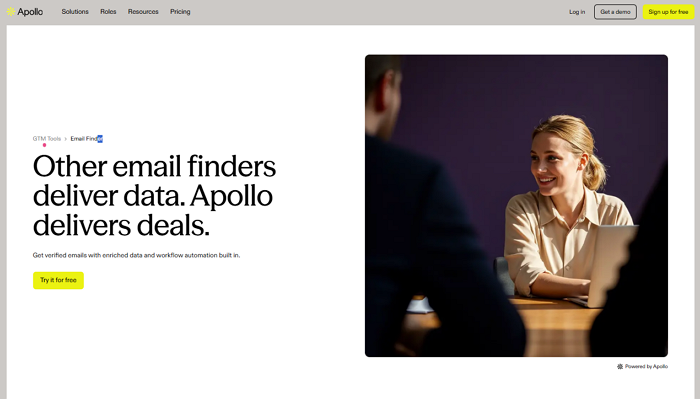
Apollo Email Finder is a B2B contact database that lets you search 270 million verified professional emails by name, job title, company, and 65+ other filters. It is the email-finding component of Apollo.io, an all-in-one sales intelligence platform used by over 600,000 companies worldwide.
Quick Answer
| Apollo Email Finder | |
| Database | 270M+ contacts, 35M companies |
| Free plan | 50 email credits/month |
| Paid plans | From $49/user/month (billed annually) |
| Claimed accuracy | 91% |
| Real-world bounce rate | 15–35% (higher outside the US) |
| Best for | US B2B prospecting at known companies |
| Weak spots | Local businesses, non-US markets, new startups |
This guide covers how Apollo works, how to set it up step by step, where it falls short, and when a web scraping tool like Octoparse closes the gap.
What Is Apollo Email Finder?
Apollo Email Finder searches a pre-built database to match a contact’s name, job title, or company to a stored email address. As part of Apollo.io’s sales platform, it combines contact discovery with email sequencing, CRM sync, and buying-intent signals in one workspace.
Apollo.io launched in 2015. Its core value for prospecting teams is speed: you define your Ideal Customer Profile (ICP), apply filters, and get a list of verified emails without manually visiting company websites or LinkedIn profiles.
Key capabilities:
- 65+ search filters: Target by job title, company size, industry, tech stack, geography, and more. A search for “Head of Growth at B2B SaaS companies with 51–200 employees in California” returns contacts matching all of those criteria simultaneously.
- Multi-step email verification: Apollo labels emails as “verified” or “unverified.” Apollo claims a 91% email accuracy rate. In practice, users on r/coldemail consistently report bounce rates of 15–35%, particularly for European and APAC contacts. Run exported lists through a dedicated verifier (NeverBounce, ZeroBounce) before sending at scale.
- Chrome extension: Pulls emails and phone numbers directly from LinkedIn profiles, company websites, and Gmail. Over 900,000 users have installed it in the Chrome Web Store.
- Built-in sequences: Add contacts to automated email sequences, schedule follow-ups, and track replies — all inside Apollo without switching tools.
- CRM sync: Two-way sync with Salesforce, HubSpot, and Pipedrive. Contacts and engagement data flow into your pipeline automatically.
How to Use Apollo to Find Emails
Apollo offers two methods for finding emails: searching the database with advanced filters for large-scale prospecting, and using the Chrome extension for quick lookups while browsing LinkedIn and company websites.
Method 1: Search the Apollo Database
Step 1: Create an account
Go to Apollo.io and sign up using a corporate email address. The free plan includes 50 email credits per month, regardless of email domain type. Paid plans start at $49/user/month and include higher credit limits and advanced features like buying-intent signals.
Step 2: Navigate to the Search tab
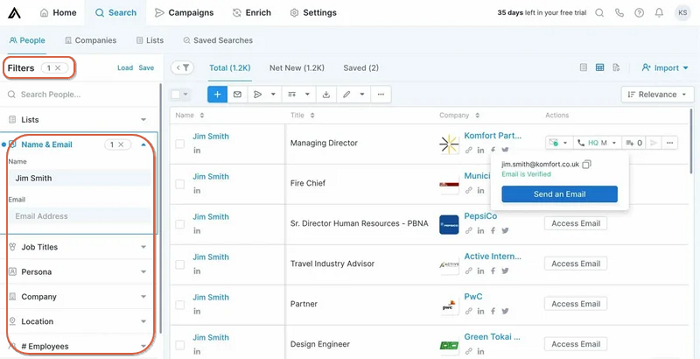
Once logged in, click “Search” from the top navigation. A filter panel appears on the left side of your screen.
Step 3: Set your filters
Define your ICP using Apollo’s filters. Specificity matters: “Head of Growth” at “B2B SaaS companies” with “51–200 employees” in “California” returns far more useful contacts than a broad search for “Marketing” in “United States.”
Step 4: Review and reveal contacts
Review the list of matching contacts. Click “Reveal” to see a verified email address. Each reveal costs one email credit. Contacts labeled “Verified” have passed Apollo’s multi-step deliverability check, though that label reflects the last check — not real-time status.
Step 5: Export or add to sequences
Export contacts as a CSV file, push them to your CRM, or add them to an Apollo email sequence for automated follow-up. Export activity also consumes credits on paid plans, so track your usage in the first month.
Step 6: Save your search
If you run similar searches regularly, save your filter criteria. Apollo sends alerts when new contacts matching your search appear in the database. It’s useful for monitoring hiring activity at target accounts.
Method 2: Use the Apollo Chrome Extension
The Apollo Chrome extension surfaces contact data while you browse, without switching tabs.
Step 1: Install the extension
Download the Apollo.io extension from the Chrome Web Store and log in with your Apollo account.
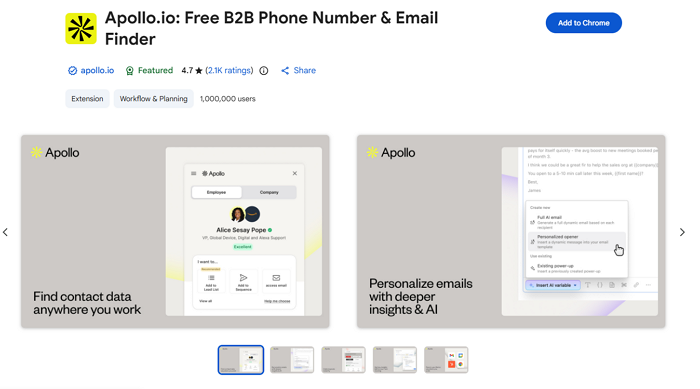
Step 2: Browse LinkedIn or company websites
Visit a prospect’s LinkedIn profile or any company website. The Apollo sidebar appears on the right automatically.
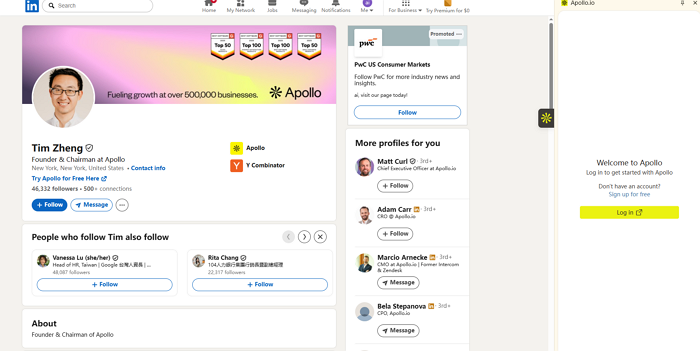
Step 3: Reveal contact info
Click to reveal the prospect’s email and phone number. From the sidebar, you can add them to an Apollo list or enroll them in a sequence without leaving the page.
Step 4: Use inside Gmail
The extension works inside Gmail, adding email tracking, meeting scheduling, and contact enrichment directly to your inbox. It surfaces Apollo data on anyone who emails you.
Tip: Bulk reveal on LinkedIn company pages
On LinkedIn company pages, the extension shows a list of employees. Filter by job title and reveal multiple contacts in bulk — faster than opening individual profiles.
Pros and Cons of Apollo Email Finder
Apollo stands out in the B2B data space because of its large database and integrated workflow. Like any tool, it comes with trade-offs. The following breakdown draws on product documentation, G2 reviews across 9,400+ ratings, and community feedback from r/coldemail and r/LeadGeneration.
What Apollo does well
Large database with granular filters
Apollo’s 270M+ contact database, paired with 65+ filters, lets you target very specific ICPs, cutting time spent on unqualified leads. The tech stack filter is particularly useful: you can target companies running specific software, which narrows ICP targeting in ways most databases cannot.
All-in-one platform
Apollo handles email finding, sequence building, response tracking, and CRM sync in one workspace. For sales teams, reducing vendor complexity, that consolidation has real operational value.
Generous free tier for early-stage teams
The free plan includes 50 email credits per month, the Chrome extension, basic sequence automation, and buying-intent signals (3 topics). For individual SDRs or early-stage startups testing outbound for the first time, that is enough to validate messaging before committing to a paid plan.
Native CRM integrations
Two-way sync with Salesforce and HubSpot means contacts and engagement data flow into your pipeline without manual imports. Even the free plan supports pulling data from HubSpot and Salesforce.
Where Apollo has limitations
Credit limits are tighter than marketed
Apollo’s free plan was reduced to 50 email credits per month in 2025 — a significant cut from previous limits. Some users reported drops from higher credit allocations without prior notice. Paid plans advertise “unlimited” credits, but these are governed by a fair-use policy. Track credit consumption during your first month to avoid surprises.
Email accuracy varies by region
Apollo claims 91% email accuracy. Real-world bounce rates of 15–35% are consistently reported by users outside the United States, particularly in Europe and APAC. One documented issue: Apollo sometimes lists US headquarters contact details for global companies rather than local-branch contacts. Treat Apollo data as a starting point and verify before sending at scale.
Database coverage has structural gaps
Apollo is limited by what its contributor network and third-party data providers index. Small businesses, niche industries, non-English-speaking markets, and startups founded within the past 6–12 months are underrepresented. These gaps are not bugs — they are structural limits of any database-driven tool.
Learning curve for new users
Apollo’s full feature set (sequences, personas, intent signals, workflows, analytics) takes time to learn. Teams that only need the email finder may find the platform’s complexity unnecessary at first.
When Apollo Email Finder Falls Short
Apollo performs best for well-indexed US B2B contacts at established companies. For many outbound teams, the following scenarios are not edge cases and represent a significant share of the prospecting pipeline.
1. Niche industries and local businesses
When targeting local service businesses such as HVAC companies, independent dental practices, and boutique consulting firms, Apollo’s database often returns thin or missing results. These businesses rarely raise venture capital, publish press releases, or maintain prominent LinkedIn profiles. Their contact information lives on their own websites, Google Maps listings, and niche industry directories.
2. Non-US and non-English markets
Apollo’s data coverage is strongest in the United States. Teams targeting German manufacturers, Japanese distributors, Brazilian retailers, or Southeast Asian tech companies report lower match rates and higher bounce rates. Apollo’s contributor network skews toward English-speaking markets, creating coverage gaps elsewhere.
3. Newly founded companies
Startups launched in the past 6–12 months are frequently absent from Apollo’s database. New companies take time to build a digital footprint, and data providers need time to index it. For teams targeting early-stage companies, this lag creates a blind spot.
4. Directories, event sites, and membership lists
Industry associations, conference speaker lists, trade show exhibitor directories, and professional membership organizations publish valuable pre-qualified contacts. No single database reliably indexes the thousands of fragmented websites where this data lives.
Octoparse: A Web-Based Alternative for Finding Emails
Octoparse is a no-code web scraping platform that extracts emails directly from live web pages such as company websites, Google Maps results, and industry directories, rather than querying a pre-built database. Where Apollo is limited by what has already been indexed, Octoparse works with whatever is currently published on the web.
Contact-detail scraping is one of the fastest-growing workloads on the platform. The users who rely on it are not grabbing a single list. They run it tens of thousands of times in aggregate, building the kind of lead pipelines that drive sustained outbound campaigns. That scale is evidence of production-level reliability, not just a backup for edge cases.
That scale is evidence of production-level reliability, not just a backup for edge cases. Download Octoparse free to try it on your own contact list.
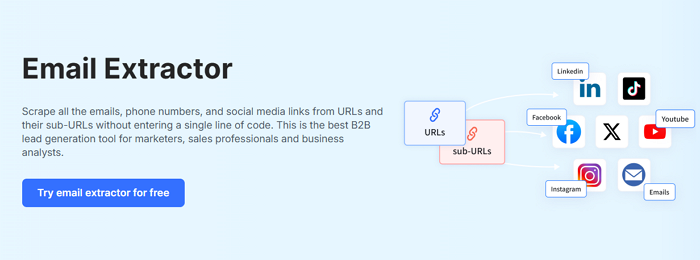
Path 1: Pre-built templates (no setup required)
Octoparse’s template library includes several contact-finding workflows that require no coding and minimal configuration.
Contact Details Scraper
Extracts emails, phone numbers, and social media links from any website and its subpages. Point it at a company domain and it automatically crawls pages like “About Us,” “Contact,” and “Team” to collect all publicly listed contact information. Supports up to 100,000 URLs per run.
https://www.octoparse.com/template/contact-details-scraper
Email and Social Media Scraper
A lighter version focused on specific pages you provide. Feed it a list of URLs and it returns emails, phone numbers, and social profile links (Facebook, LinkedIn, Twitter, TikTok) from each. Handles up to 20,000 URLs per run, useful for processing large batches of known target pages.
https://www.octoparse.com/template/email-social-media-scraper
Google Maps Email Finder
Searches Google Maps by keyword and location, returning business emails, websites, phone numbers, ratings, and addresses. A search for “digital marketing agency in Austin” produces a structured spreadsheet of matching businesses with their publicly available contact details.
https://www.octoparse.com/template/google-maps-contact-scraper
State-level filtering accuracy is a known weak point for most Google Maps scrapers. Off-the-shelf tools frequently miss 30 to 50% of cross-border results. In our own accuracy tests, Octoparse’s Google Maps Email Finder holds above 90% at the state level, which makes it reliable for regional prospecting campaigns.
All templates export to Excel, CSV, JSON, or directly to Google Sheets. Online templates run in the browser, so no software installation is required. See Octoparse pricing plans — there is a free tier with no credit card required.
Path 2: Custom scraping workflows (for any website structure)
When pre-built templates do not fit your specific data source, Octoparse’s visual workflow builder lets you create custom scrapers for any website, without writing code.
Turn website data into structured Excel, CSV, Google Sheets, and your database directly.
Scrape data easily with auto-detecting functions, no coding skills are required.
Preset scraping templates for hot websites to get data in clicks.
Never get blocked with IP proxies and advanced API.
Cloud service to schedule data scraping at any time you want.
- Paste the target URL into Octoparse.
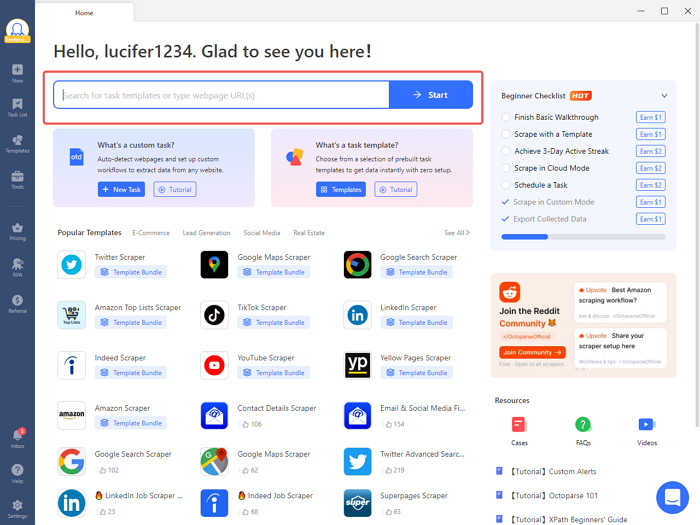
- Click “Auto-detect webpage data.” Octoparse scans the page and highlights extractable data fields.
- Select the fields you need: emails, names, phone numbers, job titles, company names, addresses, or any other visible data.
- Click “Create workflow.” Octoparse generates a visual flowchart showing every scraping action. You can review and adjust it.
- Add pagination handling or subpage navigation if the data spans multiple pages.
- Run the scraper locally or on Octoparse’s cloud servers for 24/7 automated extraction.
- Export results to Excel, CSV, JSON, or your database.
Practical example: Regional manufacturing association
A regional manufacturing association lists 400 member companies on its website, each with a profile page containing the company name, contact person, email, and phone number. A traditional B2B database covers perhaps 30% of these companies. With a custom Octoparse scraper, you visit each profile page, extract all contact fields, and export to a single spreadsheet, approaching 100% coverage of the publicly listed contacts without per-contact fees.
Additional features
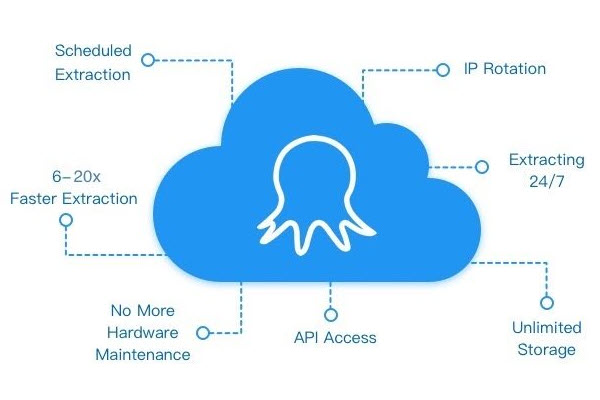
- Cloud scraping and scheduling: Run tasks on Octoparse’s cloud servers, so your computer does not need to stay on. Schedule recurring scrapes (daily, weekly, or monthly) to keep contact lists current as websites update.
- Anti-blocking: Built-in IP rotation, proxy support, and CAPTCHA handling ensure consistent extraction from sites with strong anti-scraping measures.
Apollo Email Finder vs. Octoparse: Which One Should You Choose?
Apollo and Octoparse both help you find email addresses for outreach, but they use fundamentally different methods that make each one better suited to different situations.
| Apollo | Octoparse | |
| Data source | Pre-built database | Live web pages |
| Best for | Known US B2B accounts | Local businesses, directories, non-US markets |
| Free tier | 50 email credits/month | Template-based, no credit system |
| Accuracy | 91% claimed; 15–35% real bounce | Depends on source quality |
| Credit limits | Yes (per-reveal pricing) | No per-contact fees |
| Setup time | Minutes | Minutes (templates) to 1–2 hours (custom) |
| Non-US coverage | Limited | Strong (scrapes local sources directly) |
| CRM sync | Native (Salesforce, HubSpot) | Via CSV/export |
Summary:
1. Apollo works best when targeting known contacts at companies likely to be in large B2B databases:
- If your task is “find 50 VPs of Sales at mid-market SaaS companies and add them to a sequence this week,” Apollo handles the search, filtering, and outreach from start to finish without switching tools.
2. Octoparse is the better choice when your target contacts are not in any pre-built database:
- local businesses on Google Maps, industry association member directories, trade show exhibitor lists, and company websites with publicly listed contact information.It is also better suited for bulk data extraction without per-contact credit limits or when you need more than emails, such as social profiles, addresses, ratings, and business hours.
3. Many teams get the best results using both tools together.
- Start with Apollo for quick lookups of known contacts at established companies.
- Use Octoparse to fill the gaps: scrape industry directories, Google Maps, and company websites for contacts Apollo missed. Merge the datasets, run the emails through a verification tool, and begin outreach with a more complete and accurate prospect list.
Quick decision guide:
- Selling to mid-market or enterprise US B2B companies and need volume fast? Start with Apollo. The built-in sequencer removes the need for a separate outreach tool.
- Selling to local service businesses, SMBs, or targeting Google Maps results? Start with Octoparse. Apollo’s coverage of non-tech local businesses is limited.
- Selling to Europe, APAC, Latin America, or non-English markets? Start with Octoparse and add Apollo for known accounts.
- Prospecting from industry directories, association lists, or conference speaker pages? Use Octoparse. Databases do not reliably index these sources.
- Running a broad outbound program and want the widest possible list? Use both, then verify.
For a step-by-step guide on using web scraping for email extraction and lead generation, see our dedicated tutorial.
Conclusion
Apollo Email Finder is a strong choice for quickly finding and contacting known B2B prospects, particularly in the US market. Its large database, granular filters, and built-in outreach tools make prospecting faster for well-indexed accounts.
It will not cover every contact. Niche industries, non-US markets, local businesses, and early-stage startups often fall outside its reach, and its claimed 91% accuracy does not reflect the 15 to 35% bounce rates users report in practice.
For those gaps, Octoparse extracts emails and contact details directly from public websites without per-contact credit limits, making it practical for any source a database does not index.
The most effective prospecting strategy combines both: Apollo for known contacts, Octoparse for everything else, and a dedicated verification tool before sending.
FAQs About Apollo Email Finder
Is Apollo Email Finder free to use?
Apollo offers a free plan with 50 email credits per month, the Chrome extension, basic search filters, buying-intent signals (3 topics), and integrations with Salesforce and HubSpot. No credit card is required to start. Paid plans begin at $49/user/month (billed annually) and include higher credit limits, unlimited sequences, and advanced intent data.
How accurate is Apollo’s email data?
Apollo reports a 91% email accuracy rate. In practice, users on r/coldemail report bounce rates of 15–35%, with higher error rates outside the United States — particularly for European and APAC contacts. Apollo’s “verified” label reflects a point-in-time deliverability check, not real-time status. Run exports through a dedicated verifier like NeverBounce or ZeroBounce before sending at scale.
Can Octoparse extract emails from any website?
Octoparse extracts publicly displayed contact information from most websites using pattern matching. It works for company websites, directories, and public listings. It cannot extract data behind login walls, private APIs, or contact information embedded in images.
Is it legal to scrape emails from websites?
Scraping publicly available data is generally permitted, but how you use that data is regulated by laws including CAN-SPAM (US), GDPR (EU), and CASL (Canada). Sending unsolicited marketing emails to scraped addresses may violate these laws depending on your jurisdiction and the recipient’s location. Review the target website’s terms of service and consult legal counsel for your specific situation before running outbound campaigns.
What is the difference between an email finder and an email scraper?
An email finder (like Apollo) searches a pre-built database to match a person’s name or company to a stored email address. An email scraper (like Octoparse) extracts publicly displayed email addresses directly from live web pages. Email finders are faster for well-indexed companies; scrapers cover a broader range of sources, including those no database has indexed.
Can I use Apollo and Octoparse together?
Yes. Many teams use Apollo for quick lookups of known contacts and supplement with Octoparse to scrape additional contacts from websites, directories, and Google Maps that Apollo does not cover. Combining both tools produces a more complete prospect list, particularly for teams targeting diverse industries or international markets.
Does Apollo comply with GDPR?
Apollo is GDPR compliant as both a Data Processor and Data Controller, and holds SOC 2 Type 1 and ISO 27001 certifications. For EU-targeted outreach, you remain responsible for establishing a lawful basis for processing, honoring opt-out requests, and documenting your contact sources. Legal responsibility for how you use the data does not transfer to Apollo.