Airbnb has APIs, but access is program-based and scope-specific. Its published documentation does not offer a general, self-service listing-search API for market research. The practical question is which access route matches the data you need.
For host operations, start with an approved software integration. For listing research, compare a third-party data API with a small manual sample. Consider browser extraction only where you have permission for the specific workflow. An API key, a public page, and a usable dataset are three different things.
Airbnb data access options compared
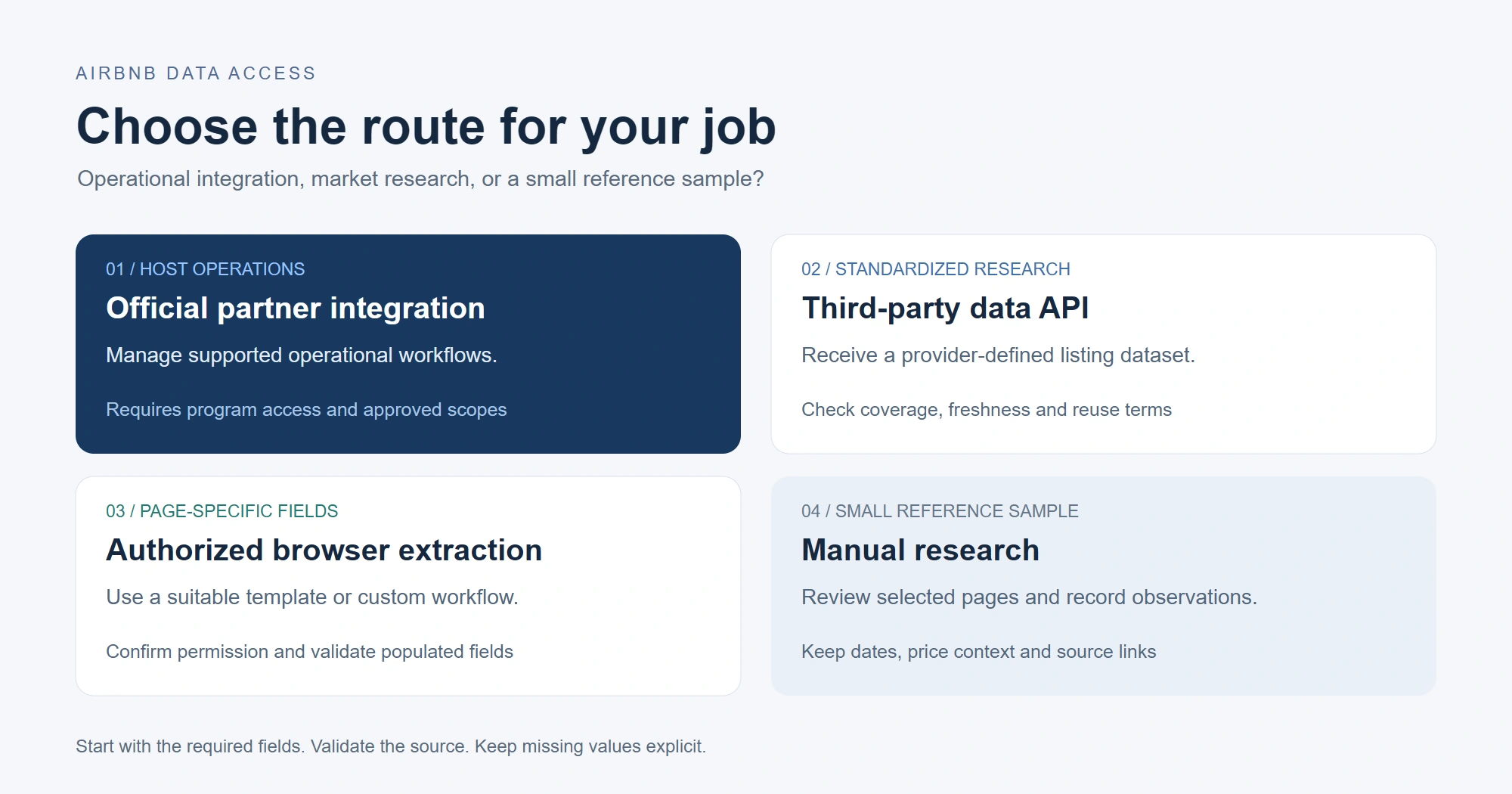
| Route | Best fit | What to verify | Main limitation |
|---|---|---|---|
| Official API integration | Host and hospitality operations | Program eligibility, authorized scopes and supported actions | Not a general listing-research API |
| Third-party data API | Standardized listing or market data | Populated sample, coverage, timestamps and reuse terms | Provider coverage and freshness vary |
| Authorized browser extraction | Page-specific fields and custom workflows | Permission, input type and field-level output quality | Page changes and missing fields |
| Manual research | A small or infrequent reference sample | Source URLs, observation dates and consistent price context | Limited scale and repeatability |
Airbnb’s API Terms describe program-based access for activities such as property management, channel management and hospitality services. Airbnb determines the available scopes. A third-party “Airbnb API” is a separate provider’s service, not evidence of official Airbnb API access.
Official integrations for host operations
Choose an official integration when you need supported host operations through an eligible software provider. Airbnb’s software partner directory and property-management software guidance are useful starting points. Confirm the connection and scopes with the provider before designing an integration.
Third-party APIs for listing research
Choose a provider API when your application needs a consistent response format and the provider can demonstrate the required coverage. Request a populated sample and an error response. Check collection timestamps, location coverage, missing-value behavior, provenance and permitted reuse before committing to a plan.
Compare cost for the same geography, refresh frequency and usable records. Subscription price alone is not comparable when one service delivers market estimates and another returns individual listing fields. Our web scraping API guide explains the broader API concepts.
Browser extraction and manual research
Manual research is often sufficient for a small reference sample. Browser extraction offers more control over page-specific fields, but requires a suitable workflow and permission for automated access. Airbnb’s Terms of Service prohibit automated collection and circumventing technical protections. Check the terms and any applicable authorization before collecting data; a successful task does not establish permission.
Essential fields for Airbnb listing research
Define your research question before choosing the tool. A price comparison needs stay dates, guest count, currency, fee treatment and collection time. A property inventory needs stable listing identifiers, source URLs and relevant property attributes. These are dataset requirements, not a promise that every template returns them.
Keep the source URL and collection timestamp alongside each record. Preserve raw displayed values beside normalized values. Treat unavailable prices, missing reviews and removed listings as explicit exceptions, not zero values or valid rooms.
For a pilot, record the approved inputs, required fields and a manually checked baseline. Compare unique valid listings with returned rows, then inspect missing fields before scaling. Useful reason codes include not_displayed, not_loaded, page_unavailable and parsing_failed. Keep private guest, reservation, payment and account data outside a public-listing research workflow.
Choosing an Octoparse Airbnb template
Octoparse is a web data platform with ready-made scrapers in the Templates Gallery, visual authoring in Octoparse Desktop and owned cloud extraction infrastructure. It is not an official Airbnb API. Choose a template by your input and required fields, then check its supported execution mode.
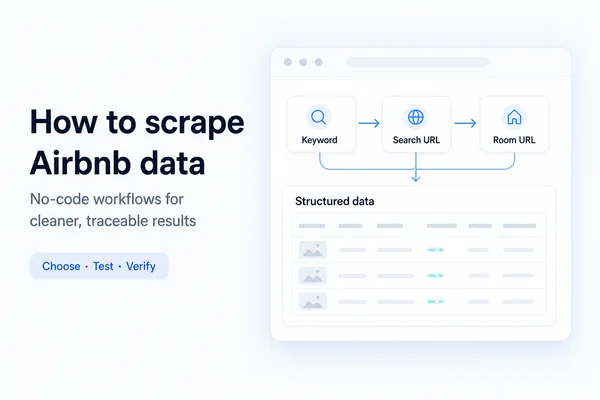
A destination keyword, a search-result URL and a room URL represent different starting points. Use the Airbnb scraping walkthrough for the broader no-code process; this section focuses on choosing a template and connecting eligible cloud workflows to an API or agent.
| Template | Input | Intended output |
|---|---|---|
| Airbnb Scraper (by Keyword) | Destination keyword | Listing discovery |
| Airbnb Scraper (by URL) | Search-result URL | Listing summaries |
| Airbnb Room Details Scraper | Room URL | Room-level attributes |
| https://www.octoparse.com/template/airbnb-en-review-details-scraper | Room URL | Review details |
https://www.octoparse.com/template/airbnb-scraper-by-keyword
https://www.octoparse.com/template/airbnb-scraper-by-url
https://www.octoparse.com/template/airbnb-room-details-scraper
The October 12 template-check notes recorded Cloud and Local modes for Room Details and EN Review Details, and Local only for the Keyword and URL templates. Treat that as a dated check: inspect the current executionMode before selecting an interface. Local-only templates run in Octoparse Desktop; the AgentTools preset workflow requires a cloud-executable template.
Room Details template inputs and output fields
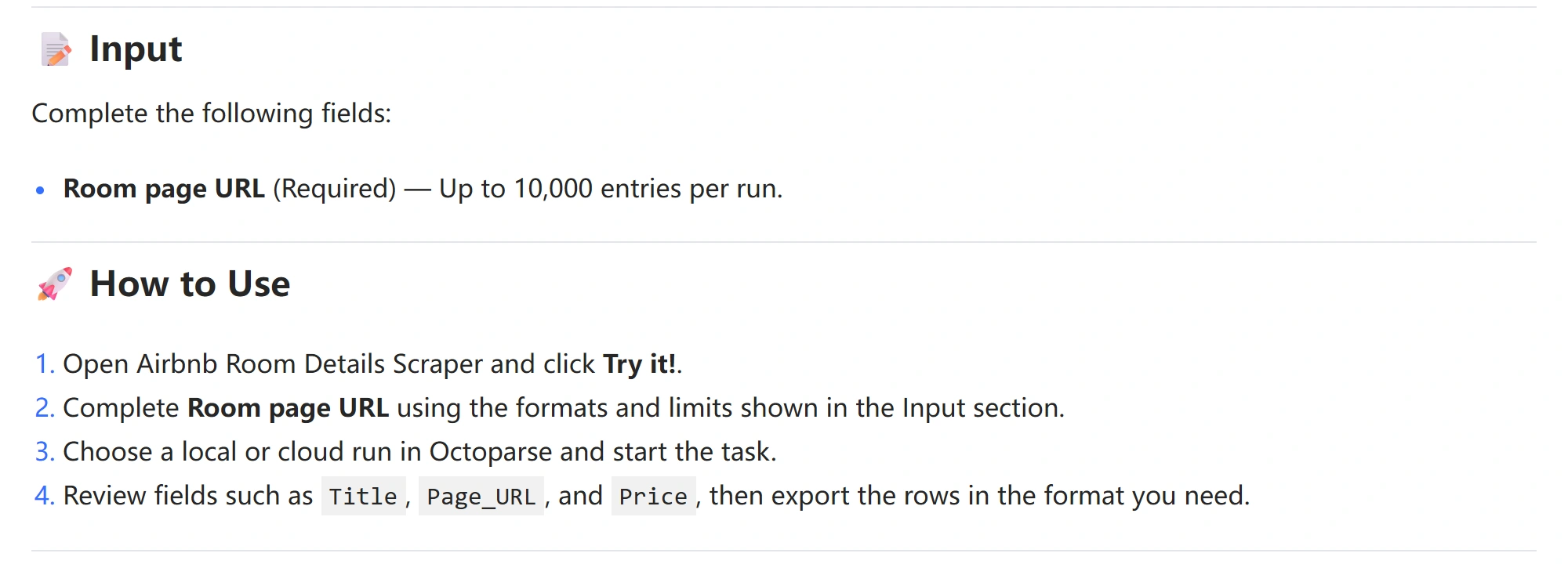
The Room Details template takes room-page URLs. Its documented output includes source URL, title, location, capacity, bedroom and bed counts, price, rating, review count, amenities, host fields, image URLs and collection time. Documented columns are not a guarantee of populated values. The example row displayed on the template page is dated 2024 and is vendor sample data, not a current test result.
Verified Web Console results: September 2
An archived September 2, 2026 Web Console test used one room URL from the template’s own examples. The matching task record, original screenshot and field-level record show a completed cloud run with one returned row and 21 seconds elapsed. This was a single-input Web Console test, not an API or MCP test and not a general speed benchmark.
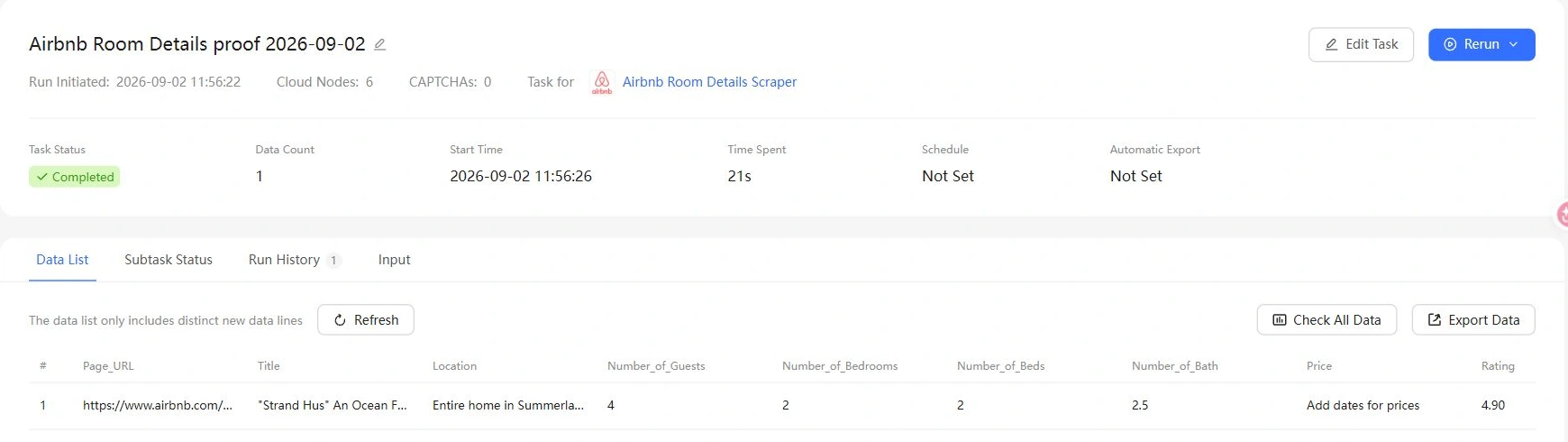
The screenshot is a crop of the original run screen, with the completion receipt and data row from the same task. Open it to inspect the full-resolution fields. The row contains listing identity, location and capacity attributes, while Price reads “Add dates for prices.” The input did not include check-in or check-out dates.
The archived field record also shows empty Amenities and Sleeping_Arrangements values. Rating was populated in this September run, unlike the later October notes below. These observations belong to different dates and interfaces; they should not be combined into a single benchmark. The practical lesson is to validate the fields your project needs, even when the task status is Completed.
Historical MCP test notes: October 12
The article’s October 12, 2026 MCP test notes describe two runs of the Room Details template, including a follow-up with stay dates. Those notes are retained below as historical observations. The matching raw exports and run receipts were not available for this update, so the observations have not been independently revalidated here. They are not a REST API benchmark or evidence of current field coverage.
Returned rows included an unavailable listing. The notes recorded a room-removal message in Title with empty detail fields. Count valid listings separately from exported rows; inspect the title, location and source URL before accepting a record.
Basic attributes and price fields behaved differently. The notes reported populated property attributes for live listings, while Price showed “Add dates for prices” without stay dates and was empty in the dated follow-up. Rating, review count, amenities, sleeping arrangements and response rate were also reported empty. Do not infer a zero price or zero reviews from those values.
For your own project, validate the required fields on a small sample before treating this template as a price or review-data source. A task can finish successfully while its output is unsuitable for the intended analysis.
Official video walkthrough: This tutorial demonstrates detail-page field selection in Octoparse. It explains the interface; it is not evidence of the historical Airbnb MCP runs.
Connecting cloud templates to applications and AI agents
Running an Airbnb workflow through AgentTools API
The following requests are documentation-based examples, not a newly executed Airbnb REST test. For a new preset-template workflow, the official AgentTools guide defines the REST API sequence searchTemplates → executeTask → exportData. AgentTools API and Octoparse MCP are separate official interfaces: AgentTools uses the https://openapi.octoparse.com base URL, HTTP headers, and camelCase endpoint names, while MCP uses the remote MCP server and snake_case tools documented below. Do not mix their authentication or request formats. Keep keys in environment variables or a secrets manager; never paste production credentials into article code.
Read the returned recommendedTemplateName, executionMode, inputSchema, sourceTree, and outputSchema. Use inputSchema[].field as the parameter key; do not guess it from a button label or hard-code an internal field identifier copied from the public page.
A response with status: accepted means the cloud task and start request were accepted; it does not prove that data is ready. Save the returned taskId, wait for the response’s retry guidance, and poll export status while the status is collecting or exporting. Stop when it becomes exported, no_data or failed; inspect invalid requests before retrying. Set a maximum wait time and do not create a second task just because an export is delayed.
If the workflow already exists in Octoparse, use the existing-task route documented in the same guide: searchTasks → startOrStopTask → exportData. For lower-level task APIs and authentication details, use the current Octoparse OpenAPI reference.
Connecting Octoparse MCP to Codex
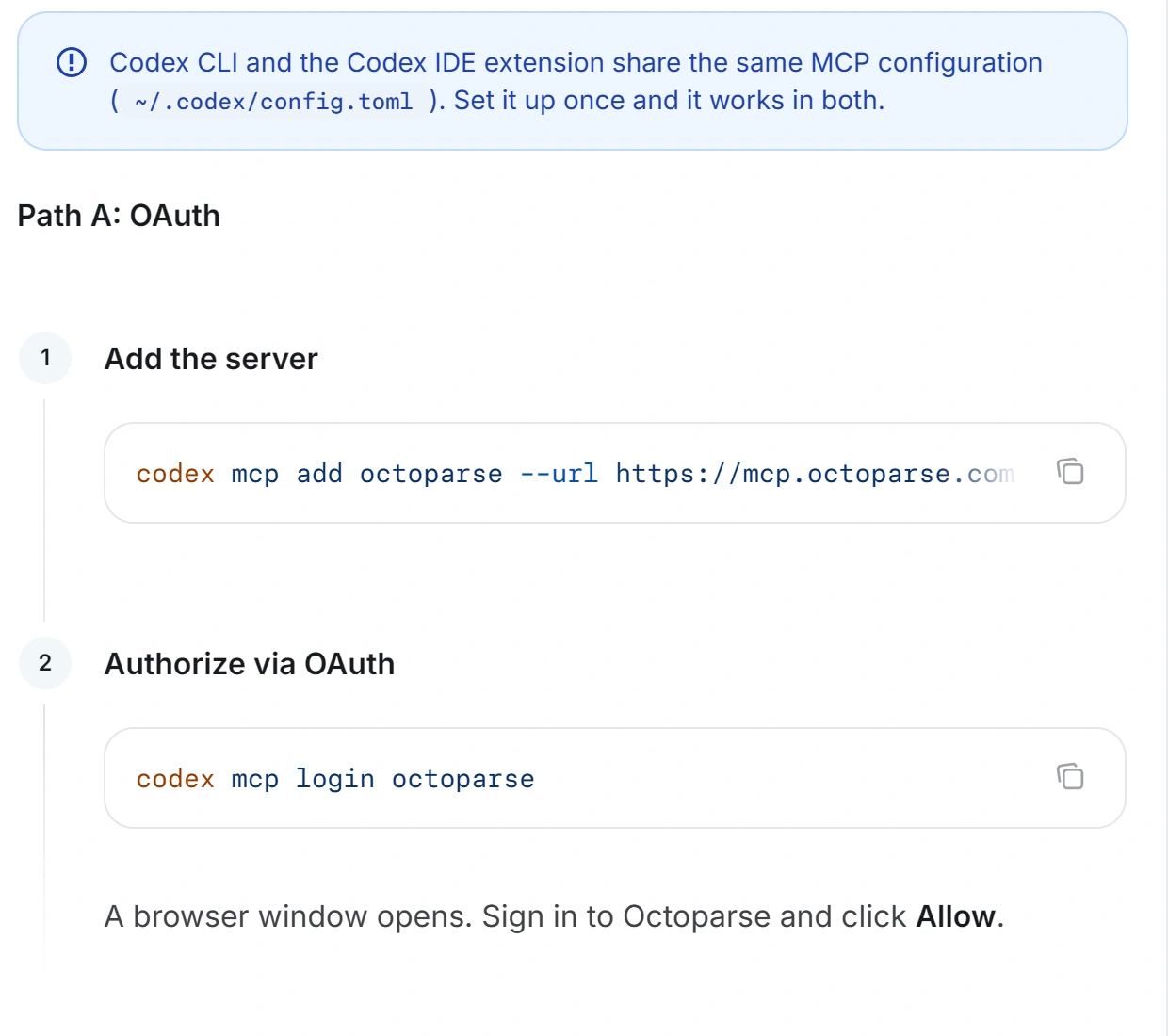
The official Octoparse MCP documentation lists https://mcp.octoparse.com as the server and gives two Codex authentication paths. Use one path exactly as documented. OAuth avoids placing an API key in the configuration:
For a headless environment, the same documentation provides an API-key configuration for ~/.codex/config.toml:
After connecting, follow the official MCP example workflow in order: use search_templates to find a pre-built template, call execute_task to run the selected cloud-supported preset, and call export_data to retrieve the full dataset as JSON or CSV. Inspect the selected template’s returned inputSchema and outputSchema; use its current field names as parameter keys. Provide only authorized room URLs and the inputs requested by the connected MCP tool. Do not send AgentTools REST payloads through MCP or invent template IDs, fields, or outputs.
Suggested Codex prompt: Follow the official Octoparse MCP workflow exactly. First use
search_templatesto find the Airbnb Room Details Scraper and show the returned template name and description. Ask me to confirm the authorized room-page URLs before callingexecute_task. Then useexport_datato return the full result as JSON or CSV. Report the actual tool status and errors, and do not claim a successful extraction unless the exported result contains data.
MCP does not turn Codex into a general-purpose Airbnb API. According to the current official scope, it cannot run local-only tasks, build or edit fully custom fields, pagination, loops, or browser workflows, upload custom templates, or scrape without a preset template. The selected preset must support cloud execution and be returned through search_templates before it is run with execute_task. Create custom workflows in Octoparse first, then use MCP for supported cloud execution and export_data.
Third-party video walkthrough: The following 2026 sponsored tutorial demonstrates the Octoparse MCP and Claude connection pattern. Treat it as a visual orientation, not as evidence of Airbnb permission, template compatibility, or extraction success.
Troubleshooting Airbnb extraction and cleaning results
Airbnb scraping can fail because traversal, access state, page context, conditional content, or downstream mapping changes. Use the checks below to diagnose your own output; they are not findings reproduced in this update.
| Symptom | Check | Action |
|---|---|---|
| Missing listings | Input vs. unique IDs | Narrow scope; stop on refusal |
| Duplicate rows | Cards, redirects, canonical URLs | Fix traversal; deduplicate by key |
| Blank price | Dates, guests, currency, rendering | Keep blank + reason code |
| Conflicting prices | Same dates, guests, stay, fees | Quarantine mismatched rows |
| Missing fields | Compare pages with baseline | Review variant before changing rules |
| Low coverage | Expected vs. collected records | Investigate stop point first |
| Wrong destination | Export vs. fresh readback | Correct mapping; validate again |
Cleaned output should preserve raw values, normalized fields, source URLs, collection context, and validation status. A successful extraction does not prove that the data is suitable for analysis.
Deduplicate only with a stable, verified identifier. Separate repeated cards, redirected URLs, unavailable pages, parsing failures, and genuinely absent fields. Never collapse those conditions into a generic blank.
For repeated collection, keep the same comparison context and measure changes in valid records and required-field completeness. Octoparse documents scheduled runs and export options. Confirm availability for your account and workflow, then read back the destination to check that the expected rows arrived.
Choosing a route for your data project
Use an approved integration for host operations, a validated provider API for standardized research data, and manual review for a small sample. Use browser extraction only where permission and a field-level pilot support the exact use case. Evaluate data quality separately from whether the task or API call succeeded.
Public visibility does not remove privacy obligations. The joint regulator statement on data scraping explains that publicly accessible personal information can remain protected by privacy law. Assess purpose, data minimization, retention and reuse for your project.
FAQs about Airbnb API access
Does Airbnb have a public API?
Airbnb documents program-based APIs for approved operational relationships. That differs from a self-service public listing-search API for arbitrary market research. Check eligibility and scopes with the relevant program or software provider.
Can I use Octoparse to collect Airbnb listing data?
Octoparse offers Airbnb templates, but technical availability does not establish permission or complete field coverage. Check the current template inputs and run mode, confirm authorization, and validate populated records before scaling.
Is a listing data API better than browser extraction?
A provider API is a better fit when its schema, coverage, freshness and reuse terms match your application. Browser extraction offers page-specific flexibility but adds workflow upkeep and field-validation work. Compare the usable output, not just the delivery format.
Can I get Airbnb prices and availability from a template?
Do not assume those fields will be populated. Prices depend on dates, guests, currency and fee context. Missing price or availability values do not establish a zero price, an unavailable stay or a confirmed booking.
Does a completed task mean every returned row is valid?
No. A completed task may include removed-page messages, duplicates or rows with missing required fields. Validate listing identity and required columns, and report valid records separately from exported rows.
Does public Airbnb data mean it can be collected automatically?
No. Public visibility alone does not determine contractual permission, privacy compliance or reuse rights. Review the current terms and applicable authorization for the specific data and purpose.