The simplest way to scrape Airbnb data without coding is to start with an Octoparse template that matches your input. Use the keyword template when you want to discover listings by destination, the URL template when you already have an Airbnb search or listing-page URL, and the room-details template when you already have individual room URLs. Test one small, authorized sample first, check the returned fields, and only then decide whether to scale the workflow.
When I tested this workflow, the practical choice was determined by the input I already had: a destination keyword, a search-result URL, or a specific room URL. That choice changed which fields were available and how much cleanup the output needed. This guide explains how to choose and validate an Airbnb scraper workflow. It does not mean every Airbnb page or use case is permitted. Airbnb’s current terms restrict automated collection, so confirm that you have permission or another valid authorization before running any workflow.
Which Airbnb Scraper Should You Use?
| Your starting point | Best workflow | What it is designed to return |
|---|---|---|
| A destination or search keyword | https://www.octoparse.com/template/airbnb-scraper-by-keyword | Search-result records such as room names, URLs, visible prices, ratings, review counts, and host fields |
| Airbnb listing URLs accepted by the current form | https://www.octoparse.com/template/airbnb-scraper-by-url | Listing-summary fields and room URLs from the submitted inputs |
| One or more individual room URLs | https://www.octoparse.com/template/airbnb-room-details-scraper | One structured room record per URL, with property, capacity, price, rating, amenity, host, and image fields shown on the current template page |
| A custom page flow or field set | Custom Octoparse task | Fields and navigation steps you configure in the visual workflow |
Template inputs and outputs can change as Airbnb and Octoparse update their products. Treat each template page as the current source of truth, and keep the source URL and collection time in every dataset so individual rows remain traceable.
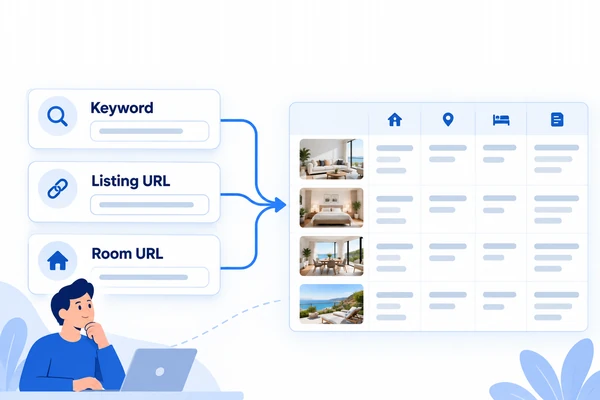
What Airbnb Data Can a Scraper Collect?
An Airbnb scraper can turn information displayed on supported search-result or room-detail pages into structured rows. The exact fields depend on the page type, locale, dates, guest count, and selected template.
- Search-result data: room title or name, room URL, visible price, rating, review count, host, and the keyword used to produce the search.
- Room-detail data: location, guest capacity, bedroom, bed and bathroom counts, visible price, rating, reviews, amenities, sleeping arrangements, host information, and image URLs when those fields are present and supported by the workflow.
- Provenance fields: the source page URL, original keyword or input URL, locale, collection time, and any search parameters that affect the result.
Do not treat an Airbnb price as a universal nightly rate without preserving context. Currency, selected dates, number of guests, fees, discounts, taxes, and availability can change what a page displays. For comparisons, collect the same inputs at the same time and document what the price field means.
Why source context matters at Airbnb scale
Airbnb’s 2025 Form 10-K reported 533 million Nights and Seats Booked. Airbnb defines that metric as stay nights plus seats booked for experiences and services, net of cancellations and alterations. Separately, Eurostat recorded 952 million guest nights in 2025 across short-stay accommodation booked through Airbnb, Booking, and Expedia in the EU and EFTA countries. If your research spans other travel platforms, see our guides to scraping Booking.com data and scraping Expedia.
Those figures show the scale of platform accommodation, but they are not comparable measures of Airbnb inventory, occupancy, or room prices. A scraped dataset therefore needs its own definitions: one row per listing or stay, the source URL, dates, guest count, locale, currency, collection time, and a clear explanation of every price field. If you are benchmarking short-term rentals against long-term listings, our guide on scraping Zillow property data covers the long-term side.
A related case: comparable records for market appraisal
In a published Octoparse customer case, Colserauto used structured marketplace records for vehicle appraisal. The case reports more than 50,000 records per crawl and describes joining comparable records in spreadsheets. This is not an Airbnb performance benchmark. It is a transferable method: collect comparable records, preserve their sources, and validate the fields before making pricing or market conclusions.
Is It Legal to Scrape Airbnb?
There is no blanket rule that makes all publicly visible Airbnb data free to collect or reuse. Public visibility, technical accessibility, contractual permission, privacy obligations, intellectual-property rights, and the intended use are separate questions.
Airbnb’s current Terms of Service state that users must not use bots, crawlers, scrapers, or other automated means to access or collect content from the platform. Airbnb also publishes robots directives, and its API Terms limit access to approved programs and permitted uses.
Before collecting any data:
- Confirm that you have Airbnb’s permission or another valid authorization for the specific pages, data, and use case.
- Review the current terms, robots directives, privacy rules, and laws that apply to your jurisdiction and intended use.
- Do not bypass login requirements, access controls, CAPTCHAs, or other technical restrictions.
- Avoid collecting sensitive or unnecessary personal information, and apply appropriate retention and security controls.
- Ask qualified legal counsel when your authorization, data rights, or reuse rights are unclear.
This section provides general information, not legal advice. A scraper tool can automate a technical workflow; it cannot grant permission to collect or reuse data.
How to Scrape Airbnb Data Without Coding
If you have authorization, the safest operating pattern is choose, test, inspect, run, and validate. That sequence prevents a large task from multiplying a wrong field mapping, broken pagination rule, or ambiguous price value.
Step 1: Define the record you actually need
Write the intended output before opening a scraper. For a search-results project, a record might need the keyword, room URL, room title, visible price, rating, review count, locale, and collection time. For detail-page research, it might need one record per room URL with capacity, bedrooms, amenities, host fields, and images.
This data contract determines whether you need discovery, enrichment, or both. It also makes it easier to detect when a field is missing instead of accepting whatever the workflow happens to return.
Step 2: Choose the template that matches your input
Open the relevant template page, select Try it, and complete the input fields displayed by the current form. Do not paste a room-detail URL into a search-result workflow and assume it will infer your intent.
The instructions and limits below were checked against the live template pages on September 2, 2026. Recheck each page before a large run because inputs, run modes, pricing, and field schemas can change.
Use Airbnb Scraper (by Keyword) for destination discovery
https://www.octoparse.com/template/airbnb-scraper-by-keyword
- Click Try it! and sign in when prompted.
- Select the required Language and Country/Region, then enter the destination or discovery terms in Keyword. The current page displays a maximum of 10 keyword entries per run.
- Run one representative keyword locally before submitting the full input list.
- Inspect
Keyword,roomTitle,roomName,roomRating,roomReviewcount,roomPrice,roomURL,Host, andhostType. KeepKeywordin the export so every row retains its discovery context.
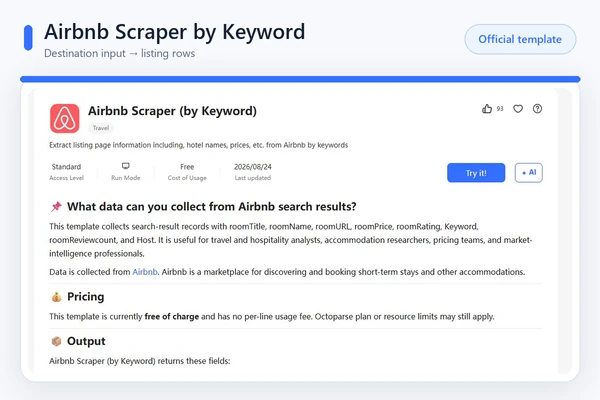
The current keyword-template page shows the declared input route and output schema. This screenshot is product-page evidence, not proof of a successful Airbnb extraction.
Use Airbnb Scraper (by URL) when you already have accepted listing URLs
https://www.octoparse.com/template/airbnb-scraper-by-url
- Click Try it! and paste one representative Airbnb URL into the required URL field.
- Confirm that the submitted URL pattern is accepted before adding more inputs. The current page displays a maximum of 1,000 URL entries per run and describes a local run.
- Inspect the returned listing fields, including
roomTitle,roomName,roomRating,roomReviewcount,roomPrice,roomURL,Host, andhostType. - Export only after the test row keeps the complete source URL and the displayed price context.
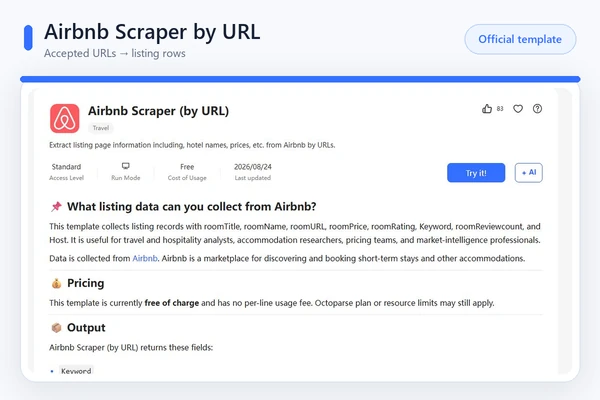
The current URL-template page displays listing-summary fields such as room title, rating, price, and source URL. Test one URL because the accepted page pattern can change.
Use Airbnb Room Details Scraper to enrich individual room URLs
https://www.octoparse.com/template/airbnb-room-details-scraper
- Click Try it! and paste one authorized room-detail URL into Room page URL.
- Run a single URL first. The current page displays up to 10,000 entries per run and lists local or cloud run options, subject to the live template and account.
- Inspect
Page_URL,Title,Location, guest and room capacity fields,Price,Rating, review count, amenities, host information, image fields, andCurrent_Time. - Compare the exported row with its source page. Reject the run if a required field is missing, mislabeled, or detached from the submitted room URL.
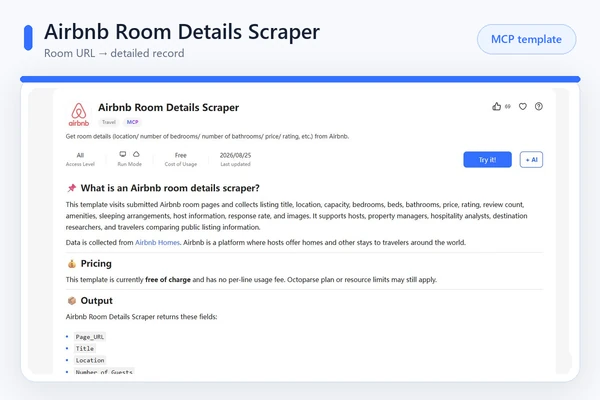
The Room Details page shows the template’s declared property, capacity, price, review, amenity, host, and image fields. It is labelled MCP, but the screenshot does not prove a completed MCP task or populated export.
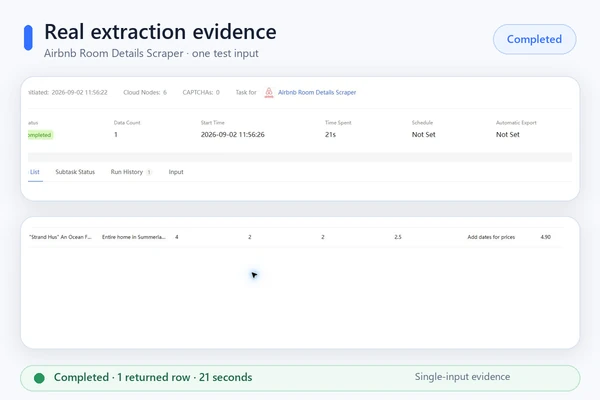
Hands-on check, September 2, 2026: an Octoparse Web Console cloud run of the Airbnb Room Details Scraper completed in 21 seconds and returned one row for a single room URL. The populated row included the title, location, guest and room counts, a 4.90 rating, 164 reviews, host, response rate, three image URLs, and collection time. Amenities and Sleeping_Arrangements were blank; the submitted URL did not include stay dates, and Price returned “Add dates for prices.” This is a one-input verification, not a general speed or completeness benchmark.
Step 3: Run one small test and inspect the output
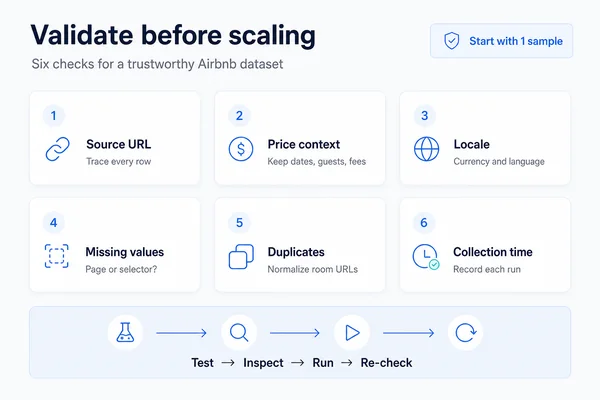
Start with one representative input. The current Octoparse workflow documentation recommends testing a small sample before a full run. Confirm that the workflow opens the intended pages, captures the required fields, advances through the expected page sequence, and returns clean sample rows.
For Airbnb data, inspect at least these questions:
- Does each row retain its source room URL or input keyword?
- Are currency, dates, language, country, and guest count consistent?
- Is the visible price a base nightly value, a total, or another page label?
- Are missing values actually absent on the page, or did the selector fail?
- Are the same room URLs appearing more than once?
Step 4: Choose a supported run mode
Run modes depend on the selected template, task, and account plan. Use a local run for testing or debugging when it is supported. Use a cloud run for eligible scheduled or unattended workflows. Check the current template page before promising a run mode, schedule, speed, or capacity.
Step 5: Export the rows and run quality checks
Octoparse supports structured exports such as CSV, Excel, and JSON, with additional destinations depending on the task and plan. Preserve the source URL, input value, locale, and collection timestamp in the exported data. Then validate required fields, duplicates, currency consistency, missing values, and a sample of rows against their source pages.
For the current product workflow, see Octoparse’s build, test, run, and export documentation and its export-format guide.
How to Build a Custom Airbnb Workflow in Octoparse
Use a custom visual task only when you are authorized to collect the data and the preset templates do not match the page type, navigation sequence, or field set you need. A custom task gives you more control, but it also requires more testing and maintenance.
- Paste an authorized target URL into Octoparse and open it in the built-in browser.
- Select the listing elements and create a loop that opens each supported detail page.
- Configure pagination or scrolling only for pages and paths you are permitted to access.
- Select the required detail fields and add the page URL as a traceability field.
- Test the complete sequence on a small sample before a longer run.
Airbnb pages load content dynamically and can change structure. Octoparse’s current Airbnb hotel-details tutorial shows how a custom workflow can combine listing loops, detail-page clicks, pagination, AJAX waits, field selection, and a local test. Treat the tutorial’s selectors as examples, not permanent guarantees; verify the live page structure before every production change.
How to Combine Airbnb Search and Room-Detail Templates
A two-stage workflow is useful when the first question is “Which listings match this destination?” and the second is “What details belong to each room?”
- Use the keyword or URL template to collect a permitted set of listing summaries and room URLs.
- Deduplicate the room URLs and keep the original keyword or search URL.
- Pass the authorized room URLs to the Room Details template.
- Join the two exports on the normalized room URL.
- Record the collection time for both stages because page values can change between runs.
The Room Details template is currently labelled for MCP access on its official page. If your goal is to orchestrate approved data access from an AI assistant or application, read the separate Airbnb API and data-access options guide. That page owns API and MCP integration details; this article focuses on choosing and validating the scraping workflow.
What Is the Difference Between a Web Scraper and a Crawler?
A crawler discovers and follows pages, while a scraper extracts selected fields from those pages. An Airbnb workflow may do both: navigate from a permitted search page to individual room pages, then save specified fields as structured records. The video below explains the general distinction.
Should You Scrape Airbnb with Python?
Python is useful when you have authorization, need custom transformation logic, and can maintain a browser-automation workflow. It is not automatically safer, more permitted, or more reliable than a no-code tool.
Octoparse vs. Python for Airbnb Scraping
| Decision factor | Octoparse template or visual task | Python workflow |
|---|---|---|
| Setup | Ready-made inputs or point-and-click workflow | Code, dependencies, browser setup, selectors, and storage |
| Best fit | Analysts and repeatable workflows with supported page patterns | Developers with custom logic or an existing data pipeline |
| Maintenance | Template or visual workflow still needs testing after page changes | Your team owns code, browser, selector, retry, and deployment maintenance |
| Output | Structured export and supported destinations | Any schema and destination your code implements |
| Permission | The same authorization, terms, privacy, and data-rights checks apply to both approaches | |
Do not use undocumented Airbnb endpoints or describe internal network requests as an official Airbnb API. Airbnb’s current API terms state that undocumented APIs may not be used. If you qualify for an approved Airbnb API program, follow its program documentation and permitted-use requirements.
Common Airbnb Scraping Problems and Checks
| Symptom | Likely cause | Safe next check |
|---|---|---|
| Empty or incomplete rows | Page content loaded after the selector ran, the field was not displayed, or the page structure changed | Check the source page and a permitted small test; confirm the field is actually visible |
| Only the first set of listings appears | Pagination or scrolling did not advance as expected | Verify the page sequence in the workflow and stop if it would enter a disallowed path |
| Prices are inconsistent | Different currency, dates, guest count, taxes, fees, discounts, or price labels | Normalize the inputs and store the full price context |
| Duplicate listings | The same room appeared under multiple search inputs or pages | Normalize and deduplicate by room URL while retaining the original input |
| Room details do not match the search row | URLs were truncated, redirected, or joined incorrectly | Keep the complete source URL and test the join on a small sample |
| CAPTCHA, login, or access restriction | The platform restricted the request or the page requires access you do not have | Stop the workflow; do not advise or attempt to bypass the restriction |
FAQs About Scraping Airbnb Data
- Can I scrape Airbnb without coding?
Yes, Octoparse provides no-code templates and a visual task builder. Use them only for pages and data you are authorized to collect, and validate a small sample before scaling.
- Which Octoparse Airbnb template should I start with?
Start with the keyword template for destination-based discovery, the URL template when you already have a supported Airbnb page URL, and the Room Details template when you already have individual room URLs.
- Can an Airbnb scraper collect prices and availability?
A supported workflow may collect the price value displayed for the selected page context. Availability and pricing depend on dates, guest count, locale, currency, fees, and the current page. Check the live template schema and output sample rather than assuming a universal field.
- How do I remove duplicate Airbnb listings?
Keep the complete room URL in every row, normalize it to a stable room identifier where possible, and deduplicate on that identifier. Retain the original keyword or search URL so you can still see which searches produced the listing.
- Is Octoparse an official Airbnb API?
No. Octoparse is a separate web-data platform, and its Airbnb templates are not the official Airbnb API. Approved Airbnb API access is governed by Airbnb’s programs, documentation, and terms.
- Can I run the Airbnb Room Details Scraper through MCP?
The current Room Details template page is labelled MCP. Confirm the live template availability and schema before building an integration, then follow the official Octoparse MCP documentation and the separate Airbnb data-access guide linked above.
- How often should I test an Airbnb scraping workflow?
Test before the first full run and after changes to the target pages, template, selectors, inputs, or output schema. For recurring work, sample source pages and exported rows on every run so a silent field change does not corrupt the dataset.
Build an Airbnb Dataset You Can Verify
The best Airbnb scraper is the workflow that matches your authorized input, returns the exact fields you need, and preserves enough context to verify every row. Start with the current template page, test one representative input, keep source URLs and collection time, and scale only after the sample passes your quality checks.
If the preset templates do not fit, build a custom visual task and test its navigation step by step. If your project is an approved API or MCP integration, use the separate data-access guide so this tutorial remains focused on the scraping workflow.