On October 14, 2026, Walmart introduced its Developer Docs MCP server, giving approved solution providers a way to search API documentation from their coding assistants. That helps with API integration; collecting product prices, sellers, and reviews is a separate job.
For authorized product research, Octoparse’s Walmart Data Extractor template turns supported Walmart URLs or item IDs into structured product and review rows. Start with a small sample, check the fields, then export the results. Sellers managing their own listings should compare the official Marketplace APIs first.
https://www.octoparse.com/template/walmart-data-extractor
Walmart data access routes
Walmart’s Terms of Use require express prior written consent for automated scraping and systematic downloading. Choose a route that fits your access rights and intended use; public visibility alone does not grant collection permission.
This article is operational guidance, not legal advice. Your authorization should define the pages, fields, frequency, retention period, and intended use. It should also cover any personal data or third-party content that may appear in the dataset.
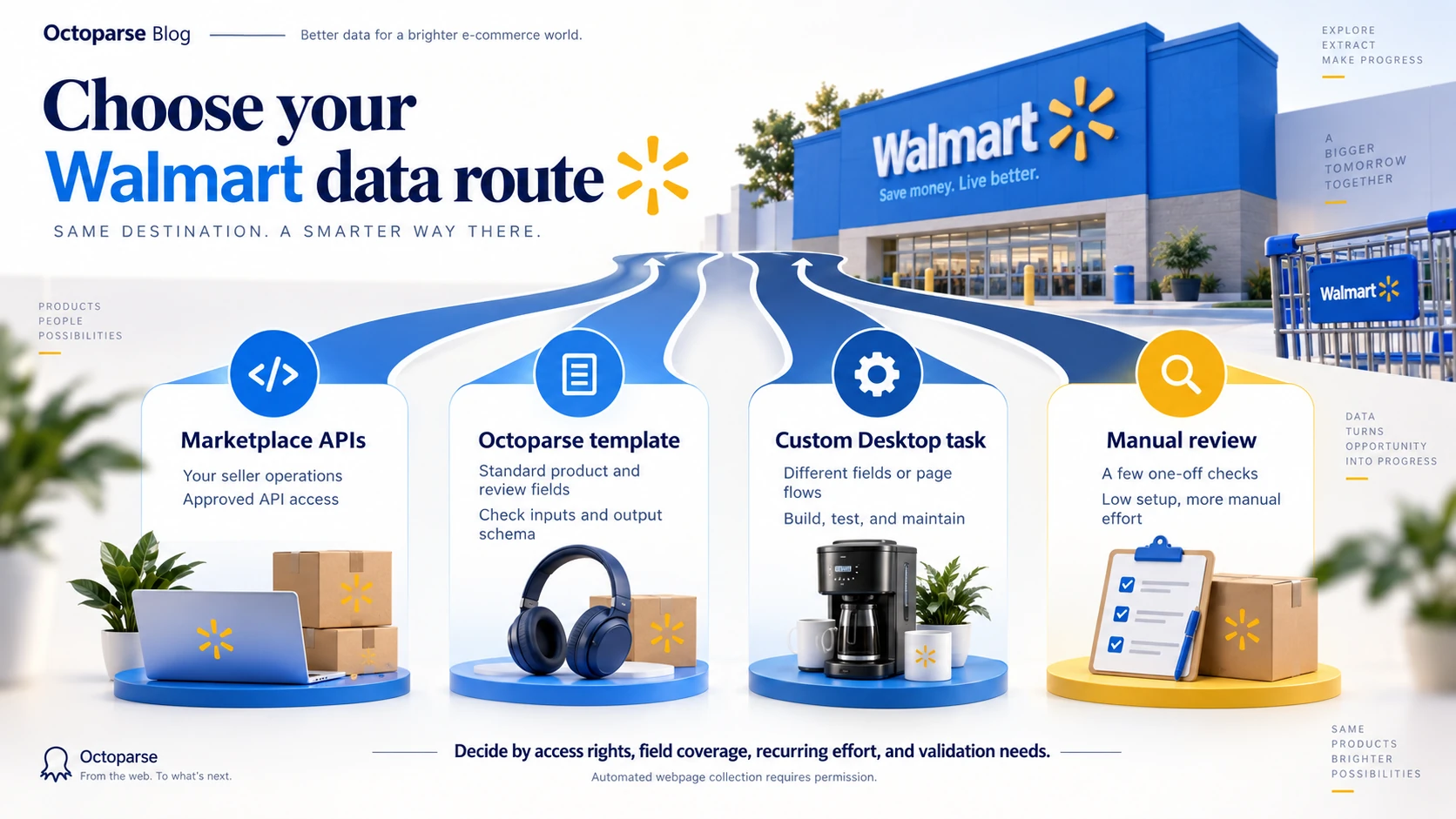
Choose by the job: API for seller operations; template for standard product data; Desktop for custom fields; manual review for occasional checks.
| Route | Best for | Fields | Cost basis |
|---|---|---|---|
| Marketplace APIs | Seller operations | Endpoint-specific | Integration cost; not benchmarked |
| Octoparse template | Products + reviews | 13 fields | $1 / 1,000 rows¹ |
| Custom Desktop task | Custom fields / flows | User-defined | Plan + build time |
| Manual review | One-off checks | User-selected | Staff time |
Template numbers: 13 declared fields · 3 product rows checked · 3 distinct item IDs. Review collection and pagination were not tested. These figures describe the schema and this small historical sample, not a success-rate benchmark.
¹ Listed Standard rate; Professional: $0.80 / 1,000 rows; Enterprise: $0.60 / 1,000 rows. Product and review rows both count toward usage. For example, 10,000 output rows at the Standard rate imply $10 in template usage, not a total project-cost quote.
Before choosing: confirm API eligibility or webpage-collection permission; check that the fields fit your analysis; and budget for repeat runs and validation. The template has a preset schema. Desktop lets you change the workflow but adds maintenance work. Collection timestamps and currency need separate handling for price-history analysis.
Compare your required fields with the Walmart Data Extractor specification, then check Walmart’s Pricing API capabilities and Octoparse’s supported export formats. The effort comparisons above are planning guidance, not measured benchmarks; validate a representative sample before committing to a route.
The Walmart Data Extractor template is the shortest route when its inputs and fields match your authorized use case. Use Octoparse Desktop to author a custom task when you need a different page flow or schema. This is an Octoparse template, not an official Walmart API.
Product and price fields to collect
A good schema is small enough to validate and rich enough to compare products over time. Start with fields that have a clear business purpose. Add optional fields only after the core record is reliable.
Recommended product and price fields
| Field | Why it matters | Validation check |
| Product ID or SKU | Joins repeated snapshots to the same item | Must remain stable across runs |
| Product title | Makes records readable and searchable | Remove duplicate whitespace |
| Current price | Supports monitoring and comparison | Store as a number plus currency |
| Reference or previous price | Helps identify a displayed markdown | Keep null when the page has no value |
| Seller | Separates Walmart-sold and marketplace offers | Capture the visible seller name |
| Availability | Explains missing or changing prices | Normalize to a small status set |
| Rating and review count | Adds customer context | Keep rating and count in separate fields |
| Product URL | Preserves traceability | Store the canonical page URL |
| Collected at | Makes every price snapshot auditable | Use one timezone consistently |
Do not treat every visible number as a price. Pages can contain unit prices, financing amounts, shipping fees, crossed-out reference prices, and promotional labels. Name fields by meaning, not by their position on the page.
Use the Walmart Data Extractor template
Octoparse is a web data platform with ready-made templates and visual authoring in Octoparse Desktop. Its Walmart Data Extractor runs in the cloud and supports product and review data in one template. Use itemType to separate product rows from review rows, and usItemId to join them. Review availability and row counts depend on the selected products and settings.
https://www.octoparse.com/template/walmart-data-extractor
Inputs:
- Walmart URLs or Item IDs (required): one or more product-detail URLs, listing URLs, search URLs, or item IDs.
- Search Keywords (optional): additional keywords to discover more items in the same run.
- Collect Reviews (optional): enable review collection in the configuration interface when your project needs it.
- Listing/Search Pages and Review Pages per Product (optional): set a small page limit for your first test; consult the template for current limits and defaults.
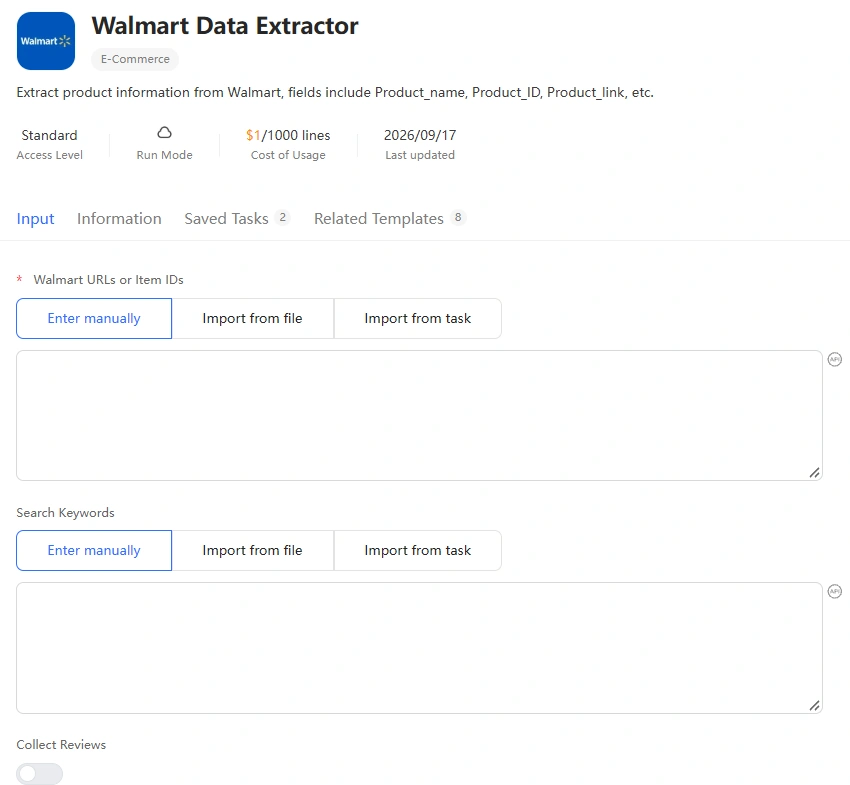
Output fields: itemType, availability, priceInfo.price, name, averageRating, sellerName, productUrl, usItemId, category, brand, and, on review rows, rating, title, text.
The declared schema has 13 fields. Currency, collection timestamp, reference price, and review count are not separate fields in that schema: add reliable run metadata or use a suitable custom workflow when your analysis needs them. The current MCP schema marks Collect Reviews as unavailable through the API; do not assume every interface control is a callable MCP parameter.
Template usage pricing: the current template metadata lists $1.00 per 1,000 output rows on Standard, $0.80 on Professional, and $0.60 on Enterprise. Review rows contribute to output volume. Check your account’s access and displayed rate before starting a run.
Historical MCP test: three product records
Our September 12, 2026 test used the Octoparse MCP server with three Walmart product URLs: Apple AirPods Pro 3 and two Keurig coffee makers. On October 15, 2026, reading the original batch again returned three product rows with three distinct usItemId values. The JSON response captured below comes from that readback, not a new collection run. The table records those historical prices and availability, not today’s offers. All three rows contained the product fields shown; review-specific rating, title, and text were empty. This sample does not establish review coverage or large-scale reliability.
| Product | Item ID | Price | Availability | Rating | Seller | Brand |
|---|---|---|---|---|---|---|
| Apple AirPods Pro 3 White In-Ear Bluetooth Earbuds | 17835006350 | $199.00 | IN_STOCK | 4.4 | Walmart.com | Apple |
| Keurig K-Express Essentials Single Serve Coffee Maker, Black | 111488395 | $73.99 | IN_STOCK | 4.4 | ycf trading inc | Keurig |
| Keurig K-Iced Essentials Iced and Hot Coffee Maker, Black | 5254334127 | $74.00 | OUT_OF_STOCK | 4.3 | Walmart.com | Keurig |
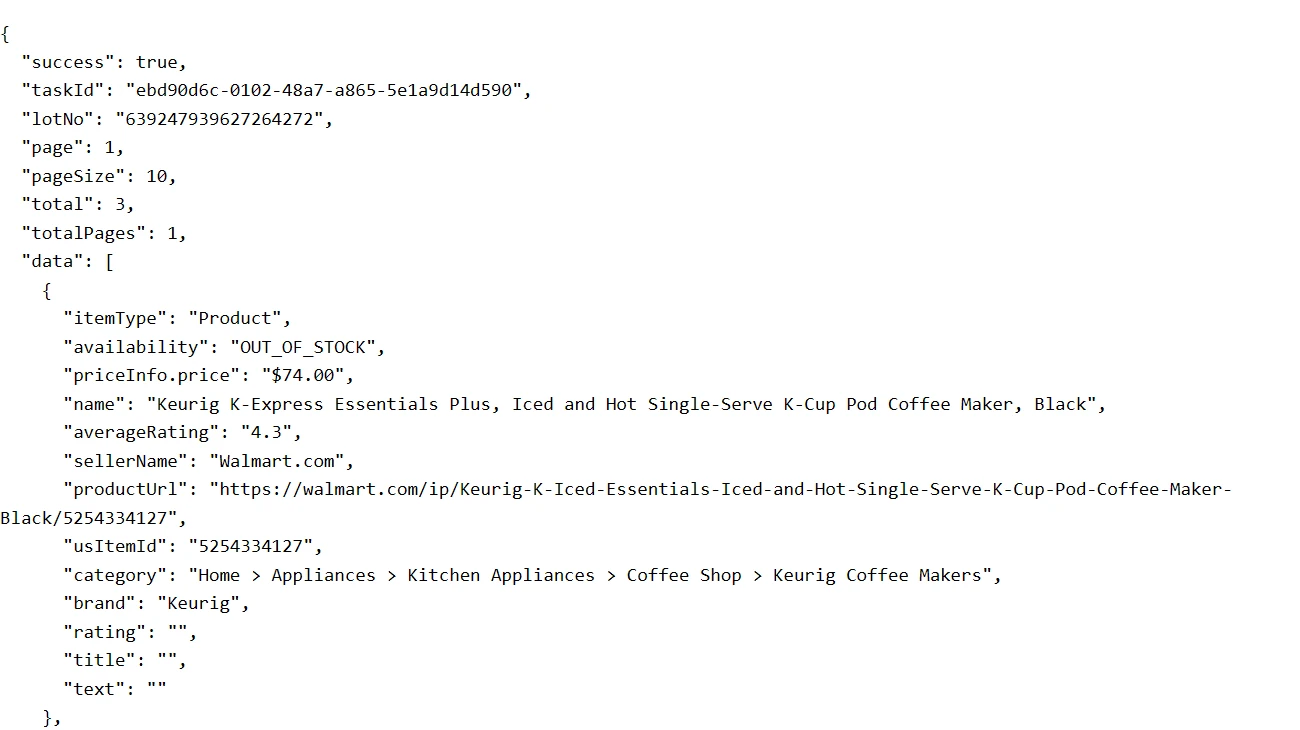
The AirPods row returned Services > Immersive Shopping Suite > View in 3D as its category. Both Keurig rows returned a coffee-maker category. The response confirms a category-quality issue on one of these three records, but does not establish its cause or reliability across other listings. Validate categories before using them to group products.
Custom Walmart workflows in Octoparse Desktop
The ready-made template does not require Auto-detect or selector editing. For it, enter your inputs, choose page and review settings, run a small authorized sample, and inspect the exported rows. The following Desktop workflow is an alternative for requirements the template does not cover. Download Octoparse to author a custom task.
Step 1: Open one authorized URL
Paste a permitted Walmart search, category, or product URL into Octoparse. Start with the smallest representative page. A narrow test reveals field and loading problems before they affect a larger run.
Record the input URL, authorization scope, locale, and collection time in your project notes. These details make a later price comparison reproducible.
Step 2: Let Auto-detect find the list
Octoparse’s Auto-detect workflow can identify repeated listing data, text, links, pagination, load-more controls, and scrolling patterns. Review the highlighted elements instead of accepting every suggestion.
If the page loads fields only after an allowed interaction, perform that interaction and detect again. If the site blocks the task or the data falls outside your authorization, stop. Do not add evasion steps.
Step 3: Select and rename the fields
Keep only the fields in your approved schema. Rename generated labels such as Text_1 to clear names such as product_title, current_price, seller, and product_url.
For price text, remove currency symbols only after storing the currency in a separate field. For product URLs, prefer a stable canonical URL and remove tracking parameters when your authorization allows that transformation.
Step 4: Add detail pages only when needed
A listing page is usually enough for title, displayed price, rating, and URL. Open product detail pages only if required fields are missing. Octoparse documents how to combine listing and detail pages in one workflow.
Detail-page loops increase page requests and failure points. Keep them out of the task when the listing already contains the data you need.
Step 5: Test, run, and export
Run one page and inspect at least one complete record. Check that the title belongs to the same product as the price, seller, and URL. Then check nulls, duplicates, currency, and timestamps.
Only after that validation should you add authorized pagination or a schedule. Export to CSV or Excel for review. For ongoing jobs, keep raw snapshots and transform a copy so you can trace every derived metric back to the collected row.
Python alternative for Walmart scraping
Python is useful when you need custom parsing or downstream processing. The video below shows the workflow in practice.
For official reference, review the Walmart Marketplace API documentation linked above and Octoparse’s supported export formats before choosing an implementation.
Walmart Marketplace APIs for seller operations
The official API and an authorized webpage scraper solve different jobs. Choose based on your role and the data source you are permitted to use.
Walmart says Marketplace API calls require a Client ID, Client Secret, and OAuth 2.0 access tokens. Its Pricing API can retrieve current prices, update prices, manage promotions, perform bulk updates, and support repricing workflows for eligible sellers and providers.
A Walmart price scraper is more appropriate only when the required information is on an authorized webpage and is not available through your API role. Do not use scraping as a shortcut around API eligibility or site restrictions.
Common Walmart scraper failures and fixes
Most failures come from page state, field selection, pagination, or access boundaries. Diagnose them in that order.
- Blank prices: The value may load after the page shell. Wait for the permitted content to render, then reselect the exact price element.
- Wrong product-price pairs: Your loop may target mismatched containers. Select the parent product card before choosing child fields.
- Duplicate pages: The pagination action may not change the URL or product set. Compare a stable product ID between pages.
- Missing seller data: Seller information may exist only on a detail page. Add the detail loop only when the field is required.
- Changing selectors: Prefer stable attributes and repeated structure over deeply nested positional selectors.
- Blocked access or a challenge: Stop the run. Confirm authorization and use an approved API or contact the site owner. This guide does not recommend bypassing access controls.
Save a small known-good sample. Re-run that sample after changing the workflow. It gives you a fast regression test before a scheduled collection.
Turn price snapshots into monitoring data
A single scrape is an inventory of visible values at one time. A price-monitoring dataset becomes useful when each snapshot is traceable and comparable. If you would rather buy than build, compare the top price monitoring tools.
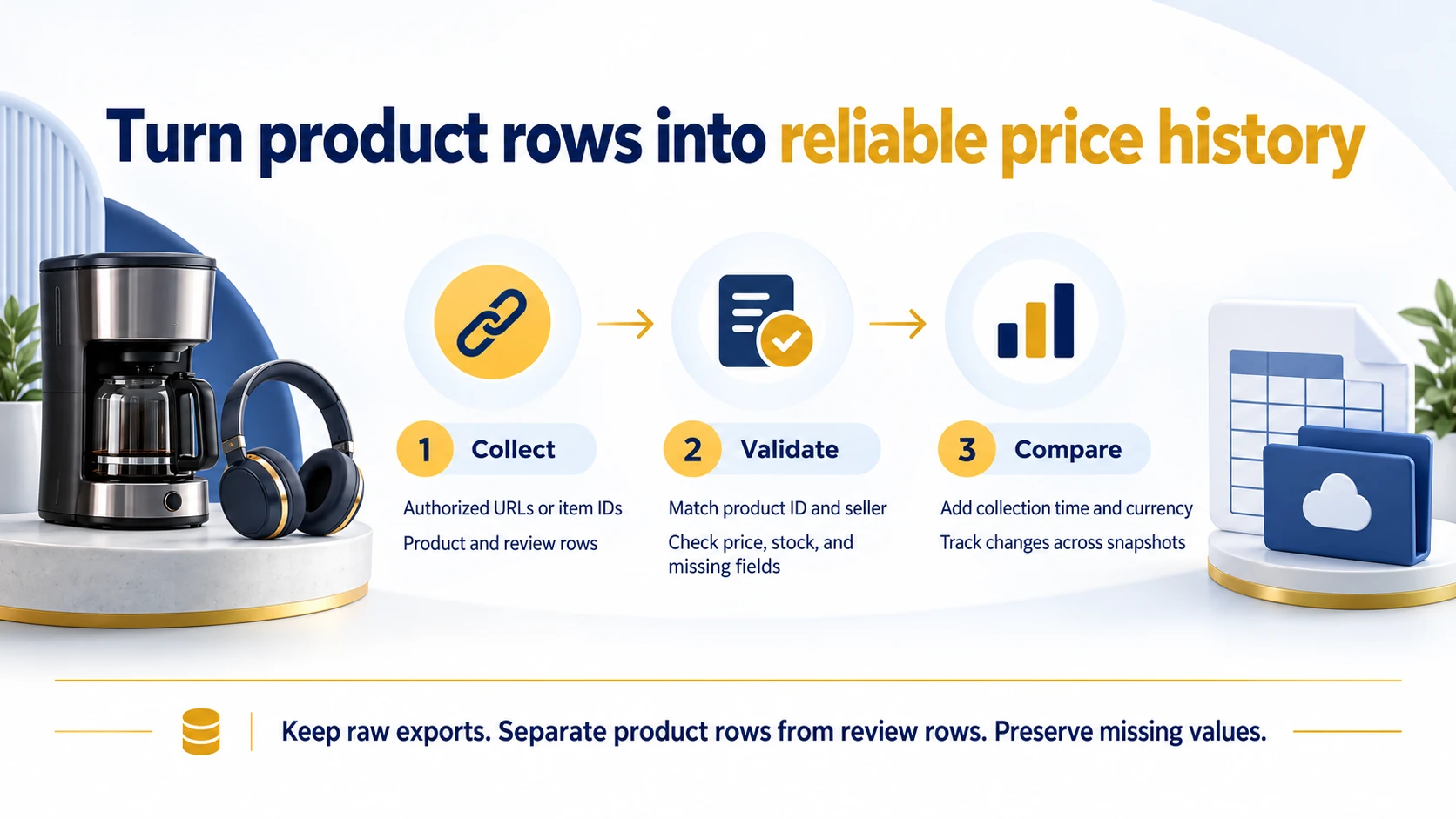
Use product_id + seller + collected_at as a practical composite key. Keep currency and locale explicit. Then calculate changes from normalized numeric price fields while preserving the original text.
Three simple outputs cover most workflows:
- Price history: One row per product, seller, and timestamp.
- Change log: Old price, new price, absolute change, percentage change, and detection time.
- Availability watch: In-stock, out-of-stock, unavailable, or unknown status over time.
Octoparse’s e-commerce data workflows can support authorized product research and monitoring. For a broader method, see the guide to price scraping workflows.
Tracking a different marketplace with the same approach? See the Amazon price scraper guide for the equivalent no-code workflow, or the eBay scraper comparison if your authorized use case spans more than one platform.
FAQs about Walmart scrapers
- Can I scrape Walmart without permission?
Walmart’s current Terms of Use say automated scraping and systematic downloading require express prior written consent. Check the current terms and your authorization before running any automated task. If you are a Marketplace seller or approved solution provider, evaluate the official APIs first.
- Can I use this data for competitive price monitoring, not just a one-time pull?
Yes, if your authorization covers repeated collection. Keep the product ID, seller, currency, and collection time consistent across runs, then compare normalized prices. An Octoparse customer pricing case study describes how structured competitor data supports pricing decisions; it is separate from this Walmart test.
- What fields should a Walmart price scraper collect?
Start with product ID or SKU, title, current price, currency, seller, availability, rating, review count, canonical product URL, and collection timestamp. Keep promotional and reference prices separate from the current selling price.
- Can Octoparse scrape dynamically loaded product pages?
Octoparse can interact with page content and build workflows for repeated lists, scrolling, load-more controls, pagination, and linked detail pages. The permitted workflow still depends on the target page, authorization, and a successful one-page validation.
- When should I use Walmart Marketplace APIs instead?
Use Walmart Marketplace APIs when you are a seller or approved solution provider and need structured access to items, inventory, orders, pricing, promotions, or reporting. The APIs require onboarding, credentials, and OAuth 2.0 authentication.
- How often should I run price monitoring?
Use only a frequency covered by your authorization and business need. Start slowly, validate change quality, and avoid collecting fields you do not use. A lower-frequency, well-audited dataset is more valuable than a large unreliable one.
- Does the template handle Walmart’s paginated results, featured items, and “related searches” blocks?
The template exposes Listing/Search Pages and Review Pages per Product controls. The three-product URL test did not test pagination, featured carousels, or related-search blocks. Check a representative listing sample before relying on that coverage. Auto-detect and additional field groups belong to a separate custom workflow authored in Octoparse Desktop, not to editing the preset template’s inputs.
Build the smallest reliable workflow first
Choose the smallest workflow that meets your data needs. Use Marketplace APIs for eligible seller operations, the Walmart Data Extractor for supported authorized product research, or a custom Desktop task for a different schema. Validate the sample before expanding the collection.
Start with one URL, one record, and a small schema. When the fields are correct and the authorization is clear, expand the workflow deliberately. You can create an Octoparse account and test the same mechanics on data you are allowed to collect.