Last reviewed: September 28, 2026
An AI web scraper turns a plain-language prompt, a trained robot, or a natural-language description into structured data pulled from a website, without you writing custom parsing code by hand. The right one depends on the job: Octoparse covers ready-made templates callable via MCP, API, or CLI; custom scraping workflows; and recurring cloud scraping; Firecrawl and ScrapeGraphAI serve developers building AI pipelines; Diffbot automatically classifies and extracts data without any prompt or selector at all; Browse AI is built for point-and-click monitoring; and Thunderbit handles quick in-browser pulls for sales and research teams.
Quick answer
| Tool | Best for | Main workflow | Important trade-off |
| Octoparse | Ready-made coverage, custom recurring collection, and structured data delivery | Templates Gallery, Desktop, Agentic Mode, Cloud, API/MCP access | Pricing can be less predictable for light, occasional use, since some plans are tied to tasks or results |
| Diffbot | Fully automatic, rule-free extraction and entity-level web data at scale | AI/computer-vision page classification through the Extract API, plus Knowledge Graph entity lookups | Pricing starts high for teams beyond light, free-tier volume, and it works best on common page types rather than a fully custom schema |
| Firecrawl | Developers building search, RAG, or AI applications | API-first crawl, scrape, map, and structured extraction | Requires an API-oriented workflow and careful credit management |
| Browse AI | Point-and-click monitoring and recurring page checks | Train a robot in the browser, then run or schedule it | Robot and credit limits become important as monitoring volume grows |
| Thunderbit | Quick, no-setup browser extraction for sales, ops, and research pulls | Describe the columns you want in natural language in the Chrome extension; the AI agent reads the page and fills the table | Free plan is capped at 6 pages/month, and per-page credit costs add up fast at higher volume |
| ScrapeGraphAI | Developers experimenting with prompt-driven extraction pipelines | Hosted API, Python/JavaScript libraries, CLI, and MCP | More technical setup and variable usage costs than a simple browser tool |
AI web scraping tools, sometimes just called AI scrapers, now cover more ground than the phrase suggests. Some, like Octoparse, combine AI-assisted selector detection with a template library, cloud scheduling, and an MCP server an AI agent can call directly. Others train a reusable monitoring robot, provide a browser extension for quick research, or wrap natural-language prompts around a developer API. That range matters: a tool built for pulling one article is a poor fit for monitoring 500 product pages a day, and a developer-first API can feel uncomfortable for a marketing team that just wants a spreadsheet.
This guide compares six tools across those workflows and explains where each one, including Octoparse, actually fits, rather than treating every product as the same kind of scraper.
What is an AI web scraper?
An AI web scraper is a program that uses artificial intelligence, such as natural-language prompts or self-adjusting element detection, to pull structured data from a website with less manual setup than a traditional scraper built on hand-written CSS or XPath selectors. It is also sometimes called intelligent website data extraction software. Octoparse, for example, applies AI at both ends of the job: AI Auto-detect and self-repairing selectors at the point of extraction, and Agentic Mode’s natural-language workflow builder at the point of authoring.
In practice, “AI web scraper” covers four overlapping approaches:
- AI-assisted visual scrapers identify page elements or help build a workflow without hand-written selectors. Examples: Octoparse Desktop’s AI Auto-detect, Browse AI’s robot trainer.
- Prompt-driven or fully automatic APIs turn a natural-language instruction, or no instruction at all, into structured JSON for an application or AI agent. Examples: Firecrawl’s extract endpoint and ScrapeGraphAI are prompt-driven; Diffbot’s Extract API classifies and extracts automatically using machine learning, with no prompt or selector to write; Octoparse’s Open API covers the programmatic side too, running and retrieving data from existing templates and tasks. For a side-by-side comparison of Firecrawl and similar tools, see Firecrawl alternatives compared by use case.
- Monitoring robots learn a page layout once and repeat the same collection task automatically when the page changes. Examples: Browse AI, Octoparse Cloud’s scheduled runs.
- Browser extensions let a researcher pull visible data while browsing, often by describing the columns they want in plain language. Examples: Thunderbit, Octoparse’s Data Collection Helper.
None of these replace source testing on their own. The features that actually decide whether a scraper keeps working at scale sit around the AI layer, not inside it: anti-blocking (IP rotation, residential proxies, and CAPTCHA handling, built into Octoparse Cloud) is what avoids bot detection on repeat runs, and cloud scheduling is what turns a one-time pull into a recurring feed.
This guide looks at the full path from source discovery to extraction, repeatability, scheduling, output, and maintenance, not just whether a product understands a prompt.
How we evaluated these AI web scraping tools
This is a hands-on comparison of public docs, product pages, and pricing checked in September 2026. It is not a lab-controlled accuracy test. We did not invent accuracy percentages or speed scores, because those numbers only mean something when every tool is asked to do the same job under the same conditions, the same URLs, fields, page states, login conditions, proxy setup, and retry policy.
To run that test yourself, give every tool the same three sources, for example a static article page, a paginated product listing, and a page that needs JavaScript to load. Ask each one for the same fields, then check:
- how long it takes to get a first working setup;
- whether every field comes back complete and correct;
- how it handles pagination, product variants, and JavaScript-rendered content;
- whether it still works after the page layout changes;
- how it schedules runs, retries failures, and exports data;
- what it costs to set up and run at your volume;
- how far it goes past a browser tool, for example an API, CLI, MCP server, or agent-ready output, since that is the part most directly tied to using it as an AI web scraper rather than a one-off manual pull.
Until that test exists, the more useful question isn’t “which tool is most accurate.” It’s “which workflow does this tool support reliably for my use case.”
The 6 Best AI Web Scrapers in 2026, Reviewed
Before the individual reviews, here is how the six tools stack up on the factors buyers ask about most: price, AI capability, and what you actually get out the other end.
6 Best AI Web Scrapers in 2026, Compared at a Glance
| Tool | Product type | Price | AI capability | Output and delivery |
| Octoparse | Web data platform | Free plan; paid plans from $69/month billed annually | AI Auto-detect, self-repairing selectors, Agentic Mode, MCP server, API | Files (Excel, CSV, JSON, HTML, XML), databases, Google Sheets, cloud runs, API access, and MCP access where supported |
| Diffbot | Automatic AI extraction API and Knowledge Graph | Free plan with 10,000 credits/month; Startup from $299/month | Rule-free page classification and extraction via machine learning and computer vision; no prompt or selector needed | JSON via the Extract API, plus Knowledge Graph entity and facet queries |
| Firecrawl | Developer API | Free tier; Hobby from $16/month annually or $19/month monthly | Natural-language extract endpoint, LLM-ready Markdown/JSON output | Markdown, JSON, crawl results, and structured extraction through an API |
| Browse AI | Visual monitoring platform | Paid plans from $19/month annually or $48/month monthly | Point-and-click robot trainer; no developer-facing AI authoring API | Robot runs, scheduled monitoring, and exports |
| Thunderbit | AI web scraping Chrome extension | Free plan with 6 pages/month; Starter from $9/month annually | AI agent reads a page and auto-fills a table from a natural-language column description; supports sub-pages, PDFs, and images | CSV/table export to Excel, Google Sheets, Airtable, or Notion; also offers an API, CLI, and MCP server |
| ScrapeGraphAI | AI extraction API and developer framework | Free tier; Starter at $20/month | Prompt-to-schema graph pipelines, agent-facing SDKs | Hosted API plus Python, JavaScript, CLI, and MCP options |
The table is a directional guide, not a performance ranking. These products have different architectures and shouldn’t be treated as interchangeable.
1. Octoparse: best for ready-made templates, custom authoring, and recurring delivery
Octoparse is a web data platform built around ready-made templates, visual and natural-language authoring, owned cloud infrastructure, and API/MCP access, so a team can pick the entry point that fits the job instead of forcing every use case through one interface.
G2 Rating:
How Octoparse works
| Surface | What it does | Most relevant when |
| Agentic Mode | Builds a scraper from a natural-language description in the user center, via the Data Collection Helper Chrome extension, which runs collection in your own logged-in browser | This is Octoparse’s most direct AI web scraper: describe the data, get structured output |
| Open Platform | API, MCP server, and CLI (beta) to discover, run, schedule, and retrieve from existing templates and tasks; the MCP server can also extract from any URL on the fly through Universal Scraper | You want an AI agent to call Octoparse directly |
| Templates Gallery | 680+ maintained, ready-to-run scrapers for common sites and use cases | You need coverage today without building anything |
| Octoparse Desktop | Visual, point-and-click builder with AI Auto-detect and self-repairing selectors | The template gallery doesn’t cover your target site |
| Octoparse Cloud | Concurrent nodes, scheduled runs, and owned anti-blocking infrastructure that renders JavaScript-heavy pages automatically | You need the scraper to run unattended on a schedule |
| DataHub / Data Service | A usage-based data API, or a fully managed, done-for-you delivery option | You’d rather buy the data than build the workflow |
The Open Platform runs and retrieves from existing scrapers; authoring a brand-new custom workflow still happens in Desktop or Agentic Mode.
Since custom scrapers are built in Desktop, two of its AI features are worth a closer look. They remove the most manual work when you build a scraper yourself.
AI Auto-detect
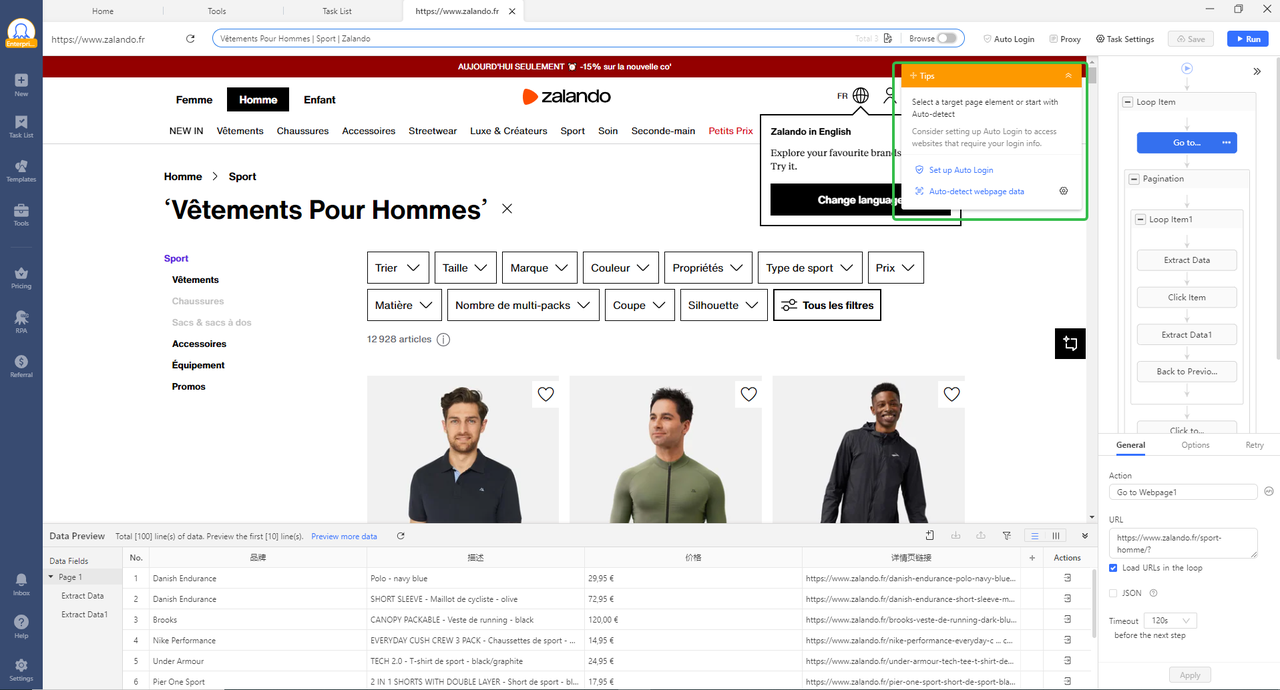
In Octoparse Desktop, Auto-detect scans a page and builds a working extraction workflow for you. It finds lists, tables, “load more” and infinite-scroll areas, and common data fields, so you don’t have to select every field by hand.
AI-assisted RegEx tool
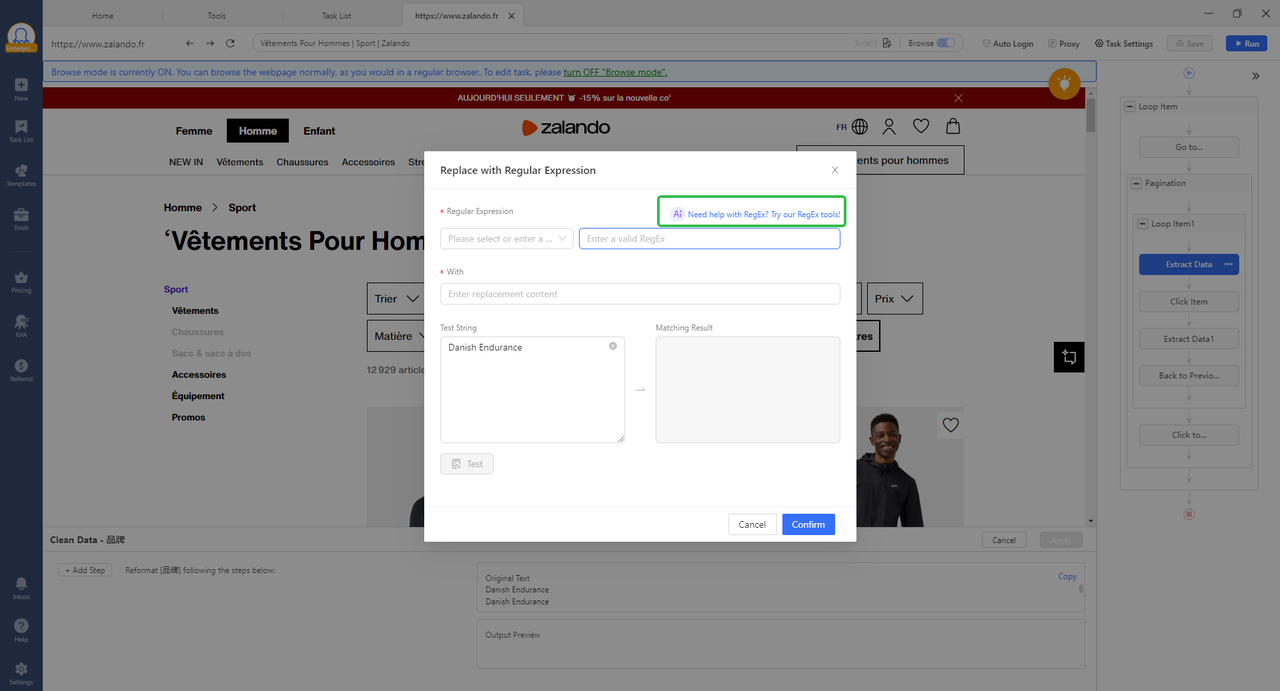
When scraped text needs cleaning, Octoparse’s built-in RegEx tool includes an AI RegEx Generator. Give it example strings and highlight the parts you want to match, and it writes the regular expression for you. It also offers a library of common patterns, such as email, phone number, and URL, plus a visual builder.
What it does well
- Ready-made coverage combined with custom authoring, rather than one or the other.
- Cloud execution for scheduled, recurring workflows, with owned anti-blocking infrastructure (IP rotation, CAPTCHA handling).
- AI-assisted selector generation and self-repair that reduce maintenance when page structures change.
- A path from no-code authoring to API, MCP, and agent access, without requiring every user to become a scraping developer.
Limitations
Octoparse has several entry points, so it takes a short discovery step to find the right one for your workflow. Pricing can be less predictable for light, irregular use when a plan is tied to tasks or results.
Pricing
Octoparse’s pricing page lists a free plan, Standard from $69/month, and Professional from $249/month, billed annually; proxy, CAPTCHA, and managed-service add-ons are priced separately.
Usage tips
- Check the Templates Gallery first. 680+ maintained templates cover many common sites, so you may not need to build anything.
- Let Auto-detect draft the workflow in Desktop, then review the fields it found and remove the ones you don’t need.
- Describe the data in words with Agentic Mode if you’d rather not click through the page. It runs in your own logged-in browser, so it can see the same pages you can.
- Move recurring jobs to Octoparse Cloud, so runs follow a schedule and don’t depend on your own computer being on.
- Connect an AI agent through the MCP server. Free and Basic accounts get 2,000 free records a month for running cloud templates through MCP or API.
Who should choose it?
Octoparse fits small and mid-sized teams with recurring, long-tail data needs: competitor monitoring, ecommerce web scraping for small-business price monitoring, product research, lead discovery, marketplace analysis, and real-estate research. It also works well when different people need different entry points: a researcher starts from a template, an operations user builds a visual workflow, a developer connects through the Open Platform, and a team that doesn’t want to maintain extraction logic evaluates DataHub or Data Service instead.
For a real-world example, GetCOAI, an AI-tools information site, uses Octoparse to collect structured information such as pricing, tutorials, and course descriptions from AI-related websites. The useful lesson isn’t a single speed number. It’s that a reusable extraction workflow can become part of an ongoing content operation instead of a one-off manual research task. Read the GetCOAI customer story for the full context.
2. Diffbot: best for fully automatic, rule-free extraction at web scale
Diffbot takes a different approach to the AI part of “AI web scraper”: instead of a prompt or a trained robot, its Extract API uses machine learning and computer vision to classify a page’s type, such as an article, product, or discussion thread, and pull the relevant fields automatically, with no selector and no instruction to write.
G2 Rating:
What it does well
Diffbot needs no setup for each new website. You send a URL, and it works out the page type and the fields to pull on its own. That suits jobs that span many different domains, where building and maintaining a separate template or robot for every site would be impractical. Diffbot also offers a Knowledge Graph, a database of entities (such as companies, people, and products) it has already extracted from the web. If you need to find companies that match certain criteria, you can search that database directly instead of scraping pages yourself. It is a better fit for broad, cross-site collection than for deep, repeated extraction from one known site.
Limitations
Automatic classification works best on common, well-structured page types; it’s less suited to a fully custom schema or a site with an unusual layout, where a template or a prompt-driven tool can be told exactly what to pull.
Pricing
Diffbot’s pricing page lists a free plan with 10,000 credits/month, then Startup at $299/month for 250,000 credits, and Plus at $899/month for 1,000,000 credits plus crawling; Knowledge Graph queries cost more credits per call than a page extraction. Verify current credit costs per product before estimating total volume.
Usage tips
- Start on the free plan. It includes 10,000 credits a month, and the Extract API uses 1 credit per page (2 through a datacenter proxy), so you can test a real sample of URLs before paying.
- Check the returned fields on a sample from every site you plan to cover. Page type is detected automatically, so unusual layouts are where mistakes show up first.
- Look in the Knowledge Graph before you crawl. For company, people, or product data, a lookup may answer your question without a fresh scrape. Entity records cost 25 credits each, so compare that with the cost of scraping the pages yourself.
- Crawling is only available from the Plus plan up, so on lower plans you supply the list of URLs yourself.
Choose Diffbot if
Choose Diffbot when you need automatic, no-configuration extraction across many different domains and page types, or when Knowledge Graph entity data can answer part of your data need without a fresh scrape.
3. Firecrawl: best for developer-first AI and RAG pipelines
Firecrawl is an API-first tool for turning websites into content that software can process. Its core workflows include scraping pages, crawling sites, mapping URLs, and extracting structured information, which makes it especially relevant to developers building search, retrieval-augmented generation (RAG), research, or agent applications.
G2 Rating:
What it does well
Firecrawl is designed around a clean developer workflow: send a URL or crawl request, specify the desired output, and get content back as Markdown or JSON, one of the more reliable ways to turn a page into structured data without writing a custom parser. That makes it a natural fit when the scraper is one component inside a larger application rather than the main interface an operations team uses directly. See Firecrawl’s API documentation for the full endpoint list.
Limitations
Firecrawl is not a visual workflow builder for non-technical users, and it isn’t primarily a ready-made template gallery. Teams still need to manage API integration, schemas, retries, source changes, and credit consumption. A good result from one page also doesn’t guarantee the same instruction will produce complete data across every site in a crawl.
Pricing
Firecrawl’s pricing page lists a free tier and paid plans including Hobby at $16/month billed annually or $19/month monthly. Confirm current credits and overage rules before comparing total cost with task-based platforms.
Usage tips
- Try the playground at firecrawl.dev first. You can scrape any URL without an API key or any setup.
- Use the scrape endpoint for single pages and the crawl endpoint for entire sites. The API treats them as two different jobs.
- Output Markdown for LLMs. Clean Markdown drops straight into any LLM pipeline or RAG ingestion system.
- Use the interact endpoint for gated content: click, type, and navigate before extracting data behind login walls or dynamic filters.
- Combine it with search: use the search endpoint to find relevant pages first, then scrape them, all in one API.
Choose Firecrawl if
Choose Firecrawl when developers own the workflow, the output needs to feed an application or AI pipeline, and Markdown or structured API responses matter more than a visual authoring experience.
4. Browse AI: best for point-and-click monitoring
Browse AI focuses on training robots to perform repeatable browser tasks. You point to data on a page, configure a robot, and use it to monitor changes or collect information on a schedule.
G2 Rating:
What it does well
Its main advantage is approachability. A marketing, operations, or research user can build a monitoring workflow without starting from code or XPath, useful for tracking price changes, inventory, rankings, listings, or updates on a known set of pages. Browse AI also treats monitoring as a first-class workflow rather than an afterthought bolted onto a scraper.
Limitations
The robot model works best when the page layout and task are stable enough to learn. Complex sites, multi-step flows, login states, and large-scale collection may need more setup and maintenance. Pay attention to robot limits, task runs, credits, and supported integrations as your monitoring list grows.
Pricing
Browse AI’s pricing page lists paid plans from $19/month annually or $48/month monthly. Price alone isn’t enough for a comparison; check how many robot runs, websites, rows, and historical records are included.
Usage tips
- Start with a pre-built robot: 250+ ready-made robots cover Amazon, LinkedIn, Google Maps, and more, with almost no setup.
- Turn on change monitoring for competitor tracking, so you are notified as soon as the data updates.
- Combine it with Zapier to send scraped data straight into your CRM, spreadsheet, or Slack.
- Test on the free tier before upgrading. 50 free credits is usually enough to validate your use case.
Choose Browse AI if
Choose Browse AI for visual, recurring monitoring of a defined set of pages, especially when the person building the robot isn’t a developer.
5. Thunderbit: best for quick, no-setup browser extraction
Thunderbit is an AI web scraping Chrome extension built for a fast, one-page-at-a-time workflow: open a page, describe the columns you want in plain language, and its AI agent reads the page and fills in a table, without CSS selectors or a separate workflow builder.
G2 Rating:
What it does well
Thunderbit’s main advantage is speed to a first result. It’s aimed at sales, operations, and research users who want a table out of a single page, or a short list of pages, right now, and it supports sub-page scraping plus extracting from PDFs and images alongside regular web pages. Exports go straight to Excel, Google Sheets, Airtable, or Notion, and it also offers an API, CLI, and MCP server for teams that outgrow the point-and-click extension.
Limitations
The free plan is capped at 6 pages/month, and per-page credit costs on paid plans can add up quickly for anything beyond occasional pulls. Like other browser-based tools, it depends on the page being logged in and visible in your own browser session, so it isn’t a substitute for scheduled, unattended cloud collection.
Pricing
Thunderbit’s pricing page lists a free plan with 6 pages/month, Starter from $9/month billed annually, and higher Pro and Business tiers with more credits and API access. Verify current credit allowances before comparing cost at your volume.
Usage tips
- Name each column clearly in plain language, for example “product name” and “price”, and the AI agent fills the table from the page.
- Test on the free plan first. Six free pages a month is enough to check that Thunderbit reads your target page correctly.
- Use sub-page scraping when the details you need sit on each item’s own page rather than on the listing.
- Export straight to Excel, Google Sheets, Airtable, or Notion instead of copying the table by hand.
- Move to the API, CLI, or MCP server if you outgrow the one-page-at-a-time extension workflow.
Choose Thunderbit if
Choose Thunderbit when you want the fastest path from “I’m looking at this page” to a usable table, and your volume is closer to dozens of pages than thousands.
6. ScrapeGraphAI: best for prompt-driven developer workflows
ScrapeGraphAI combines natural-language extraction with developer tooling, aimed at users who want to describe the information they need and integrate the result into a Python, JavaScript, CLI, API, or agent workflow.
G2 Rating:
What it does well
Prompt-driven extraction can cut down on page-specific parsing code for some tasks. ScrapeGraphAI is especially relevant to developers who want to experiment with graph-based extraction or connect scraping to an AI application; its libraries and agent-facing interfaces give technical teams more control than a browser-only extension.
Limitations
Prompt-based extraction is not a substitute for validation. A model may misread a field, miss a variant, or behave differently when the page changes, so define a schema, validate required fields, log failures, and test repeatability before using the result in a business-critical pipeline.
Pricing
ScrapeGraphAI’s official site currently lists a free tier and paid plans including Starter at $20/month, Growth at $100, and Pro at $500. Verify current request limits, model options, and included credits before using those figures in a buying decision.
Usage tips
- Describe what you want in plain language in the prompt box, for example “extract blog titles, meta description, and author name from the current URL”, then run SmartScraper to generate the pipeline.
- Choose the right graph type: SmartScraperGraph for single-page tasks, SearchGraph for multi-page or web-search tasks.
- Use the Python SDK for complex flows. When pages need multi-step navigation, build and test locally with the library.
- Pair it with LangChain or any LLM stack to feed cleaned web data straight into downstream models.
Choose ScrapeGraphAI if
Choose ScrapeGraphAI when a developer or AI builder wants prompt-driven extraction inside a programmable workflow and is prepared to handle validation, cost control, and failure recovery.
Other prompt-driven, developer-facing options worth knowing about include Apify and Zyte, which take a similar API-first approach to Firecrawl and ScrapeGraphAI. We didn’t review them in full here; if they’re on your shortlist, compare them against the seven factors in the methodology above before deciding.
Which AI web scraper should you choose?
| Your situation | Start here |
| You need an existing scraper right now | Octoparse Templates Gallery |
| You want to build a reusable custom scraper visually | Octoparse Desktop |
| You want natural-language authoring with guided browser collection | Octoparse Agentic Mode |
| You need recurring cloud runs and scheduled delivery | Octoparse Cloud for a broader workflow, or Browse AI for focused monitoring |
| You need broad, automatic extraction across many different domains | Diffbot’s Extract API, or its Knowledge Graph for pre-extracted entity data |
| You’re building web content into an AI application or agent | Compare Firecrawl and ScrapeGraphAI by output format, API behavior, and cost |
| You’re researching a small dataset directly in Chrome | Thunderbit is usually the fastest starting point |
| You don’t want to build or operate the extraction workflow | Compare Octoparse DataHub and Data Service separately from the authoring tools above |
The best tool is usually the one that minimizes total operating effort, not the one with the flashiest AI demo. Weigh setup time, how the tool handles a page redesign, how you’ll validate the data, and who owns the workflow six months after launch.
Conclusion
There’s no single best AI web scraper for every job. Firecrawl and ScrapeGraphAI are strong candidates for developer-led AI pipelines. Diffbot is a practical option when you need broad, automatic extraction across many domains without configuring anything per site. Browse AI is a practical option for point-and-click monitoring. Thunderbit is convenient for quick, browser-based pulls. Octoparse is the broadest fit when a team needs to move from existing templates to custom authoring, recurring cloud execution, and structured data access, including through its own MCP server.
The deciding factor is the operating model. If you need a quick answer, choose the lightest tool that works. If you need data that keeps arriving, choose the workflow your team can build, validate, run, and maintain.
FAQs about AI web scrapers
- Can an AI web scraper extract data from any website?
No. Results depend on page structure, JavaScript behavior, authentication, rate limits, anti-bot controls, and the fields you’re requesting. AI can cut authoring effort, but it doesn’t remove the need for source testing and ongoing monitoring.
- Is a prompt enough to build a reliable AI web scraper?
Usually not for recurring business data. A prompt is a useful starting point, but a production AI web scraper still needs a defined schema, required-field checks, retry handling, logging, and a plan for when the source page changes.
- What’s the difference between an API-based AI web scraper and a browser-based one?
An API-based scraper, like Firecrawl, Diffbot, or ScrapeGraphAI, is built to be called by software and returns structured responses. A browser-based scraper, like Thunderbit or Browse AI’s robot trainer, runs in a browser context and can be easier for visual selection or authenticated pages. Some platforms, including Octoparse, combine both.
- Does Octoparse’s MCP server replace building an AI web scraper workflow?
Not always. MCP can make supported extraction capabilities available to AI tools and agents, including running existing cloud templates or extracting from a URL through the Universal Scraper. Reusable workflow authoring and saving still happens through Agentic Mode or Desktop; confirm the current scope before you build around it.
- Can ChatGPT or another AI chatbot scrape a website directly?
General-purpose chatbots can fetch and read a single page, but they aren’t built for structured, repeatable extraction at scale. Pair a chatbot with a dedicated AI web scraper, such as one exposed through an MCP server, to handle the data pull, then let the chatbot analyze or summarize what comes back.
- Can AI-scraped web data be used to fine-tune or ground an LLM?
Yes, if the export is clean, properly licensed, and structured consistently. Tools like Firecrawl and ScrapeGraphAI output Markdown or JSON suited to a training or retrieval pipeline; Octoparse exports data from any template or custom task as Excel, CSV, JSON, HTML, or XML files, straight into databases such as MySQL, PostgreSQL, and Oracle, or to Google Sheets, and higher plans add cloud storage such as Google Drive, Dropbox, and Amazon S3. Check the source’s terms before reusing scraped data this way.
- Is there a free AI web scraper for beginners with no coding required?
Several of the tools above have a free tier: Octoparse’s free plan includes two separate allowances: 50,000 rows/month of exports from custom tasks you build yourself, and 2,000 records/month for running Octoparse’s ready-made cloud templates through the MCP server or API (open to Free and Basic plan users), Thunderbit and Diffbot both offer free tiers for light volume, and Browse AI and Firecrawl start free before scaling to paid usage. For a broader roundup, see 12 free web scrapers we tested.
- What’s a realistic AI web scraper budget for around 1,000 pages a day?
At roughly 30,000 pages a month, compare a flat monthly plan against a credit-metered API before assuming the cheapest per-page rate wins. A template-based platform like Octoparse’s Standard plan can end up cheaper at steady volume than paying per page on a usage-based API like Firecrawl’s Hobby tier, since a flat plan doesn’t add per-page overage once you’re past the included quota.
- How do you compare accuracy across AI web scrapers?
Use the same URLs and schema across every tool. Check each required field by hand, count missing and incorrect values, test pagination and dynamic content, and repeat the run after a page change. Don’t compare an API’s result on one simple article against a browser robot’s result on a multi-step marketplace flow.
- Are AI web scraping tools legal to use?
It depends on the source, the type of data, the purpose, the jurisdiction, and the site’s terms. Review applicable laws, privacy requirements, terms of service, robots guidance, access controls, and internal policies before collecting or redistributing data. This article is not legal advice. If you want to know more, check our guide on web scraping legality.