To use a YouTube scraper API with Python, use Octoparse as a web data platform: select a cloud-capable template, read its live input schema, authenticate your request, create the task once, and poll the export until structured rows are ready. Your Python code sends a permitted public YouTube URL, preserves the returned task ID, and writes the finished dataset to a CSV file, spreadsheet, database, or analysis workflow.
A YouTube scraper API is usually asynchronous. A successful task-creation response means collection has started; it does not prove that the export is ready. Begin with a small public target, validate the returned fields, and use bounded polling before scaling the workflow. This guide demonstrates that lifecycle with the Octoparse API and explains how the same cloud templates can also be controlled through Octoparse MCP or CLI.
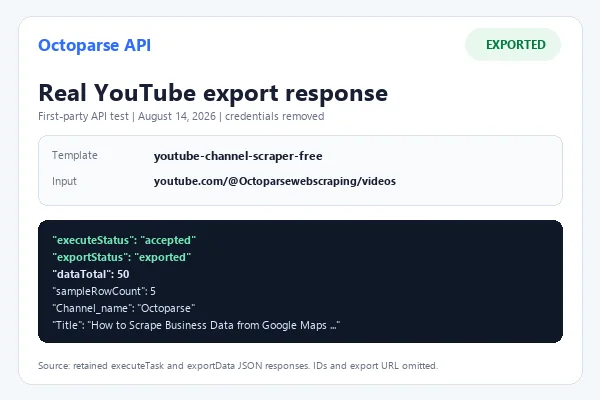
Tested evidence: A first-party Octoparse API run on August 14, 2026 returned 50 populated video records in about four minutes. A new live MCP run started on August 30, and a snapshot captured on August 31 followed the current official workflow and returned 199 observed rows with five populated preview records. The task still reported
running, so 199 is an observed snapshot rather than a guaranteed final total.
How to Use a YouTube Scraper API with Python
The shortest reliable path is to discover the live template, build parameters from its schema, authenticate, create one cloud task, and poll the export with a fixed time limit. The Python client should preserve the task ID before any retry and should treat an accepted task and a populated export as different states.
- Install
requestsand load the API key from an environment variable. - Discover
youtube-channel-scraper-freeand read its current schema. - Send the permitted channel Videos page URL in
youTube_Account_URLs. - Create the task once and save the returned task ID.
- Poll
exportDatauntil a terminal status is returned, then validate the rows before using them.
Prepare the Python Environment
Before you write the executor, prepare:
- A recent Python 3 release
- The
requestspackage - An Octoparse API key
- A stable external user ID
- Access to a cloud-executable YouTube template
- A public YouTube channel handle you are permitted to process
Install the Python dependency:
Store secrets outside your source code:
Use the same external user ID when you need to find or reconcile tasks created for the same application user. Do not generate a random value for every retry.
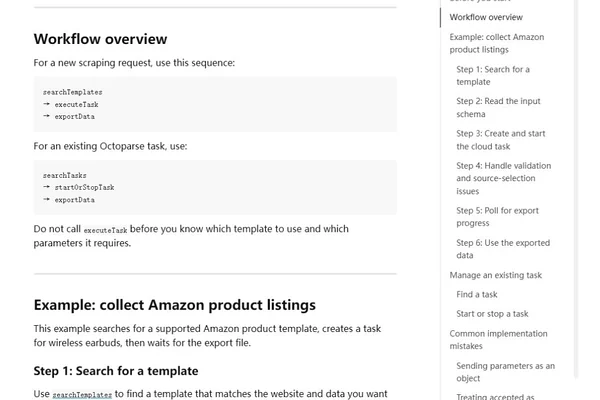
Octoparse documents the new-task sequence as searchTemplates → executeTask → exportData. The Octoparse API workflow also specifies the base URL, authentication headers, schema rules, and export statuses used below.
Step 1: Find the Exact YouTube Template
YouTube Channel Scraper (Free) is the URL-based template used in the populated API test. Its live discovery result identified template ID 1813, Cloud and Local execution modes, one required URL-array input, and ten output fields.
https://www.octoparse.com/template/youtube-channel-scraper-free
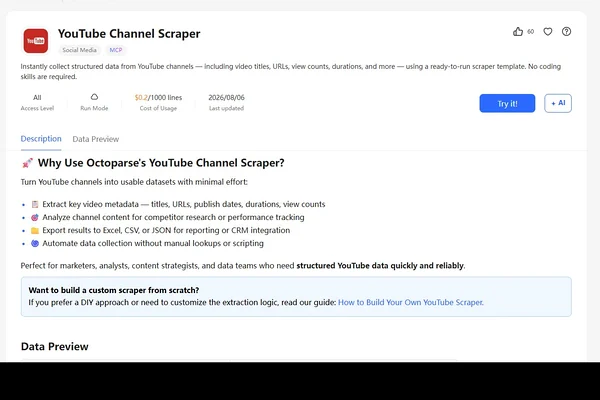
Start with searchTemplates. Search for the exact slug rather than a broad keyword, then match the returned template by slug. Do not select the first item simply because it mentions YouTube.
From the response, capture and save:
recommendedTemplateName- The exact template ID and slug
executionMode- The complete
inputSchema - The complete
sourceTree sourceSummary, when returnedoutputSchema
Confirm that the selected template is cloud-executable. A local-only template cannot be started with executeTask.
Step 2: Build Parameters from the Input Schema
The live schema returned one required field: youTube_Account_URLs. It is a multi-input field with the value format string[], so send an array even when the run contains one channel.
Use a complete public channel Videos page URL that you are permitted to process:
Recheck this field in the current schema before every production rollout. The field name is case-sensitive, and the verified template expects full channel URLs rather than handles alone.
Step 3: Configure Authentication
Octoparse API requests use x-api-key. Task creation also requires x-external-user-id:
Do not log these headers. In a production application, load the key from a secret manager and rotate it according to your organization’s credential policy.
Step 4: Create the Cloud Task Once
The parameters property must contain a serialized JSON string. This example uses the exact template name and input field observed in the verified discovery response.
Call executeTask only once. If the client times out after the server receives the request, reconcile the saved task before resubmitting. In the test, targetMaxRows was 10 while the final response reported 50 rows, so treat it as a stop target rather than an exact output or billing guarantee.
An accepted response means the task was created and cloud extraction was requested. Save its taskId; the export is not ready yet.
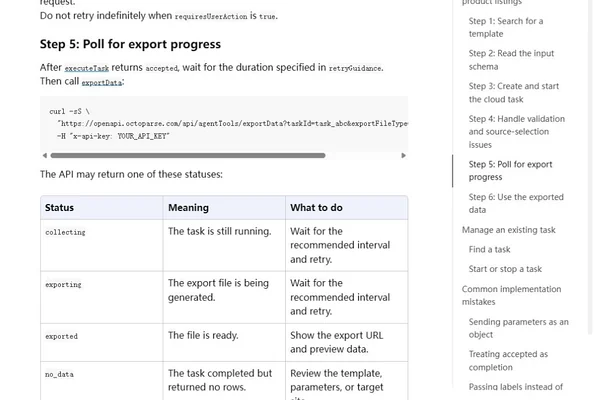
Step 5: Poll Export Status Safely
Poll serially and follow the API’s returned retryGuidance, suggestedNextCall, or workflow instructions. A sensible client should also have hard limits so a stuck task cannot run an infinite loop.
The loop handles the documented terminal states and limits polling to 30 attempts or 15 minutes, whichever comes first. It does not automatically download the export file. Your application can present the export URL and preview first, then download or analyze the file when that behavior is explicitly required.
What Did the Verified API Run Return?
In the August 14, 2026 first-party test, the URL-based template completed the asynchronous Octoparse API workflow in approximately 260 seconds and reported 50 video records. All five preview rows contained a title, video URL, duration, visible view count, and publication date. This is the populated extraction evidence used for the Python example.
What Did the August 30–31 MCP Live Run Return?
The retest followed Octoparse’s current official MCP workflow: discover a template, execute the task, then export the results. OAuth was renewed through the documented Codex login path before the direct MCP tools were called.
| Stage | Observed result | What it means |
search_templates | ID 1813; Cloud and Local; required youTube_Account_URLs string array; ten output fields | The current schema matches the Python example |
execute_task | Accepted; status running | The cloud task was created exactly once with only the schema-defined input |
| Status check | Running; 199 collected rows | Collection remained active when the latest snapshot was read |
export_data | 199 rows; 40 pages; five populated preview rows | Structured data was available before the run reported completion |
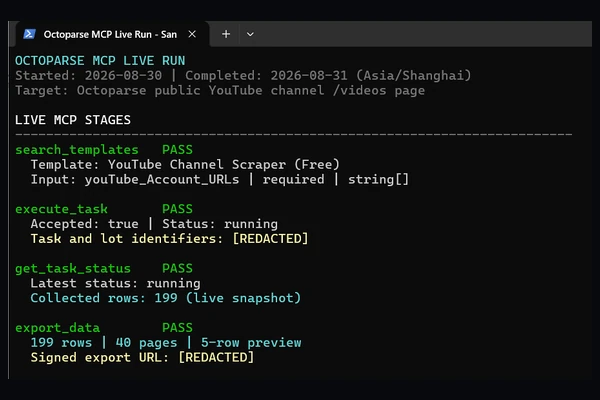
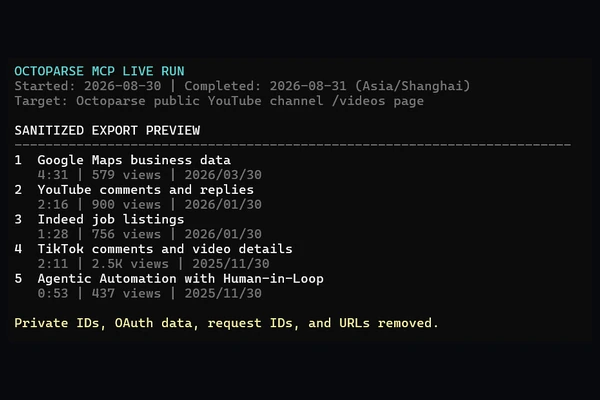
All five preview rows contained channel context, title, video and cover URLs, duration, visible view count, and date. The result verifies the MCP path for this template, account, target, and test time. It does not make 199 a fixed final total, because the status was still running when the snapshot was exported.
Sanitized MCP Preview
| Title | Duration | Visible views | Date |
| How to Scrape Business Data from Google Maps with Octoparse | Cat Cafe Example | 4:31 | 579 views | 2026/03/30 |
| How to Scrape YouTube Comments and Replies Fast | 2:16 | 900 views | 2026/01/30 |
| How to Scrape Indeed Job Listings Fast | 1:28 | 756 views | 2026/01/30 |
| How to scrape TikTok comments and video details Fast | 2:11 | 2.5K views | 2025/11/30 |
| Agentic Automation with Human-in-Loop — Octoparse AI Copilot | 0:53 | 437 views | 2025/11/30 |
What Is a YouTube Scraper API?
A YouTube scraper API is an interface between your application and a managed web-data workflow. Instead of writing code to launch a browser, scroll a channel page, identify video cards, and recover from layout changes, you send a request to a service that performs those steps for you. In this article, “scraping” means collecting permitted public metadata; it does not mean downloading YouTube videos or bypassing access controls.
The typical workflow has three parts:
- Discovery: Find a scraper that supports the page and data you need.
- Execution: Supply valid inputs and create a cloud extraction task.
- Export: Monitor the asynchronous task and retrieve its structured output.
This is different from a simple synchronous API call. A channel with hundreds of videos may require several minutes of browsing and extraction. For that reason, the first successful response usually means the job was accepted—not that the data is ready.
The distinction matters in production. If your code treats an accepted task as a finished export, it will return no dataset. If it submits a new task every time a network request times out, it can create duplicates. A reliable integration needs to preserve the task ID and treat execution and export as separate states.
YouTube Scraper API vs. YouTube Data API
The official YouTube Data API and a scraper API solve overlapping but different problems. The official API is the natural first choice when its supported resources, fields, and policies fit your application. According to Google’s YouTube Data API overview, it requires a Cloud project and credentials, uses a quota system, and requires OAuth 2.0 for operations involving authorization or private user data.
Official quota reference (checked September 1, 2026): Google documents a separate daily allowance of 100 search.list calls, with each call costing one unit. A channels.list request costs one unit, while the default combined allowance for other endpoints is 10,000 units per day. These defaults can change, so confirm the current quotas in your Google Cloud project before choosing an architecture.
A scraper API works from information publicly displayed on webpages. It may be useful when your project needs a web-visible dataset in a format provided by an existing scraping template. It is not an “unlimited” or policy-free version of the official API.
YouTube API comparison
| Factor | YouTube Data API | YouTube scraper API |
| Source | Official YouTube API resources | Publicly accessible webpage content |
| Setup | Google Cloud project, API credentials, and OAuth for authorized operations | Provider credentials, a compatible template, and valid template inputs |
| Limits | Quota units and method-specific costs | Provider task, plan, and extraction limits |
| Response pattern | Often a direct resource response | Commonly an asynchronous task followed by export polling |
| Maintenance | Stable documented resource model | Scraping workflow must adapt to webpage changes |
| Best fit | Supported YouTube features and official integrations | Repeatable collection of a template’s public web dataset |
The two methods can also coexist. For example, a team might use the official API for supported product features and use a scraper for an internal research dataset that reflects what visitors can see on public channel pages.
What Data Can You Extract from YouTube Channels?
The verified YouTube Channel Scraper (Free) workflow is designed for public channel and video metadata. Its observed schema and sample included:
https://www.octoparse.com/template/youtube-channel-scraper-free
- Video title
- Author or channel account
- Video URL
- Publish time
- View count
- Video length
The template page may describe broader input behavior, but the verified API run used one full channel /videos URL in youTube_Account_URLs. Treat the live inputSchema and outputSchema returned by searchTemplates as the source of truth before sending one or multiple inputs. This workflow is not presented as a comments or transcript extractor.
Treat the template’s live API schema as the source of truth. Marketing copy and screenshots help you understand the product, but an integration must use the field keys and allowed options returned by searchTemplates. Never infer an API key from a label such as “Usernames to Scrape,” because the machine-facing key can be different.
Why Use Octoparse for a YouTube Scraping Workflow?
Building a YouTube crawler yourself gives you control, but it also makes your team responsible for browser orchestration, scrolling behavior, selector changes, retries, infrastructure, and export logic. Octoparse provides a web data platform with a Templates Gallery and Octoparse Desktop for building or validating workflows, then exposes cloud task management and export through the OpenAPI. The same template boundary can also be operated through Agentic Mode, MCP, or CLI where the relevant access is enabled; those interfaces orchestrate extraction, while your Python service validates and routes the data.
That division of labor is useful when you want to:
- Send YouTube data into an existing Python pipeline
- Run the same collection method for many public channels
- Export structured data without operating a browser cluster
- Keep application code focused on validation, orchestration, and analysis
The benefit is not “zero engineering.” You still need to select the correct template, validate parameters, secure credentials, manage task state, and handle failures. The difference is that you are integrating a managed scraping workflow instead of rebuilding the crawler layer.
Python Implementation Checklist Before Production
The examples use values observed in one successful API run. Template metadata can change, so revalidate the integration instead of treating this article as a permanent schema contract.
Verified Values and Production Checks
| Item | Observed value | Production check |
| Template | youtube-channel-scraper-free, ID 1813 | Match the current slug and Cloud execution mode |
| Input field | youTube_Account_URLs | Confirm string[] in inputSchema |
| Input format | Full channel /videos URL | Validate each permitted URL before task creation |
| Output | Ten channel and video fields | Map the current schema and inspect a small sample |
| Polling | 60-second guidance in the test | Follow the value returned for the current task |
| Row target | Requested 10; response reported 50 | Do not assume an exact hard cap |
Before deployment, combine and compile the Python code, mock every terminal export state, and run one small authorized end-to-end sample. Persist the task ID before retrying any ambiguous task-creation request.
Common Errors and How to Handle Them
YouTube scraper API troubleshooting table
| Symptom | Likely cause | Recommended action |
401 or 403 | Missing, invalid, or unauthorized API key | Verify the key and template access without exposing credentials in logs |
invalid with missing parameters | Request does not match inputSchema | Add the named field using its exact schema key |
awaiting_source_selection | A source-backed option is unresolved | Inspect sourceTree and send the option key |
accepted but no file | Extraction is asynchronous | Wait according to retryGuidance, then call exportData |
| Repeated duplicate tasks | Retrying executeTask after an ambiguous timeout | Persist identifiers and reconcile before resubmitting |
collecting or exporting | Task or export is still in progress | Continue bounded serial polling |
no_data | Target, parameters, or public page returned no rows | Check the channel input and template requirements |
failed | Extraction or export failed | Inspect error details and retry only when the response says recovery is possible |
Avoid generic retry decorators around task creation. Retries are useful for idempotent reads, but cloud-task creation can have side effects even when the client never receives the response.
How Fast Is a YouTube Channel Scraper?
There is no single reliable runtime for every channel. Channel size, page behavior, cloud load, template configuration, and retry conditions can all affect completion time. A small public channel may finish quickly, while a large catalog can require a longer extraction and export cycle.
Use a representative sample of your own target channels before setting production timeouts or service-level expectations. In Octoparse’s 2026 HubSpot YouTube competitor-analysis test, a channel task returned 364 videos in 4 minutes 24 seconds with no failed URLs. A follow-on task across 10 videos returned 124 comments in 1 minute 21 seconds with no duplicates. These are observed results for those targets and settings, not general throughput guarantees.
Practical YouTube Scraper API Use Cases
Competitor channel monitoring
Collect public video titles, dates, durations, and visible view counts on a schedule. A downstream job can calculate posting frequency, identify recurring formats, and flag unusually strong videos for human review.
Creator research
Build a consistent dataset of public channel videos for an initial creator shortlist. Scraped metadata can support discovery and comparison, but human review should remain part of any partnership decision.
Content research
Group titles by topic, compare publishing cadence, or analyze how video length varies across a channel. The API handles repeatable collection; your analysis layer handles normalization and interpretation.
For adjacent collection needs, use the YouTube channel crawler guide for no-code channel exports and the YouTube comment scraper guide for comment-specific workflows. This tutorial remains focused on the Python task lifecycle.
Dataset enrichment
Join public YouTube metadata to an existing list of companies, products, or creators. Preserve collection timestamps because values such as visible view counts change over time.
Legal and Responsible Scraping Considerations
Public visibility is not blanket permission to collect or reuse information for every purpose. YouTube’s current Terms of Service restrict automated access except in specified circumstances, including prior written permission or where applicable law permits it. They also restrict collecting information that may identify a person unless an applicable permission or legal basis exists.
Before running a scraper:
- Review YouTube’s current Terms of Service and applicable policies.
- Confirm that your collection and intended use are lawful in relevant jurisdictions.
- Limit the workflow to data you are authorized to collect.
- Avoid private, restricted, or sensitive personal information.
- Do not use the workflow to download videos or bypass access controls.
- Apply reasonable volume, retention, and security controls.
- Seek legal advice when the use case or jurisdiction creates uncertainty.
This article explains a technical integration and is not legal advice.
FAQs about YouTube Scraper API
- Is there a YouTube scraper API?
Yes. Third-party scraping providers can expose public YouTube data collection as an API workflow. The Octoparse API lets an application discover a supported template, start a cloud task, and export the resulting dataset.
- Can I scrape YouTube with Python?
Python can orchestrate a managed YouTube scraper through HTTP requests. You need provider credentials, an exact cloud-executable template, parameters built from its current schema, and code that handles asynchronous task states.
- Is a YouTube scraper API an alternative to the YouTube Data API?
It can be an alternative for some public web-data research tasks, but it is not a drop-in replacement. The official API provides documented YouTube resources and authorization flows; a scraper API collects the public webpage dataset supported by its template. Choose based on your fields, policies, operational needs, and permitted use.
- What can the Octoparse YouTube Channel Scraper collect?
The active template page shows public video metadata including titles, URLs, publish times, view counts, lengths, and channel or author information. Confirm the exact current output through outputSchema and an exported sample before building downstream mappings.
- Do I need to build an Octoparse desktop task first?
Not when a suitable cloud-executable template already exists. The Octoparse API discovery endpoint can return supported templates and their input schemas. A local-only template, however, cannot be started through executeTask.
- Why does the API return accepted without data?
Scraping and export take place asynchronously. accepted confirms task creation and the cloud-start request. Save the task ID, follow the returned retry guidance, and call exportData until the status becomes exported or another terminal state is returned.
- Is it legal to scrape public YouTube data?
Legality and contractual permission depend on the data, method, jurisdiction, and intended use. Public accessibility alone does not settle the question. Review YouTube’s current terms, protect personal information, and obtain professional legal advice when needed.
Build the Integration Around the Task Lifecycle
A dependable YouTube scraper API integration is less about sending one POST request and more about controlling the full lifecycle. Discover the exact template, derive parameters from its live schema, create the task once, preserve the task ID, and poll the export endpoint within clear limits.
That pattern gives your application a clean boundary: Octoparse operates the browser-based extraction workflow, while your Python service validates inputs, tracks task state, and routes the exported dataset to its destination.
The template schema and one populated API execution/export sequence have been verified for this example. Before production use, repeat discovery, compile the combined script, test every terminal status, and run one small permitted sample because template behavior can change.