Looking to scrape Google Images without writing any code? Or perhaps you need a Python-based solution for collecting images at scale for AI training?
Since Google doesn’t offer an official image search API, scraping remains the most effective way to gather image data from Google Images in bulk. Octoparse will explore the top five scraping tools we tested in 2026, offering clear insights into their strengths and limitations.
Quick Overview:
A Google Image Scraper automatically extracts key data such as image URLs, alt text, dimensions, and source page information from Google Images search results. Here’s a breakdown of the best tools available:
- Octoparse is the best no-code option for users with no technical background.
- Apify is perfect for developers familiar with APIs.
- Python with Playwright is ideal for engineers who need full, custom control.
- SerpAPI is great for structured JSON output through API.
- Outscraper is the best for quick cloud-based scraping with no setup required.
Images are one slice of the SERP. For the full results page see our SERP API guide, and note that Google’s official search API is being retired in 2027.
What Is a Google Image Scraper?
A Google Image Scraper is a tool that automates the process of searching Google Images and extracting structured data from the results, such as image URLs, alt text, source page URLs, image dimensions, and thumbnails.
Why Scrape Instead of Using an Official API?
Google doesn’t offer a dedicated Image Search API. The Custom Search JSON API, the closest official option, limits image results to 10 per query and charges $5 per 1,000 queries after the free 100-query limit. As of 2025, new users cannot access this API, and existing users must transition to Vertex AI Search by 2027.
Web scrapers, in contrast, interact with Google Images like a browser, extracting results into structured formats (CSV, Excel, JSON).
In our 2026 test, pulling 1,000 image URLs through Google’s Custom Search API would cost $4.50 and take nine separate billing cycles. The same 1,000 URLs took 4 minutes and $0 on another free Google image scraper. Once you have the image URLs, a bulk image downloader can turn the list into files.
Is Scraping Google Images Legal?
In the U.S., scraping publicly accessible data is generally legal, as clarified by the 2022 hiQ Labs v. LinkedIn ruling. However, this only applies to the Computer Fraud and Abuse Act (CFAA) and doesn’t override other legal considerations, such as copyright law or a website’s Terms of Service.
Scraping metadata (e.g., URLs, alt text, dimensions) is distinct from downloading and redistributing image files. Image files are usually copyrighted, so redistribution without permission can violate copyright law.
Best Practices:
- Always review a website’s Terms of Service and robots.txt file before scraping.
- For commercial use, consult a legal expert to ensure compliance with relevant laws. This article does not constitute legal advice.
What Can You Do with Scraped Google Images?
When choosing a Google Image Scraper, consider these common use cases:
- AI and ML Datasets: Researchers build large, labeled datasets for AI models, accelerating the process compared to manual collection.
- Competitor Visual Monitoring: Brands track competitor product images to improve their visual strategy in e-commerce, fashion, and consumer goods.
- Market Research: Scraping image results helps businesses spot trends in packaging, colors, and product formats.
- E-commerce Product Collection: Retailers need web scraping for e-commerce for catalogs and price comparison sites.
- Academic Research: Researchers save time on manual downloads by scraping images for large-scale visual analysis.
5 Best Google Image Scrapers in 2026
⭐ How We Tested ⭐ We tested each tool using three keywords: “product packaging design,” “modern office design,” and “cat breeds.” Our evaluation focused on the following key factors:
- Setup Time: Time from sign-up to first export.
- Image Retrieval: Number of images scraped within 10 minutes.
- Failure Modes: Any issues encountered during testing.
We also evaluated tools based on five criteria:
- Setup Complexity
- Handling of Dynamic JavaScript Rendering
- Data Quality (full metadata vs. image files only)
- Cloud Execution & Scheduling Support
- Pricing Transparency
1. Octoparse: Best No-Code Google Image Scraper
Best for: Non-technical users, marketers, AI dataset builders, academic researchers
Octoparse is a no-code web scraping platform that allows users to build a Google Image Scraper in under five minutes using a pre-built Octoparse web scraping template.
You can run it two ways: directly in your browser through Octoparse’s web app, or download Octoparse on Windows and Mac. Both options use the same template and produce identical outputs.
Its AI Auto-detect feature analyzes the page structure and automatically identifies the necessary data fields. Exports are available in CSV, Excel, Google Sheets, or via API.
⭐ Test Results: In our test, Octoparse’s Google Image Scraper template returned 459 image rows in 21 minutes 42 seconds for the query “cut dog,” running on 20 cloud nodes with zero CAPTCHA triggers. The export CSV contained nine columns:
- Query, Title, Title_URL, Source, Full_image, Full_image_size, Thumbnail_image, Thumbnail_width, Thumbnail_height.
Key Features:
- Dynamic Rendering Support: Handles infinite scrolling and lazy-loaded images with its built-in browser engine.
- Cloud Mode: Runs scrapers on Octoparse’s servers for 24/7 operation, saving local resources.
- Pre-built Templates: Free template for Google Image scraping. Enter a keyword, choose local or cloud mode, and export results. Supports up to 10,000 keywords for batch processing.
- Comprehensive Output: Extracts full image URL, thumbnail, alt text, source, and dimensions in one run.
- Optional Proxy Access: Routes scrapers through rotating IPs for large batches or restricted regions.
| Pros | Cons |
| ✅ No coding required, and works in both browser and desktop client, no installation needed ✅ AI auto-detection for image URL, alt text, source, and dimensions ✅ Handles dynamic pages and infinite scrolls natively ✅ Cloud-based scheduling with 24/7 scraping ✅ GDPR and CCPA compliant ✅ Pre-built templates for faster setup ✅ Batch processing supports up to 10,000 keywords per task | ❌ Cloud scraping consumes plan credits ❌ Larger scraping tasks may be slower compared to API-first tools |
- Free plan available (local scraping, limited cloud runs)
- Paid plans start at $69/month, with a 5-day money-back guarantee on all paid plans.
What users say from Trustpilot:
I discovered Octoparse while looking for a better way to scrape large amounts of web data. After trying manual methods and basic tools, Octoparse stood out as the most powerful and time-saving option. It’s accurate, flexible, and easy to use, even for small or personal projects. The support team was also incredibly responsive.
Honest Limitations:
Octoparse is great for extracting structured metadata like URLs and alt text, but it’s not suited for image manipulation tasks (e.g., resizing or classification). Additional tools would be needed for those. Heavier batch jobs (thousands of keywords) require a paid plan for cloud nodes, as the free plan supports only local, single-threaded runs.
Our Verdict: For regular Google Image scraping without coding, Octoparse is the most practical solution in 2026. Its AI-driven field detection and cloud-based scheduling make it ideal for non-technical users, saving time on setup and configuration.
👉 Start a free Octoparse trial | Browse Google Images scraping templates
https://www.octoparse.com/template/google-image-scraper
2. Apify: Best for Developers and API Workflows
Best for: Developers needing API integration and familiar with actor-based platforms.
Apify’s Google Images Scraper is a community-built “Actor” (containerized scraping task) on their cloud platform. It extracts image URLs, alt text, titles, dimensions, thumbnail URLs, and source page data, exporting in JSON, CSV, Excel, or HTML formats.
⭐ Test Results
In our test, Apify’s scraper pulled 500 images in 2 minutes 40 seconds, using about 0.14 Compute Units (CU). At the Scale plan rate of $0.25 per CU, this costs around $0.035 per 500 images (excluding per-event charges set by the Actor maintainer).
Apify uses a pay-per-event pricing model, charging based on image results returned. The free plan includes $5 in monthly credits, sufficient for small-to-medium extractions.
Key Strengths for Developers:
- API Integration: Trigger scraper runs programmatically via REST API.
- Actor Chaining: Link to other Actors, like “Download Images From Dataset,” to bulk-download image files.
- Cloud Service Integration: Connect with other cloud services via webhooks.
| Pros | Cons |
| ✅ Flexible API for programmatic control ✅ Can chain with other Actors for extended functionality ✅ Scalable via webhooks and cloud integrations ✅ Supports multiple output formats (JSON, CSV, Excel, HTML) | ❌ Requires knowledge of Apify’s Actor model and Compute Units ❌ Not suitable for non-technical users due to complexity ❌ Community-built Actor, reliability depends on individual developers |
Pricing:
- Free plan with $5 in credits monthly
- Pay-per-event pricing based on per-image extraction, with full pricing details available on Apify’s pricing page.
What users say from Trustpilot:
The biggest friction point is the learning curve, like understanding compute units, navigating actor-specific pricing, and getting comfortable with the dashboard, all take real time upfront.
Honest Limitations: Apify is great for developers, but the Actor model and API integration may be challenging for non-technical users. Since the Google Images Scraper is a community-built Actor, its maintenance and reliability rely on the individual developer, not Apify itself.
Our Verdict: If you have technical resources or are a developer, Apify provides strong flexibility and scalability through its API and cloud integrations. However, it’s not the best option for non-technical users looking for a simpler, no-code solution.
3. Python + Playwright (or Selenium): Best for Engineers Needing Full Control
Best for: Software engineers who need more control over the scraping process when off-the-shelf tools are too limiting.
Using Python with Playwright (or Selenium) provides engineers with complete control, ideal for custom solutions like specific pagination logic, resolution filtering, or integration with ML pipelines. Both libraries are free and open-source.
⭐ Test Results: In our test, a baseline Playwright script extracted 180 image URLs before triggering a rate limiter at request 85. By using a residential proxy ($8/GB), we extended the session to 600+ URLs. Setup time for a developer new to Playwright was around 30 minutes, including installing Chromium and inspecting selectors.
How It Works:
- Launch a headless browser.
- Navigate to Google Images with your search query.
- Wait for the dynamic content to load.
- Extract
imgtags and associated metadata (URLs, alt text, etc.).
Why Playwright Over Selenium in 2026? Playwright is generally preferred over Selenium due to its async support and more reliable element detection, making it a more stable choice for 2026.
⚠️ Two common pitfalls with this approach:
- Frequent frontend changes: Google’s HTML structure often updates, breaking selectors like img.YQ4gaf. Always inspect the page first.
- Base64 thumbnails: The
srcattribute often returns base64 thumbnails instead of full URLs. Click each result to extract the full URL.
| Pros | Cons |
| ✅ Full control over the scraping logic ✅ Free, open-source ✅ Customizable for complex needs ✅ Ideal for pipeline integration | ❌ High maintenance due to changing CSS selectors ❌ Vulnerable to detection (headless browser, CAPTCHAs) ❌ Ongoing engineering effort for reliability |
Honest Limitations: While Python + Playwright (or Selenium) is powerful, frequent HTML changes and detection hurdles make it less practical at scale. For recurring tasks, managed tools are often more reliable and cost-effective.
Our Verdict: Great for one-off projects or teams with engineering resources. For recurring workflows, managed tools may offer better long-term value.
4. SerpAPI: Best for Clean JSON Output via API
Best for: Developers who need Google Images data in structured JSON format without managing a browser.
SerpAPI provides a search engine results API with a dedicated Google Images endpoint. With a single HTTP request, you can retrieve structured JSON data, bypassing the need for browser automation, HTML parsing, or selector management. It handles proxy rotation, CAPTCHA solving, and rendering.
⭐ Test Results:
- 1 request returned 100 image results in 1.3 seconds.
- Median response time across 20 requests: 2.4 seconds.
- $75/month for 5,000 searches (~$0.015 per query).
- Returned data: Original image URLs/Thumbnail URLs/Titles /Source domains/Image dimensions
| Pros | Cons |
| ✅ Clean, structured JSON output with minimal setup ✅ Automatic handling of proxies, CAPTCHA, and rendering ✅ Easy integration with Python, Node.js, etc. ✅ Scalable for production use ✅ U.S. Legal Shield on higher-tier plans (up to $2M) | ❌ No free plan (starts at $75/month) ❌ Limited metadata (no surrounding page content) ❌ Less cost-effective for one-off research |
What users say from G2:
The “use it or lose it” credit model is often criticized, as unused searches do not roll over, which increases effective costs for projects with variable volume.
Honest Limitations: SerpAPI is perfect for structured data extraction but lacks the full contextual data that full-page scrapers provide. Its pricing may not be ideal for occasional use.
⚠️ Legal Note:
In December 2025, Google filed a DMCA lawsuit against SerpAPI for bypassing Google’s anti-scraping system. The case is ongoing, with a hearing in May 2026. Plan for a backup provider in production.
Our Verdict: SerpAPI is great for developers needing reliable, structured Google Images data. However, the lack of a free plan and the ongoing legal case may make it less suitable for casual users or those needing single-vendor reliability.
👉 Explore SerpAPI’s Google Images API | Check out pricing details
5. Outscraper: Best for Quick Cloud-Based Tasks Without Setup
Best for: Users who need a simple, browser-based Google Images scraper without installation.
Outscraper provides a cloud-based Google Images scraper that requires no installation. Simply sign up, enter keywords, and download results as CSV or Excel. A free tier with limited credits is available.
⭐ Test Results:
- Free-tier credits covered approximately three runs of 50 images each.
- Setup time: Under 2 minutes to the first export.
- Extraction time: 35 seconds per 50 images.
- Data returned: Image URLs/Source page URLs/Image titles/Thumbnail links
Note: Outscraper doesn’t extract alt text in a structured way like Octoparse or Apify, which may limit its use for AI training datasets.
| Pros | Cons |
| ✅ No installation required, runs in the cloud ✅ Simple interface for quick, one-off scrapes ✅ Exports to CSV or Excel ✅ Free tier available for limited usage ✅ Ideal for occasional image extraction | ❌ Limited flexibility for complex scraping tasks (e.g., no visual builder, limited scheduling) ❌ No pre-configured template library ❌ Not ideal for recurring or multi-keyword scraping ❌Inconsistent alt text extraction compared to other tools |
Honest Limitations: Outscraper works well for one-off tasks but lacks advanced features like a visual builder and complex scheduling, making it unsuitable for ongoing scraping needs.
Our Verdict: For quick, cloud-based scraping with no installation required, Outscraper is a great choice. However, for more complex or recurring scraping, tools like Octoparse or Apify offer more features and flexibility.
👉 Start with Outscraper | Explore available plans
⭐ Honorable Mentions
While the five tools above cover most use cases, here are a few others worth considering in 2026:
- ScrapingBee’s Google Image Scraper API: Returns structured image URLs, metadata, and alt text. Priced from $49/month. Ideal for developers who need a simple HTTP endpoint without extensive search engine coverage.
- ScraperAPI: A general-purpose scraping API with support for Google Images via its SERP endpoint. Starts at $49/month for 100,000 credits. Great for teams already using ScraperAPI for other data sources.
- Scrapingdog’s Google Images API: A newer option with per-request pricing starting at $0.001 per query. Less mature documentation than SerpAPI but more cost-effective at high volumes.
These options are worth exploring if your needs don’t align with the top five tools mentioned earlier.
Google Image Scraper Comparison Table
| Tool | Best For | Setup Time | JS Rendering | Starting Price | Free Option | Alt Text Capture |
| Octoparse | Non-coders, scheduled runs | 5 min (template) | ✅ Native | $69/mo | ✅ Free plan (local) | ✅ Yes |
| Apify | Developers, API workflows | 10 min + API key | ✅ Handled | $29/mo + per-event | ✅ $5/mo credits | ✅ Yes |
| Python + Playwright | Engineers, custom logic | 30+ min | Manual | Free (libraries) | ✅ Fully free | ✅ If coded |
| SerpAPI | Clean JSON, production | Under 5 min | ✅ Handled | $75/mo for 5K queries | Limited (100/mo) | Partial |
| Outscraper | One-off jobs, no install | 2 min | ✅ Handled | Pay-as-you-go | ✅ Limited credits | ⚠️ Inconsistent |
How to Scrape Google Images with a Step-by-Step Guide
The fastest way to scrape Google Images with Octoparse is by using the pre-built Google Image Scraper template. No setup or selector configuration is required. Just enter your keyword and run.
Step 1: Open the Template
- Web: Visit octoparse.com/template/google-image-scraper, sign in or create an account, and click Try it!
https://www.octoparse.com/template/google-image-scraper
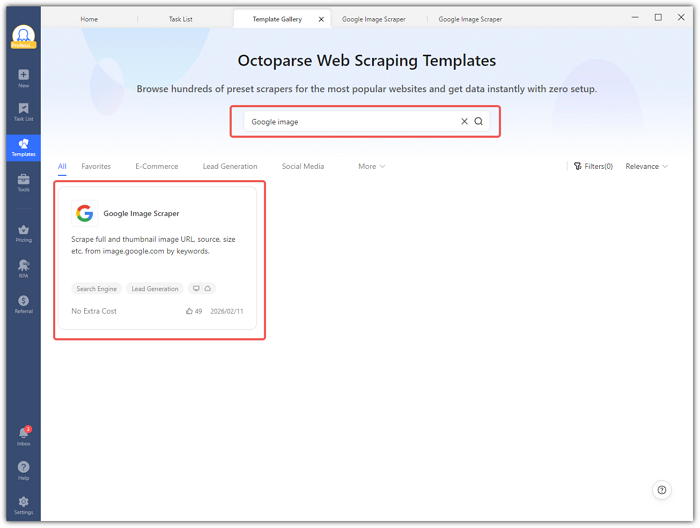
- Desktop: Open Octoparse, go to Templates > search “Google image” > select the template.
Step 2: Enter Your Search Keyword
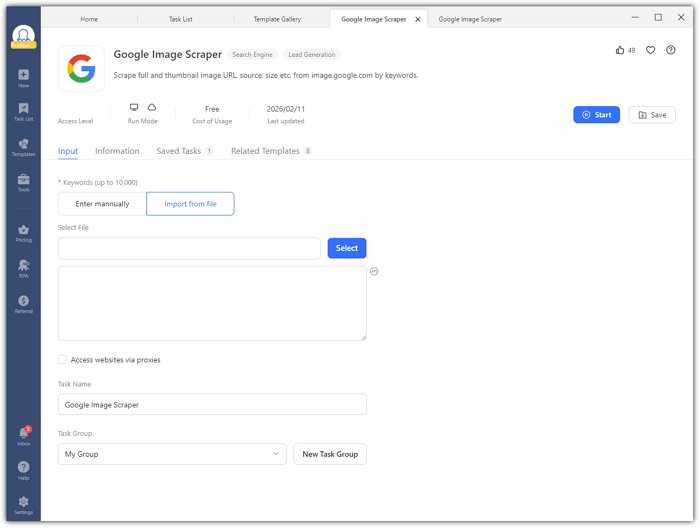
The Input panel accepts up to 10,000 keywords. You have two options:
- Manual entry: Type one keyword per line (e.g., “cut dog” or “product packaging design”).
- File import: Upload a TXT or CSV file with keywords for large batches.
- Optional: Check “Access websites via proxies” for rotating IPs to avoid throttling.
Step 3: Configure Task Settings (Optional)
Scroll down to the Task Setting section to rename your task or assign it to a group. Defaults work fine for most use cases.
Step 4: Run the Task
Click Start and choose your run mode:
- Run on Web / Run Locally: Runs on your machine (good for small tasks).
- Run in Cloud: Runs on Octoparse’s servers, allows scheduled tasks, consumes plan credits.
Step 5: Monitor the Run
Track progress via the Task Info page: status, data count, time spent, cloud nodes used, and CAPTCHAs encountered.
Step 6: Export Your Data
Once completed, click Export Data and choose your format: CSV, Excel, Google Sheets, or JSON via API. Data includes 9 columns like image URLs and alt text.
👉 Browse the Octoparse Template Library Need to scrape other Google properties? Octoparse has templates for the full Google ecosystem:
- Google Maps Scraper: business names, addresses, ratings, reviews, phone numbers, and more for lead generation and local SEO.
https://www.octoparse.com/template/google-maps-advanced-scraper
- Google Maps Email Finder: contact emails extracted from Google Maps listings, priced at $0.5 per 1,000 lines.
https://www.octoparse.com/template/google-maps-contact-scraper
For developers who want to scrape images using Python, check our complete guide on how to crawl data using Python.
Common Challenges When Scraping Google Images (and How to Fix Them)
Challenge 1: IP Blocks and CAPTCHAs
Google blocks IPs after too many requests in a short time.
Fix:
- Use cloud-based scrapers like Octoparse, Apify, or Outscraper for automatic proxy rotation.
- For Python scripts, integrate residential proxies and add delays (e.g., 1.5–4 seconds) to mimic human behavior.
Challenge 2: Google’s CSS Selectors Change Without Notice
If you’re using a DIY Python scraper, selector-based extraction breaks silently whenever Google pushes a frontend update. These updates occur multiple times a year, and your script will return empty results without warning.
Fix:
- Use visual no-code scrapers or API-first services:
- Octoparse adapts to page structure with a rendering engine rather than relying on static selectors.
- Apify’s Actor maintains updated selectors to keep pace with Google’s changes.
- For Python, validate that results are returned and set up alerts if the scraper yields nothing.
Challenge 3: Headless Browser Fingerprinting
Google detects headless Chromium browsers using properties like navigator.webdriver = true, missing plugins, and inconsistent viewport behavior. Headless sessions are blocked faster than regular ones.
Fix:
- Use Playwright’s stealth mode to set navigator.webdriver=false, making it harder to detect.
- Use realistic viewport dimensions and a plausible user agent string.
- Cloud platforms like Octoparse handle this invisibly, reducing detection risks compared to DIY scripts.
Challenge 4: Copyright and Image Usage Rights
While scraping Google Images can give you metadata, images are often copyrighted. Downloading and redistributing images without proper licensing can lead to legal issues.
Fix:
- Focus on collecting image URLs and metadata instead of downloading image files for research or AI training datasets.
- Use Google’s usage rights filter for published content:
- For Creative Commons-licensed images, use this search URL format:
- https://images.google.com/search?q=your+query&tbm=isch&tbs=il:cl
- The
tbs=il:clfilters for Creative Commons licensed images. - Add
&tbs=il:olto get images that allow commercial use.
Frequently Asked Questions
Is it legal to scrape Google Images? In the U.S., scraping publicly accessible data is generally legal under the hiQ v. LinkedIn ruling (2022), which clarified that scraping doesn’t violate the Computer Fraud and Abuse Act (CFAA). However, this doesn’t override copyright law, website Terms of Service, or state claims.
For Google Images, scraping metadata (e.g., URLs, alt text, dimensions) is distinct from downloading image files. Since images are typically copyrighted, redistributing or using them commercially without permission can still lead to legal issues.
Does Google have an official image search API?
No. Google’s Custom Search JSON API supports image search but limits responses to 10 results per query and is not suitable for bulk extraction. Google Photos API only works with personal libraries, not general image search. For bulk image collection, web scraping tools are more practical.
How do I scrape Google Images without Python?
Use a no-code tool like Octoparse. Open the Google Image Scraper template in the browser or the desktop app, enter your search keyword, let the template handle the rest, then export to CSV or Google Sheets. No programming knowledge is required.
What data can I extract from Google Images?
A Google Image scraper can collect:
- Image URL: Direct link to the image file
- Thumbnail URL: Preview version
- Alt text: Descriptive text
- Source page URL: Where the image was found
- Image title: The title attribute of the image
- Image dimensions: Width and height in pixels
Check your tool’s output to ensure it captures the data you need.
How do I download bulk images from Google Images?
Scraping provides image URLs, but downloading the actual images is a separate step:
- In Octoparse, export the URL list to CSV, then use a batch download tool or a Python script.
- In Apify, chain the Google Images Scraper Actor with the “Download Images From Dataset” Actor for automation.
- For Python users, add a
requests.get(image_url)loop after scraping to download each image.
Which Google image scraper is free?
Several tools offer free tiers. Octoparse’s free plan includes the Google Image Scraper template with up to 50,000 rows per month on local runs. Apify’s free plan provides $5 in monthly credits, enough for hundreds of small extractions. Python with Playwright is fully free to run, though residential proxies ($8–$15/GB in 2026) are needed at volume. Outscraper offers limited free credits. SerpAPI offers a free tier for testing but requires a paid plan starting at $75/month for production use.
Conclusion
Choosing the right Google Image Scraper depends on your needs. For non-technical users, Octoparse offers an easy, no-code solution. Developers who need more control can opt for Apify or Python with Playwright, though the latter requires more maintenance. If you’re looking for a simple, cloud-based tool without installation, Outscraper is a solid option for quick tasks. Ultimately, select a tool based on your frequency of use, customization needs, and technical expertise.
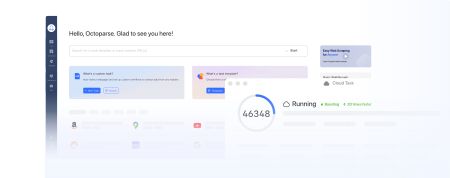
Turn website data into structured Excel, CSV, Google Sheets, and your database directly.
Scrape data easily with auto-detecting functions, no coding skills are required.
Preset scraping templates for hot websites to get data in clicks.
Never get blocked with IP proxies and advanced API.
Cloud service to schedule data scraping at any time you want.