Midea’s PortaSplit portable air conditioner has sold out across Germany, France, Spain and the UK during Europe’s June 2026 heatwave, with resale prices running two to three times retail. The fastest way to track real availability is to scrape the “in stock” status directly from retailer product pages, not to add items to a cart. Below are three no-code methods: checking Amazon by keyword, monitoring stock across every European Amazon store at once, and building a custom tracker for a retailer that has no ready-made template.
Quick Review: 3 Methods to Track Midea PortaSplit Stock
| Method | Best for | Setup time |
| Amazon UK keyword search | Finding current listings and prices fast | ~1 minute |
| Multi-marketplace batch check | Watching stock across several countries at once | ~1 minute |
| Custom tracker (any retailer) | Sites without a pre-built template, like John Lewis & Partners | ~10 minutes |
Why Midea PortaSplit Keeps Selling Out
Europe’s June 2026 heatwave pushed temperatures above 40°C in Germany, Belgium and the Netherlands, and Midea’s PortaSplit, a portable split air conditioner that installs without drilling, sold out across multiple countries within weeks. Midea shipped more than 200,000 PortaSplit units to Europe in 2026, doubling year-on-year volume, while German e-commerce sales rose 37% and shipments to Spain and France jumped 108%, according to the EqualOcean report on Midea’s European shipment surge. Units originally priced between €699 and €900 have resold for as much as €2,679 on secondary markets.
The scarcity has pushed some buyers to extreme lengths. One Vienna resident spent days searching for stock, deployed three AI agents to monitor retailer inventory, and eventually drove 200 kilometers to buy a unit, as CNN reported in June 2026. That is the exact problem this guide solves, minus the 200-kilometer drive.
We tested the methods below using cloud-based scraping templates that read the stock label already displayed on a product page. That distinction matters more than it sounds, and the next section explains why.
The Legal Line: What You Can (and Can’t) Safely Scrape
Not all stock-checking methods carry the same risk. There are two very different techniques, and only one of them is worth using.
Reading the displayed stock label (“In Stock”, “Only 2 left”, “Currently unavailable”) is passive data collection. It reads information the retailer already published for every visitor. Scraping publicly listed prices, descriptions and availability data on e-commerce platforms is generally considered fair game. And since this workflow reads publicly displayed product, price and availability information rather than personal data, that reading itself does not trigger GDPR obligations, though marketplace seller names could occasionally count as personal data for an individual seller, per the ICO’s definition of personal data. The main real risk is a Terms of Service violation, which can get an account or IP blocked but is a business risk, not a data-privacy one.
Adding items to a cart to test stock is a different category entirely. Some sites only reveal precise inventory counts when you attempt to add a large quantity and read the resulting error message, a technique generally known as cart scraping. It gets worse during an actual shortage: many e-commerce platforms briefly reserve inventory the moment an item is added to a cart. Bots that repeatedly add high-demand items to a cart without checking out can hold that reserved stock long enough to block real buyers from completing a purchase, a pattern OWASP classifies as a Denial of Inventory attack in its Automated Threats to Web Applications taxonomy.
In other words, if you scrape Midea PortaSplit stock by hammering the “add to cart” button, you risk contributing to the exact shortage this article is about. Every method below reads the stock label on the page. None of them touch the cart.
Method 1: Check Midea PortaSplit Stock on Amazon by Keyword
This is the fastest way to find current Midea PortaSplit listings, prices and ASINs on Amazon, and it is the right starting point before running a deeper stock check.
- Open Octoparse’s Amazon Product Listing Scraper (for UK) template:
https://www.octoparse.com/template/amazon-product-listing-scraper-for-uk
- Enter “Midea PortaSplit” as the search keyword.
- Set the number of pages to scan (1-2 is enough for a single product line).
- Run the task in the cloud and export the results.
What it collects: product title, ASIN, price (plus original price, discount and coupon text when present), star rating, number of reviews, search position and page number, whether the listing is organic or sponsored, delivery text and Prime/free-delivery flags, “bought in past month” badges, and promotional badge text (e.g. Amazon’s Choice, Limited time deal), and the listing URL and main listing image URL.
Scale: up to 1,000 keywords in a single run, so the same task can track several Midea models or competing portable AC units side by side.
Export formats: Excel, CSV, HTML, JSON, XML files and more, exported straight from the task.
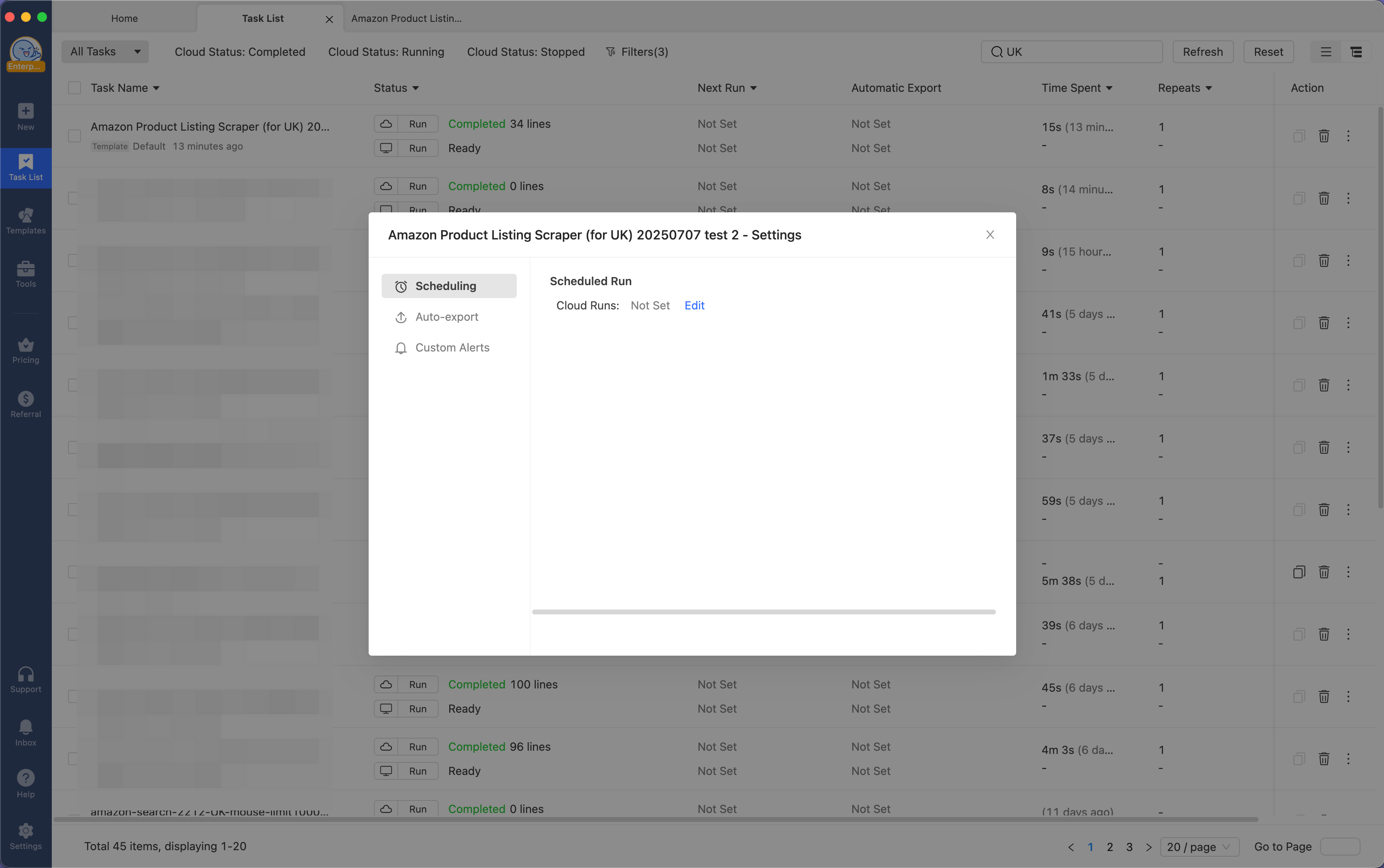
Turning it into ongoing monitoring: a one-off run tells you today’s price and ASIN. To catch restocks, schedule the same task to run every few hours in the cloud, so the ASINs you just discovered stay fresh in a recurring check. The scheduling panel (under Task Settings) lets you set a Cloud Runs interval. This UK template is a code-based template that only supports cloud scraping, so Local Runs doesn’t apply here:
Prefer to trigger the check from an AI assistant instead of a fixed interval? Octoparse also runs as an MCP server, so an agent like Claude can call this same task on demand or on its own schedule rather than relying only on Octoparse’s built-in scheduler.
We ran this exact search on July 2, 2026. It returned 22 listings. The task was set to scan just 1-2 pages, so this is a slice of Amazon’s results for the keyword, not the full catalog, a mix of the genuine Midea unit and competing portable ACs that show up for the same keyword. A follow-up run on July 7 pulled 34 listings across two pages for the same keyword, and the real Midea 4-in-1 PortaSplit (ASIN B0D3PP64JS) didn’t appear among them at all, which is a stronger shortage signal than any single price snapshot, since Amazon’s own keyword ranking no longer reliably surfaces the sold-out unit. The rest of the results ranged from under £5 for small accessories to £768.99 for unrelated split units. That spread is worth knowing before you scrape: a plain keyword search casts a wide net, so plan to filter down to the exact ASIN you care about (Method 2 does that) rather than treating every row as the product you’re chasing.
Instead of a screenshot, here’s one sample record from the July 7 run showing the full field set (long tracking parameters trimmed for readability):
The listing scraper is a discovery step. It tells you what’s for sale and at what price, but a search results page does not always show live stock status, which is where the next method comes in.
Method 2: Monitor Midea PortaSplit Stock Across All of Amazon’s European Stores at Once
Once you have the ASIN from Method 1, checking a single storefront isn’t enough. Midea PortaSplit sells through separate Amazon storefronts for Germany, France, Spain, the UK and more, and stock varies country by country as the shortage moves around. Octoparse’s Amazon Details Scraper template handles this in one task instead of five.
- Open the Amazon Details Scraper template:
https://www.octoparse.com/template/amazon-details-scraper
- Enter the ASIN (or product URL) found in Method 1.
- Select multiple Amazon marketplaces from the dropdown, for example Germany, France, Spain and the UK together.
- Set products per batch (200 is the recommended default for large lists).
- Run the task and export.
What it collects: price, availability status, shipping price, delivery estimate, fastest delivery option, seller name, number of sellers or buying choices when available, star rating, review count, product images, bullet points, product specs, dimensions, item weight, size/capacity, variant attributes, category, and best-seller rank, pulled from each selected marketplace in the same run. For portable air conditioners specifically, the dimensions, weight, and delivery-time fields are worth watching, since buyers care whether a unit can be delivered quickly and will physically fit their room.
Scale: up to 100,000 ASINs or URLs per task, across 22 Amazon marketplaces. That headroom matters if you’re tracking a whole category of portable ACs, not just one model.
Export formats: same file formats as Method 1, plus direct export to a database or straight to Google Sheets, for teams piping results into their own dashboard.
Turning it into ongoing monitoring: because this template accepts a batch of ASINs and marketplaces at once, it’s the one worth scheduling as a recurring task if you want a single daily snapshot of “who in Europe still has this in stock” instead of checking country by country. Like Method 1, this task isn’t limited to the built-in scheduler either, because Octoparse’s MCP server exposes task execution and data export as callable tools, an agent like Claude connected to it can start this exact multi-marketplace batch job and pull the results, whether it’s this template, the Method 1 keyword search, or a fully custom task like the one in Method 3.
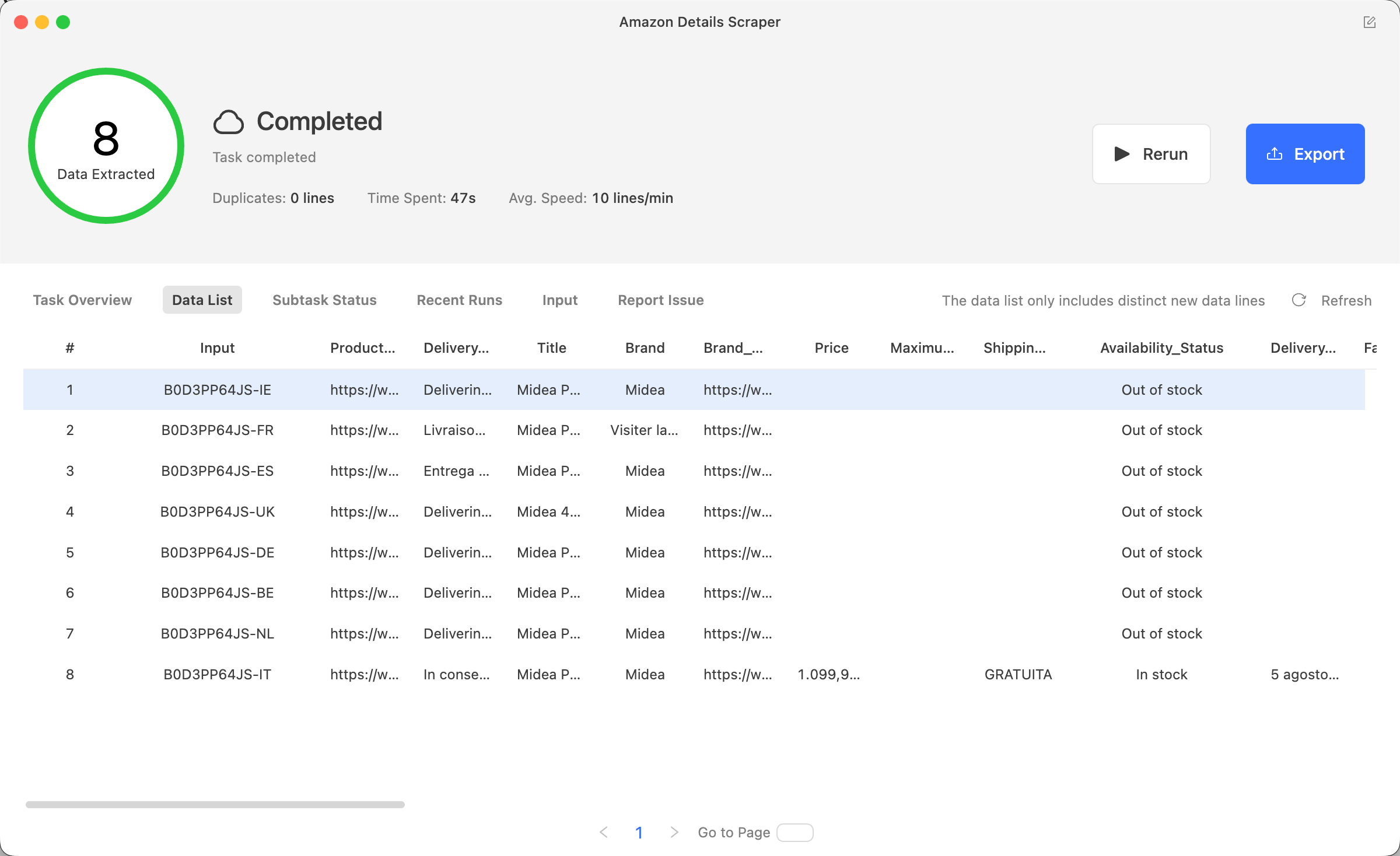
Running this on the real ASIN (B0D3PP64JS) across eight European Amazon storefronts at once (Ireland, France, Spain, the UK, Germany, Belgium, the Netherlands and Italy) returns one row per marketplace for the same ASIN, which is what turns a single-country check into the “who in Europe still has stock” view this method is built for. On July 9, 2026, seven of the eight storefronts came back “Out of stock.” The only one with real availability was Italy, at €1,099.90 with free shipping and a delivery window of August 5 – September 9.
Method 3: Build a Custom Stock Tracker for Retailers Without a Template (John Lewis & Partners)
Not every retailer selling Midea PortaSplit has a ready-made Octoparse template. John Lewis & Partners, the UK department store chain (not to be confused with the American civil rights leader of the same name), is a good example: there’s no pre-built John Lewis template, but that doesn’t mean you need to write code.
- Open a new blank task and paste the John Lewis & Partners search results URL for “air conditioners” (or the specific product page once you’ve found it).
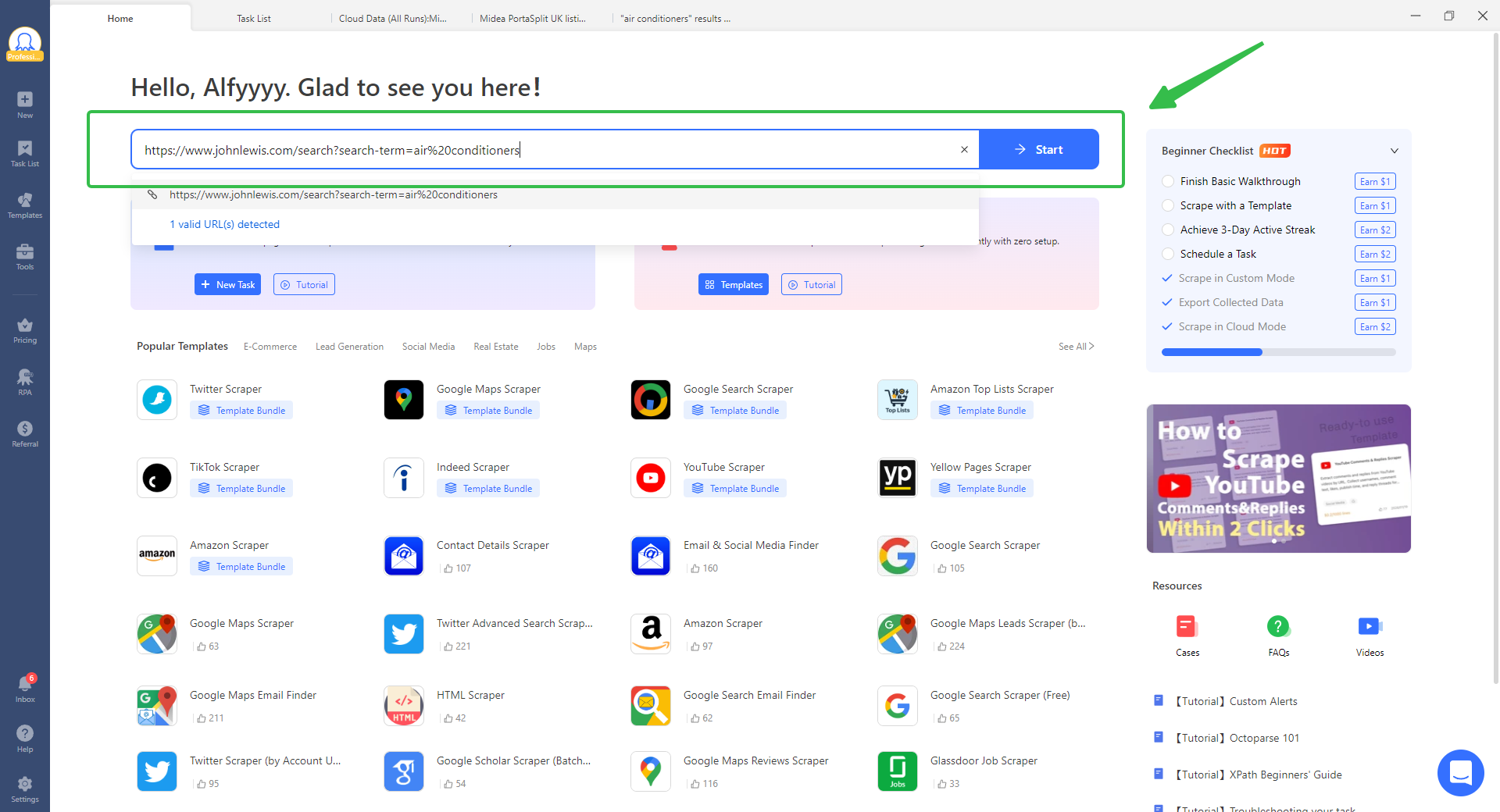
- Use Octoparse’s auto-detect feature, which scans the page and proposes fields to extract automatically.
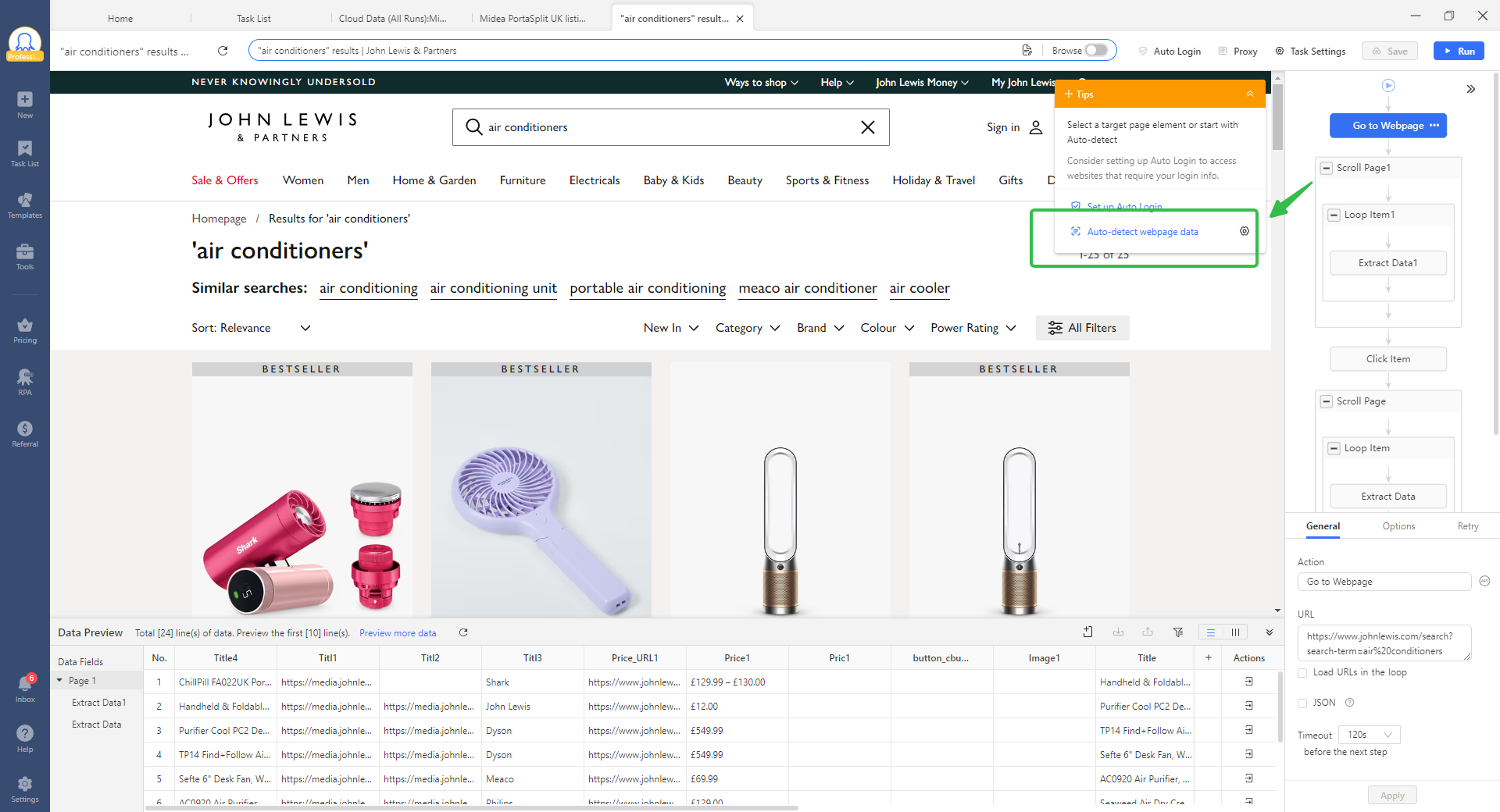
- Confirm or adjust the fields it picks up, typically product title, price and the in-stock status text.
- Run the task locally for the most stable results (cloud runs work too).
What it collects: whatever fields the page actually displays, most often title, price and a stock/availability label. Auto-detect reads what’s already on the page, so it won’t manufacture data a retailer doesn’t show.
Scale: works for a single product page just as easily as a large batch. You can point auto-detect at many keywords or URLs at once, not just one. This is the “one retailer, no template” fallback, and it scales with your input list.
Export formats: same export options as any other Octoparse task — file formats, direct database export, or Google Sheets.
Turning it into ongoing monitoring: once auto-detect has a working task, it behaves exactly like a template-based one for scheduling purposes. Set a recurring interval and it becomes your custom in-stock alert for a retailer nobody else has built a scraper for.
We ran this on John Lewis & Partners’ “air conditioners” results page. Midea doesn’t sell through this retailer, but the results told a bigger story: every portable air conditioner in the category, six different models across Dimplex, Meaco and De’Longhi, showed “Email when available” instead of an add-to-basket button. A Dimplex EcoIQ Air 12KBTU at £449.00, a Meaco Cirro 14000 BTU at £629.99, a De’Longhi Pinguino AP98 at £799.99, all out of stock at once. That’s the auto-detect method proving useful beyond a single product: it caught an entire category selling out, not just the one model that made the news.
The practical lesson here: when a hot product sells out at a retailer without a template, auto-detect turns that into a working Octoparse template in minutes instead of leaving you refreshing the page by hand, and it can surface shortage patterns you weren’t specifically looking for.
Bonus: Still No Luck? Track Alternatives the Same Way
Method 3 solves a technique problem: no template exists for this retailer, so you build one. This is a different problem: even a perfectly working tracker returns nothing useful if Midea PortaSplit itself is sold out everywhere you check. When that happens, the goal quietly changes from “find this exact unit” to “find any portable AC before the heatwave passes.” Point the same auto-detect task at a retailer’s air conditioner category page instead of a single product, and it will surface every model’s stock status at once, not just one SKU. That’s how we found the Dimplex EcoIQ Air 12KBTU (£449.00), the Meaco Cirro 14000 BTU (£629.99), and the De’Longhi Pinguino AP98 (£799.99) all sitting on “Email when available” at John Lewis & Partners on the same day. Run the category-page version of Method 3 on two or three retailers and you’ll know within minutes whether any brand, not just Midea, currently has stock.
From One-Time Stock Check to Ongoing Availability Monitoring
Checking stock once, during a shortage, solves today’s problem. To make it a standing habit instead of a one-off chore, wire the same tasks into an AI agent instead of a fixed schedule. For example, with Octoparse’s MCP server connected to Claude, you can ask Claude directly to run Method 1 or Method 2: “check Midea PortaSplit stock on Amazon UK, DE, FR and ES, and tell me if any come back in stock”. And Claude calls the same tasks described above, no dashboard clicking required.
The workflow is simple: connect Octoparse’s MCP server to Claude once, describe the check you want in plain language, and let the agent set up and trigger the task automation and summarize the results back to you, on demand or on whatever cadence you ask for.
The same principle scales down. If you’re reselling, dropshipping, or simply tired of refreshing a product page, the three methods above work exactly the same way as a scheduled task that they do as a one-time check.
FAQs About Tracking Midea PortaSplit Stock
- Is it legal to scrape a retailer’s stock availability?
Reading publicly displayed stock status, price and product details is generally low-risk since no personal data is involved. The main exposure is a Terms of Service violation, which can result in an IP or account block rather than legal action. Avoid techniques that manipulate the cart, since those carry a different, higher risk profile.
- What’s the difference between this and an “in stock alert” app?
Consumer in-stock alert apps notify you passively when a specific item you’re watching comes back. The methods here give you the underlying data, price, seller, availability, across as many products and retailers as you choose, which is more useful if you’re tracking multiple listings, reselling, or need the data somewhere other than a phone notification. But if you want to track inventory of commodities across different e-commerce platforms, a reliable web scraper like Octoparse is recommended.
- Can I get a free tool to track Midea PortaSplit stock?
Octoparse’s Amazon templates are available on a free trial, and simple one-off checks like Method 1 cost very little to run. Ongoing monitoring across many marketplaces uses more collection credits, so it’s worth starting with a single scheduled task and scaling up once you know how often stock actually changes.
- How often should I check stock during a shortage like this one?
Retailers in this shortage have restocked and sold out again within hours during peak demand. A check every 1-2 hours during an active shortage is a reasonable starting point; once supply stabilizes, once or twice a day is usually enough.
- Will this work for other sold-out products, not just Midea PortaSplit?
Yes. Nothing in these three methods is specific to air conditioners. The same Amazon templates and the same auto-detect approach work for any product experiencing a shortage, from gaming hardware to holiday toys.
Methodology Explained
The scraping methods in this guide use Octoparse’s cloud-based Amazon templates and its point-and-click auto-detect builder, which reads the stock and price fields already rendered on a retailer’s page rather than simulating a checkout. We did not use cart-manipulation techniques for any of the examples above, for the reasons explained in the legal section. Marketplace availability and pricing change quickly during an active shortage; treat specific prices and stock counts in this article as a snapshot from early July 2026, not a live figure.
Ready to build your own stock tracker? Start a free Octoparse trial and try the Amazon templates referenced above, or read our full guide to price monitoring tools if ongoing competitor pricing is the bigger goal.