Let me be honest.
If your scraper keeps getting blocked even after rotating proxies and handling CAPTCHAs, the problem is the approach.
More specifically, it is your user agent and how poorly it is being used.
The worst part? Most people do not really understand what user agents are, why they matter in web scraping, or how to rotate them properly.
And if you are simply rotating a random Chrome user agent on every request and assuming that is enough, it is not.
Websites do not just look at the user agent string you send. They look at patterns, consistency, mismatches, and overall behavior.
For example:
- The same browser version hitting thousands of pages
- A user agent that claims Chrome on Windows, while the headers behave like mobile Safari
- The IP rotating, but the browser fingerprint staying the same
That is more than enough to quietly shut down your scraper.
In this post, I will break down what a user agent really is, how it contributes to scraping blocks, how to handle it properly in Python, and when it makes more sense to let a no code tool handle the complexity for you.
What Is a User Agent?
A user agent, or UA, is simply a string your browser sends with every request to a website. It tells the site which browser you are using, which operating system you are on, and how your browser behaves.
According to MDN, a user agent is a computer program that represents a person, such as a browser in a web context.
You can think of it as a piece of identifying information sent as a string so the website knows what is making the request.
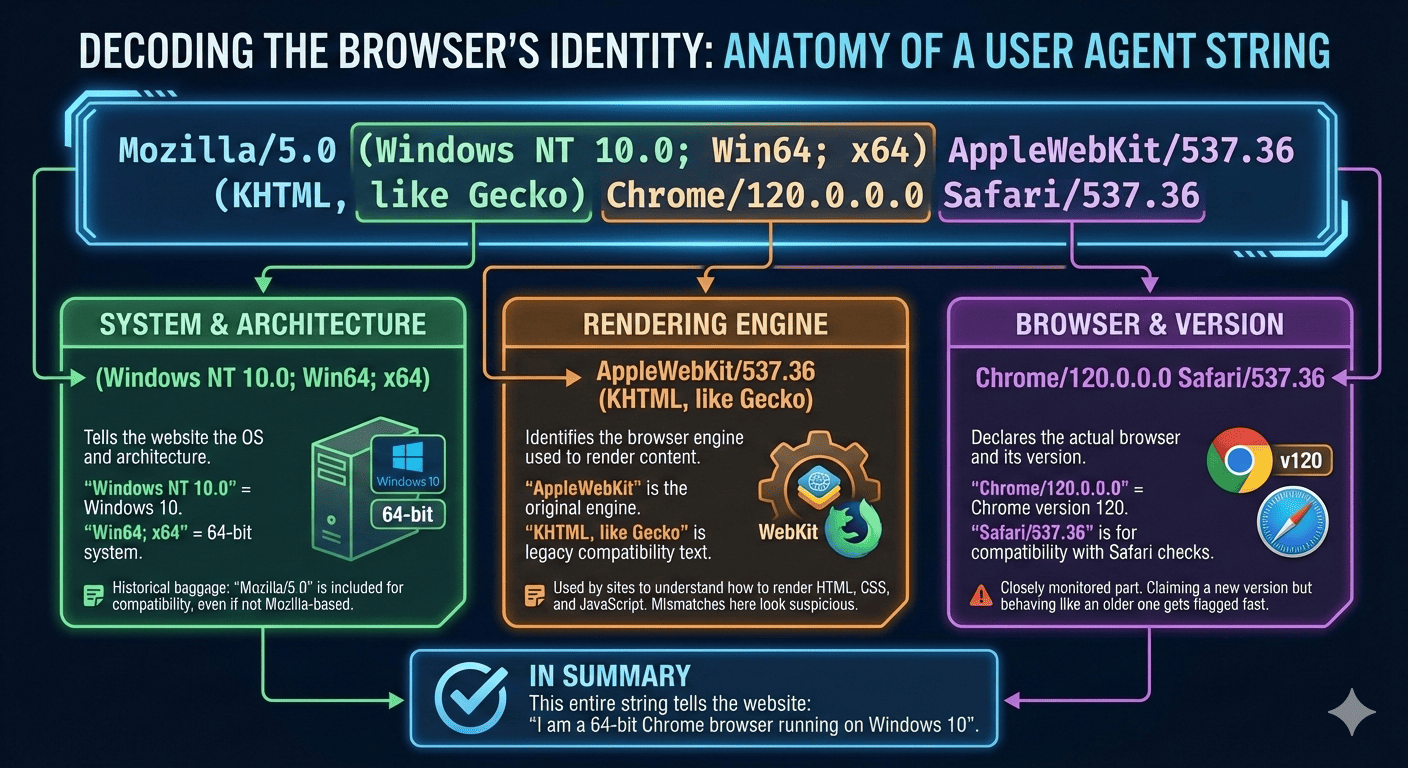
Here is an example of a real browser user agent string:
When you look at a full User-Agent string, it may look scary, but it is actually just a structured way for the browser to describe itself.
Let me explain it visually:
You can even see the user agent in your real browser by opening any website inside Chrome, opening the developer tools, going to the Network tab, refreshing the page, and clicking on any request.
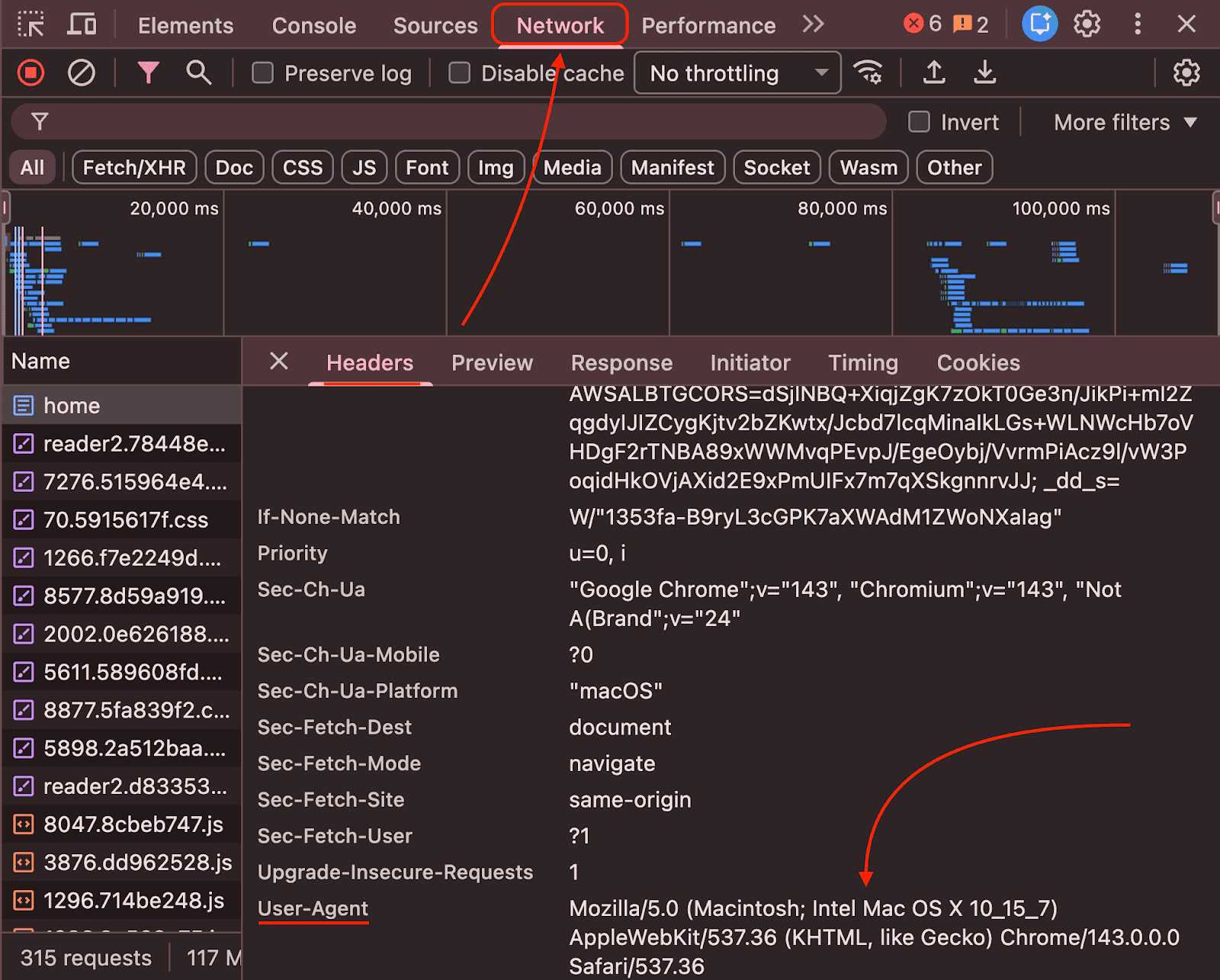
In simple terms, whenever you visit a website, your browser includes a user agent so the site can identify the client.
And yes, every request you send carries this identifying string, and that’s why you can click on any request inside the Network tab, and you will see the same string.
Just to let you know: Originally, the User-Agent existed to help websites serve the right experience to the right device. Today, its purpose is to track and identify a user.
Why User Agents Matter in Web Scraping and How Blocks Actually Happen
You may have noticed that when you send too many requests to a website or access it too frequently, the site asks you to solve a CAPTCHA.
That is one of the ways websites try to confirm that you are a real human and not a bot.
Behind the scenes, every request carries data about you, mainly through the user agent your browser sends.
And when you scrape a site with a high volume of requests, the website starts analyzing your request patterns.
More specifically, anti bot systems look for common user agent based signals such as:
- The same user agent being used thousands of times
- User agents that clearly indicate automation, like python requests, curl, or Scrapy
- Very old browser versions that no real user runs anymore
- A user agent that claims Chrome on Windows, while the headers behave like mobile Safari
- A user agent that stays constant while the IP keeps rotating, which is a major red flag
Think like a website for a moment. They do not want their valuable data to be extracted in seconds by automated systems.
So if they see:
- Ten thousand requests
- Coming from different IP addresses
- All using the exact same Chrome version
They will block you.
Your goal may be to scrape data for your business, but from the website’s point of view, this behavior looks suspicious.
That is where proper user agent rotation comes in, and that is what I will explain next, along with practical examples.
How to Rotate User Agents in Python
Now it is time to get practical and look at how to rotate user agents in Python.
Why Python?
If you work in web scraping, you already know that Python has a wide range of libraries and frameworks built specifically for scraping. It is also one of the most widely used languages among developers in this space.
With that in mind, let me show you three real-world ways people rotate user agents, and exactly where each one starts failing.
1. Using fake_useragent (fast, but fragile)
This is usually the first method most tutorials recommend.
Why people like it:
- Zero setup
- Instantly gives you a random user agent
- Easy to use in Python
Why it fails in production:
- UAs can be outdated
- No control over browser distribution
- Doesn’t match other headers (Accept, Accept-Language)
- Breaks when the source goes down
2. Manual list + random.choice() (Boring but reliable)
Here, you use a simple list of user agent strings and randomly select one for each request.
Here is how it looks:
Why this works better:
- You control browser versions
- You control operating system distribution
- You can rotate user agents intentionally
However, this is only the first step. To look truly realistic, you also need to:
- Match Accept headers
- Match Accept Language
- Match TLS fingerprints
- Match request timing and behavior
This is where things start to get painful, which is why this approach alone isn’t very powerful at scale.
3. Selenium / Puppeteer (Looks real, still detectable)
Yes, you can also set user agents in Selenium or Puppeteer.
Here is a simple example using Selenium:
This approach helps with JavaScript heavy websites, but modern sites do not rely only on the user agent string.
They also compare:
- navigator.userAgent
- HTTP headers
- Client hints
- Rendering behavior
- Interaction and timing patterns
If these signals do not align with how a real browser behaves, the site flags your scraper as a headless bot and blocks it.
So simply changing the user agent is not enough to stay undetected.
The Real Challenges of Manual UA Rotation
In the last section, we looked at different ways to rotate user agents in Python and briefly touched on their limitations.
Now let us break down the real problems more clearly.
1. Outdated user agents get flagged quickly
You know, browsers update frequently, often every month.
And if your code uses an old browser version, it immediately looks suspicious.
On top of that, many Python libraries send default headers like python-requests/x.y.z, which clearly signal automation.
This means you have to constantly track browser releases, update your user agent lists, and remove outdated entries.
Over time, this becomes tedious and error prone.
2. User agent consistency with other fingerprints
Modern websites do not rely only on the user agent string.
Their anti bot systems perform full browser fingerprinting to check whether everything about your request matches what your user agent claims.
To be more specific, state-of-the-art browser fingerprinting pipelines combine HTTP headers, JavaScript APIs, and low-level signals to build a stable device identity that does not depend on cookies.
In simple terms, if your user agent says Chrome on Windows but your headers behave like mobile Safari, you will get blocked almost instantly.
It goes even deeper.
With manual rotation using random.choice(), websites also evaluate:
- Accept and Accept Language headers
- TLS fingerprints
- Request timing and behavior
And if you are using Selenium or Puppeteer, the checks become even stricter. Sites examine navigator.userAgent, HTTP headers, client hints, rendering behavior, and interaction patterns.
3. Maintenance becomes a full time job
Once you start scraping at scale, managing user agents turns into ongoing infrastructure work.
You now have to maintain:
- User agent lists
- Header combinations
- Proxy and location matching
- Failover and retry logic
At this point, scraping is no longer just about writing code.
It becomes about managing fragile systems, and this is where many people quietly give up or start looking for better alternatives.
Why Automatic User Agents Rotation is Better
In the previous section, we saw how managing user agents manually quickly becomes tedious and difficult to scale.
At this point, many of you may be asking the obvious question. What is the solution?
This is where no code tools like Octoparse come in.
They automatically rotate user agents, keep them up to date, match headers correctly, and simulate real browser behavior.
But Nitin, how do I get started with Octoparse?
Well, simply visit the Octoparse website and click the “Start a free trial” button.
And once you begin scraping a specific website, you just need to:
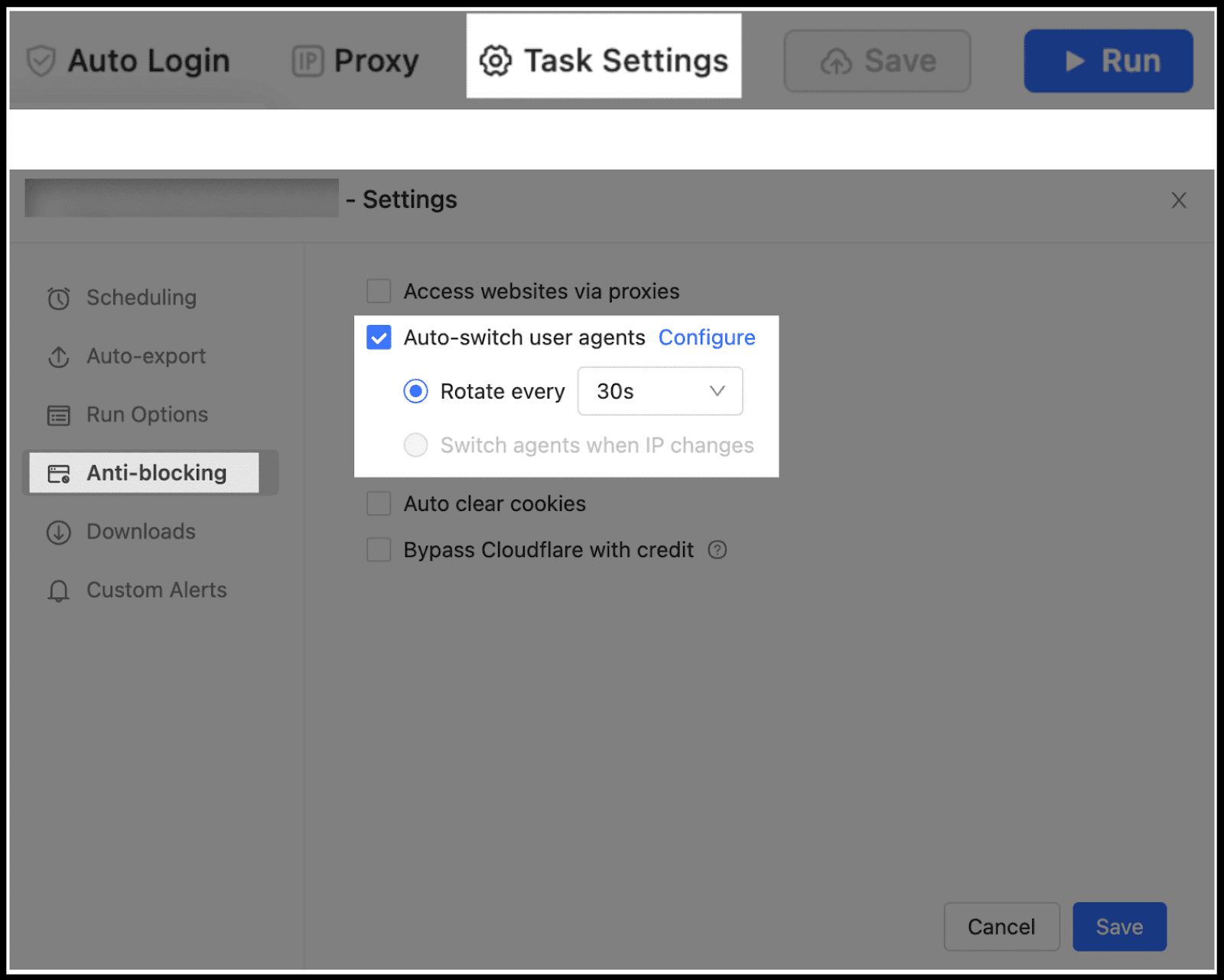
- Navigate to the Task Settings – Anti-blocking.
- Check the box for Auto-switch browser agents.
- Click Configure to select from a list of available user agents.
- Important: Choose agents that match your intended device type:
- For PC/Desktop scraping: Only select desktop user agents (e.g., Chrome, Firefox on Windows).
- For Mobile scraping: Only select mobile user agents (e.g., Firefox for mobile, Safari iPhone).
- Set the rotation frequency (e.g., switch every X minutes) or select Switch UAs concurrently for maximum variation
- Confirm your settings.
When this makes sense:
- You care more about data than infrastructure
- You don’t want to babysit scraper failures
- You’re scraping business-critical data
- You don’t want to debug fingerprint mismatches at 2 a.m.
Python vs No-Code: Which One Fits You?
If you have read the post so far, you may have got a clear idea about which one is the right fit for you.
But to give you a clear idea, here’s the honest comparison table:
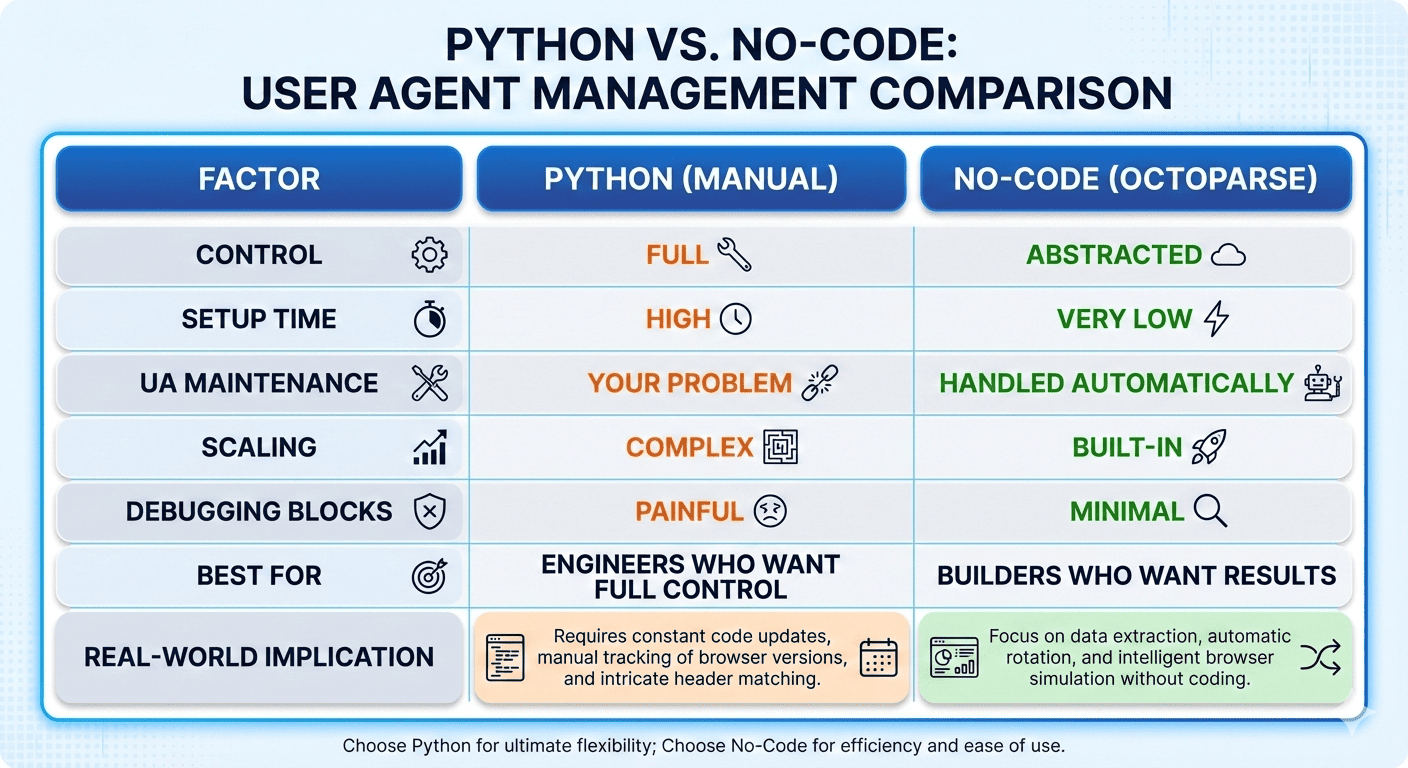
To be more specific, Python makes sense when you want full control and are prepared for the cost that comes with it, including:
- Maintaining up to date user agent lists
- Making sure user agents, headers, TLS, and proxy locations actually match
- Debugging blocks when something silently changes
- Keeping everything realistic month after month as browsers keep updating
And choose a no code tool like Octoparse if your priority is getting data without managing the underlying complexity.
Since no code tools make sense when:
- You do not want to track browser updates
- You do not want to debug user agent and header mismatches
- You just want the data to keep flowing at scale
Based on this, simply ask yourself one simple question: Do you want to build and maintain scraping infrastructure, or do you want to extract data and move on?
And you will get the answer.
Best Practices for User Agent Management
So far, we have covered what a user agent is, how to use it through different approaches, and where each approach starts to break.
What we have not discussed yet are the best practices for managing user agents properly.
Here are the best practices you should follow.
1. More user agents do not make you safer
Don’t use hundreds of user agents, because it only adds unnecessary complexity without real benefits.
Instead, use 10 to 20 real and modern browser user agents and rotate them slowly.
Why this works:
- Real users do not change browsers on every request
- Consistency looks human
- Random behavior looks automated
If you switch user agents on every request, you are likely already flagged, just not immediately.
2. Lock user agents and headers as a single unit
Never rotate only the user agent, because modern websites also check other request headers.
Each user agent should always ship with:
- Matching Accept headers
- Matching Accept Language
- A matching platform, such as Windows or iPhone
- A matching proxy location
If your user agent claims Chrome on Windows in the US but your headers behave like mobile Safari from India, no amount of proxy rotation will help.
3. Update user agents on a schedule, not when things break
Browsers update frequently, and anti bot systems are aware of this.
If your Chrome user agent is several versions behind, it looks suspicious even at low request volume.
A simple rule of thumb:
- Check browser releases once a month
- Remove outdated user agents aggressively
- A small set of fresh user agents is better than many stale ones
4. Do not let IP rotation expose user agent patterns
One of the fastest ways to get blocked is this pattern:
- The IP changes on every request
- The user agent never changes
That behavior clearly signals automation.
If you rotate IPs:
- Rotate user agents occasionally
- Keep the same user agent across multiple requests per IP
- Let sessions look continuous and realistic
5. Use no code tools when possible
Managing user agents correctly is time consuming and fragile.
No code tools like Octoparse automatically rotate user agents, keep them up to date, match headers correctly, and simulate real browser behavior.
This allows you to focus on extracting data and getting results instead of managing scraping infrastructure.
FAQs
1. If I use residential proxies, do User-Agents still matter?
Absolutely, because proxies only solve one part of the problem: IP reputation.
Most anti-bot systems look beyond IP addresses, such as User-Agent, headers, TLS fingerprint, request timing, and more.
So if you rotate IPs but keep the same User-Agent across hundreds of sessions, that pattern alone is enough to get blocked.
2. Is rotating a random User-Agent on every request a bad idea?
Yes, and this is one of the most common mistakes people make.
Real users do not change their browser identity on every page load.
If your scraper switches from Chrome 120 on Windows to Chrome 121 on macOS on every request, you look more automated, not less.
3. Are Python libraries like fake_useragent safe for production scraping?
Not really.
They are fine for quick experiments but fragile for real scraping at scale. User agents can be outdated, the source can break, and most importantly, the generated User-Agent rarely matches the rest of your request headers.
4. Why do scrapers get blocked even when using “real” Chrome User-Agents?
Because a Chrome User-Agent alone doesn’t make your request look like a real browser.
Most modern anti-bot systems cross-check that claim against other signals like headers, TLS fingerprints, browser APIs, and behavior signals.
So when your request claims “Chrome on Windows” but behaves like a Python script, the inconsistency stands out immediately.
5. At what point does managing User-Agents in Python stop being worth it?
The moment your scraper becomes business-critical and you no longer want to deal with the tedious process involved when using Python.
That’s where no-code tools start to make sense, not because Python is bad, but because the hidden complexity becomes expensive.