Updated September 2026. Applies to Octoparse MCP server, Octoparse OpenAPI, and Octoparse CLI (beta).
Short answer
When a daily Zillow listing monitor built on the Octoparse MCP server or API sends duplicate alerts, false “status changed” alerts, or misses price drops, the cause is almost always in the change-detection layer, not the scraper: the monitor compares runs without a stable key (zpid), compares unnormalized price and status strings, or diffs against a partial or unfinished run; fix it by keying every record on zpid, normalizing price and status before comparing, and only diffing completed runs that you have not processed before.
When this problem happens
Call method: MCP (AI agent such as Claude, ChatGPT, or Cursor calling execute_task and export_data), OpenAPI (executeTask and exportData from your own code or n8n), or Octoparse CLI in a cron job. The problem is the same in all three because all three return full snapshots, not changes.
Typical setup: a scheduled job runs the Octoparse Zillow Listing Scraper template once a day for a watched area (for example Austin, TX, buy), exports the rows, compares them with yesterday’s rows, and sends an alert for new listings, price drops, and status changes.
How it reproduces:
- Run the same Zillow search on two consecutive days.
- Compare the two exports row by row, by address or by row position.
- Send an alert for every row that differs.
Who hits it: brokerage teams, acquisition teams, market researchers, and developers building a real estate AI assistant on top of Zillow listing data.
What you see: symptoms and status values
No error code is returned. Every call succeeds. The failure is visible only in the alert output.
Observed symptoms
- The same listing triggers a “new listing” alert on several days.
- A listing triggers a “status changed” alert although nothing changed on Zillow.
- A real price drop on Zillow produces no alert.
- Listings are reported as “removed” or “sold” after a run that stopped early.
- An AI agent reports a price drop with a “previous price” that does not exist in any stored snapshot.
Related non-error responses worth checking
| Where | Value | Meaning |
|---|---|---|
exportData status | collecting, exporting | Data is not final yet. Diffing now produces missed or false changes. |
exportData status | no_data, failed, invalid | Do not diff. Treat the run as failed, not as “all listings removed”. |
executeTask status | accepted | Run started. Rows are not ready. |
executeTask status | ready | Data is available for export. |
| MCP or OpenAPI HTTP status | 429 Too Many Requests | Rate limited. A blind retry can start a second run and double the alerts. |
The status values above are listed in the Octoparse API reference for executeTask and exportData.
Why a Zillow listing monitor sends false alerts
1. No stable record key
- Address strings and row order are not stable identifiers.
- Zillow assigns each property a
zpid(Zillow property ID). - The Octoparse Zillow template returns
zpidon every row. - Diffing by anything other than
zpidcreates false “new” and “removed” events.
2. Status comes back as raw text, in several labels
- The template returns
statusas raw text from the search result, not as a fixed set of values. - In our real test export, one search returned four different status labels for listings that are all for sale.
- A string comparison treats a label change as a status change.
3. Price comes back as display text
- The template returns price as text, for example
$649,000. - String comparison of formatted prices is unreliable for “lower than” checks.
4. The export is a full snapshot, not a change feed
- The documented
exportDataparameters aretaskId,exportFileType, andpreviewRows. - No parameter returns only new or changed rows.
- Change detection must happen in your code, against a snapshot you store.
5. Partial runs are treated as complete
- A run stopped early, capped by
targetMaxRows, or exported while stillcollectingcontains fewer rows. targetMaxRowsis not an exact cap. Theexecute_taskresponse states that the service sends “a best-effort internal stop request” and that “the final row count may exceed this threshold between polls.”- A run capped by
targetMaxRowsis a sample of the search, not the whole search. - Listings missing from a partial run look “removed”.
- Their return in the next full run looks “new”.
6. Blind retries start a second task
- By design, every
execute_taskcall creates a new task. In three test calls on 2026-08-13 and 2026-08-14, each call returned a differenttaskIdwith atask_createdmilestone. - The MCP tool guidance covers this case: “If a failure result includes
taskId, callget_task_status(taskId); do not callexecute_taskagain.” A uniquetaskNamealso lets you find the run later withsearch_tasks. - A client that ignores this and retries after a
429or timeout starts a second task and a second run. - Both runs get diffed and both send alerts.
7. The AI agent does the comparison from memory
- An LLM asked “what changed since yesterday?” without a stored snapshot will guess.
- Guessed “previous prices” are hallucinations, not data.
Real test data behind these causes
Zillow template run, 2026-09-10
On 2026-09-10 we ran the Zillow Listing Scraper template through the Octoparse MCP server with locations = ["Austin, TX"] and buy_or_rent = buy. The cloud run returned 574 rows before we stopped it. In the first 60 exported rows:
zpidwas present and unique on all 60 rows.statushad four labels for listings that are all for sale:Active(57),Home for sale(1),House for sale(1),Zillow Preview(1).pricewas a formatted string such as$649,000.listing_bywas empty on 2 of 60 rows.
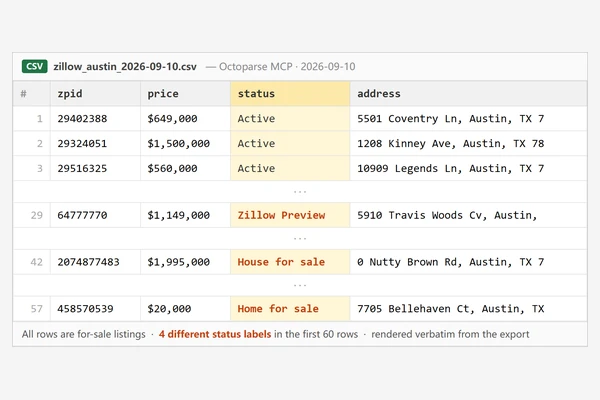
One real row per status label, copied from the export. Each zpid can be checked on Zillow.
| zpid | status | price |
|---|---|---|
| 29402388 | Active | $649,000 |
| 64777770 | Zillow Preview | $1,149,000 |
| 2074877483 | House for sale | $1,995,000 |
| 458570539 | Home for sale | $20,000 |
Prices are copied exactly as exported, including the unusually low $20,000 listing. Listings change after the export date, so a zpid checked today may show a different status or price.
What execute_task returned
Excerpt from one of three real execute_task responses we recorded on 2026-08-13 and 2026-08-14 (YouTube channel templates, targetMaxRows set to 10). The other two calls returned the same message with different taskId values.
The other two taskId values were 3b23cec7-2fd7-451c-b826-1808c6a90a65 and fcc444f8-5b27-4831-80f7-fe821f4c09d0.
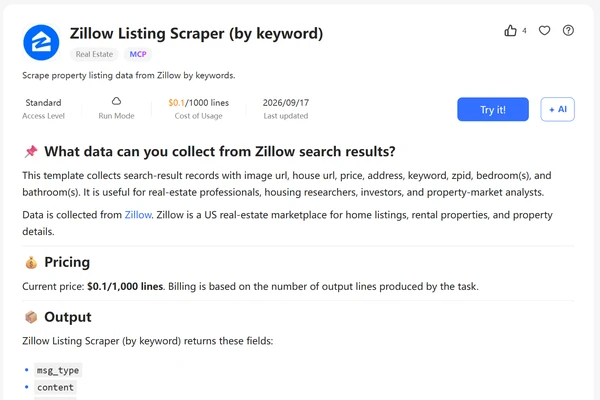
https://www.octoparse.com/template/zillow-scraper-by-keywords
For the template’s full field list, the other Zillow templates, and how Zillow’s bot protection affects scraping, see our Zillow API data access guide linked above.
How to find which cause you have
Work through these in order. Stop at the first step that explains your symptom.
- Check the run status before diffing. Confirm
exportDatareturnedexported(orexecuteTaskreturnedready). If you diffed acollectingorno_dataresult, that is the cause. - Compare row counts between the two runs. A large drop in row count (for example, 574 yesterday, 120 today) means a partial run. Do not trust “removed” alerts from it.
- Check the diff key. If your code matches rows by address, URL text, or row index, switch to
zpid. - List distinct
statusvalues in one export. If you see more than one label that means “for sale”, normalize them. - Check how price is compared. If you compare the raw string, parse it to an integer first.
- Count runs per day. If you find two
taskId/lotNopairs for the same watched area on the same day, your retry logic is starting duplicate runs. - Check where the agent gets “previous” values. If the agent answers from conversation memory instead of a stored snapshot, move the comparison into code.
How to fix duplicate and missed Zillow alerts
Step 1: Key every record on zpid
Store one row per zpid per run. house_url also contains the zpid (in our test export, every house_url contained its row’s zpid), so it can serve as a fallback if the zpid column is empty.
Step 2: Normalize before comparing
- Price: strip
$and,, convert to integer. - Status: map every “for sale” label to one canonical value, and keep an unknown-label bucket that is logged, not alerted.
Step 3: Only diff complete, final runs
- Wait for
exported(API) or task completion (MCP) before exporting. Theexecute_taskresponse itself instructs the client to wait 60 seconds before the firstexport_datacall. - Reject a run whose row count falls below a threshold you set, for example 80% of the previous full run.
- Mark a listing as removed only after it is absent from two consecutive complete runs.
Step 4: Make runs idempotent
- Store every processed
taskIdandlotNo. - Skip any pair you have already diffed.
- On
429or a timeout afterexecute_task, do not callexecute_taskagain. If the result includes ataskId, poll it withget_task_status; if not, find the run by itstaskNamewithsearch_tasks. - For any other call that returns
429, wait until theX-RateLimit-Resettime, then retry the same call.
Step 5: Move the diff out of the LLM
- The agent calls
execute_taskandexport_data. - Your code stores the snapshot and computes the diff.
- The agent only explains the computed change list. It never produces a “previous price” on its own.
Step 6: Alert on a rule, not on any difference
| Event | Rule |
|---|---|
| New listing | zpid not seen in any stored snapshot |
| Price drop | same zpid, normalized price lower than last complete run |
| Status change | same zpid, normalized status differs from last complete run |
| Removed | zpid absent from 2 consecutive complete runs |
Boundaries: what this fix and Octoparse do not cover
Read this section before quoting any fix above as a product capability.
What stays in your own code
- The documented Octoparse MCP tools (
search_templates,execute_task,export_data,search_tasks,start_or_stop_task) and API endpoints do not include change detection, deduplication across runs, or alerting. You build those. exportDatahas no documented “only new rows” or “only changed rows” option as of September 2026.- Reusable Zillow scrapers are built in Octoparse Desktop or the AI Assistant (formerly Agentic Mode). The MCP server runs templates and existing tasks, and can also pull data from a URL on the spot through Universal Scraper.
- The MCP server only supports templates that can run in the cloud. Local-only templates must run in Octoparse Desktop.
Where this fix does not apply
- If the watched search returns more listings than a single run collects, some listings will be missing every day. Split the area into smaller searches instead.
- If Zillow itself changes a listing’s
zpid, the listing will appear as removed plus new. How often this happens: no data available. - If the template’s field names change after a template update, your normalization map must be updated. Confirm current fields with
search_templatesbefore each schema change. - Price history before your first stored snapshot cannot be reconstructed from Octoparse exports.
Account and access limits
- The Free plan includes MCP and API access for running cloud templates, capped at 2,000 records per month as of September 2026. A daily monitor outgrows it fast: our single Austin run returned 574 rows, so four daily runs would pass the cap. Paid plans start from $69/mo, billed annually; confirm current terms there.
- The MCP server allows 300 requests per minute per OAuth session.
execute_taskalways creates a new task; it does not reuse an earlier task with the sametaskName. Key on thetaskIdandlotNopair that each response returns.targetMaxRowslimits cost, not accuracy. Do not use it to decide whether a run is complete.
Legal and data use
Zillow’s terms of use apply to how listing data is collected and used. This article does not cover legal review.
Call examples: correct and wrong requests
Correct MCP call (run the template for one watched area)
parameters is a JSON object serialized as a string. Keys must match inputSchema[].field exactly. For this template, search_templates returned locations (lowercase, a list even for one city) and buy_or_rent (a string) on 2026-09-29. Writing Locations or passing a plain string for locations does not match the schema.
templateName accepts the template slug. In our test responses, templateName came back as the slug (for example youtube-channel-scraper) together with a numeric templateId.
Wrong pattern (blind retry starts a second task)
Correct diff (keyed on zpid, normalized, complete runs only)
The FOR_SALE set contains the four labels that appeared in our real 2026-09-10 export. Treat it as a starting list, not a complete one.
FAQ about Zillow listing monitors
Does Octoparse send Zillow price-drop alerts on its own?
No. The documented MCP tools and API endpoints run templates and export data. Diffing and alerting are built in your own code, n8n workflow, or agent.
Which field should I use to deduplicate Zillow listings?
zpid. It is Zillow’s property ID and the Octoparse Zillow template returns it on every row. In our test export it was unique on all 60 sampled rows.
Why does my monitor flag status changes that did not happen?
Zillow listings that are all for sale can come back with different status labels. Our real export of one Austin search had 4 different labels. Normalize status to one canonical value before comparing.
Why did my monitor report dozens of listings as removed overnight?
The latest run was probably partial: stopped early, capped by targetMaxRows, or exported before it finished. Only diff complete runs, and require a listing to be missing from 2 consecutive complete runs before calling it removed.
How do I avoid duplicate runs when I hit a rate limit?
Never retry execute_task blindly: each call creates a new task, which we confirmed across 3 test calls that returned 3 different taskId values. Look up the task that was already created and poll it. For other calls, wait until the X-RateLimit-Reset timestamp and retry. Store each processed taskId and lotNo pair and skip pairs you have already diffed. The Octoparse OpenAPI allows 20 requests per second; the MCP server allows 300 requests per minute per OAuth session.
Can the AI agent calculate the price change itself?
Only from data you give it. If the agent has no stored previous snapshot, any “previous price” it states is invented. Compute the diff in code and let the agent explain the result.
How much does a daily Zillow run cost?
The Zillow Listing Scraper template was billed at $0.1 per 1,000 rows on a Standard plan when we checked the template page on 2026-09-10. On the Free plan, MCP and API runs share a 2,000-records-per-month quota, which one 574-row daily run would use up in four days. Plan pricing changes; confirm on the pricing page before budgeting.
Can I get only new or changed rows from exportData?
Not as a documented option as of September 2026. exportData returns the task’s collected data. Store each snapshot and compute changes yourself.