OpenClaw is a free, open-source AI agent that connects large language models like Anthropic’s Claude, OpenAI’s GPT-4, and others to your local machine, messaging apps, and the web. Unlike a chatbot, it doesn’t just answer questions. It takes action: browsing websites, reading files, running scripts, and collecting data — all triggered by a simple message on WhatsApp or Telegram.
The project launched in November 2025 and went viral almost instantly. Within 72 hours, it had over 60,000 GitHub stars. By March 2026, that number reached 247,000 , making it one of the fastest-growing open-source projects ever.
For data teams, growth marketers, and analysts, OpenClaw is worth understanding. It can automate lightweight web scraping and data collection tasks out of the box, but with real security trade-offs and hard limits at scale. This guide covers all of it.
What Is OpenClaw?
OpenClaw is essentially a local AI agent framework rather than a polished product from a major AI lab. It’s open-source and runs on your own machine. You provide your API key, and OpenClaw takes care of sending requests to the model, executing tasks, and maintaining context across sessions.
The core architecture has three components:
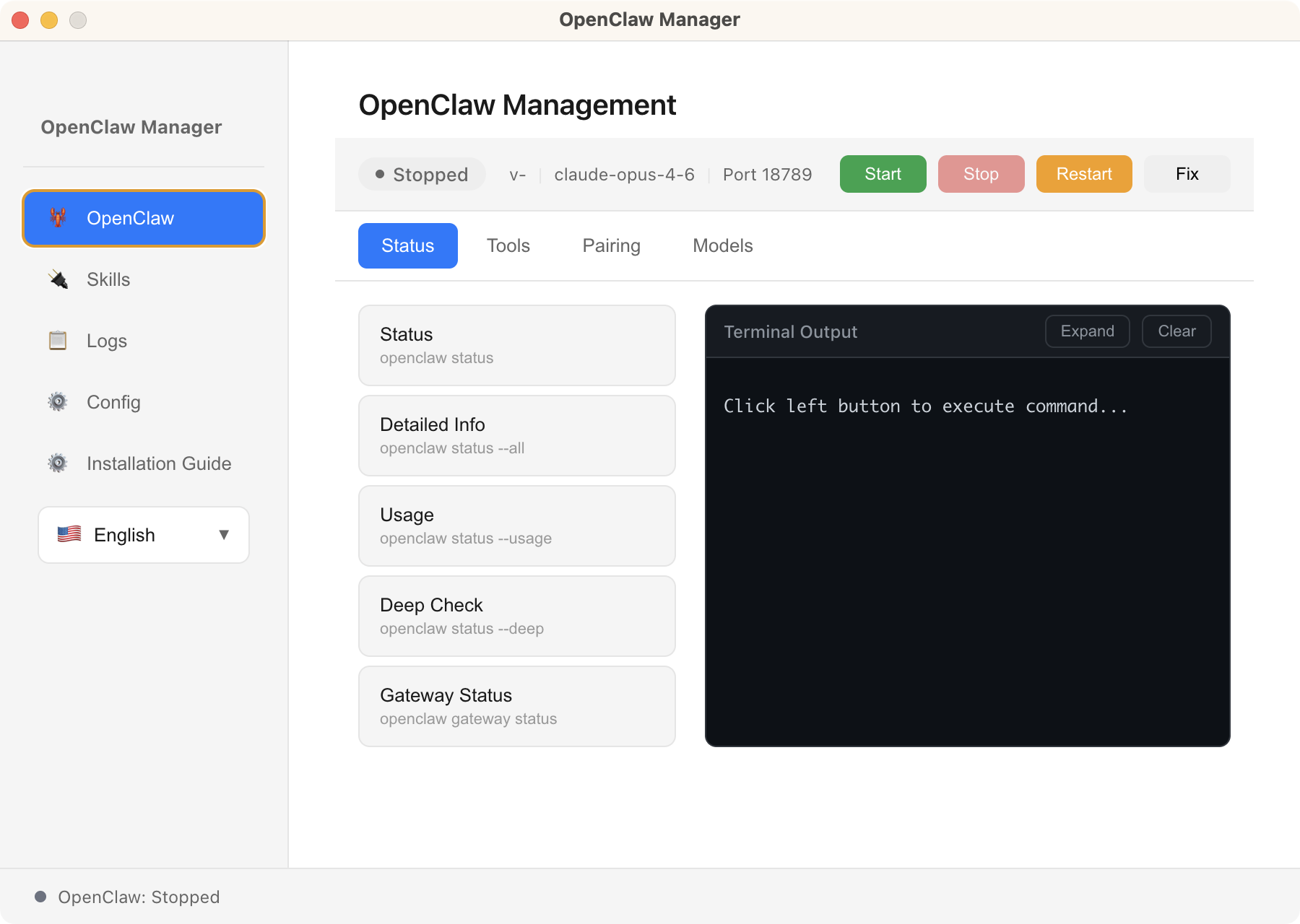
- Gateway: the always-on local service that listens for your messages and routes them to the AI model. Runs in the background on your machine (laptop, Mac Mini, or VPS) on port 18789 by default.
- Skills: modular extensions that give the agent new capabilities, including sending emails, controlling a browser, searching the web, running scripts. Stored as Markdown-based instruction files, installable from ClawHub.
- Channels: the messaging interfaces you use to talk to the agent. OpenClaw supports 20+ platforms: WhatsApp, Telegram, Slack, Discord, Signal, iMessage, Microsoft Teams, and more.
The skills marketplace, ClawHub, hosts over 10,700 community-built skills as of March 2026. This extensibility is one of OpenClaw’s defining features.
OpenClaw Key Features: What Makes It Different
Several features set OpenClaw apart from conventional chatbots and AI coding agents:
- Persistent memory: stores your preferences, projects, and history in local Markdown files. Remembers across all conversations.
- Proactive scheduling: tasks run on a cron-style schedule without any manual trigger. Set it once, forget it.
- Multi-channel inbox: one agent accessible from WhatsApp, Telegram, Slack, Discord, Signal, and 15+ other platforms simultaneously.
- Self-extensible: OpenClaw can autonomously write new skills to extend its own capabilities when asked to do something it doesn’t currently support.
- Local-first privacy: your data and conversation history stay on your own hardware. No cloud dependency for core functionality.
- Bring-your-own model: works with Claude, GPT-4/GPT-5, Gemini, DeepSeek, local models via Ollama. No vendor lock-in.
Is OpenClaw Safe? Security Risks You Need to Know
OpenClaw’s power comes with a meaningful security surface. Because it runs locally with access to your files, shell, network, and connected services, a misconfigured or compromised instance can cause serious harm. Several security issues have already been reported since its rapid growth in early 2026:
A high-severity flaw with a CVSS score of 8.8 allowed attackers to steal authentication tokens through a crafted link and execute code remotely. The issue was patched in version 2026.1.29, but it showed that even local AI agents can be exposed through browser-based attack paths.
Security reports confirmed that malicious skills were uploaded to ClawHub, some disguised as crypto or productivity tools. At least 14 were identified in a short time window, and they could access local files and execute commands once installed
- Exposed instances caused by weak configuration
Researchers have found large numbers of OpenClaw instances exposed to the public internet without proper authentication. In some reports, this reached tens of thousands of deployments, making them vulnerable to takeover if not secured.
- Prompt injection and agent manipulation
Like other tool-using AI agents, OpenClaw is vulnerable to prompt injection. Research shows that malicious instructions embedded in web content or skill files can influence the agent to leak data or execute unintended actions without clear user awareness.
These risks are not unique to OpenClaw. They come from a broader pattern: combining LLM reasoning with tool execution and local system access.
To reduce these risks, the OpenClaw team and security researchers recommend:
- Running the Gateway inside a sandbox or container
- Binding services to localhost instead of exposing them publicly
- Treating every third-party skill as trusted code with full system permissions
If you are not comfortable managing these risks at a system level, OpenClaw is not yet suitable for business-critical or large-scale data workflows.
OpenClaw, Clawdbot, Moltbot: The Naming History Explained
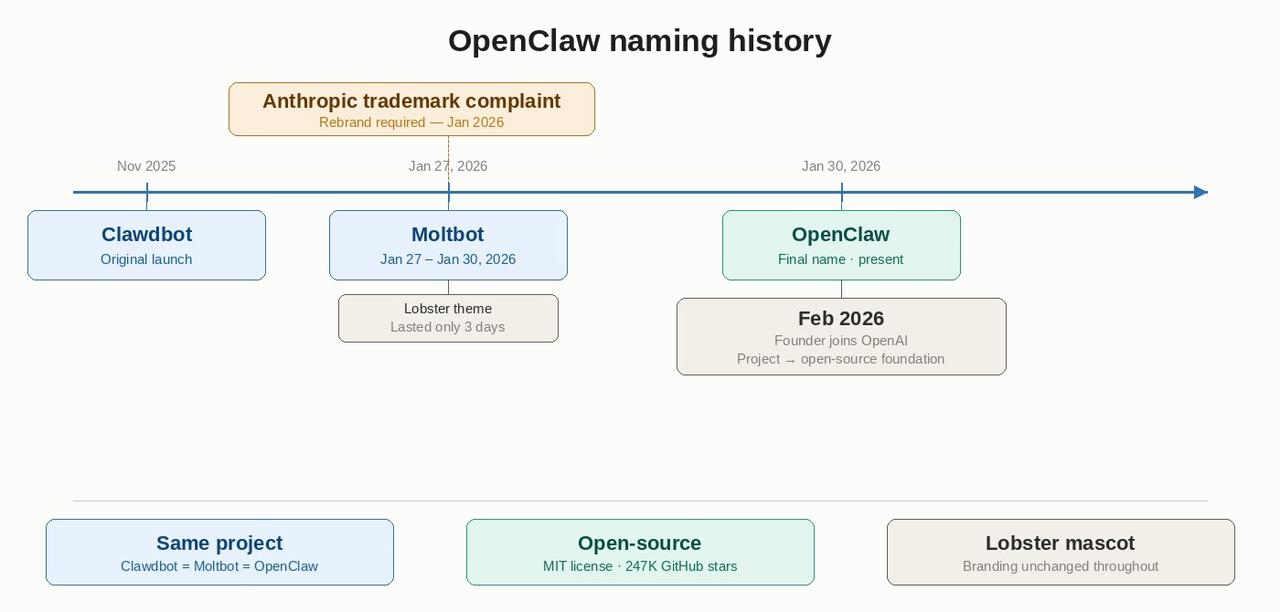
If you’ve seen references to Clawdbot or Moltbot, they are all the same project. The OpenClaw Wikipedia page explains much of the confusion in search results.
OpenClaw was originally published in November 2025 under the name Clawdbot. Within a few months of its release, the project was renamed Moltbot, and then renamed again a few days later to OpenClaw.
According to the project’s own history, the name “Moltbot” was short‑lived because it did not resonate as well with the community. By late January 2026, the final name OpenClaw was adopted, and the branding, domains, and mascot remained consistent with the lobster theme.
In February 2026, founder Peter Steinberger announced he would be joining OpenAI and that the OpenClaw project would transition to an independent open‑source foundation.
How OpenClaw Works: Gateway, Skills, and Channels
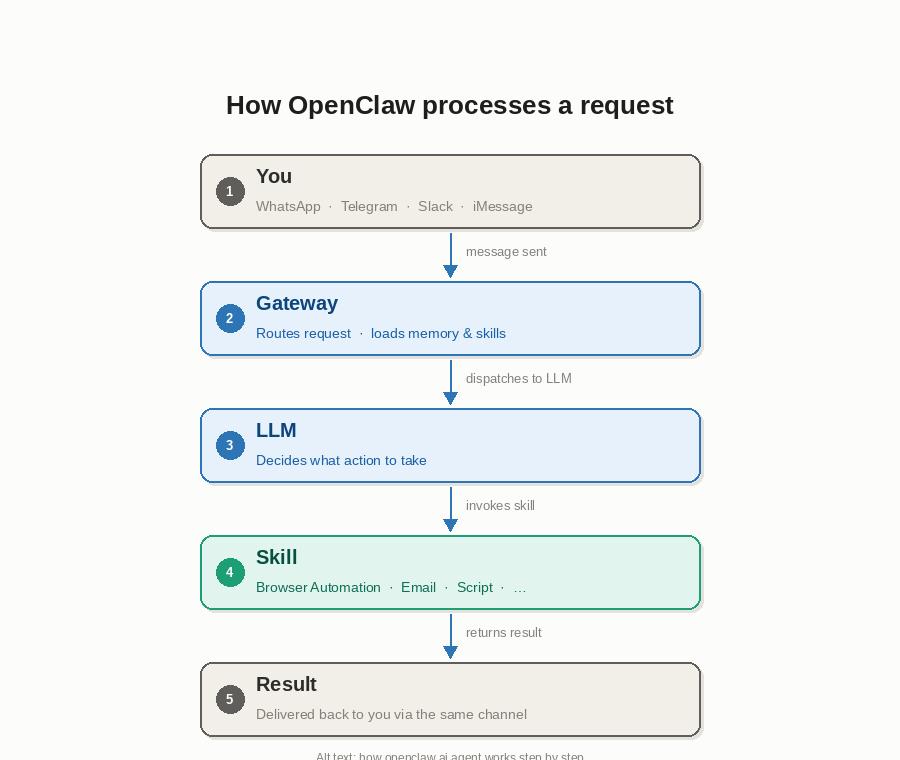
The workflow is simpler than the architecture suggests. Message your OpenClaw agent on WhatsApp — for example, “Check the price of this product and tell me if it’s dropped below $49” — and the agent gets to work.
Here is what happens under the hood:
- Your message arrives via a connected channel and is routed through the Gateway.
- The Gateway sends your message to the configured LLM along with a context prompt that includes your memory, skills, and relevant background.
- The LLM decides what tools to invoke. For example, the Browser Automation skill to visit and read a URL.
- The skill executes the task, returns a result, and the agent replies via the same channel.
OpenClaw also runs proactively on a cron-style schedule. Instruct the agent to check a website each morning at 7am and push a Telegram summary — no manual message required.
OpenClaw Use Cases: From Task Automation to Data Collection
OpenClaw is a general-purpose agent. Its use cases span personal productivity, developer workflows, and business automation. Depending on what you are trying to accomplish, one category will stand out — for data work, the breakdown below is where you will find the most relevant examples.
Personal Productivity and Task Automation
Most users start here. OpenClaw connects to tools you already use and handles recurring tasks without manual triggers:
- Morning briefings: summarise your calendar, unread emails, and news headlines each day at a set time
- Email triage: flag urgent messages, draft replies, and file threads based on rules you define in plain language
- Reminders and follow-ups: track action items from conversations and nudge you at deadlines
- Note-taking: listen to meetings via connected apps and write summaries to Notion or Obsidian automatically
Developer and Technical Workflows
Developers were among OpenClaw’s earliest adopters:
- GitHub monitoring: watch pull requests, issues, and CI failures and receive alerts in your messaging app
- Code review summaries: get a plain-English digest of what changed in a PR before you review it
- Deployment notifications: hook into webhook triggers and get real-time build status updates
- Overnight autonomous tasks: run a coding session, capture errors, wake up to completed pull requests
Data Collection Automation: What OpenClaw Can Do
OpenClaw’s Browser Automation skill lets it visit URLs, read pages, and extract information. This makes it genuinely useful for lightweight, ad-hoc data collection. Five scenarios where it performs well:
- Price Monitoring
Ask: “Check the price of [URL] and let me know if it’s dropped below $49.” Works well for 1–5 URLs at low frequency. For systematic competitor price tracking across hundreds of products, a dedicated tool is more reliable.
- Competitor Research
Tell the agent: “Read our competitor’s pricing page and summarise any changes since last week.” Natural language instructions beat rigid scrapers for one-off intelligence tasks. For systematic competitor monitoring at scale, you need more infrastructure.
- Lead Research
OpenClaw visits company About pages and extracts structured details: founding year, headcount, tech stack, contact email. Combined with a CRM skill, this becomes a lightweight lead enrichment pipeline. Works well for 10–30 companies at a time.
- Morning News and Data Briefings
Set the agent to run each morning to read RSS feeds, scrape headlines from industry blogs, remove duplicates, and send a structured summary to Telegram. This cron-style scheduling runs automatically and is arguably OpenClaw’s strongest data collection use case because the frequency is low, the pages are simple, and the output is conversational.
- Market Research
Ask OpenClaw to read a product review page or Reddit thread and summarise sentiment, common complaints, or feature requests. Works well on publicly accessible, text-heavy pages that don’t require login or complex JavaScript.
Why OpenClaw Works Well for Data Collection
Even with its limitations, OpenClaw brings genuine advantages to data workflows that traditional scrapers don’t.
Natural Language Instructions
You describe what you want in plain English. No XPath selectors, no CSS class hunting, no scraper maintenance when a site redesigns. For automated data collection tasks where the output is a summary or a decision rather than a structured dataset, this is a real productivity gain. As far as I know, some AI web scrapers like Chat4Data also have the same feature.
Always-On, Proactive Collection
Most scrapers are reactive so that you run them when you need data. OpenClaw collects proactively on a schedule and pushes results without manual triggers. For monitoring tasks (price changes, news alerts, competitor updates), this changes the workflow meaningfully.
Integrated Downstream Actions
A scraper extracts and stops. OpenClaw can extract and then act: add a row to Notion, send a Slack alert, open a GitHub issue, or compose a draft email. That said, collection and action are in a single instruction.
Low Setup Overhead for Ad-Hoc Tasks
For one-off or low-frequency tasks, OpenClaw’s conversational interface is faster than configuring a full extraction workflow: read this page once, compare these two prices, and summarise this thread. The trade-off is reliability at scale, covered next.
OpenClaw for Data Collection: Pros, Cons, and Real Limits
OpenClaw is not a dedicated web scraping tool. Its Browser Automation skill handles ad-hoc tasks well, but runs into predictable walls the moment your requirements grow. Here is an honest breakdown.
What Works Well
- Ad-hoc, conversational collection: ideal for one-off research and low-frequency monitoring
- Scheduling simple page reads: morning briefings and lightweight alert systems work reliably
- Combining collection with action: extract then notify, file, or summarise in one instruction
- No scraper maintenance: natural language instructions don’t break when a site’s CSS classes change
Where It Falls Short
- No bulk scraping: looping through 100+ URLs reliably is outside what the browser skill was designed for. These are well-documented scraping challenges that require purpose-built infrastructure.
- CAPTCHA failures at scale: Cloudflare Turnstile, reCAPTCHA v2/v3, and modern bot detection stop it reliably. No built-in bypass.
- No structured export: output is text summaries, not CSV or JSON. Downstream pipelines require extra steps.
- Fragile on SPAs: React, Vue, and Angular sites with infinite scroll or lazy loading often return incomplete results.
- Local machine dependency: if your device goes offline, so does your agent. Cloud execution on a VPS adds setup complexity and security risk (30,000+ exposed instances documented in early 2026).
The pattern is consistent: OpenClaw excels at light, conversational, one-off data tasks. When you need scale, structure, or reliability across protected sites, a dedicated extraction tool fills the gap.
When You Need a Dedicated Data Extraction Tool
For the collection scenarios where OpenClaw’s browser skill hits its limits, Octoparse is built for exactly that job — no code required.
Octoparse is a no-code web scraping platform. Point it at a website, click the data elements you want, and it builds the extraction workflow automatically. Where OpenClaw returns a text summary, Octoparse delivers structured CSV, JSON, or Excel — ready for analysis, no extra steps.
- Bulk extraction: run parallel scrapers across hundreds of URLs via cloud execution
- CAPTCHA bypass: built-in handling for Cloudflare Turnstile, reCAPTCHA v2/v3, and hCaptcha
- Cloud scheduling: runs 24/7 on Octoparse’s servers, fully independent of your machine or VPS
- Structured output: clean CSV, JSON, Excel, Google Sheets, or direct database connections
- Ready-to-use pre-built templates: Amazon, LinkedIn, Google Maps, Yelp, Indeed, and more, zero setup needed.
Octoparse also connects directly to AI assistants through the Octoparse MCP (Model Context Protocol). Once connected, a single natural-language prompt can trigger a chain of extraction tasks across multiple Octoparse templates simultaneously by pulling competitor pricing, lead lists, and inventory data in one instruction, then surfacing the results directly inside your AI assistant.
For data teams that want the reasoning power of an LLM combined with the reliability and scale of a dedicated scraper, this is the practical path forward.
📑 Now you can connect Octoparse MCP on OpenClaw, see our guide on OpenClaw for web scraping with Octoparse MCP
OpenClaw vs Octoparse: Data Collection Capability Comparison
| Data Collection Task | OpenClaw | Octoparse |
| Ad-hoc price check (1 URL) | ✅ Works well | ✅ Works well |
| Read & summarise a web page | ✅ Works well | ✅ Works well |
| Bulk scraping (100+ URLs) | ❌ Not designed for this | ✅ Built for this |
| CAPTCHA bypass | ❌ Fails on modern CAPTCHAs | ✅ Built-in, incl. Cloudflare |
| Structured CSV / JSON export | ❌ Text summaries only | ✅ Native export |
| Cloud scheduling (24/7) | ❌ Local machine only | ✅ Cloud-based, always on |
| JavaScript-heavy / SPA sites | ⚠️ Unreliable | ✅ Full JS rendering |
| No-code setup | ⚠️ Requires CLI / terminal | ✅ Point-and-click |
| pre-built templates | ❌ | ✅ |
The comparison above covers the core extraction layer.
If you’re exploring AI-assisted data pipelines more broadly, see how Octoparse MCP compares to Apify MCP for AI-native scraping options. And if you want to connect Claude directly to real-time web data, Claude can now scrape websites using the Octoparse MCP integration.
OpenClaw vs ChatGPT vs Claude Code: Key Differences
| Feature | OpenClaw | ChatGPT | Claude Code |
|---|---|---|---|
| Type | Local AI agent runtime | Cloud-based chatbot | Terminal coding agent |
| Persistent memory | ✅ Across all sessions | ❌ Session only | ❌ Session only |
| Proactive scheduling | ✅ Cron-style, runs 24/7 | ❌ | ❌ |
| Messaging channels | ✅ WhatsApp, Telegram, Slack, 20+ | ❌ | ❌ |
| Local file & system access | ✅ Full (files, shell, browser) | ❌ Sandboxed | ✅ Terminal only |
| Web browsing | ✅ Via Browser Automation skill | ✅ Sandboxed | ❌ |
| Code writing & debugging | ⚠️ Via LLM, not specialised | ⚠️ General purpose | ✅ Purpose-built |
| No-code setup | ⚠️ Requires CLI / terminal | ✅ Browser-based | ⚠️ Requires terminal |
| Data collection | ✅ Ad-hoc, lightweight | ⚠️ Limited, sandboxed | ✅ Custom scripts |
| Runs offline / locally | ✅ | ❌ Cloud only | ✅ |
| Security risk | ⚠️ High (broad system access) | ✅ Low (sandboxed) | ⚠️ Medium |
| Best for | Recurring automation via chat | Conversational AI tasks | Writing scraping scripts |
OpenClaw is frequently compared to Claude Code and ChatGPT. The differences matter for data-related work.
Claude Code is a terminal-based coding agent. Strong at writing and debugging scraping scripts, but lacks persistent memory, proactive scheduling, or messaging-channel integration. OpenClaw suits non-developers who need recurring task automation via chat.
ChatGPT (including custom GPTs) can browse the web but runs in a sandboxed environment with no access to local files or system actions. OpenClaw can take system-level actions — more powerful, more risky.
The key distinction: OpenClaw is not a chatbot. It is an agent runtime, a framework that gives an AI model eyes, hands, memory, and a schedule. A meaningfully different category from any current mainstream AI assistant.
Conclusion
OpenClaw represents a genuinely new kind of software: an AI agent that runs locally, remembers everything, acts on a schedule, and connects to the tools you already use. In less than four months it went from a weekend project to one of the most-starred open-source repositories on GitHub.
For data collection, it occupies a specific and useful niche because it is lightweight, conversational, and proactive. Tasks such as price alerts, competitor summaries, lead lookups, and morning briefings are examples where a natural language interface works better than configuring a traditional scraper.
When you need scale, structure, or reliability across protected sites, Octoparse handles what OpenClaw cannot. No code, no maintenance, structured output from the first run.
FAQs about OpenClaw
- Why do OpenClaw users abandon it after initial setup — and what keeps others hooked long-term?
Most drop-off happens in the first 48 hours. The main friction points are Node.js version mismatches, API key configuration errors, and messaging-channel pairing failures. Users who push past the initial setup typically stay because of two features: persistent memory (the agent remembers context across days and weeks, not just sessions) and proactive scheduling (it does useful things without being prompted).
The users who stick around longest tend to give the agent one high-value recurring task like a morning briefing, a daily price check, or an inbox triage, and expand from there.
- How do I install and set up OpenClaw on my machine?
OpenClaw installs via npm. You need Node.js 22.16 or higher (Node 24 is recommended). Run npm install -g openclaw@latest, then run openclaw onboard –install-daemon to launch the guided setup wizard.
The wizard walks you through choosing an AI model provider, entering your API key, pairing a messaging channel (WhatsApp, Telegram, Slack, etc.), and installing the Gateway daemon. The full process takes 10–20 minutes on a clean machine. Works on macOS, Linux, and Windows via WSL2.
- What are the hardware requirements for running OpenClaw locally?
OpenClaw is lightweight by design. The Gateway daemon runs comfortably on any modern machine with 2 GB of RAM including Raspberry Pi 4, older MacBooks, and low-spec VPS instances. If you run a local AI model via Ollama rather than a cloud API, requirements increase: a 7B parameter model needs at least 8 GB of RAM; a 13B+ model benefits from 16 GB or more.
For cloud API models (Claude, GPT-4), the bottleneck is your internet connection, not your hardware. CPU speed matters less than memory and storage I/O.
- How does OpenClaw compare to a traditional web scraper?
A traditional web scraper is purpose-built for structured, repeatable data extraction. You configure it once, it runs reliably at scale, and it outputs clean CSV or JSON.
OpenClaw approaches the web conversationally: you describe what you want in plain English, and the agent figures out how to get it. That flexibility is its strength for ad-hoc tasks. Its weakness is the same: it cannot match a dedicated scraper for volume, consistency, or structured output. If you need to pull 10,000 product listings every morning, use a scraper.
If you need to summarise a competitor’s new blog post and send it to Slack, OpenClaw is faster to set up.
- How does OpenClaw’s multi-agent system coordinate workflows?
OpenClaw supports spawning sub-agents for long or parallelisable tasks. A primary agent can split a large job, for example, researching 50 companies, into parallel sub-agent instances, each handling a subset of the work, then collate the results. Each sub-agent runs in its own isolated session with its own context window. Coordination happens through a shared workspace directory: agents write structured output files (JSON or Markdown) that the parent agent reads and synthesises. This architecture is still maturing; complex multi-agent workflows require careful prompt design to avoid context collisions and runaway loops.