Updated September 2026. Tested on a real Zillow rental search for ZIP 78704 (Austin, TX) on 2026-09-29.
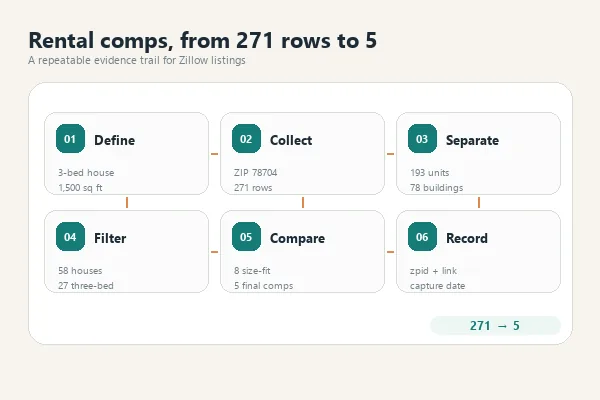
To find rental comps, pull every current rental listing in the subject property’s ZIP code, drop building-level “from” prices, keep only units of the same property type and bedroom count within about 15% of the subject’s square footage, and read the rent range and median from what is left. In our real test, that funnel took 271 Zillow rental rows for ZIP 78704 down to 5 true comps for a 3-bed, 2-bath, 1,500 sq ft house, with asking rents from $3,200 to $5,200 a month.
TL;DR
- A rental comp is a similar nearby rental: same type, bedrooms, and size band, in the same market area.
- The fastest free source is current rental listings on Zillow and similar sites. They show asking rents, not signed leases.
- Most of the work is filtering. Raw search results mix apartment buildings, other property types, and sizes that do not match.
- Keep the evidence. Save each comp’s listing ID, link, and capture date so the rent you set can be explained later.
What are rental comps?
Rental comps (rental comparables) are rental properties similar enough to yours that their rents show what the market will pay. Landlords use them to set an asking rent. Investors use them to underwrite a purchase. Lenders use them to support income on an investment property. Comps are one of several real estate data use cases where collected listing data replaces manual copying.
The lender version is the most structured. Fannie Mae’s Form 1007, the Single-Family Comparable Rent Schedule, has columns for the subject and three comparables. For each comp it asks for:
- address and proximity to the subject
- lease start and end dates
- monthly rent, less utilities and furniture
- data source
- adjustments for rent concessions, location, design, age and condition, room count, and living area
You do not need an appraiser’s form to price a rental. The same fields are still a good checklist for what a comp record should contain.
Where to find rental comps
| Source | What you get | Cost | Limitation |
|---|---|---|---|
| Rental listing sites (how to scrape Zillow property data, Apartments.com, Realtor.com) | Current asking rents, beds, baths, square feet, links | Free to browse | Asking rent, not the signed lease rent |
| Rent estimate tools | A single estimated rent plus a few comps | Free tier or paid | Model output; the comp selection is not yours |
| MLS leased data (through an agent) | Closed lease rents with dates | Needs agent access | Not available to most landlords directly |
| Local property managers | Rents they actually achieved | Free, if they share | Small sample, not systematic |
| Your own collected listings | Every listing in the area, filtered your way | Time, or a scraper | Still asking rents; you own the method |
A common complaint on real estate investing forums is that listing rents are not leased rents. That is true, and it is the main limit of every listing-based method, including the one below. Use listings to find the range, then confirm with leased data when you can get it.
How to find rental comps in 6 steps
Step 1: Define the subject property
Write down property type, bedrooms, bathrooms, square footage, and ZIP code. Our example subject: a 3-bed, 2-bath house of about 1,500 sq ft in 78704.
Step 2: Pull every current rental listing in the ZIP code
You have three ways to do this:
- Manually: search the ZIP on Zillow with the “For Rent” filter and copy listings into a spreadsheet. Fine for 10 listings, slow for 200.
- With a scraping template: run a ready-made Zillow template with the ZIP as the location and “rent” as the listing type, then export to CSV or Excel. This is what we did below.
- With your own code: build a script. Zillow uses bot detection, so a plain HTTP request often returns an empty page. Our guide to Zillow’s data access options and API limits covers what a script has to handle.
Pull the whole ZIP, not the first page. A comp set built from a partial pull is biased toward whatever the site shows first.
Step 3: Separate building-level rows from unit rows
This is the step most comp guides skip. Rental search results mix two kinds of rows:
- Unit rows: one rentable home or apartment with a monthly rent, such as “$3,200/mo”.
- Building rows: an apartment community with a starting price, such as “$1,175+”, and often no square footage.
A building’s “from” price is not a comp. Remove those rows before any math.
Step 4: Filter to true comparables
Apply the filters in this order and note how many rows survive each one:
- Same property type (house, condo, townhouse, apartment).
- Same bedroom count.
- Square footage within about 15% of the subject.
- Similar bathroom count.
If fewer than 3 comps survive, widen one filter at a time (for example, square footage to 20%) and note that you did.
Step 5: Read the rent range, the median, and rent per square foot
Report three numbers, not one: the lowest comp rent, the highest, and the median. Also compute rent per square foot and multiply by the subject’s size. If the two methods disagree a lot, the comp set is small or mixed, and a person needs to look closer.
Step 6: Record the evidence and review by hand
For every comp, store the listing ID, link, capture date, and the fact that the rent is an asking rent. Then check what data cannot tell you: condition, finishes, parking, yard, and exact location within the ZIP. These are the same adjustment rows Form 1007 asks an appraiser to fill in.
Real example: rental comps for a 3-bed house in 78704
On 2026-09-29 we ran the Octoparse Zillow Listing Scraper template for ZIP 78704 with the listing type set to rent. The cloud run finished on its own with 271 rows.
What the raw data looked like
- 193 rows were individual rentals with a monthly price such as
$3,200/mo. - 78 rows were apartment communities with a starting price such as
$1,175+. For those rows the status field held the building name, and most had no square footage. - Among the 193 unit rows: 90 apartments, 58 houses, 35 condos, and 10 townhouses. All 193 were in ZIP 78704.
The comp funnel
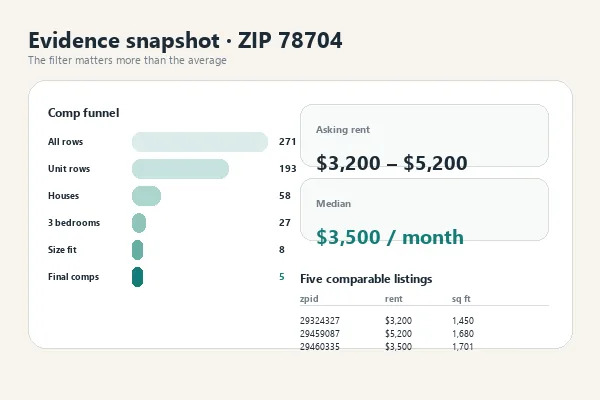
| Filter | Rows left |
|---|---|
| All rows returned | 271 |
| Unit rows only (building “from” prices removed) | 193 |
| Houses only | 58 |
| 3 bedrooms | 27 |
| 1,275 to 1,725 sq ft (within 15% of 1,500) | 8 |
| 2 to 2.5 baths | 5 |
The 5 comps
| zpid | Asking rent | Beds / baths | Sq ft | Rent per sq ft |
|---|---|---|---|---|
| 29324327 | $3,200/mo | 3 / 2 | 1,450 | $2.21 |
| 29459087 | $5,200/mo | 3 / 2 | 1,680 | $3.10 |
| 2093938951 | $4,500/mo | 3 / 2 | 1,315 | $3.42 |
| 29460335 | $3,500/mo | 3 / 2 | 1,701 | $2.06 |
| 29477031 | $3,495/mo | 3 / 2 | 1,277 | $2.74 |
What the comps say
- Asking rent range: $3,200 to $5,200 a month.
- Median asking rent: $3,500.
- Median rent per square foot: $2.74, which gives about $4,105 for a 1,500 sq ft house.
The two estimates differ by about $600. With only 5 comps and a $2,000 spread, the right answer is a range plus a manual look at condition and location, not a single number. Before filtering, the 27 three-bed houses in the same ZIP asked anywhere from $2,000 to $10,500 a month, which is why filters matter more than averages.
Using AI to organize comps, and keep the pricing evidence
AI assistants are useful for the tedious part: cleaning a list, building the comparison table, and writing a short rent rationale. They are not a comp source. If you ask an AI “what are the rental comps for my house?”, it may return rents that no listing supports.
A safer split:
- Your data does the finding. Pull the listings (Step 2) and keep them as a file.
- Code or a spreadsheet does the math. Filters, median, and rent per square foot are deterministic. Do not let a model estimate them.
- AI does the writing. Give it the filtered comp table and ask for a rationale that cites each comp by listing ID.
A prompt that keeps the evidence attached:
To track how rents in a ZIP change over time, run the same pull on a schedule and compare snapshots by listing ID. Our guide to tracking property prices with web scraping covers the broader monitoring pattern; the Zillow listing monitor guide covers duplicate and missed alerts.
Pulling Zillow rental listings with Octoparse for a ZIP code
Octoparse is a web data platform, no code required. Its Templates Gallery holds 680+ ready-made scrapers maintained by the Octoparse team, and they run on Octoparse Cloud with anti-blocking browsers, so Zillow’s bot checks and pagination are handled for you.
The Zillow Listing Scraper (by keyword) takes two inputs: one or more locations (an address, neighborhood, city, or ZIP code) and “buy” or “rent”. For rental comps, enter the ZIP and choose rent. Each row comes back with the listing ID (zpid), price, bedrooms, bathrooms, square feet, status, address, listing link, and image link.
https://www.octoparse.com/template/zillow-scraper-by-keywords
You can run it three ways:
- In the browser: open the template, enter the ZIP, choose rent, run it in the cloud, and export to Excel, CSV, or JSON.
- From an AI assistant: connect the Octoparse MCP server to Claude, ChatGPT, or Cursor and ask it to run the template. The MCP server runs templates and returns the rows; it does not estimate rent.
- From your own code: call the same template through the Octoparse API.
The MCP call we used for the 78704 test:
The Free plan currently separates 50,000 rows per month for custom-task export from 2,000 records per week for cloud templates through MCP/API. Paid-plan terms can change; check the pricing page before budgeting.
What listing-based rental comps cannot tell you
- Asking rent is not leased rent. Listings show what landlords want, not what tenants signed. Discounts and concessions are usually invisible.
- Lease dates are missing. Form 1007 asks when each lease starts and ends. A listing only tells you it was on the market on the capture date.
- Condition is missing. Renovation level, finishes, and appliances drive rent but are not in listing fields.
- ZIP code is a coarse proximity measure. Two streets in the same ZIP can rent very differently. Check each comp’s location by hand.
- Rent estimate tools are models. An automated rent estimate is a starting point, not a comp.
- Listings change daily. Record the capture date with every comp, and re-pull before a pricing decision.
FAQ
How many rental comps do I need?
Aim for at least 3. Fannie Mae’s Form 1007 has columns for exactly 3 comparables. In our 78704 test, strict filters left 5 comps from 271 listings, which was enough for a range but not for a single confident number.
Where can I find rental comps for free?
Current rental listings on Zillow and similar sites are the most complete free source. You can copy them by hand or pull a whole ZIP with a scraping template. Both give asking rents, so confirm with leased data from an agent or property manager when possible.
How do I find rental comps by zip code?
Search the ZIP with a “for rent” filter and collect every listing, not just the first page. With the Octoparse Zillow template, enter the ZIP as the location and choose rent; our 78704 run returned 271 rows in one cloud run.
Are Zillow rent estimates the same as rental comps?
No. A rent estimate is an automated model output. Rental comps are specific, verifiable listings you chose with explicit filters. Use estimates as a sanity check against your comp range.
Can AI find rental comps for me?
AI can organize and explain comps you give it, but it should not invent them. Pull real listings first, filter them with code or a spreadsheet, and ask the AI to cite each comp by listing ID.
Why is my rental comp range so wide?
Usually because the set still mixes property types, bedroom counts, or sizes, or includes building-level “from” prices. In our test, 3-bed houses in 78704 asked from $2,000 to $10,500 before size filters, and from $3,200 to $5,200 after them.
How often should I update rental comps?
Re-pull comps right before each pricing decision. Listings change daily, and a comp captured weeks ago may already be leased or repriced.