You do not need to build a scraper, train a model, or hire a development team to start a real estate AI business.
A solo business can begin with a narrower workflow: collect fresh Zillow listing data, give it to an AI model, and turn the result into a report, alert, shortlist, or research product that a specific customer pays for.
This article shows how to build that workflow without writing code. Zillow is the data source, Octoparse is the web data layer, and an AI assistant turns structured listings into a useful business deliverable.
Already connected to Octoparse MCP? You can give this article to your AI assistant as the workflow brief. Tell it the Zillow market, property type, filters, capture schedule, and report format. With an authorized MCP connection, the assistant can look for a supported Octoparse template, run a supported cloud task, retrieve the rows, and apply the analysis prompt below. Without the connection, upload an Octoparse export instead.
What Is a No-Code Real Estate AI Business?
A no-code real estate AI business sells a repeatable outcome rather than a generic chatbot.
For more ways to apply scraped property data in a business, see real estate scraping use cases.
Customers care that a weekly report arrives on time, the listings are comparable, missing values are visible, and the recommendations can be checked against source URLs.
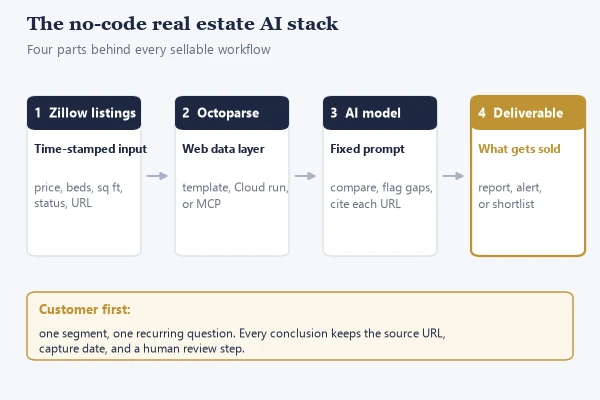
The business has four parts:
| Part | Question to answer |
|---|---|
| Customer | Who has this problem every week? |
| Data contract | Which fields are needed for a trustworthy answer? |
| AI transformation | What comparison, classification, or summary should AI perform? |
| Delivery | Will the customer receive a report, alert, spreadsheet, or client-ready brief? |
Why Zillow Data Is Useful for AI Workflows
Zillow listings can provide a current view of asking prices, rents, property types, bedroom and bathroom counts, square footage when disclosed, locations, listing status, URLs, and other visible listing fields.
That makes Zillow useful as an input for research workflows. It does not make a listing a complete record of a transaction. Asking rent is not realized rent, a listed price is not a market valuation, and an active status can change after the collection time.
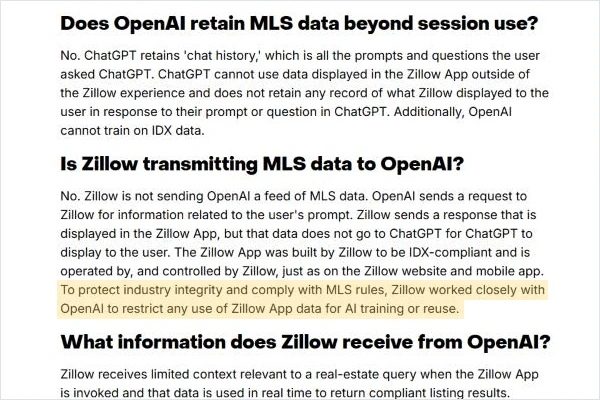
Zillow is also moving toward conversational housing discovery. Its ChatGPT app allows people to browse homes, explore neighborhoods, and learn about affordability in natural language. Zillow says the integration restricts the reuse of app data for AI training to protect industry rules. Zillow’s ChatGPT app is a useful signal for founders: the opportunity is not simply to display more listings, but to help a defined user make sense of changing housing information.
Your AI product should preserve the source, capture date, assumptions, and missing values for every conclusion.
Real Cases Behind No-Code Real Estate AI
These examples should be labeled accurately.
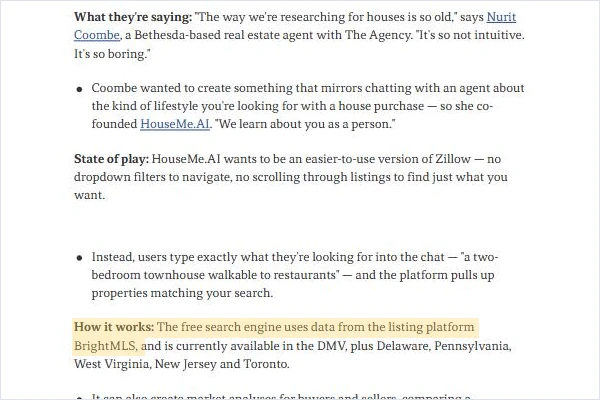
HouseMe.AI is the closest independent-founder example. Axios reported that real estate agent Nurit Coombe co-founded HouseMe.AI after finding traditional property search too rigid. The platform uses BrightMLS data to support natural-language search, market analysis, and offer research. It is an adjacent market example, not a Zillow case. Read the Axios report on HouseMe.AI
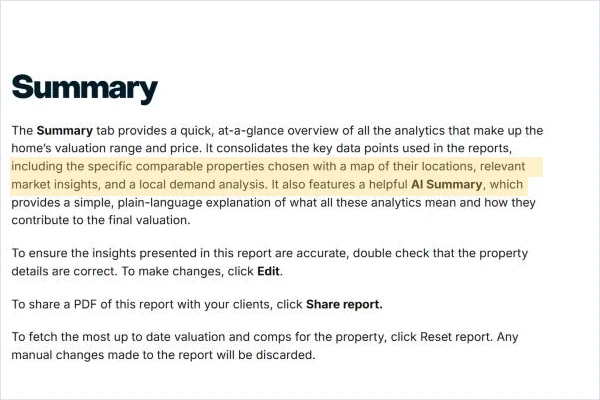
Zillow Listing IQ shows the product shape. Zillow combines comparable properties, valuation signals, local demand, and an AI Summary in a report that agents can review and share. See Zillow Listing IQ This validates the report format, not a claim to reproduce Zillow’s proprietary valuation system.
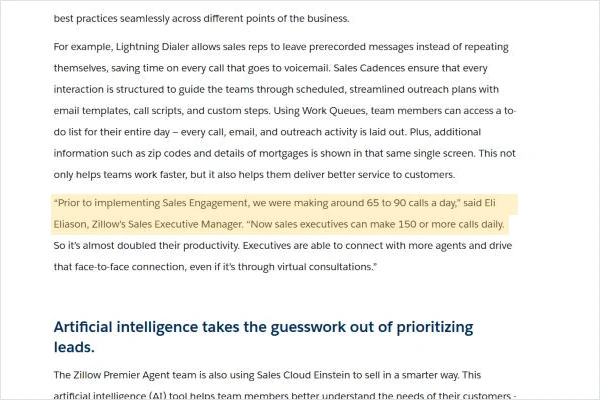
Zillow’s Salesforce case shows the operational payoff. Salesforce reports that Zillow used Sales Engagement and Einstein to automate sales tasks and prioritize leads. Zillow’s sales executives moved from roughly 65 to 90 calls per day to 150 or more. Read the Salesforce customer story It demonstrates why structured data becomes more valuable when AI turns it into a prioritized next action.
Video: CNBC Events interview with Ryan Serhant on how his brokerage uses AI and where agents still matter (12 min).
5 Real Estate AI Businesses You Can Start Without Coding
1. Rental Comp Reports
A rental comp service helps landlords and property managers compare a subject property with similar active listings.
The workflow can group listings by bedroom count, neighborhood, property type, and approximate size. AI can then calculate median asking rent, show the range, flag outliers, and explain which records were excluded.
The deliverable is a weekly or monthly report. It can include a table of comparable listings, a short pricing narrative, and links back to the source records.
2. Price-Change Monitoring
A price-change service tracks a defined set of listings and reports new listings, price reductions, status changes, and removed properties.
This is useful to buyer agents, investors, and local market newsletters. The value comes from the change log.
AI can compare the latest export with the previous export, describe the largest changes, and separate genuine changes from formatting differences. Your report should show the previous value, the new value, and the capture times.
For the broader tracking method behind a recurring price-change service, see how to track property prices with web scraping.
3. Investor Shortlists
An investor shortlist turns a long search result into a smaller research queue.
The customer defines the rules, such as market, property type, maximum price, minimum bedroom count, rent range, and a required source URL. AI applies those rules to the collected rows, labels records that need manual review, and explains why each property passed or failed.
This is decision support. It is not an investment guarantee, appraisal, or lending recommendation. A useful shortlist makes the assumptions visible so that the customer can change them.
4. Listing Briefs for Agents
An agent can use a listing brief to prepare for a call, showing, or local market update.
The report can summarize new listings in a ZIP code, compare the asking price with a defined peer group, identify missing fields, and create a short list of questions for the seller or listing agent.
The AI should cite the listing URL beside each material claim. This makes the brief faster to review and easier to correct when a listing changes.
5. Property-Manager Repricing Reports
A property manager can receive a recurring report on competing rentals by building, neighborhood, bedroom count, or amenity set.
The service can identify new competing units, price movements, and gaps in the manager’s own inventory. AI can write a plain-language explanation of what changed and propose questions for a human pricing review.
Do not present an AI-generated pricing suggestion as an instruction to change rent. Present it as a research signal that a qualified person reviews.
A No-Code Zillow-to-AI Workflow for One Person
Start with a weekly rental report for one neighborhood
The fastest way to validate the idea is to create one repeatable report for one customer segment.
First, choose the market and rules. For example, track two-bedroom rentals in one ZIP code, below a defined maximum asking rent, with a weekly capture.
Next, use an Octoparse web data workflow. The Templates Gallery provides ready-made scrapers for common sites, while Octoparse Desktop lets you author a custom workflow with point-and-click controls. When the workflow needs recurring execution or system access, use the surface that matches the task, such as Octoparse Cloud or the Open Platform. The MCP server can search templates, run supported cloud tasks, and retrieve results. It is a data access path, not a promise that an AI assistant can author every custom task.
For a visual Zillow collection walkthrough, see the Zillow scraper guide.
Octoparse is a web data platform built on ready-made templates, visual authoring, and owned extraction infrastructure. Its role in this business is to produce clean, repeatable rows that an AI model can inspect. Keep the collection step separate from the reasoning step so you can check what was actually collected.
Then export the rows to the format your AI workflow accepts. A spreadsheet is enough for the first customer. Add a capture date and preserve the source URL.
Finally, ask AI to analyze the rows using a fixed prompt and return a report with the same sections every week. A consistent output is easier to sell, review, and improve than an open-ended chat.
Octoparse already documents a Zillow MCP example in which Claude analyzes Brooklyn two-bedroom listings under $3,500. The published example returned 488 listings, an average asking rent of $2,941, and square-footage values for 151 of 488 listings. Those figures are a dated demonstration, not a current market benchmark, so any reuse must retain the run date and caveat. It shows the type of collection-to-analysis handoff this article describes.
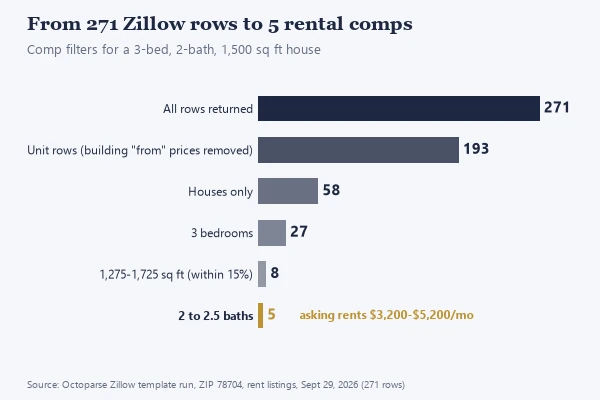
Here is what that handoff looks like on a real run. On September 29, 2026, we ran the Octoparse Zillow template for rentals in ZIP 78704 and got 271 rows. Five stated filters narrowed them to 5 comparable houses for a 3-bed, 2-bath, 1,500 sq ft subject, with asking rents from $3,200 to $5,200 a month. The full method is in our rental comps guide.
The Minimum Zillow Data Contract
Before asking AI to compare properties, define the fields it must receive.
| Field | Why it matters |
|---|---|
| zpid or listing identifier | Helps identify the same record across runs |
| address or location | Defines the market and supports review |
| city, state, and ZIP code | Enables geographic grouping |
| price or rent | Main comparison value |
| status | Separates active, pending, and removed records |
| beds and baths | Supports like-for-like comparisons |
| square feet | Enables size-adjusted analysis when present |
| property type | Prevents mixing unlike inventory |
| listing URL | Lets a human verify the result |
| capture date | Shows when the observation was made |
Do not hide missing values. If square footage appears for only part of the dataset, the report should show the denominator used for the calculation.
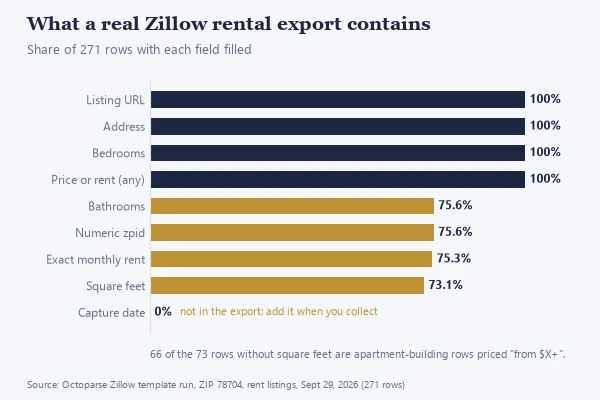
Gaps are normal in real exports. In the same 271-row ZIP 78704 run, only 73.1% of rows had square footage and 75.3% had an exact monthly rent. Most gaps came from apartment-building rows priced from a starting rent, such as “$1,175+”. The export also had no capture-date column, so add one when you collect.
A data contract reduces hallucination risk. Tell AI to use only the provided rows, avoid filling missing values, and cite the listing URL for every material conclusion.
Copyable AI Prompt for Real Estate Analysis
Use this prompt after you provide the structured Zillow rows:
This prompt is reusable across a report, a price-change alert, or an investor shortlist. Change the business rules, not the evidence rules.
Video: Jeff Su shows a repeatable way to analyze a spreadsheet with ChatGPT (12 min). The same discipline applies to Zillow exports: fixed questions, visible record counts, and output you can check.
Can ChatGPT or Claude Connect to Zillow from This Article?
No. Giving an AI assistant this article does not automatically grant access to Zillow or to your Octoparse account.
The article can give the model the workflow, field definitions, prompt, and limitations. The user still has to connect an authorized data source, run the relevant Octoparse workflow, and provide the resulting rows to the AI tool. An MCP connection can make that handoff more direct when the user’s environment supports it, but the connection and permissions still belong to the user.
This distinction matters for trust. A good article helps an AI understand what to do after the data is available. It should not imply that a URL alone creates a live data pipeline.
For implementation details, the existing guides on Zillow listing monitoring, rental comps, the Zillow API, and collecting Zillow data cover adjacent workflows. This page should remain the business and product strategy layer.
Zillow Data, Terms of Use, and Human Review
Before collecting or distributing data, review the current Zillow Terms of Use, applicable listing or feed rules, MLS agreements, privacy requirements, and the terms of the tool used to collect the data.
The Zillow Terms of Use can change and may apply different rules to different products or data types. Do not assume that visible information can be copied, stored, or resold without restriction. Avoid republishing listing photos, descriptions, personal information, or raw feeds unless you have the necessary permission.
A safer product design keeps the source URL and capture date, limits the output to the customer’s authorized workflow, and gives the customer an analysis that can be checked rather than a hidden data dump.
Housing is also a sensitive domain. Zillow has described AI systems that explicitly avoid using behavioral models for housing eligibility and lending decisions. Your own workflow should follow the same boundary. Use AI to organize public listing research and prepare questions for a professional review. Do not use it to make decisions about protected classes, housing access, loan approval, or tenant eligibility.
How to Package and Sell the Service
Start with a fixed deliverable.
Possible offers include:
- A one-time rental comp report
- A weekly price-change monitoring service
- A monthly neighborhood inventory brief
- A listing research package for agents
- A managed data and analysis service for property managers
Ask early customers what they copy into spreadsheets, how often the task occurs, and what format they would actually use.
Once the workflow is stable, automate delivery or add a dashboard.
FAQ
Can I build a real estate AI business without coding?
Yes. Start with a narrow recurring report. Use a ready-made collection workflow and an AI assistant for comparison and writing.
Is Zillow asking rent the same as market rent?
No. Zillow asking rent is an observation from a listing. It is not the same as a signed lease, realized rent, or an appraisal. Reports should label it as asking rent and include the capture date.
Can AI make an investment decision from Zillow listings?
AI can help organize and compare listings, but it should not be presented as a guarantee or substitute for due diligence. Keep the assumptions, formulas, source URLs, and human review step visible.
Does Octoparse MCP automatically create any Zillow scraper I describe?
Not necessarily. The MCP server can search supported templates, run supported cloud tasks, and retrieve results. Reusable custom scrapers are built in the AI Assistant (formerly Agentic Mode) or Octoparse Desktop. Confirm the current workflow before promising a capability.
What should every AI-generated Zillow report include?
At minimum, include the market definition, capture date, field definitions, record count, missing-value notes, source URLs, and a clear statement that listing observations are not closed transaction data.
Can I resell raw Zillow listing data?
Do not assume so. Review Zillow’s current Terms of Use and any applicable MLS, feed, privacy, or customer agreements before storing or redistributing data. A permissioned analysis service is a different product from an unauthorized raw listing feed.
Final Takeaway
A no-code real estate AI business does not begin with a large application. It begins with a reliable answer to one recurring question.
Use Zillow listings as a time-stamped input, Octoparse as the web data layer, and AI as the analysis and delivery layer. Keep the fields explicit, cite the source rows, preserve human review, and sell the result that saves a specific customer time.
This is enough to test demand before writing software.