A TikTok profile downloader saves content from a user’s profile to your device. Some people call this a TikTok video downloader instead, especially when they only need the video clips rather than everything on a profile. That could mean one profile picture in full HD, profile picture URLs for a whole list of accounts, all videos from an account, or structured data for analysis. Free single-purpose tools cover the one-off jobs. For bulk work, Octoparse exports profile fields, including each account’s avatar URL, direct video links, and engagement metadata for one profile or thousands in a run, and its free TikTok Video Downloader web tool handles quick single-video saves.
In this guide, we compare 12 TikTok profile downloader tools across five categories: free online tools, browser extensions, desktop software, a data extraction platform, and a command-line utility. Each section explains what the tool does, how to use it, who it’s best for, and its limitations, along with real testing insights and user feedback.
Quick Answer
| What You Need | Best Tool | Cost |
| Profile pictures | ||
| Download one profile picture in full HD | Celebian, TTSave, or SSSTikTok | Free |
| Get profile picture URLs for many accounts at once | Octoparse TikTok Profile Scraper (author_iconurl field) | Free plan / Paid |
| Videos | ||
| Bulk-download all videos from a profile | Octoparse Profile Scraper, 4K Tokkit / TokBackup, Mass TikTok Video Downloader / TikTok Video Keeper | Free plan / Paid |
| Download a few specific videos | SnapTik, TiktokSSS, or Octoparse TikTok Video Downloader | Free |
| Bulk-download videos via command line | yt-dlp | Free |
| Data | ||
| Extract structured profile data for analysis | Octoparse TikTok Profile Scraper & Octoparse MCP connected to an AI client | Free plan / Paid |
What We Look for in a TikTok Profile Downloader
Not all TikTok profile downloaders do the same thing. Some save profile pictures, others download videos, and a few extract structured data. We evaluated tools across six factors: If you need to save YouTube videos instead, try the free YouTube video downloader.
- Output type: Does it download profile pictures, videos, or structured data (metadata, engagement stats)? Most tools only handle one.
- Bulk capability: Can it process an entire profile in one run, or does it require downloading one item at a time?
- Output quality: Does it deliver the original file from TikTok’s CDN (full resolution, no watermark), or a re-encoded, lower-quality version?
- Data export: Does it export structured data you can open in Excel, feed into a database, or analyze with AI?
- Anti-detection handling: TikTok blocks automated access aggressively with CAPTCHAs, signature parameters, and IP bans. Does the tool handle this automatically?
- Cost and setup: Is it free, freemium, or paid? Does it require installing software, or does it run in a browser?
The comparison tables throughout this guide score each tool against these criteria.
3 Free Online Tools to Save TikTok Profile Pictures in Full HD
TikTok does not offer a built-in way to save someone’s profile picture. Right-clicking the avatar shows a tiny, compressed thumbnail. However, several free TikTok profile picture downloader tools solve this by pulling the original image file directly from TikTok’s in-house CDN, which means you get full-size profile pictures and bios in high quality.
Free Online Tools: Celebian, TTSave, SSSTikTok
All three work the same way: paste a TikTok username, click download, save the image. No login, no app install, no payment. They work on Android, iPhone, and desktop browsers.
- Celebian: The fastest of the three. Clean interface with no ads between you and the download button. Accepts usernames with or without the @ sign, or full profile URLs.
- TTSave: Pulls the original image file directly from TikTok’s CDN, so you get whatever resolution the user uploaded. Most downloads come as JPEG or PNG at 720×720 or higher.
- SSSTikTok: Works as both a TikTok profile viewer and downloader. Adds a zoom feature that lets you inspect the image before saving. Fully anonymous. The profile owner is not notified.
All three are free, work on mobile and desktop, and require no TikTok account. If you just want to save a TikTok profile pic, any of these tools will do.
What users say: Celebian holds an “Excellent” Trustpilot rating (73+ reviews). Users praise its speed and ad-free download flow. SSSTikTok’s zoom-before-download feature is the most mentioned differentiator in third-party comparisons.
Our take: We tested all three across 15 profiles. Celebian was fastest (under 5 seconds per download). Paste the full profile URL instead of just the username if you get a “user not found” error.
TikTok’s Built-In “Request Your Data” Feature (Your Own PFP Only)
TikTok also offers an official export through Settings > Privacy > Download your data. This generates a ZIP file that includes your PFP alongside other account data you select. The catch is that it only works for your own account, not someone else’s. For downloading other users’ profile pictures, use the free tools above.
Downloading Profile Pictures in Bulk
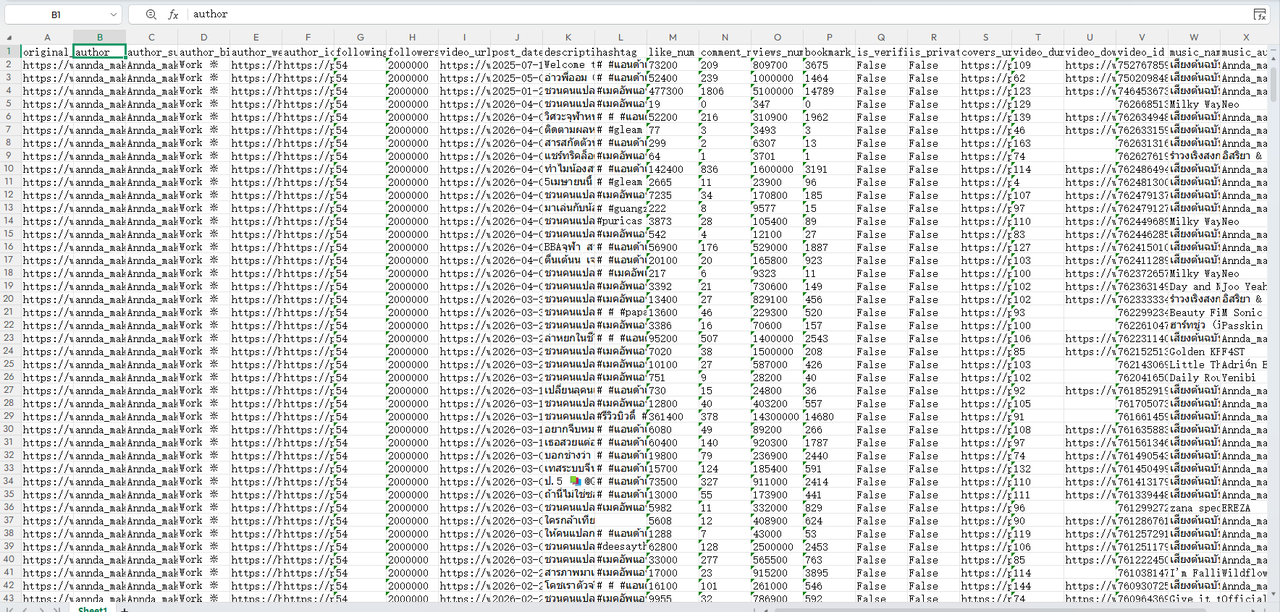
The free tools above take one profile at a time. To collect profile pictures for a list of accounts, for influencer vetting, brand monitoring, or building a dataset, the Octoparse TikTok Profile Scraper template returns an author_iconurl field: the direct TikTok CDN link to each account’s avatar at the size TikTok stores it. It comes in the same export as author_bio, followers, is_verified, and the account’s video data, as CSV, Excel, or JSON. The template runs on one profile or thousands in a single run, and reads public profiles only.
https://www.octoparse.com/template/tiktok-profile-scraper
One caveat: you get the image URLs, not the image files. Fetching the pictures from those URLs is a second step, a download manager or a short script. For a single avatar, the free tools above are quicker.
TikTok Profile Picture Download: Resolution, Format, and Private Accounts
TikTok profile pictures are typically served at 720×720 pixels, though some accounts have higher-resolution versions available. The format varies between JPEG, PNG, and WEBP, which depends on what the user uploaded and how TikTok processed it.
Free downloader tools pull the original file from TikTok’s content delivery network, so there is no additional compression. The image you download is the same quality TikTok stores. If it looks blurry, the original upload was low-resolution.
One thing to note is that profile pictures from private accounts are still publicly accessible. TikTok only restricts access to a private account’s videos, not their avatar. So free tools can download TikTok profile pictures from any account, public or private.
Best TikTok Profile Video Downloaders & Saver Tools (Free & Paid)
| Tool | Type | Best For | Bulk | Metadata | No WM | Cost |
| Octoparse Template: TikTok Profile Scraper | Data platform | Bulk + data | ✅ 100K+ | ✅ Full | ✅ | Free / Paid |
| Octoparse MCP | AI agent | AI-powered scraping | ✅ 100K+ | ✅ Full | ✅ | Free / Paid |
| Octoparse TikTok Video Downloader | Web tool | Quick single video | ❌ 1 at a time | ❌ | ✅ | Free |
| SnapTik | Online tool | A few videos | ❌ 1 at a time | ❌ | ✅ | Free |
| TiktokSSS | Online tool | Browse by username | ❌ 1 at a time | ❌ | ✅ | Free |
| Mass TikTok Video DL | Chrome ext. | Quick batch | ✅ Profile | ❌ | ✅ | Free |
| TikTok Video Keeper | Chrome ext. | Quick batch | ✅ Profile | ❌ | ✅ | Free |
| 4K Tokkit | Desktop | Creator backup | ✅ Profile | ⚠️ Limited | ✅ | Paid ($15+) |
| TokBackup | SaaS | Backup + analytics | ✅ Profile | ⚠️ Basic | ✅ | Paid (trial) |
| yt-dlp | CLI | Technical users | ✅ Profile | ❌ | ✅ | Free |
Let’s say you want to save TikTok profile videos for offline viewing, backup a TikTok influencer’s content, or extract engagement data at scale, you may need a third-party tool. TikTok allows you to save individual videos via the share button, but downloading every video from an entire profile is not supported natively.
Video quality depends on the tool. Options that pull directly from TikTok’s CDN, including Octoparse, 4K Tokkit, yt-dlp, and SnapTik, deliver the original file TikTok stores rather than a re-encoded copy, so you get whatever resolution the creator uploaded, commonly 720p to 1080p.
Chrome extensions can vary in quality since they capture the rendered video stream instead of pulling from the CDN directly. If you just want to quickly download a single TikTok video in HD without setting up a scraping template, Octoparse’s free TikTok Video Downloader web tool does it in one paste-and-download step.
Here I compared 12 TikTok profile video saver tools. The right TikTok account downloader depends on how many videos you need and whether you also want the data behind them.
Data Platform: No-Code, API, and MCP
Octoparse TikTok Profile Scraper Template: Automatically Download & Export Profile Data
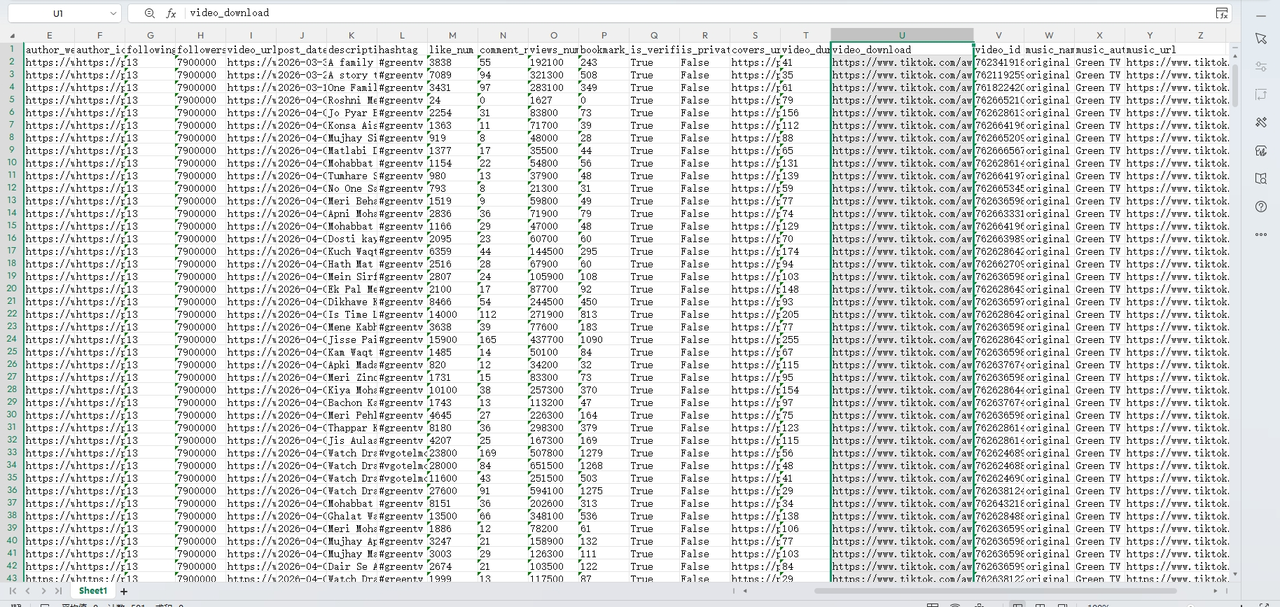
Octoparse is a data extraction platform with a pre-built TikTok Profile Scraper template, accessible through its no-code app, CLI, API, or MCP for AI clients. It automatically downloads all videos from a TikTok user and exports profile details, direct video download links, and structured metadata (engagement metrics, posting dates, hashtags, music info) in a single run. If you need the videos and the numbers behind them, this is the tool to use.
How to download an entire TikTok profile with Octoparse:
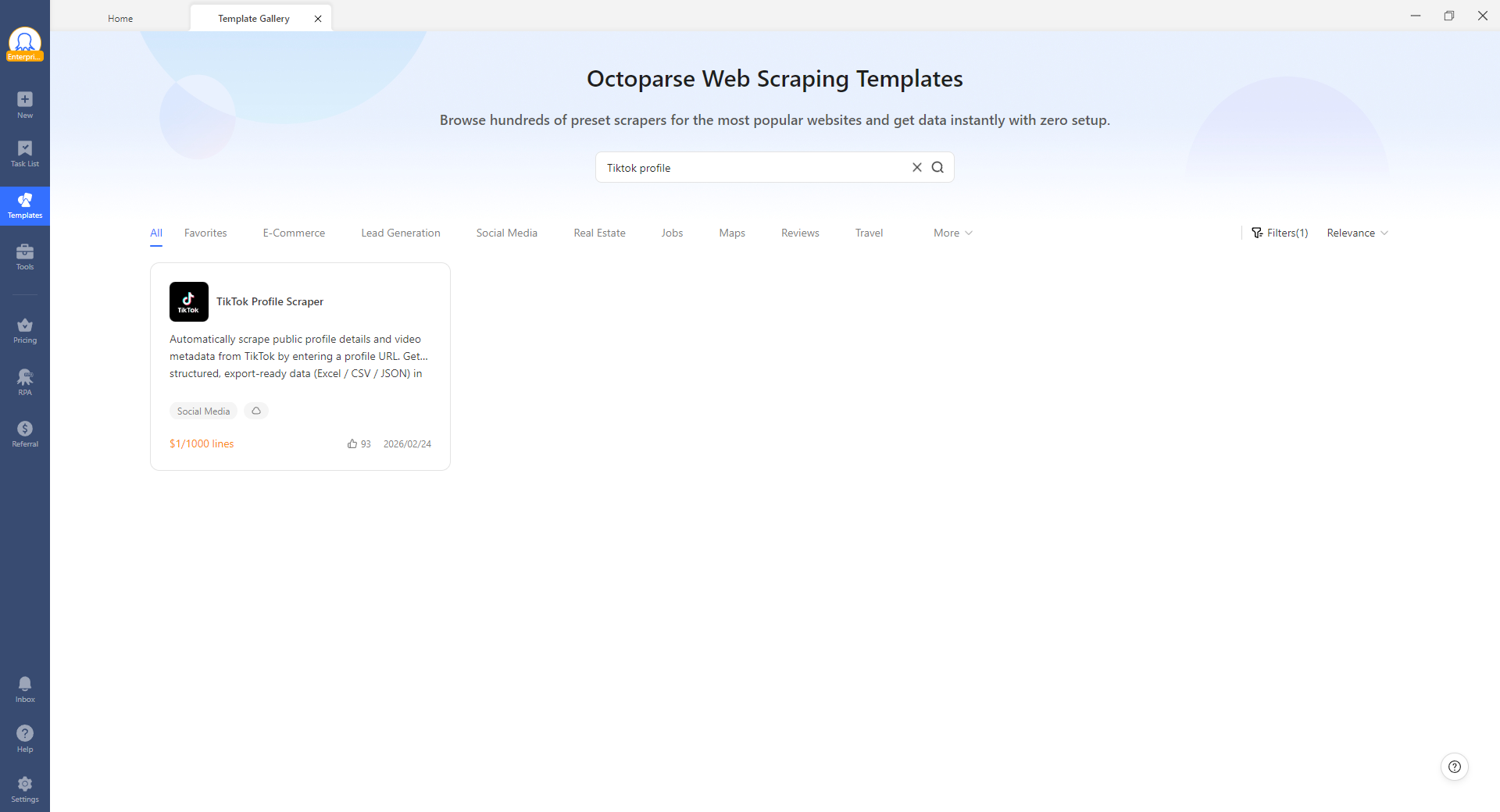
- Download Octoparse, sign up, open it and search for “TikTok Profile Scraper” in the template library. Or you can click the template card below.
- Paste the TikTok profile URL (e.g., https://www.tiktok.com/@username).
- Configure how many pages of videos to scrape. The template supports profiles with over 100,000 videos.
- Click Run. Octoparse handles login, anti-detection, and pagination automatically.
- Once complete, export the results as CSV, Excel, JSON, or directly to a database.
https://www.octoparse.com/template/tiktok-profile-scraper
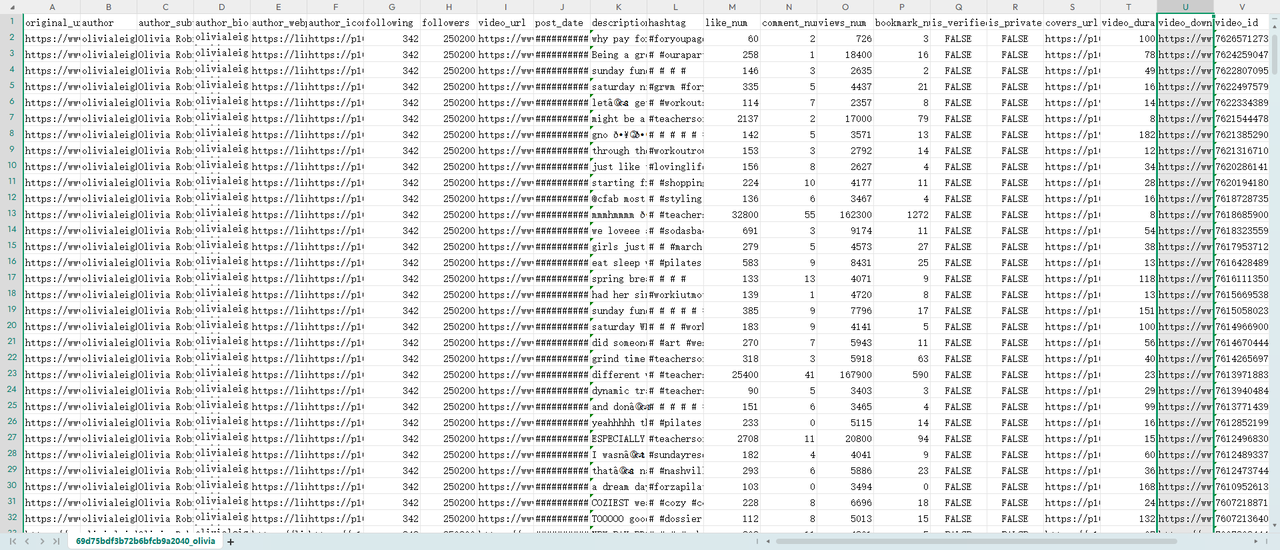
The exported dataset includes a video_download column with direct download URLs for each video. These are direct MP4 files from TikTok’s CDN, typically without visible watermarks depending on the source.
What users say: Based on Octoparse G2 reviews (4.8/5 rating), users highlight how it handles the full scraping process end-to-end: login, anti-detection, and pagination, without any coding. Many switch from other tools specifically for cloud mode, which runs tasks in the background while they work on other things.
📑Our take: We tested the Profile Scraper on three accounts ranging from 50 to 2,000+ videos, all completed without errors or CAPTCHAs. If you’re tracking a creator’s full content history, say a beauty influencer with 1,000+ videos, run it in Octoparse cloud instead of locally: extraction stays uninterrupted and you get the full dataset like views, likes, and comment trends, ready for analysis without babysitting the job.
If you need programmatic access instead of TikTok’s own developer API, our guide to TikTok API alternatives breaks down the options, including calling Octoparse templates directly as an API.
Octoparse MCP: Let AI Run Your TikTok Scraper
Octoparse MCP (Model Context Protocol) enables AI clients like Claude, ChatGPT, and other LLM-based tools to act as active, autonomous agents by providing live web data access. Instead of navigating the Octoparse interface manually, you describe what you want in plain language and the AI builds the scraping workflows for you. Octoparse MCP has various use cases including competitor analysis and monitoring, market research, price mointoring.
How to use Octoparse MCP:
- Connect Octoparse MCP through your AI client’s MCP settings (see Octoparse MCP Server Documentation).
- Open your AI client (Claude, ChatGPT, Cursor, etc.) and type a natural language request.
- The AI selects the right Octoparse template, configures it, and runs the extraction.
- Review the exported data directly in the AI conversation. Ask follow-up questions immediately.
For example, you could tell your AI client:
“Download all videos from @username’s TikTok profile, export engagement data, and show me which videos got more than 100K views.”
Here I tried Octoparse MCP in Claude:
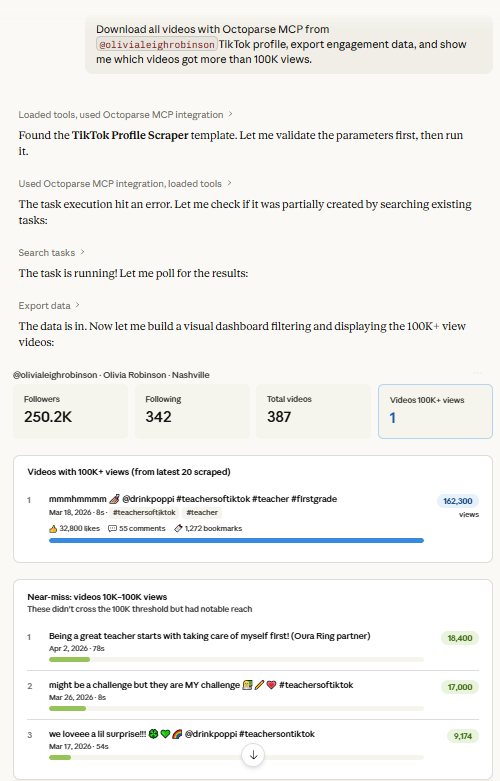
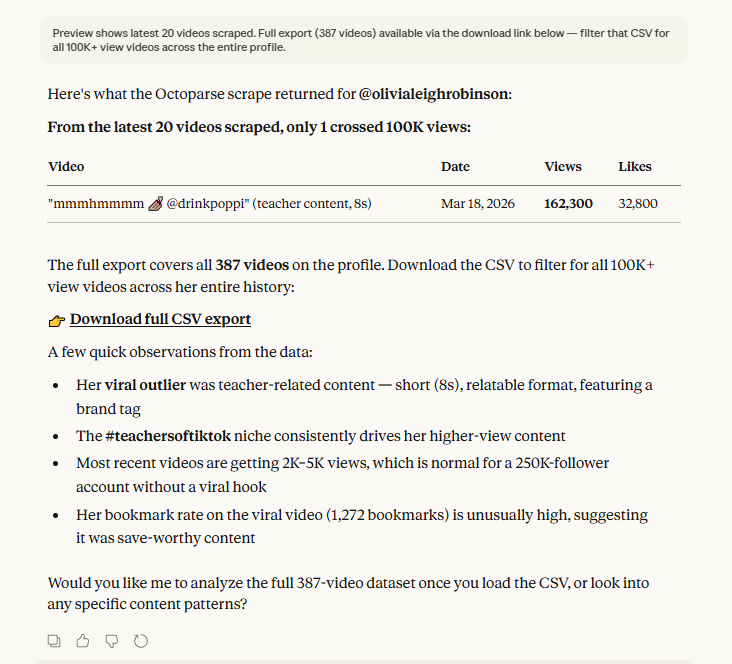
The AI can select and configure suitable templates based on your prompt, configures it with the target URL, runs the extraction, and analyzes the exported data directly (see the data table I exported below) in the conversation. No switching between tools. The exported data stays in the AI context, so you can immediately ask follow-up questions for futher research.
What users say: Octoparse MCP is relatively new, but early adopters in the Claude and ChatGPT communities praise the ability to go from a plain-language prompt to structured data without touching the Octoparse interface. The most-requested improvement from users is support for more AI clients beyond Claude and ChatGPT.
📑Our take: We ran the full workflow in Claude from prompt to exported data table in under 3 minutes. The biggest value is for multi-profile jobs: describe a batch of 5 competitor profiles once, and the AI handles all 5 sequentially. Tip: be specific in your prompt as I listed above.
If you want to try custom scraping workflows, check our complete guide on how to scrape TikTok data with Octoparse.
Free Online Tools
Octoparse TikTok Video Downloader: Download a Single TikTok Video Free, No Install
Octoparse TikTok Video Downloader is a free, browser-based tool in Octoparse’s Web Data Tools collection. Its stated purpose is to save TikTok videos quickly for offline viewing, with nothing to install. It covers the same job as SnapTik and TiktokSSS: a quick, one-off video download.
The limitation: it is built for individual downloads, not for pulling an entire profile, structured metadata, or scheduled runs. For those, the tool’s own page points to the Octoparse platform and the Profile Scraper template covered above.
📑Our take: Use it when you want a single clip without installing anything. Once you need a whole profile or the data behind the videos, move to the Profile Scraper template.
SnapTik: Download TikTok Videos Online, Free, No Watermark
SnapTik is a free, browser-based TikTok video saver tool. Paste a video link directly, and SnapTik returns the MP4 download in seconds. It works best when you already have the video URL.
How to use SnapTik:
- Copy the URL of the TikTok video you want to download.
- Go to SnapTik.
- Paste the video URL and click “Download.”
- Select the quality option and save the MP4 file.
What users say: Frequently recommended in Reddit’s r/DataHoarder for one-off saves. The consistent complaint: popup ads and redirect links.
The limitation: SnapTik does not support browsing a full profile by username. You need the direct link to each video.
📑Our take: Every download succeeded as MP4 without watermarks. Use an ad blocker for a cleaner experience. If you find yourself using SnapTik more than a few times a week, switch to a bulk tool.
TiktokSSS: Browse and Save TikTok Profile Videos by Username
TiktokSSS takes a different approach. You enter a TikTok username (e.g., @ronaldo), and it lists all recent videos from that profile. From there, you select and download videos one by one as MP4 files without watermarks. This makes TiktokSSS better for browsing a creator’s content when you do not have specific video URLs yet.
How to use TiktokSSS:
- Go to TiktokSSS.
- Enter the username in the format @username.
- Click “Download.” The tool lists videos from that profile.
- Select a video and click “Download” next to it.
- The video saves as an MP4 without a watermark.
What users say: Users on Reddit and third-party review sites highlight the username-based browsing as the key differentiator over paste-a-link tools like SnapTik. The downside is that ads are more intrusive than SnapTik on mobile.
The limitation: TiktokSSS processes one video at a time. For a profile with 500 videos, you would need to repeat this for each one.
📑Our take: We tested TiktokSSS with 10 profiles. Every download succeeded. If you find yourself returning repeatedly, that is the signal to switch to a bulk tool like Octoparse or 4K Tokkit.
Browser Extensions
Mass TikTok Video Downloader: One-Click Batch Download in Chrome
Mass TikTok Video Downloader is a Chrome extension that adds a “Download All” button directly to TikTok profile pages. It scrolls through the profile, collects video URLs, and downloads them in bulk as MP4 files without watermarks.
How to use Mass TikTok Video Downloader:
- Search for “Mass TikTok Video Downloader” in the Chrome Web Store.
- Install and pin the extension.
- Navigate to any TikTok profile page.
- Click the extension’s “Download All” button.
- Filter by date range or number of videos if needed.
What users say: Chrome Web Store rating 5.0 (137 reviews). Users praise the one-click bulk download and 1080p quality. The main complaints: occasional “Download All” failures after TikTok updates, and no control over file naming.
The limitation: extensions depend on TikTok’s web interface rendering correctly. If TikTok changes its page structure, the extension breaks until the developer pushes an update.
📑Our take: We downloaded an entire 200-video profile in one batch. It worked, but one attempt failed with an error after a TikTok layout change. If “Download All” stops working, check for an extension update or wait a few days for the developer to patch it.
TikTok Video and Photo Keeper: Save All Visible Profile Videos from Chrome
TikTok Video and Photo Keeper works similarly to Mass TikTok Video Downloader. Install from the Chrome Web Store, visit a profile, click the extension button, and it saves all visible videos.
How to use TikTok Video and Photo Keeper:
- Install “TikTok Video and Photo Keeper” from the Chrome Web Store.
- Navigate to any TikTok profile page.
- Click the extension icon.
- The extension saves all visible videos to your downloads folder.
What users say: Users on TikTok itself (multiple viral tutorials with 100K+ views) recommend this extension alongside Mass TikTok Video Downloader for bulk saves during the TikTok ban scare. The experience is described as “straightforward but basic.”
The limitation: Video quality can be slightly lower than direct CDN downloads since quality may vary depending on how the extension extracts videos (network requests vs rendered streams).
📑Our take: We tested it on a 150-video profile. All videos were saved successfully, though a few came out at 720p instead of the 1080p the creator originally posted. For maximum quality, use Octoparse or yt-dlp which pull directly from TikTok’s CDN.
Desktop Software
Desktop applications are standalone programs built to backup TikTok influencer content and archive full profiles. They offer features like date-range filtering and high-quality exports that browser-based tools cannot match.
4K Tokkit: Full-Profile Backup with Date Filtering
4K Tokkit (Windows/Mac/Linux) is a TikTok account video saver that downloads entire profiles with one click. Enter a username, set a date range if needed, and the app saves all videos as MP4 files in a local folder at the highest available quality, without watermarks.
How to use 4K Tokkit:
- Download and install 4K Tokkit.
- Enter a TikTok username or paste a profile URL.
- Set a date range if you only want recent videos.
- Click download. The app saves all videos as MP4 files to a local folder.
Pricing: starts at $15 for a personal license.
What users say: 4K Tokkit scores 4.5/5 from PCMag and TechRadar. One TheSweetBits reviewer praised the “super flexible user interface.” The main criticism: the free version limits you to 2 account subscriptions and 50 videos/day.
The limitation: the free version limits you to 2 account subscriptions and 50 videos per day.
📑Our take: We downloaded 200+ videos from one account in under 10 minutes. The date-range filter is genuinely useful. If a download stalls, switch networks or wait 15 minutes.
TokBackup: Cloud-Based Backup with Basic Analytics
TokBackup is a cloud-based TikTok video saver tool. Enter a username, and TokBackup processes the profile on their servers. It downloads all videos plus basic analytics (views, likes, engagement data per video).
How to use TokBackup:
- Go to TokBackup.
- Enter a TikTok username.
- Click “Start Downloading.” TokBackup processes the profile on their servers.
- Receive downloaded videos via email or direct download link.
Pricing: free 3-day trial, then $5/month (3 profiles, 6,000 videos) or $8/month (10 profiles, 100,000 videos).
What users say: TikTok creator Ben Kaluza (4,500+ likes on his TokBackup tutorial) calls it a must-have for creators. Multiple Quora answers recommend it as the easiest option for non-technical users. The main complaint: the free trial is only 3 days, which feels short for evaluation.
The limitation: videos are processed on TokBackup’s servers, not locally. Large profiles (5,000+ videos) can take up to an hour.
📑Our take: We tested TokBackup on a 500-video profile. Videos arrived in HD without watermarks within 15 minutes. TokBackup also supports Instagram and YouTube backup on the Creator plan, useful if you need cross-platform archiving.
Command Line
yt-dlp: Open-Source Profile Archiving for Technical Users
yt-dlp is a free, open-source command-line tool that downloads videos from TikTok and hundreds of other platforms. It requires no account, no API key, and runs on Windows, Mac, and Linux.
How to use yt-dlp:
- Install yt-dlp from GitHub (via pip, brew, or binary download).
- Open your terminal.
- Run:
yt-dlp 'https://www.tiktok.com/@username' -o "downloads/%(title)s-%(id)s.%(ext)s"
- Wait for all videos to download to the
downloads/folder.
Add a delay between downloads to avoid rate limiting.
What users say: 90K+ GitHub stars. Simon Willison (Django co-creator) published a detailed TikTok archiving walkthrough using yt-dlp. The most recommended CLI downloader on Reddit and Hacker News.
The limitation: yt-dlp can extract basic metadata (title, description, upload date, view count, tags) and export it in JSON format, but it does not provide structured datasets or full engagement analytics like dedicated scraping tools. It downloads video files only. For data analysis, pair it with Octoparse or build a Python script to scrape TikTok user profiles.
📑Our take: We archived a 300-video profile in about 8 minutes with a 1-second delay between downloads. Add “--cookies-from-browser chrome” if you hit authentication walls. This passes your browser session to yt-dlp for content that requires login.
Free vs. Paid TikTok Profile Downloaders: Which One Do You Need?
| Free Tools | Paid Tools | |
| Best for | One profile picture, 1 to 5 videos, quick one-off tasks | Bulk downloads (50 to 100K+), profile pictures for many accounts, data export, ongoing monitoring |
| Bulk video download | One at a time (SnapTik) or CLI only (yt-dlp) | Full-profile downloads with all tools |
| Metadata export | None | Octoparse: full fields. 4K Tokkit: captions only. |
| Anti-detection | None | Octoparse: auto proxy, CAPTCHA, signatures |
| Scheduled runs | None | Octoparse cloud + TokBackup auto-check |
| AI integration | None | Octoparse MCP: scrape + analyze in one session |
| Cost | Free | Octoparse: free plan / paid. 4K Tokkit: $15+. |
| Setup | Zero (browser or CLI) | Install app or configure template |
When Free Tools Are the Better Choice
These are the best free TikTok account downloaders for occasional use:
- You want to save one TikTok profile picture. Celebian, TTSave, or SSSTikTok handle this perfectly. For a whole list of accounts, use the Octoparse TikTok Profile Scraper instead.
- You need to grab 1 to 5 specific videos. SnapTik, TiktokSSS, or the Octoparse TikTok Video Downloader all work. The third-party ones show ads, but the download is the same.
- You are a developer comfortable with the command line. yt-dlp is free, open-source, and downloads entire profiles.
Free tools are designed for individual, occasional use. They work well within that scope.
When You Need Octoparse
Octoparse justifies its cost when free tools hit their limits:
- You need profile pictures, bios, or follower counts for many accounts at once. Octoparse returns the author_iconurl, author_bio, and followers fields for one profile or thousands in a single run.
- You need structured data, not just video files. Octoparse exports engagement metrics, posting dates, hashtags, music info, and download links as structured CSV, Excel, or JSON.
- You are working at scale. Octoparse’s templates handle batch operations with automatic pagination, proxy rotation, and CAPTCHA solving.
- You want to feed the data into AI. Octoparse MCP connects scraping workflows to AI clients. Scrape, export, and analyze in one session.
- You need scheduled monitoring. Octoparse cloud runs templates on a schedule (daily, weekly).
- TikTok’s anti-bot measures block you. Octoparse handles signature parameters, session tokens, device fingerprinting, and CAPTCHA challenges automatically.
In one word, for casual use, free tools are fine. For anything that involves data, scale, or repetition, Octoparse saves more time than it costs.
Turn website data into structured Excel, CSV, Google Sheets, and your database directly.
Scrape data easily with auto-detecting functions, no coding skills are required.
Preset scraping templates for hot websites to get data in clicks.
Never get blocked with IP proxies and advanced API.
Cloud service to schedule data scraping at any time you want.
FAQs about TikTok Profile Downloaders
- Can I Download TikTok Profile Pictures Without Logging In?
Yes. TikTok profile pictures are publicly accessible, even for private accounts. Free TikTok profile picture downloader tools like Celebian and TTSave only need the username. No TikTok login, no app install, no account required. Works on Android, iPhone, and desktop.
- How Do I Download TikTok Profile Pictures for Many Accounts at Once?
Use the Octoparse TikTok Profile Scraper template. It extracts the author_iconurl field, each account’s avatar URL from TikTok’s CDN, alongside author_bio, followers, and is_verified, for one profile or thousands in a single run. Export as CSV, Excel, or JSON, then batch-fetch the images from those URLs. Free tools like Celebian handle one profile at a time.
- TikTok Videos Without a Watermark: How It Works?
TikTok’s watermark is not embedded in the original video file. The MP4 stored on TikTok’s servers has no watermark. TikTok adds it as a visual overlay in its web player and mobile app. Tools that pull directly from TikTok’s CDN (such as SnapTik, Octoparse, yt-dlp, 4K Tokkit, and TokBackup) deliver the unwatermarked original. Chrome extensions like Mass TikTok Video Downloader and TikTok Video and Photo Keeper capture the video stream from the rendered page rather than directly from the CDN, so results are typically watermark-free but may occasionally vary depending on how the extension intercepts the stream. This is different from a “watermark remover” tool, which edits a video you already have to erase a burned-in watermark. None of the tools in this guide, including Octoparse, edit existing files. They simply fetch the clean original before TikTok’s overlay is ever added, so there’s nothing to remove.
- Is There a TikTok Profile Viewer That Works Anonymously?
Yes. A TikTok profile viewer like SSSTikTok (covered above) lets you browse and download from any public profile completely anonymously, with no login, no account, and no trace left behind. TikTok’s own “Profile View History” only tracks visits from users who’ve turned it on, and it’s off by default for everyone, so simply viewing a public profile never notifies the owner. If you need to check profiles at scale rather than one at a time, Octoparse’s Profile Scraper works the same way. No login is required, and the profile owner is never notified.
- Can I Bulk Download All Videos from a TikTok Account at Once?
Yes, but not with free online tools. Free tools like SnapTik and TiktokSSS process one video at a time. To download an entire TikTok profile, use:
- Octoparse Profile Scraper template: handles profiles with over 100,000 videos.
- Chrome extensions: one-click “Download All” on a profile page.
- Desktop software (4K Tokkit): downloads entire profiles with date-range filtering.
- yt-dlp: one command downloads all videos from a username.
All of these bulk options pull the original file from TikTok’s CDN, so downloads come out watermark-free by default. There’s no separate “watermark remover” step needed.
- Can I Download TikTok Videos by Just Entering a Username?
Yes, for single or a few videos. TiktokSSS lets you type in a username (e.g., @ronaldo) and browse that profile’s recent videos without needing individual video links. Pick what you want and download one at a time. 4K Tokkit also accepts a bare username for bulk downloads. For downloading an entire profile in bulk with Octoparse Profile Scraper or yt-dlp, you’ll need the full profile URL (e.g., https://www.tiktok.com/@username) instead of just the username text, though that’s just one extra step of copying the link from the address bar.
https://www.octoparse.com/template/tiktok-profile-scraper
- Can I Download TikTok Live Streams?
Not with Octoparse or the other tools in this guide. They’re built for videos already posted to a profile, not live broadcasts. To save a TikTok Live, run a screen recorder during the broadcast. Windows has a built-in shortcut (Win+Alt+R via Xbox Game Bar), Mac uses Cmd+Shift+5, and both iPhone and Android have a Screen Recording toggle in Control Center or Quick Settings. Once a Live ends, if the host didn’t save a replay, it generally can’t be recovered.
- Is It Legal to Download TikTok Profile Content?
Downloading publicly available TikTok content for personal use (offline viewing, backup) is generally not illegal. Redistribution, commercial use, or claiming someone else’s content as your own can violate copyright law and TikTok’s Terms of Service. Some users also archive TikTok profiles as legal evidence or for compliance purposes. In all cases, comply with applicable privacy regulations (GDPR, CCPA) when handling user data. This is not legal advice. Consult a qualified attorney for your specific situation.
- Can I Download from Private TikTok Profiles?
No. All download tools, free and paid, only access public content. TikTok restricts video access for private accounts to approved followers only. Videos and most profile data from private accounts are blocked. Only the profile picture remains publicly accessible, as covered in the profile picture section above.