SEO ranking API sounds like a single product category, but it covers two different jobs. A rank-tracking API returns normalized positions for a monitored keyword set. A SERP scraper collects the result page itself, including URLs, titles, snippets, ads, People Also Ask, and other SERP features. You need the first when you want a reporting system. You need the second when you want to inspect what actually appeared for a query.
This guide shows how to combine both approaches. It explains what a Yandex rank tracker does, what an SEO ranking API can and cannot tell you, and how to scrape keyword rankings and SERP features when you need raw evidence.
TL;DR
- Use a rank-tracking API for scheduled positions, historical changes, locations, devices, and competitor comparisons.
- Use a SERP scraper when you need the result-level evidence behind a position, such as the ranking URL, title, snippet, or SERP feature.
- Google Search Console measures impressions and clicks for properties you control. It is not a general competitor rank API. The official Search Console API supports query, page, device, country, and search appearance dimensions.
- For a repeatable workflow, store the query, engine, country, language, device, timestamp, result position, result URL, title, and SERP feature in one row.
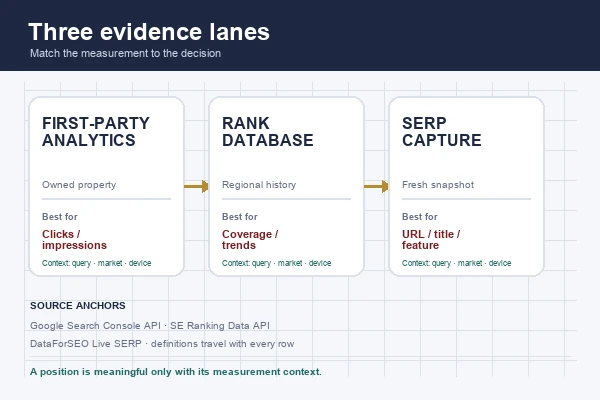
Infographic: the three evidence lanes used in this guide.
What is an SEO ranking API?
An SEO ranking API is a programmatic interface for retrieving search visibility data. Depending on the provider, the response may contain keyword positions, ranking URLs, search volume, traffic estimates, SERP results, competitor domains, backlinks, or technical audit findings.
The key distinction is data ownership. The Google Search Console API reports performance for a verified property. Its response can include clicks, impressions, CTR, and average position for queries and pages, but it does not give you a universal view of every competitor’s ranking. A third-party provider such as SE Ranking’s SEO API or a SERP API such as SerpApi’s SEO use case provides a broader dataset, subject to its own collection method, coverage, and credit model.
That difference changes how you interpret the number. “Position 4” from a rank tracker usually means the provider checked a defined keyword, engine, location, language, device, and date. “Average position 4” in Search Console is an impression-weighted property metric. Those values answer related questions, but they are not interchangeable.
Authority-backed data points and practical cases
Use these source definitions before comparing tools. They keep a raw SERP observation separate from a first-party performance metric and from a vendor’s modeled database.
| Source or case | What the source actually measures | How to use it |
|---|---|---|
| Google Search Console Search Analytics API | Rows grouped by query, page, country, device, date, or search appearance; position is an average position, and Google says the API may return only top rows. | Validate owned-site performance, not competitor rankings. |
| Google’s How Search Works documentation | Google says results can vary with location, language, and device, and search features vary by query. | Store those settings beside every ranking observation. |
| Yandex Webmaster popular queries endpoint | For a verified host, the endpoint can return up to 3,000 queries for the previous week, with indicators such as impressions, clicks, average display position, and average click position. | Use it for first-party Yandex reporting; do not call it a universal competitor feed. |
| DataForSEO Live SERP Advanced | Returns real-time SERP data for a specified keyword, engine, and location, including featured snippets and other SERP elements. | Choose it when a controlled location and structured SERP feature coverage matter more than a dashboard. |
| SerpApi Google Search API | Supports query and location parameters and returns structured organic, local, ads, knowledge-graph, and other result types; its documentation recommends city-level location when simulating a user. | Use a location-controlled SERP API when comparing markets. |
| SE Ranking Data API domain-keyword endpoint | Retrieves keywords a domain or URL ranks for in a selected regional database, with organic/paid type and SERP-feature filtering. | Use a regional database for history and coverage, then label it as database data rather than a live page capture. |
| Google’s AI features guidance | AI Overviews appear only when Google determines they add value; Google says there are no additional technical requirements beyond being eligible for normal Search. | Treat AIO as a separate, intermittent SERP feature—not a guaranteed column in every run. |
Three decisions these sources support
- Owned property: join Search Console clicks, impressions, CTR, and average position to your page and query dimensions. Do not use a third-party SERP position as a substitute for those metrics.
- Competitor snapshot: use location-specific Live SERP data or a controlled scraper, then retain the raw URL, title, result type, and collection context.
- AI visibility: follow Google’s AI features guidance and record an empty AIO field as “not observed in this run,” not as proof that the feature cannot appear.
These are complementary lanes: first-party analytics explains what happened to a verified property, a rank database explains a provider’s coverage, and a SERP capture shows what appeared under one defined set of conditions.
What is a Yandex rank tracker?
A Yandex rank tracker checks where a domain or URL appears for selected queries in Yandex results, then stores the observations over time. A tracker normally lets you segment by country, region, language, device, and search depth.
Yandex also exposes first-party site performance data through its Webmaster API. Its popular-query endpoint returns a top-3,000 query list for a host and an average display position. That is useful for measuring a site you control. It is different from scraping a public Yandex result page for a competitor, which requires a separate collection method and careful compliance review.
When a brief says “rank tracking for Baidu” or “Yandex rank tracker,” ask which of these jobs is required:
- First-party performance for an owned site.
- A third-party database of estimated rankings.
- A fresh SERP observation for a specific query and location.
Only the third job gives you the exact result page that a user saw at collection time.
Rank tracker, SEO ranking API, and keyword scraper: what is the difference?
Rank tracker
A rank tracker is the product layer. It manages projects, keyword lists, schedules, alerts, history, and charts. The API may expose those project records, but the dashboard is usually the main product.
SEO ranking API
An SEO ranking API is the integration layer. It lets your application request ranking or SEO data as JSON. Providers may offer keyword research, domain analysis, backlink, audit, project management, or SERP endpoints. Compare the exact endpoint and unit cost rather than assuming that every “SEO API” returns live positions.
Keyword scraper
A keyword scraper collects pages or result pages associated with a keyword. For SERP work, the useful output is a row-level observation: query, position, URL, title, snippet, result type, engine, market, device, and collection time. It is closer to raw evidence than to a finished rank-tracking product.
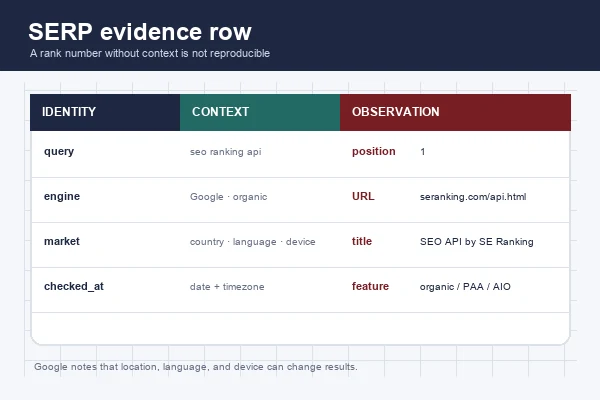
Infographic: a reproducible SERP evidence schema.
What data should you collect from a SERP ranking check?
A position alone is too thin for competitive analysis. Store a minimum schema that lets another person reproduce the observation:
| Field | Why it matters |
|---|---|
| Query | The exact keyword, including punctuation and spelling |
| Engine | Google, Yandex, Baidu, Bing, or another source |
| Market and language | Results vary by country, city, interface language, and locale |
| Device | Desktop and mobile can return different layouts |
| Checked at | Ranking is time-sensitive; keep the timestamp and timezone |
| Position | The ordinal position within the selected result set |
| Result URL | The page that earned the position |
| Title and snippet | Useful for SERP copy and intent analysis |
| Result type | Organic, ad, video, local pack, PAA, AI feature, or other module |
| Target domain | Lets you group and compare competitors |
Google explains that location, language, and device can change the results served for a query in its official Search documentation. Treat these settings as part of the key, not as optional metadata.
How to scrape keyword rankings and SERP features
1. Define one reproducible check
Start with a small set of queries. Write down the engine, country, language, device, result depth, and whether ads or SERP modules are included. Do not mix a desktop Google check in New York with a mobile check in London and call the difference a ranking change.
2. Choose the data route
Use a first-party API when you own the property and need clicks or impressions. Use a commercial ranking API when you need managed history across many projects. Use a SERP API when your application needs structured result pages at scale. Use a browser-based scraper when you need a custom field or a result type that a provider does not expose.
A provider page can confirm that an endpoint exists, but it does not prove that its result definitions match yours. Record the provider, endpoint, collection date, and response schema in your evidence ledger.
3. Collect the result rows
For each query, capture the fields in the schema above. Keep organic results separate from ads and modules. If the same URL appears in several modules, preserve the module context instead of deduplicating it too early.
For a ready-made workflow, choose Google Search Scraper in the Octoparse Templates Gallery, then run it through MCP on Octoparse Cloud. We tested this route with a single query before adding the example below.
https://www.octoparse.com/template/google-search-scraper
Hands-on example: one query, 10 organic results, 6 related searches
On September 22, 2026, we ran seo ranking api through Google Search Scraper (template ID 15) using the Octoparse MCP server and cloud execution. The completed task returned 16 records: 10 organic results with positions 1–10 and six related searches. All 10 organic records contained a title, URL, and snippet, with no duplicate organic URLs.
We used all_these_words: ["seo ranking api"], interface_Language: "English", and pagination_times: "1". Every exported record reported Current_Page: "1". The workflow was search_templates → execute_task → export_data; the export contained all 16 records in one storage page.
| Returned position | Result title | Result URL |
|---|---|---|
| 1 | SEO API by SE Ranking: SEO & AEO Data at Scale | seranking.com/api.html |
| 2 | SEO – SerpApi | serpapi.com/use-cases/seo |
| 3 | Best Rank Tracker API in 2026: Tested & Compared (Speed + Pricing) | scrapingdog.com/blog/rank-tracker-api/ |
What this teaches: filter Result_type = organic before reading Position. The six related_query records used Related_Queries_Title and Related_Queries_URL, with blank positions. Counting all 16 records as ranked pages would overstate the result count. The template includes AI Overview and People Also Ask columns, but both were empty in this run. Treat those columns as optional extensions: an empty value does not establish that Google never displays the feature, and this test does not validate AIO or PAA coverage.
Test limits: this was one query and one run. We set the interface language to English, left the region unspecified, and did not control the device. The output supplied a collection date, not a precise timestamp or timezone. We verified the exported fields and counts, but did not independently validate positions against a simultaneous browser capture. Use this as a collection example, not a location-specific rank benchmark or a measure of tracking accuracy.
Evidence reference: task 56620d45-9d91-4bc6-b2bf-f26581e935c5; collection lot 639256694012461465. Keep the task, lot, input settings, and raw export together when reproducing the workflow.
Official Octoparse tutorial: “How to scrape Google SERP for SEO.”
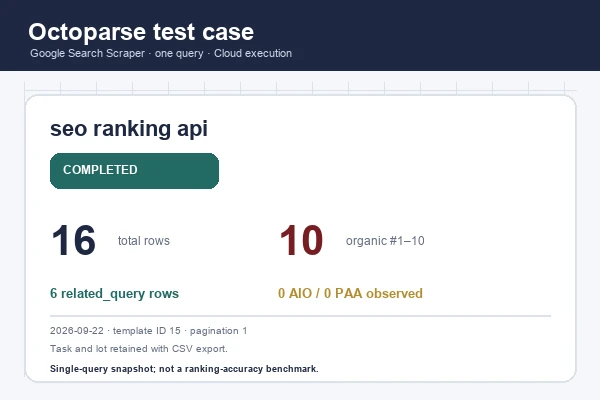
Infographic: verified Octoparse test settings and output counts.
4. Normalize and compare
Normalize URLs before grouping. Preserve the original URL as a raw field, then add a normalized host and path. Compare like with like: the same engine, market, language, device, depth, and time window. A rank delta without that context is not a reliable alert.
5. Validate against owned analytics
If you control the site, compare collected SERP observations with Search Console or Yandex Webmaster data. Google states that Search Console data is queried through searchanalytics.query() and is subject to row and data-availability limits. It is a validation lane, not a replacement for a raw SERP capture.
When should you use SE Ranking or DataForSEO?
Choose a managed ranking API when the hard part is coverage, scheduling, and historical storage. SE Ranking’s API page lists keyword research, domain analysis, project management, rankings, and SERP-related data. DataForSEO is another API-first route for teams that want to assemble keyword, SERP, and competitive-analysis workflows themselves.
Ask each vendor five questions before committing:
- Which engines and countries are supported for the exact endpoint?
- Is the result live, cached, or modeled from a database?
- How are credits charged for depth, location, device, and SERP features?
- Can you retrieve the ranking URL and raw result type, not only a position?
- Can you export historical observations for audit and reprocessing?
Do not treat vendor-reported database size or accuracy as a benchmark. Run the same controlled keyword set through two providers and compare coverage, freshness, missing modules, and URL agreement.
How Octoparse fits a keyword-ranking workflow
When the API does not expose the field you need
Octoparse is a web data platform that combines the Templates Gallery, Octoparse Desktop authoring, cloud execution, and the Open Platform. For a standard Google result-page workflow, a ready-made template can reduce setup time. For a custom SERP module, Desktop lets you author the extraction flow by selecting the fields you need. The Open Platform can run and retrieve data; reusable task authoring remains in Desktop or Agentic Mode unless current documentation confirms another boundary.
When you need a repeatable evidence table
A useful workflow is: define the query set, run the same collection settings, export the rows, and preserve the collection timestamp. That gives an SEO team a reviewable evidence table instead of a screenshot with no context. The output can then feed a spreadsheet, a dashboard, or a downstream API process.
When you want a no-code starting point with room to grow
Start with the Templates Gallery for a supported search workflow. Move to Octoparse Desktop when the template does not expose a required field. Use the MCP documentation or Open Platform when a verified task needs to be run from an application or agent. Check the current pricing page before quoting quotas or costs.
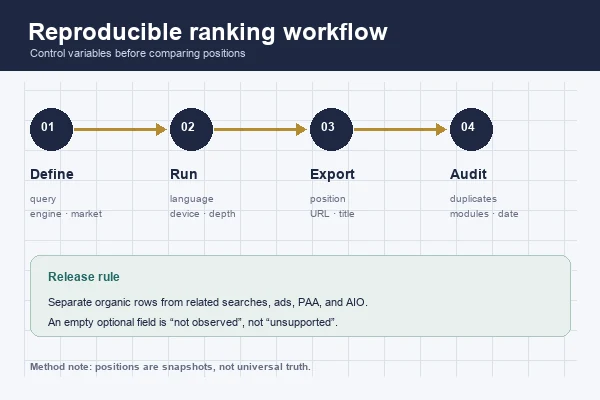
Infographic: controls and validation rules for repeatable ranking checks.
Is scraping keyword rankings legal?
Legality depends on the target site, jurisdiction, authentication state, contract terms, and the type of data collected. A public result page does not automatically grant permission to ignore rate limits, access controls, or terms. Keep collection narrow, respect applicable policies, avoid personal data unless you have a clear lawful basis, and document why the data is needed. For guidance on evaluating third-party SEO advice, use Google’s official guidance on third-party SEO tools and the target service’s current terms.
FAQ
- What is the Yandex rank tracker?
A Yandex rank tracker records where a domain or URL appears for selected queries in Yandex results. Yandex Webmaster also exposes a top-3,000 query list and average display position for a host; that is first-party performance data, not a universal competitor rank feed.
- What is the SEO ranking API?
It is a programmatic interface for retrieving ranking or related SEO data. The response may contain positions, ranking URLs, SERP rows, keyword metrics, competitors, or audits. Always verify the endpoint’s engine, location, freshness, and billing model.
- What is a keyword scraper?
A keyword scraper collects pages or search-result records associated with a query. For rank research, it should return the query, position, URL, title, result type, market, device, and timestamp so the observation can be checked later.
- Can Google Search Console replace a rank tracker?
No. Search Console is valuable for properties you verify, but it reports your site’s impressions, clicks, CTR, and average position. It does not provide a general competitor rank feed.
- Can one API track Google, Yandex, and Baidu?
Sometimes, but coverage is endpoint-specific. Confirm engine, country, language, device, and result-depth support for the exact API method. Do not infer Baidu or Yandex coverage from a provider’s Google documentation.
- What is the difference between a rank tracker and a SERP API?
A rank tracker manages projects, schedules, history, and alerts. A SERP API returns a structured result page. A team may use both: the tracker for monitoring and the SERP response for evidence and diagnosis.
- Should I use a scraper or an SEO API?
Use an SEO API when you need managed coverage and historical data. Use a scraper when you need a custom field, a specific SERP module, or a workflow the API does not expose. Test both against the same controlled query set before scaling.
Conclusion
An SEO ranking API answers “where did this keyword rank under defined conditions?” A keyword scraper answers “what did the result page actually contain?” A reliable workflow keeps those questions separate, records the collection context, and validates third-party observations against first-party analytics where available.