Most tutorials for scraping Google search results were written before January 2025, when Google made a change that quietly broke almost all of them. If you’ve tried copying a requests + BeautifulSoup snippet from a 2023 blog post recently and ended up with an “enable JavaScript” page instead of search results, this is why.
This guide walks through three methods that still work in 2026: a no-code template, a Python script using a headless browser, and commercial SERP APIs. You can pick the one that fits your volume, budget, and how much code you want to write. You’ll get organic rankings, paid ads, SERP features like People Also Ask, related searches, and (where present) AI Overview citations, all exportable to Excel, CSV, or JSON.
If you need Google results as structured data at scale, see our full guide on how to get Google search data, and compare the tools in our best SERP APIs roundup
Quick Answer: Pick Your Method in 30 Seconds
| Method | Best for | Coding required | Realistic success rate (May 2026) |
| 1. Octoparse no-code template | Marketers, SEO teams, weekly tracking of hundreds to low thousands of rows | None | ~70% to 80% on 7-day rolling average; failed runs can be auto-retried |
| 2. Python + Playwright + proxy | Developers running mid-volume (100 to 500 queries/day) custom pipelines | Intermediate | Medium. Single-IP scripts hit CAPTCHA within 1 to 2 days without proxy rotation |
| 3. SERP API (Serper, DataForSEO, Bright Data, SerpApi) | Engineering teams running thousands of queries per day, rank tracking at scale | Light (HTTP client) | Highest. Providers absorb proxy and CAPTCHA cost |
If you need a one-line recommendation: start with Method 1 if you don’t code, Method 2 if you do code and your volume is small, and Method 3 the moment you cross a few thousand queries per day.
Why Most Pre-2025 Google Scraping Tutorials Don’t Work Anymore
If you tried an older tutorial recently and it failed, there are three structural reasons, not bugs in your code.
The January 2025 JavaScript Requirement
In January 2025, Google began enforcing JavaScript rendering for google.com/search requests. A raw requests.get() call no longer returns the search results HTML; it returns a stripped-down page asking the client to enable JavaScript. Every old tutorial that relies on requests + BeautifulSoup to parse h3 tags directly is now broken at the first network call. This is the single biggest reason the original code at the bottom of this article needed to be rewritten.
Obfuscated CSS Class Names
Even when you do render JavaScript, Google rotates the CSS class names of result containers (.g, .tF2Cxc, .VwiC3b, and so on) every few months. Selectors copied from a 2022 Stack Overflow answer have a short shelf life. You either pin to more stable attribute selectors (div[data-snhf], [data-sncf]) or accept that selectors will need maintenance.
Aggressive IP and Behavioral Detection
Google uses reCAPTCHA v3 with session-level scoring, which means a single residential IP making search-page requests at any consistent rhythm starts seeing CAPTCHA prompts within a day or two. This is widely reported on Hacker News and in vendor write-ups from Zyte and Scrapfly. Rotating proxies, randomized timing, and realistic browser fingerprints have moved from “nice to have” to “required” for any DIY approach.
What Data Can You Extract from Google Search Results
You can scrape what you see from the results pages after you enter a keyword. Not only for the first page but also all pages with a pagination. Here are some examples of the types of data that can be extracted from Google search results:
| Field | Example use |
| Title, URL, position | Rank tracking, share-of-search |
| Meta description / snippet | Click-through optimization |
| Featured snippet | Snippet opportunity hunting |
| People Also Ask (PAA) | Content gap analysis |
| Related searches | Long-tail keyword discovery |
| Ads (sponsored slots) | Competitor PPC monitoring |
| Local pack | Local SEO position tracking |
| AI Overview text + cited sources | Brand mention tracking in AI-generated answers |
Why People Scrape Google Search Results
Beyond generic “market research,” here are seven concrete workflows people actually run:
- Rank tracking: monitor your own keyword positions across geographies and devices over time.
- Competitor SERP monitoring: see which queries competitors rank for and how that set shifts week over week.
- AI Overview citation tracking: a 2026 use case for checking whether your brand is being cited in Google’s AI-generated answers, and which competitors are cited instead.
- PAA-driven content gap analysis: pull People Also Ask questions to find topics your competitors haven’t covered.
- Local pack monitoring: track local search positions for service-area businesses across postcodes.
- Ad copy intelligence: observe which competitors are running paid ads on your money keywords and what their angles are.
- Featured snippet hunting: find keywords where a snippet exists, but the current owner has a weak page you could outrank.
If you’re scoping a broader SEO data pipeline, see our guide on how to conduct SEO research with web scraping.
Does Google Search Have an Official API?
Google blocks direct API access to search results—by design.
Google officially deprecated its Web Search API in November 2010 and fully shut it down in September 2014 to protect ad revenue and prevent automated data extraction that bypasses their monetization model.
However, Google offers several other APIs that provide access to various services and functionalities, such as the Google Maps API, Google Translate API, and Google Sheets API. These APIs allow developers to integrate specific Google services into their applications but do not provide direct access to search results.
Method 1: Scrape Google Search Results Without Coding (Octoparse)
If you have no idea about coding, you can try the best Google search scraper – Octoparse. It can help you scrape the Google search results without any coding. Octoparse makes the process of data extraction from the web more accessible and faster. It can automatically scrape data from any page and save it in an organized format like Excel files.
The free version of Octoparse can meet most of your scraping needs, but if you’re looking for some advanced features like cloud extraction, scheduled scraping, IP rotation, preset task templates, and some others, then you can ask for an advanced version or the data service. What’s more, Octoparse provides preset scraping templates where you can get data by entering your keywords and a few clicks.
Turn website data into structured Excel, CSV, Google Sheets, and your database directly.
Scrape data easily with auto-detecting functions, no coding skills are required.
Preset scraping templates for hot websites to get data in clicks.
Never get blocked with IP proxies and advanced API.
Cloud service to schedule data scraping at any time you want.
In the next part, you can follow the easy steps about extracting search results data from Google. Similarly, you can use the following steps to extract search results from not only Google but also Bing or DuckDuckGo.
Preset templates to scrape Google SERP online
If you don’t want to download any software to your device and just want to extract Google Search data once a time, you can try Octoparse online data scraping template, which allows you to scrape Google Search data online within a few clicks.
https://www.octoparse.com/template/google-search-results-scraper
https://www.octoparse.com/template/google-search-scraper
3 steps to export Google search results without coding
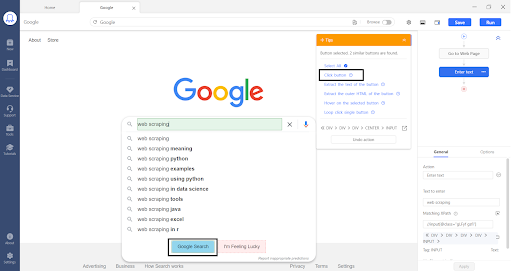
Step 1: Open Google in Octoparse and enter the search keyword
After installing Octoparse on your device, we will start by entering the Google URL in the Octoparse application and clicking on Start.
After that, we will click on the search bar in Google and click on the “enter text” button in the Tip Box. Then we enter the search keyword that we want to search for on Google.
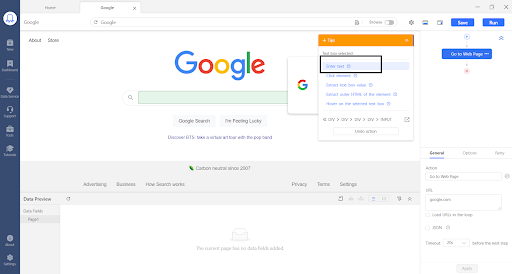
Then click on the search button on Google and click “Click Button” on the Tip Box. This will click the Search button, and we will be sent to the search result page of Google.
Step 2: Select the data that you need to extract
When we get to the search result page, we click on the data that we need to extract. For example, if we want to extract the search result title, click on the first and second titles, and it will automatically select all the other titles.
Then click on “Extract Text of Selected Element” and the scraper is ready to get all the titles from the search result.
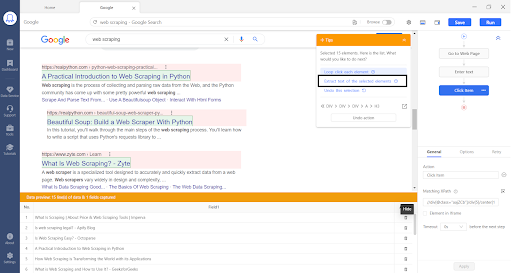
If you need more information on scraping Google search results with Octoparse and you need to extract other data like the URL of the site, title, meta description, and other details, or you want to paginate to the next pages of Google search results, then you can check out Google Search results scraping guide.
Step 3: Export scraped Google search results into Excel
Click the “Run” button at the top to start the scraping process. Select whether you want to run the scraper on your device or on the cloud. Once the run is complete, you can click on the ‘Export Data’ button and export the scraped Google search result data in different formats like Excel, HTML, CSV, or JSON.
If the template doesn’t cover what you need (say you want a specific custom field), you can build a workflow from scratch: open google.com inside Octoparse, click the search bar (Octoparse offers “Enter Text”), type your keyword, click the search button (“Click Button”), then select the elements you want to extract on the results page. The Octoparse help center walks through the custom version step by step.
Video tutorial: Scraping data from Google Search
Real-World Usage You Can Expect
Google Search is one of the two most-used template workflows on the Octoparse platform, and power users run it 100+ times per active period, which suggests the dominant use case is ongoing SEO monitoring rather than one-off research. If you’re evaluating no-code scrapers for recurring SEO work, that’s the workflow the platform’s engineering effort has been tested against most.
In terms of raw reliability, the 7-day rolling success rate on the two main Google Search Scraper templates currently sits in the 70% to 80% range; failed runs can be auto-retried from the task settings, so for typical SEO workloads the effective completion rate after retries is higher. (Like every SERP scraper, success rates fluctuate when Google tightens its defenses. Anyone quoting a flat number above 90% is showing you a best-case snapshot, not steady-state behavior.)
Two patterns from real usage that may be useful as reference points:
- An in-house brand and community monitoring team uses the platform to watch their company’s name and product titles across multiple search and community sources. Their setup runs dozens of SERP and community tasks on schedules ranging from every ten minutes to once a day, replacing what used to be manual polling of multiple search and forum entry points.
- A research and data enrichment firm uses Google SERP data as an input layer for entity validation and signal extraction. The scraped fields (title, URL, snippet) feed downstream normalization, deduplication, and cross-referencing pipelines before being used in market and audience analysis.
When the No-Code Path Is Enough (and When It’s Not)
It’s enough when you’re pulling hundreds to a few thousand rows per week, you care more about the data than about owning the pipeline, and you want export-to-Excel rather than JSON-into-your-app. It’s not enough when you need tens of thousands of queries per day, sub-second latency, or programmatic delivery into a downstream system. At that point Method 3 (a SERP API) is more honest about the cost structure.
Method 2: Scrape Google Search Results with Python
If you write code and your volume is small, you can run your own scraper. But the 2023-era recipe of requests + BeautifulSoup is no longer viable for the reasons covered above. The working 2026 version uses a headless browser.
Why You Need a Headless Browser Now
Because Google requires JavaScript, you need something that actually executes JavaScript on the page. The three options are Playwright, Selenium, and Puppeteer. We recommend Playwright: it has cleaner Python bindings, faster startup, and is less likely to be flagged by Google’s bot detection than Selenium in default configurations.
Install Playwright:
Minimal Working Example
The script below opens a Chromium instance, runs one search, and returns the top results as a list of dicts. It’s intentionally minimal: at any real volume you’ll need proxies, randomized delays, and probably a stealth plugin (see “Why This Will Still Fail at Scale” below).
Change the query string in the main block to whatever you want to track. To run the same script across many keywords, wrap it in a loop and add a randomized delay between requests:
Export to CSV
Once you have the list of dicts, pandas is the shortest path to a usable file:
Why This Will Still Fail at Scale
The minimal script above works fine for a one-off test or a few dozen queries from a residential IP. Push it to a few hundred per day from the same IP and you’ll start seeing CAPTCHAs, sometimes outright blocks. At that point you have to add:
- a rotating proxy pool (residential or mobile; datacenter IPs are usually blocked on first contact)
- realistic timing: randomized delays, occasional pauses, no perfectly regular cadence
- a stealth library (e.g.,
playwright-stealth) to mask common automation fingerprints - a CAPTCHA solver for the cases where rotation isn’t enough
By the time you’ve built all of that, you’re operating something close to a small SERP API, which is the trade-off Method 3 makes explicit.
Method 3: Use a SERP API (Best for Production and Scale)
If you need thousands of queries per day or a guaranteed success rate, building your own is rarely worth the maintenance cost. A SERP API takes a query, returns parsed JSON, and absorbs proxy rotation, browser rendering, CAPTCHA handling, and selector maintenance on its end.
How a SERP API Works
You send an HTTP request with a query string (and optional parameters like country, language, device); the API runs the actual search against Google using its own infrastructure and returns either structured JSON or raw HTML. You pay per successful request. This collapses everything in Method 2’s “Why This Will Still Fail at Scale” list into someone else’s problem.
Popular Options
Pricing changes frequently; figures below were verified in May 2026 and reflect each provider’s published pay-as-you-go or entry plan. Check the vendor’s pricing page before committing.
Pick based on the shape of your workload: low volume and latency-sensitive (Serper), high volume and batch-tolerant (DataForSEO Standard Queue), production reliability over price (Bright Data), or already invested in the SerpApi ecosystem.
For a broader survey of SEO tooling beyond just SERP collection, see our competitor analysis tools post.
How to Choose: Octoparse vs. Python vs. SERP API
Three quick personas to make the trade-off concrete:
- “I’m in marketing and need a snapshot for a client report.” → Method 1 (Octoparse template). You’ll have an Excel file in under an hour, with no environment setup.
- “I’m a developer building an internal SEO tool with 100 to 500 queries per day.” → Method 2 (Python + Playwright + a small proxy plan). You keep full control over the parsing logic.
- “I’m building a SaaS that needs hundreds of thousands of SERPs a month.” → Method 3 (SERP API). At that volume, DIY’s hidden costs (proxy bill, CAPTCHA solvers, on-call for selector breaks) exceed the API spend.
FAQ about Scraping Google Search
Can You Still Scrape Google Search Results in 2026?
Yes, but the methods that worked before 2025 mostly don’t. Raw requests + BeautifulSoup returns an “enable JavaScript” page now. The three approaches that still work are: a no-code template like Octoparse, a Python script using a headless browser (Playwright), or a commercial SERP API.
Why Did My Old Python Scraper Stop Working?
In January 2025, Google started requiring JavaScript rendering for search results. requests.get() now returns a stripped page asking the client to enable JavaScript, not the SERP HTML. The fix is to switch to a headless browser (Playwright or Selenium) or to a SERP API that handles rendering on its end. See Method 2 for a working 2026 script.
How Do I Export Google Search Results to Excel?
With Octoparse: after the run finishes, click Export Data and choose Excel. With Python: convert the scraped list to a pandas DataFrame and call df.to_excel("results.xlsx", index=False). With a SERP API: the JSON response can be loaded into pandas the same way, or imported directly into a spreadsheet.
How Many Google Search Results Can I Scrape Per Day for Free?
With a DIY Python script on a single residential IP, you can realistically expect 50 to 200 queries per day before CAPTCHA blocks set in (consistent with reports on Hacker News from developers running similar setups). With Octoparse’s free plan, the limit depends on the plan’s task and row quota; check the pricing page for current numbers. With SERP API free tiers, Serper gives 2,500 free searches and most other providers offer trial credit in the $1 to $20 range.
Is It Legal to Scrape Google Search Results?
Many people may wonder if it is ok to scrape data from Google results. Does Google allow data scraping? Is there a high possibility of being banned by Google? In summary, it is complex to define the legality of
scraping Google search results. Web scraping is not inherently illegal. Its legality depends on factors such as website terms of service, scraped content, and operating jurisdiction.
So, being cautious is essential. We advise you to read Google’s terms of service before scraping, follow the website terms, and ask for permission when needed. For example, Google’s Terms of Service clearly state that scraping is prohibited in their “robots.txt” file.
It’s also important to learn the laws and rules of your country. And personal privacy data is generally protected by laws in most countries. Another important consideration is your data usage; please note that it is not allowed for commercial or profitable purposes. You can also read the is web scraping legal article to learn more about this question.
Can I Scrape Google with No Coding at All?
Yes. Octoparse’s https://www.octoparse.com/template/google-search-results-scraper requires zero lines of code: you enter keywords, click run, and export. It’s the fastest path from “I need this data” to “I have a spreadsheet.”
Tips for scraping Google without getting blocked
The patterns below apply across all three methods, though Methods 1 and 3 handle most of them for you under the hood:
- Use rotating proxy servers; residential or mobile, not datacenter, for Google specifically.
- Don’t make requests at a perfectly regular rhythm; vary delays and add occasional longer pauses.
- Have a CAPTCHA-solving fallback for the cases where rotation isn’t enough.
- Respect
robots.txtwhere you can, and stick to the data you actually need rather than crawling at full speed. - Skip image and JavaScript resource fetches when you don’t need them; fewer requests mean a lower fingerprint.
- For high volumes, consider a SERP API instead of solving these problems yourself.
Final Words
Scraping Google in 2026 is harder than it was in 2022, but it’s still doable. Which method you pick should come down to volume, budget, and how much code you want to maintain, not which one a marketing page tells you is “the best.” For occasional or weekly SEO work, the no-code template is the lowest-effort path. For developer-scale workloads, Playwright with proxies is honest about its limits. For production scale, a SERP API is the only setup that doesn’t slowly turn into a maintenance project.
If you want to try the no-code path, start with the Google Search Results template. It takes a few minutes to set up, and you’ll know within one run whether the output fits your workflow.
Download Octoparse and have a free trial now to begin extracting Google search results easily!
Turn website data into structured Excel, CSV, Google Sheets, and your database directly.
Scrape data easily with auto-detecting functions, no coding skills are required.
Preset scraping templates for hot websites to get data in clicks.
Never get blocked with IP proxies and advanced API.
Cloud service to schedule data scraping at any time you want.