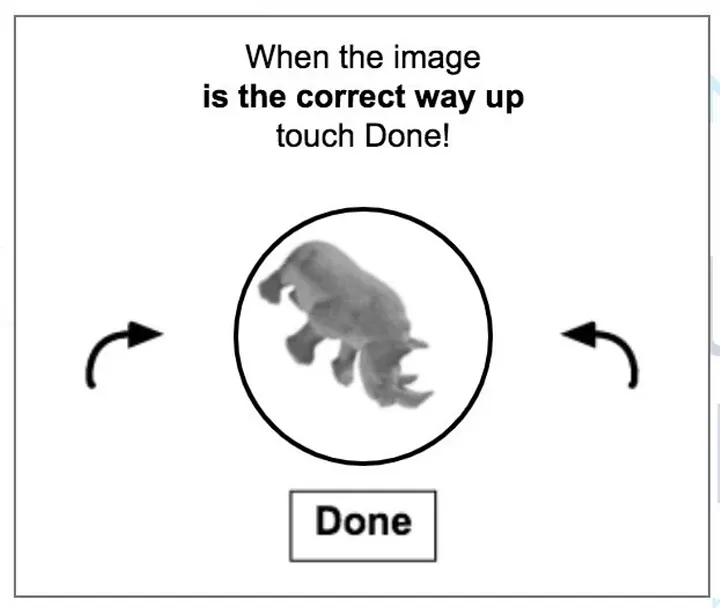
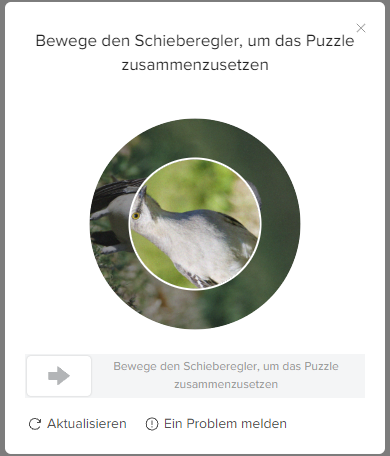
If you’ve ever tried to scrape TikTok data at scale, you already know what happens. You set up a task, hit “Run,” and within minutes — a spinning image appears, asking you to rotate a picture until it looks “right.” Your scraper stops. Your whole task stalls. And you’re left manually solving puzzles like it’s 2012.
That’s a rotate CAPTCHA, and for years, it’s been one of the hardest anti-bot defenses to crack automatically. Unlike text-based CAPTCHAs that distort a few characters, rotate CAPTCHAs demand something far more complex: the machine has to understand what an image looks like right-side-up. A cat with its head pointing up. A building with its foundation at the bottom. A landscape with the horizon level.
Until recently, this was an unsolved problem for automated scraping tools. Not anymore.
Why Traditional Approaches Fail
Here’s the thing — the usual tricks don’t work on rotate CAPTCHAs. Most CAPTCHA-solving tools are designed to read distorted text — they break the image into pieces, identify each character, and type it out. But a rotate CAPTCHA doesn’t contain text at all. It contains a photograph that’s been randomly rotated, and you (or your scraper) must spin it back to its natural orientation within a tolerance of just 0-2 degrees.
That’s a fundamentally different problem. It requires three capabilities that traditional scraping tools simply don’t have:
It has to “see” like a human. The system must “know” that cats face upward, buildings stand vertically, and skies belong at the top. This isn’t simple pattern matching — the machine needs a sense of how the real world looks when it’s right-side-up.
It has to be extremely precise. Even a small misalignment of 3–10 degrees causes verification to fail. Close isn’t good enough — the rotation has to be nearly perfect.
Every CAPTCHA is different. The background images are random. Every single puzzle is unique. There’s no fixed set of answers to memorize — the system has to figure out each one from scratch.
This is why most CAPTCHA-solving services — even the ones that work well for reCAPTCHA or image selection puzzles — struggle with rotate CAPTCHAs. It’s not about recognizing something in the image. It’s about predicting an exact angle. That’s a completely different kind of problem.
The Breakthrough: Teaching AI to “See” Orientation
Octoparse’s engineering team took a different approach. Instead of trying to figure out what’s in the image and then reason about which way it should face, they built an AI system that simply looks at any image and predicts exactly how many degrees it needs to rotate to look right — a single number between 0° and 360°.
Think of it like this: rather than teaching the AI “cats face up, so rotate until the cat faces up,” they taught it to look at any image and output a number — the exact number of degrees it needs to rotate to reach its natural position.
The core architecture uses a Convolutional Neural Network (CNN) — a type of deep learning model that’s especially good at understanding images — combined with a technique called regression, which just means “predict a number.”
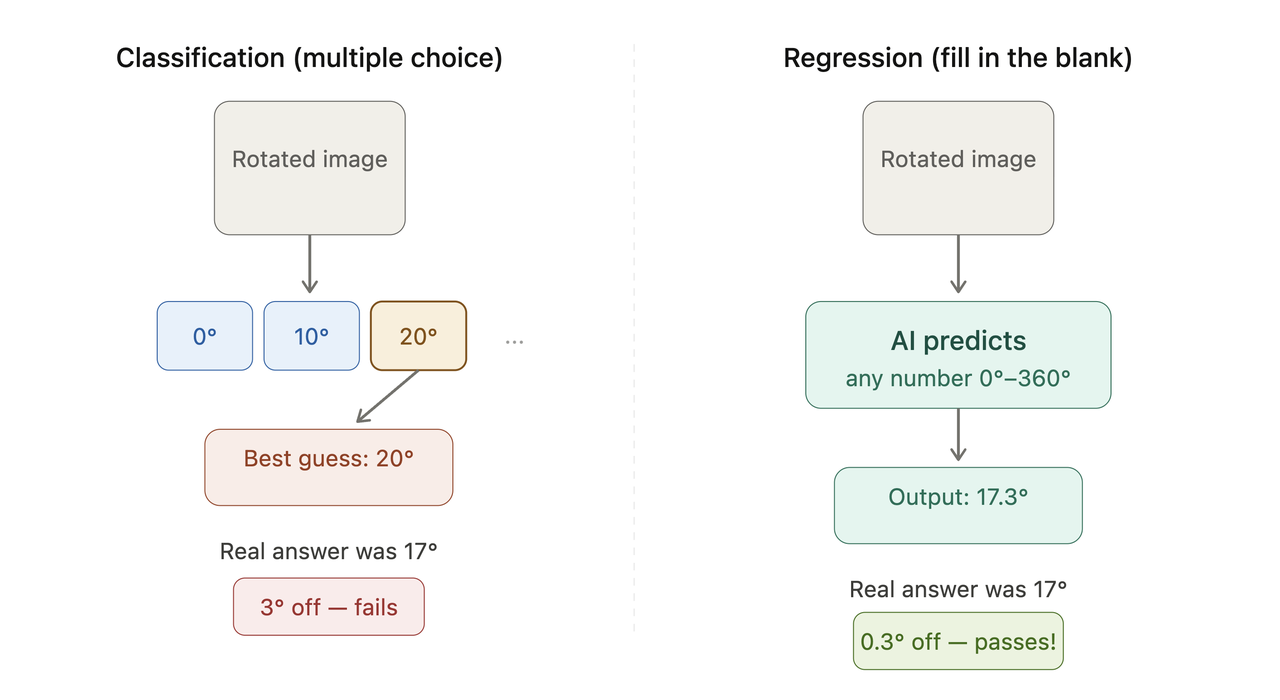
Here’s the key idea: instead of asking the model “which of these 36 preset angles is closest?” (like multiple choice), we ask it “exactly how many degrees does this image need to rotate?” (like fill-in-the-blank). The first approach forces the model to pick from a limited menu — 0°, 10°, 20°, and so on — and if the real answer is 17°, the best it can do is guess 20° and hope that’s close enough. The second approach lets the model output 17.3° directly. That extra precision is what gets us past the tight 0-2 degree tolerance that rotate CAPTCHAs demand.
How We Trained the AI
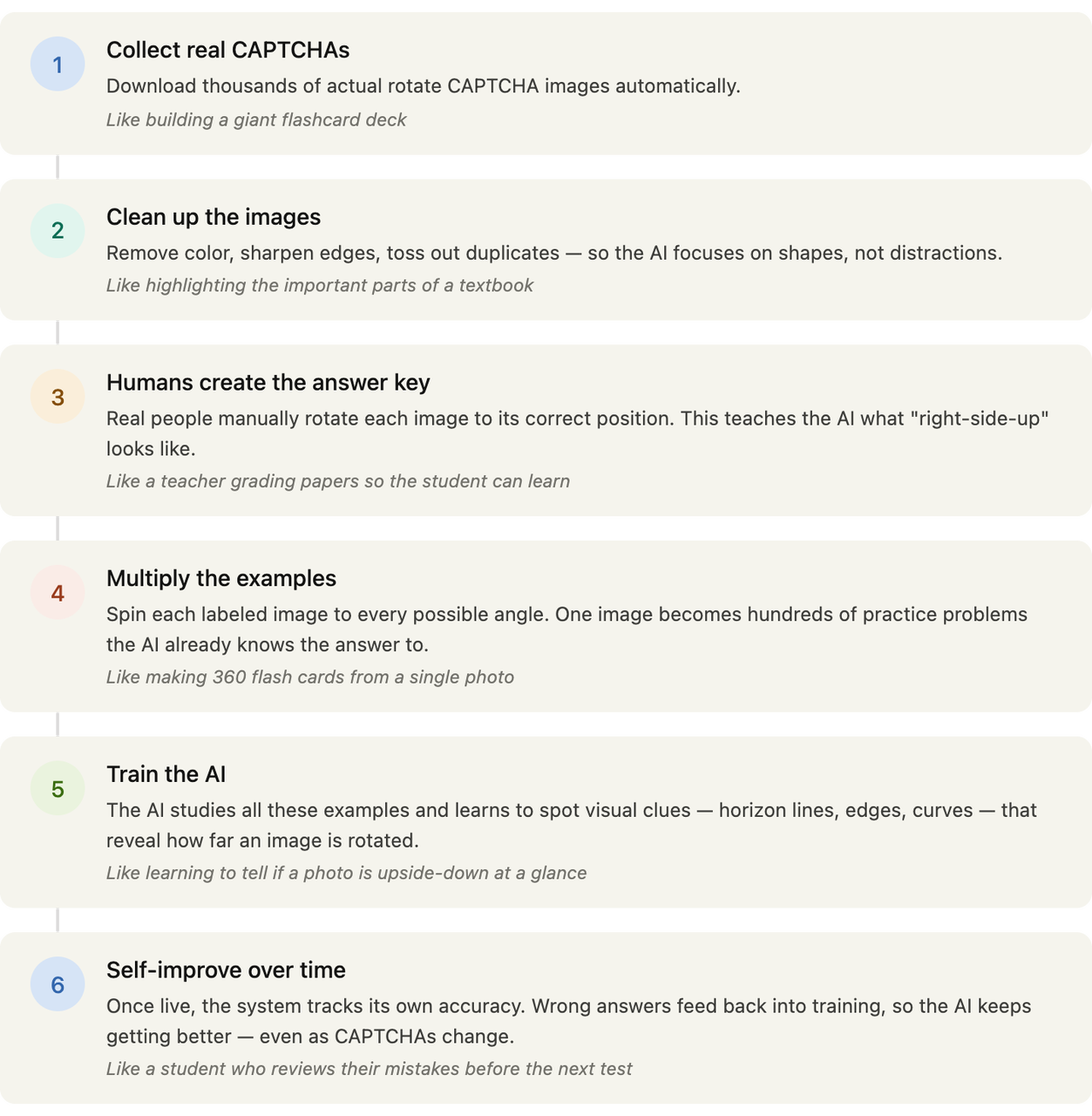
Teaching an AI to solve rotate CAPTCHAs is a lot like teaching a child to recognize when a photo is upside-down — you need to show them thousands of examples first. Here’s how that process works, in plain English:
- Collect thousands of real CAPTCHAs. First, we need study material. The system automatically downloads real rotate CAPTCHA images — thousands of them. Think of this as building a giant flashcard deck for the AI to learn from.
- Clean up the images. Not every image is useful. We simplify each image by removing color and sharpening the outlines of objects, so the AI can focus on shapes and structure rather than getting distracted by colors or background noise. We also toss out duplicates — showing the AI the same image twice doesn’t help it learn anything new.
- Show the AI what “correct” looks like. This is the human step. Real people manually rotate each image to its correct, right-side-up position using a custom tool. This creates the “answer key” — the AI needs to know what “perfectly upright” looks like before it can learn to predict rotation angles.
- Multiply the training data. Here’s a clever trick: once we know an image’s correct orientation, we can spin it to every possible angle — 47°, 182°, 311°, you name it — and the AI already knows the answer for each one. One labeled image becomes hundreds of training examples.
- Teach the AI to spot orientation clues. The AI learns to detect visual cues that reveal rotation — straight lines that should be horizontal, curves that suggest a horizon, edges that indicate “up” versus “down.” These patterns are what the AI relies on when it encounters a brand-new CAPTCHA it’s never seen before.
- Let it self-improve. Once deployed, the system tracks its own success rate. When it gets a CAPTCHA wrong, that feedback helps improve the AI over time — so it keeps getting sharper, even as CAPTCHA providers update their challenges.
The end result is a lightweight AI model that Octoparse runs in the background — solving each CAPTCHA in milliseconds, without the user even noticing.
96% Success Rate in Real-World Use
In real-world use, this system achieves over 96% recognition accuracy on rotate CAPTCHAs — enough to keep your scraping tasks running essentially without interruption, even when CAPTCHAs pop up frequently.
To put that in perspective: most CAPTCHA-solving services that use human workers to solve puzzles report accuracy rates between 85–95%, and they’re much slower. Octoparse’s AI approach matches or beats those numbers while solving each CAPTCHA in milliseconds — so fast you won’t even notice it happening.
Where We Deploy This — and Where We Don’t
Here’s an important point about how Octoparse uses this technology in practice. We didn’t take this rotate CAPTCHA solver and bolt it onto every scraping task indiscriminately. That would be both technically wasteful and ethically questionable.
Instead, we took a targeted approach: we deploy this technology only on sites that allow public data scraping, to ensure all practices remain fully legal and compliant. In the web scraping industry, the legal landscape has become increasingly clear. The landmark hiQ v. LinkedIn ruling established that scraping publicly available data doesn’t violate the Computer Fraud and Abuse Act (CFAA), and the 2024 Meta v. Bright Data case reinforced this precedent for public social media data.
For sites where the business value is high and the CAPTCHA challenge is severe, Octoparse has integrated the rotate CAPTCHA solver directly into the template itself. For these sites, users don’t need to configure anything. They select the template, input their parameters, and the CAPTCHA handling happens automatically behind the scenes. No setup.
Truly out-of-the-box.
The TikTok Case Study
TikTok is a perfect example. With approximately 1.9 billion monthly active users globally as of early 2026 — and roughly 136 million users in the US alone — TikTok has become one of the world’s most valuable datasets for market research, influencer analysis, content strategy, and competitive intelligence.
But TikTok also deploys aggressive anti-bot measures, including rotate CAPTCHAs that trigger frequently during automated browsing. For anyone trying to scrape TikTok data at scale, this has historically been a painful bottleneck.
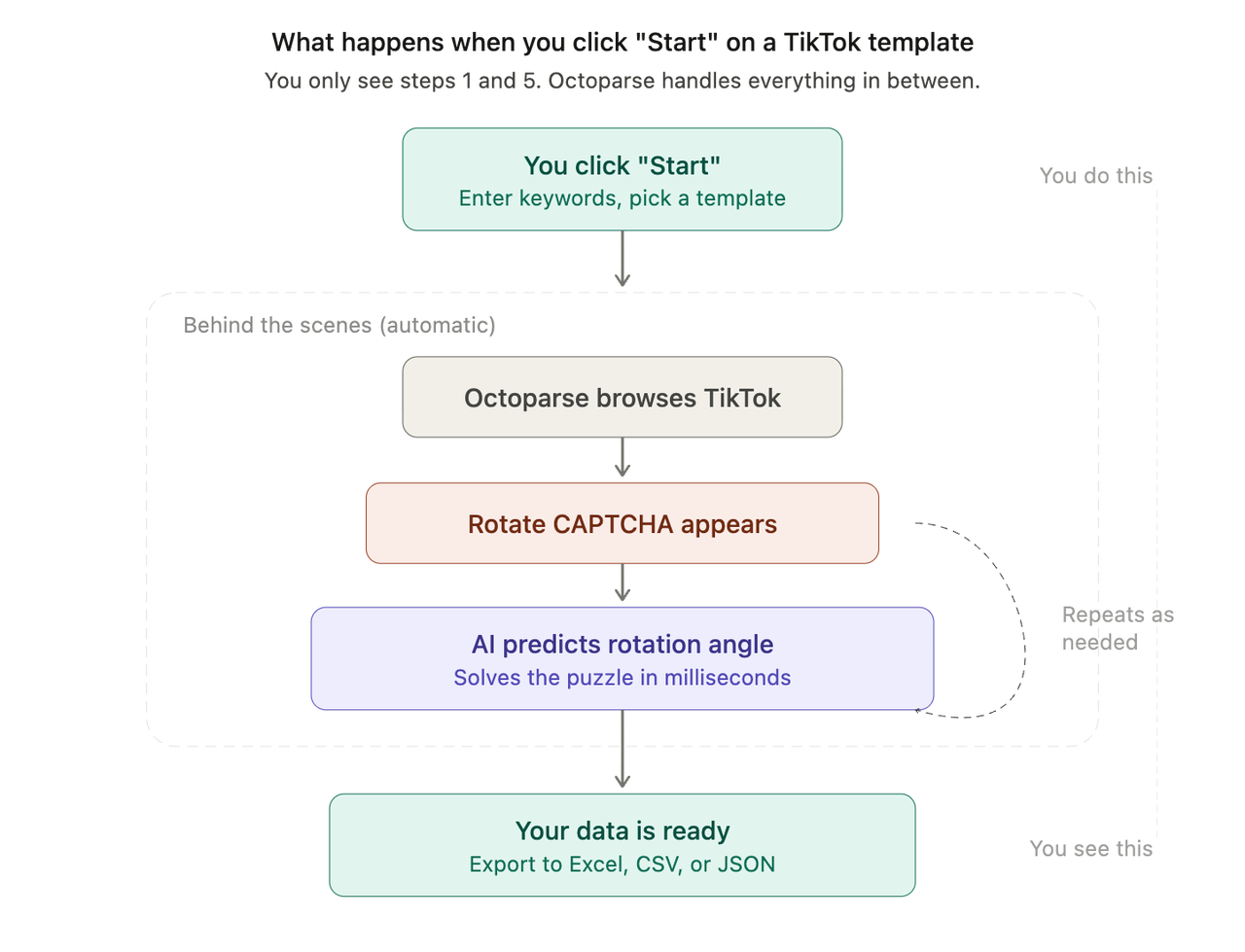
Octoparse’s TikTok scraper templates now include the rotate CAPTCHA solver baked directly into the workflow. Here’s what happens behind the scenes: when a CAPTCHA pops up during scraping, the template automatically grabs the CAPTCHA image, runs it through the AI, figures out the correct rotation, completes the puzzle, and keeps scraping — all without you lifting a finger.
You can explore the full suite of TikTok templates:
https://www.octoparse.com/template/tiktok-video-comments-scraper
https://www.octoparse.com/template/tiktok-profile-scraper
https://www.octoparse.com/template/tiktok-video-url-scraper
https://www.octoparse.com/template/tiktok-video-details-scraper
For a comprehensive walkthrough of all methods and use cases, check out our complete guide: How to Scrape TikTok Data with Octoparse. And for more technical approaches, see The Complete Guide (Templates, Workflows & Python).
A Note on Ethics and Compliance
Octoparse takes legal compliance seriously. Our rotate CAPTCHA technology is deployed exclusively in contexts where:
- The target site permits public data access without authentication
- The data being collected is publicly visible information
- The scraping practices align with established legal precedents around public data collection
We encourage all users to review the legality of web scraping and respect the terms of service of any site they work with. For a deeper dive into CAPTCHA-related best practices, explore our guides on bypassing CAPTCHA in web scraping and advanced CAPTCHA solving techniques.
Conclusion
Rotate CAPTCHAs were once considered one of the toughest anti-bot defenses on the web. They combine image recognition, precise angle prediction, and realistic mouse interaction — a combination that defeated most automated tools.
The fact that AI can now solve these puzzles at 96%+ accuracy in everyday use isn’t just a nerdy milestone. It signals a bigger shift: visual puzzles of all kinds — distorted text, “click all the traffic lights” grids, and now rotation challenges — are becoming less and less effective against well-trained AI models. Researchers have consistently found that deep learning can be trained to crack specific CAPTCHA types with high accuracy, and the technology keeps getting better.
For websites, this means security is moving away from visual puzzles and toward behavioral analysis — watching how you move your mouse, how fast you click, and whether your browsing patterns look human. The puzzle-based era is winding down.
For people who need web data, it means the tools are finally catching up. The days of manually solving CAPTCHAs mid-task — or paying per-solve fees that eat into your budget — are fading fast.
How to Get Started?
If you’re scraping TikTok — or any site where rotate CAPTCHAs have been slowing you down — here’s how to get moving:
- Download Octoparse — available for Windows and macOS, with a free trial
- Open the template gallery and select a TikTok scraper template
- Enter your keywords, hashtags, or video URLs
- Click “Start” — the rotate CAPTCHA solver handles the rest
Happy scraping!