OpenClaw and Claude Code are the two most-talked-about AI agent tools of 2026 — but they are rarely compared fairly, because they were never really built for the same job. OpenClaw is a life-automation platform that runs tasks across your email, messaging apps, and calendar while you sleep. Claude Code is a specialist coding agent that lives in your terminal and understands your entire codebase.
Octoparse will break down exactly what each tool does well, where each one falls short, and what happens when your workflow starts with something neither tool was designed to handle: collecting structured data from the web at scale.
What Is OpenClaw?
OpenClaw is an open-source AI agent created by Peter Steinberger, an Austrian software engineer and founder of PSPDFKit. The project had a turbulent naming history: it launched as “Clawdbot,” was renamed to “Moltbot” after Anthropic filed a trademark complaint, and finally became OpenClaw on January 29, 2026. Steinberger later joined OpenAI on February 14, 2026, and the project is now transitioning to an independent, OpenAI-sponsored open-source foundation.
The growth speaks for itself. OpenClaw gained 60,000 GitHub stars in just 72 hours during its viral moment in late January 2026, surpassing React’s decade-long record. As of early April 2026, it sits at 257K+ stars with over 1,200 contributors and 11,440+ commits.
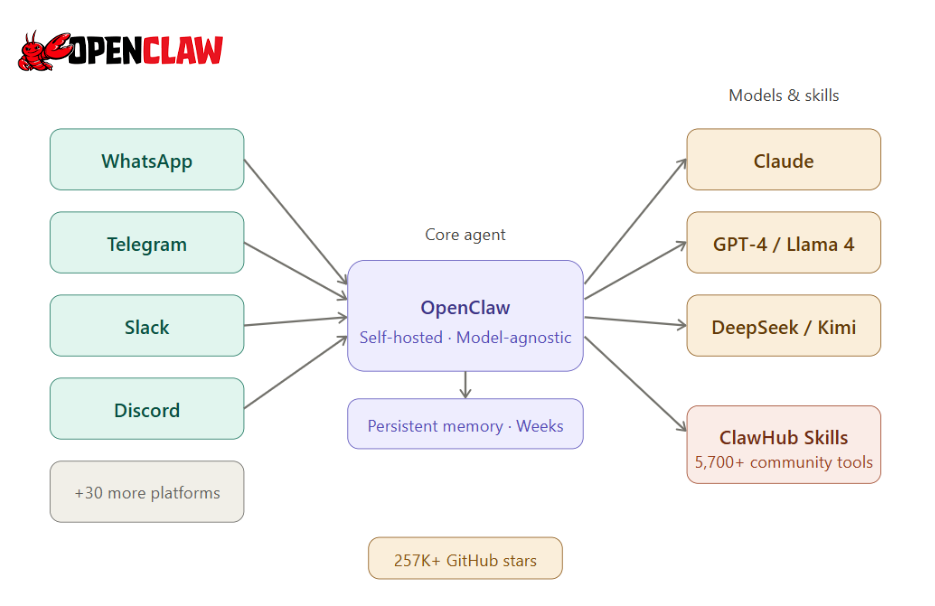
What makes OpenClaw different from other AI tools:
- Self-hosted: Your infrastructure, your data. You control the entire stack.
- Model-agnostic: Works with Claude, GPT-4, Llama 4, Kimi 2.5, DeepSeek, or any Ollama-compatible local model.
- Persistent memory: Remembers context across weeks of interaction, unlike session-based tools.
- Skills ecosystem: ClawHub hosts 5,700+ community-built Skills for browsing the web, managing files, controlling apps, and automating multi-platform workflows, including OpenClaw search providers that help streamline your search tasks across multiple platforms.
- Multi-channel: Connects natively to WhatsApp, Telegram, Slack, Discord, Signal, iMessage, and 30+ platforms.
- Free software: You pay only for the AI model APIs you connect to, or nothing at all if you run local models via Ollama.
My Personal Experience: The setup weekend is real. But so is the payoff. The first time you send a task from your phone while away from your desk and come back to find it done — emails handled, data collected, Slack messages sent — something clicks about what autonomous AI actually means in practice. The plugin quality varies enormously, which means curating your Skill stack carefully matters.
What Is Claude Code?
Claude Code is Anthropic’s official CLI-based coding agent. It lives inside your terminal or IDE (VS Code, JetBrains, Xcode) and acts as a context-aware pair programmer that understands your entire codebase: file structure, git history, dependencies, and project conventions.
It runs on Claude Opus 4.6 at the highest subscription tier, and achieves 80.8% on SWE-bench(Verified, Q1 2026) — one of the strongest results among AI coding tools available today. According to community reports, Claude Code now accounts for roughly 4% of all public GitHub commits, with projections reaching 20%+ by end of 2026.
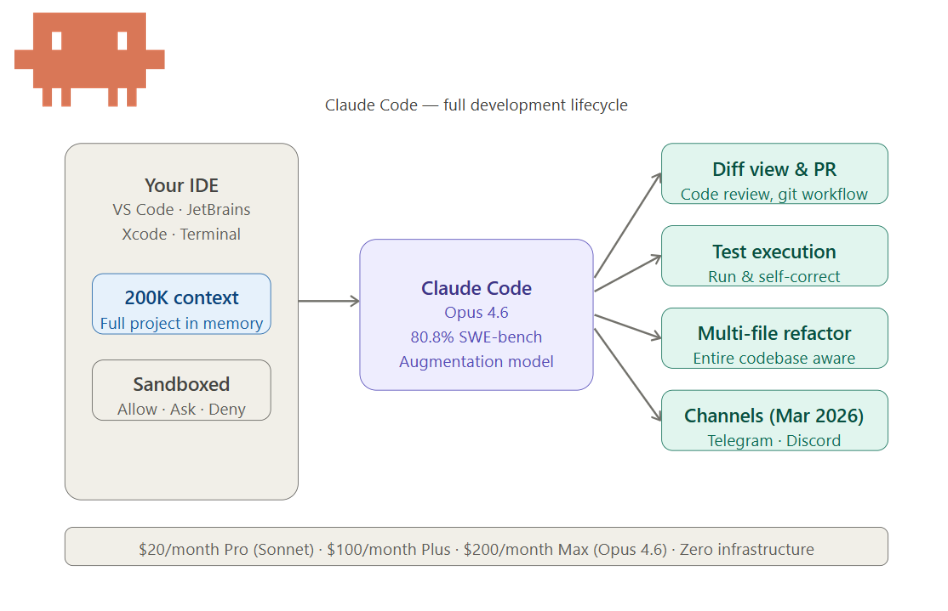
What makes Claude Code different:
- Zero infrastructure work: Install it and start coding immediately. No servers, no Docker, no config files.
- Deep code context: A 200K-token context window keeps entire projects in memory, not just the file you are looking at.
- Full development lifecycle: Diff views, PR creation, test execution, code review, and git workflow management are all built in.
- Explicit permission model: Sandboxed execution with allow, ask, and deny behavior modes. Anthropic’s security team manages the trust boundary.
- Predictable pricing: Monthly subscription tiers from $20/month (Pro with Sonnet) to $200/month (Max with Opus).
- Expanding reach: Now available across terminal, web, IDE integrations, Slack, desktop, and browser.
Claude Code Channels (March 2026): Anthropic launched Claude Code Channels, letting developers message Claude Code through Telegram and Discord. This covers one of OpenClaw’s signature advantages (mobile messaging), though it is limited to coding workflows and does not replace OpenClaw’s broader life-automation capabilities.
My Personal Experience: The moment you point it at a real codebase and ask it to handle a complex refactor, it earns back its subscription quickly. The 200K context window means it genuinely understands large projects — not just the file you are looking at. The session reset is manageable with a good project context file. For coding, it simply outperforms everything I have tried.
OpenClaw vs. Claude Code: Which Is Better?
The short answer: it depends on what you are using it for. These tools occupy different categories, and the right choice comes down to your primary workflow.
1. OpenClaw vs. Claude Code for Coding
If your main job is writing and shipping code, Claude Code wins, and it is not close.
The 200K-token context window means it understands your full project, not just the open file. It follows your code style, respects dependencies, provides diff views, creates PRs, and runs tests. OpenClaw lacks the inline completions, IDE integration, and self-correction loops that make Claude Code a specialist.
OpenClaw can write code too, especially with strong models. But its strength shows when the task goes beyond one codebase: write a script, run it, send the output to Slack, update a spreadsheet, message you on Telegram when it is done. That multi-platform orchestration is what OpenClaw was built for.
2. Autonomy vs. Augmentation
The bigger difference is philosophical.
- OpenClaw is built around autonomy. You describe a goal, and the agent plans, decides, and acts across tools without waiting for you. It keeps working while you are away. It maintains memory. It routes across platforms.
- Claude Code is built around augmentation. You stay in control. The AI accelerates your work but never assumes ownership of the project lifecycle.
As one developer put it: “Claude Code is the worker. OpenClaw is the manager.”
3. Security
Security is where the comparison gets serious.
In January 2026, researchers found CVE-2026-25253 (CVSS 8.8), a remote code execution flaw in OpenClaw. Over 40,000 instances were found exposed on the public internet, 63% without authentication. Koi Security discovered that 12% of skills on ClawHub were malicious. Bitdefender later identified 824+ malicious skills (20% of the registry), mostly distributing the AMOS infostealer. The patch shipped in version 2026.1.29, and OpenClaw has since partnered with VirusTotal for skill scanning.
Anthropic manages Claude Code’s security: sandboxed execution, explicit permissions, and regular audits. The attack surface is narrower since it only touches your codebase and terminal.
4. Pricing and the API Ban Wave
The two tools also differ sharply in their pricing structures, and one pricing dispute made headlines.
- Claude Code charges a predictable monthly subscription ($20–$200/month, depending on tier).
- OpenClaw is free to self-host; you pay only for the AI model APIs you connect.
- For teams of 10+, that difference compounds quickly: $2,400+/year for Claude Code versus $120–$240/year in hosting costs for OpenClaw.
The ban wave: In early 2026, Anthropic banned users who piped flat-rate Claude subscription tokens through OpenClaw to avoid per-token API pricing. Anthropic later clarified that running OpenClaw with a proper API key is fully within their Terms of Service. The enforcement targets subscription arbitrage, not normal usage — so if you are paying for API access directly, you have nothing to worry about.
5. Full Comparison
| Claude Code | OpenClaw | |
| Primary purpose | Software development | Life and workflow automation |
| Interface | Terminal, IDE, Web, Slack | WhatsApp, Telegram, Slack, Discord, 30+ platforms |
| AI models | Claude only | Claude, GPT-4, Llama, Kimi 2.5, DeepSeek, local models |
| Memory | Session-based (resets) | Persistent (survives weeks) |
| Setup time | Minutes | 15–20 hours |
| Security | Managed sandbox (Anthropic) | User-managed, community-audited |
| Data sovereignty | Anthropic’s servers | Your infrastructure |
| Entry price | $20/month (Pro) | Free + $5–$150/month API |
| Full power | $100–$200/month (Max) | Varies by model |
| Team cost (10 users/year) | $2,400+ | $120–$240 hosting + API |
| Free option | No | Yes (local models via Ollama) |
What Real Developers Are Saying: Community Feedback
One of the most candid community reviews comes from OpenClaw VS Claude Code Reddit: “Honest review about OpenClaw vs Claude Code after a month of real use.” The thread attracted significant engagement from developers who had used both tools in production workflows. Here is what surfaced consistently:
On Claude Code:
- Deep code context understanding was the most frequently praised feature, especially for multi-file refactors and large codebase navigation
- Session memory reset was the top frustration — re-explaining project context at the start of every session adds friction (mitigated by a good CLAUDE.md project context file)
- Cost complaints almost always came from people using it for tasks it was not designed for — like email automation or general-purpose workflows
- Safety guardrails occasionally block power users who need to run aggressive system commands, though most developers view this as a net positive for team environments
On OpenClaw:
- The setup investment was the biggest friction point — a full weekend for many first-time users, and some never got past it
- Those who cleared the setup hurdle reported genuine satisfaction, especially for background automation tasks that run unsupervised
- Skill quality was flagged as wildly inconsistent: some excellent, some abandoned months ago, and some outright dangerous (see the Security section above)
- Persistent memory was cited as a genuine differentiator — the ability for the agent to remember weeks of context without explicit re-prompting
The most-upvoted takeaway from the thread:
“These tools are not competitors. They’re different tools for different jobs. I was making the wrong comparison.”
My take: The pattern is consistent — frustration almost always traces back to tool mismatch, not tool quality. Someone complaining that Claude Code is “too expensive” is usually running email automations on a coding specialist. Someone saying OpenClaw “isn’t good enough at coding” bought a life OS when they needed a pair programmer. The right question is not which tool is better, but which job you are actually trying to do.
OpenClaw vs. Claude Code: Who Should Use What?
Both tools are genuinely powerful — but they were built for fundamentally different users. Claude Code is a precision instrument for developers who live in their codebase. OpenClaw is a broad automation platform for anyone who wants AI running in the background across their entire digital life.
Choose Claude Code if:
- Your primary work is writing, debugging, or refactoring code
- You want to be productive within minutes, not after a weekend of setup
- Your team has security or compliance requirements
- Predictable monthly billing matters
- You want Anthropic support and a polished, actively maintained product
Choose OpenClaw if:
- You want an autonomous agent managing email, calendar, Slack, and file tasks in the background while you focus elsewhere
- You are comfortable with self-hosting and willing to invest setup time upfront
- Model flexibility matters — you want to swap between Claude, GPT-4, Llama, or local models
- You run a team of 10+, and cost savings justify the setup investment
- Data sovereignty is a hard requirement
Use both if: You are a developer who wants Claude Code handling active coding work while OpenClaw manages everything else — scheduling, communication, file routing, and cross-platform coordination — running quietly in the background.
A practical example:
- Claude Code builds and reviews your PR during the day.
- OpenClaw monitors your inbox, summarizes client messages, and pings you on Telegram with a digest each evening.
- OpenClaw’s Anthropic provider supports Claude Code API tokens directly, so they share the same underlying model subscription without double-billing.
The Missing Piece: What Happens When Your Workflow Starts With Web Data?
Here is a gap that almost every comparison of these two tools misses.
Both OpenClaw and Claude Code are strong at processing and acting on data once you have it. But neither was built to collect structured data from the web at scale — and that gap matters more than people expect.
Consider what a typical research or intelligence workflow actually looks like before any AI agent can do its job:
- A competitive analyst needs current pricing from 200 e-commerce pages, updated daily
- A sales team needs structured lead data extracted from industry directories
- A market researcher needs to track product launches across 50 supplier sites each week
In each case, the workflow does not start with a prompt. It starts with raw, unstructured data on the web — and neither tool handles that collection reliably.
OpenClaw’s built-in web_search and web_fetch work for ad-hoc lookups: summarizing a competitor blog post, pulling a single product page, checking a news headline. But web_fetch makes plain HTTP requests with no JavaScript rendering and no CAPTCHA handling, and results are cached for 15 minutes. At volume, it breaks down. Claude Code has no web data collection capability at all.
Both tools assume the data is already somewhere accessible — a file, an API, a codebase. When it is not, you need something upstream.
Octoparse: The Data Layer for AI Agent Workflows
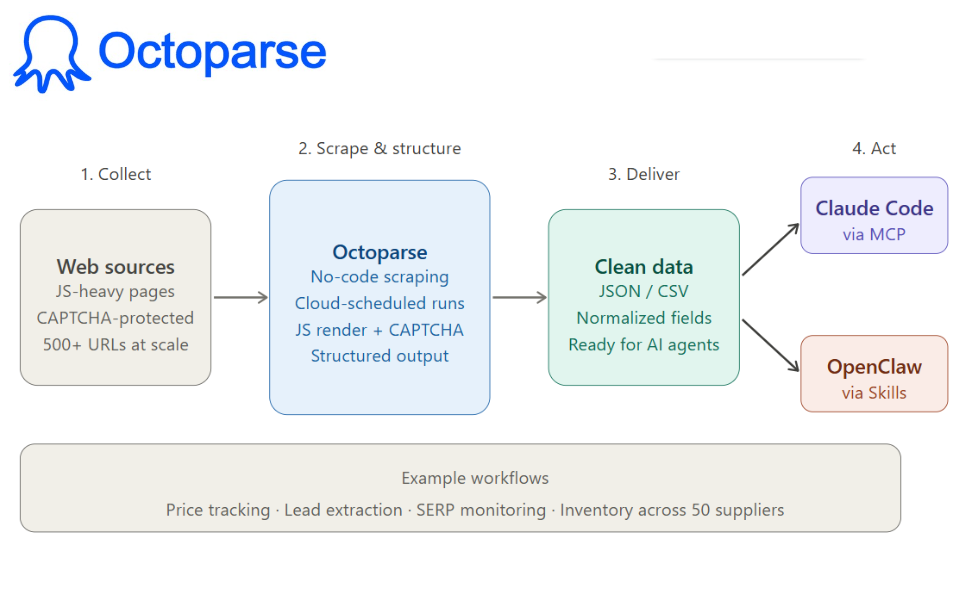
Octoparse is a no-code web scraping platform purpose-built for exactly this gap. It extracts structured data from any website, including JavaScript-heavy pages, handles CAPTCHAs, runs on cloud-based schedules, and delivers clean, structured output that OpenClaw and Claude Code can immediately act on.
Where OpenClaw’s web tools are conversational and reactive, useful for a one-off lookup, Octoparse is systematic and proactive, designed for volume, consistency, and scheduled delivery into downstream pipelines.
See our guide on OpenClaw for web scraping with Octoparse MCP
How It Compares to OpenClaw’s Built-In Web Tools
| Task | OpenClaw web_search | Octoparse |
| Summarise one competitor blog post | Works well | Overkill |
| Monitor 500 product prices daily | Unreliable at scale | Purpose-built |
| Extract structured lead data from directories | Limited | Handles it cleanly |
| Track inventory across 50 suppliers | Context window breaks | Scheduled automation |
The distinction is not that one is better — it is that they operate at different scales and for different purposes. OpenClaw’s web tools are conversational and reactive. Octoparse is systematic and proactive.
How Integration Works
With Claude Code via MCP:
Octoparse MCP integrates through the Model Context Protocol (MCP), giving Claude Code direct access to scraping tasks without leaving your terminal or IDE. No manual export, no file transfer — the data arrives in your workflow as structured input.
🔎Prerequisites:
- an active Octoparse account
- The MCP connector is configured in your Claude Code settings
- a scraping task already set up in Octoparse.
Practical examples:
- Octoparse scrapes competitor product pages on a daily schedule → Claude Code processes the output and generates a pricing report
- Octoparse extracts SERP data and competitor content → Claude Code analyzes gaps and writes optimization recommendations
- Octoparse monitors a target company’s job listings → Claude Code summarizes hiring signals and flags technology changes
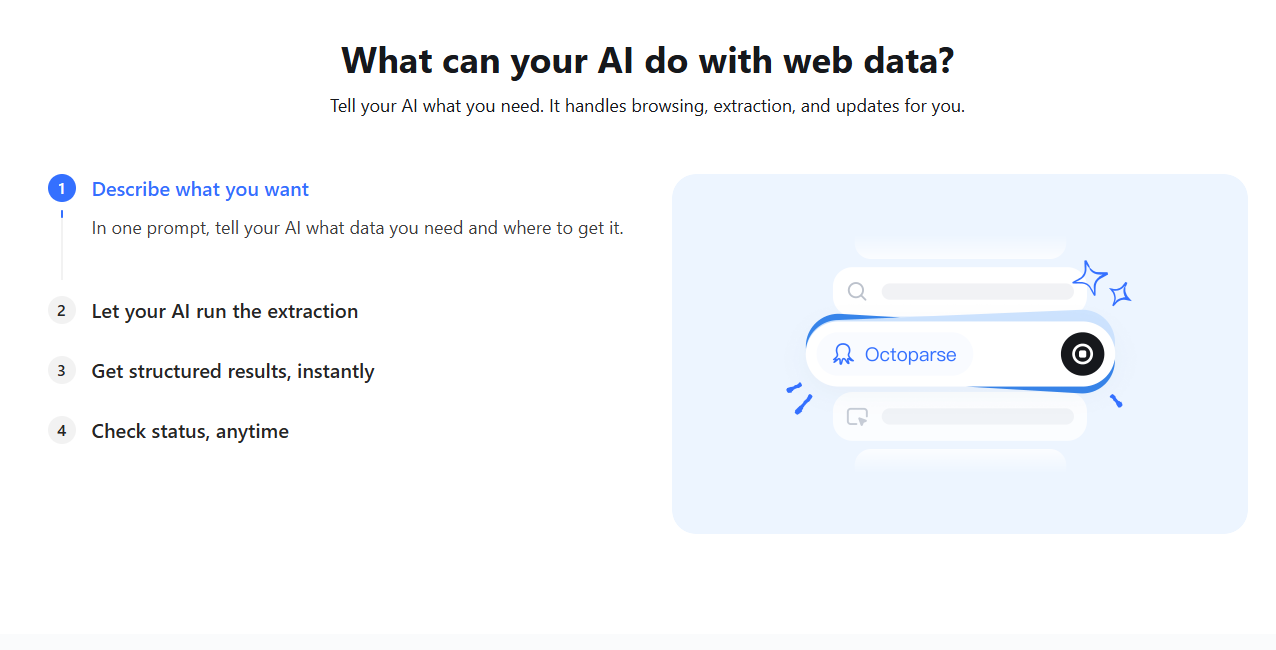
With OpenClaw via Skills:
Octoparse integrates into OpenClaw’s Skills system as a data source within a larger automated workflow.
🔎Prerequisites:
- The Octoparse Skill installed from ClawHub
- Your Octoparse API key is configured
- A scheduled task created in Octoparse.
Once using the MCP server, OpenClaw can trigger scraping runs, retrieve results, and route them downstream – collecting lead data in the morning, pushing it to your CRM in the afternoon, and summarizing findings in Slack by evening, all without manual intervention.
FAQs about OpenClaw and Claude Code
Is Claude Code the same as OpenClaw?
No. Claude Code is a coding agent for your terminal and IDE. OpenClaw is a life-automation platform that connects to messaging apps, email, calendars, and dozens of other services. They share the ability to use Claude models, but their purpose and architecture are completely different.
Is OpenClaw good for coding?
It can write code, but it lacks the IDE integration, diff views, and deep codebase context that make Claude Code far stronger for development work. OpenClaw shines at orchestrating workflows that include code, not at being your primary coding tool.
Is Claude Code the best AI coding agent available?
Claude Code, powered by Opus 4.,6 scores 80.8% on SWE-bench (Verified, Q1 2026) and is consistently rated among the top AI coding agents. Tools like Copilot, Cursor, and Codex have strengths in specific areas (autocomplete speed, editor integration), but for agentic tasks like multi-file refactors and PR creation, Claude Code is hard to beat.
Can Anthropic ban me from using OpenClaw?
Not if you use a proper API key. The 2026 ban targeted users piping flat-rate subscription tokens through OpenClaw to avoid per-token pricing. Normal API usage is within Anthropic’s Terms of Service.
The Bottom Line
OpenClaw is workflow-driven. Claude Code is developer-driven. One emphasizes autonomy and long-running execution across your entire digital life. The other emphasizes precision, depth, and controlled collaboration within your codebase.
If you write code for a living, Claude Code delivers more value with less friction. If you want AI managing your background tasks across every platform you use, OpenClaw is a more powerful system once you are past the setup curve. If you need both, they are designed to work together.
And if your workflow starts with raw data from the web, before any agent can process, analyze, or act on it, Octoparse fills the gap that neither tool was built to close.
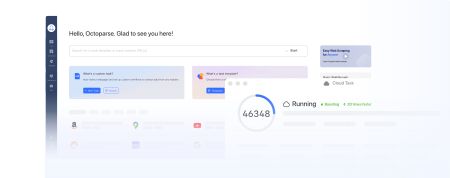
Turn website data into structured Excel, CSV, Google Sheets, and your database directly.
Scrape data easily with auto-detecting functions, no coding skills are required.
Preset scraping templates for hot websites to get data in clicks.
Never get blocked with IP proxies and advanced API.
Cloud service to schedule data scraping at any time you want.