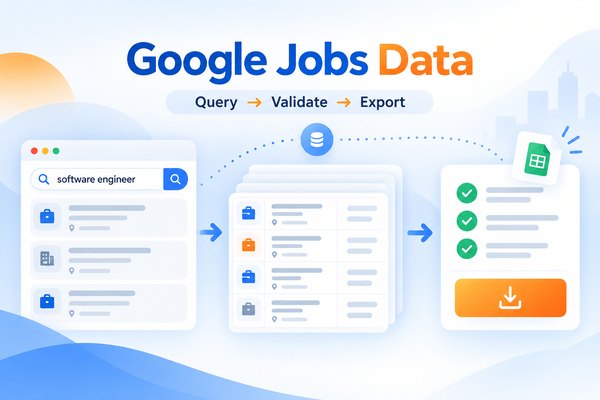
Short answer: can you scrape Google Jobs?
Yes, but you should treat Google Jobs collection as a controlled observation of search results, not as a complete labor-market database. Results change with the query, location, language, device, indexing time, source availability, and page behavior. Start with one role and one location, capture the visible fields, record the retrieval time, and validate duplicates and missing values before scheduling recurring runs.
There is no documented general public read API for the aggregated Google Jobs search surface in the official documentation reviewed for this draft. Google Cloud Talent Solution is a separate service for searching a customer’s own indexed job corpus, while the Indexing API helps publishers notify Google about eligible job pages.
What does Google Jobs data actually contain?
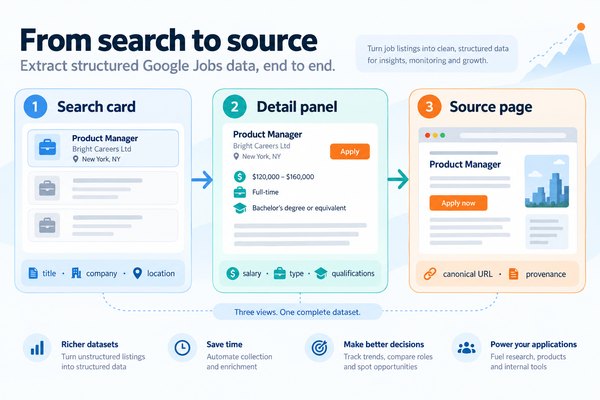
Google Jobs is an aggregation experience inside Google Search. A result can contain three different layers:
- The search card: title, employer, location, source, and a displayed posting-age phrase.
- The detail panel: description, salary, employment type, qualifications, and application choices when the source exposes them.
- The original source page: the employer or job-board record that may contain fields not shown in Search.
Do not merge these layers into one supposedly complete record. Store the observed card values separately from detail-page values and preserve the source URL. A relative date such as “3 days ago” is only meaningful together with the retrieval timestamp.
Start with seven core fields
| Field | Why it matters | Validation rule |
|---|---|---|
| Job title | Identifies the role | Non-empty text |
| Company | Supports employer analysis | Preserve displayed spelling |
| Location | Defines geographic scope | Keep raw and normalized values |
| Source domain | Shows provenance | Validate domain and redirect |
| Application URL | Enables follow-up | Store observed and canonical URL |
| Query | Makes the run reproducible | Save exact query text |
| Retrieval timestamp | Makes freshness measurable | Use UTC or a stated timezone |
Add salary, employment type, description, qualifications, and job ID only when those values are actually present. Missing salary is a missing value, not zero. Keep the raw salary phrase beside any normalized minimum, maximum, currency, or pay-period fields.
Does Google provide a Google Jobs read API?
The reviewed Google JobPosting documentation explains how a publisher can make an individual job page eligible for the job-search experience. It does not document a read endpoint for retrieving the public aggregated results.
Google Cloud Talent Solution is different. Its REST reference for searching a customer’s indexed job corpus describes a service for an organization’s own job content, not a reader for other employers’ public Google Jobs listings.
The Indexing API quickstart for publisher notifications lets eligible publishers notify Google when their own job pages are added or removed. It is not a listing-export API.
That leaves four practical collection routes:
| Route | Best fit | Main trade-off |
|---|---|---|
| Manual review | One-off discovery | Low repeatability |
| Browser automation | Engineering-owned parsing | Rendering, selectors, blocks, maintenance |
| SERP API | Programmatic result collection | Provider limits and per-request cost |
| Visual workflow platform | Repeatable no-code process | Requires a live field and behavior test |
Browser-control tools can interact with dynamic pages. For example, Playwright documents actionability checks and auto-waiting, while Selenium defines WebDriver as a browser-control protocol. Those documents explain browser automation; they do not prove complete Google Jobs extraction.
How should you build a Google Jobs query matrix?
One query is not a market estimate. Build a matrix that varies role names, synonyms, locations, countries, remote wording, companies, seniority, skills, and language. Save the exact query and settings for every run.
For each row, record:
- query text and location
- country, language, device, and retrieval timestamp
- result identifiers and source domains
- records observed
- duplicate count and missing-field count
- stopping reason and run status
Run narrow combinations before broad ones. Compare overlap between combinations to find duplicate-heavy patterns. Report a result count as “records observed for this query and time,” never as the total number of available jobs.
The udm=8 parameter appears in third-party tutorials, but the supplied evidence does not establish it as a stable first-party method. Treat it as an experiment or omit it from production instructions until a controlled test verifies current behavior.
How can Octoparse support this workflow?
Octoparse is a web data platform that turns websites into structured data. For this use case, evaluate its Templates Gallery, Octoparse Desktop authoring, and owned extraction infrastructure against the exact Google Jobs fields and regions you need. No-code authoring is a way to build the workflow; it is not proof that every result card or detail panel will be captured.
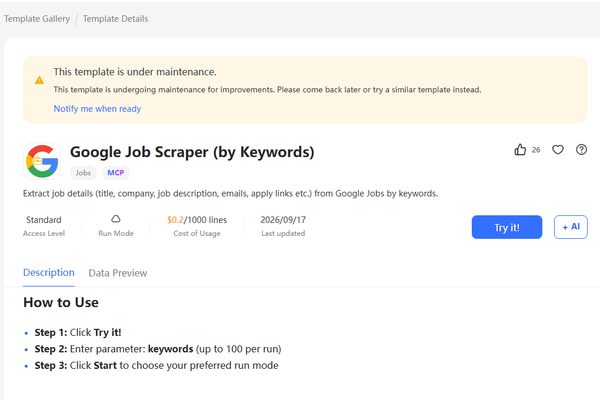
The Google Job Scraper template page was checked on September 28, 2026. It currently shows a maintenance notice, supports the UK, US, and Canada, accepts up to 100 keywords per run, and lists a usage price of $0.2 per 1,000 lines. The page also lists fields such as job title, company, location, source, posting time, employment type, salary, qualifications, responsibilities, job description, website, email, and apply links. These are current page observations, not proof of a successful run or complete coverage; recheck them before publication.
There is one limit discrepancy to resolve before publication: the public page says “up to 100” keywords, while the current API template schema labels the input “up to 10,000” and exposes a maximum string-array length of 5,000. Use the page-visible 100-keyword limit in reader-facing copy until the product owner confirms which limit is authoritative.
https://www.octoparse.com/template/google-job-search
Start with one role, one location, and a small sample. Define the query, select card fields, and check whether scrolling or detail-page navigation is required. Keep query, location, source URL, retrieval timestamp, and task identifier with every row. Stop when a consent screen, CAPTCHA, unexpected personal data, or access block appears.
Octoparse documents page-scroll actions for lazy-loaded pages and recurring task schedules. Use scheduling only after a small run proves field completeness, stopping behavior, and duplicate handling.
What should a small validation run prove?
The first run should answer five questions:
- Does the query return the intended role and location?
- Are title, company, location, source, application URL, query, and timestamp populated?
- Does scrolling add new cards or repeat existing cards?
- Which fields are absent from the card but available in the detail panel?
- What happens when consent, CAPTCHA, or an access block appears?
Save the task settings, a redacted export, screenshots, and a run receipt. Repeat the same task so that changing Google results can be separated from a workflow defect.
Verified small-sample run
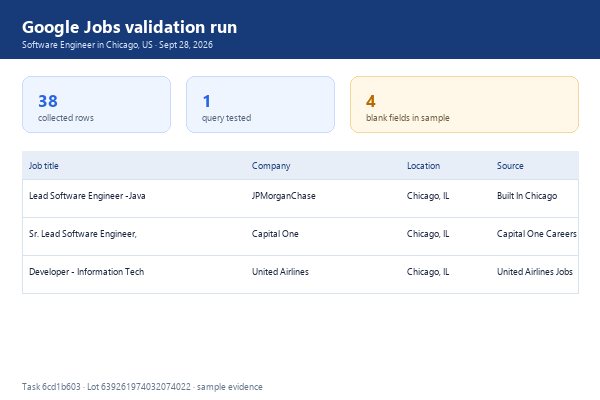
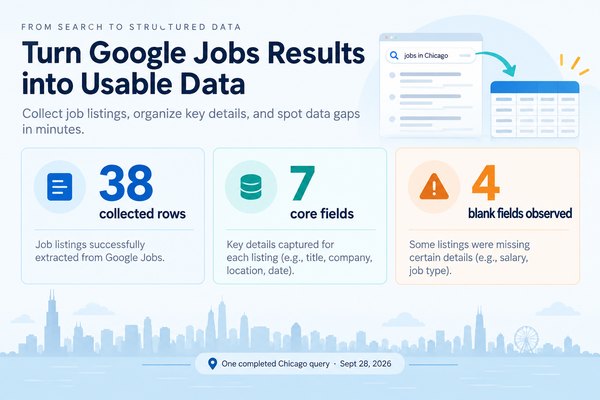
On September 28, 2026, the Google Job Scraper template was run once with the query Software Engineer in Chicago, US. The task completed with 38 collected rows. The first page of the export returned job title, company, location, source, query, and detail URL values. Salary, employment type, degree requirement, and posting time were blank in the sampled rows, which is exactly why field completeness must be measured rather than assumed.
Three returned records were:
| Job title | Company | Location | Source |
|---|---|---|---|
| Lead Software Engineer -Java Full stack | JPMorganChase | Chicago, IL | Built In Chicago |
| Sr. Lead Software Engineer, Full Stack | Capital One | Chicago, IL | Capital One Careers |
| Developer – Information Technology | United Airlines | Chicago, IL | United Airlines Jobs |
Run receipt: task ID 6cd1b603-4f44-4388-aa9f-fecc65fbc190; lot number 639261974032074022. This is a one-query, small-sample validation, not proof of complete Google Jobs coverage or production stability.
How should Google Jobs data be cleaned?
Validate query and location metadata first. Then validate required text fields and URL formats. Preserve both the observed application link and a resolved canonical URL when redirects occur.
Deduplicate in this order:
- job ID, when available
- canonical URL
- company-title-location key
- description similarity and source-domain comparison for syndicated postings
Normalize dates, salary, location, and employment type only after preserving raw values. Relative dates need the collection timestamp. A salary shown by one source can differ from the employer’s page, so retain provenance.
Flag stale, reposted, conflicting, or incomplete records. Maintain an audit log with source URL, query, timestamp, validation status, and corrective action.
What business questions can this data answer?
Recruiting teams can use Google Jobs for cross-source discovery. Competitor-hiring analysis can compare which employers appear to be hiring for similar skills. Salary research is useful only where compensation is actually published and normalized carefully.
Do not turn observed search results into population estimates. Report countries, languages, query combinations, retrieval dates, source mix, missing-field rates, and known exclusions. For context, PwC’s 2026 report covering more than one billion job advertisements is a labor-market study, not evidence of Google Jobs coverage.
Why does a Google Jobs workflow fail?
| Symptom | Likely cause | Diagnostic action |
|---|---|---|
| Empty HTML | JavaScript rendering or consent interstitial | Inspect the rendered page |
| Too few cards | Lazy loading or incomplete scrolling | Log counts after each scroll |
| Missing salary | Source omitted compensation | Store null and preserve raw text |
| Duplicate roles | Syndication or query overlap | Compare IDs, URLs, and descriptions |
| Wrong region | Country, language, IP, or query interpretation | Repeat with explicit settings |
| Broken application link | Redirect or source change | Keep observed and canonical URLs |
| CAPTCHA or block | Access control or rate response | Stop and record the event |
A successful page load proves only that some content arrived. It does not prove that every card loaded, every detail panel opened, or every source was represented.
What compliance limits should you review?
Before automation, review Google’s Terms of Service, Google’s Privacy Policy, robots guidance, and Google’s crawling documentation. Also review source-site terms, permissions, privacy obligations, and employment-data requirements in each operating region.
These documents do not decide whether a specific collection activity is lawful. The answer depends on jurisdiction, purpose, access method, personal data, and contract terms. Obtain qualified advice for high-risk use cases, minimize collected data, protect credentials, apply rate controls, and stop when unexpected personal information appears.
FAQs
Can I scrape every Google Jobs listing?
No. Results depend on query wording, region, language, timing, indexing, source availability, and page behavior. Report the observed scope of each run instead of claiming complete coverage.
What fields should I collect first?
Start with seven fields: title, company, location, source domain, application URL, query, and retrieval timestamp. Add salary, employment type, description, qualifications, and job ID only when available.
Is Cloud Talent Solution a Google Jobs read API?
No. Its documentation describes searching a customer’s own indexed job corpus. It is separate from the public Google Jobs search experience.
Why are salaries often missing?
Many source postings omit salary or expose it only in a detail view. Keep missing values null and preserve the original salary phrase when it exists.
How can I detect incomplete scrolling?
Track card counts after each scroll, repeated records, stable page state, and an explicit stopping reason. Preserve those checks in the run log.
Should I use Octoparse for production monitoring?
Run a controlled pilot first. Verify the current template status, regional coverage, fields, scheduling, exports, duplicate behavior, and compliance requirements before relying on recurring collection.