To track brand mentions in ChatGPT, run a fixed set of buyer questions through ChatGPT on a schedule and record whether your brand is named, where it ranks in the answer, and which sources it cites. You can do it by hand in a spreadsheet, or automate the whole loop with a tool like Octoparse and its https://www.octoparse.com/template/chatgpt-visibility-tracker template — no API key to set up, and free for your first 2,000 rows each week. This guide covers both.
https://www.octoparse.com/template/chatgpt-visibility-tracker
More and more buyers ask ChatGPT for recommendations before they ever open a search engine. When it answers “the best tool for X,” the brands it names become the shortlist — and if yours isn’t there, you’ve lost the deal at the research stage, with no click in your analytics to tell you it happened. Tracking those mentions is how you make that invisible moment measurable. (For the bigger picture on why this matters, see our guide to AI search visibility.)
What Does Tracking Brand Mentions in ChatGPT Mean?
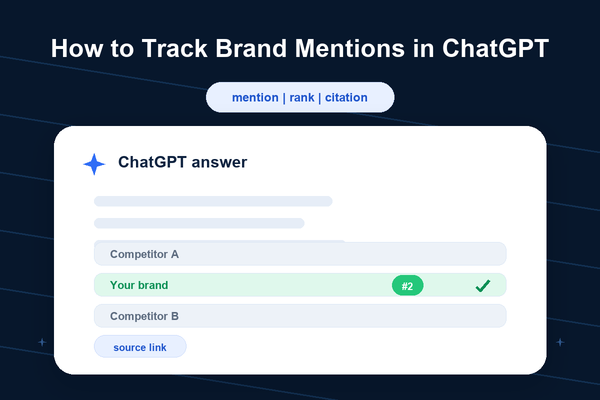
Tracking brand mentions in ChatGPT means measuring, over time, how your brand shows up in ChatGPT’s answers to the questions your customers ask. There are two outcomes worth recording, and they aren’t the same:
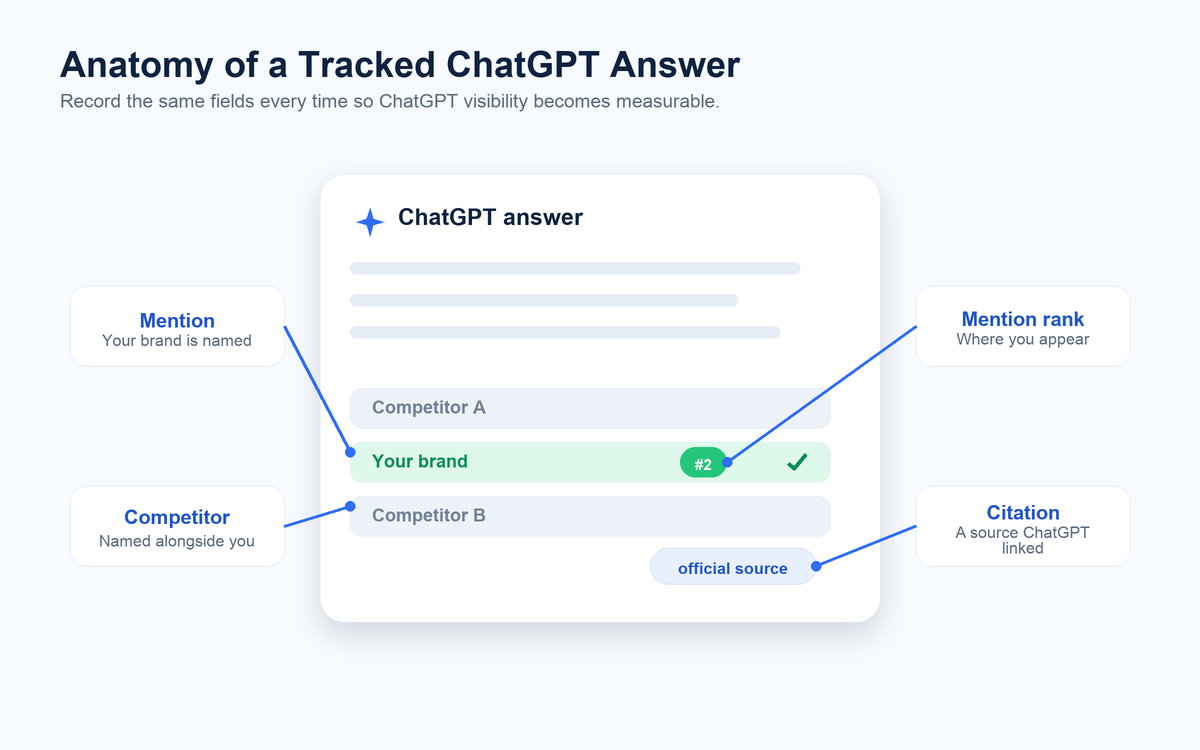
- A mention is ChatGPT naming your brand in the text of its answer.
- A citation is ChatGPT linking one of your pages as a source.
You usually earn a citation first and a mention later, so tracking both — plus where you rank among the brands named and which competitors appear beside you — tells you not just whether you’re visible but how visible, and against whom. It’s the same idea as rank tracking, moved from the results page into the answer itself.
How to Track Brand Mentions in ChatGPT (Step by Step)
The method is a five-step loop you run on the same prompt set each time, so the numbers stay comparable.
Step 1 — Build your prompt set. Write down the real questions a buyer would ask ChatGPT on the way to choosing you. Cover three intents: discovery (“how do I solve X”), comparison (“best tools for X”), and decision (“X vs Y”). Thirty prompts split across the three is a solid start. Freeze this list — you’ll reuse it every run so the results are comparable.
Step 2 — Decide what to measure. For each answer, you’ll record: whether your brand is mentioned (yes/no), its rank in the answer (named first, third, tenth?), whether ChatGPT cited one of your pages, which competitors appear, and how each brand is described. Those columns are your scoreboard.
Step 3 — Run your prompt set through ChatGPT with Octoparse. Checking a few prompts by hand in the ChatGPT app is fine for a one-off, but it won’t hold up as a routine. To run the whole set automatically, load your prompts into Octoparse’s https://www.octoparse.com/template/chatgpt-visibility-tracker template, add the brands you want to track, and let it query ChatGPT for every prompt — no API key to set up and no copy-paste, capturing the full response and any links.
https://www.octoparse.com/template/chatgpt-visibility-tracker
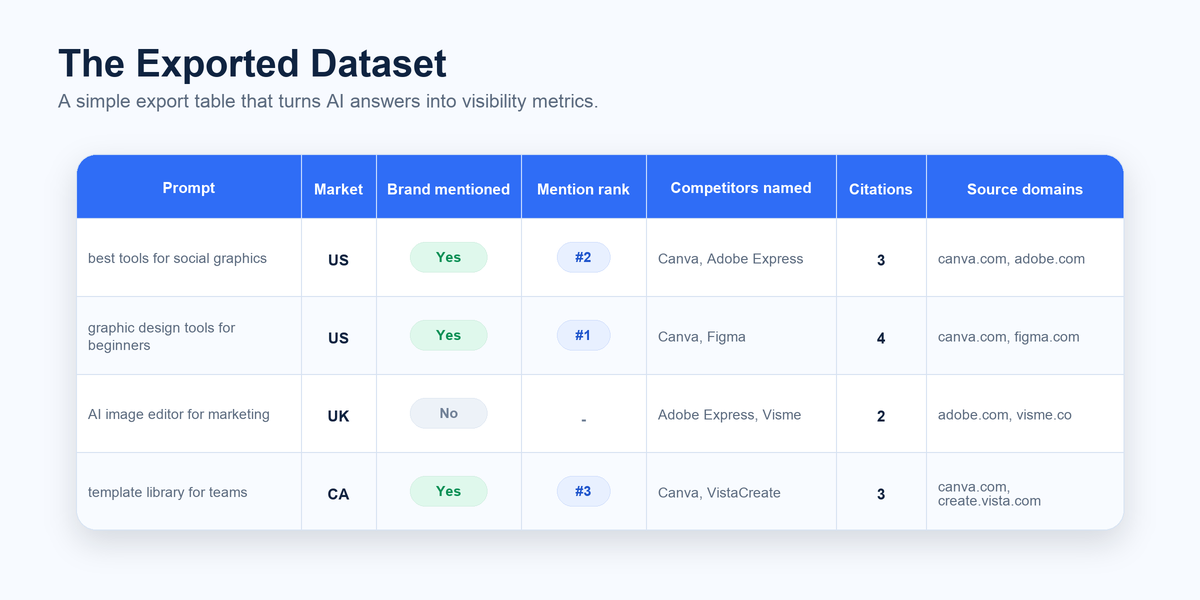
Step 4 — Get a structured dataset back, not screenshots. Instead of hand-logging rows, the template exports one row per prompt with everything already parsed: the run timestamp, the prompt, the market, the full ChatGPT response, and the citation count with cited titles, URLs, and domains. Then, for each brand you track — yours and your competitors — it records four fields: whether it was mentioned, how it was described, its mention rank in the answer, and whether its official page was cited. That per-brand set is what turns a pile of answers into competitive intelligence — who ChatGPT names first, and how it characterizes each of you. Everything exports to Excel, CSV, or JSON.
Step 5 — Schedule it so it re-runs itself. A single snapshot tells you little, because ChatGPT’s answers drift between runs. Set the template to run on a schedule in Octoparse’s cloud — daily or weekly, with no machine left on overnight — so the same prompt set re-runs automatically and every result lands in the same growing dataset. Then watch the trend: your mention rate, your average rank, and which sources ChatGPT keeps trusting.
Manual vs Automated Tracking
Both approaches measure the same things; they differ in effort and scale.
Manual vs automated tracking comparison
| Manual (spreadsheet) | Automated (template) | |
| Setup | None — open ChatGPT and a sheet | Load the template, add your prompts and brands — no API key to set up |
| Effort per run | High — paste and copy every prompt by hand | Low — one click, or scheduled |
| Best for | A quick one-off audit of a few prompts | Ongoing tracking across many prompts and competitors |
| Consistency | Easy to drift or skip a run | Same prompt set, same schedule, every time |
| Cost | Free (your time) | Free for your first 2,000 rows/week, then $80 per 1,000 — no API key needed |
For a first look, manual is fine. For anything you’ll repeat, automating it pays for itself in the first run.
What to Do With What You Find
Tracking is only useful if it changes something. If ChatGPT names competitors but not you, the fix is usually to become the kind of source it prefers to cite: lead your key pages with a direct, self-contained answer to the question, structure content with clear question-style headings, keep your brand described consistently across the web, and earn references from the sites ChatGPT already leans on. Then re-run your prompt set and watch whether your mention rate and rank move. Our AI search visibility guide covers those tactics in depth.
FAQ
- How do I track brand mentions in ChatGPT?
Build a fixed list of questions your customers would ask, run each through ChatGPT, and record whether your brand is named, where it ranks, and which sources are cited. Do it manually in a spreadsheet for a one-off check, or automate it with a tool that runs the prompts and exports the results.
- Can I see if ChatGPT recommends my brand?
Yes. Ask ChatGPT the comparison and “best tool” questions your buyers use, and note whether your brand appears and how it’s described. Running a fixed prompt set on a schedule turns those one-off checks into a trend you can act on, rather than a single lucky or unlucky answer.
- Do I need an API key to track ChatGPT mentions?
Not with Octoparse. The ChatGPT Visibility Tracker has ChatGPT access built in, so you never supply or manage an OpenAI key — you just add your prompts and the brands to track. It’s free for your first 2,000 rows each week (via API or MCP), then $80 per 1,000 rows. Checking a few prompts by hand in the ChatGPT app also needs no key.
- How often should I track ChatGPT mentions?
Monthly is the minimum useful cadence, since answers drift slowly enough to show month-over-month change. Move to weekly once you start changing content to influence the results, so you can tell which changes actually moved your mention rate and rank.
- What’s the difference between a mention and a citation in ChatGPT?
A citation is ChatGPT linking one of your pages as a source; a mention is ChatGPT naming your brand in the answer text. Citations tend to come first and mentions later, so tracking both shows how far along your visibility is, not just whether you appear at all.
- Which tool tracks brand mentions in ChatGPT?
Options range from paid AI-visibility platforms (Semrush, Otterly, Peec.ai) to do-it-yourself templates you run yourself. Octoparse’s https://www.octoparse.com/template/chatgpt-visibility-tracker runs your prompt set and exports each answer’s mentions, ranks, and citations to a spreadsheet, so you own the raw data.
https://www.octoparse.com/template/chatgpt-visibility-tracker