You’ve been there. You finally got the scraper running, pulled thousands of records from across the web, opened the export file, and… it’s a mess.
Review text is tangled with HTML tags. Dates show up in three different formats — sometimes four. Half the entries are duplicates. There’s spam mixed in with real customer feedback. And somehow, a column that should contain prices has the word “null” in every other row.
This is the part of data cleaning nobody warns you about when they sell you on “data-driven decisions.” The scraping is the easy part. Cleaning data — making it consistent, accurate, and actually usable — is where the real work begins.
And it’s not a small problem. According to Anaconda’s 2020 State of Data Science survey of over 2,300 data professionals, respondents spend roughly 45% of their time on data loading and cleaning — making it the single most time-consuming part of their job. Not analysis. Not insights. Just getting the data into a state where analysis is even possible.
If you’ve been cleaning data by hand — or worse, hiring developers to write one-off scripts for every project — you already know this isn’t sustainable. The question is: what’s the alternative?
That’s what this article is about. We’re going to break down what data cleaning actually involves, why traditional data cleaning tools fall short for web-scraped data, and how Octoparse combines AI intelligence with configurable rules to handle the messiest part of any data project — without writing a single line of code.
What Is Data Cleaning — and Why Does It Eat Most of Your Project Time?
Let’s get specific, because “data cleaning” gets thrown around a lot without people explaining what it actually means in practice.
Data cleaning (also called data cleansing or data scrubbing) is the process of detecting and fixing errors, inconsistencies, and quality issues in a dataset so it’s reliable enough to use for analysis or decision-making.
That sounds simple. It’s not.
When you’re working with web-scraped data — pulled from e-commerce sites, social media platforms, directories, or content platforms — cleaning typically involves five distinct challenges:
Standardizing formats. The same piece of information looks completely different depending on the source. A date might appear as “04/23/2023” on one site, “23-04-2023” on another, and “April 23, 2023” on a third. A price could be “$29.99,” “29.99 USD,” or “29,99 €.” Without standardization, your data is impossible to compare or aggregate.
Stripping noise. Raw scraped data often comes wrapped in HTML tags, embedded with special characters, or cluttered with whitespace and formatting artifacts. A product review that should read “Great product” actually looks like <p class="review-text"><b>Great product!!!</b></p> in your export. That noise has to go.
Removing duplicates. When you’re scraping multiple pages — or the same page over time — duplicates creep in everywhere. Sometimes they’re exact copies. More often, they’re near-duplicates with subtle differences (a trailing space, a slightly different timestamp) that make them hard to catch with simple deduplication.
Filtering junk. Not every piece of scraped data is worth keeping. Spam comments, bot-generated reviews, ads masquerading as content, test entries — these all pollute your dataset. Identifying and removing them requires more than simple keyword matching.
Handling missing values. Real-world data has gaps. A product listing might be missing its price. A review might have no date. Deciding how to handle these gaps — fill them in, flag them, or remove the record entirely — is a judgment call that depends on your use case.
Think of cleaning data like refining crude oil. You’ve pumped it out of the ground (scraping), but you can’t put crude oil in your car. It needs to be processed, filtered, and refined before it becomes something useful. Data cleaning is that refining step.
The bottom line: If you skip data cleaning or do it poorly, every analysis built on that data is unreliable. It’s the foundation. Get it wrong, and everything downstream wobbles. According to Gartner’s 2020 research on data quality solutions, poor data quality costs organizations an average of $12.9 million per year. And Thomas C. Redman, writing in MIT Sloan Management Review, estimates that bad data costs most companies 15% to 25% of revenue.
Why Most Data Cleaning Tools Weren’t Built for This
Here’s where things get frustrating. There’s no shortage of data cleaning tools out there — from Excel’s built-in functions to dedicated ETL platforms like Talend or Alteryx. So why does cleaning scraped web data still feel so painful?
Because most data cleaning tools were designed for structured data that already lives in databases. They assume your data arrives in predictable columns with mostly predictable formats. Web-scraped data breaks every one of those assumptions.
The format chaos problem. When you’re pulling data from Amazon, eBay, Twitter, and YouTube simultaneously, you’re dealing with wildly different data structures, date formats, encoding standards, and field layouts. Traditional tools expect you to write transformation rules for each source individually — and rewrite them every time a website updates its HTML.
The scale problem. Cleaning a few hundred rows in Excel is manageable. Cleaning 500,000 records from six different platforms? Excel crashes. Traditional scripting approaches (Python pandas, SQL transforms) work but require a developer, testing time, and maintenance every time the data structure changes.
The intelligence problem. Rule-based cleaning is powerful, but it’s rigid. A regex pattern that strips HTML tags won’t catch spam reviews. A deduplication rule that matches exact strings won’t catch near-duplicates. You end up needing layers of rules, each one hand-crafted — and they still miss edge cases that a human would spot instantly.
This is the gap. Web-scraped data needs a cleaning approach that’s flexible enough to handle unpredictable formats, smart enough to catch problems rules alone would miss, and accessible enough that you don’t need a data engineering team to set it up.
The Hybrid Approach: When AI Meets Configurable Rules
Octoparse’s engineering team spent years working with the messiest web data imaginable — multi-platform e-commerce exports, multi-language social media feeds, cross-regional content datasets. And they arrived at a conclusion that might sound obvious in hindsight:
Neither AI alone nor rules alone solves the data cleaning problem. You need both, working together.
Think of it like a kitchen with two chefs. The AI chef has brilliant instincts — it can taste a dish and instantly identify what’s off, suggest what spices to add, and spot spoiled ingredients nobody else noticed. The rules chef is precise and consistent — it follows recipes exactly, measures ingredients to the gram, and produces the same result every time.
Separately, each has weaknesses. The AI chef improvises too much; the rules chef can’t adapt. Together, they cover each other’s blind spots.
That’s the philosophy behind Octoparse’s data cleaning engine. Today, the AI layer powers smart regex generation and semantic entity extraction — it understands your data and writes the cleaning patterns for you. The rule-based layer handles the precision work — regex transformations, date format standardization, HTML transcoding, deduplication, and field extraction. Both run inside a visual interface where you can configure, adjust, and combine them without writing code.
And Octoparse is actively expanding the AI layer. Capabilities like sentiment analysis, spam detection, and advanced anomaly recognition are already available through Octoparse’s data services — and are on the roadmap for direct product integration. The foundation is built; the intelligence keeps growing.
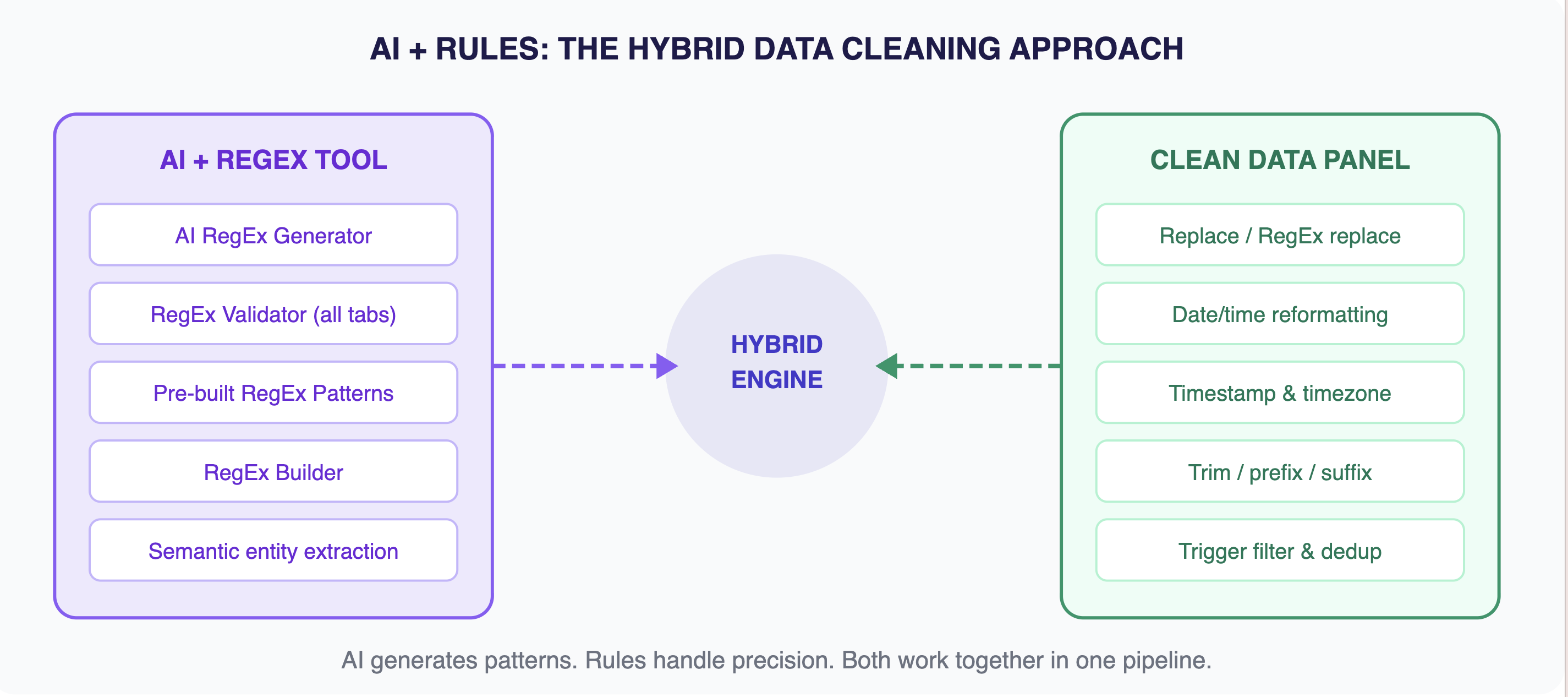
The hybrid engine: AI handles intelligence, rules handle precision — both controlled through a visual, no-code interface.
Three Layers of Cleaning Power — Zero Lines of Code
Let’s get concrete. Here’s what Octoparse’s data cleaning toolkit looks like in practice — broken into the three layers that handle different types of cleaning challenges.
Smart Pattern Matching with RegEx (No PhD Required)
Regular expressions — regex — are the workhorses of text-based data cleaning. They let you find and transform patterns in your data: extract product IDs from messy strings, reformat phone numbers, pull out price values, remove special characters.
The problem? Writing regex has always been a skill barrier. A pattern like (\d{2})/(\d{2})/(\d{4}) looks like alien code if you haven’t worked with it before.
Octoparse solves this with a three-pronged approach:
- AI RegEx Generator. You insert up to 5 text samples into the Test String field, then drag your cursor to highlight the expected matches — the exact portions you want extracted. Click “AI Generate,” and the AI analyzes your highlighted selections to produce a working regex pattern. No syntax knowledge needed. For instance, you paste three product strings like “Product ID: ABC12345,” highlight just the ID portion in each one and the AI generates a reliable pattern that works across your entire dataset. Verify it in the validator below, then hit “Save” to apply it.
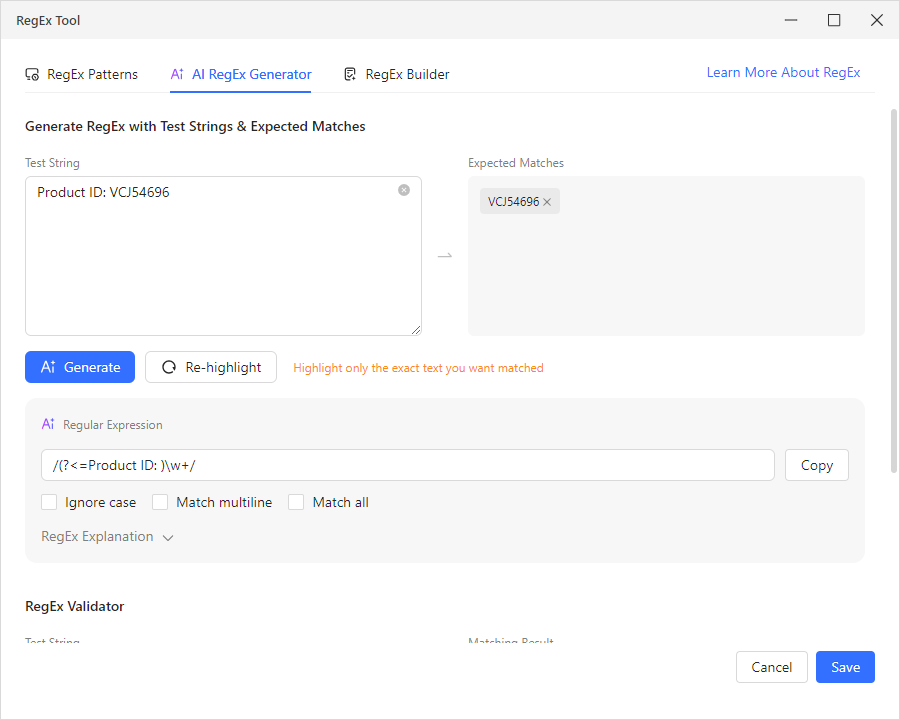
- RegEx Patterns. Octoparse ships with a library of pre-built regex patterns for the most common extraction tasks: Common Email Address, URL/Web Address, US Phone Number, US ZIP Code, Date (YYYY-MM-DD format), Integer, Floating Point Number, Trailing Whitespace and Newline, Alphabetic Characters, and more. Select one from the dropdown, and apply it with a click.
- RegEx Builder. For targeted extractions, the builder lets you generate regex using matching rules — “Match by Start” (with an “Include Start” option), “Match with End” (with “Include End”), and “Matched by Content” (“Contains One”). Set your conditions, click “Generate,” and it constructs the regex for you — no manual syntax writing required.
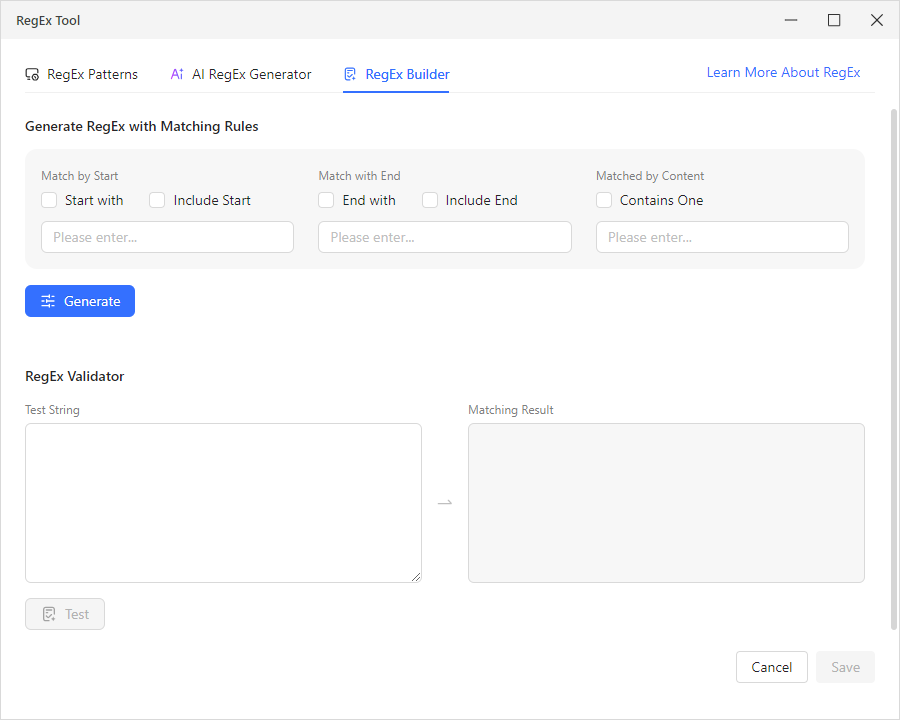
All three tabs include a built-in RegEx Validator with Test String and Matching Result fields, so you can verify any pattern before applying it to your data.
Real example: You scraped product listings and the price field contains messy strings like “Price: $29.99 USD” mixed with “From $25.00.” Instead of writing a regex pattern from scratch, you open the AI RegEx Generator, paste a few sample strings into the Test String field, drag your cursor to highlight just the numeric price in each one, then click “AI Generate.” The AI produces a working pattern that extracts clean price values. Verify it in the RegEx Validator, hit “Save,” and it applies across your entire dataset.
Date and Time Standardization (One of the Hardest Problems in Data)
If you’ve ever merged datasets from different countries, you know the nightmare. Is “04/05/2023” April 5th or May 4th? Depends on whether the source is American or European. Now multiply that by a dozen data sources across time zones, and you’ve got a serious consistency problem.
Octoparse handles this with three dedicated cleaning options in the Clean Data panel:
- Reformat extracted date/time. The system recognizes incoming date formats — MM/DD/YYYY, DD/MM/YYYY, YYYY-MM-DD, “Apr 23, 2023” — and converts them all to your chosen standard format. You configure it once; it applies across your entire dataset.
- Timezone conversion. When your data comes from sources in different time zones (say, Amazon US vs. Amazon UK), this option normalizes timestamps to a single timezone so your time-based comparisons actually make sense.
- Timestamp conversion. Raw timestamps like “1682294400” become human-readable dates, making your data instantly readable without manual calculation.
AI-Powered Intelligent Cleaning
Beyond pattern matching and format conversion, Octoparse’s AI layer adds a level of understanding that pure rules can’t match.
Semantic entity extraction (available now). This is where the AI really shines in today’s Octoparse product. You point and click on the content you want to extract from unstructured text — product names buried in review paragraphs, company mentions in social posts, price points embedded in comment threads — and the AI understands the semantic meaning of what you’re selecting. It then automatically generates regex patterns that capture those entities across your entire dataset, organizing them into clean, separate fields. It’s not just pattern matching — it’s the AI understanding what you’re looking for and building the extraction logic for you.
Sentiment analysis, spam detection, and smart rule suggestions (via data services, with product integration on the roadmap). For teams that need deeper AI cleaning — like automatically tagging review sentiment as positive, negative, or neutral, flagging bot-generated spam, or getting AI-recommended cleaning rules based on anomaly detection — these capabilities are available today through Octoparse’s professional data services. The engineering team is actively building these into the core product, so they’ll become self-serve features in future releases. The architecture is already designed for it; it’s a matter of when, not if.
Seeing It in Action: Cleaning E-Commerce Review Data
Let’s walk through a real-world scenario. You’ve scraped 50,000 product reviews from multiple e-commerce platforms for a competitive analysis project. Here’s what the raw data looks like — and what happens when Octoparse’s cleaning engine processes it.
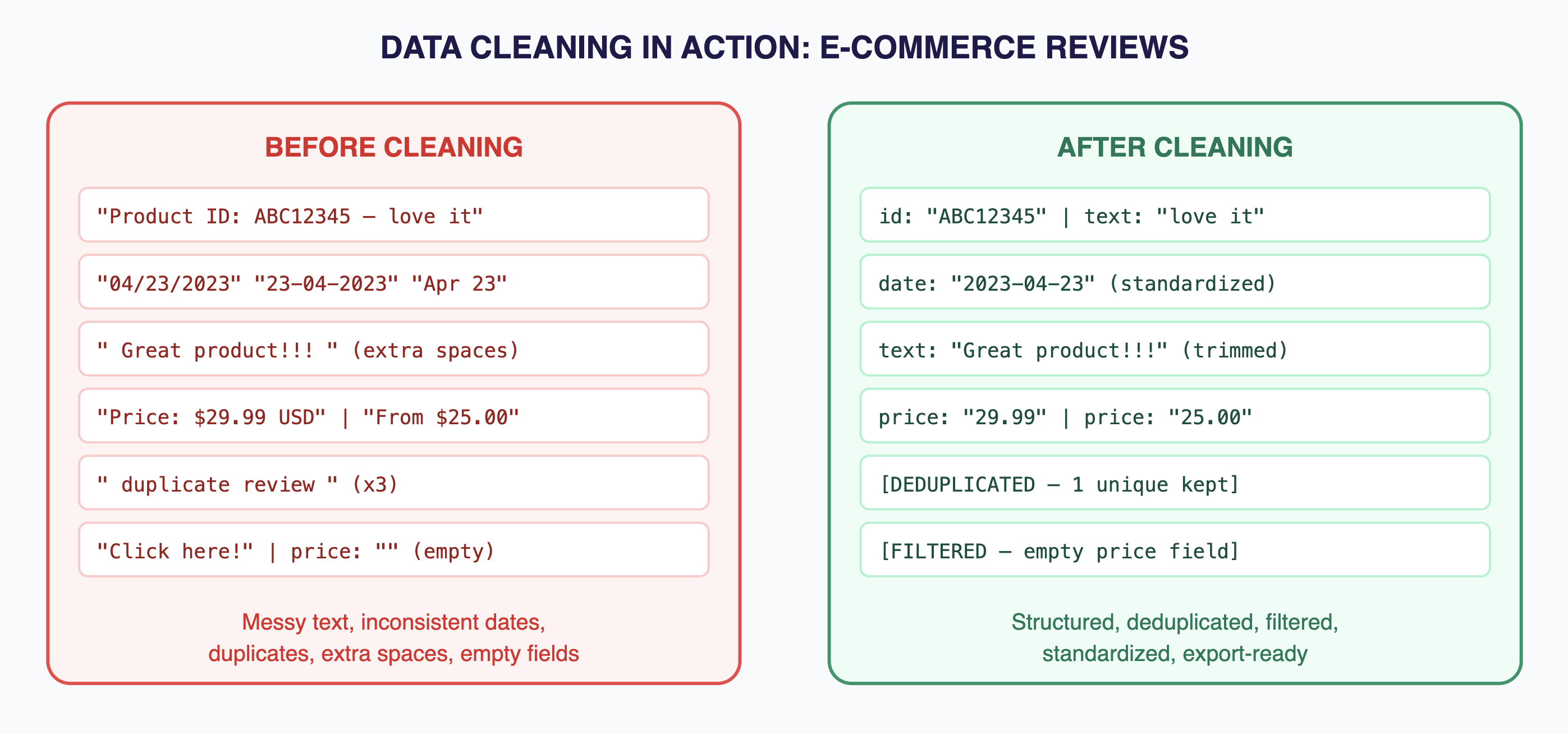
Before and after: messy multi-source review data becomes structured, deduplicated, and analysis-ready.
Here’s how you’d set this up in Octoparse, step by step:
- Step 1: Open the cleaning tools on your data field. Within Octoparse’s custom task editor, right-click the data field you want to clean. You’ll see the “Clean Data” option in the context menu — click it to open the cleaning panel.
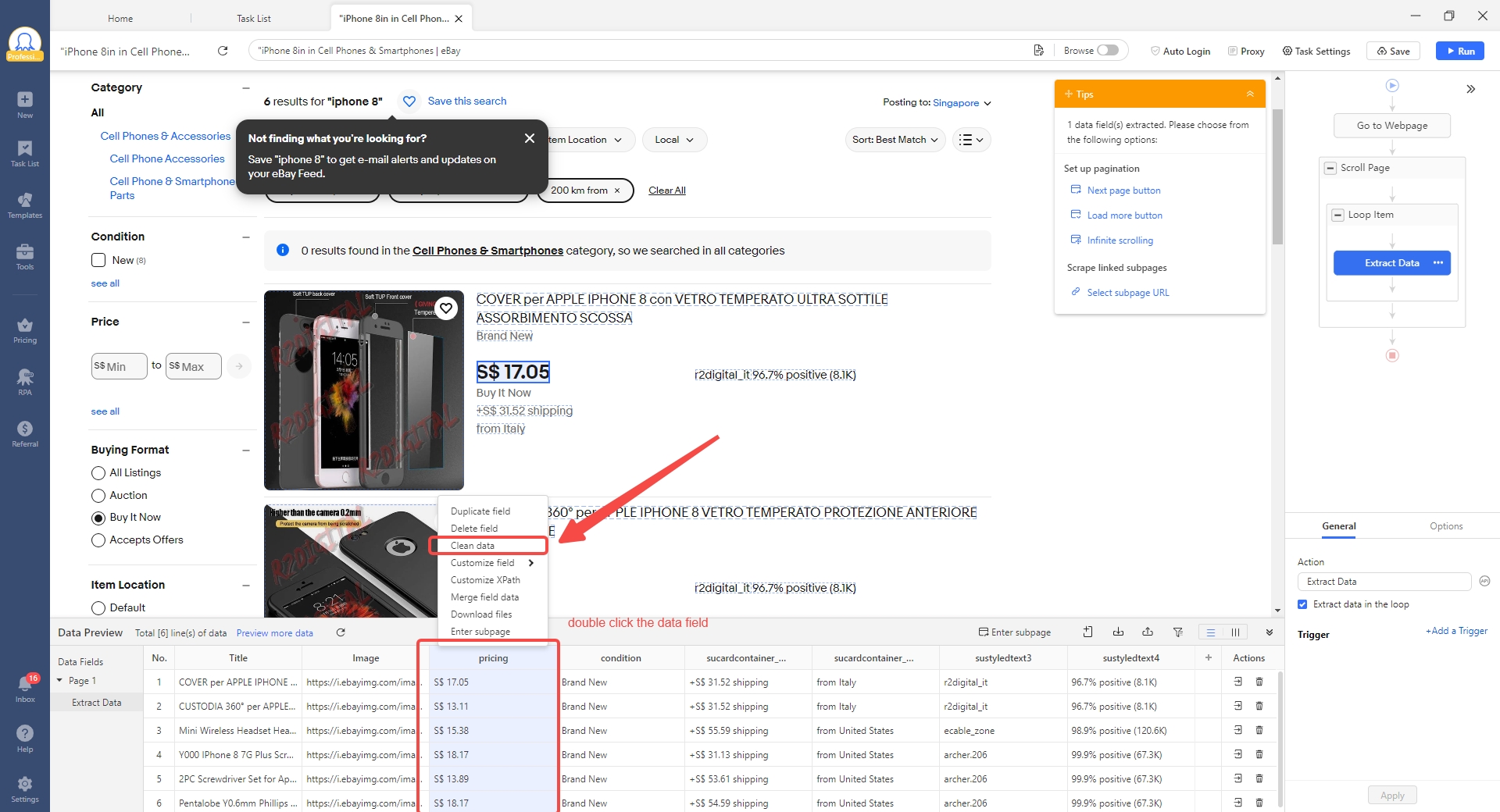
- Step 2: Standardize date formats. On the review_date field, add a cleaning step and select “Reformat extracted date/time.” Choose your target format (YYYY-MM-DD). Octoparse auto-detects the incoming formats and converts them all.
- Step 3: Use AI regex to extract entities. Need to pull product IDs, brand names, or specific data points from messy review text? Open the RegEx Tool (in the Tools section), switch to the AI RegEx Generator tab, paste up to 5 sample strings, highlight the target portions, and click “AI Generate.” Verify the result in the RegEx Validator, then save — it applies across your entire dataset.
- Step 4: Filter unwanted data. Use the Trigger function to set conditions that filter out rows you don’t need — for example, exclude reviews where the price field exceeds a certain threshold, or drop rows where a required field is empty.
- Step 5: Deduplicate. For deduplication on a single data field, use the Remove Duplicates feature within the Data Preview module to filter out duplicate values. For whole-record deduplication across your entire dataset, Octoparse’s export function includes a built-in dedup option that removes duplicate rows automatically when you export.
- Step 6: Export clean data. Run the task on the cloud. Export to Excel, CSV, your database, or via API. The 50,000 messy records come out as a clean, structured, analysis-ready dataset.
Total setup time? About 15 minutes.
Compare that to the traditional approach: A Python developer writes a custom script with pandas, BeautifulSoup, dateutil, and a sentiment analysis library. Testing takes a day. Edge cases take another day. When the next project has different data sources, they start over. That’s the difference between a purpose-built data cleaning tool and a general-purpose coding approach.
Where Else This Matters
The hybrid AI + rules approach works for any web data cleaning scenario. Here are a few that Octoparse users handle regularly:
Price monitoring across marketplaces. Scraped prices come in every imaginable format — “$29.99,” “29,99 €,” “£24.99,” “From $25.” Regex strips the noise and extracts the numeric values, while filters catch anomalies like prices that are obviously wrong (a $0.01 laptop listing, for instance).
Social media brand tracking. Posts from Twitter, Reddit, and forums arrive with platform-specific formatting, emojis, hashtags, and varying degrees of noise. Rule-based cleaning strips formatting artifacts. AI-powered regex extracts entities like brand names and product mentions, while regex patterns and filters handle noise removal. For deeper analysis like sentiment tagging, Octoparse’s data services team can set up custom pipelines.
Lead generation from directories. Business listings scraped from Yellow Pages, LinkedIn, and industry directories contain inconsistent formatting for phone numbers, addresses, and company names. Regex standardizes formats, and the Remove Duplicates feature filters out repeated entries so your final list is clean and ready for outreach.
Content research and aggregation. Video metadata from YouTube, articles from news sites, and blog posts from across the web all need date standardization, deduplication before they’re useful for research. The hybrid engine handles it in a single pipeline.
What Makes This Different From Other Data Cleaning Tools
| Manual / Excel | Python Scripts | Traditional ETL Tools | Octoparse Hybrid Engine | |
| Learning curve | Low | High (coding) | Medium-High | Low (visual, no-code) |
| Web data handling | Poor | Good (if custom-built) | Fair | Purpose-built for web data |
| AI capabilities | None | DIY (add libraries) | Limited | AI regex generation + semantic extraction (sentiment & NER via data services) |
| Regex support | Basic | Full (manual) | Varies | AI-generated + library + visual builder |
| Reusability | None | Copy-paste scripts | Template-based | Modular, shareable cleaning steps |
| Scale | ~10K rows max | Unlimited (with infra) | Depends on license | Cloud execution, 500K+ records |
| Setup time | Minutes (but manual) | Days to weeks | Weeks | Minutes to hours |
Why This Matters for Your Next Project
If you’re reading this article, you’re probably not new to data. You know the value of clean, structured information. The question isn’t whether data cleaning matters — it’s whether you’re spending your time on it wisely.
Every hour you spend manually cleaning data is an hour you’re not spending on analysis, strategy, or decision-making. Every week a developer spends writing one-off cleaning scripts is a week they’re not building features or products.
Octoparse’s hybrid cleaning engine doesn’t eliminate the need for data cleaning — that need isn’t going anywhere. What it eliminates is the manual grind. The AI handles the intelligence. The rules handle the precision. The visual interface handles the accessibility. And the cloud handles the scale.
The result: cleaning data goes from being the biggest time sink in your data workflow to one of the fastest steps. You configure it once, reuse it across projects, and let the system do the heavy lifting.
Getting Started With Octoparse’s Data Cleaning
Ready to try it? Here’s the quick path:
- Create a free account at octoparse.com. No credit card required. The free plan includes data cleaning features.
- Set up a scraping task. Use the point-and-click builder in a custom task to start extracting data from your target website.
- Open the cleaning tools. Right-click any extracted data field and select “Clean Data.” You’ll see options like Replace, Replace with Regular Expression, Match with Regular Expression, Trim spaces, Add a prefix/suffix, Reformat extracted date/time, Timestamp conversion, Timezone conversion, and HTML transcoding. For advanced regex work, the RegEx Tool in the Tools section offers an AI RegEx Generator, pre-built RegEx Patterns, and a RegEx Builder.
- Run and export. Execute on the cloud, schedule it to run automatically, and export clean data to your preferred format — Excel, CSV, database, or API. Enable deduplication at export for automatically clean output.
That’s it. Four steps from raw web data to clean, structured output.
Clean Data, Clear Decisions
Here’s the thing about data cleaning: nobody gets excited about it. It’s the part of the data workflow that everyone wants to skip but nobody can afford to ignore. It’s the unsexy foundation that makes everything else — the dashboards, the insights, the competitive intelligence — actually trustworthy.
Octoparse doesn’t make data cleaning exciting. But it does make it fast, accurate, and accessible to anyone — regardless of whether you’ve ever written a line of code. And in a world where the companies that move fastest on data win, that’s the edge that matters.
Turn website data into structured Excel, CSV, Google Sheets, and your database directly.
Scrape data easily with auto-detecting functions, no coding skills are required.
Preset scraping templates for hot websites to get data in clicks.
Never get blocked with IP proxies and advanced API.
Cloud service to schedule data scraping at any time you want.
FAQs about Data Cleaning
What is data cleaning and why does it matter?
Data cleaning is the process of identifying and fixing errors, inconsistencies, duplicates, and quality issues in a dataset. It matters because every analysis, report, or decision built on dirty data is unreliable. For web-scraped data specifically, cleaning is essential because websites format information inconsistently — so raw exports are rarely usable without processing.
What are the most common data cleaning tasks for scraped data?
The five most common tasks are: standardizing date and number formats across sources, extracting specific values from messy text fields, removing duplicate records, filtering out junk entries, and trimming unwanted whitespace or characters. Octoparse handles these through a combination of Clean Data options (Replace, Trim spaces, date/time reformatting), the RegEx Tool with AI-assisted pattern generation, Remove Duplicates in Data Preview, deduplication at export, and configurable Trigger filters.
Do I need to know regex to use Octoparse’s data cleaning tools?
No. Octoparse’s RegEx Tool has three tabs designed for different skill levels. The AI RegEx Generator lets you paste up to 5 sample strings, highlight the parts you want matched, and click “AI Generate” — it writes the regex for you. The RegEx Patterns tab offers a library of pre-built patterns for common tasks (emails, phone numbers, URLs, dates, integers). And the RegEx Builder lets you create patterns using matching rules like “Match by Start,” “Match with End,” and “Matched by Content.” Every tab includes a RegEx Validator so you can test before applying. Power users can write custom regex too, but it’s entirely optional.
How does Octoparse’s AI cleaning differ from just using ChatGPT or another AI tool?
General-purpose AI tools like ChatGPT can help you figure out a cleaning approach, but they can’t process 50,000 records in bulk, they don’t integrate directly into a scraping pipeline, and they don’t offer persistent, reusable cleaning configurations. Octoparse’s AI regex generator is purpose-built for data cleaning — you feed it examples from your actual data, and it generates reliable patterns that run at scale across your entire dataset, right inside your extraction workflow. No copy-pasting between tools.
Can I clean data from multiple platforms in the same pipeline?
Absolutely. Octoparse’s cleaning tools work on the extracted data regardless of the source. If you’re pulling reviews from Amazon, eBay, and Walmart, you configure your cleaning rules once and they apply uniformly across all records. Date formats get standardized, unwanted text gets trimmed, duplicates get caught — regardless of which platform the data came from.
Is data cleaning included in the free plan?
Yes. The free plan lets you run up to 10 scraping tasks with full access to data cleaning features including regex tools, format conversion, and AI-assisted cleaning. The Standard plan ($69/month billed annually) and Professional plan ($249/month billed annually) add cloud execution, scheduling, higher concurrency, and priority support.
Can Octoparse handle non-English data cleaning?
Yes. The regex and format conversion tools are language-agnostic, and the AI regex generator works with any language’s character set. This is especially useful for cross-regional projects — say, cleaning product reviews from Amazon US, Amazon UK, and Amazon France in a single pipeline. The tools handle different character encodings natively.