Have you ever ask yourself: “Should I use a VPN or a proxy for web scraping?”
The short answer is: 9 out of 10, a VPN will get you blocked faster once you scale. But the real situation could always be more nuanced. Below is the long answer — with practical advice for Octoparse.
The Truth About The Difference Between VPN and Proxy
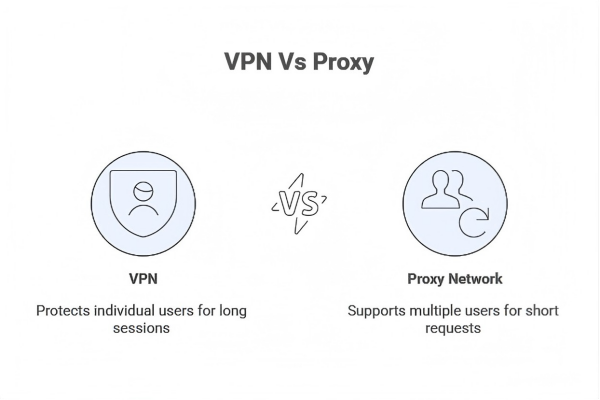
On the surface, VPNs and proxies appear interchangeable because both replace your original IP address. This similarity is cosmetic.
Under the hood, they are designed for opposite use cases:
- A VPN is built to protect one human user for long browsing sessions.
- A proxy network is built to support many short-lived requests that look like different users.
Anti-bot systems do not care why you are making requests. They only measure patterns. This is where VPNs fail — predictably and mathematically.
What Anti-Bot Systems Actually See
Instead of starting with abstract definitions, it is more useful to look at how modern websites evaluate traffic.
Platforms such as Amazon, LinkedIn, and most Cloudflare-protected sites focus on three primary signals:
- Request frequency per IP
- IP reputation and history
- Behavioral consistency over time
Now compare how VPNs and residential proxies behave under these signals.
VPN vs Residential Proxy
| Dimension | VPN (Nord, Express, etc.) | Residential Proxy (Octoparse) |
| IP allocation | Static or semi-static per session | Rotates per request |
| Request pattern | Many requests from one IP | Few requests per IP |
| IP reputation | Known datacenter ranges | Real household networks |
| Encryption | Heavy (AES-level) | Minimal or none |
| Scraping stability | Degrades quickly | Designed for scale |
VPN providers openly advertise shared servers. Hundreds or thousands of users exit through the same IP ranges. Those ranges are cataloged, scored, and throttled by major websites.
When you attach automation to those IPs, the risk of getting blocked compounds instantly.
When VPNs Are “Guaranteed” to Fail
VPNs rely on persistent tunnels. This persistence is what keeps a human user safe while browsing for hours — and what exposes a scraper within minutes.
The Math of Getting Blocked
Let us assume a modest scraping setup in Octoparse:
- 1 page per second
- 60 pages per minute
With a VPN:
- The target site sees 60 requests from one IP in 60 seconds
- This exceeds typical rate-limit thresholds
- Result: CAPTCHA, 403, or IP ban
With rotating residential proxies:
- The site sees 60 requests from 60 different IPs
- Each IP behaves like a normal user
- Result: no rate limit triggered
This is why people say VPNs are “fine for testing but not production.” They are not wrong — but they often underestimate how low the ceiling actually is.
VPNs protect the user. Proxies protect the workflow.
Why Encryption Is a Disadvantage in Scraping
VPN marketing heavily emphasizes encryption strength. For scraping, this is mostly irrelevant — and sometimes harmful.
- HTTPS already encrypts request payloads
- VPN encryption adds CPU overhead
- Encryption does not improve IP reputation
For high-volume scraping, throughput and consistency matter more than cryptographic strength. This is why most large-scale data pipelines avoid VPNs entirely and rely on proxy infrastructure instead.
Why Residential Proxies Work (When Configured Correctly)
Residential proxies route requests through IPs assigned by real Internet Service Providers. From the website’s perspective, traffic appears to come from normal households.
Key advantages:
- Natural traffic distribution
- Lower historical risk scores
- Rotation breaks behavioral fingerprints
Octoparse integrates residential proxy rotation at the task level, which is a critical distinction. You are not swapping IPs manually; the system handles it automatically per request.
How to Switch Without Breaking Your Setup
If you are currently toggling VPN servers while scraping, you are creating friction instead of reducing risk. Below here is the most reliable way I found to web scrape with proxy with least turbulance.
Recommended Workflow for Octoparse Users
1. Do not run a system-wide VPN
2. Open your Octoparse task settings
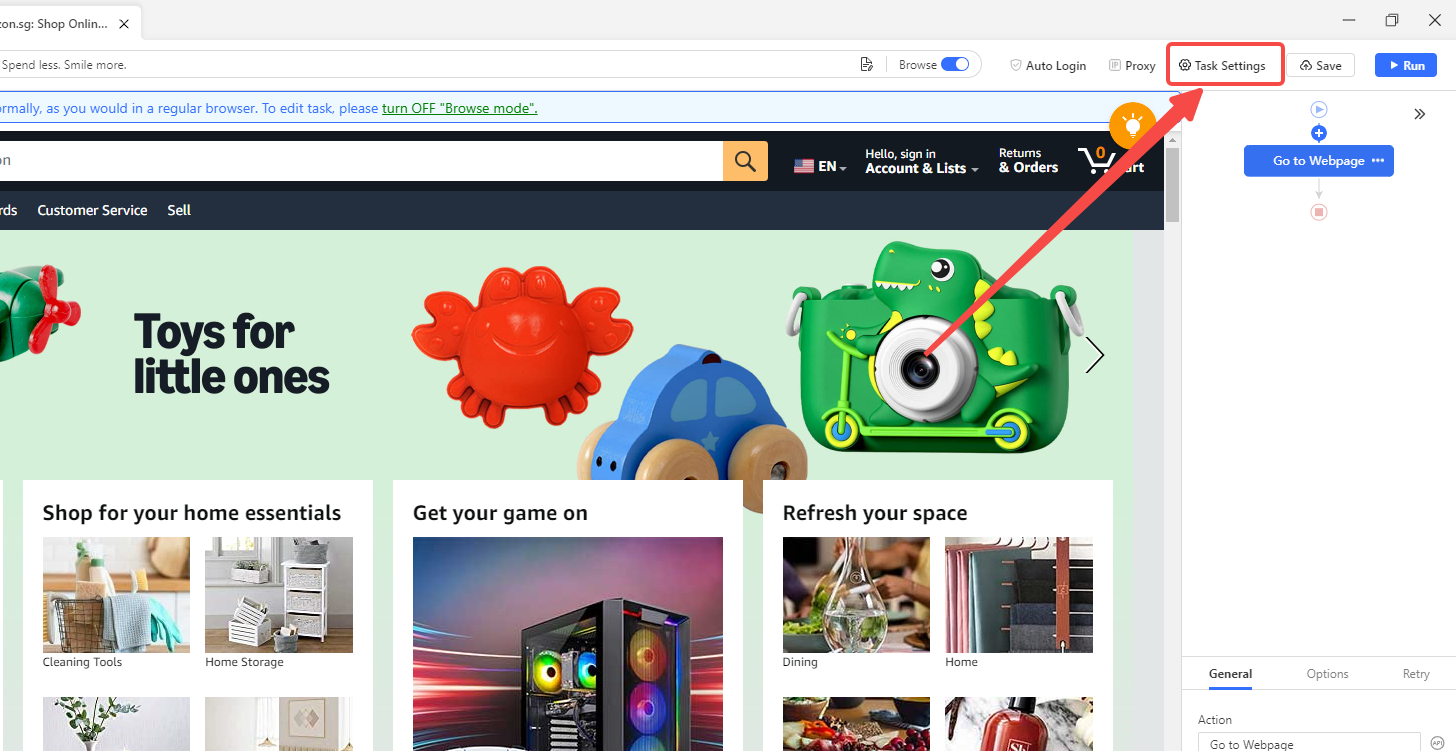
3. Configure proxy usage (near “Use my own proxies”) inside the task
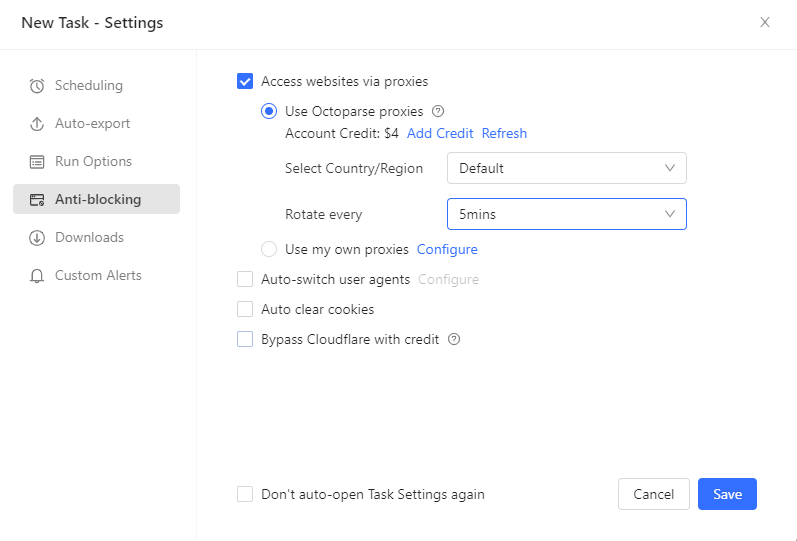
4. Select Residential Proxy from the IP pool:
5. Let Octoparse rotate IPs automatically
At this point, each URL request appears to come from a different user environment. You are no longer “hiding” behind one address; you are distributing activity across thousands.
This shift alone typically eliminates the majority of Cloudflare blocks and rate-limit failures for new users.
This is also how I was able to collect fifteen thousands of raw data from social media like Youtube and Reddit for sentiment analysis to find out: “Do the Driving Modes in Cadillac LYRIQ Offer Different Ranges or Battery Usages?“
Wrapping Up
If your goal is privacy while browsing, use a VPN.
If your goal is reliable data extraction at scale, use rotating residential proxies.
Most scraping failures attributed to “anti-bot systems” are actually infrastructure mismatches. Once you align your tools with how websites evaluate traffic, the problem becomes manageable — and predictable.
For Octoparse users, this alignment is already built in. The key is knowing when to stop treating scraping like private browsing and start treating it like a data pipeline.
FAQs
Can I use a free VPN for web scraping?
No. Free VPNs rely almost exclusively on heavily abused datacenter IPs. These IPs are already flagged by major platforms and are blocked almost immediately.
Is a proxy faster than a VPN for scraping?
Yes. Proxies avoid encryption overhead and are optimized for high request volumes. This results in higher throughput and fewer timeouts during large jobs.
Do I still need to slow down my scraper if I use proxies?
Yes. Proxies reduce IP-based blocking, not behavioral detection. Reasonable request intervals and browser simulation still matter.
Can a VPN ever work for scraping?
Only for very small, manual tests. The moment automation and volume increase, VPN limitations surface.