Quick answer: Twitter/X pages can technically be collected without an API, and Octoparse can turn permitted public pages into structured rows without custom code. However, X’s current Terms of Service say users may not scrape the service without X’s express written permission. Public visibility is not the same as contractual permission, so confirm that your workflow is authorized before collecting data.
For an authorized workflow, choose a ready-made scraper for your exact input: a search query, post URL, hashtag, or public profile URL. Use the official X API when you need supported application access or near-real-time integrations. Use Python when you need complete control and can maintain the workflow when X changes its interface.
Which Twitter data collection method should you use?
| Method | Best for | What you configure | Main trade-off |
| Octoparse Twitter scraper | Permitted public-data exports, research, and no-code workflows | Template input and run settings | Templates can have account, credit, or input limits |
| Official X API | Supported apps, streaming, and predictable structured endpoints | App access, authentication, and endpoints | Usage is billed by resource and endpoint |
| Python browser automation | Custom logic and developer-controlled workflows | Browser session, selectors, scrolling, and retries | You maintain the workflow when the site changes |
Verified August 12, 2026: the X API uses pay-per-usage pricing, with credits deducted by resource or endpoint. Compare the live API rate with scraper operating time before choosing a method; do not rely on older fixed-tier pricing articles.
What data can a Twitter scraper collect?
A Twitter scraper converts fields visible on public X pages into structured records. Depending on the page and template, the output can include post text, timestamps, media URLs, hashtags, replies, engagement metrics, and public profile data. It does not provide private messages, private-account content, or fields hidden from the authorized session.
Public Twitter/X data fields by source page
| Source page | Common fields to extract | Typical use |
| Search results | Post text, author, date, URL, replies, reposts, likes, and media links | Topic and competitor monitoring |
| Post and replies | Original post, reply text, reply author, timestamps, and engagement | Sentiment and customer research |
| Hashtag results | Hashtag posts, authors, dates, engagement, and media | Campaign and trend analysis |
| Public profile | Display name, handle, bio, profile URL, and public posts | Creator or account research |
| Followers or following | Public account names, handles, bios, and profile URLs | Audience analysis |
Private accounts, direct messages, deleted content, and fields hidden behind permissions are outside the scope of a public-data scraper. X can also change page layouts or access controls, so test a small sample before starting a large collection.
How do you scrape Twitter data without the API?
For an authorized browser-based workflow, you can collect public Twitter/X data without using the X API by running a purpose-built template. Octoparse Twitter scraping templates accept inputs such as keywords, advanced-search queries, hashtags, post URLs, and public profile URLs. Each template has its own input rules, available fields, login requirements, and usage limits.
Step 1: Match the Twitter scraper to your input
Start with the page or query you already have:
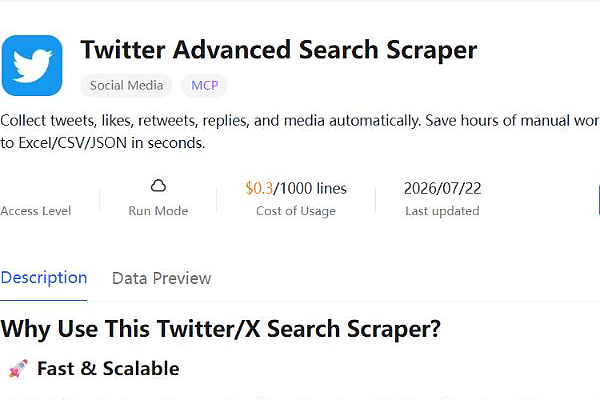
- Use https://www.octoparse.com/template/twitter-scraper-by-keywords for keywords, phrases, accounts, dates, and other X search operators.
- Use https://www.octoparse.com/template/tweets-comments-scraper-by-search-result-url when you have a post or search-result URL and need replies.
- Use https://www.octoparse.com/template/twitter-scraper-by-hashtag when the hashtag defines the dataset.
- Use https://www.octoparse.com/template/twitter-scraper-by-account-url for the public posts of a specific account.
- Use the https://www.octoparse.com/template/twitter-follower-list-scraper when the audience list, rather than the posts, is the target.
For a focused audience-workflow walkthrough, see how to scrape Twitter followers without coding.
This selection matters. A profile scraper cannot reliably answer a reply-level question, and a hashtag scraper may not support the date or author filters available in advanced search.
Step 2: Check the sample fields and requirements
Open the template detail page and review its sample output before running it. Confirm that the template returns the fields your analysis requires.
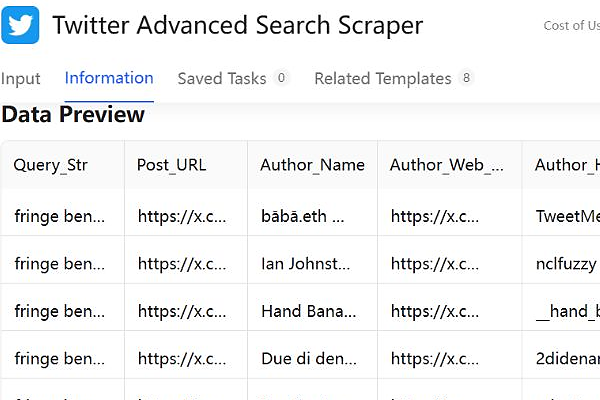
Also check whether the template:
- runs locally or in the cloud;
- requires an X login or session information;
- accepts one URL or a list of URLs;
- supports date ranges or result limits;
- uses subscription capacity or pay-per-result credits.
Octoparse notes that some JavaScript or Python templates are cloud-only and may carry usage limits. Template requirements can change as X changes its site, so the detail page is the source of truth.
Step 3: Enter a precise query or valid public URL
Specific inputs produce cleaner datasets. For keyword monitoring, use X advanced-search operators instead of a broad one-word query. A practical query can combine:
- an exact phrase;
- one or more accounts;
- a date range;
- a language;
- minimum engagement;
- inclusion or exclusion terms.
For URL-based templates, use the exact public post, search-result, hashtag, or profile URL requested by the template. If a run returns no rows, validate the URL format and date range before changing the scraper.
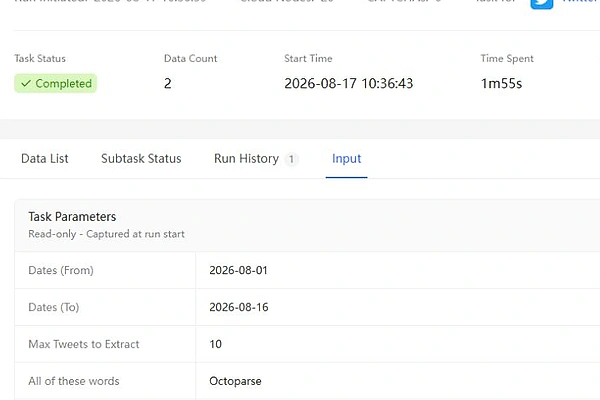
Octoparse, and a 10-row maximum.Step 4: Test, inspect, and then scale the run
Run a small sample first. Check for missing fields, duplicate posts, unexpected languages, and date gaps.
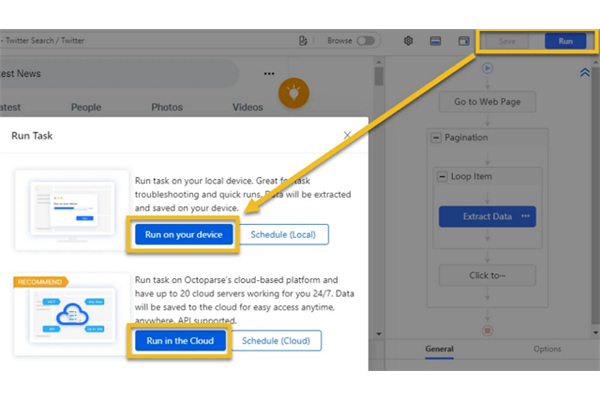
On August 17, 2026, we tested the current https://www.octoparse.com/template/twitter-scraper-by-keywords in the Octoparse web console. The first-party run used template registration ID 288 and current version ID 3448, searched for Octoparse from August 1 through August 16 in day mode, and set Max Tweets to Extract to 10 with Top results and reply filters off.
First-party test results
| Observed item | Result |
| Run status | Completed in 1m55s using 20 cloud nodes; 0 CAPTCHAs |
| Requested versus returned | 10-row ceiling; 2 rows returned |
| Populated output | 22 of 26 displayed fields had values, including query, author name and handle, UTC time, tweet content, post ID and URL, replies, reposts, likes, views, bookmarks, image URLs, language, quote content, and result type |
| Empty output | Reply_to_Whom, Reply_to_Whom_URL, Reply_to_Whom_Username, and Reply_to_Whom_Handle were empty in both rows |
| Duplicate check | The console reported 0 duplicates, but both rows shared the same Post_ID and Tweet_URL, leaving 1 unique post after manual deduplication |
| Export and cost limits | The JSON export remained queued for more than six minutes, so file-open validation was not completed. The page listed $0.3/1000 lines, but no itemized charge was visible when checked |
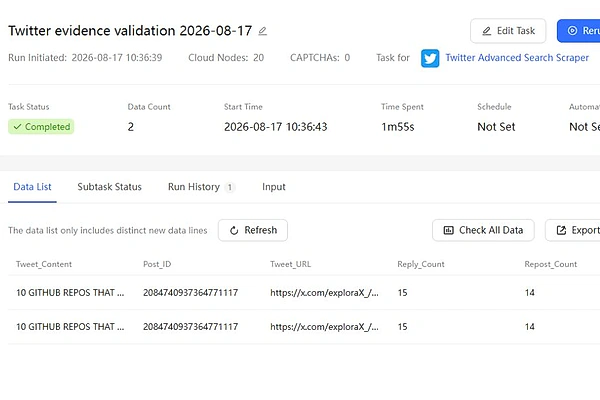
Post_ID 2084740937364771117, which the manual audit counted as one unique post even though the console reported 0 duplicates.This test shows why a result limit should be treated as a ceiling rather than a guaranteed row count. Deduplicate on a stable field such as Post_ID or Tweet_URL, audit required fields before scaling, and confirm that an export reaches Ready before depending on the file. This is one dated test, not a universal speed, completeness, cost, or reliability benchmark.
Only increase the result limit after the sample matches the intended dataset. This prevents a valid-looking but incorrectly scoped query from producing thousands of unusable rows.
For recurring work, use cloud scheduling and export automation where your Octoparse plan and template support them. Octoparse pricing starts with a free plan, while paid plans add cloud runs, scheduling, anti-blocking features, and higher operating capacity.
Which Twitter scraper should you use for each goal?
| Goal | Recommended starting point | Why |
| Monitor a topic or competitor | Twitter Advanced Search Scraper | Supports richer search criteria than a plain hashtag |
| Analyze reactions to one post | Twitter Comments Scraper | Keeps replies connected to a defined conversation |
| Track a campaign hashtag | Twitter Hashtag Scraper | Produces a focused hashtag-level dataset |
| Research one public account | Twitter Scraper by Account URL | Starts from a known profile rather than a broad search |
| Analyze an audience | Follower or following scraper | Captures public account-level fields instead of post-level fields |
| Build a custom application | Official X API | Provides supported programmatic endpoints and structured objects |
The advanced-search route is the best general starting point. X search syntax can express topic, author, time, language, and engagement constraints in one query, which reduces cleanup after export.
How does a no-code Twitter scraper compare with the X API?
The official X API and a no-code scraper solve different problems.
The X API offers supported REST endpoints for posts, users, lists, trends, and other platform objects. It is the stronger choice for application features, supported authentication, streaming, and predictable schemas. Current self-service access is credit-based and pay-per-use, with endpoint rate limits and a monthly post-read cap.
A no-code scraper can reduce setup time for a defined public-data export. It avoids app creation and code maintenance, and it can mirror a visible workflow such as search, infinite scrolling, and extraction. The trade-off is that website changes can affect the workflow, and public-page access does not equal permission to use the data for every purpose.
Choose based on the operating model:
- Choose the X API for supported product integrations, near-real-time streams, or application features.
- Choose a no-code Twitter scraper for research exports, one-off datasets, scheduled reports, or analysts who do not want to maintain code.
- Choose both when the API powers a product while a scraper supports ad hoc research that is awkward to build into the application.
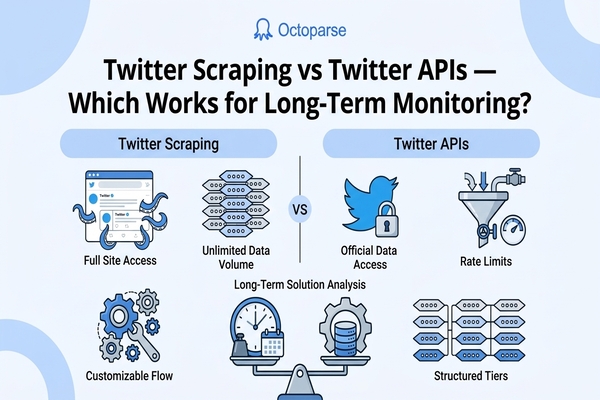
For a deeper decision framework, compare Twitter scraping with Twitter APIs for long-term monitoring.
Should you scrape Twitter with Python instead?
Use Python for Twitter scraping when the workflow needs custom parsing, integration logic, or developer-controlled infrastructure and your team can maintain it. Browser automation tools such as Playwright and Selenium can load X pages, retain an authorized session, scroll dynamic timelines, and extract selected elements. Python does not remove X’s access rules or the maintenance burden created by interface changes.
The code is only part of the job. A production workflow must also handle:
- authentication and session expiry;
- infinite scroll and lazy-loaded posts;
- retries, timeouts, and empty states;
- selector changes after X interface updates;
- deduplication and checkpointing;
- rate control and responsible collection.
Do Twint and snscrape still work for Twitter?
Do not treat an old tutorial as current compatibility evidence. The Twint repository was archived by its owner on March 30, 2023, so Twint should not be the default for a new production workflow.
The snscrape repository still documents Twitter users, profiles, hashtags, searches, and individual tweets. That documentation is not proof that every Twitter workflow works in 2026. Before adopting snscrape, run a dated acceptance test with the required input, fields, and output volume, then record failures and missing data.
For a complete Python implementation, use a dedicated Python Twitter scraper guide. This page only explains when the Python route is appropriate, which keeps the two pages from competing for the same query cluster.
Why does a Twitter scraper return no data?
A zero-row result usually means the input or scope does not match what the template can access. It does not always mean the scraper is broken.
Check these causes in order:
- Invalid page type: Confirm that a post scraper received a post URL and a profile scraper received a profile URL.
- Empty date range: A public account may not have posted during the requested period.
- Overly narrow search: Remove one filter at a time to find the condition excluding all results.
- Private or restricted content: Public-data templates cannot collect content the session cannot view.
- Expired login state: Refresh the required session information if the template depends on authentication.
- Template limit: Check pagination, result, cloud-run, and credit limits on the current detail page.
- Temporary site change: Retry a small job and consult Octoparse support if the page layout has changed.
Octoparse’s template troubleshooting guide recommends validating inputs and date ranges before escalating a failed run.
How do you export Twitter data to CSV, Excel, or JSON?
After the run finishes, inspect the extracted rows and export the dataset in the format required by the next step. Octoparse’s supported export formats include spreadsheet, structured-file, database, cloud-storage, and API delivery options; availability differs between local and cloud data.
- CSV or Excel: Best for filtering, pivot tables, manual review, and analyst handoff.
- JSON: Best for scripts, databases, and machine-learning pipelines.
- Google Sheets: Useful for shared reporting when the selected plan supports the connection.
- Database or API delivery: Useful for recurring workflows that feed a production system.
Keep a raw export before cleaning the data. In the analysis copy, normalize timestamps, preserve the original post URL, remove exact duplicates, and document the query and collection time. Those details make the dataset reproducible.
Is it legal to scrape public Twitter data?
Scraping public Twitter/X data is not automatically permitted simply because the page is visible. Three separate questions matter: whether the access method violates applicable law, whether X’s terms authorize automated collection, and whether storing or using the data complies with privacy, intellectual-property, and sector-specific rules.
Legal access and platform permission are separate questions
X’s current Terms of Service state that users may not scrape the service without X’s express written permission or work around technical limitations. That contractual restriction applies even when a page is publicly visible, unless another authorized basis applies.
If the workflow uses X developer products or APIs, review X’s Developer Policy as well; it governs permitted use of developer access and X Content.
The Ninth Circuit’s 2022 decision in hiQ Labs v. LinkedIn addressed access to publicly available LinkedIn profiles under the U.S. Computer Fraud and Abuse Act. It was not a blanket approval for all scraping or all uses of collected data.
Use a conservative collection policy:
- collect only data that is publicly visible to the authorized session;
- do not collect private messages or bypass account permissions;
- review X’s current terms and developer policies;
- minimize personal data and define a retention period;
- comply with privacy, intellectual-property, and sector-specific rules;
- obtain legal advice for sensitive or commercial use cases.
This section provides general information, not legal advice.
Frequently asked questions about Twitter scraping
- Can you scrape Twitter without an API key?
Technically, a browser-based or no-code tool can collect data displayed on public X pages without an API key. X’s current terms prohibit scraping without express written permission, so an API-free workflow still requires authorization and must comply with access controls, privacy rules, and applicable law.
- What is the best Twitter scraper for non-developers?
The best Twitter scraper for a non-developer is the template that matches the exact page and output needed. Octoparse offers separate starting points for advanced search, replies, hashtags, public profiles, and follower data, which reduces the need to build and maintain a custom workflow.
- Can you scrape tweets and replies together?
Yes, but the workflow must preserve the relationship between the original post and its replies. Use a comments or conversation-focused scraper and retain the source post URL or conversation identifier in every exported row.
- Can you scrape historical tweets?
Historical coverage depends on what X displays to the current session and what the selected API endpoint or scraper supports. Test the requested date range before promising complete historical coverage. For supported full-archive requirements, evaluate the current X API and Enterprise options.
- Can a Twitter scraper collect email addresses?
A Twitter scraper can only collect email addresses that users have made publicly visible on accessible pages. Many profiles do not expose an email address. Do not infer or enrich private contact details without a lawful basis and a compliant workflow.
- How often should you run a Twitter monitoring scraper?
Run frequency should match the decision being supported. Daily collection may suit fast-moving campaign or incident monitoring, while weekly collection may be enough for competitor and topic reports. Test the query, dataset quality, and operating limits before scheduling frequent runs.
- Can you still scrape Twitter in 2026?
Technically maintained tools can still collect accessible X pages in 2026, but technical capability does not grant permission. Use the official API or obtain an authorized basis, then test current templates and documentation because X changes its interface, pricing, and access rules over time.
Start with a small, verifiable Twitter dataset
Evidence note: This guide checks product and API claims against first-party documentation and includes a controlled Twitter template run dated August 17, 2026. That run returned two rows but only one unique
Post_ID, and its JSON export was still queued when checked. It supports the specific observations reported above, not a broader performance, completeness, cost, or export-speed claim.
For an authorized collection, the reliable workflow is simple: define the decision, choose the matching Twitter scraper, test a small sample, and scale only after checking the output.
Browse the Octoparse template library to find the current Twitter template for your source page. If the template fits the data you need, create a free Octoparse account and validate the first sample before scheduling a larger run.