You click a link. The page won’t load. Now you’re wondering: is the website actually down, or is something wrong on my end?
It’s a surprisingly common question—and the answer matters. If the site is down for everyone, there’s nothing you can do but wait. If it’s just you, there’s usually a quick fix.
Here’s how to figure out which situation you’re in, what typically causes websites to go down, and what you can do about it.
Quick answer: How to check if a website is down
The fastest way to check is using a free status-checking tool. These services ping the website from their own servers, so they can tell you whether the site is reachable from outside your network.
Free tools that work:
- Down for Everyone or Just Me — Simple, fast, does exactly what the name says
- IsItDownRightNow — Shows response time and recent uptime history
- Downdetector — Best for major services (Netflix, Discord, banks) because it aggregates user reports and shows outage patterns
If these tools say the site is up but you still can’t access it, the problem is likely on your end.
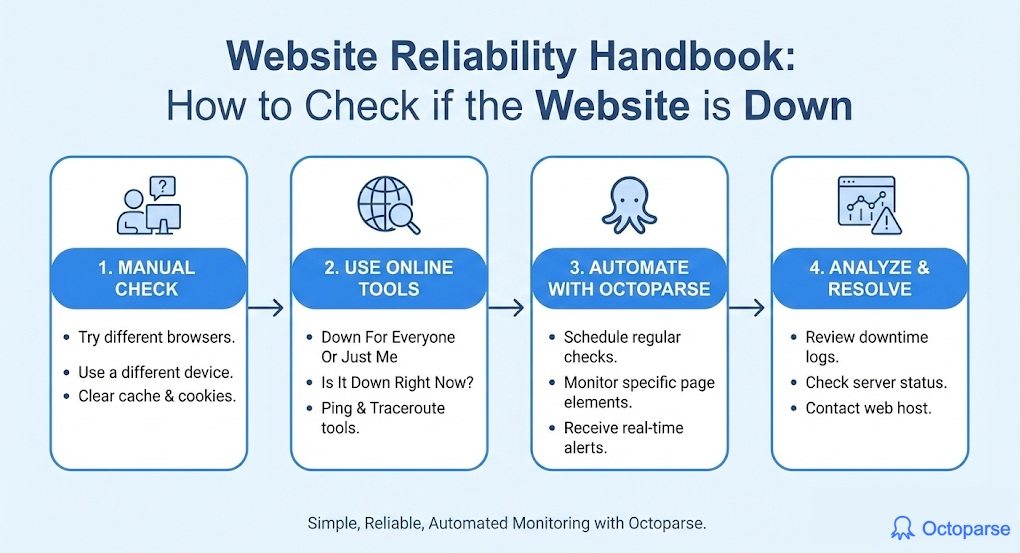
“It’s just me” — How to fix common access problems
When a website works for everyone else but not you, try these fixes in order:
1. Refresh and clear cache
Hit Ctrl+F5 (Windows) or Cmd+Shift+R (Mac) for a hard refresh. This forces your browser to fetch a fresh copy instead of loading a cached version that might be broken or outdated.
2. Try a different browser or incognito mode
If the site loads in Chrome but not Firefox (or vice versa), a browser extension or corrupted cache is probably interfering. Incognito/private mode disables most extensions automatically.
3. Check your internet connection
Can you load other websites? If not, the problem is your connection, not the site. Try:
- Restarting your router
- Switching from WiFi to mobile data (or vice versa)
- Running a speed test at fast.com
4. Flush your DNS cache
Your computer stores a local record of website addresses. Sometimes this gets corrupted or outdated.
Windows: Open Command Prompt and type ipconfig /flushdns
Mac: Open Terminal and type sudo dscacheutil -flushcache; sudo killall -HUP mDNSResponder
5. Try a different DNS server
Your ISP’s DNS servers might be having issues. Switching to a public DNS like Google (8.8.8.8) or Cloudflare (1.1.1.1) can help. Search “change DNS server” plus your operating system for instructions.
6. Disable your VPN
VPNs route your traffic through different servers, which can sometimes cause access issues. Try disconnecting temporarily to see if that’s the culprit.
“It’s down for everyone” — Why websites go down
When a website is genuinely down, you can’t fix it—but understanding why helps set expectations for when it might come back.
Example
Amazon Web Services guarantees 99.99% uptime across most services. Sounds bulletproof until you do the math: 99.99% uptime still allows for 52.6 minutes of downtime annually.
AWS supports roughly 30% of the internet’s cloud infrastructure, and even they have outages. When they do, their teams analyze what went wrong and publish detailed post-mortems. The takeaway isn’t that outages are acceptable—it’s that even the best infrastructure requires active monitoring.
Server overload
The most common cause. When too many people try to access a site at once (think: concert tickets going on sale, breaking news, viral social media moments), servers can’t keep up and stop responding.
Typical recovery time: Minutes to hours, depending on whether the site can add capacity.
Hosting or cloud provider issues
Websites run on infrastructure provided by companies like Amazon Web Services, Google Cloud, or smaller hosting providers. When these services have problems, every site using them goes down simultaneously.
In 2017, a single typo during routine maintenance at AWS took down huge portions of the internet, including Slack, Quora, and Trello. It happens.
Typical recovery time: Usually resolved within hours. Major providers have strong incentives to fix problems fast.
Maintenance windows
Sometimes downtime is planned. Companies take their sites offline to deploy updates, perform database maintenance, or upgrade infrastructure. Well-run organizations schedule this during low-traffic hours and communicate it in advance.
Typical recovery time: Usually announced beforehand—check the company’s social media or status page.
Cyberattacks
DDoS (Distributed Denial of Service) attacks flood a website with fake traffic until it can’t serve real users. These are unfortunately common, especially against gaming platforms, financial services, and controversial sites.
Typical recovery time: Varies widely. Some attacks are mitigated in minutes; others persist for days.
Domain or certificate problems
Websites need valid domain registration and security certificates to function. If a company forgets to renew these (it happens more than you’d think), the site goes dark until someone notices and fixes it.
Typical recovery time: Hours to a day, once the issue is identified.
Code deployment gone wrong
Developers push updates that accidentally break something critical. The site was working fine, someone deployed new code, and now it’s down.
Typical recovery time: Usually fast—rolling back to the previous version is often straightforward.
How to check if a specific service is down
Major platforms often have dedicated status pages where they report ongoing issues:
- Google: status.cloud.google.com
- Amazon/AWS: status.aws.amazon.com
- Microsoft/Azure: status.azure.com
- Cloudflare: cloudflarestatus.com
- GitHub: githubstatus.com
For other services, try searching “[service name] status” or checking their Twitter/X account—companies often post updates there during outages.
When to worry (and when to just wait)
Just wait if:
- Multiple status-check tools confirm the site is down
- Other users are reporting the same issue on social media or Downdetector
- The company has acknowledged the outage
Investigate further if:
- The site works for everyone else but not you
- You’re getting unusual error messages (like security warnings)
- The problem persists for more than a few hours with no acknowledgment from the company
Contact someone if:
- It’s your own website or one you manage
- You’re a paying customer of a service that’s been down for an extended period
- You suspect your account specifically has been affected (rather than a general outage)
For website owners: When “is it down?” becomes your responsibility
If you run a website—even a small one—the question flips. You’re no longer asking “is it down?” You’re asking “how do I know before my users tell me?”
The difference between catching an outage in 30 seconds versus finding out an hour later from an angry email is substantial. For businesses, it’s often the difference between a minor blip and lost revenue.
The average IT outage costs roughly $14,056 per minute, according to a 2024 study by EMA and Big Panda. For an e-commerce site during peak hours or a SaaS platform clients depend on, even a few minutes of downtime can erase a day’s margin.
That’s why professionals don’t check if websites are down. They build systems that tell them the moment something goes wrong—often before users notice anything.
Professional monitoring is a bigger topic than we can cover here, but the core idea is simple: automated tools check your site continuously (every minute or even more frequently) and alert you immediately when something’s wrong. Services like UptimeRobot, Pingdom, and Better Uptime offer free or low-cost tiers that work well for small sites.
If you’re interested in going deeper on website monitoring, reliability, and the infrastructure that keeps sites running, we cover these topics in the next section
How Does The Professional Monitor A Website
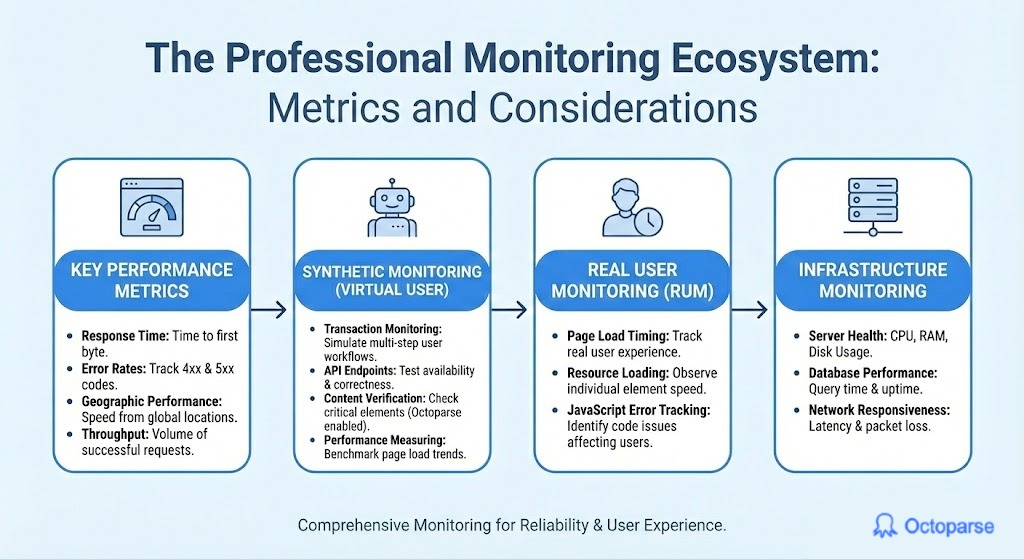
When discussing professional monitoring, there are a couple of other performance metrics besides the most popular uptime metric:
- Response time: The duration it takes for the server to process a request and return the initial byte of the response. A faster response time means a better user experience.
- Error rates: Track the number of requests that result in errors. Any HTTP status code in the 4xx or 5xx range often indicates a complete outage.
- Geographic performance: Global businesses may be impacted by the considerable distances that a request must travel to reach the server and back from the user. Considering multiple geographic locations for the server can be beneficial for speed and reliability.
- Throughput: The total volume of successful requests or data processed by the system within a given time frame. High throughput often indicates the system’s ability to handle large amounts of traffic.
With these metrics in mind, professional tools also test user behavior on websites to check different pathways. Such an approach is called synthetic monitoring and acts as a virtual user continually testing how a user would interact with the system. Here is everything that is tested in synthetic monitoring:
- Transaction monitoring: Simulating complex, multi-step user actions (e.g., login, adding items to a cart, checkout process) to ensure the whole business workflow is functional.
- API endpoints: Directly testing the availability, response time, and correctness of internal and external APIs that the website relies on.
- Content verification: Checking that specific, critical elements (text, images, links) are present and correctly rendered on the page, ensuring a functional user interface. With Octoparse, such monitoring of custom elements on any website is straightforward.
- Performance measuring: Collecting metrics like page load time and resource loading speed under controlled, simulated conditions to benchmark and track performance trends.
While synthetic testing is beneficial for checking if a website works as it should, Real User Monitoring (RUM) is responsible for what actually happens with real visitors. Real User Monitoring includes:
- Page load timing: Tracking the time it takes for a page to fully display content to a real user, measured from the initial request to the moment the page is fully interactive.
- Resource loading performance: Certain elements, such as images, load more slowly than text or tables. Hence, it must be observed whether it is good enough to avoid any delays.
- JavaScript error tracking: Any JavaScript code-related issue can cause the website to slow down or not display elements correctly.
RUM and synthetic monitoring are part of behaviour monitoring, a crucial part is the infrastructure monitoring of our services, such as:
- Server Health: CPU, RAM, Disk Usage.
- Database performance: Query response time, uptime, and connection counts.
- Network responsiveness: Latency, packet loss.
All of these factors above are part of what can go wrong when a website goes down, which is why it is essential to monitor and test constantly.
Keep learning
Curious about how websites actually work behind the scenes? Understanding the technology that powers the web—from how servers handle requests to how data moves between systems—opens up a lot of possibilities.
Here are some good starting points:
- [What is web scraping and how does it work?] — Understanding how data is extracted from websites
- [How proxies work and why they matter] — The infrastructure that routes internet traffic
- [Introduction to APIs] — How applications communicate with each other
The more you understand about how the web works, the better equipped you are to troubleshoot problems, build your own projects, or simply make sense of the digital world around you.
FAQs
1. How do I check if a website is down for everyone or just me?
Use a free tool like Down for Everyone or Just Me (downforeveryoneorjustme.com) or IsItDownRightNow. These services check the website from external servers, so they can confirm whether it’s globally unreachable or if the problem is specific to your connection.
2. Why would a website be down for just me?
Usually it’s a local issue: corrupted browser cache, DNS problems, VPN interference, a flaky internet connection, or sometimes an IP block (if you’ve been flagged as suspicious traffic). Try clearing your cache, switching browsers, or connecting from a different network.
3. How long do website outages typically last?
Most outages are resolved within minutes to a few hours. Major services like Google, Amazon, and Microsoft rarely stay down for long because of the financial and reputational costs. Smaller sites might take longer, especially if the owner hasn’t noticed yet.
4. What does it mean when a website shows a 500 error?
A 500 error (or any error starting with 5) means something went wrong on the website’s server—it’s their problem, not yours. There’s nothing you can do except wait for them to fix it. A 400-series error (like 404) usually means you requested something that doesn’t exist or you don’t have permission to access.
5. Can I tell why a website went down?
Usually not precisely, but you can make educated guesses. If Downdetector shows a sudden spike in reports, it’s probably a widespread outage. If the site’s social media mentions a maintenance window, that’s planned downtime. If there’s no acknowledgment and it comes back quickly, it was likely a brief technical glitch or failed deployment.