Web scraping is a technique for extracting web data from one or more websites using computer programs like scraping bots. For anyone that is looking to obtain a relatively large amount of information from any particular website in bulk, web scraping is the go-to solution and can hugely reduce the time and effort it takes to fulfill your data acquisition needs. In this post, you can learn how to easily scrape data from a URL list.
What You’ll Learn
Scrape data from a list of URLs without writing code
Extract data from multiple web pages using Python
Export scraped data directly to Excel or CSV
Handle pagination across multiple pages of results
Extract specific data types: prices, titles, metadata, publication info
Use Cases of Scraping Multiple URLs
Web scraping becomes essential when you need data that can’t be copied manually. Extracting data from multiple URLs typically falls into three scenarios:
1. You may want to pull a large amount of information that extends across multiple pages of a particular website.
For example, when you scrape product listings information from e-commerce like Amazon, you may need to loop over multiple pages under one category or query. And very likely these web pages share the same page structure.
2. You may want to pull some data from completely different websites.
A quick example would be when you may need to gather job opening information from different companies’ career pages. These pages do not share anything in common other than they are all web pages. Or another example is when you need to aggregate data from multiple websites, like news or financial publications. You may pre-gather all the URLs for more data processing at a later time.
3. You may also want to extract metadata and publication information from URL lists
A common use case is extracting publication names, article titles, dates, and author information from a pre-compiled list of article URLs. This is particularly useful for:
- Academic research and citation management
- Media monitoring and news aggregation
- Content auditing across multiple sources
Example: You have 500 article URLs and need to extract the publication name, publish date, and headline from each.
How to Scrape URL List Without Coding
If you’re not comfortable with programming, no-code web scraping tools make extracting data from multiple URLs straightforward.
Octoparse handles scalable data extraction for various data types including text, images, URLs, email addresses, pricing, reviews, and metadata. It offers two approaches for scraping URL lists:
Turn website data into structured Excel, CSV, Google Sheets, and your database directly.
Scrape data easily with auto-detecting functions, no coding skills are required.
Preset scraping templates for hot websites to get data in clicks.
Never get blocked with IP proxies and advanced API.
Cloud service to schedule data scraping at any time you want.
Option A: Scrape a list of URLs with online preset templates
Octoparse provides ready-made templates for popular sites like Amazon, eBay, Google Maps, and LinkedIn.
These templates accept multiple URLs as input and extract structured data automatically. With these templates, you can get data easily by searching a keyword or entering multiple URLs in batch. You can find data templates from Octoparse Templates page and have a preview on the data sample it has.
How to use templates:
- Visit the Octoparse Templates page
- Find a template matching your target site
- Enter your list of URLs (one per line)
- Run the extraction and export results
For example, you can try the Google Maps Listing Scraper by the link below, and extract data like name, address, tags, phone number, geographical information, etc. on the listing page from Google Maps.
https://www.octoparse.com/template/google-maps-scraper-listing-page-by-url
Option B: Customize URL lists scraper with Octoparse
Octoparse offers more flexibility for dealing with customized data requirements. It lets you build a crawler from scratch to get data from the websites that has not been covered in the templates, or the data you need cannot be scraped exactly using the templates.
However, with the auto-detecting mode in Octoparse, you can easily build a multiple URLs scraper without coding skills too. Download Octoparse and follow the simple steps below, or read the tutorial on batch input URLs in Octoparse to learn more details.
Step 1: Click the “+New” button on the sidebar and select “Custom Task” to create a new task.
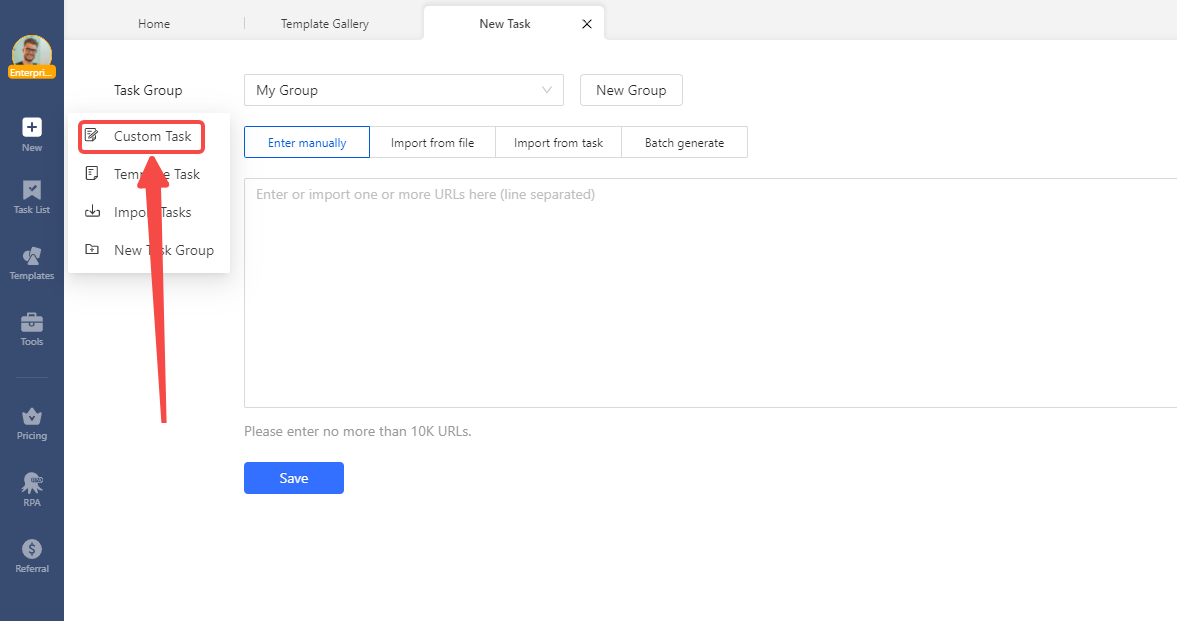
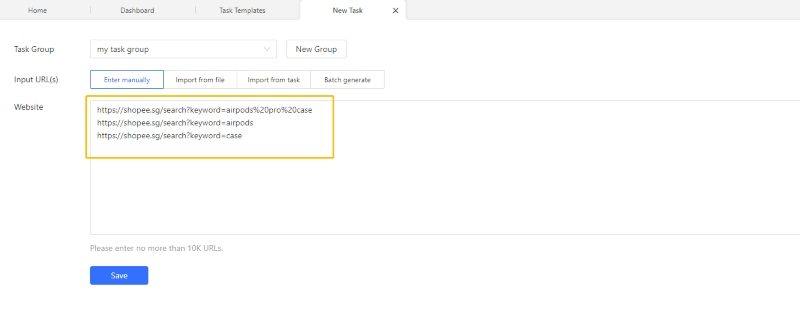
Step 2: Copy and paste the list of URLs into the text box and click “Save”. Octoparse will go on to create a workflow automatically.
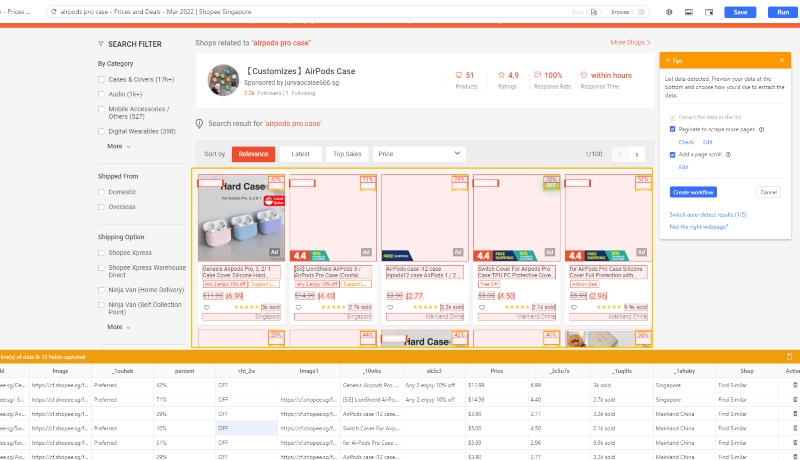
Step 3: Use the auto-detect feature to start the scraping process when the page finishes loading. The scraper identifies extractable data and suggests fields.
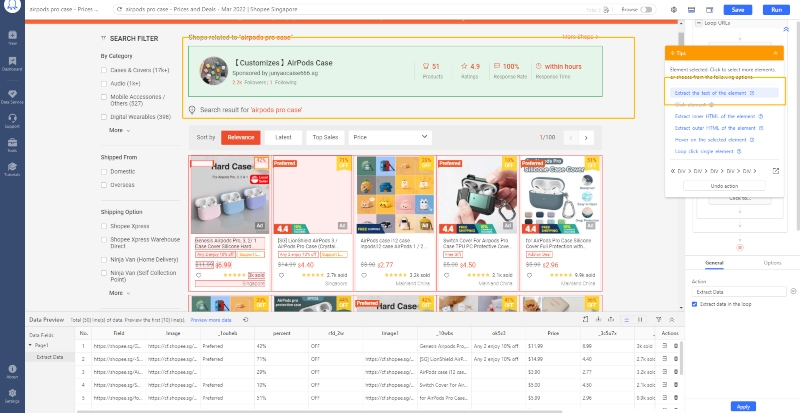
If the “guessing” is not 100% accurate, don’t worry, you can switch between different sets of data or add the data fields to scrape by manually clicking on the web data.
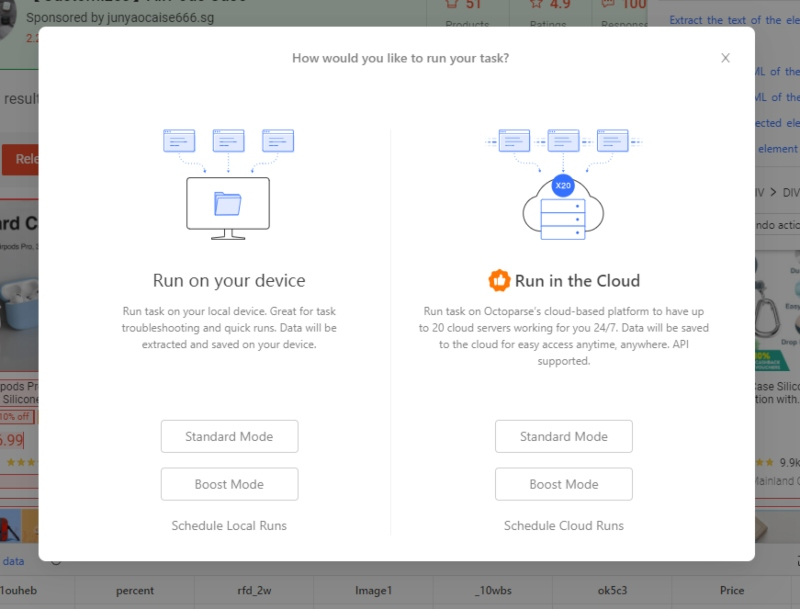
Step 4: After you are done with the task setup, click “Save” and run the task to get your data! You can choose to run the task locally or in the cloud.
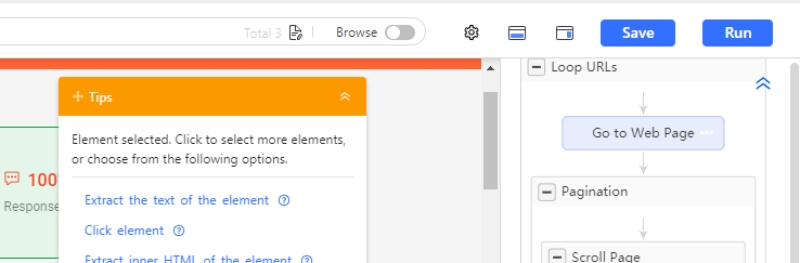
Step 5: Save and run. Choose local execution or cloud-based scraping for larger jobs.
Final Step: Exporting to Excel and CSV
After extraction completes, Octoparse offers multiple export formats:
- Excel (.xlsx) — Best for data analysis and sharing
- CSV — Universal format for databases and spreadsheets
- JSON — Ideal for developers and API integrations
- Google Sheets — Direct export for collaborative access
- Database — Push directly to MySQL, SQL Server, or PostgreSQL
To export: Click “Export Data” after your task completes, select your format, and download.
Get All URLs from a Website with Python
For developers who need full control, Python offers powerful libraries for web scraping. This approach provides flexibility for complex extraction logic and integration with data pipelines.
Required libraries:
- requests — Sends HTTP requests to fetch page content
- BeautifulSoup — Parses HTML and extracts data
- pandas — Structures data and exports to Excel/CSV
Scrape data from multiple URLs using Python
To scrape data from multiple URLs using Python, you can utilize libraries like requests for making HTTP requests and Beautiful Soup or lxml for parsing the HTML content.
Here’s a Basic example: Extract titles from multiple URLs
In this script:
- The
requestslibrary is used to send HTTP requests to the URLs. - The
BeautifulSouplibrary is used to parse the HTML content of the webpages. - The script iterates through the list of URLs, sends a GET request to each URL, and then extracts and prints the title of the webpage.
Example 2: Production-ready example with Excel export and error handling
For real-world use, you need error handling, rate limiting, and structured output:
Example 3: Extracting publication metadata from article URLs
For scraping article metadata—publication names, dates, and authors—target Open Graph and schema markup that most publishers include:
For more complex scraping tasks, you can customize the script to extract specific data elements, handle different types of content (like JSON or XML), manage errors, and store the scraped data in a structured format like CSV or JSON.
Best Practices for Scraping Multiple URLs With Python
1. Respect rate limits
Adding delays between requests prevents overwhelming servers and reduces the chance of getting blocked:
python
2. Handle failures gracefully
URLs will fail—servers go down, pages move, connections timeout. Build retry logic:
python
3. Identify your scraper
Use a descriptive User-Agent so site owners know what’s accessing their content:
python
4. Check robots.txt
Before scraping at scale, verify the site allows automated access. While robots.txt is advisory, respecting it demonstrates good faith.
How Do I Know Which Method Fits Me?
| Scenario | Recommended Method |
|---|---|
| No coding experience | Octoparse templates or Advanced Mode |
| Need data quickly from supported sites | Octoparse templates |
| Custom extraction requirements | Octoparse Advanced Mode |
| Integration with existing data pipeline | Python script |
| Complex extraction logic | Python with BeautifulSoup |
| JavaScript-rendered content | Octoparse (built-in rendering) or Python with Selenium |
| Enterprise scale (100,000+ URLs) | Octoparse cloud or distributed Python |
Next Steps
Now that you can scrape data from multiple URLs:
- Need to discover URLs first? See our guide on extracting URLs from web pages
- Working with JavaScript sites? Learn about scraping JavaScript-rendered pages
- Want ready-made extractors? Browse Octoparse scraping templates
Final Thoughts
With the methods mentioned above, you now have ideas on how to scrape data from multiple website URLs.
Scraping data from multiple URLs is straightforward with the right tools:
- For non-coders: Octoparse handles URL lists through templates or custom workflows, with direct Excel/CSV export
- For developers: Python with BeautifulSoup provides full control and integrates with any data pipeline
- For both: Add delays between requests, handle errors gracefully, and export to your preferred format
Choose the Python one if you know something about coding, and select Octoparse if you know nothing about coding or just want to save time and efforts.