Data scraping is the automated process of extracting structured information from websites, applications, and digital systems. If you’ve ever wanted to monitor competitor prices daily, build a lead list from Google Maps, or collect product reviews at scale, data scraping is how that gets done. From e-commerce retailers tracking market pricing to researchers pulling millions of data points from academic sources, automated data collection has become as fundamental to modern business as a spreadsheet.
The term is often used interchangeably with web scraping, but data scraping is the broader category. It covers web scraping (from websites), screen scraping (from desktop interfaces and legacy systems), and report mining (from structured reports and databases).
This guide covers all three, plus how to do it legally, which tools fit which situation, and how to avoid getting blocked.
Quick Answer
| Question | Answer |
| What is data scraping? | Automated extraction of data from websites, apps, or systems into a structured format |
| Is it the same as web scraping? | Web scraping is the most common type of data scraping, but not the only one |
| Is it legal? | Depends on data type, access method, and jurisdiction; public non-personal data is lowest risk |
| Do you need to code? | No; no-code tools like Octoparse handle most use cases without programming |
| What’s it used for? | Price monitoring, lead generation, research, market intelligence, AI training data, and more |
What Is Data Scraping?
Data scraping is the automated extraction of data from websites, applications, or digital systems into a structured, usable format, typically a spreadsheet, database, or API feed. The term describes the collection process: a program visits a source, identifies the data you need, and writes it somewhere useful, without manual copy-pasting.
In everyday use, “data scraping” and “web scraping” are used interchangeably. Technically, data scraping is the broader category. It covers three distinct approaches depending on where the data lives:
| Type | Extracts from | Typical tools | Best for |
| Web scraping | Public websites (HTML pages) | Octoparse, Scrapy, BeautifulSoup | Prices, leads, listings, reviews |
| Screen scraping | Desktop app UIs, legacy systems | UiPath, AutoHotkey, Copyfish | Automating non-web internal systems |
| Report mining | Structured reports, PDFs, databases | Tabula, custom scripts | Extracting data from formatted documents |
Web scraping is the most common form because most data people want lives on the web. Screen scraping predates web scraping; it was originally developed to extract data from terminal interfaces and early desktop applications using image recognition and UI automation rather than HTML parsing. Report mining handles structured documents like PDFs and financial statements where data is formatted but not directly machine-readable.
Not sure how data scraping differs from web scraping, data mining, or APIs? The next sub-sections breaks down each distinction.
Data Scraping vs Web Scraping vs Data Mining
These three terms are closely related but describe different things:
Data scraping vs web scraping
Data scraping is the umbrella term. Web scraping is the most common subset, specifically referring to automated extraction from web pages, also called web data extraction. In most practical contexts the terms are interchangeable; the distinction matters mainly when discussing screen scraping or report mining as separate categories.
Data scraping vs data mining
Data scraping is the collection step: getting raw data from external sources into your system. Data mining is the analysis step: finding patterns, correlations, and insights within data you already have. They are sequential, not competing. A retailer might scrape competitor prices daily (data scraping), then analyze six months of trends to spot pricing patterns (data mining).
Want to dive deeper, see our related articles:
Data scraping vs APIs:
APIs are an official, sanctioned channel for data access provided by the website or platform itself. Data scraping collects data whether or not an official channel exists. When to use each is covered in the tools section below.
How Does Data Scraping Work?
Web-based data scraping follows three steps regardless of whether you use a no-code tool or write Python:
Step 1: Send a request. The scraper visits a URL the same way a browser does, either fetching the raw HTML response directly, or loading the page in a headless browser for JavaScript-rendered content.
Step 2: Parse the response. The tool identifies the target fields using CSS selectors, XPath expressions, or AI-powered auto-detection that maps page structure from examples.
Step 3: Output structured data. Extracted fields are written to a spreadsheet, CSV, database, or API endpoint.
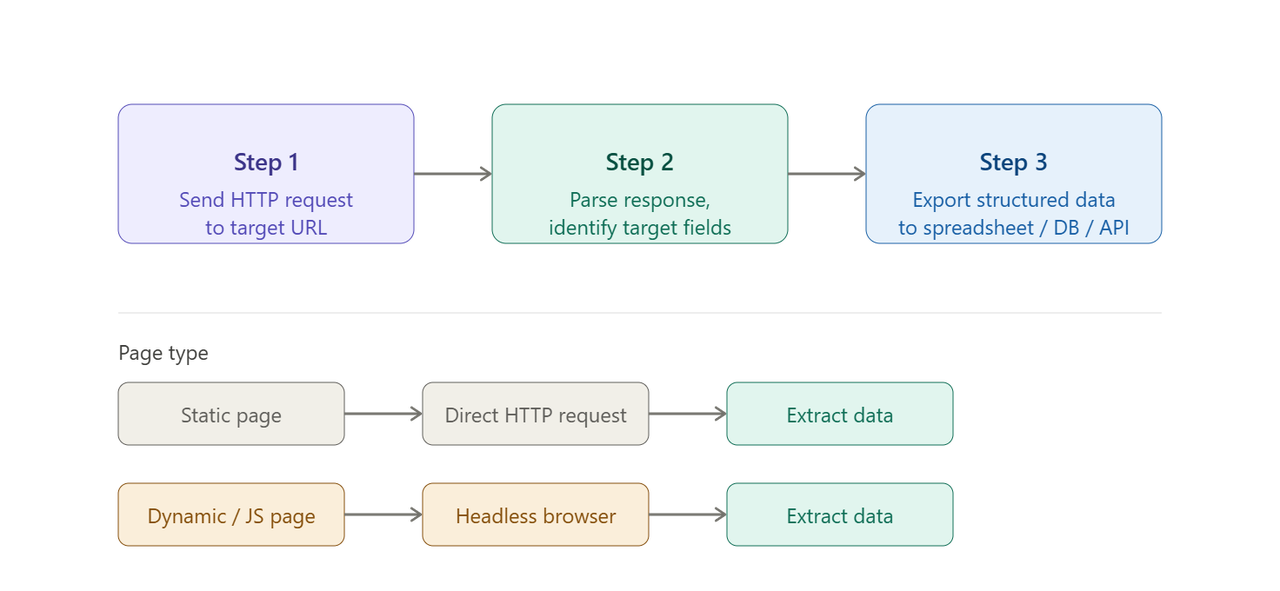
The distinction between static and dynamic pages matters in practice. For static pages (product listings, business directories, news articles), a basic HTTP request returns complete HTML and extraction begins immediately. For pages that load content after the initial request (JavaScript-rendered prices, infinite scroll feeds, login-gated content), a headless browser like Playwright simulates a real user session first. Most modern e-commerce and social media sites fall into this second category.
Whether you use a point-and-click tool or write code, the mechanics are identical. The difference is who configures the selector logic and handles edge cases.
What Is Data Scraping Used For? 8 Real-World Examples
Competitor price monitoring (Small business / Enterprise)
E-commerce retailers and B2B companies scrape competitor pricing to stay competitive in real time. A European B2B holding company managing approximately 50 companies replaced gut-feel pricing with automated weekly competitor price scraping. Sales teams now use data-backed formulas, for example taking the median price of three competitors and applying a multiplier, rather than relying on estimates. Based on their experience, moving to data-driven pricing typically yields a 2-4% improvement in profit margins.
B2B lead generation (Small business / Marketing)
Sales teams scrape contact directories, Google Maps, LinkedIn, and business listing sites to build targeted prospect lists. A digital marketing agency in Spain scrapes Google Business Profiles daily to identify newly registered local businesses. Their 30-person remote sales team contacts new entrepreneurs within 15 days of their Google listing appearing, before most competitors notice them. This real-time lead pipeline has directly contributed to measurable revenue growth and operational cost savings.
Real estate market intelligence (Enterprise / PropTech)
Property platforms and real estate agents scrape listing sites to track price changes, time-on-market, and new listing alerts. A Japan-based real estate technology company built a daily scraping system covering property prices, floor areas, and listing durations. This powers both a B2B SaaS product for agents and an outbound sales team that uses property signals (long-unsold listings, recent price drops) to identify motivated sellers. Since automation, their data collection volume grew more than 100x and qualified sales meetings increased approximately 5x.
📑 If you want know the way to scrape real estate data, see our guide of web scraping for real estate.
Market research and competitive intelligence (Enterprise / Consultancy)
Research firms and strategy consultancies scrape product databases, review platforms, and news sources to map competitive landscapes. Marketing Synergy, an Australian consultancy specializing in the liquor industry, built a centralized pricing database covering more than 20 retail liquor sites, representing over 95% of Australia’s online liquor sales channels. Manufacturers, retail groups, and independent sellers use the data to compare and monitor market pricing.
Academic research (Researcher / University)
Researchers use data scraping to collect datasets that would be impractical to gather manually. Purdue University’s Center for Food Demand Analysis and Sustainability (CFDAS) uses Octoparse to scrape grocery information from 20 online grocery chains daily, covering more than 2 million products. The scraped data feeds an interactive dashboard used by agribusinesses, policymakers, and farmers to monitor food prices and guide food system decisions.
📑 See also: Web scraping for academic research
Job market intelligence (Researcher / Enterprise HR)
Recruiters, HR teams, and labor economists scrape job boards to track hiring trends, monitor competitor headcount growth, and benchmark compensation. Job posting data reveals which roles are in demand, which companies are expanding in specific markets, and how salary ranges are shifting; information that official statistics don’t provide in real time.
📑 See also:
AI and machine learning training data (Enterprise / AI teams)
AI development teams use data scraping to build custom training datasets for large language models, image classifiers, and recommendation systems. Rather than relying on static public datasets, teams scrape raw text, metadata, and structured content from targeted sources matched to their model’s domain. HTML and metadata scraping workflows have seen some of the fastest usage growth on the Octoparse platform over the past year, with patterns strongly consistent with AI training dataset construction at scale.
Enterprise-scale workflow automation (Enterprise)
Large organizations use data scraping to automate high-volume data workflows that would overwhelm manual processes. A leading international music rights agency uses Octoparse to register 3,000 clients across 160 international collection societies and track usage across a database of over 2 million music tracks, automatically cycling through approximately 1,500 separate accounts. The good result is that, at least one full business week saved per month (approximately 25% time reduction), and a registration task for 800 performers completed in 20 hours rather than weeks. Of course, you can rely on data services to help you solve such large-scale scraping tasks.
How to Do Data Scraping: Tools and Methods Compared
The right approach depends on your technical background, the complexity of your target sites, and how often you need to run it. There are five paths that I’ve tried effective for me. They may also work for you:
| Approach | Best for | Skill required | Scale | Cost |
| No-code desktop tool (e.g. Octoparse) | Recurring workflows, complex sites, cloud scheduling | None | Small to enterprise | Free tier + paid plans |
| Browser extension (e.g. Chat4Data) | Quick one-off page scrapes, natural language extraction | None | Single pages to lists | Free (usage credits) |
| Python libraries (BeautifulSoup, Scrapy, Playwright) | Custom logic, large-scale pipelines, developer workflows | Python intermediate-advanced | Small to large | Open source |
| Official API | Structured, sanctioned data from platforms that offer it | Low-medium (auth + docs) | Depends on rate limits | Per-call or subscription |
| Managed data service | Enterprise-scale, fully outsourced extraction | None (you specify requirements) | Unlimited | Custom pricing |
No-code: Octoparse
Octoparse is a desktop and cloud-based scraping platform built for users who don’t write code. Three ways to get started:
1. 600+ Ready-to-use Templates
The template library covers 600+ pre-configured scrapers for sites including Amazon, LinkedIn, Google Maps, Zillow, and Indeed. Select a template, enter your parameters, and run. No setup required. Once you try them, you’ll know how convenient they are. Below I found a free template for you to try:
https://www.octoparse.com/template/contact-details-scraper
2. Custom workflows:
For sites without a template, AI auto-detect reads the page structure and identifies data fields automatically. Point it at a URL, confirm the fields, and the task is ready. It also allows you to adjust the scraping workflows by yourself if you are not satisfied with the them. Cloud scheduling then runs it on your chosen interval without your computer being on. Results export to Excel, Google Sheets, CSV, or via API. Of course you can create custom scraping workflows.
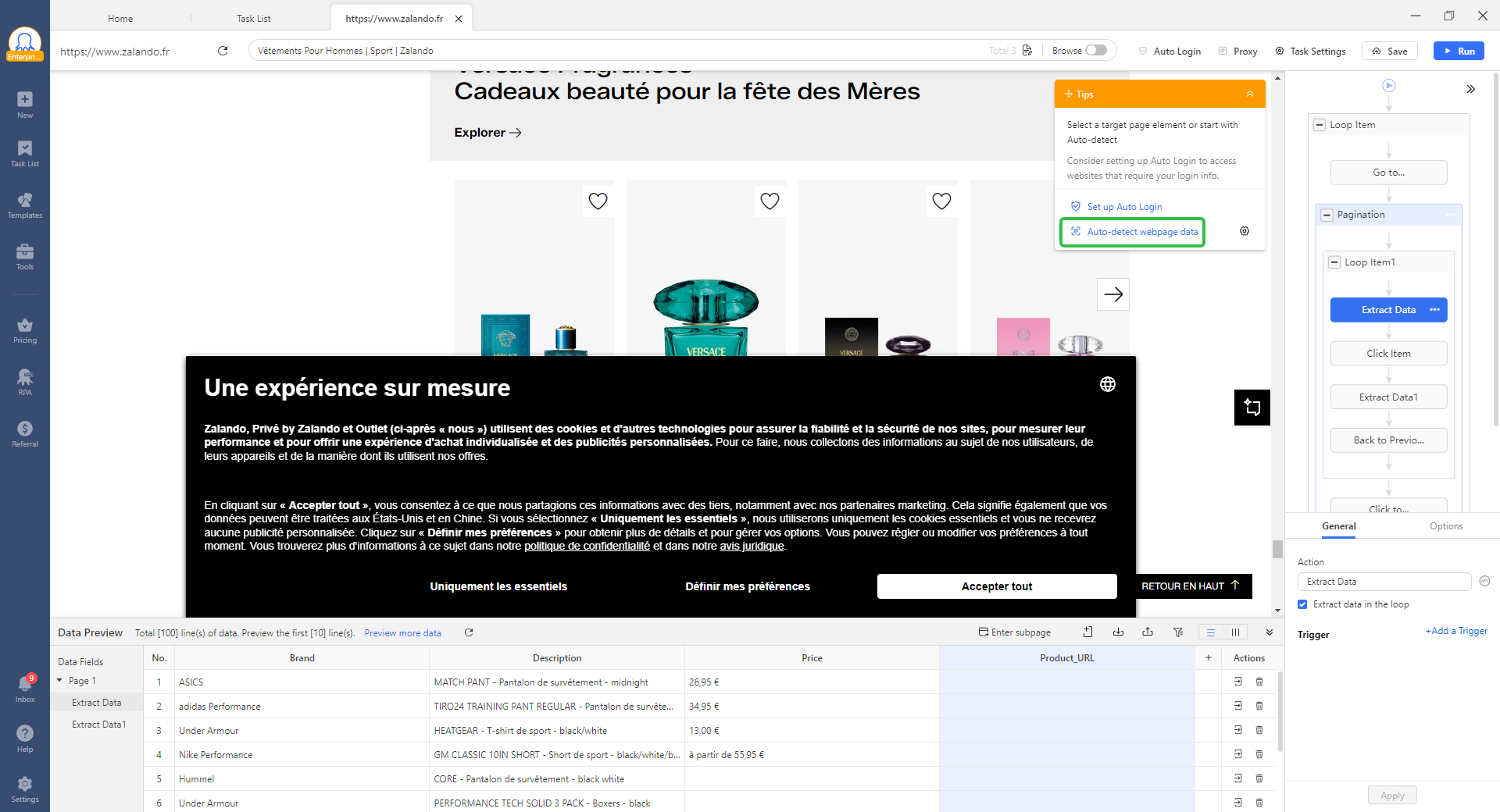
For teams integrating scraping into AI or automation stacks, Octoparse MCP allows triggering tasks, retrieving results, and managing workflows programmatically. You can even analyze the exported data without leaving the interface.
📑 See the MCP web scraping guide and MCP scraping use cases.
No-code: Chat4Data (browser extension)
Chat4Data is an AI-powered Chrome extension that extracts data using natural language prompts. Open a page, describe what you want (“get product names, prices, and ratings from this page”), and the AI handles detection, extraction, and export. Best for quick, one-off grabs where you don’t need a recurring scheduled task. Free with 100 starter credits.
Code: Python libraries for data scraping
For developers who need custom logic or large-scale pipelines. BeautifulSoup parses static HTML pages (lightweight, fast to set up). Scrapy handles production-grade crawls needing concurrency and pipeline control. Playwright handles JavaScript-heavy pages requiring full browser execution.
📑 For a step-by-step walkthrough, check out these articles:
When to use an official API instead of scraping
When a website offers an official API, it’s almost always the better choice: structured data, documentation, guaranteed stability, no ToS risk. The practical problem is that the data you actually need is often unavailable via API, restricted to specific partners, or priced prohibitively for large-scale use.
- Use an API when one exists and covers your data needs fully, or when you’re building a production integration where scraper breakage would be costly.
- Use data scraping when no API exists, the API is partner-only or rate-limited, or you need data from multiple sites simultaneously.
Wandering which API to choose? Read our review on Best Web Scraping APIs for Real Time Data.
Managed service: Octoparse Data Service
For enterprise teams that want data delivered rather than doing the scraping themselves, Octoparse Data Service handles the entire pipeline at custom scale.
How to Avoid Getting Blocked While Doing Data Scraping
Websites detect automated access through rate limiting, browser fingerprinting, behavioral analysis, and CAPTCHA challenges. The core tactics:
Anti-blocking Methods That Prove Effective
- Slow down and randomize requests
Fixed-interval requests are an obvious bot signal. Randomized delays (2-5 seconds with natural variation) and off-peak scheduling reduce detection risk significantly.
- Rotate IPs
When a single IP sends too many requests, it gets flagged. Residential proxies (IPs assigned to real home internet connections by ISPs) are significantly harder to detect as scraper traffic than datacenter IPs, and understanding how proxies prevent IP bans is essential for any serious scraping project.
Real-world result: a user scraping an automotive parts website collected 0 usable records without proxy IP rotation; after enabling it, successful extraction reached over 90%. (Source: Octoparse user experience, 2025)
- Rotate user agents and manage cookies.
A consistent browser User-Agent string across thousands of requests is a bot signal. Cycling through realistic UA strings, combined with regular cookie clearing to reset session state, helps traffic blend with normal browser behavior.
- Run in the cloud.
Cloud-based scraping uses distributed server infrastructure rather than your local IP. Octoparse breaks large tasks into sub-tasks across multiple global nodes, each making requests from a different IP, significantly reducing the risk of any single source getting blocked.
How Octoparse handles anti-blocking when scraping
Octoparse’s Task Settings includes a dedicated Anti-blocking panel with built-in residential IP proxies (available to paid users at $3/GB), auto-switching browser agents, auto cookie clearing, and Cloudflare bypass, usable individually or in combination. Configuration instructions are in the Octoparse help center.

Is Data Scraping Legal?
Is data scraping illegal?The short answer is that it depends on what you scrape, how you access it, and where you and the target site operate.
| Factor | Lower risk | Higher risk |
| Data type | Public, factual, non-personal | Personal data (PII), copyrighted content |
| Access method | Standard requests, respecting robots.txt | Bypassing logins, CAPTCHAs, access controls |
| Use of data | Internal research, market analysis | Commercial resale, AI training without licensing |
The landmark US case is hiQ Labs v. LinkedIn (Ninth Circuit, 2022): scraping publicly available data does not violate the Computer Fraud and Abuse Act (CFAA). “Public” is the operative word; data behind login walls is treated differently. GDPR Article 6 adds complexity for EU data: even publicly visible personal information about EU residents requires a lawful basis to collect and process, regardless of where the scraper operates. A site’s robots.txt file signals the owner’s preferences for crawlers; ignoring it has been cited as evidence of bad faith in CFAA cases.
📑 For a full breakdown of US case law, GDPR, CCPA, and regional rules: Is web scraping legal? What you need to know in 2026.
FAQs About Data Scraping
- Can you scrape data from any website?
Technically, most public-facing websites can be scraped. Legally, it depends on data type, access method, and Terms of Service. Public, non-personal data carries the lowest risk. Data about EU or California residents triggers GDPR/CCPA regardless of whether it’s publicly visible. Data behind login walls raises CFAA exposure in the US. Always check the site’s Terms of Service and robots.txt before starting..
- How is AI changing data scraping?
In two directions. First, AI is making scrapers smarter: modern no-code tools use AI to auto-detect page structure, handle layout changes without breaking, and extract data from unstructured content. Second, AI is driving demand: acoording to Mordor Intelligence, over 65% of organizations now use web-scraped data as part of AI and machine learning training pipelines.
- Is scraping social media data legal?
The hiQ v. LinkedIn ruling (Ninth Circuit, 2022) affirmed that scraping publicly visible profile data does not violate CFAA. Data behind login walls is a different question. GDPR applies regardless of visibility: personal data about EU residents requires a lawful basis to collect, even from public posts. Platform Terms of Service typically prohibit automated access, creating contractual risk even where legal exposure is otherwise low.
- What is the best data scraper for non-technical users?
It depends on your use case. For recurring, automated workflows across complex or JavaScript-heavy sites, Octoparse is the most capable no-code option (600+ templates, cloud scheduling, built-in anti-blocking). For quick one-off page grabs using plain English, Chat4Data works in seconds from your browser. A full comparison of free data scrapers covers more options side by side.
- What is data scraping in Python?
In Python, data scraping typically uses one of three libraries: BeautifulSoup for parsing static HTML pages, Scrapy for large-scale crawls requiring concurrency and pipeline control, and Playwright for JavaScript-heavy pages that require a real browser session. The choice depends on whether your target pages are static or dynamic, and whether you need a one-off script or a production-grade pipeline. The tools section above covers when each applies.