“Real-time” in web scraping is often misunderstood. Websites rarely push updates outward. In most cases, what businesses call real-time scraping is actually high-frequency, automated checking designed to detect changes as quickly as possible without getting blocked.
Besides, scraping web data in real time from websites is of paramount importance for most companies. It’s usually the case that the more up-to-date information you have, the more choices available to you.
In this article, we’ll talk about what is real time web scraping and why it is important, also the best web scraping tool for you.
Not Everything Called an “API” Is Web Scraping
Before comparing tools, it’s important to separate three things that are commonly mixed together.
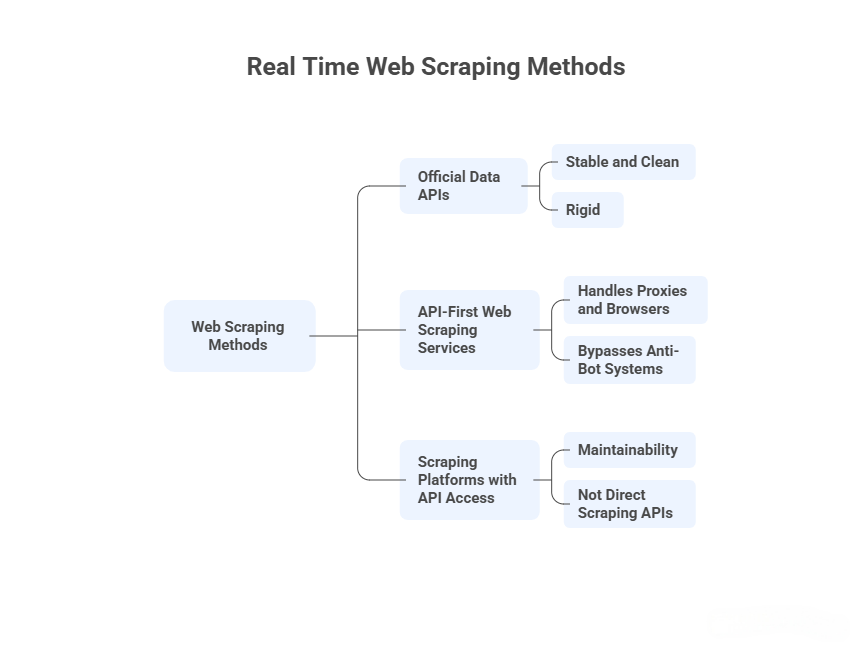
1. Official data APIs (not web scraping)
Examples include Google Search APIs, Google Maps APIs, Yahoo Finance APIs, and similar services.
I use these when:
- The data I need fits their schema
- Rate limits are acceptable
- Coverage gaps don’t matter
They are stable and clean, but rigid. The moment I need fields they don’t expose, historical gaps they don’t support, or results beyond quotas, I have to look elsewhere.
These APIs provide licensed data, not access to web pages.
2. API-first web scraping services
These are what most people mean when they search for “web scraping API.”
I send a URL (or query), configure a few parameters, and the service:
- Handles proxies and browsers
- Bypasses basic anti-bot systems
- Returns HTML or structured JSON
They are request-driven and stateless.
3. Scraping platforms with API access
These tools are not direct scraping APIs. Instead, I define scraping logic first (visually or in code), then automate and retrieve results via APIs.
They trade immediacy for maintainability.
This distinction matters, especially for real-time or near-real-time use cases.
What “Real-Time” Means for Web Scraping
In practice, web scraping is almost never real-time in the streaming sense.
Most “real-time” pipelines I’ve built rely on:
- High-frequency scheduled runs (every few minutes)
- Fast execution
- Immediate delivery once extraction finishes
Since most websites do not push updates outward, real-time scraping is really about how quickly you can detect change without getting blocked.
The best APIs to get data as it happens
1. ScraperAPI — quickest way to test an idea
ScraperAPI is usually the first tool I try when I want to validate whether a site is scrapable at all.
How I use it:
- Send a URL
- Toggle JavaScript rendering if needed
- Add country targeting when results differ by region
- Parse the returned HTML or use their auto-parsing options
What I’ve noticed:
- Works well for simple sites and unprotected pages
- Google and Amazon scraping works, but response times are slower than competitors
- Some social platforms are blocked by default, which limits flexibility
- Async mode is useful when rendering takes time
I don’t use ScraperAPI for complex flows, but it’s effective for fast experiments and lightweight pipelines.
2. ScrapingBee — predictable and developer-friendly
ScrapingBee is what I reach for when I want fewer surprises.
In daily use:
- The API surface is small and easy to reason about
- JavaScript rendering works consistently
- CAPTCHA handling is reliable for mid-difficulty sites
- Documentation is clear enough that I rarely need support
It’s not the fastest at scale, but it’s stable. When I want a scraping API that “just works” without tuning dozens of parameters, ScrapingBee is usually sufficient.
3. Bright Data (Web Unlocker & SERP API) — when reliability matters more than cost
Bright Data is what I use when other APIs fail.
In practice:
- SERP scraping success rates are noticeably higher
- Marketplaces with aggressive blocking are more accessible
- Structured outputs reduce parsing work
- Configuration options are extensive — sometimes overwhelming
This is not my default choice. It’s the API I justify when scraping failures have business consequences.
4. Oxylabs — strong when structured output matters
I typically use Oxylabs when I care more about clean data objects than raw HTML.
From hands-on use:
- Parsing accuracy is strong, especially for e-commerce pages
- Response times are competitive
- API supports scheduling and async delivery
- Pricing makes sense only once volume increases
Oxylabs works well when I want to minimize post-processing and schema maintenance.
5. Octoparse — often the better solution
Octoparse does not behave like ScraperAPI or ScrapingBee, and evaluating it that way misses the point.
How I actually use Octoparse:
- Build a scraper visually (point-and-click)
- Upload it to the cloud
- Schedule runs every few minutes
- Retrieve results via API or automated exports
Why I choose it:
- Non-developers can build and fix scrapers
- Layout changes are easier to repair visually
- Cloud execution handles proxies and scheduling
- The API focuses on task control and data delivery, not page fetching
When teams ask for “an API” but really need something that keeps working month after month, Octoparse often reduces maintenance overhead.
How To Use Octoparse in a Real-Time API Workflow
When people ask whether Octoparse “has a web scraping API,” they are usually imagining something like this:
Send a URL → receive parsed data instantly.
That is not how Octoparse works — and in real-world API workflows, that difference matters more than it sounds.
In my experience, Octoparse behaves less like a request-based scraping API and more like an API-controlled scraping engine. You do not scrape through the API; you operate scraping jobs with the API.
Here is how that typically plays out in practice.
I start by building the scraper visually — defining pagination rules, dynamic loading, login steps, and data fields inside the Octoparse app. This is where most scraping APIs struggle anyway: JavaScript-heavy pages, inconsistent DOMs, and anti-bot systems are easier to solve interactively than in code.
Once the task is stable, the API becomes the control layer.
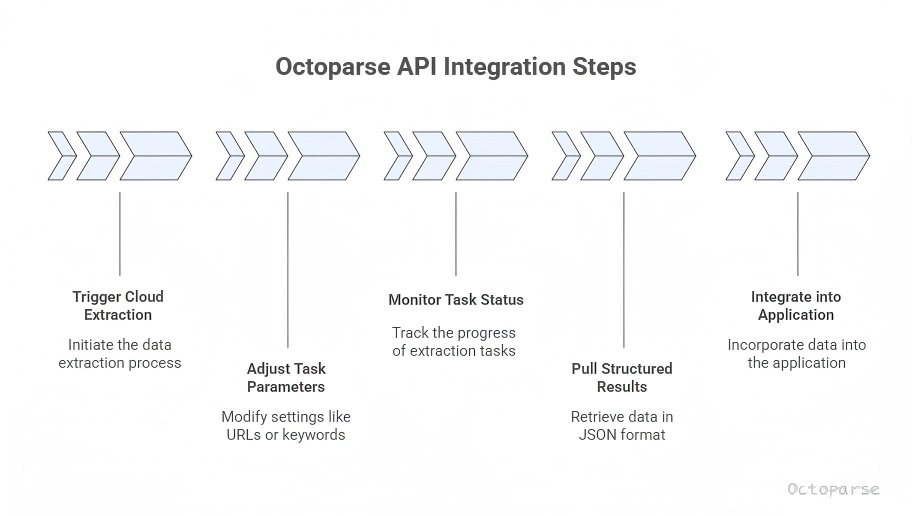
Using the Octoparse OpenAPI, I can:
- Trigger cloud extraction runs programmatically
- Adjust task parameters (such as target URLs or search keywords)
- Monitor task and subtask status in near real time
- Pull structured results into my application or database as JSON
At this point, Octoparse fits cleanly into an API-driven pipeline. My backend does not worry about proxies, retries, or headless browsers — it simply treats Octoparse as a managed data source that refreshes on demand or on schedule.
This is especially useful for “near real-time” use cases, where data freshness is measured in minutes, not milliseconds:
- Tracking price or inventory changes every 5–10 minutes
- Refreshing SERP or marketplace data for dashboards
- Feeding updated datasets into analytics or internal tools
Scrape real-time data with Octoparse API
Octoparse and its web scraping API would be your best choice. It can build API integration that you will be able to achieve two things:
1. Extract any data from the website without the need to wait for a web server’s response.
2. Send extracted data automatically from the cloud to your in-house applications via Octoparse API integration.
If you are frustrated in using an API as well, you will find great value in Octoparse as its integration process is easy.
Turn website data into structured Excel, CSV, Google Sheets, and your database directly.
Scrape data easily with auto-detecting functions, no coding skills are required.
Real-time scraping with IP proxies and rotation.
Cloud service and scheduling task to scrape data in real-time.
How I Choose Between The Best APIs For Real Time Data (Decision Logic)
Here’s the logic I actually use:
- Need instant HTML from a URL?
→ ScraperAPI or Octoparse - Need structured data without writing parsers?
→ Octoparse or Bright Data APIs - Need custom workflows, or maintainable, repeatable scraping without heavy coding?
→ Octoparse
There is no single “best” web scraping API — only tools that fit different operational constraints.
Conclusion
The limitation becomes clear when compared to direct scraping APIs. If your workflow depends on scraping arbitrary URLs on the fly or responding to user-triggered queries, Octoparse will feel indirect. The setup overhead is real, and spontaneity is not its strength.
But if the goal is to stop thinking about scraping altogether — to let data arrive on schedule and fit neatly into an existing system — this model starts to make sense. Octoparse’s API is not about reaching the web faster. It is about reaching a point where scraping no longer interrupts the rest of your work.
That difference is subtle, but once you have operated both models, it is difficult to unsee.
FAQs About Real Time Web Scraping APIs
1. Can web search api handle html content scraping for real-time knowledge updates, making it a must-have for dynamic industries?
No. A web search API (Google, Bing, etc.) does not handle HTML content scraping.
What it can do:
- Return indexed search results
- Provide metadata (title, snippet, URL, sometimes ranking signals)
- Reflect changes after the search engine crawls and re-indexes a page
What it cannot do:
- Fetch live HTML from arbitrary pages
- Extract page-level content
- Guarantee freshness at the moment content changes
This makes search APIs adjacent to, but not a replacement for, web scraping.
2. Is a web scraping API the same as a public data API like Google Finance or Yahoo Finance?
No. These serve fundamentally different purposes.
Public data APIs (such as Google Finance or Yahoo Finance endpoints) expose predefined datasets selected and curated by the provider. You can only request what the API owner has decided to make available, in the structure they control.
Web scraping APIs, by contrast, retrieve data directly from web pages. They do not depend on a provider’s schema or update cadence. This is why scraping APIs are often used when public APIs are incomplete, delayed, or discontinued.
In short:
- Public APIs offer stability and compliance.
- Scraping APIs offer coverage and flexibility.
They are complementary, not interchangeable.
3. Can web scraping APIs guarantee “real-time” data accuracy?
Not in the strict, streaming sense.
Most web scraping APIs simulate real-time access through high-frequency requests, not continuous data feeds. The data is as fresh as the moment the page is fetched, but it is still pull-based.
True real-time systems require the data source to push updates, which most websites do not allow. Scraping APIs operate within that limitation by optimizing request timing, proxy rotation, and delivery speed.
This distinction matters for use cases like:
- Flash pricing changes
- Inventory monitoring
- News or announcement tracking
In these scenarios, “near real-time” is usually the practical ceiling.
4. When should you use a search API instead of a web scraping API?
Search APIs are better suited for discovery, not extraction.
If your goal is to:
- Identify relevant pages
- Track visibility in search results
- Monitor how information propagates across the web
then a search API is often sufficient.
If your goal is to:
- Collect structured fields
- Track page-level changes
- Store raw content for analysis
then a scraping API or scraping workflow is required.
Using a search API to replace scraping often leads to partial data and false confidence.
5. Are tools like Octoparse considered “web scraping APIs”?
Not in the narrow sense.
Octoparse is not a single endpoint that fetches HTML on demand. It is a scraping system that exposes API access to managed extraction workflows.
This distinction explains why Octoparse is commonly used for:
- Scheduled data collection
- Long-running monitoring projects
- Integration with internal databases or BI tools
and less commonly used for:
- User-triggered, on-the-fly scraping
- Stateless API calls
Understanding this difference helps avoid misaligned expectations when evaluating “API-based scraping.”
6. Why do some companies combine search APIs and scraping APIs in the same workflow?
Because each fills a gap the other cannot.
A common pattern is:
- Use a search API to discover new or updated URLs.
- Use a scraping API or scraping platform to extract page-level data from those URLs.
- Store and analyze the results internally.
This hybrid approach reduces unnecessary scraping while preserving data depth and freshness.
It is not redundant. It is architectural.
7. Does using an API make web scraping more compliant or legal?
An API does not change the underlying compliance considerations.
Whether you scrape via code, a proxy-based API, or a managed platform, the same factors apply:
- Website terms of service
- Robots.txt policies
- Data usage regulations
APIs reduce technical complexity, not responsibility. The compliance burden remains with the user.