A web crawler is an automated program that browses the internet by following links from page to page, then collects and indexes what it finds. Search engines such as Google and Bing rely on web crawlers to discover content and decide what shows up in your search results.
You may also see a web crawler called a spider, a crawler bot, or a search engine bot. They all mean the same thing. This guide explains the web crawler meaning in plain language: how crawlers work step by step, what they are used for, common examples, and how a crawler differs from a web scraper.
Quick Answer: What Is a Web Crawler?
| Question | Answer |
| What is it? | An automated program that visits web pages, reads their content, and follows links to discover new pages |
| Other names | Spider, web spider, spiderbot, search engine bot |
| Primary purpose | Discover and index pages for search engines |
| Who runs them? | Google, Bing, OpenAI, Anthropic, SEO tools, and more |
| Different from scraping? | Yes. Crawlers discover URLs; scrapers extract data from specific pages |
Crawlers are a central part of how the internet runs today. According to the Imperva 2025 Bad Bot Report, automated programs generated 51% of all web traffic in 2024, marking the first time bots surpassed human activity in a decade. Search engine crawlers and other legitimate bots make up a significant share of that traffic.
How Do Web Crawlers Work?
Web crawling is the process of automatically discovering, fetching, and indexing web pages. A web crawler works through a simple loop: fetch a page, read it, collect its links, then visit those links. Five steps repeat constantly behind the scenes.
Step 1: Start from seed URLs
Every crawl begins with a starting list of known pages, called seed URLs. These are usually trusted, high-authority pages. The crawler loads each seed page and reads its content, including the title, meta description, and body text.
Step 2: Extract links and grow the queue
The crawler pulls every hyperlink out of each page it visits and adds new URLs to a waiting list, often called the crawl frontier. This is how crawlers discover pages nobody submitted to them. A page with no links pointing to it may never be found at all.
Step 3: Prioritize what to crawl next
The web grows faster than any crawler can keep up with, so crawlers rank their queue instead of visiting pages in order. Pages linked from many relevant sites get visited sooner. Pages that update often get revisited more frequently than pages that rarely change.
Step 4: Respect crawl rules
Before fetching pages from a site, polite crawlers check its robots.txt file for instructions about what they may and may not visit. They also limit how fast they send requests so they do not overload the site’s server.
Step 5: Index the content and repeat
Finally, the crawler hands the page content to an indexing system, which stores it in a searchable database. This is the step where crawling and indexing come together: the crawler discovers, and the indexer organizes. Then the loop starts again with the next URL in the queue. Through constant repetition, crawlers find new pages, record changes to existing ones, and flag dead links.
How Web Crawlers Interact With Your Website
What a crawler visit looks like in your server log
If you manage a website, you have already been crawled. Every visit a bot makes leaves a line in your server’s access log. Here is what a typical entry from Googlebot looks like:
The key piece is the user-agent string at the end. That tells you which crawler visited. You can identify GPTBot (GPTBot/1.0), Bingbot (bingbot/2.0), and AhrefsBot (AhrefsBot/7.0) the same way. If you see unfamiliar bot names flooding your log, check whether they are legitimate crawlers or unwanted scrapers, and adjust your robots.txt accordingly.
Robots.txt and how crawlers follow site rules
Robots.txt is a plain text file placed at the root of a website that tells crawlers which parts of the site they may visit. Site owners use it to keep bots out of admin pages, duplicate content, or sections that waste crawl resources.
Two points are often misunderstood. First, robots.txt is a request, not a lock: well-behaved crawlers follow it, but malicious bots can ignore it. Second, blocking a page in robots.txt does not guarantee it stays out of search results; preventing indexing requires a noindex directive instead. The full syntax and rules are documented in Google’s robots.txt introduction.
What Web Crawlers Are Used For, and the Main Types
Web crawlers serve very different purposes depending on who runs them. The sections below cover the main use cases, the active crawlers behind them, and how to tell them apart.
Search indexing
Search engines were the original reason web crawlers were built. Googlebot, Bingbot, and similar crawlers continuously discover and re-crawl pages to keep their indexes current. Without this step, no search engine would have anything to rank. According to the Cloudflare Radar 2025 Year in Review, search engine crawlers accounted for 40% of all verified bot traffic in 2025, the largest single category.
AI training and retrieval
Crawlers such as OpenAI’s GPTBot and Common Crawl’s CCBot collect public web content used to train large language models. A separate class of AI crawlers, including OAI-SearchBot and Perplexity’s crawler, fetches pages in real time when a user asks an AI chatbot a question. According to the Cloudflare Radar 2025 Year in Review, AI crawlers accounted for 20% of verified bot traffic in 2025, the fastest-growing category on the web. According to Cloudflare Radar AI Insights, training accounts for roughly 52% of all AI crawler traffic, mixed-purpose crawling for around 36%, and search retrieval for only about 9%.
SEO and site health auditing
Commercial crawlers from platforms like Ahrefs and Semrush scan websites to find broken links, duplicate content, missing tags, and other technical issues. These tools give website owners visibility into how their sites look to search engines.
Web archiving
Projects like the Internet Archive use crawlers to preserve snapshots of pages before they change or disappear. These crawlers do not index for search; they store complete copies for historical reference.
Data extraction pipelines
Crawlers discover URLs, and then a scraping layer pulls structured data from them. A Japanese B2B sales company, for example, uses automated Google Maps crawling to discover business listings and then extract company names, phone numbers, and addresses at a pace of approximately 15 million records per month. Since implementing this workflow, their monthly sales closings increased by approximately 30 deals. If you need structured web data delivered directly, Octoparse also offers a managed data service.
Research and aggregation
Universities and news platforms crawl pages to study online behavior or gather articles at scale. Focused crawlers in this category only follow links related to a specific topic rather than trying to cover the whole web.
Active web crawlers: a quick reference
| Crawler | Operator | Purpose | User-Agent String |
| Googlebot | Search indexing + AI training | Googlebot/2.1 | |
| Bingbot | Microsoft | Search indexing + AI training | bingbot/2.0 |
| GPTBot | OpenAI | AI model training | GPTBot/1.0 |
| OAI-SearchBot | OpenAI | ChatGPT live search retrieval | OAI-SearchBot/1.0 |
| ClaudeBot | Anthropic | AI model training | ClaudeBot/0.5 |
| Meta-ExternalAgent | Meta | AI model training | Meta-ExternalAgent/1.1 |
| Bytespider | ByteDance | AI model training | Bytespider |
| AhrefsBot | Ahrefs | SEO analytics | AhrefsBot/7.0 |
| SemrushBot | Semrush | SEO analytics | SemrushBot/7~bl |
| CCBot | Common Crawl | Open AI training dataset | CCBot/2.0 |
The crawlers above are the ones you are most likely to see in a server log today. One thing worth noting: OpenAI runs GPTBot and OAI-SearchBot as two separate crawlers with different purposes. GPTBot collects training data. OAI-SearchBot fetches pages when a ChatGPT user asks a live question. You can block one without blocking the other in your robots.txt, and understanding this distinction matters if you want to appear in ChatGPT search results without giving away training data.
Web Crawler vs Web Scraper vs Web Spider
| Web Crawler | Web Scraper | |
| Primary goal | Discover and index pages | Extract structured data from known pages |
| Output | URL index, page snapshots | Structured datasets (CSV, JSON, database) |
| Typical use | Search engines, site audits | Price monitoring, lead gen, research |
| Scope | Often entire web or large site | Targeted pages or sections |
| Works alone? | Yes | Often needs a crawler to supply URLs first |
A web spider is simply another name for a web crawler. A web scraper is a different kind of program. The key difference is the goal: a crawler explores and indexes pages it has not seen, while a scraper extracts specific data fields from pages you choose.
In practice the two often work together. A crawler discovers the URLs first, then a scraper pulls the data you need from them. For a deeper breakdown with use cases, see our comparison of web crawling vs web scraping.
Web Crawler vs Search Engine
A web crawler is one component of a search engine, not the search engine itself. Search works in three stages: crawling discovers pages, indexing analyzes and stores them, and ranking decides which results to show for a query.
The scale is enormous. According to Google’s How Search Works documentation, the Google Search index covers hundreds of billions of web pages and exceeds 100,000,000 gigabytes in size. None of that index would exist without the crawling stage feeding it.
Should You Block AI Crawlers?
The robots.txt conversation shifted completely after 2023. As AI crawlers like GPTBot and ClaudeBot started collecting content at scale, site owners had to decide whether to allow it. The Cloudflare Radar 2025 Year in Review found that AI crawlers were the most frequently fully disallowed user agents in robots.txt files across the top 10,000 domains, more blocked than any other category of bot.
The key is that not all AI crawlers work the same way. OpenAI runs GPTBot for training data and OAI-SearchBot for ChatGPT search queries. Blocking GPTBot stops your content from being used as training data, but blocking OAI-SearchBot removes you from ChatGPT’s search results. Forward-thinking site owners block training crawlers while explicitly allowing search crawlers, getting AI search visibility without providing free training data.
You can verify how your site handles these bots by reviewing your own server logs and cross-referencing with Cloudflare Radar’s bot directory.
How Web Crawlers Affect SEO
If a crawler cannot reach a page, that page cannot rank. This makes crawling the foundation of SEO. Three factors matter most:
- Discoverability. Internal links and backlinks from established sites are the paths crawlers follow to find your pages. Orphan pages with no links pointing to them often go uncrawled.
- Indexability. Crawled does not mean indexed. Search engines skip thin, duplicate, or low-value content. Original pages that match search intent are far more likely to make it into the index.
- Crawl budget. Large sites get a limited amount of crawler attention. Fast pages, clean site structure, and few broken links help crawlers spend that budget on the pages that matter.
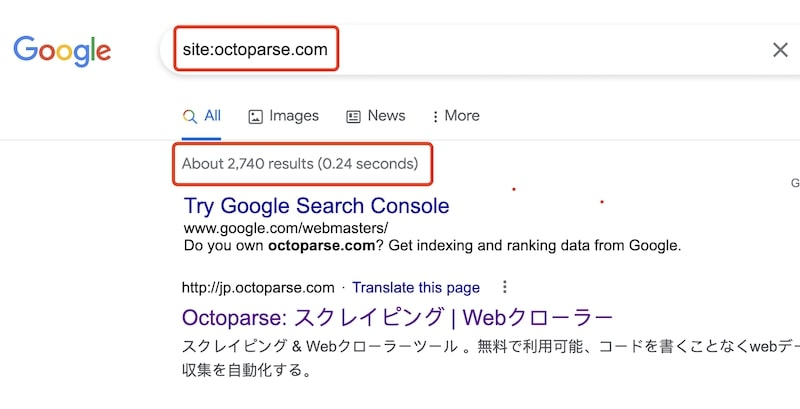
You can check which of your pages are indexed with a site:yourdomain.com search on Google, or in detail through the Page Indexing report in Google Search Console.
When Should You Use a Web Crawler?
You need a crawler whenever the URLs themselves are unknown. Typical cases include auditing every page on your own site, mapping a competitor’s site structure, building a list of product or listing pages before extracting data from them, and monitoring sections of a site for new content.
You do not need to run a search-engine-scale crawler for any of this. Ready-made tools handle site-level crawling without infrastructure work. We compared the leading options in our list of top web crawling tools, and if you want to test the waters without a budget, start with these free online website crawlers.
How to Build a Web Crawler
Two routes exist, and the right one depends on how much control you need versus how quickly you want results.
Code-first vs no-code: a quick comparison
| Code-first (Python) | No-code (Octoparse) | |
| Setup time | Hours to days | Minutes |
| Technical skill needed | Python, HTML/CSS | None |
| JavaScript rendering | Manual setup required | Built-in |
| Anti-blocking | Manual (IP rotation, headers) | Automatic |
| Maintenance | Ongoing when sites change | Handled by platform |
| Best for | Custom pipelines, full control | Fast data extraction, no overhead |
For a full walkthrough of both approaches, see our guide on how to build a web crawler from scratch.
Start Collecting Web Data
Web crawlers are the invisible infrastructure behind everything from Google search results to the AI models you use every day. Understanding how they discover, fetch, and index pages makes you a sharper SEO practitioner and a smarter data engineer, whether you are optimizing your own site for Googlebot or deciding which AI crawlers to allow.
If your next step is collecting structured data rather than building crawl infrastructure, that is where a scraping layer takes over from the crawl. Octoparse combines the crawling and extraction steps into one no-code workflow. It is used by 4.5 million users in 150+ countries and ships with 600+ ready-made templates for popular websites. You can download Octoparse and run your first task on the free plan. New to web scraping? Our on-demand webinars walk you from setup to first export in under an hour.
FAQs About Web Crawlers
- What is a web crawler in simple terms?
A web crawler is a computer program that reads web pages the way you browse them, but automatically and at massive scale. It opens a page, saves what it finds, follows the links on that page, and repeats the process. Search engines use crawlers to build the index that powers your search results.
- What else is a web crawler known as?
A web crawler is also known as a spider, web spider, spiderbot, or search engine bot. All of these names describe the same kind of program. The word “spider” comes from the way the program moves across the web of links that connect pages, much like a spider moving across its web.
- What is the main purpose of a web crawler program?
The main purpose of a web crawler is to discover web pages and send their content to an indexing system. Search engines need this step to know what pages exist and what they contain. Without crawlers, search engines would have no data to rank, and your searches would return nothing.
- How often does Google crawl the web?
It depends on the page. Googlebot re-crawls popular, frequently updated pages every few hours or days. Smaller or rarely updated pages may not see a revisit for weeks. You can check your site’s crawl frequency in the Crawl Stats report inside Google Search Console. Creating fresh, quality content and earning backlinks encourages more frequent crawls.
- Can ChatGPT crawl the web?
Not directly. ChatGPT itself does not crawl, but OpenAI operates two crawlers: GPTBot, which collects public web content for model training, and OAI-SearchBot, which fetches pages for ChatGPT’s live search feature. Site owners can block either or both through their robots.txt file. If you want ChatGPT to fetch live web data on demand, you can connect it to Octoparse via the Octoparse MCP server, which lets ChatGPT scrape any supported site using a plain-language prompt.
- Do web crawlers visit every page on the internet?
No. Crawlers skip pages blocked by robots.txt, pages behind logins or paywalls, and pages with no links pointing to them. Crawlers also prioritize, so low-value pages may wait a long time between visits. That is why a large share of the web never appears in search results.
- Is web crawling legal?
Crawling publicly available pages is generally legal, and search engines have done it openly for decades. Legal risk comes from specifics like violating a site’s terms of service, collecting personal data, or overloading servers. We cover court cases and practical guidelines in our guide to the legal side of web crawling.