Getting a single YouTube transcript is easy. Open the video, scroll to the description, and click the Show transcript button to see the full text with timestamps.
YouTube’s own help documentation confirms that any video with captions exposes a transcript through the description area, which opens a timestamped panel on the right.
The hard part starts when you need transcripts for dozens or hundreds of videos: building datasets from video content, running SEO research, turning tutorials into documentation, or searching across many transcripts at once. At that scale, three habits break down:
- Copying transcripts by hand, one video at a time
- Running scripts that are hard to maintain
- Relying on browser extensions that break or miss half the text
This guide covers four ways to extract YouTube video transcripts, starting with the most practical no-code method and ending with an automation option. The comparison below shows which method fits which job.
Quick answer
To extract a YouTube transcript, open the video, expand the description, and click Show transcript to read it with timestamps. To extract transcripts from many videos at once, use a no-code scraper such as Octoparse with its YouTube Transcript Scraper template, which turns a list of video URLs into structured, exportable text. Pick the manual route for a single video and a no-code tool for repeatable, large-batch work.
4 Methods to Extract YouTube Transcripts at a Glance
| Method | Bulk extraction | No code | Export formats | Best for |
| Octoparse | Yes (many URLs per run) | Yes | Excel, CSV, JSON, database | Repeatable, large-batch extraction |
| Manual (Show transcript) | No | Yes | Copy-paste only | A single video, one quote |
| NotebookLM / n8n | Limited / setup-heavy | NotebookLM yes, n8n no | In-app / workflow output | Analysis inside NotebookLM, or custom automations |
| Online tools / extensions | No (one at a time) | Yes | Text / clipboard | Quick one-off grabs |
What a YouTube Transcript Is (and Why There Is No Bulk API)
A YouTube transcript is the text version of everything spoken in a video, usually written line by line with timestamps. Transcripts are either auto-generated by YouTube or uploaded by the creator. From an extraction standpoint there is no difference between the two.
In both cases the transcript is already visible to viewers, just hidden behind a few clicks. You are not bypassing restrictions or accessing hidden data; you are collecting content that is already on the page.
One limitation shapes every method below: there is no YouTube API endpoint that returns transcripts or captions in bulk. Even when captions exist, the API does not expose them in a clean, scalable way. That gap is why the methods in this guide exist.
Method 1: Extract YouTube Transcripts With a No-Code Tool
This is the most practical method for anyone who needs more than one transcript. It lets you scrape YouTube transcripts from many videos at once, with no code, no API, and no manual copying.
Octoparse is a no-code web scraping tool that handles YouTube transcript extraction end to end. You can build a workflow from scratch or use the ready-made YouTube Transcript Scraper template, which is the faster route.
- Download Octoparse and create a free account.
- Open the Template section and search for the YouTube Transcript Scraper template.
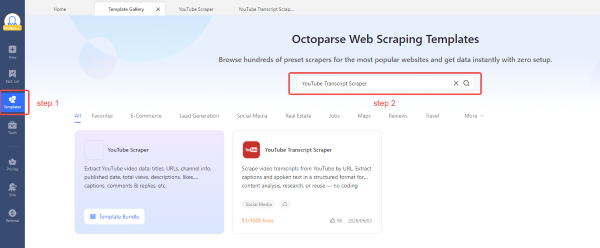
- On the template page, choose how to enter your YouTube video URLs: type them in manually, import from a file, or import from an existing task.
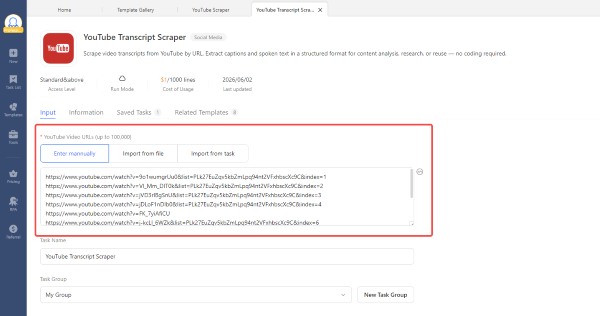
- Run the task, then export the results as Excel, CSV, or JSON.
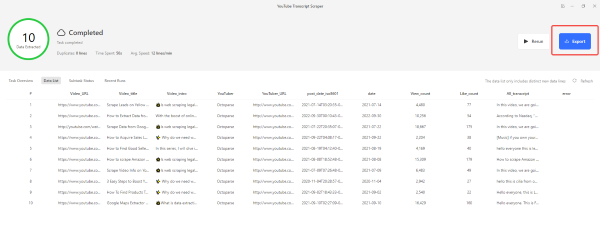
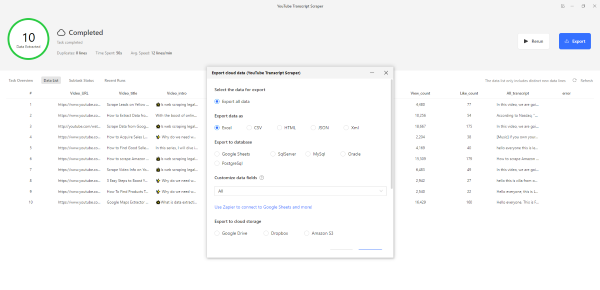
The template accepts up to 100,000 video URLs per run and is priced at $1 per 1,000 lines of transcript, so a typical batch of videos costs very little. You can load URLs manually, from a file, or from an existing Octoparse task, then export structured transcript data in the format your next tool expects.
In our own test, we ran the template on 10 YouTube videos. All 10 completed in 50 seconds with no duplicates and no CAPTCHA prompts. Each result came back structured, with the video URL, title, channel, publish date, and full timestamped transcript in separate fields, ready to export. The same workflow scales from a handful of videos to thousands without any extra setup.
This kind of bulk extraction is increasingly common. Across our user base over the past year, raw HTML and metadata scraping has risen sharply, with the usage profile pointing to teams building AI and LLM training datasets rather than grabbing cleaned, one-off fields. If transcripts are feedstock for a model or a knowledge base, batch extraction is the workflow that matters.
Try the ready-made template here: https://www.octoparse.com/template/youtube-transcripts-scraper
Method 2: Extract a Transcript Manually
Most people still pull transcripts by hand. It works for a single video but does not scale, since you can only do one at a time.
- Open the YouTube video.
- Scroll to the description section.
- Click Show transcript, then copy the timestamped text.
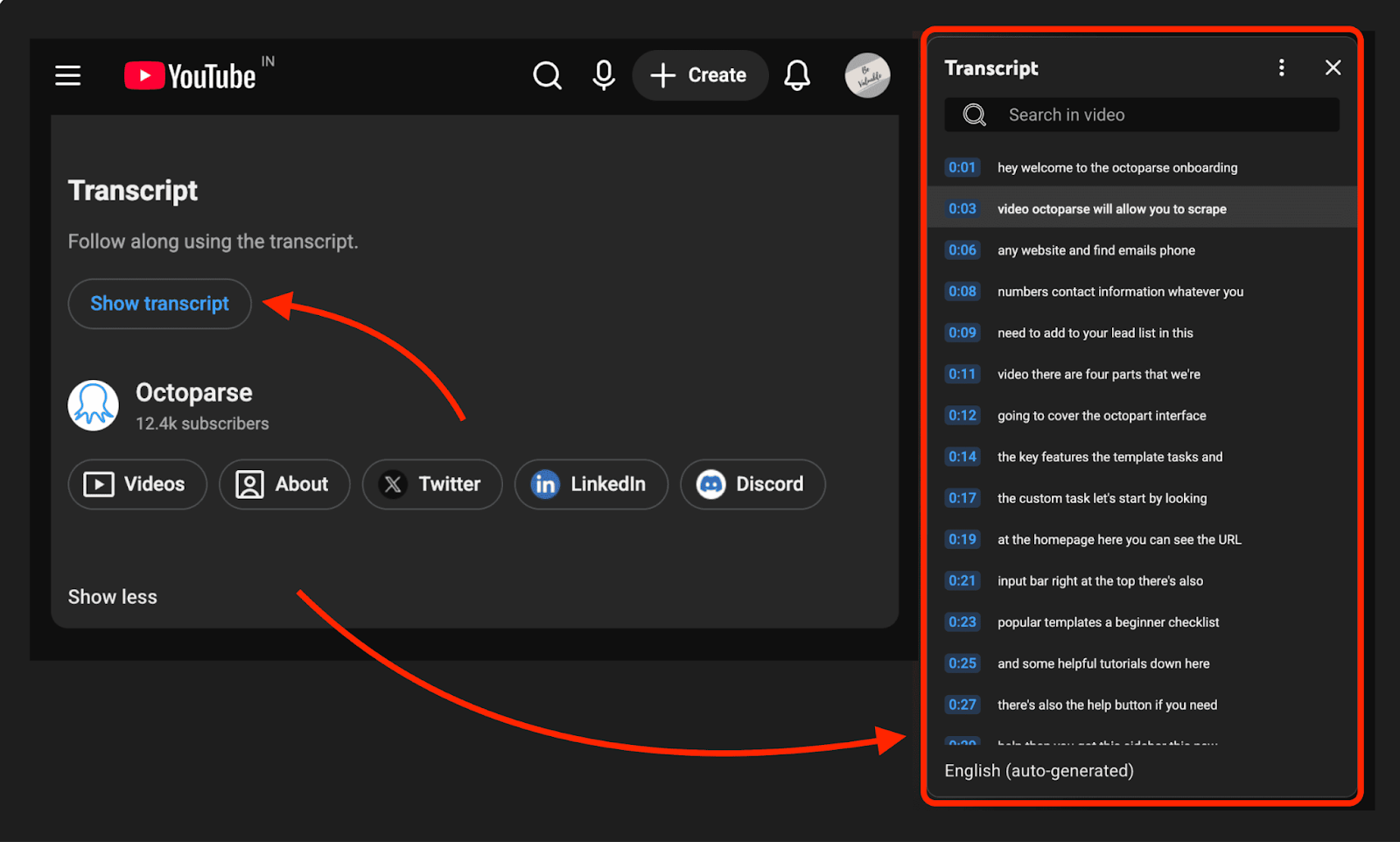
For one quote or one video this is fine. As soon as it becomes a recurring task, Method 1 saves the time this approach costs.
Method 3: Use NotebookLM or n8n
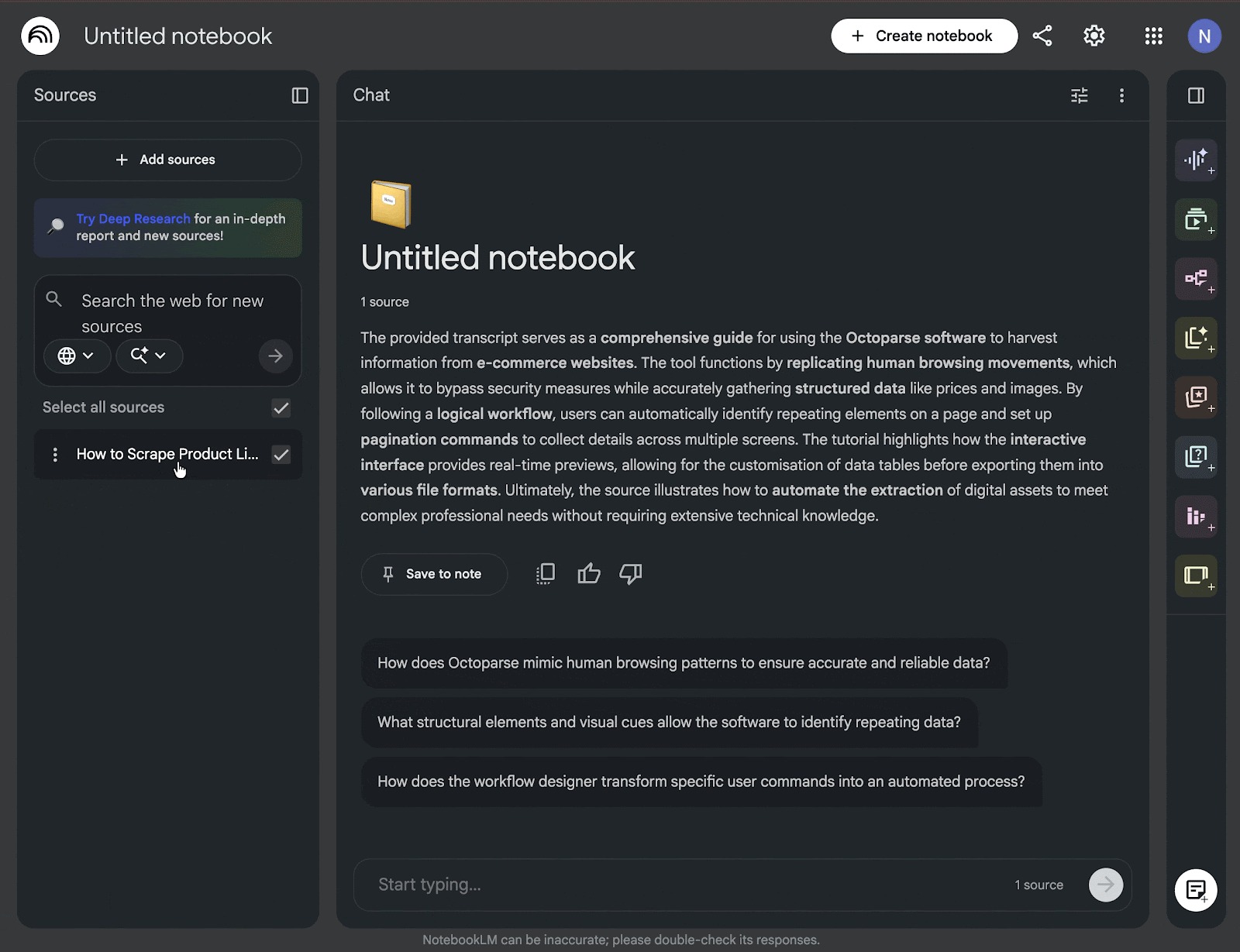
NotebookLM can pull a transcript and then summarize it, generate audio overviews, or answer questions about the content. Create a notebook, choose YouTube as a source, and paste the video link; the transcript appears in the source panel, ready for analysis.
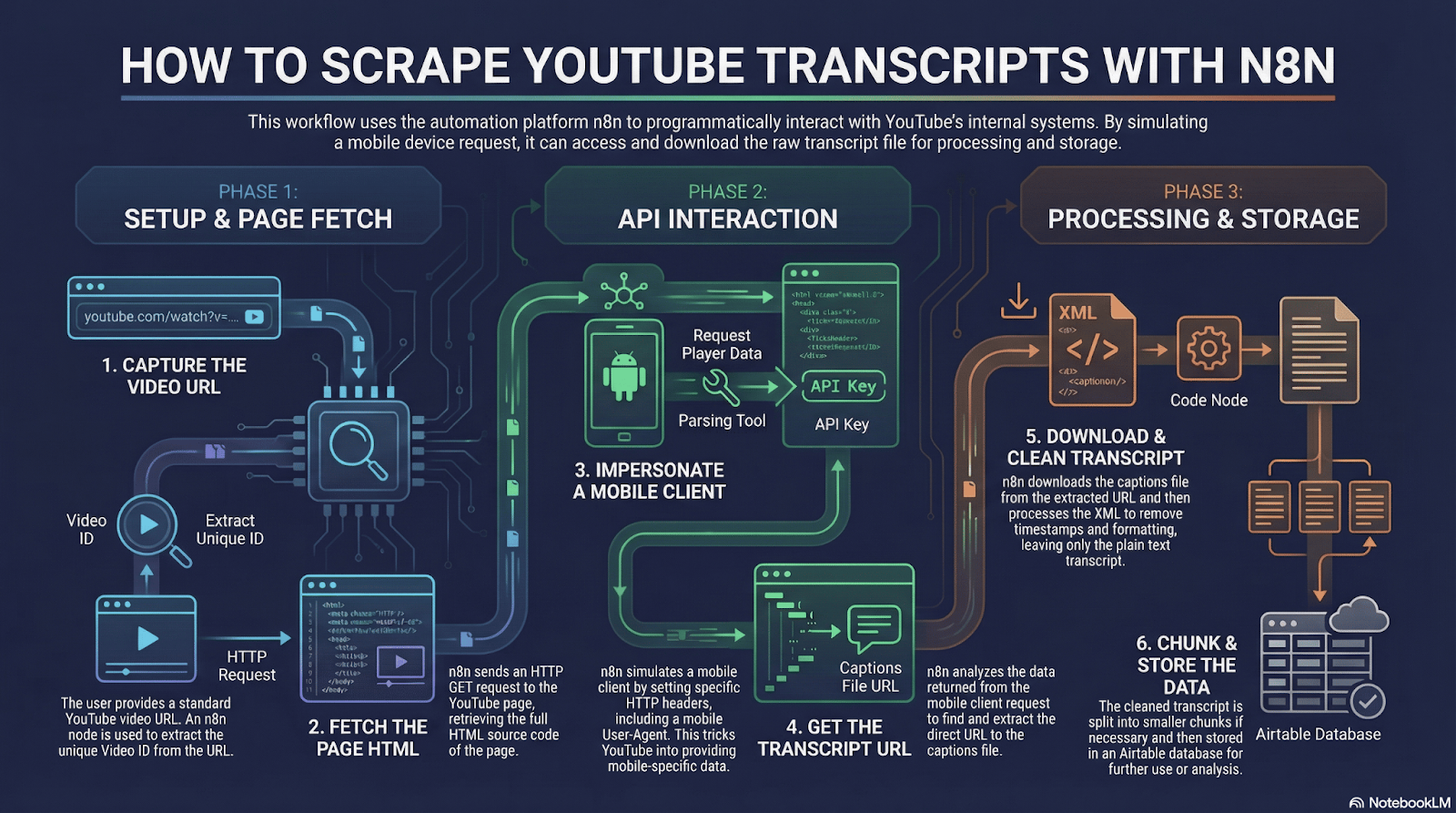
For custom pipelines, n8n is an automation platform that can fetch transcripts as one node in a larger workflow. It is the most flexible option here and the most setup-heavy, so it suits users who already work with automations.
Method 4: Use an Online Tool or Browser Extension
A range of web-based transcript tools and browser extensions can pull a transcript in a few clicks. With an online tool you paste a video link, click a button, and get the text within seconds. A browser extension adds a transcript shortcut directly on the YouTube watch page, so the text is one click away while you watch.
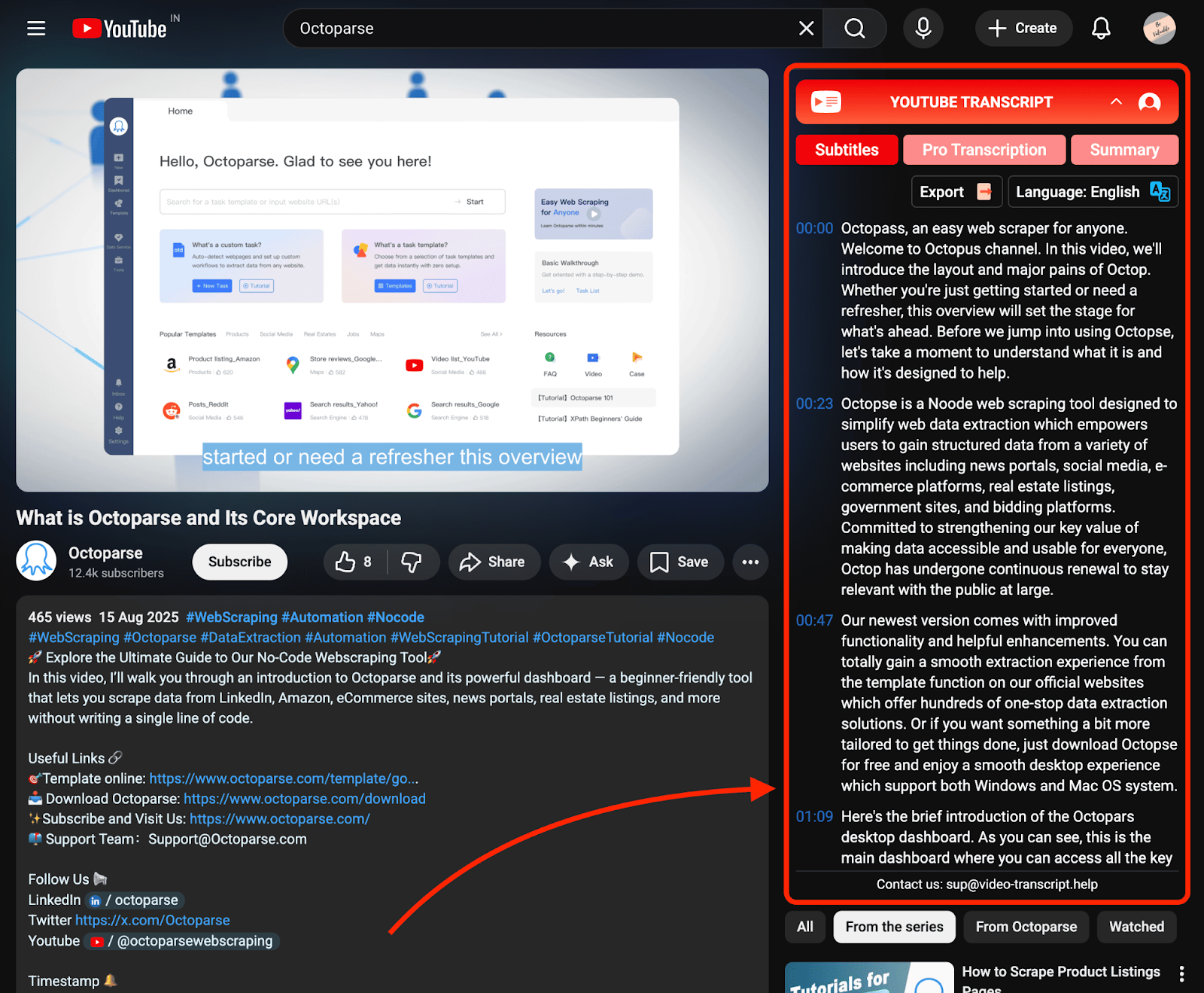
The trade-off is reliability and scale. These tools depend on access methods that change often, so the one you rely on today may stop working next month, and almost all of them handle one video at a time. For an occasional single-video grab, they are convenient. For anything you need to repeat, or for more than a handful of videos, a no-code tool like the one in Method 1 is the steadier choice.
How to Choose the Right Method
Match the method to the job, not the other way around:
- One video, one quote: manual extraction or NotebookLM. Zero setup, instant result.
- Recurring or large-batch work: a no-code tool like Octoparse. It can scrape YouTube transcripts from a whole list of URLs into structured, exportable data on every run.
- Custom automation pipeline: n8n, if you already build workflows and want transcripts as one step among many.
Once transcripts are in a clean, structured format, the data opens up:
- Analyze long-form content for repeated ideas or gaps
- Run SEO research on the words creators actually use
- Turn videos into blog posts, documentation, or social content
- Build datasets for research or internal knowledge bases
- Feed transcripts into AI models for training or experimentation
The real question is whether you need this once or as a repeatable workflow. The answer points to your method.
Ready to extract transcripts in bulk? Download Octoparse for free and try the YouTube Transcript Scraper template on your own list of videos.
Turn website data into structured Excel, CSV, Google Sheets, and your database directly.
Scrape data easily with auto-detecting functions, no coding skills are required.
Preset scraping templates for hot websites to get data in clicks.
Never get blocked with IP proxies and advanced API.
Cloud service to schedule data scraping at any time you want.
FAQs About YouTube Transcript Extractors
1. Can I extract transcripts for private or unlisted YouTube videos?
Only if you can already view the video and its transcript in your own browser. Extraction works on content that is visible to you; it does not unlock videos you do not have access to.
2. Does Octoparse extract auto-generated transcripts or only creator-uploaded ones?
Both. From an extraction standpoint there is no difference. If the transcript is visible inside YouTube, whether auto-generated or uploaded by the creator, a no-code scraper can extract it.
3. Is it safe to extract YouTube transcripts this way?
Extracting transcripts that are already visible to viewers is low-risk, because you are collecting public, on-page content rather than bypassing YouTube’s systems. As always, respect copyright and YouTube’s terms when you reuse the text.
4. Why can’t I just use the YouTube API to get transcripts?
There is no official YouTube API endpoint that returns transcripts or captions in bulk. Even when captions exist, the API does not expose them in a clean, scalable format, which is why dedicated extraction methods are needed.
5. How do I download or export a YouTube transcript to text or CSV?
A manual transcript can be copied straight into a text file. For structured output, a no-code tool like Octoparse exports transcripts as Excel, CSV, or JSON, so they drop directly into analysis, a database, or an AI pipeline.
6. What is the best method if I want transcripts regularly, not just once?
Use a no-code scraper. With a ready-made template you load a list of video URLs and extract transcripts in bulk on a repeatable schedule, which is what one-off tools and manual copying cannot do.