Yahoo does not currently list a public Yahoo Finance market-data API in its developer API catalog. Most tools described as a “Yahoo Finance API” are unofficial Python wrappers, commercial data services, or scraping workflows.
Use yfinance for a lightweight Python research workflow. Use an Octoparse template for fast no-code company-data exports, the Octoparse API or MCP for a validated recurring task, and Octoparse Desktop when the required fields or page interactions need custom extraction logic. For no-code walkthroughs of related datasets, see how to scrape financial data without Python and stock market analysis using web scraping.
Does Yahoo Finance Have an Official API in 2026?
No. Yahoo’s current developer API catalog does not include a public market-data API for Yahoo Finance. It lists products such as the Yahoo Fantasy Sports API and Sign In with Yahoo. Most tools labeled a “Yahoo Finance API” are unofficial libraries, undocumented endpoints, commercial data services, or web scrapers.
The popular yfinance GitHub project, for example, states that it is open source, is not affiliated with Yahoo, and is intended for research and educational use. Unofficial tools can be useful, but they do not provide the same documented contract, support, or stability as an official market-data API.
What Yahoo Finance Data Can You Extract and Export?
If the required information is displayed on Yahoo Finance, Octoparse can turn the visible page into structured rows without requiring a Yahoo Finance API key. Choose the workflow by dataset: the ready-made template covers published company-profile and ownership fields, while a custom Octoparse Desktop task is the better fit for quote pages, historical-price tables, and financial statements.
Yahoo Finance Data Routes by Dataset
| Data need | Recommended Octoparse route | Fields to map when displayed | Export result |
|---|---|---|---|
| Company profile and ownership | Yahoo Finance Scraper template | Company, sector, industry, executives, major holders, institutional holders, and governance fields | Structured rows for comparison and analysis |
| Quotes and historical prices | Custom Octoparse Desktop workflow | Date, open, high, low, close, adjusted close, and volume | Excel, CSV, JSON, or another supported destination |
| Financial statements | Custom Octoparse Desktop workflow | Line item, reporting period, and value from income statement, balance sheet, or cash flow tables | Period-by-period financial tables |
| Recurring delivery | Validated cloud task with Octoparse API or MCP | The tested task schema and completed result rows | Programmatic retrieval or downstream export |
How to Export Yahoo Finance Quotes or Financial Statements
- Open the Yahoo Finance quote, historical-data, income-statement, balance-sheet, or cash-flow page that contains the required table.
- Paste the page URL into Octoparse Desktop and run Auto-detect Webpage Data.
- Keep the table headers and row fields you need. Check that dates, ticker symbols, currencies, reporting periods, and numeric values are mapped correctly.
- Run a small sample and compare representative rows with the source page. Review blank cells, duplicate rows, delayed quotes, and changed page layouts.
- Export the validated dataset to Excel, CSV, JSON, a database, or another supported destination. Review Yahoo Finance data-provider information and applicable terms before collecting, using, or sharing the data.
Most Used Yahoo Finance API Alternatives
- Python wrappers: The yfinance API reference documents historical downloads, ticker data, financial statements, search, screening, and streaming interfaces. It remains a community-maintained, unofficial tool rather than a Yahoo product.
- Commercial data APIs: Compare primary documentation, licensing, request limits, and support. Supported providers are a better fit when an application requires a contractual market-data service.
- Octoparse workflows: Use a template for its published fields, Desktop for visible custom tables, and Octoparse API or MCP only after the extraction task and output schema have been validated.
Which Yahoo Finance Scraping Method Should You Choose?
A good workflow should earn its complexity. The right method is not the one with the most controls; it is the simplest one that can still produce the fields, cadence, and confidence the project requires. The progression below begins with the shortest no-code route and adds machinery only when the work genuinely needs it.
Yahoo Finance Scraping Methods from Easiest to Most Advanced
| # | Method | Best for | Why choose it | Main limitation |
|---|---|---|---|---|
| 1 | Octoparse template | Fast, no-code company-data exports | Enter stock symbols and run a prepared workflow | Fields and supported inputs are defined by the template |
| 2 | Octoparse API or MCP | Scheduled pipelines, apps, agents, and repeatable jobs | Runs existing cloud tasks or templates through code or natural language | Requires authentication, a supported task or template, and output validation |
| 3 | Octoparse Desktop client | Dynamic pages, custom fields, pagination, and complex interactions | Provides the most control for building, testing, and correcting extraction logic | Requires more setup than a ready-made template |
Method 1: Use the Yahoo Finance Scraper Template
https://www.octoparse.com/template/yahoo-finance-scraper
For company and ownership research, the Yahoo Finance Scraper template is the shortest route. It accepts organization stock symbols and is configured to return company profiles, ownership, governance, insider-activity, and sustainability fields without requiring the reader to design selectors. Its scope is equally important: it is a prepared scraper for those published fields, not a historical-price API.
Octoparse Templates Related to Yahoo Finance
As verified on August 19, 2026, the Yahoo Finance template page presents the following main and related Octoparse templates. Choose by the dataset you actually need rather than treating every finance template as interchangeable.
- https://www.octoparse.com/template/scrape-yahoo-cryptocurrencies Scrape Yahoo Cryptocurrencies: collects Yahoo Finance cryptocurrency listings such as symbols, names, intraday prices, changes, market capitalization, volume, and circulating supply.
- https://www.octoparse.com/template/coinmarketcap-scraper CoinMarketCap Scraper: an adjacent crypto-market template shown in Octoparse’s related-template list. It is useful for cryptocurrency rankings, prices, market capitalization, and supply data, but its source is CoinMarketCap rather than Yahoo Finance.
In the Console interface observed on August 19, 2026, the template was labeled Standard and Free, with a last-updated date of March 18, 2025. The required field was Organization Stock Symbols (Up to 20K). The displayed 20K value is an interface limit, not proof that every account or source condition will process 20,000 symbols successfully.
Step 1: Enter and Scope the Stock Symbols
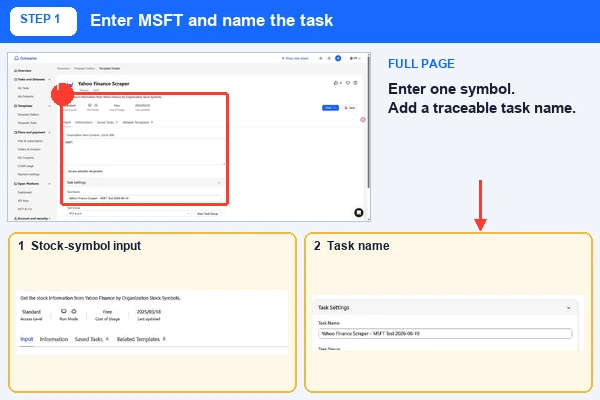
Enter one organization stock symbol per line. For the successful dated test below, the input was MSFT and the task name was Yahoo Finance Scraper – MSFT Test 2026-08-19. Begin with one representative symbol before scaling the job.
Step 2: Configure the Task and Start a Test Run
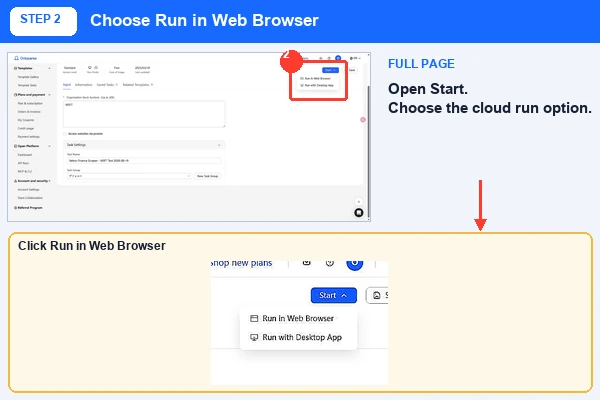
Expand Task Settings, assign a recognizable name, and place the task in the appropriate group. The observed Start menu offered Run in Web Browser and Run with Desktop App. This test selected Run in Web Browser so the cloud execution could be documented in the Console.
Step 3: Monitor the Task and Inspect the Dataset
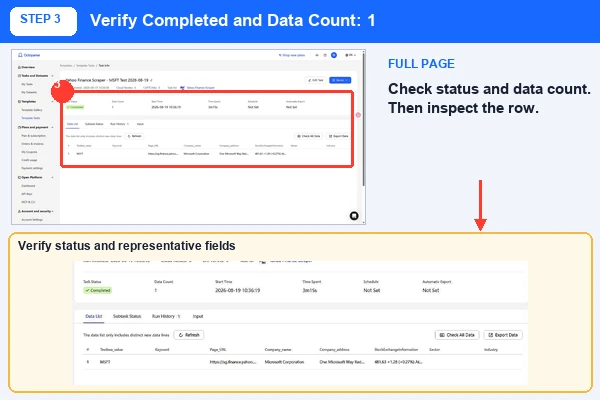
The Console created task 9320372f-088c-478c-a919-94f88c8b62a1. The run began at 10:36:19 on August 19, 2026 with six cloud nodes and zero CAPTCHAs. It completed in 3 minutes 15 seconds with a data count of one. The returned row identified Microsoft Corporation and included company-profile, address, price-summary, governance, major-holder, institutional-holder, mutual-fund-holder, and related source-page fields.
Step 4: Export Only After Validating the Result
The visible MSFT result contained one row and 22 output columns. Some fields can be blank when the source page does not expose a value. After checking the representative fields, select Export Data. The observed export wizard offered Excel, CSV, HTML, JSON, XML, and Google Sheets.
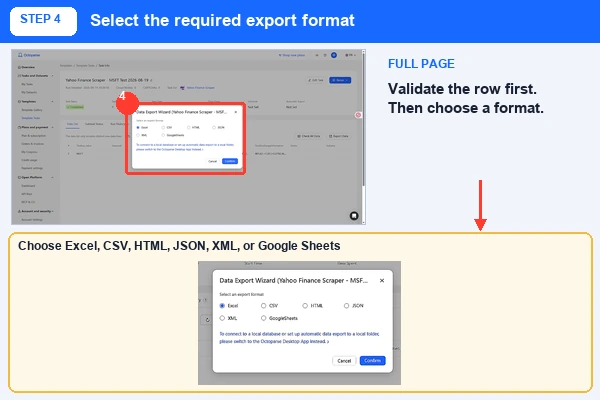
Verification boundary: MSFT completed with one Console row in 3 minutes 15 seconds. Earlier dated tests using KO, AAPL, and YM=F returned zero rows. A downloaded workbook contained an earlier KO failure record rather than the visible MSFT row, so that file is not cited as a validated MSFT export. The screenshots support the input, run mode, completed Console result, and export-options steps only.
Method 2: Automate the Workflow with the Octoparse API or MCP
Once a one-off export becomes a recurring obligation, the work changes character. The question is no longer only “Can this data be collected?” but “Can it arrive on time, in the right system, without another round of manual clicks?” The Octoparse API connects existing workflows to REST-based applications and data pipelines, while the Octoparse MCP server lets compatible AI assistants discover and run supported pre-built templates through natural-language tool calls.
Automation magnifies whatever it is given. A well-tested task becomes a dependable routine; a poorly defined task simply fails faster and at greater scale. API or MCP access therefore does not replace task design. It automates a working template or cloud task. If the required Yahoo Finance fields fall outside the template, build and test the extraction logic in Desktop first.
Step 1: Create an Octoparse API Key
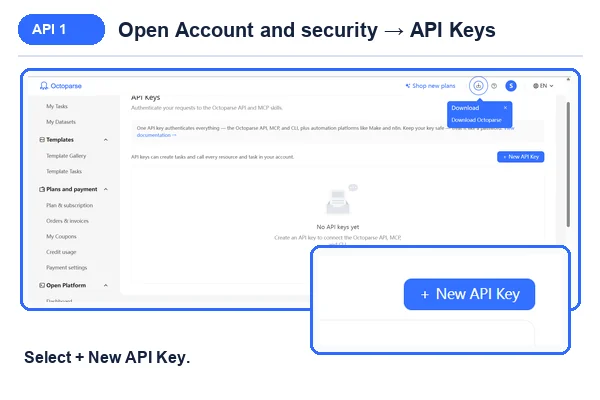
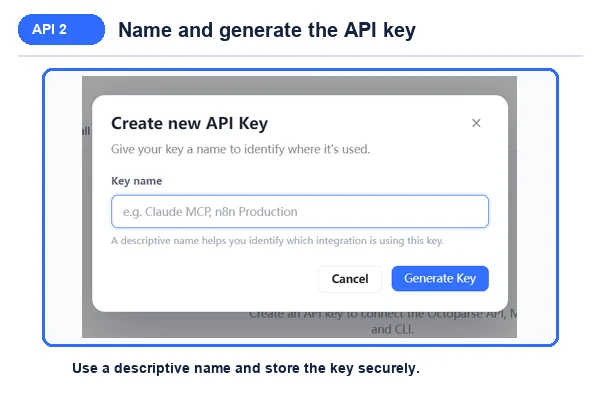
In the Octoparse Console, open Account and security → API Keys, select + New API Key, and give the key a descriptive name. Copy the generated value only to a secure credential store. The screenshots below deliberately stop before displaying or transmitting a complete key.
Step 2: Connect the Octoparse MCP Server
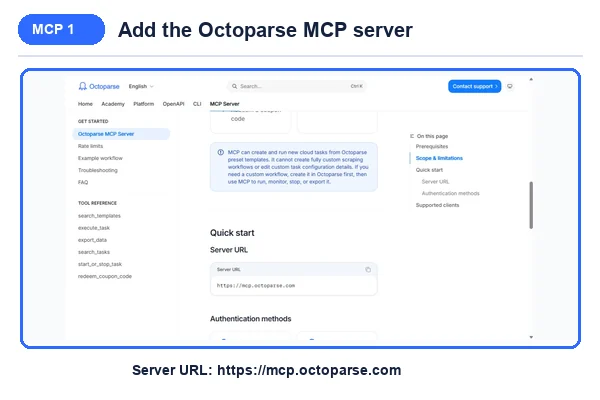
Add https://mcp.octoparse.com to a supported MCP client. OAuth browser sign-in is the simplest path for interactive use. API-key authentication is better suited to approved headless or automated environments. Follow the current MCP setup guide for the selected client.
Step 3: Search, Execute, and Export
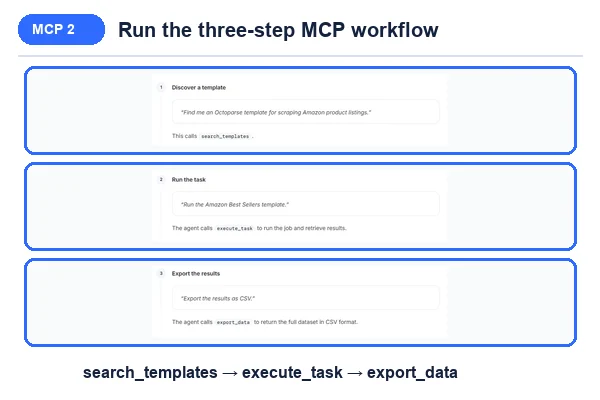
The official example follows three stages: use search_templates to find a supported template, call execute_task with the required parameters, and call export_data only after the job has completed. Start with one symbol, confirm the task ID and status, then validate row count, representative values, missing fields, and the output schema before sending data downstream. An accepted request is not proof that the result is ready.
When Should You Use the Octoparse API?
Use the Octoparse API when a backend service, scheduled job, notebook, or data pipeline needs to start tasks, monitor status, or retrieve results programmatically. The official OpenAPI reference documents authentication, task management, cloud extraction, and data export. Plan availability and permissions vary by endpoint.
When Should You Use Octoparse MCP?
Use Octoparse MCP when an AI assistant should find and run a supported template from a natural-language request. MCP is convenient for agent workflows, but it cannot create or edit a custom task configuration. Local-only tasks and unsupported page logic still require the Desktop client.
This automation layer asks for more technical care than the Console template, yet it keeps page-specific extraction logic out of every downstream application. That separation matters: when a source page changes, one maintained workflow is easier to repair than many scattered implementations.
Method 3: Build a Custom, High-Control Workflow in Octoparse Desktop
Yahoo Finance pages may load in stages, reveal fields after interactions, or lead into nested profile and market pages. Octoparse Desktop is appropriate when those page behaviors must be modeled explicitly. It lets the operator observe page loading, define each interaction, inspect extracted fields, and test a small sample before running the workflow at scale.
This added control should not be mistaken for guaranteed accuracy or uninterrupted access. Yahoo can still change its layouts and access behavior. Desktop sits at the end of this progression because it exposes more of the extraction process for inspection and correction when a workflow no longer matches the source page.
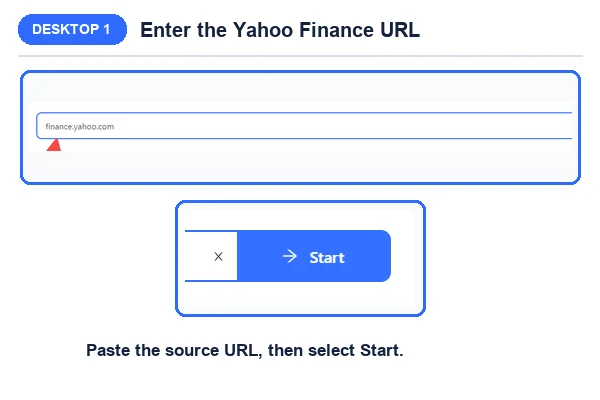
Step 1: Enter the Yahoo Finance Page URL
Open the Yahoo Finance page that contains the required data, copy its URL, and paste the URL into Octoparse Desktop. Start with one representative company or listing page so the extraction logic can be checked before adding more URLs.
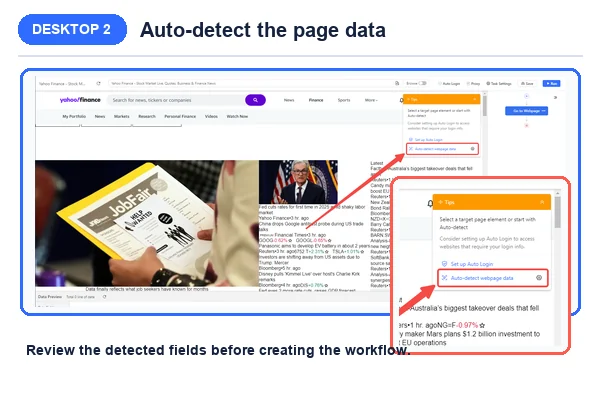
Step 2: Auto-Detect and Refine the Workflow
Let Octoparse auto-detect the page data, then review the generated workflow and data preview. Rename the fields, remove irrelevant elements, and add pagination, clicks, scrolling, waits, or detail-page actions when the source requires them. The preview should show the correct values before a full run starts.
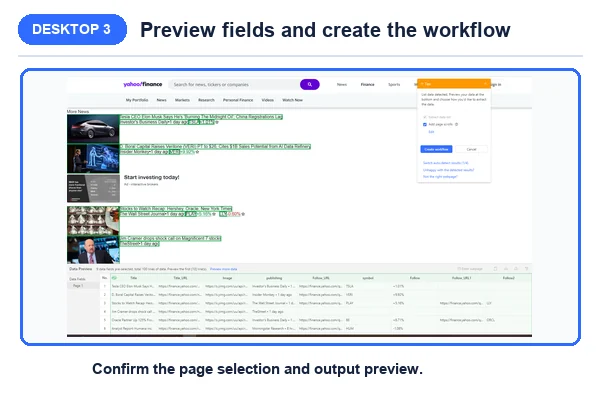
Step 3: Test, Run, and Export the Workflow
Run a small local test and compare several extracted rows with the source page. After the field mapping and page sequence are correct, run locally or in the cloud. Export the validated result to a file, spreadsheet, database, or another supported destination.
For a related stock-price workflow, see the Yahoo Finance monitoring guide.
Python Alternatives: yfinance and Beautiful Soup
Not every data question needs to become a platform workflow. For analysts who think naturally in notebooks and data frames, Python can be the shortest distance between a question and an answer. The methods below are alternatives to Octoparse API and MCP, not features of the Octoparse API. They trade visual control for code-level flexibility and ongoing maintenance when Yahoo changes its pages or access behavior.
What Is yfinance?
yfinance is a community-maintained Python package for retrieving market data associated with Yahoo Finance. Its API reference documents functions for historical prices, tickers, financial statements, searches, sectors, industries, and market data. The project repository states that yfinance is not affiliated with, endorsed by, or vetted by Yahoo.
Does yfinance Require an API Key?
Common yfinance download functions generally do not require a conventional API key. Install the package and request a ticker and date range directly.
Observed yfinance Test Result
In a test conducted on August 18, 2026, yfinance 1.6.0 returned 250 AAPL trading-day records for the requested 2025 period. The export contained adjusted close, close, high, low, open, and volume fields. The result confirms that the example worked for historical research under the tested conditions; it does not establish production reliability or unrestricted data-use rights.
First Five Rows from the Dated yfinance Test
| Date | Adjusted close | Close | High | Low | Open | Volume |
| 2025-01-02 | 242.093140 | 243.850006 | 249.100006 | 241.820007 | 248.929993 | 55,740,700 |
| 2025-01-03 | 241.606659 | 243.360001 | 244.179993 | 241.889999 | 243.360001 | 40,244,100 |
| 2025-01-06 | 243.234848 | 245.000000 | 247.330002 | 243.199997 | 244.309998 | 45,045,600 |
| 2025-01-07 | 240.464935 | 242.210007 | 245.550003 | 241.350006 | 242.979996 | 40,856,000 |
| 2025-01-08 | 240.951401 | 242.699997 | 243.710007 | 240.050003 | 241.919998 | 37,628,900 |
How the Original Beautiful Soup Workflow Works
The original guide used Requests, Beautiful Soup, and pandas to collect Yahoo Finance news headlines. Install the dependencies, request the page, parse the returned HTML, select the desired elements, and save the values to CSV.
This simplified example preserves the original Python approach, but page selectors must be inspected and tested against the current Yahoo Finance markup. A generic a selector will also capture unrelated links, so production code should use a narrower, verified selector.
Yahoo Finance API Pricing and Cost Comparison
Yahoo Finance API pricing cannot be reduced to one universal fee because the phrase covers several different access routes. A Python package may have no license fee yet require engineering and maintenance time; a template may be free to start while cloud execution consumes account resources; and a commercial market-data API usually prices access through quotas or subscription tiers. The relevant cost is the total cost of obtaining, validating, and maintaining the required data.
Yahoo Finance API Cost Comparison by Access Route
| Method | Direct price model | Additional cost to evaluate | Best fit |
|---|---|---|---|
| yfinance | Open-source package | Development, monitoring, breakage, and data-use review | Python research and historical-market-data experiments |
| Octoparse Yahoo Finance template | The observed template was labeled Free on August 19, 2026 | Account credits, cloud runtime, scheduling, and applicable plan conditions | Fast company-profile and ownership exports |
| Octoparse API or MCP | Depends on the Octoparse account and execution resources | Task validation, automation monitoring, and export operations | Repeatable application or agent workflows |
| Octoparse Desktop | Depends on the applicable Octoparse plan | Workflow design, testing, local or cloud execution, and maintenance | Custom fields and the highest workflow control |
| Commercial market-data APIs | Free quotas or paid subscription tiers | Request limits, dataset licensing, support level, and overage rules | Supported, contract-based data access |
Is Yahoo Finance Data Access Free?
Some routes can be started without a direct software fee, but no production workflow is costless. The yfinance documentation describes an open-source project for research and educational use and directs readers to Yahoo’s terms for rights in downloaded data. Octoparse templates, API/MCP automation, and Desktop workflows can introduce account, execution, maintenance, and validation costs even when a template is labeled free.
Commercial API quotas are part of the product rather than a footnote. As checked on August 19, 2026, the EODHD API limits listed 20 calls per day on the free plan, 100,000 per day by default on paid plans, and up to 1,000 requests per minute. Treat these figures as dated evidence and recheck provider documentation before choosing a production source.
Reliability, Accuracy, and Responsible Use
Market data rewards precision and punishes complacency. Unofficial libraries and scraping workflows can encounter throttling, access restrictions, missing fields, and page changes, sometimes without producing an obvious error. Historical request limits associated with discontinued services should not be repeated as if they were current Yahoo Finance limits.
- Start with a representative sample and compare the output with the source page.
- Validate field names, data types, pagination, and detail-page navigation.
- Log empty responses, missing fields, failed pages, and schema changes.
- Cache responses when appropriate and avoid unnecessary repeated requests.
- Use conservative retry limits and review applicable terms and data-use requirements.
The legality and permitted use of collected data cannot be answered with a universal yes or no. Relevant factors include jurisdiction, contractual terms, copyright, privacy requirements, access method, and intended use. This article provides technical information and is not legal advice.
Conclusion
There is no virtue in choosing the most sophisticated tool before the work asks for it. Begin with the Yahoo Finance template, test one supported symbol, and export only after the row looks right. When repetition becomes the burden, add Octoparse API or MCP. When the page itself becomes the problem because of custom fields, dynamic interactions, pagination, or frequent debugging, move into Octoparse Desktop for the greatest control and stability.
Python wrappers and Beautiful Soup remain valuable for research and code-first exploration, but they belong to a different path from the Octoparse API/MCP workflow. Whichever route you choose, decide what a trustworthy result means before you scale it: which fields must be present, how fresh the data must be, where it should go, and how it may be used. Tools collect rows; judgment turns those rows into dependable evidence.
FAQs About Yahoo Finance API
- Does Yahoo Finance Have an Official Public API?
No. Yahoo’s developer API catalog does not list a public Yahoo Finance market-data API. The phrase usually refers to unofficial wrappers such as yfinance, commercial market-data providers, or scraping workflows. Check the official catalog and each provider’s terms before choosing a production source.
- Does yfinance Require a Yahoo Finance API Key?
No. yfinance generally retrieves publicly available Yahoo Finance data without requiring a Yahoo-issued key. However, yfinance is an independent open-source project, not an official Yahoo product. Its documentation directs users to Yahoo’s terms for rights concerning downloaded data.
- Which Method Is Best for Historical Stock Prices?
For Python research, yfinance can retrieve historical open, high, low, close, adjusted-close, and volume data. The Octoparse Yahoo Finance template is better suited to company-profile and ownership fields. Use a custom Octoparse Desktop workflow when the required data is visibly available and must be mapped into a tailored export.
- Can Every Template Field Be Expected in Every Row?
No. A configured field can be empty when the source page does not display a value for that company, period, or record. Run a small representative sample, compare rows with the source page, and confirm missing values before scaling the task or connecting it to an automated export.
- How Can a Yahoo Finance Scraper Avoid Unnecessary Blocks?
Use a reasonable request rate, avoid duplicate requests, cache results when appropriate, and validate a small sample before scaling. Proxies can help with delivery, but they do not replace compliance with Yahoo’s terms, source-specific rate rules, licensing requirements, or permitted data-use conditions.