To scrape Craigslist data responsibly, first confirm that you have permission under Craigslist’s current Terms of Use. Start with the preset Craigslist Scraper when its location and category inputs fit your target; build a custom Octoparse workflow when you need different pages or fields; use Python only for HTML you are authorized to process. Validate field accuracy and geographic scope before scaling, and never bypass CAPTCHAs, login controls, or other access restrictions.
Watch: How to Scrape Data from Craigslist Easily
This original Octoparse walkthrough shows the Craigslist scraping workflow before the guide compares the preset template, custom no-code workflow, and Python approach in detail.
The right method depends on your target category, required fields, and maintenance capacity. This guide compares all three routes, shows the output of a real Octoparse template run, and explains the limitations you should check before using the data.
Important: Craigslist’s Terms of Use restrict automated and manual collection unless Craigslist grants a separate license. Review the current terms, obtain any required permission, and seek legal advice for your use case. This article is technical information, not legal advice, and does not cover access-control bypassing or private data collection.
Which Craigslist scraping method should you choose?
Choose a preset template when speed matters, a custom visual workflow when the template does not cover your page, and Python when your team can maintain code and has permission to process the source material.
| Method and setup | Best for | Main limitation |
|---|---|---|
| Preset Craigslist scraper template — No coding · Low setup | A supported location and category with standard listing fields | Inputs and fields are limited to the template’s current design |
| Custom Octoparse task — No coding · Medium setup | Custom listing pages, field selection, and reusable visual workflows | Page changes may require workflow maintenance |
| Python parser — Coding required · High setup | Authorized HTML, custom transformations, and developer-controlled pipelines | You own permission checks, selectors, error handling, and maintenance |
For most first-time users, the preset template is the fastest way to validate whether the available fields match the project. Build a custom task only after identifying a gap. Use Python when code-level control is worth the added maintenance.
Is Craigslist scraping allowed?
Craigslist scraping is not automatically allowed just because a page is publicly viewable. The current Craigslist Terms of Use state that users may not copy or collect Craigslist content with robots, scripts, scrapers, crawlers, or a manual equivalent unless they have a separate agreement.
Craigslist documents a Bulk Posting Interface, but that interface submits and manages authorized postings. It is not a general public API for reading listings. Access is granted case by case to qualifying high-volume posters in supported paid categories.
Before starting a project, answer four questions:
- Do you have permission or another valid basis to collect the target data?
- Does the project avoid private, personal, or identifying information?
- Can you minimize the number of pages and fields collected?
- Can you stop the workflow if access rules, page behavior, or requirements change?
Do not bypass CAPTCHAs, login controls, blocks, or other technical restrictions. Do not use collected contact details for unsolicited messages. If the project is commercial, recurring, or large scale, request legal review before launch.
Method 1: How to use the Octoparse Craigslist Scraper template
The preset Craigslist Scraper is the quickest route when its location, section, and category inputs match your target. The template runs from the browser, so you can test a supported scenario before building a custom workflow.
https://www.octoparse.com/template/craigslist-scraper
Step 1: Open the template and review its inputs
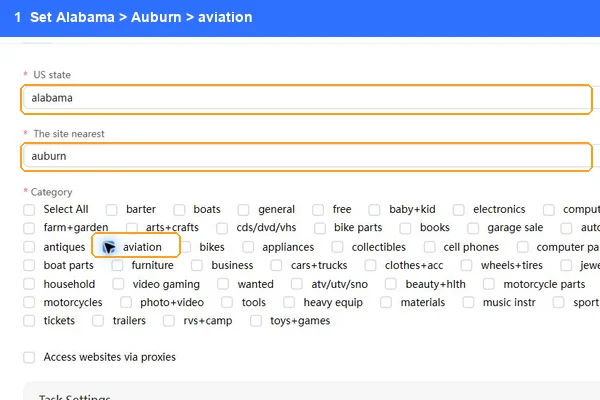
Open the template page and inspect the available location and category selectors. Confirm that the template can represent the Craigslist site and section you need. A location selection can map to the nearest available site, so treat it as an input to verify rather than a guaranteed city-only filter.
Step 2: Choose a location, section, and category
Select the required values and start a browser run. Keep the first test narrow. A small, specific test makes it easier to compare the returned rows with the source pages and identify missing fields.
Step 3: Review the extracted rows before export
Check the title, post URL, posting time, description, post ID, price, image, and location fields. Optional values should remain empty when the source listing does not provide them. An empty field is not automatically an extraction failure.
What happened in our August 31, 2026 test?
We ran the web template once with Alabama > Auburn > Aviation. The run completed in 2 minutes 10 seconds and returned 60 rows, with 0 duplicates and 0 CAPTCHA events reported in that run.
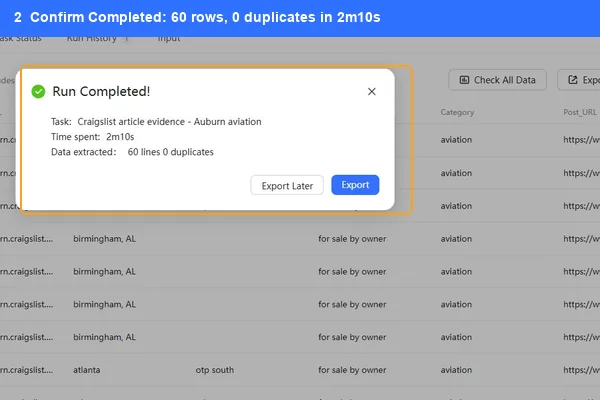
| Test item | Observed result |
|---|---|
| Run status | Completed |
| Output rows | 60 |
| Duplicate rows | 0 |
| Core-field completeness | 60/60 |
| Price present | 57/60 |
| Main image present | 53/60 |
| Address present | 10/60 |
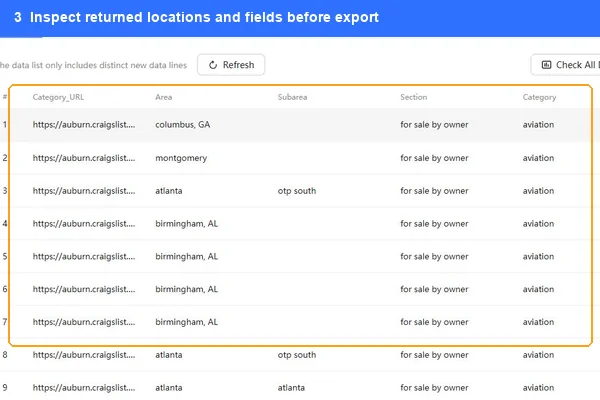
One sampled row matched its live source for title, price, post ID, description, and image URL. However, Craigslist reported zero local Auburn results and displayed nearby listings instead. The template returned those nearby results accurately. This test is one case study, not a general success-rate claim.
The main takeaway is simple: verify both field accuracy and geographic scope. A completed run proves that the task finished, but only source comparison shows whether the rows answer your actual question.
Method 2: How to build a custom Craigslist workflow without code
A custom Octoparse task is useful when the preset template does not support your page, category, or desired field. The visual workflow gives you more control without requiring a Python environment.
Step 1: Define one target page and an output schema
Start with a single authorized listing or search-results page. Before building anything, list the fields you need. A practical schema might include title, post URL, price, post time, location, description, post ID, and image URL.
Avoid selecting every visible element. A smaller schema is easier to validate and maintain. It also reduces the chance of collecting information you do not need.
Step 2: Create a new Octoparse task
Download Octoparse, create a new task, and enter the target URL. Let Octoparse detect repeatable content, then compare the detected rows and fields with your schema.
Rename fields before running the task. Clear names such as post_url, post_id, and posted_at make later checks much easier than generic column labels.
Step 3: Configure pagination or detail-page navigation
If the source page has multiple result pages, inspect how navigation works and set a bounded stopping rule. If required fields only appear on detail pages, add detail-page navigation and return to the results list after extraction.
Use conservative limits during testing. The goal is to validate the workflow, not to maximize request volume.
Step 4: Test representative rows
Run the workflow on a small set that includes:
- a listing with a price and image;
- a listing without a price;
- an updated listing;
- a nearby result, if Craigslist supplies one;
- an expired or removed URL, if one appears naturally in the test.
Compare several exported rows with their source pages. Check for shifted columns, repeated descriptions, mismatched URLs, and empty optional fields. Save a dated QA sample so future page changes can be detected.
Step 5: Run and export the approved workflow
After the test passes and the collection is authorized, run the bounded task and export only the fields you need. Excel and CSV are useful for manual review. A database export is better for a recurring, governed pipeline.
Method 3: How to parse authorized Craigslist HTML with Python
Python is the most flexible method when a developer needs custom transformations and has permission to process the source material. To keep the parser separate from site access, begin with an HTML file that you are authorized to use.
The example below parses a locally saved listing page. It does not request Craigslist, automate browsing, bypass controls, or collect contact details.
Treat selectors as versioned configuration, not permanent facts. Craigslist can change page markup, and categories may expose different elements. Add fixture-based tests for pages with and without prices, images, and optional metadata. If a selector stops matching, fail visibly instead of silently exporting blank or incorrect columns.
For an authorized production pipeline, add input validation, structured logs, duplicate checks, and a review queue for unusual records. Keep acquisition permission and parser accuracy as separate gates. A technically correct parser does not create permission to access or reuse data.
What data can a Craigslist scraper collect?
A Craigslist scraper can structure the fields present on each supported source page. Field availability varies by category, location, and individual listing, so a reliable schema distinguishes required fields from optional ones.
| Field | Typical use | Data-quality check |
|---|---|---|
| Title | Identify and classify the listing | Compare the text with the source H1 |
| Post URL | Preserve source traceability | Require a valid, unique URL |
| Post ID | Deduplicate or update records | Store as text and check for duplicates |
| Price | Compare asking prices | Allow blanks and normalize currency separately |
| Post time | Sort and monitor listings | Parse timezone and keep the raw value |
| Updated time | Detect changes | Expect this field to be optional |
| Description | Search or classify listing content | Remove page boilerplate before analysis |
| Area and subarea | Group listings geographically | Confirm whether nearby results are included |
| Address | Map listings where supplied | Never infer a missing address |
| Main image | Review listing media | Keep the source URL and allow blanks |
In our 60-row template test, the core fields were present in every row, but several optional fields were sparse. Price appeared in 95% of rows, the main image in 88%, and address in 17%. Those percentages describe only the tested Auburn Aviation result set on August 31, 2026.
Why does a Craigslist scraper return nearby listings?
A Craigslist result page can show nearby listings when the selected local area has few or no matches. A scraper may then return the content Craigslist presents, even when those listings are outside the location a user selected initially.
The Auburn Aviation test demonstrated this behavior. Craigslist displayed a message that no local results were found and supplied nearby results sorted by distance. The extraction matched that page behavior rather than enforcing a separate Auburn-only rule.
Add a geographic QA step when location matters:
- Save the selected input values with every run.
- Capture the source page’s local or nearby-results message.
- Retain area and subarea fields where available.
- Filter or label nearby listings after extraction instead of assuming they are local.
This distinction matters for local price research, inventory monitoring, and any report that compares areas.
What limitations should you check before using Craigslist data?
Craigslist data should pass source, completeness, scope, and permission checks before analysis. A successful task status alone does not establish data quality.
Use this checklist:
- Source accuracy: Compare a sample of titles, URLs, IDs, prices, descriptions, and images with the live or authorized source.
- Optional fields: Measure null rates by field and category. Do not fill missing prices or addresses with guesses.
- Geographic scope: Identify local and nearby results separately.
- Duplicates: Deduplicate by a stable combination such as post ID and post URL.
- Removed listings: Decide whether to retain, flag, or remove records whose source pages disappear.
- Markup changes: Alert when required selectors or fields become empty unexpectedly.
- Access rules: Stop collection when permission, site terms, or technical restrictions change.
- Personal data: Exclude contact or identifying information unless collection and use are clearly authorized and necessary.
A dated validation sample is especially useful for recurring projects. It turns page changes into measurable QA failures instead of silent data drift.
What can structured Craigslist listing data be used for?
Structured listing data can support analysis when the collection and reuse are permitted. Common applications include comparing asking prices, organizing personal research, monitoring an authorized set of postings, and classifying listing descriptions.
For example, a researcher can group listings by area and category, calculate price ranges only for rows with valid prices, and retain each source URL for review. A business should add stronger governance, including data minimization, retention rules, source attribution, and legal approval.
Avoid using scraped personal information for unsolicited outreach. Do not treat listing text as verified truth. Craigslist states that it does not promise completeness, accuracy, availability, or reliability, so important decisions should be checked against the original source and other evidence.
FAQs about Craigslist Scrapers
What is a Craigslist scraper?
A Craigslist scraper is a tool or script that converts Craigslist page content into structured fields such as title, URL, post ID, price, description, date, location, and image URL. Its use still depends on permission, site terms, and applicable law.
Does Craigslist offer a public API for reading listings?
Craigslist does not document a general public read API for listing retrieval. Its documented Bulk Posting Interface is for authorized posting workflows and is available only to qualifying users on a case-by-case basis.
Is it legal to scrape Craigslist for personal use?
Personal use is not an automatic exemption from Craigslist’s Terms of Use. The terms restrict automated and manual-equivalent collection unless separately licensed. Legal analysis depends on the jurisdiction, data, method, and purpose, so seek qualified advice for your project.
What fields are available in the Octoparse template?
The tested output included area, section, category, post URL, title, post time, description, post ID, posted status, price, image, updated time, subarea, address, and several optional fields. Availability varies by source listing and test scenario.
Why are some price, address, or image fields blank?
Fields are blank when the source listing omits the value or the page structure differs from the expected pattern. Measure field completeness and compare representative rows before deciding that a blank is an error.
Can a scraper collect Craigslist contact details?
Do not collect or use personal or identifying information without a clear, lawful, and authorized need. Craigslist’s terms restrict collecting user information and impose additional rules around unsolicited communications.
Start with the Craigslist scraping method that fits your scope
Start with a narrow, permitted test and verify the output before scaling. Use the Craigslist Scraper template when its inputs and fields fit your target. Build a custom Octoparse task when you need different pages or fields. Use Python for authorized HTML when your team can maintain selectors, tests, and data governance.
https://www.octoparse.com/template/craigslist-scraper
Whichever method you choose, keep permission, source accuracy, field completeness, and geographic scope as separate release checks.