The best data extraction tools in 2026 depend on what you’re pulling: websites, PDF documents, or SaaS databases. This guide compares the top 12 tools across all three categories, with free plans, real pricing, and honest trade-offs based on G2 and Reddit user feedback. A Quick Answer table maps your use case to the right tool. We’ve also flagged where each tool actually breaks (Cloudflare-protected sites at scale, large PDFs with handwriting, schema-drifting APIs) so you don’t discover it after you’ve signed up.
A data extraction tool is software that automatically pulls data from one source (a website, a document, or a database) and converts it into a structured format like CSV, JSON, or a direct database load, ready for analysis, reporting, or AI training.
Quick Answer: Which Data Extraction Tool or Software Should You Use?
| Your situation | Recommended tool | Why |
| Scraping 5+ different websites, no coding | Octoparse | 600+ pre-built templates plus visual builder |
| Developer-led pipeline with API workflows | Apify | Open Actor marketplace, full REST API on free tier |
| Enterprise-scale collection, heavy anti-bot targets | Bright Data | 150M+ residential IPs, 195 countries, SOC2 |
| Tracking specific data points + alerts | Browse AI | Pre-built monitoring with Zapier/Make/n8n integrations |
| Extracting from invoices and receipts | Rossum or Nanonets | AI OCR trained on hundreds of document types |
| Syncing SaaS data to a warehouse | Fivetran, Hevo, or Airbyte | 150 to 350+ pre-built connectors, schema-drift handling |
| Pulling web data into ChatGPT or Claude | Octoparse MCP | Free MCP Server, up to 2,000 records/week |
The single biggest mistake we see in tool selection is treating “data extraction” as one category. A team scraping competitor prices needs a different tool than a team extracting invoice line items, even though both might call themselves “data extraction” software. The rest of this guide walks through the 12 best tools, organized by what you’re extracting: websites, documents, or databases.
How We Picked These Data Extraction Software
We selected tools that met four criteria:
- (1) active in 2026 with a publicly available pricing page
- (2) at least 50 user reviews on G2, Capterra, or Trustpilot with a 4.0+ average rating
- (3) a free plan or trial that lets you validate the workflow before paying
- (4) a verifiable track record in at least one of the three categories (web, document, or database).
Pricing was confirmed against each vendor’s pricing page in 2026, and limitations are sourced from a mix of G2, Reddit (r/webscraping, r/dataengineering), and Trustpilot user feedback.
What Are Data Extraction Tools? 3 Categories That Actually Matter
A data extraction tool automates the work of pulling data from one source and reshaping it into a structured format ready for analysis. In 2026, the market splits cleanly into three categories, and tools in one category rarely solve problems in another.
Web data extraction tools (web scrapers)
These pull data from public websites: product listings, business directories, job boards, social profiles, real estate portals. Typical users are sales, marketing, ecommerce, research, and pricing teams who need data that isn’t available through an API. The hardest part isn’t extracting the data, it’s surviving the defenses: JavaScript-rendered content, anti-bot systems like Cloudflare, login walls, IP rate limiting, and constant layout changes that break selectors.
Document data extraction tools (IDP / OCR)
These pull structured fields out of unstructured documents: PDFs, scanned invoices, receipts, contracts, identity documents, and purchase orders. Used heavily in finance (accounts payable automation), legal (contract review), insurance (claims processing), and logistics (shipping docs). The hard problems are handwriting recognition, layout variation across vendors, multi-language documents, and complex tables that span pages.
Database & API extraction tools (ETL / ELT)
These move data from SaaS apps (Salesforce, Shopify, HubSpot), databases (Postgres, MySQL), and APIs into a data warehouse (Snowflake, BigQuery, Redshift) for analytics. Used by data and analytics teams. The hard problems are connector maintenance, schema drift (when a source adds or renames a field), rate limits, and incremental sync logic.
One observation worth flagging before we get into the tool list: over the past year, the users who got the most value from any data extraction tool weren’t the ones with the largest data needs. They were the ones who planned a recurring workflow before picking a tool. Casual one-off grabbers tend to abandon tools regardless of which one they pick.
Top 12 Data Extraction Tools and Software for 2026
Web Data Extraction Tools
Octoparse: Best for non-technical teams scraping multiple websites
- Best for: Marketers, ecommerce, sales teams scraping 5+ different websites from one platform
- Pricing: Free (10 tasks, 50K rows/month) → Standard $69/mo (annual) → Professional $249/mo (annual)
- Free plan reality: Local runs only on free; cloud runs require Standard or above
- Platforms: Windows + Mac desktop builder, plus cloud runs accessible from any OS
- Standout feature: 600+ pre-built templates for Amazon, Google Maps, LinkedIn, Yelp, Zillow, Indeed; MCP Server for ChatGPT, Claude, Cursor, and Gemini
With over 4.5 million users globally, Octoparse is the strongest no-code option when you need to extract data from multiple different websites with one tool. Octoparse template library covers the most-requested sources (Amazon listings, Google Maps businesses, LinkedIn profiles and jobs, Indeed listings, Zillow properties, Yelp reviews), so for popular sites you select a template and run immediately. For sites without a template, the visual point-and-click builder handles most pages without code.
In state-level filtering tests on Google Maps over the past year, Octoparse’s template held accuracy above 90%; typical off-the-shelf tools leak 30 to 50% cross-border results on boundary-adjacent queries. If you’re evaluating scrapers for local business data, that’s the category where the engineering effort matters most.
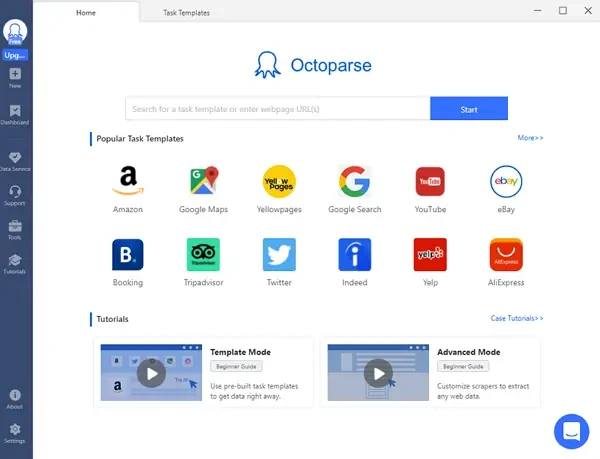
New in 2026: MCP Server integration. Connect Octoparse to ChatGPT, Claude, Cursor, or Gemini CLI and ask in plain English: “Get me the top 5 wireless headphones on Amazon under $450, sorted by rating.” The MCP Server matches a template, runs it, and returns structured data inside your AI chat. The free tier covers up to 2,000 records per week.
Where Octoparse breaks (honest limitations):
LinkedIn at scale: Custom Octoparse tasks against LinkedIn at scale are difficult because of LinkedIn’s aggressive anti-bot defenses. You can use the pre-built templates, which are tuned for scale and are how most users running LinkedIn workflows do it in production.
https://www.octoparse.com/template/linkedin-job-search-scraper-by-url
Octoparse in production: 2 real customer outcomes
A European B2B holding company managing approximately 50 portfolio companies replaced gut-feel pricing with automated weekly competitor price scraping. Sales teams use formulas like “median of three competitors × multiplier” instead of anecdotal market estimates. Based on their experience across the portfolio, moving to data-driven pricing typically yields a 2 to 4% improvement in profit margins, a concrete example of what production-grade web data delivers at scale.
A leading international music rights agency uses automated extraction to register 3,000 clients across 160 international collection societies and track usage across a database of over 2 million tracks, logging into approximately 1,500 separate accounts automatically. The agency saves at least one full business week per month. A registration task for 800 performers that would have taken weeks manually was completed in 20 hours.
Apify: Best for developers and API-first workflows
Apify is a Czech-based web scraping and automation platform built around an open marketplace of pre-built scrapers called “Actors,” with a developer-first interface and full programmatic control.
- Best for: Developers building scrapers as part of a larger pipeline
- Pricing: Free ($5/mo credit) → Starter $29/mo → Scale $199/mo → Business $999/mo
- Standout: Open “Actor” marketplace (1,500+ pre-built scrapers), full REST API on free tier, Playwright/Puppeteer under the hood
- Limitation: Steeper learning curve than visual tools; many Actors require coding to customize, and pay-per-result Actors can compound costs unpredictably
Apify is most useful when scraping is part of a larger codebase. You can call any Actor through a REST API, schedule runs, and chain results into downstream services. The free $5/month credit is genuinely useful for evaluation, though most Store Actors add per-result fees on top of compute, so production workloads need careful cost modeling.
ParseHub: Best visual alternative when Octoparse hits JavaScript limits
ParseHub is a desktop-based visual web scraper from a Toronto company, available natively on Mac, Windows, and Linux, focused on JavaScript-heavy and infinite-scroll sites.
- Best for: Mac/Linux users who specifically need a visual scraper not tied to Octoparse’s ecosystem; SPA-heavy sites
- Pricing: Free (200 pages/run) → Standard $189/mo → Professional $599/mo
- Standout: Native Mac, Windows, Linux support; reliable infinite-scroll handling
- Limitation: Roughly 2.5× more expensive than Octoparse Standard; smaller template library
Bright Data: Best for enterprise-scale collection with proxy infrastructure
Bright Data (formerly Luminati Networks) is an Israeli enterprise web data platform best known for the world’s largest residential proxy network, paired with managed Scraper APIs for high-volume collection.
- Best for: Enterprises with high-volume, anti-bot-heavy targets
- Pricing: Starter $499/mo (141 GB residential traffic) → Advanced $999/mo → Enterprise $1,999+/mo
- Standout: 150M+ residential IPs across 195 countries, SOC2/ISO 27001 certified, 120+ Web Scraper APIs
- Limitation: 5 to 10× more expensive than mid-market tools; overkill unless you’re collecting at industrial scale
- Browse AI: Best for scraping + monitoring + change alerts
Browse AI is a no-code scraping and monitoring platform built around “robots” you train by clicking on a page, designed for users who want recurring extraction plus change alerts rather than one-time data dumps.
- Best for: Tracking specific data points on a recurring schedule with alerts
- Pricing: Free → Starter $19/mo → Professional $99/mo
- Standout: Pre-built “robots” plus monitoring and native Zapier/Make/n8n integration
- Limitation: Visual recognition can break on site redesigns; per-credit pricing scales fast at volume
Document Data Extraction Tools
Rossum: Best for AP automation and complex invoices
Rossum is an AI-powered document processing platform from a Prague-based company, built specifically for accounts payable automation, with deep learning models trained on millions of invoices, receipts, and purchase orders.
- Best for: Finance teams processing high-volume invoices, POs, receipts
- Pricing: Custom enterprise pricing; 14-day free trial
- Standout: AI OCR trained on 276+ languages, handwriting in 30+ languages, learns from user corrections
- Limitation: Enterprise-only pricing puts it out of reach for SMBs
Nanonets: Best for AI-powered OCR on varied document types
Nanonets is an AI OCR platform from a San Francisco company, focused on extracting structured data from invoices, receipts, IDs, and custom document layouts using zero-shot machine learning models.
- Best for: Teams extracting from receipts, invoices, IDs, custom document templates
- Pricing: Free tier; paid plans scale into the high three digits per month at volume
- Standout: Pre-trained models for invoices and receipts; zero-shot extraction on custom forms
- Limitation: Per-page pricing adds up fast on high volume
Docparser: Best for structured PDF parsing with consistent layouts
DocParser is a rules-based PDF and document parser that uses zonal OCR and anchor keywords to extract data from documents with consistent formatting, popular with finance and logistics teams handling standardized templates.
- Best for: Teams with consistent document templates (purchase orders, statements, bills of lading)
- Pricing: Starter $39/mo → Business $74/mo
- Standout: Zonal OCR plus anchor keywords for predictable layouts
- Limitation: Less flexible than AI-first tools when document layouts vary across vendors
Database & API Data Extraction Tools (ETL)
Fivetran: Best for fully managed enterprise ETL
Fivetran is a fully managed ELT (extract, load, transform) platform from an Oakland-based company, designed to replicate SaaS and database data into cloud warehouses with zero-maintenance pre-built connectors.
- Best for: Companies syncing SaaS data to warehouses (Snowflake, BigQuery, Redshift)
- Pricing: Usage-based, starts around $120/mo for small workloads, scales sharply
- Standout: 500+ pre-built connectors, automatic schema-change handling, near-zero maintenance
- Limitation: Usage-based pricing can balloon unpredictably as data volume grows
Hevo Data: Best no-code ETL for SMBs
Hevo Data is a no-code data pipeline platform from a San Francisco and Bangalore-based company, focused on real-time replication from SaaS apps and databases into warehouses for mid-market analytics teams.
- Best for: Mid-market teams needing real-time pipelines without engineering overhead
- Pricing: Free tier (1M events/mo) → Starter $239/mo → Business $679/mo
- Standout: 150+ connectors, real-time change data capture (CDC), no-code transformations
- Limitation: Per-event pricing makes high-volume streaming expensive
Airbyte: Best open-source ETL alternative
Airbyte is an open-source ELT platform from a San Francisco company, offering the largest community-maintained connector library and a Python-extensible architecture for teams who want to own their data infrastructure.
- Best for: Teams wanting self-hosted, code-extensible pipelines
- Pricing: Free open-source → Cloud from $10/mo (usage-based)
- Standout: 350+ connectors (largest open-source library), build custom connectors in Python
- Limitation: Self-hosted version requires DevOps capacity; cloud UI less polished than commercial alternatives
Skyvia: Best for bidirectional sync and reverse-ETL
Skyvia is a cloud-based data integration platform from Devart, focused on no-code two-way sync between SaaS apps, databases, and warehouses, with support for ETL, reverse-ETL, and scheduled replication in one tool.
- Best for: Teams needing two-way sync between SaaS apps (for example, Salesforce ↔ HubSpot)
- Pricing: Free tier → Basic $79/mo → Standard $159/mo
- Standout: 200+ connectors, no-code interface, supports ETL + ELT + reverse-ETL + replication
- Limitation: Not built for high-volume streaming; better for scheduled batch sync
Side-by-Side Comparison:
| Tool | Category | Free plan | Starting paid | Standout |
| Octoparse | Web | 10 tasks, 50K rows/mo | $69/mo | 600+ templates and MCP for AI |
| Apify | Web | $5/mo credit | $29/mo | Open Actor marketplace |
| ParseHub | Web | 200 pages/run | $189/mo | Native Mac/Linux desktop |
| Bright Data | Web | $25 to $50 trial credit | $499/mo | 150M+ residential IPs |
| Browse AI | Web | Yes (limited) | $19/mo | Built-in monitoring and alerts |
| Rossum | Document | 14-day trial | Custom | AI OCR, 276+ languages |
| Nanonets | Document | Yes | Paid scales fast | Zero-shot custom extraction |
| Docparser | Document | 30-day trial | $39/mo | Anchor-based zonal OCR |
| Fivetran | Database | 14-day trial | ~$120/mo | 500+ managed connectors |
| Hevo Data | Database | 1M events/mo | $239/mo | Real-time CDC pipelines |
| Airbyte | Database | Open-source free | $10/mo (cloud) | 350+ connectors, extensible |
| Skyvia | Database | Yes | $79/mo | Bidirectional plus reverse-ETL |
How to Choose a Data Extraction Tool: 4 Questions That Decide Everything
What’s your data source: websites, documents, or databases?
The categories don’t overlap. A web scraper cannot extract line items from a scanned invoice, and an OCR tool cannot maintain a real-time pipeline from Salesforce to Snowflake. Answer this question first, before you look at any pricing page. If you have data in two categories, you’ll almost certainly need two tools, not one tool that “does everything.”
Will this run once or run forever?
A one-time extraction (a list for a single research project, one batch of leads for an outreach campaign) can almost always be done on a free plan. Options include Octoparse free, Airbyte open-source, Apify’s free credit, and Instant Data Scraper as a Chrome extension. A recurring production workflow is a different problem: you need cloud reliability, scheduled retries, error alerting, and schema-drift handling. Among users who registered in 2025 and 2026, paid users used cloud-based scraping at roughly 4× the rate of free users. Cloud scraping is the feature that consistently separates evaluation from production use.
Who’s going to run this: a developer, an analyst, or a non-technical user?
Developers usually prefer Apify, Airbyte, or Bright Data’s API products. These are flexible, code-first, and integrate cleanly into existing pipelines. Analysts tend to pick Octoparse, Skyvia, or Hevo, which offer visual interfaces that don’t require code but expose the underlying logic. Non-technical users get the most value from Octoparse (templates remove the setup), Browse AI (built-in monitoring), or Rossum (document workflows handled end-to-end).
Where does the data need to go?
If the destination is Excel, CSV, or Google Sheets, any tool in this list will work. If it’s a data warehouse like Snowflake, BigQuery, or Redshift, you almost certainly want one of the ETL tools (Fivetran, Hevo, Airbyte) with a native connector. If it’s a large language model (feeding live data into ChatGPT, Claude, or a custom RAG pipeline), check for MCP Server support. Octoparse currently has the most accessible MCP integration for non-technical users, with free tier access for ChatGPT, Claude, Cursor, and Gemini.
Common Mistakes When Choosing A Data Extraction Tool
These four patterns show up across G2, Reddit, and Trustpilot reviews of every major scraper. None of them is about the tool being “bad.” They’re about mismatches between what the buyer expected and what the workflow actually demanded.
- Picking a “no-code” tool without testing the complex parts of your workflow. Auto-detect works well on standard product pages and directory listings. On nested pagination, AJAX-loaded multi-step flows, or login-gated content, you’ll often need XPath knowledge to fix the selectors. Most vendors offer support and XPath tutorials, but factor in that “no-code” usually means “no-code for the common 80%, some code for the rest.” Test your hardest target page before committing. Octoparse support and the XPath tutorial library cover this.
- Underestimating anti-bot defenses. Cloudflare, PerimeterX, DataDome, and similar systems block a significant share of scraping attempts. Tools handle this in different ways. Bright Data and Oxylabs invest heavily in evasion infrastructure, which is why they cost more. Octoparse offers built-in CAPTCHA-solving and proxy rotation that consume add-on credits per attempt, which is neither free nor 100% successful. Whichever path you pick, anti-bot handling is the line item most buyers forget to budget for.
- Confusing “extracting” with “extracting + cleaning + enriching.” A raw CSV of scraped lead data isn’t a sales-ready list. You’ll still need deduplication, field normalization, email verification, and firmographic enrichment before anyone can work it. If your real goal is “qualified leads in CRM,” budget for the post-extraction pipeline too. The scraper is one component, not the whole solution.
- Optimizing for the free tier when you’ll need cloud. Free plans typically run locally, have task limits, and don’t include scheduling or API access. A common pattern: a team validates a workflow on a free plan, then discovers at production time that cloud reliability, retries, and scheduled runs all sit behind the paid tier, and they have to reconfigure the workflow on the new plan. If you already know the workflow will be recurring, start on a paid plan from day one.
Across G2 and Reddit reviews of every major scraper, the most common one-star complaint isn’t “the tool didn’t work.” It’s “the tool worked on the demo page, then broke on my real workflow.” Budget two to three hours to get past your first real task, not twenty minutes.
Data Extraction Tools FAQ
What tool is used for extracting data from a database?
For database extraction, ETL tools like Fivetran (fully managed, from around $120/mo), Hevo Data (real-time CDC, from $239/mo), and Airbyte (open-source free; cloud from $10/mo) are the standard. They handle connection management, schema drift, and incremental sync, which is work you’d otherwise have to script manually.
Which AI tool is best for data extraction?
For document extraction, Rossum and Nanonets lead with AI OCR. For web data inside AI chats, Octoparse’s MCP Server lets ChatGPT, Claude, Cursor, and Gemini pull live data from 600+ supported sites with a plain-English prompt. For unstructured page-to-structured-data conversion, Firecrawl and Kadoa are newer AI-native options worth testing.
What is an example of data extraction?
A B2B sales team scrapes Google Business Profiles daily to find newly registered local businesses, exports the list to a CRM, and assigns prospects to reps within 15 days of the listing appearing. Another example: a finance team extracts line items, totals, and vendor details from PDF invoices directly into an accounting system, eliminating manual data entry.
What is the best data extraction tool for non-technical users?
Octoparse is the most commonly recommended no-code option because of its 600+ pre-built templates for popular sites. You can extract data from Amazon, Google Maps, or LinkedIn without configuration. Browse AI is a strong alternative if your main need is monitoring and change alerts rather than bulk extraction.
Is there a free data extraction tool?
Yes, several. Octoparse free includes 10 tasks and 50K rows/month with local extraction. Apify’s free plan gives $5/month in platform credits. Skyvia has a free tier with row caps. Airbyte is fully open-source. Instant Data Scraper is a Chrome extension that’s completely free. The free-vs-paid trade-off is usually cloud reliability and scheduling, not raw extraction capability.
What’s the difference between data extraction and web scraping?
Web scraping is one type of data extraction, specifically pulling data from websites. Data extraction is the broader category that also covers documents (PDFs, invoices, contracts), databases (SQL, NoSQL), and SaaS APIs (Salesforce, Shopify, HubSpot). Web scrapers and ETL tools are both “data extraction tools,” but they solve completely different problems.
Final Words
Choosing the right data extraction tool comes down to three questions in this order: what are you extracting (website, document, or database), who’s running it (developer, analyst, or non-technical user), and is this a one-off or production workflow? Get those three answers and the 12 tools above filter down to two or three reasonable choices.
If you’re extracting from multiple websites and want to start without writing code, Octoparse’s free plan includes 10 tasks and 50,000 rows per month, enough to validate a recurring workflow before deciding whether you need cloud features. For AI-native workflows, the Octoparse MCP Server connects directly to ChatGPT, Claude, Cursor, and Gemini at no cost up to 2,000 records per week.
Turn website data into structured Excel, CSV, Google Sheets, and your database directly.
Scrape data easily with auto-detecting functions, no coding skills are required.
Preset scraping templates for hot websites to get data in clicks.
Never get blocked with IP proxies and advanced API.
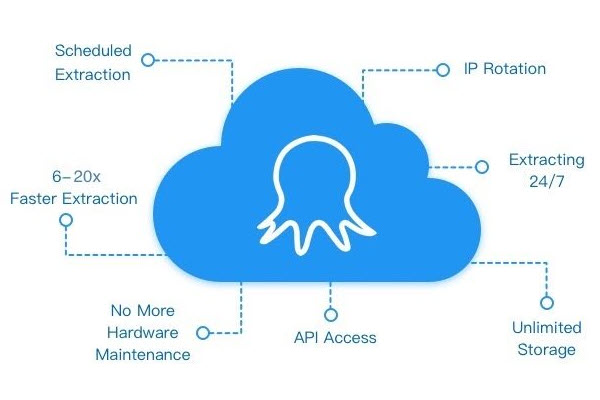
Cloud service to schedule data scraping at any time you want.