

What does Kaufland Product Information Scraper (for Germany) do?
This cloud template collects product data from kaufland.de, the German online marketplace, without writing a line of code. Enter a search term such as "akkuschrauber" (German for cordless drill), and you get a table with price, shipping cost, delivery time, seller, ratings, manufacturer, EAN, manufacturer part number, product description, specifications and image URL for each product. The template runs in the Octoparse cloud and is built for price and competitor research on the Kaufland marketplace.
- Input: search terms, one per line (e.g. akkuschrauber, bosch gsr 12v-15)
- Output: 13 fields, including price, shipping cost, seller, manufacturer and EAN
- Scope: products from the search results; the template opens each product page and reads the details there
- Runs: in the cloud, with no security checks for you to confirm; your computer can be switched off
- Cost: $0.80 per 1,000 rows
- Export: Excel, CSV, HTML, JSON or XML, directly to Google Sheets, databases or cloud storage, or automatically via Zapier
Which Kaufland template is right for you?
Octoparse offers two templates for Kaufland.de. The free template is good for trying things out on your own computer. The cloud template is built for reliable runs, scheduled price checks and MCP.
| Template | Input | Cost | Best for |
|---|---|---|---|
| Kaufland.de Scraper | Search terms + number of pages | free | Trying it out, local runs |
| Kaufland Product Information Scraper (for Germany) | Search terms | $0.80 / 1,000 rows | Price monitoring, scheduling, MCP |
From search list to price monitoring
Once set up, the template delivers current prices on a regular basis, and you match them against your own data by EAN.
- Choose your search terms: Enter your brands, models or categories, for example "bosch gsr 12v-15". Kaufland Product Information Scraper (for Germany) returns price, shipping cost, seller and EAN for each product.
- Set a schedule: Run the task daily or weekly in the cloud.
- Export automatically: New data goes straight to Google Sheets, your database, or other tools via Zapier.
- Compare by EAN: Match the "EAN" column against your product list. You can see price changes, new sellers and offers below the recommended retail price. To add other retailers' prices from idealo, use the Idealo Price Comparison Scraper.
For an overview of price monitoring tools and when to collect prices yourself, see 10 Best Price Monitoring Tools in 2026.
How to use Kaufland Product Information Scraper (for Germany)
- Open the template: Click "Try it!" at the top. If you don't have an account yet, sign up for free.
- Enter search terms: One search term per line, the way a shopper would type it on kaufland.de, for example:
akkuschrauber
bosch gsr 12v-15
kaffeevollautomat - Start: Click "Start". The task runs in the cloud. Because the template opens each product page, a run takes longer than collecting a plain results list. For regular price checks, set up a schedule.
- Export: Save the data as Excel, CSV, HTML, JSON or XML. You can also send it directly to Google Sheets, a database (SQL Server, MySQL, Oracle, PostgreSQL) or cloud storage (Google Drive, Dropbox, Amazon S3). Zapier can forward new data automatically.
Tips for clean results
- Search in German: kaufland.de is a German shop, so use the terms German shoppers would type, such as "kaffeevollautomat" instead of "coffee machine". Brand and model names work as they are.
- Be specific: "bosch gsr 12v-15" returns the offers for one model, "akkuschrauber" gives a broad market overview. For broad coverage, split your search into several specific terms.
- One task per search term if you need them apart: Results from all search terms end up in one table. If you need to analyze them separately, run one task per search term.
- Calculate the total price: The "Versandskosten" column contains "Kostenloser Versand" (free shipping) or an amount such as "zzgl. 5,99 € Versand" (plus €5.99 shipping). Extract the amount and add it to the price. Prices use a decimal comma (69,70 € = €69.70), so convert them before calculating.
What you can use the data for
| Fields | What you use them for |
|---|---|
| Preis (price), Versandskosten (shipping cost) | Compare total prices, check your own price position |
| Verkäufer (seller) | See which retailers sell your category or brand |
| EAN, Herstellernummer (manufacturer part number), Hersteller (manufacturer) | Identify products unambiguously, match them to your product list and RRP |
| Kundenbewertung (rating), Anzahl_der_Bewertung (number of reviews) | Spot popular products and competitors' weak points |
| Lieferung (delivery time) | Compare competitors' delivery times with yours |
| Produktbeschreibung (description), Produktinfos (specifications) | Analyze competitors' product features and listing copy |
| Bild_URL (image URL) | Review how competitors present their products |
| Produkt_url (product URL) | Open products on Kaufland, remove duplicates |
Input and Output
Input
Output
Typical use cases
- A seller tracks competitors in its own range: A tool retailer sells on the Kaufland marketplace and wants to know where its prices stand. It enters its key models as search terms and runs the template every week. In Google Sheets, it compares other sellers' prices, shipping costs and delivery times with its own offers and adjusts prices where needed.
- A brand checks reseller prices: A manufacturer searches for its brand name and matches the "EAN" column against its product list. The "Verkäufer" column shows which retailers carry its products, so it can spot offers below the recommended retail price before they drag down the market.
- A cross-border seller sizes up the German market: Before listing on Kaufland.de, an online seller searches its main categories and looks at price ranges, the number of competing sellers, ratings and delivery times. This shows where there is room for a new offer.
Customer story: A European B2B holding group uses Octoparse to collect competitor prices every week. Its portfolio companies now set prices based on data instead of gut feeling. Read the story
Query Kaufland product data with an AI assistant (MCP)
With MCP (Model Context Protocol), you control Octoparse directly from Claude, ChatGPT or Cursor. Describe the data you need in one sentence. The assistant runs the template in the cloud, waits for the results and analyzes the prices in the same chat.
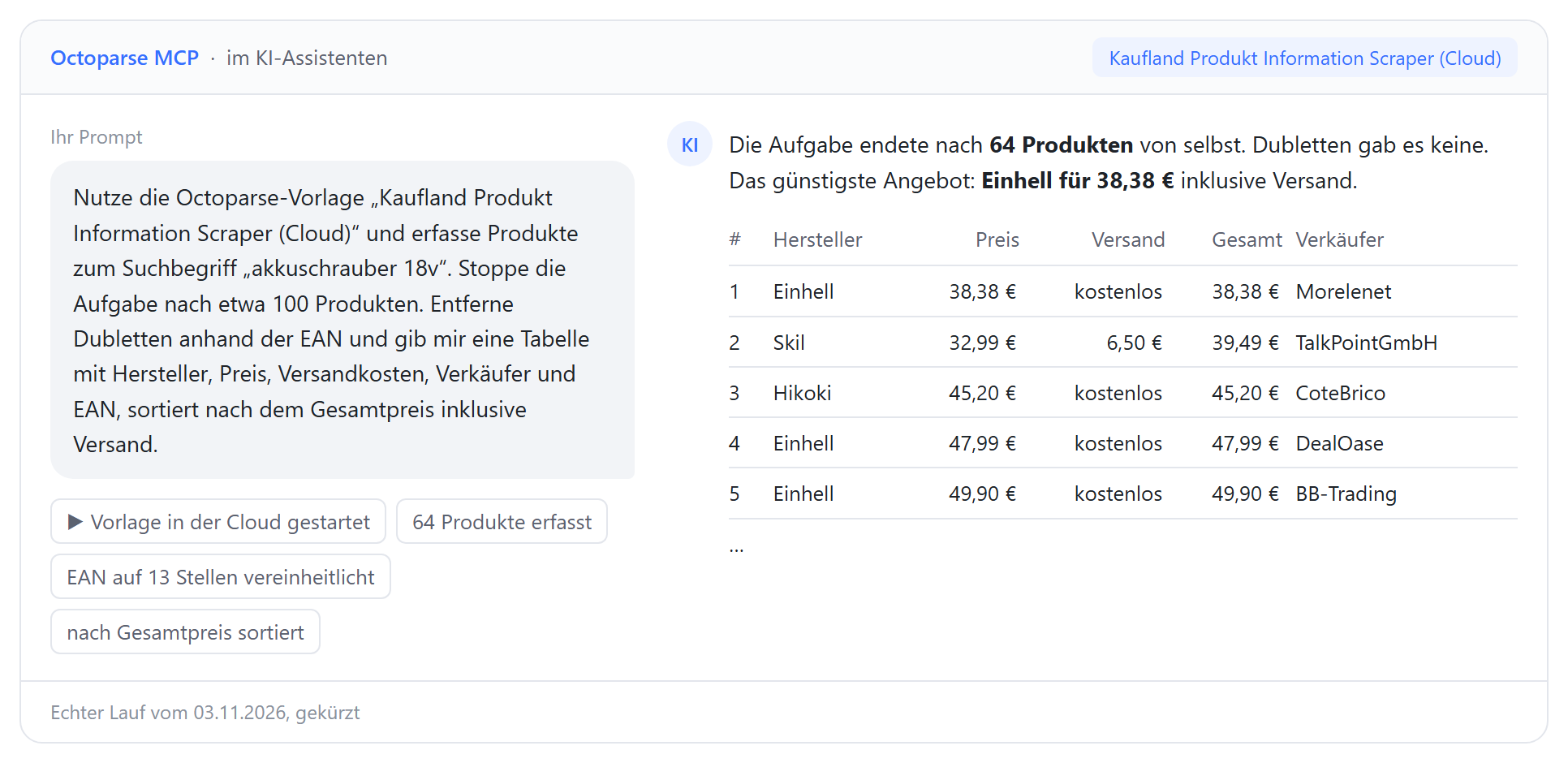
Example prompt:
Use the Octoparse template "Kaufland Product Information Scraper (for Germany)" to collect products for the search term "akkuschrauber 18v". Stop the task after about 100 products. Remove duplicates by EAN and give me a table with manufacturer, price, shipping cost, seller and EAN, sorted by total price including shipping.
Result: The task ended on its own after 64 products. Once the EANs were normalized to 13 digits, there were no duplicates. Total prices range from €38.38 (Einhell, free shipping) to €575.78 (Metabo); two offers without shipping information are listed at the end.
- Total price at a glance: Price and shipping cost are added up and sorted.
- Clean EANs: Codes with and without a leading zero are normalized to 13 digits, so duplicates stand out.
- No export and import: Collection and analysis happen in one conversation.
FAQ
How much does Kaufland Product Information Scraper (for Germany) cost?
$0.80 per 1,000 rows; one row is one product. So 10,000 products cost about $8. The cost is deducted from your credits. Credits are included in every plan and can be topped up when needed. See our pricing page for details. To try things out on your own computer, use the free Kaufland.de Scraper.
How many products does the template collect per search term?
The template collects products from the search results, but for broad search terms not necessarily every result Kaufland shows. For broader coverage, split your search into several specific terms, for example by brand, model or feature.
Can I search in English?
kaufland.de is a German shop, so German search terms return the most relevant products. Brand names, model numbers and many product names work in any language.
Is there a Kaufland API for product data?
Yes, the Kaufland Seller API. It is only available to merchants with a seller account, every request must be signed with the keys from that account, and the integration requires development work. Kaufland Product Information Scraper (for Germany) needs neither an account nor code and collects what the product page shows: price, shipping cost, delivery time, seller, ratings and EAN.
Which price and seller are collected?
When several retailers sell the same product, Kaufland highlights one offer. The template takes the price, shipping cost, delivery time and seller of that offer.
Do I get the EAN?
Yes, the "EAN" column is usually filled. For some products the cell contains several codes, for example the same EAN with and without a leading zero. Use the 13-digit code to match against your product list.
How often can I update the prices?
As often as you like. Set up a schedule, for example daily or weekly, and export new data automatically to Google Sheets or your database. Compare runs by EAN to spot price changes.
Is it legal to scrape prices from Kaufland?
The template only collects information that is publicly visible on kaufland.de. Comparing publicly displayed prices is everyday practice in retail. Automated collection is also subject to the platform's terms of use. For an overview, see Is Web Scraping Legal? If in doubt, have your specific use reviewed by a lawyer.
I need more fields. Can the template be customized?
Yes. Contact our support team via the chat in the bottom right corner if you need additional fields or a customized template.
Related reading
These articles help you use marketplace data for price and competitor research:
- 10 Best Price Monitoring Tools in 2026 – free and paid tools compared, and when to collect prices yourself.
- From gut feeling to data-driven pricing – how a European B2B holding group collects competitor prices every week.
- Grab competitors' data and stay ahead in eCommerce – how to use scraped data for competitor analysis.
- How to scrape web data using MCP – collect and analyze data from an AI assistant.


