
Before you start
- An Octoparse account. Any plan works, Free included. On Free, each run collects up to 100 rows. See Credits and plans.
- For Browser Use: Octoparse in Chrome, the Octoparse browser extension.
- For Auto-detect and Desktop templates: Octoparse Desktop, to edit and run the task.
1
Open AI Assistant
Go to octoparse.com/console/task/agentic, or type your request into the chat box on the Octoparse homepage.
2
Describe the data you need
Write what you want in your own words, in any language: the site, the fields, and any filters. You can paste a URL. If you’d rather start from an example, pick one of the suggested requests.For example: Collect dental clinics in New York from Google Maps with name, address, rating, and phone.See Describe your data for tips, or copy one of the example requests.
3
Check what AI Assistant understood
AI Assistant sums up your request in a What I understood card, with the Website, Goal, and Constraints. If anything is off, select Edit, fix it, and select Save.
4
Pick an option
If a ready-made template fits, AI Assistant shows it first. Otherwise, it recommends a way to build the task: Browser Use, Cloud Agent, or Auto-detect (shown as Desktop app in the chat). See How AI Assistant works.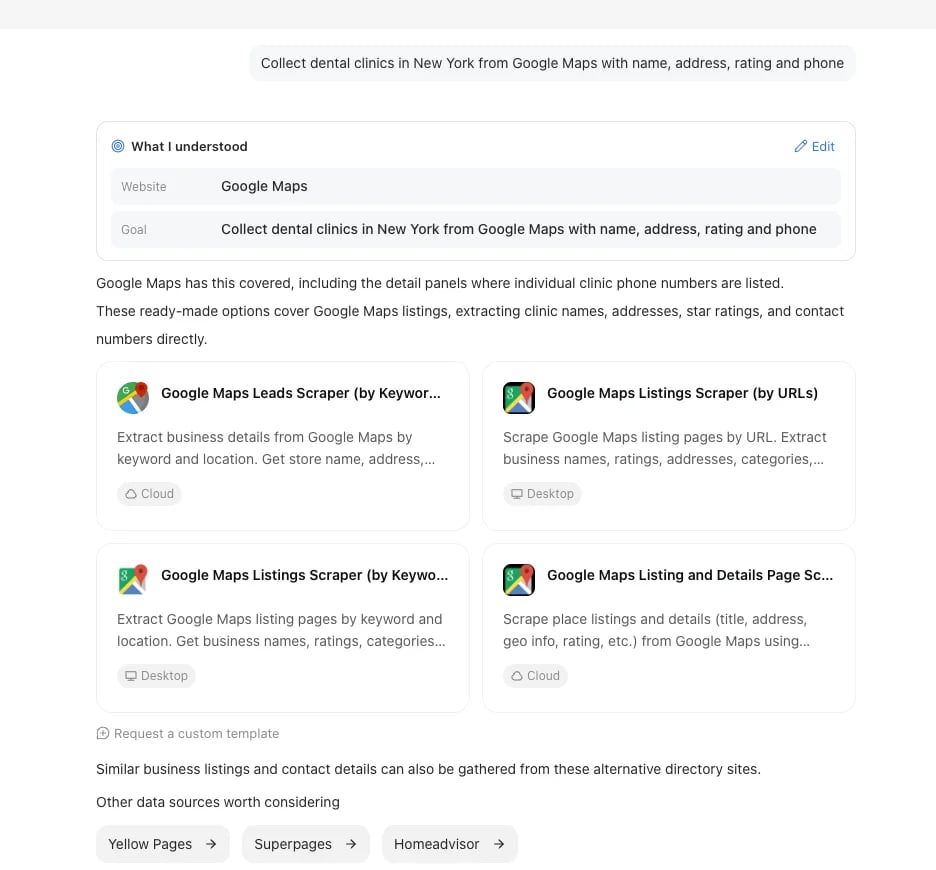
5
Get your task
What happens next depends on the option you picked:
Next steps
To see where your task is saved, and which chats are kept, see Chats and tasks.Manage AI tasks
Run, change, schedule, and export tasks built with AI Assistant.
How AI Assistant works
How it reads your request and picks a route.